













DIY : How to Root Micromax Canvas 4 A210
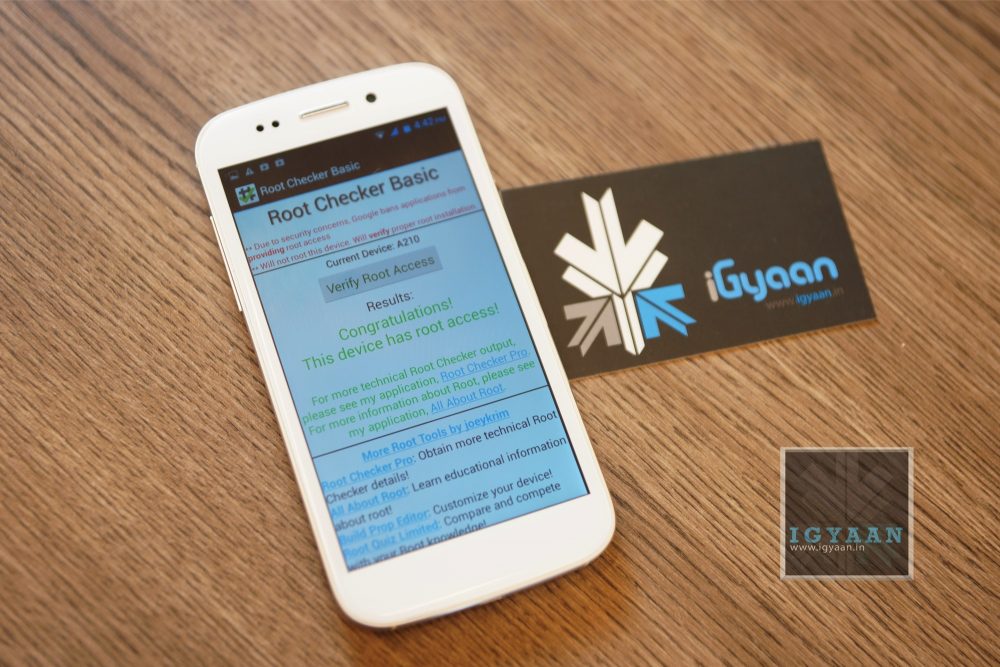
If you recently bought the new Micromax Canvas 4 A210 and need root access to download games or modify the OS?

Here is a quick method by iGyaan to Root Micromax Canvas 4 A210!

Simply follow the instructions below.

(Note : the following method will also work for the Micromax Canvas HD A116)


Here is what you need

    1. Micromax Canvas 4 A210 (For Sure)
    2. Windows PC/Laptop
    3. USB – MicroUSB Cable
    4. iGyaan Micromax Canvas Root File (based on Motochopper) (Right click and save)
    5. Patience and Perseverance 


Root Micromax Canvas 4 A210


Step 1:

Make sure you phone is fully charged.
 

 Micromax Canvas 4 A210 Root 0

Step 2:

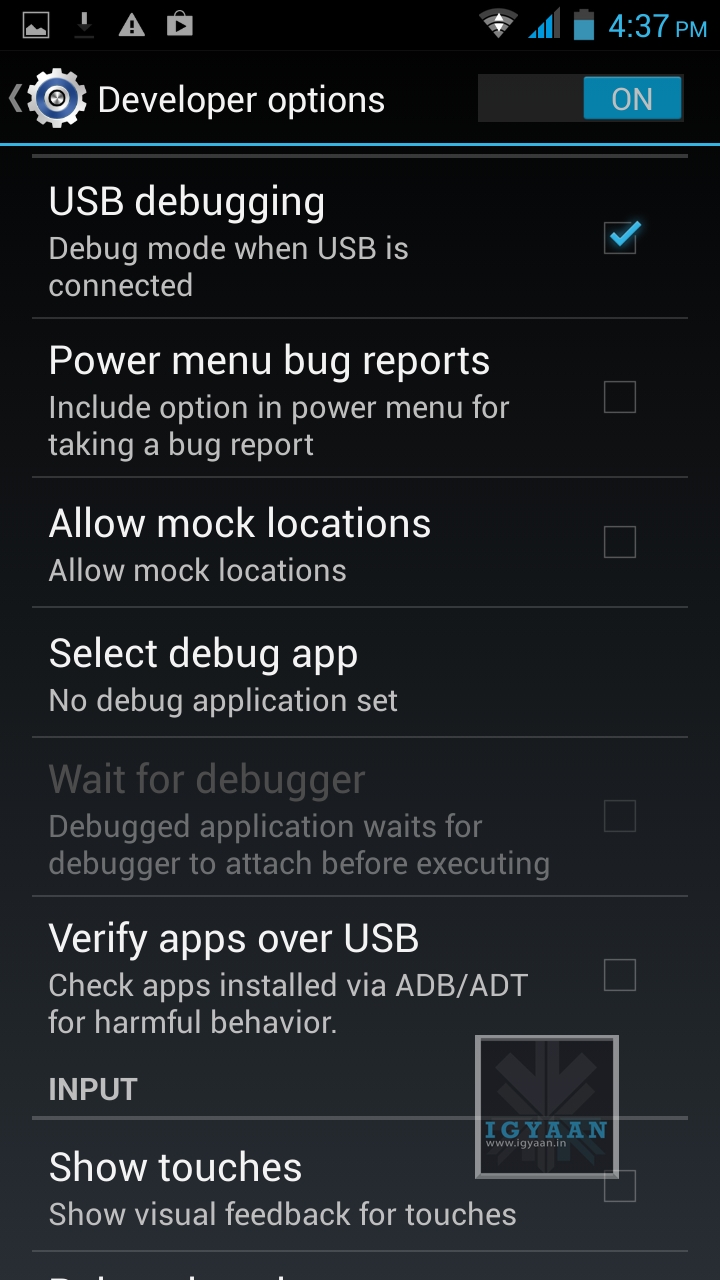
Enable USB debugging on your device.

Go to Settings > Development > USB debugging.

Disable Verify Apps over USB like shown above.

Not: If you don’t see the  Development Panel, enable it by tapping several times on the Build Number in the Setting > About screen .

Once enabled connect your Canvas 4 to your PC via the USB cable. (make sure all the drivers for the phone are installed, this will happen automatically)


Step 3:

Download the iGyaan Root Tools zip file above and unzip them into a folder called “root” on the Desktop.


Step 4:

Open this new “root” folder and launch Run.bat and press Enter.

Micromax Canvas 4 A210 Root 3

The Process will begin and your device may reboot several times, DO NOT REMOVE THE CABLE until the process is compete.

Micromax Canvas 4 A210 Root 2

Once completed you will find “SuperSu” in the application list. You now know how to root the Micromax Canvas 4 A210.
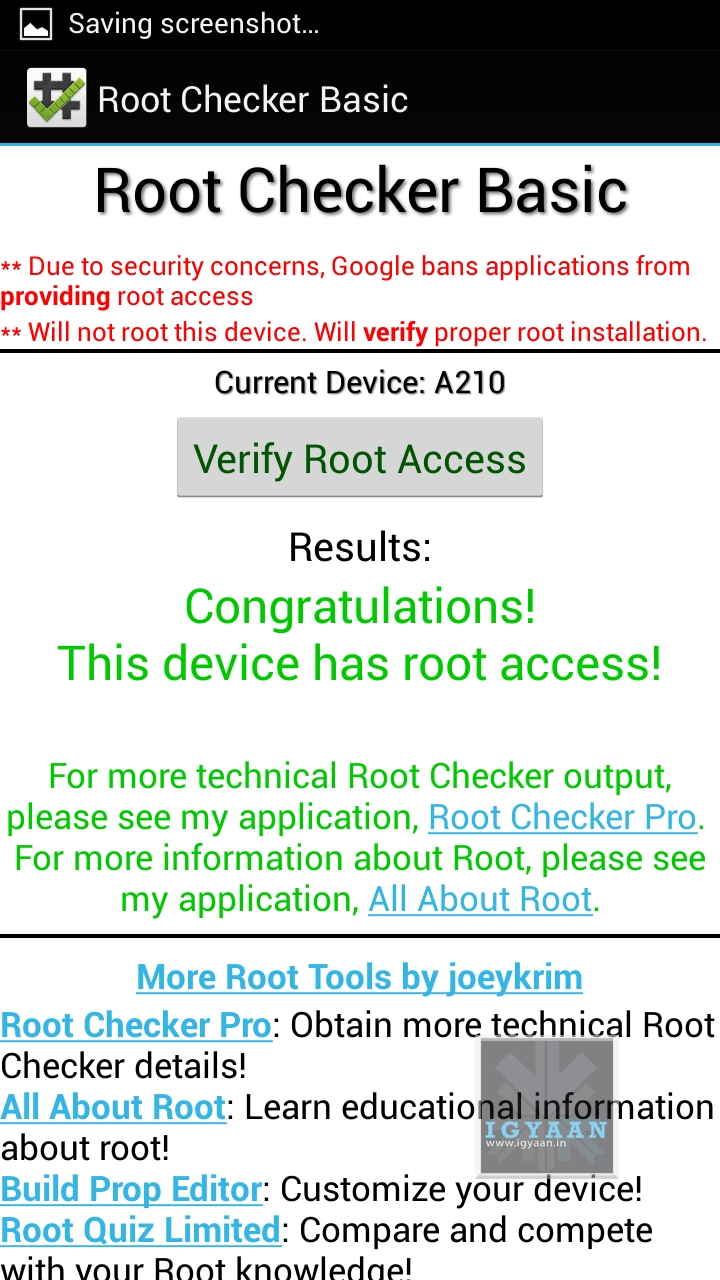
 

Micromax Canvas 4 A210 Root 1

UN Root Micromax Canvas 4

Simply Open SuperSU > Settings > Full Unroot

Your Micromax Canvas 4 A210 will reboot and Unroot.


Video

[youtube id=”R8VFEcmzCdw” width=”100%” height=”300px”] 


Related Products

Comments

73 responses to “DIY : How to Root Micromax Canvas 4 A210”

  1. Ashutosh Avatar
    Ashutosh

    hey how can i get this?

  2. Vinayak Avatar

    doesn’t work with my canvas 4. at the command prompt it just hangs and nothing happens thereafter.

  3. pushkardua Avatar
    pushkardua

    Video Tutorial https://www.youtube.com/watch?v=HQ15xHmaUcU

  4. vsaikarthik007 Avatar
    vsaikarthik007

    Can anyone help me cause my canvas 4 is not rooting..i had run the bat file and also pressed enter for rooting but it says daemon started successfully  but after that it doesnt proceed further..plz i need help

  5. KiranReddy1 Avatar
    KiranReddy1

    i have rooted my phone as per video …but after i rooted i couldnt see supersu rootcheck app in application list

  6. PavanHm Avatar
    PavanHm

    i rooted my canvas 4 using above technique…it was working fine ..now it is getting stuck after boot logo..what should i do?will hard reset work?

  7. VikramSingh2 Avatar
    VikramSingh2

    Thanks Bro

  8. Yogesh Kurane Avatar
    Yogesh Kurane

    #serious_doubts
    Does it void the waranty. I got canvas 4 few
    months back. Is it safe after unroot will the mmx ppl knw i had rooted anyhow the phone?
    Expectations high on u dude.
    Nice work (if replyied soon :p)

  9. shorya Avatar
    shorya

    dude its showing su binary needs to be updated n its nt updating what to do?

  10. chintoo reddy Avatar
    chintoo reddy

    hii der..
    can i use this micromax root file for rooting my samsung galaxy mega ???
    reply me as soon as possible please

  11. Rajeev Avatar
    Rajeev

    I am struggling to root my canvas 2 A110, can you kindly help me rooting it. I want to use CanvaS4 ROM for which I need to root my device.
    I had upgraded to Official jelly bean in my A110.

    Thanks in advance.
    Rajeev

  12. tejus Avatar
    tejus

    is it safe for rooting my device

  13.  Avatar
    Anonymous

    will i lose all my downloaded apps and contacts and other stuff after rooting my canvas 4

      1.  Avatar
        Anonymous

        Is there any way to root canvas 2 plus without loosing data??

      2.  Avatar
        Anonymous

        dude su binary neeeds to be updated n its nt updating :(

  14. Manoj Avatar
    Manoj

    Well This is great…I was able to root my micromax canvas fun and was able to remove unnecessary stock apps…Thank you…

  15. Vineet Sharma Avatar
    Vineet Sharma

    when we will have root for Canvas doodle 2 A240?
    Any desktop manager application provided by Micromax to upgrade OS?

  16. ghosty Avatar
    ghosty

    i have rooted my phone as per video …but after i rooted i couldnt see supersu rootcheck app in application list

  17. aanu.uchiha Avatar
    aanu.uchiha

    i m not able to Disable Verify Apps over USB in my canvas 4 the optn is not accessible dont knw why……………………………..admin pls help

    1. Aakash Chopra Avatar
      Aakash Chopra

      Bro….1st you have to enable usb debugging to disable that option…

  18. Zeeshan Shaizan Avatar
    Zeeshan Shaizan

    hi bharath i have tried the same but nothings happening,my phone is not shutting down and restarting..the run.bat file runs and also says to press any key to restart the phone when i did nothings happening to my canvas 4 mobile.please help

  19. Akash Dubey Avatar
    Akash Dubey

    P275 Fun Book tablet ..I own a Micromax P275 Funbook tablet , this tablet do not have any Physical Button for Volume+/- therefore in the RECOVERY mode I am Unable Navigate up and down , Kindly Help me thanks in advance.

    1. bilal Avatar
      bilal

      u should connect a mouse with this tab and then navigate up and down

  20. ronald stefinson Avatar
    ronald stefinson

    i don’t want to take any chances. Will i be able to unroot it somehow?

  21. ARNOLD DIXON Avatar
    ARNOLD DIXON

    how to root gionee elife e3 and put new rom for it please

    1. nandhu jayan Avatar
      nandhu jayan

      the custom rom is not yet released ..wait for few months more .. :)

  22. Mihir Parekh Avatar
    Mihir Parekh

    Does this work for the Micromax Canvas A110? Also known as the Micromax Canvas 2?

  23. Aiswaran Avatar
    Aiswaran

    hello,
    as you mentioned this rooting tutorial works even with mmx canvas HD.
    i tried as you showed in your video my canvas hd, drivers were already installed onto my computer i extracted those files as you said and i ran the RUN.bat file it started with the press of the enter button when it showed ‘daemon started successfully ‘ it never continued after that i waited for about an half hour and still it didn’t process after that i even tried closing it and restarting it,but it never worked. Please help me with problem i’ll grateful if replied !!

    1. ????? ??????? ??? Avatar
      ????? ??????? ???

      After Several hours of reserch I have found that we need to select media option while connecting to pc , please dont select usb device, Then it will not stop. Enjoy rooting!

      1. Aiswaran Avatar
        Aiswaran

        Thank you :) it worked i tried with the process of installing a new software PDAnet+ which made some tweaks and finally it made it run after that

        1. Rudra Avatar
          Rudra

          where exactly do i select “media option”?

        2. ????? ??????? ??? Avatar
          ????? ??????? ???

          When you connect mobile to PC, You will get option that USB device charge only or any other option in notification bar, select that , you will get option for media .

        3. Ashutosh Avatar
          Ashutosh

          bro what is PDAnet+, and how can I get this

  24. harsimran Avatar
    harsimran

    I tried using the link to get super user access however i couldnt get the access . it install with the update but then.. updates the super su icon. after clicking and after few min. it says filed

  25. Himanshu Avatar
    Himanshu

    If after rooting my phone i unroot it again then will micromax find any trace of rooting or not??

  26. Ratnadeep Mitra Avatar
    Ratnadeep Mitra

    Dear Admin can you please tell me how to root Mircomax Canvas Music A88 as there is very low functionality of options available on this phone. I’ll be highly appricated if you could provide me with some help.

    1. HD_Alive Avatar

      Hey, i am also finding out the same, please let me know if you got the root for Canvas Music.. email me: [email protected]

  27. kumar Avatar
    kumar

    im not able to Disable Verify Apps over USB!!!!

    1. aanu.uchiha Avatar
      aanu.uchiha

      same here

  28. initn Avatar
    initn

    Pls post root tool link for Sony xperia tipo dual.

  29. SarthakJain Avatar
    SarthakJain

    Got it! Got my Canvas 2 plus rooted by the same method! As the ram, processor, and OS are same, I tried it and was successful!

  30. SubhajyotiGoLui Avatar
    SubhajyotiGoLui

    Is it gonna void my warranty ??

    1. SarthakJain Avatar
      SarthakJain

      Yup…..but if u unroot it, anyone can hardly recognize that it has been rooted..

      1. Silver Hood Avatar
        Silver Hood

        Inshort its voiding the warranty.???

  31. t abhishek Avatar
    t abhishek

    can u plz tell how to root KARBONN A11 (JELLY BEAN) with a video PLZ it failed many times

  32. SarthakJain Avatar
    SarthakJain

    How to root Canvas 2 Plus A110q????plz reply…..

  33. NikhilKashyap Avatar
    NikhilKashyap

    root karna ka advantages kya ha . can you plzz tell

    1. RKUMAR Avatar
      RKUMAR

      NikhilKashyap performance incerease it  gives you full  access to the  device    you will be able  to  download and use the apps and games which are  not usually available for your  device

  34. Jaymshukla Avatar
    Jaymshukla

    Thank you JayantAhrodia

  35. Jaymshukla Avatar
    Jaymshukla

    Frnds is there any way to root Sony Tipo Duos. Please paste the link for same.

  36. harishchengaiah Avatar
    harishchengaiah

    can someone tell me what are the advantages and disadvantages of rooting this particular device(canvas 4)

    1. RKUMAR Avatar
      RKUMAR

      harishchengaiah advantages : performance increase   gives you full  access  
      disadvantages : it may brick your device

  37. Harsh Patel Avatar
    Harsh Patel

    plzzz say me ans ..

  38. Harsh Patel Avatar
    Harsh Patel

    mere paas canvas HD hai .. Root karunga to kya hoga ??

  39. Harsh Patel Avatar
    Harsh Patel

    mobile ko Root karne se kya hota hai ???

    1. RKUMAR Avatar
      RKUMAR

      Harsh Patel  dude if you dont  know  wjt  rooting is  then you  i think  it is  not  your  requirement  dont  do it

      1. Harsh Patel Avatar
        Harsh Patel

        RKUMAR aap bataoge to pata chalegana.. fir mujhe lagega to root kar dunga.. lekin kya hota hai wo pata chale to me vo karuna..

  40. JayantAhrodia Avatar
    JayantAhrodia

    is there any root process for galaxy grand duos GT-I9082 and to unroot it fully.. ….

    1. neoasr Avatar
      neoasr

      JayantAhrodia here http://forum.xda-developers.com/showthread.php?t=2160671

  41. Rehnuma Singh Avatar
    Rehnuma Singh

    Thnx

  42. venkyrockz316 Avatar
    venkyrockz316

    Android is a playground afterall…

  43. AbhinavAggarwal Avatar
    AbhinavAggarwal

    Mr. Nagpal pls find the way to root micromax hd bohot pareshan kiya va hai is ph ne pls help me dude…! i know u the only person i can relay in this matter…

    1. kanishk Avatar
      kanishk

      AbhinavAggarwal this works with canvas hd already tried :

  44. BijindraGaurav Avatar
    BijindraGaurav

    Is there anyway to root and Upgrade OS in Micromax a91..

    1. neoasr Avatar
      neoasr

      BijindraGaurav first u have to root , then u can flash custom rom with 4.2.1

  45. Droidfreak Avatar
    Droidfreak

    Now try to port CM10 also :-P

  46. Droidfreak Avatar
    Droidfreak

    Great thing occurs

  47. prabhuespn Avatar
    prabhuespn

    Will this work for Canvas HD??

    1. kanishk Avatar
      kanishk

      prabhuespn yes it does, iGyaan had uploaded a similar file earlier, but they removed it. it works

    2. AkshayNaik Avatar
      AkshayNaik

      prabhuespn or try Root method by Bin4ry works on all Android 4.0+ devices

Leave a Reply

Your email address will not be published. Required fields are marked *

iGyaan Network
Privacy Overview

This website uses cookies so that we can provide you with the best user experience possible. Cookie information is stored in your browser and performs functions such as recognising you when you return to our website and helping our team to understand which sections of the website you find most interesting and useful.

Share via