
Author: Preetish Gumber

  • Take Care Of Your Smartphone, Only You Can Do It!

    Take Care Of Your Smartphone, Only You Can Do It!

    It is difficult to find someone these days who does not uses a smartphone, no matter if its a low or high end device they come up with hard earned money. Even while you take care of your phone have you ever faced any problems or do you have anything you would want to change with your smartphones ? We are sure 90% answers would be yes!

     A smartphone makes your life easier and helps you in daily tasks and activities, imagine your life without whatapp? facebook on mobile? a good camera ? emailing on the go? these are just few that are done with the smartphones. We really do not count on the tasks that we do on our phone,  a lot of multitasking and using the phones every now and then. The only thing we forget is that even though the phone gives us so many benefits to make life easy, at the end of the day it is a machine which needs to be cared for.

    We get our car/bike serviced because when you use them for a while or so they would need to be thoroughly cleaned and tuned up as they are machines. We are not saying to get your smartphone serviced, but what you can do is to take care of it on daily basis. Here are some basic steps that you can follow:

    • The Screen- This is one of the first part prone to scratches, can be because of anything like: nails, keys in the pocket, some change, the irregular surface its kept on or a bad quality screen guard. It is very important that we use good quality screen guards on our much loved smartphone and also taking care of small things like where we keep our phone. 

     

    Scratches
    Screen scratches
    • The Phone Itself- Not only the screen but the phone’s body is easily prone to scratches too, no matter how much you care for the phone there are some scratches that shows up now and then. In order to protect your phone’s body you can use a good back cover, that might not only give safety but add up to looks.   

    Back cover scratches


    •  The Battery- The most talked about problems is the quick draining battery, does your phone lasts for just a day ? or not even that ? well, here are few steps that might just help you. Make sure that the brightness of the screen is as per your need because the more brighter it is the more battery it consumes. You should enable the power saving mode. Close all unnecessary apps and most importantly NEVER overcharge your phone, this can result to low life of battery or harm the phone charging port in the long run.  

     

    These are few steps that can help you to take better care of your phone. We spend upto 45,000 Rupees for the best of smartphones available, so its good if we take care of them which would further ensure these phones to be with us for long times.

  • Android 4.3 Will Keep WiFi Always On

    Android 4.3 Will Keep WiFi Always On

    The latest Google Android 4.3 upgrade brings all new features and also offers great performance. Google has also made a new change to the WiFi settings in Android 4.3. 

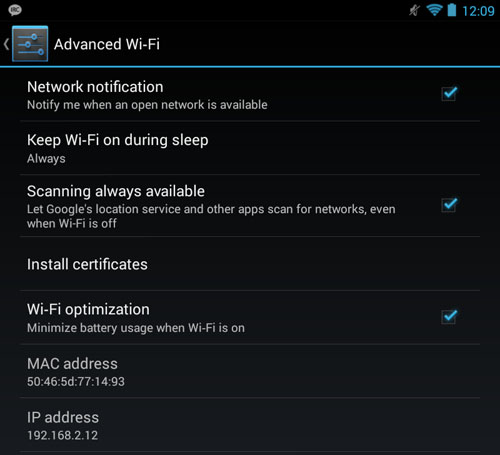
    To improve location accuracy and for other purposes, Google and other apps may scan for nearby networks, even when Wi-Fi is off ” – describes Google.

     It has been seen that the new version of Android will keep the WiFi radio always on, even after the user has manually turned it off. This feature is probably designed to save one’s battery life instead of wasting it, given that the only other way for one’s smartphone to discern one’s location is to drain the battery using GPS.

    To check and see whether your phone has this feature enabled by default (a number do not), you’ll have to navigate through the Android operating system’s settings. Here’s how:

    Android_43_Wifi


    Open up the Settings app and tap your finger on the Wireless and Networks option. Tap on the WiFi option, and then tap on the Menu button on your phone’s lower-right-hand corner. When the list pops up, tap your finger on the Advanced option. From there, you’ll want to make sure to check the “Scanning always available” option if you want to participate in the new Android 4.3 feature. Otherwise, if it’s checked, you need merely to uncheck it to ensure that “WiFi off” really means “WiFi off.”

    However, many now expressed their concern that malicious applications might exploit this new functionality. 

    Various user reports indicate that this feature remains off by default when they’ve updated their devices to Android 4.3. That means, it’s more important that you know about this potentially useful setting than to freak out about it, but it’s also worth checking this, and many of Android’s other “Advanced” wireless configuration options, when you’ve upgraded your mobile OS.

    Now will Google resolve this or add something to counter the issue is to be seen, but for the time being users must carefully read the application access and if they feel something suspicious they should avoid installing that application.


  • Facebook Pays Bug Hunters $1 Million, India Second Biggest Recipient

    Facebook Pays Bug Hunters $1 Million, India Second Biggest Recipient

    The social media giant ‘Facebook’ has paid over 1 million USD to security researchers  who report bugs on their website, with India being the second biggest recipient among other countries. India has over 78 million Facebook users, and now is one of the fastest growing in the Bug Bounty program. The social networking major said 329 people have received rewards, including professional researchers, students and part-timers. The youngest recipient was 13 years old.

    A software bug is an error, flaw, failure, or fault in a computer program or system that produces an incorrect or unexpected result, or causes it to behave in unintended ways. Most bugs arise from mistakes and errors made by people in either a program’s source code or its design, and a few are caused by compilers producing incorrect code. 

     As per Facebook To qualify for a bounty, you must:

    • Adhere to the Responsible Disclosure Policy of Facebook.  
    • Be the first person to responsibly disclose the bug
    • Report a bug that could compromise the integrity of Facebook user data, circumvent the privacy protections of Facebook user data, or enable access to a system within the Facebook infrastructure, such as:

      • Cross-Site Scripting (XSS)
      • Cross-Site Request Forgery (CSRF/XSRF)
      • Broken Authentication (including Facebook OAuth bugs)
      • Circumvention of our Platform/Privacy permission models
      • Remote Code Execution
      • Privilege Escalation
      • Provisioning Errors
    • Use a test account instead of a real account when investigating bugs. When you are unable to reproduce a bug with a test account, it is acceptable to use a real account, except for automated testing. Do not interact with other accounts without the consent of their owners.
    • Reside in a country not under any current U.S. Sanctions (e.g., North Korea, Libya, Cuba, etc.

    Facebook offers great prize money which is a minimum of $500 and there is no maximum amount they have quoted, as each bug is awarded a bounty based on its severity and creativity.

    Our Bug Bounty program allows us to harness the talent and perspective of people from all kinds of backgrounds, from all around the world,Two of the bounty recipients have taken up full-time jobs with the Facebook security team” Facebook Security Engineer Collin Greene said 


iGyaan Network
Privacy Overview

This website uses cookies so that we can provide you with the best user experience possible. Cookie information is stored in your browser and performs functions such as recognising you when you return to our website and helping our team to understand which sections of the website you find most interesting and useful.