Evernote updated the Android version of its app Monday to version 5, bringing an enhanced look to the app as well as a number of new features including support for the app’s Smart Notebook.
A multishot feature lets users snap multiple photos of a moment, and save them without ever leaving the in-app camera. Evernote is also bringing its “page camera” over from iOS, which uses the smartphone’s camera to turn Evernote into a pocket scanner. The page camera finds the edges of scanned pages, removes any shadows and improves the contrast, Evernote says.
The Page Camera function comes particularly in handy with Evernote’s Smart notebook. The Moleskine notebook is designed specifically to work along with Evernote. Dots on each page help page Camera create the optimal representation of a page within Evernote. Smart Stickers allow you to tag a page in real life, while simultaneously tagging the virtual page as well.
Premium users also get to enjoy some new goodies, namely in the form of Document search. Evernote will now search through attached documents, spreadsheets and presentations from the universal search.
Your shortcuts are always just a swipe to the left away, offering you quick access to your most frequently used notebooks and notes.
Engadget reports that there are continued issues with Evernote’s text recognition, which tends to be slow for non-premium users.
There are reports that Facebook is pushing updates to its Android Appoutside of the Google Play Store, meaning users would still install the app initially through Play, but updates after that would come straight from Facebook. This functionality would only be for Android users, because this sort of thing would be impossible on iOS.
As Liliputing first reported, users are receiving a persistent notification letting them know that an update is ready, and on clicking the notification are taken directly to the Facebook app to download the new version, known as 141046.
This Facebook update is reportedly talking about adding some new and seemingly expected features such as being able to change your profile picture as well as being able to download files without notification.
The updates would only be downloaded over WiFi, and won’t use your data plan.
According to Facebook product manager Ragavan Srinivasan, “We’re working quickly to improve Facebook for Android and want to make sure everyone is using the best version of our app. You’ll experience these updates when you are on Wi-Fi, and they won’t rely on your data plan.”
One reason for this update to be pushed outside of the Play Store could be that Facebook is just trying it out, and it isn’t the final version yet.
It is interesting to note that Google’s terms of service does not give permission for apps “that cause users to unknowingly download or install applications from sources outside of Google Play.” Will the legal eagles there deem Facebook as crossing the line this time around?
BlackBerry will launch its Secure Work Space solution for iOS and Android devices in Q2, with a formal announcement at BlackBerry Live in May.
BlackBerry Secure Work Space promises to emulate some of the functions of BlackBerry Balance, which is an integral part of BlackBerry 10, and allows enterprises to have control over confidential data while still providing employees with a fully functioning smartphone.
BlackBerry Balance effectively creates two different profiles on any device, with administrators able to create their own application store that host custom apps as well as software from the public BlackBerry App World that has been approved for use in the workspace. Once approved, these applications can interact with other work apps and secure data.
Secure Work Space will operate slightly differently, but will provide secured client applications for email, calendar, contacts, tasks, memos, secure browsing and document editing, while additional apps can be secured and added to the workplace without the need to modify the source code
The Canadian manufacturer claims that the update will save its enterprise customers effort and expense as they will no longer have to configure and maintain expensive VPNs to provide access to data and applications behind a corporate firewall. It hopes that its reputation for mobile security and management will tempt companies who operate in a Bring Your Own Device (BYOD) environment.
“With Secure Work Space for iOS and Android devices, we’re extending as many of these (Balance) features as possible to other platforms,” said David Smith, BlackBerry’s head of mobile enterprise computing, in a statement.
BlackBerry’s move comes just as Samsung, whose line of Galaxy devices have gained great popularity, attempts to make itself a more viable option for enterprise customers with security features such as Samsung Knox and SAFE, or Samsung for Enterprise.
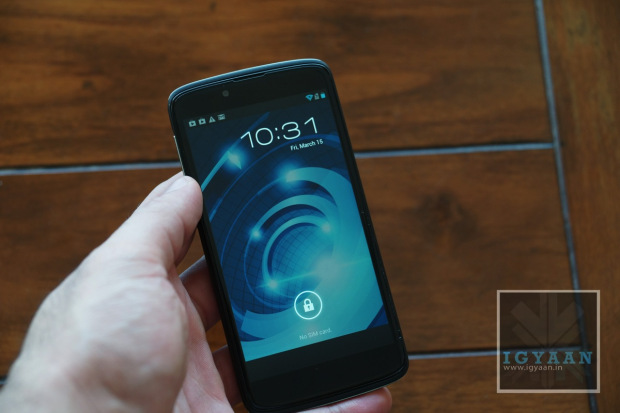
With many a options available, the Android market space has yet another competitor in the Rupees 20,000 price segment. The Xolo X1000 was launched yesterday for a price that was lower than expected, but does it truly offer what the market is looking for?. Interms of Hardware we have an Intel Atom medfield platform at Single core and 2GHz on the clock, for the Graphics we have a 400 MHz GPU.
The front has a brilliant 4.7 inch SHARP™ HD 2.5 D edge curved glass display, which has a resolution of 1280 x 720p. The cameras are 8 and 1.3 MP with with former being the rear camera with full HD 1080p video, and the latter being the front facer.
[pullquote_left] Get ready for premium feel![/pullquote_left] Holding the phone in the hand for the first time might just take you by surprise, the touch and feel of the phone is far from expected (in a positive sense). The phone feels really premium and does a fantastic job of making you feel like you are holding a truly premium device.
The HD Display is truly commendable as well, with brilliant viewing angles and fantastic color reproduction, its easily one the best displays of the price segment. The response from the screen is also snappy and initially gave instant feedback. A couple of facts that did let us down start with the fact that the device runs on Android 4.0.3 and Xolo is not yet ready with a jelly bean software update yet.
Check out the video above or the images below. Stay tuned for the Gaming and benchmarks videos.
Usually when Google removes apps from the Play Store it’s because they’re malicious, stealing your data, or otherwise messing with your phone in a way you don’t actually want. Today we’ve learned of Google’s most recent wave of culling apps from the Play Store, only this time the apps themselves weren’t doing anything naughty, and instead Google decided to interpret its AndroidDeveloper Distribution Agreement to prohibit all ad-blockers.
Google has decided that all these apps are in violation of Section 4.4 of the Android Developer Distribution Agreement, and has removed all of them from the official storefront.
Even open source software such as AdAway has been removed from the app portal, and is expected to never appear there again.
4.4 Prohibited Actions. You agree that you will not engage in any activity with the Market, including the development or distribution of Products, that interferes with, disrupts, damages, or accesses in an unauthorized manner the devices, servers, networks, or other properties or services of any third party including, but not limited to, Android users, Google or any mobile network operator. You may not use customer information obtained from the Market to sell or distribute Products outside of the Market.
Basically, Google seems to be saying don’t mess with advertising — which is the Web giant’s central source of revenue.
Jared Rummler, the developer for the Ad Blocker Root app, announced on Twitter that his app was yanked from Google Play today.
Some of these apps are still available as cache on the Play Store, but all have been removed the affected developers’ app listings. We’ll update this story as we learn more.
Opera has switching over to the open source WebKit engine to power its mobile browser on the Android platform, instead of the Presto engine it is currently using. WebKit is the same engine that powers browsers such as Safari, Chrome and the stock Android browser. While opinions vary, it’s generally regarded as the fastest option around, routinely beating competitors like Mozilla’s Gecko.
The browser is in beta mode, and is now available to Android users via the Google Play Store.
The new browser centres around its homepage which features three columns that you can swipe left and right between. The left most is the familiar history while central is Speed Dial and to the right is Discover.
Speed Dial is a place to store bookmarks to your favourite sites, which are laid out in a grid pattern and can be combined into folders just like apps.
As for Discover, its yet another variation on these news feed apps that present curated content in a stylised column of pictures. It does go a step further than many such offerings though as it also caches the first couple of paragraphs of the article saving having to download the whole lot.
Also key is the new Off-road mode which when engaged, like Opera mini, routes page requests through Opera’s servers where they’re compressed before being delivered to your device.
Other features of the new browser include tabbed browsing, a combined search and address bar and an offline mode for saving whole webpages for reading later.
The download manager can be used to save, rename, start, stop, and resume downloads. The browser’s compatibility is currently listed as “varies with device.” Have you downloaded it yet? Tell us what you think in the comments!
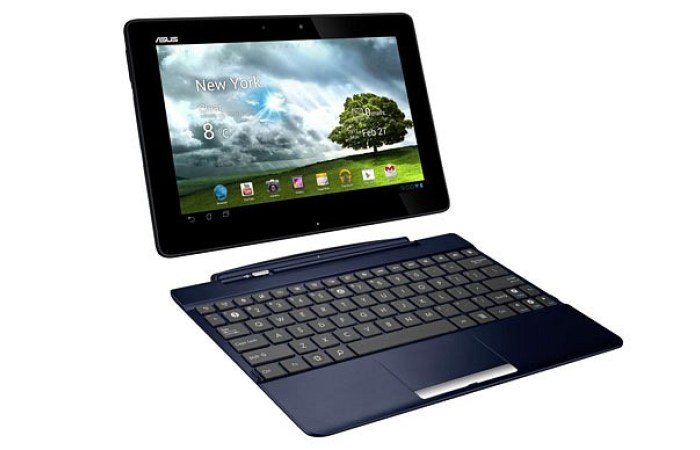
Asus has started rolling out an update to Android 4.2 Jelly Bean for its Transformer Pad TF300 tablet.
The software update means that the Transformer Pad 300 is the first tablet to get Android 4.2 Jelly Bean aside from Google’s Nexus 7 and Nexus 10. Asus is rolling the firmware out in the US from today and other regions during March.
In a time where Android 4.2 is still a rarity for those who don’t own a Nexus device, ASUS has come along and, once again, put a lot of OEM to shame with swift action on the latest version of Android.
Along with all of the goods Jelly Bean 4.2 brings, including widgets on the lock-screen and user profiles for multiple users, ASUS will also have significant updates in tow for its App Locker, its virtual keyboard, the lock-screen and setup wizards. Users can grab the upgrade over-the-air so be sure to take a quick trip to the Settings > About Tablet menu where you’ll be able to pull this one down.
In related news, ASUS has confirmed several other tablets in its lineup that will get Android 4.1 in the second quarter of this year. These tablets include the Transformer Pad Infinity, the ASUS MeMO Pad Smart 10, and the MeMO Pad.
Good going Asus!
[toggle_box title=”Press Release” width=”Width of toggle box”]
Android 4.2 released for the ASUS Transformer Pad TF300
Improvements include enhanced performance, stability and multiple user account logins
Fremont, CA (March 4, 2013) — ASUS is excited to announce Android 4.2 is now available in the US region for the ASUS Transformer Pad TF300T. Android 4.2 will be released to Transformer Pad owners via a free over the air update starting today in the United States and will be available in other regions during March. This new version of Android enhances performance and stability, improves the user experience with new features as well as providing multiple user account logins.
The ASUS Transformer Pad TF300 is one of the most successful ASUS tablets to date and offers a full notebook PC experience when attached to the innovative mobile dock. ASUS is committed to providing the best customer experience, and is the first manufacturer to receive Android 4.2 for partnered tablets. The ASUS Transformer Pad Infinity, ASUS MeMO Pad Smart 10”, and ASUS MeMO Pad will receive Android 4.2 in Q2.
Google’s Chrome for Android team is experimenting with a new data compression proxy feature to speed up browsing similar to the methods used by Opera Turbo and Amazon Silk. The feature is currently optional but could one day be flipped on by default if Google deems it ready, significantly helping those on slow connections.
The latest build of Chromium, the open source browser project which Chrome is built upon, sports this new functionality. The feature was first spotted by developer Francois Beaufort, who talked about it in a Google+ post.
“Reduce data consumption by loading optimized web pages via Google proxy servers,” Google describes the feature.
The feature is still in early testing, users can enable it in Chrome for Android via a command line flag, which means they’ll need to be able to run a command like shell on their phones, either remotely via adb or via a terminal emulator on the device.
It’s unclear whether the technology actually works at this point or whether it’s just a placeholder.
There are several ways in which Google could lighten the load on the connection and speed up website loading. For one, as the name suggests, Chrome will connect to the Google cloud via SPDY, reducing some of the overhead.
What’s more, using the proxy means that Chrome will connect to the closest Google data center rather than to a server which may be halfway around the world. Popular websites would also be cached by Google ensuring faster load times.
Both Opera Turbo and Silk use pre-processing on their respective company’s servers to optimize a web page, reducing the amount of data that is sent to the browser by compression and other methods.
Mozilla announced that it will be bringing its Firefox OS to carrier-sold devices in 2014. But a fundamental part of that ecosystem is the performance of its mobile browser, which is likely why the company is working so hard to perfect the underlying architecture of its Android version.
Private Browsing is perhaps the biggest part of the Firefox Beta update, but not the only one. The Monday announcement also detailed several more updates that users will likely find interesting.
First the big news though. Prior introduced “Firefox for Android Beta comes with new per tab private browsing, allowing you to switch between private and standard tabs within the same browsing session”. While this mode has been called by other, less-savory, names it has many legitimate uses. For instance, you may want to shop for your spouse’s birthday present without her accidentally stumbling across the evidence. Of course, you can erase history, but Private Browsing has your back in case you forget.
Second, Mozilla has a new and updated version of the Home screen. The latest Firefox beta allows users to customize the shortcuts. Users can completely change the images on the home screen to their favorite or most frequently visited sites. To do this, simply tap and hold a site to pin it to the Home page.
Also, the latest version introduces compatibility with much more ARMv6 hardware; “Firefox for Android Beta is now available to phones with minimum requirements of 600MHz, 384MB, QVGA. New devices supported include: Samsung Galaxy Next (GT-S5570, GT-S5578), HTC Aria (S31HT), HTC Legend (A6363), Samsung Dart (SGH-T499), Samsung Galaxy Pop (SCH-i559), Samsung Galaxy Q (SGH-T589).”
Mozilla is going in the opposite direction of Opera, which is adapting itself to the high-performance WebKit engine; Firefox started with high-end devices and is now expanding down, promising good performance on two- and three-year-old hardware.
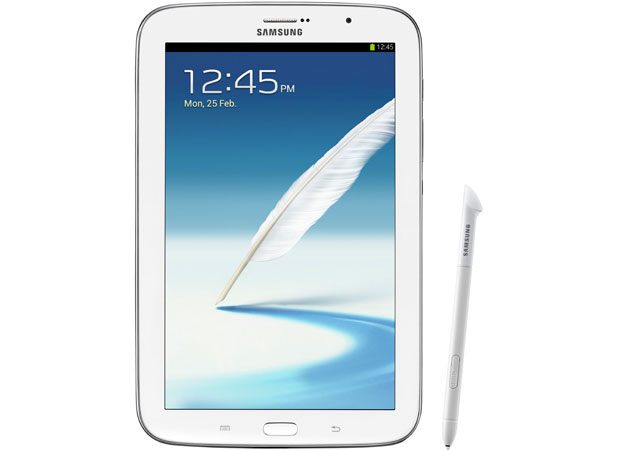
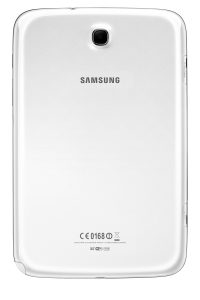
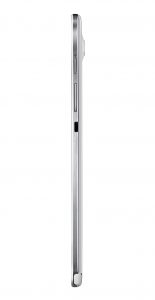
After months of leaks and news , Samsung has finally launched the new Galaxy Note 8.0. The new 8 inch marvel sports an 8-inch 1,280 x 800 TFT display with an equivalent resolution to the 10.1 inch Note and a 189ppi density. Built along the lines of previous tablets with a plastic chassis the Note 8 has an Exynos 4 Quad processor set at 1.6GHz with 2GB RAM. The Galaxy Note 8 will also be capable of handling full Phone calls and Video calls directly from the unit itself, and it does have an earpiece.
The Galaxy Note 8.0 also has WiFi a/b/g/n, Bluetooth 4.0, A-GPS, GLONASS and HSPA+ 21 (850/900/1900/2100MHz). On the inside of the Note 8 is up to 32GB of internal storage (microSD expansion separate), a nice and large 4,600mAh battery. The Galaxy Note 8.0 will come with version 4.1.2 of Jelly Bean onboard and the new TouchWiz Nature UX.
For Cameras the Galaxy Note 8.0 has and 8 MP rear and a 2.1 MP 5 MP Rear and 1.3 MP front facing camera, With the rear capable of full HD video at 1080p.
Samsung Galaxy Note 8.0 will have the features found in the Note II and S3 and more recent devices including Smart Stay, Multi-Window and Air View functionality, Popup video and S Note, AllShare Play and Cast. Flipboard (designed to be used with S Pen’s hover and preview capabilities for headlines) and Awesome Note, which is debuting as a one-year exclusive.
The Unique feature that sets the Galaxy Note 8.0 apart from previous versions is the ability to use the Android buttons with the S Pen.
See a preview in the video below.
[toggle_box title=”Press Release” width=”Width of toggle box”]
INTRODUCING THE GALAXY NOTE 8.0,
A NEW ERA OF PORTABILITY AND EVERYDAY PRODUCTIVITY
SEOUL, Korea [February 24, 2011] – Samsung Electronics Co., Ltd, a global leader in digital media and digital convergence technologies, today announced the launch of the 8 inch tablet, the GALAXY Note 8.0; a new era of intelligent Note technology set to re-ignite the mid-size tablet category that Samsung established in 2010. Providing unrivalled multimedia performance within a compact one-hand-grip screen, the GALAXY Note 8.0 has the power and advanced technology to evolve the tablet experience and ensure you achieve new levels of efficient multi-tasking while benefitting from superb voice call functionality*. Furthermore, the intelligent S Pen brings together the latest innovation and the ease of using a traditional pen and paper; creating a sophisticated mobile experience that will enhance life on the go.
“Back in 2010 the launch of the first Samsung GALAXY Tab with 7 inch screen opened a new chapter in the mobile industry. Now almost three years later, Samsung continues to evolve the sector that meets the demands of modern life.” said JK Shin, President of the IT & Mobile Communications Division at Samsung Electronics.
“The GALAXY Note 8.0 breaths fresh life into the category as it delivers the perfect fusion of portability and everyday productivity – the result is a pioneering, pocket-sized solution that enhances and enriches our everyday lives, whether at work or play,” added Shin.
At the core of the GALAXY Note 8.0’s innovative solutions are beneficial functions, including multi-window options to split the portable 8inch screen and allow optimal access to a number of live applications; a new generation of Samsung’s intelligent S Pen with advanced usability; access to a suite of S Note templates and tools that allow you to create, edit, manage and share everyday documents; the Samsung “reading mode” technology to enjoy e books with optimized resolution, video and voice calls*. In addition, a suite of exciting new content and services are pre-loaded for users at no additional cost including, for the very first time on Samsung GALAXY tablet, the innovative Flipboard, and Awesome Note.
A smart diary for life on the go
Slim and compact enough to become the perfect on-the-go work and play companion, the GALAXY Note 8.0 brings powerful performance and functionality to support even the most demanding of lifestyles. Designed to store and manage your personal and professional data efficiently, the new era device gives users the perfect pocket-sized hands-on organizational tool. Practical S Note templates and S Planner feature help to manage everyday tasks, including meeting notes, to-do lists and even personal diary entries. All content can be entered and updated with the finest of detail thanks to the evolution of the intelligent Samsung S Pen. Enhanced precision is offered with Handwriting-to-Text conversion and advanced Productivity Tools that support formula and shape recognition are now available at the touch of your S Pen.
New content and services
GALAXY Note 8.0 is packed with pre-loaded content and apps specifically for the value maximizing, mass multimedia consumer. Upgraded Chat-On provides easy instant messaging and group chatting in multiple formats – images, video, voice, contacts – for simple, enjoyable communication. Awesome Note, an integrated application that is introduced in android tablet for the first time with NOTE 8.0, is capable of unlimited note-taking uses including Memo, Diary and Must-remember lists. With Flipboard, your news, social network and other feeds come together in one stylish, flippable format so you can enjoy all your news and life’s great moments in one place. Flipboard developed a customized version of its application exclusively for Samsung that allows users to take the S Pen’s hover feature and preview article headers beneath Flipboard’s main screen tiles. Finally, Smart Remote, gives you a universal remote control and electronic programming guide allowing you to manage TV and video watching seamlessly.
A new age of S Pen intelligence
Optimized to aid personalized creativity, the Samsung S Pen has evolved to increase everyday usability and enhance creation expression. Embedded within the tablet, the S Pen is an extension of the GALAXY Note 8.0. Removing the S Pen from the device will automatically launch innovative features such as Pen Detection that will suggest adapted menus that it thinks you’ll need and Page Buddy, a feature that will intuitively activate your most recently adapted S Note home screen.
S Pen technology is now so advanced that it doesn’t even have to touch the screen. With Air View, the S Pen needs only to hover over the screen to see previews of videos, emails, photos and appointments on SPlanner without opening the file or application in full. S Pen Gesture allows images and content to be easily edited and cropped, whilst Paper Artist and Photo Note allow photos to be artistically personalized.
In addition, for the very first time in GALAXY NOTE category, you can use S Pen to control the physical menu/back buttons on the device with WACOM technology.
Maximizing mass multimedia consumption
Creative multi-tasking with the GALAXY Note 8.0 is effortless due to innovative Dual View feature, two multi window options that seamlessly allow you to facilitate multi-screen usage. Dual View’s split screen accommodates optimal operation of different apps, such as launching the S Note on the web browser screen and allowing content to be resized, dragged and dropped as required.
Multi-tasking is extended to phone calls*. Pop Up Note allows you to access S Note at any time to keep track of key actions and Pop Up Video ensures you can keep surfing the web whilst chatting – content windows can be easily resized by pinching to enlarge or reduce.
Perfect info-tainment partner
Packed with features to engage, entertain and excite, the GALAXY Note 8.0 supports your practical everyday needs. Reading Mode transforms the GALAXY Note 8.0 into an e-Book reader, provides the optimal reading conditions to ensure you can curl up and enjoy a good book. You can even turn it into a universal remote control with Smart Remote, to seamlessly manage TVs, set-up boxes, DVD & Blu-ray players.
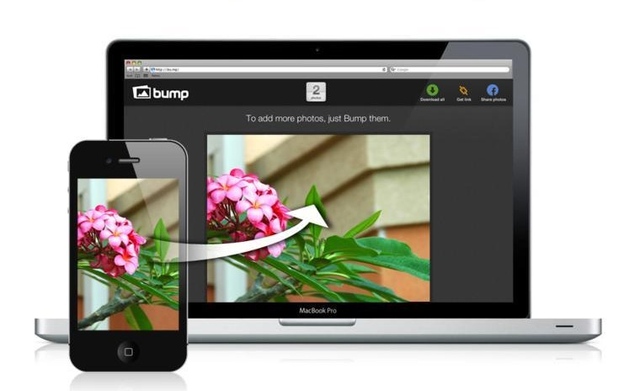
Do you use Bump a lot? Get ready, because now it’s even better. From now, not only can you bump devices to transfer your photos, you can bump computers! When you bump your phone with a computer, the photos you’ve chosen immediately get transferred to that computer. It’s like magic.
If you’ve missed it, Bump is a mobile app which makes it possible to share files and photos between devices simply by bumping them into each other. It uses your geo-location and some statistics to recognize your specific bump among millions of others. In order to bump photos onto your computer, all you have to do is hit the space bar with your device.
Thanks to the update, you can now easily save all the videos on your phone to your computer’s hard drive. If you get a new phone, you can back up all your contacts onto your computer and reload them onto your new device. Or, you can grab a presentation from your desk computer and bump it to a conference room PC.
It works by matching digital signatures between devices, be it two smartphones or, now, between a smartphone and a computer. We’ve been using the new functionality to transfer photos between my phone and the PC; it’s incredibly fast and works very well.
If you haven’t tried the app yet, it’s a great addition to your mobile repertoire.
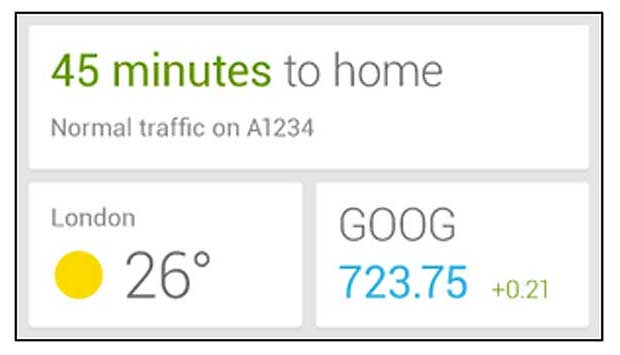
Google has issued an update to its Search app for Android, bringing the rumoured widget functionality to devices running Jelly Bean and higher. The update brings in fresh data, and adds support for movie tickets from Fandango.
The update, for Android 4.1 and higher, will now provide users with movie ratings from Rotten Tomatoes, and real estate information from Zillow, when a house is listed on the markets and resides in that provider’s database. Also, if you live in the United States, and use the app, you will now be provided with a music button a song is currently employed and the app is in voice mode.
What’s in this version: For Android 4.1+ (Jelly Bean): – Google Now widget for home screen or lock screen. – Movie passes from Fandango – Movies now includes ratings from Rotten Tomatoes – Real estate listings from Zillow when in the market for a home – Music button when a song is playing in voice mode (US only) – Support for US college sports
Google, which made the widget announcement in an Android blog post, assured that Now is just getting started, so we’re sure to see many more updates and improvements hit the pipeline before long.
The Google Search app for Android is available as a free download from the Google Play Store.
The official Facebook for Android application has been upgraded in the Google Play Store to make life easier on those who tend to change their profile cover photo quite often. Users can now make the change right from their timeline instead of having to dig through settings and go through the grueling, nerve-wrecking task of pressing button upon button upon button.
No one ever accused Facebook of being swift or thorough with its app updates, but they’re at least usually very welcome when they arrive. Back in 2011, the social network introduced ‘Timeline’, the now-mandatory profile layout that gives you one giant photo at the top, with a secondary profile picture in the bottom-left corner. Up until recently, you couldn’t change your cover photo on mobile. Now, in version 2.2, you can.
Again, not a huge feature but certainly appreciated. We’d love Facebook to redesign the app or, barring that, improve the performance of the one we have. But the company clearly has different priorities. That said, today’s upgrade is waiting for you in the Google Play Store so get over there to check it out.
Temple Run 2 for Android has also been updated, the developers have added the ability to restore the coin doubler if you happened to have re-installed the app on your device and purchased the power up.
We’re sure that many of you guys use the WhatsApp messenger on your Android device, but if you have felt that WhatsApp’s interface on your Android device is starting to get a bit stale, you might be pleased to learn that an update could be heading your way soon.
A new beta has been released of WhatsApp Messenger for Android featuring, among other things, a new, Holo-style theme much better suited to the general look and feel of Android in general. The app has, hitherto, looked like a straight port of its iOS cousin, but with the security issues of yesteryear now having been resolved with WhatsApp Messenger for Android, the developers behind the popular app can now focus on aesthetics and features.
As well as the beautiful Holo theme, it also looks as though the beta also contains new expandable notifications, making the general functionality of the app in general just that little bit more streamlined. Expandable notifications make everything seem tidier and more natural, and with WhatsApp always seeming a prime candidate for the feature, it’s good to see the WhatsApp team finally implement it.
The update should be rolling out to the Play Store in the coming days or weeks (WhatsApp has not publicized the update yet) but it’s available to download from the company’s website.
As ever, the trial period for WhatsApp Messenger lasts for a year, with an annual service charge of $0.99 thereafter. If you have already paid, you will not be charged again to use the beta.
You can grab the update by heading over toWhatsApp.com/Android
Electronic Arts has announced that the third release from its popular Real Racing series will be landing at the Google Play Store for Android, and the App Store for iOS, as of the 28th February. The iPhone 5 launch gave us a glimpse of things to come from Real Racing 3, but while the snippets appeared remnant of Gran Turismo, fans have had to wait quite a while for a solid release date.
Now, the wait appears to be almost over, and by the end of the month – provided no unforeseen delays crop up – the mobile arena’s favorite racer will be back for a third lap.
The title promises “46 licensed vehicles covering 3 classes, a 22 car grid, real world tracks, 8 varied event types and 900+ events.”
As you might expect, not all of that content will be free right away. Though players will be able to unlock all content for free over time, they can also skip the rigmarole by simply purchasing cars and tracks with real cash, according to CNET.
The freemium model has worked wonders for many other developers, as it entices gamers to try out a game in the first place. At $9.99/INR 550, one is only likely to spend money having played before, but if a gamer can try – and enjoy – a title for free having just found it while browsing the App or Google Play Stores, the inclination to spend further money is certainly higher.
Much like other racing games, Real Racing revolves around racing around in cars. The first game was critically acclaimed with an average review score of 94 percent on Metacritic. The series is praised for its visuals and intelligent AI.
The second game was released in December 2010. It features a number of real cars, including the 2006 BMW Z4 M Coupe, the 2010 Chevrolet Corvette C6.R, and the 2010 Ford Shelby Mustang GT500, among others. As with the first game, it features an extensive career mode, time trials, and online play.