Category: Apple

  • Reminder : Tonight Apple Keynote, Possible iPhone 5 Launch : We will cover it Live !


    There is a lot of information pointing to the fact that a new iPhone may just be released today evening at the WWDC (morning in USA) . We will cover the even live from all aspects on our Live Blog.


    CLICK HERE FOR LIVE BLOG

    So be sure to bookmark the page as you may never know what secrets Apple might have up its sleeve.

  • Rumor: iOS5 to bring Automatic App Updates

    Rumor: iOS5 to bring Automatic App Updates


    Rumors abound that Apple’s new iTunes will have an option to automatically download app updates to your iOS devices without needing to perform a wired sync. The leaked version of iTunes has a My App Updates screen which describes a previously unseen feature “If your device has Automatic Download enabled for apps, your updates will download to your device without having to sync.”

    As the Automatic Download setting doesn’t yet exist in iOS, the leak appears to suggest that this feature will become available in iOS 5. All features of iOS 5 will be revealed on Monday during the Apple World Wide Developers Conference. We will be covering the event live here.

  • Apple WWDC Keynote on iOS 5, Mac OS X Lion and iCloud is on June 6th, We will Cover it Live!

    Apple WWDC Keynote on iOS 5, Mac OS X Lion and iCloud is on June 6th, We will Cover it Live!

    Who knows whats going to happen at this keynote, iOS 5 , Mac OS X lion and iCloud are already known facts. A lot of speculation on the iPhone 5 and possibly the iPhone Nano. We will just have to wait till Mr. Jobs shows up in his Black turtle neck and blue jeans.

    In the mean time bookmark this page to get unrestricted access to our live coverage of the event.

    10:30PM – INDIA / New Delhi/Mumbai/Kolkatta/Chennai/Bengaluru

    06:00PM – London
    07:00PM – Paris
    09:00PM – Moscow
    02:00AM – Tokyo (June 7th)

  • Shantanu Narayen Claims Adobe-Apple Fight is over : Time to Move On!

    Adobe’s CEO, Shantanu Narayen said that Adobe’s problems with Apple, which were a result of Cupertino’s decision to omit support for Flash in its products, are over.

    “Yes, the argument is over from our point of view,” Narayen said. “We are so excited about opportunities we have. We’re focused on that.”“At the end of the day, where Adobe makes its money is through our application tools, as well as our solutions, (and) being able to make that content and measure that content and manage that content,”

    He also talks about Adobe’s achievements with the Blackberry PlayBook, But has really no answer to the poor performance of the Flash content on the Android Platform.


    [AllThingsD]

  • Chinese boy sells kidney to buy an iPad 2

    Chinese boy sells kidney to buy an iPad 2

    We have heard some amazing and shocking stories relating to Apple products, from thieves to muggers,but this by far is the worst. A 17-year-old Chinese boy living in the Anhui province in China sold his kidney for 22,000 yuan, or about $3,400 (INR 1,60,000/-) So that he could buy the iPad 2.

    “I wanted to buy an iPad 2 but could not afford it,” the unnamed boy told Shanghai Daily. “A broker contacted me on the Internet and said he could help me sell one kidney for 20,000 yuan.”


    He underwent surgery at a Chenzhou hospital. When his parents found out, they notified the police immediately but they have been unable to locate the broker, according to the report. The child now says he regrets his decision.

    Make sure the next time you need to buy things you cannot afford, the enjoyment of owning that item, will be a lot less without your crucially important bodily organs.

  • Thrive – Meet the Toshiba Tablet

    Thrive – Meet the Toshiba Tablet


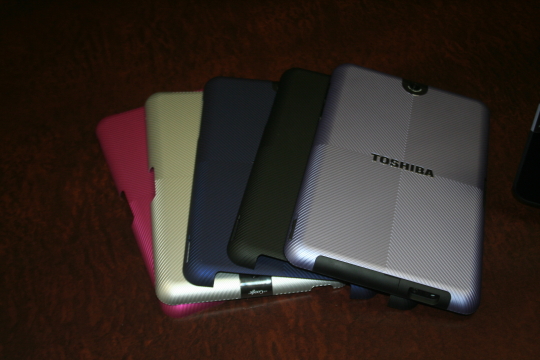
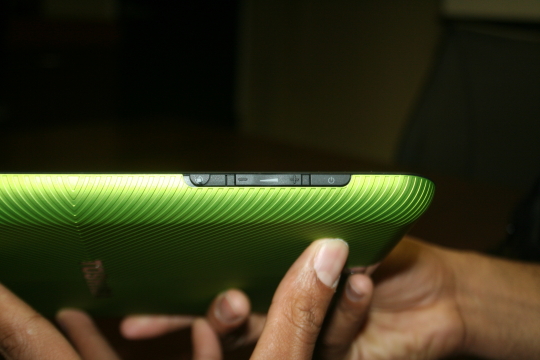
    The Japanese manufacturer is coming out with a new tablet called the Thrive this summer. The Thrive has most of the features you’ve come to expect from a tablet, a 10.1 inch screen, the latest version of the Android operating system, Honeycomb 3.1, front-facing 2.1-mega pixel camera and 5-mega pixel rear-facing camera for photos and video conferencing, a gyroscope, rotation lock, and a 7- to 8-hour battery life (that’s continuous hours of playing HD video). It weighs in at 1.6 pounds, and is a little on the thicker side at 0.6 inches.

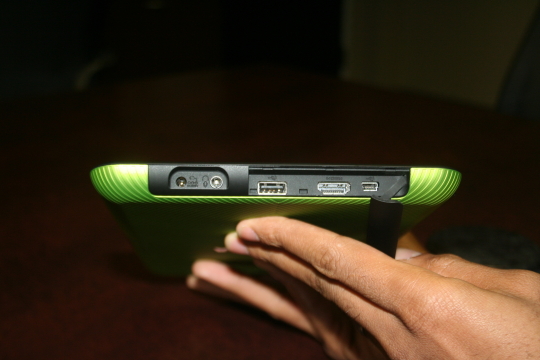
    The thickness was compromised for several features that Toshiba thinks customers will want: built-in HDMI out port, USB, mini USB, SD card slot. In other words, ports you’d find on many computers.The Thrive also comes with a few perks. It has Log Me In software installed for you to control your desktops from the tablet, a file manager built on top of Android for you to view files stored on your pen-drives and SD cards and also a piece of software that’s called PrintShare which allows you to print documents directly from the tablet, which is similar to Apple’s AirPrint and Samsung’s MobilePrint.

    The Thrive will come in three sizes: 8GB, 16GB, and 32GB. All are Wi-Fi only, and will be priced at $429, $479, and $579, respectively.


  • Apple camera patent will stop Smartphone pirates dead in their tracks

    Apple camera patent will stop Smartphone pirates dead in their tracks

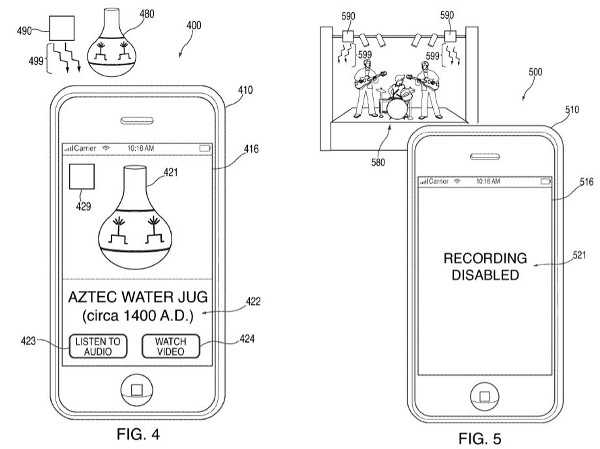
    Apple inc. filed a patent yesterday, that they could actually potentially use. Pairing an infrared sensor with the camera already on board, portable devices could receive data from transmitters placed on strategic locations at copyright events.

    These transmitters would prevent the camera from recording and would instead show, watermarks, blank screen and even warning messages to the smartphone user.

    [Patently Apple]

    [US Patent Office]


  • Apple Releases Update to Detect and Delete MacDefender ‘Scareware’: UPDATE

    Apple Releases Update to Detect and Delete MacDefender ‘Scareware’: UPDATE


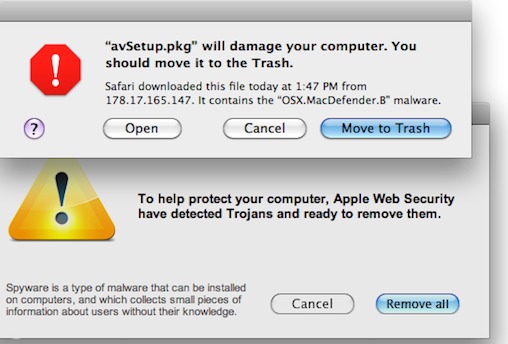
    Yesterday, Apple released an update for Snow Leopard  to detect and warn useres if they have installed a fake Mac security software called MacDefender. The term ‘Scareware’ basically means that the software will plague users with popups and alerts warning them that their computer is infested with trojans, worms and other malware. To get rid of these popups users have to fork over $60 to $80 to purchase the registered version of the useless software.

    The update, labelled 2011-003, adds a new definition to the rudimentary virus detection engine embedded in Snow Leopard, and also increases the requency with which it checks for definition updates to daily. This brings the total tally of antivirus definitions on the Mac AV engine to 6.

    This update was only offered to users running OS X 10.6 aka Snow Leopard. Macs powered by the older 10.5 Leopard OS will not recieve the same anti-MacDefender protection. Users can download the update from the apple website or update their system using the regular ‘Software Update’.


    UPDATE:

    The people responsible for the fake Mac security software has already updated their “scareware” to evade defenses Apple put in place late Tuesday, a French security company Intego confirmed today. “Apple’s [antivirus] did not detect the new sample,” said Peter James, a spokesman for Intego. According to James, the new malware file is identified as “mdinstall.pkg” and if installed, plants the phony MacDefender software on the victim’s Mac.

    Intego confirmed  that the scammers had created a new version that wasn’t detected by Apple’s new defenses. “This isn’t surprising, that there’s a new variant out almost as soon as Apple released its security update Tuesday,” said James. “[The attackers] are following the news, they’re efficient.”

  • Apple releases iWork to iPhone and iPod touch (PR)

    Apple releases iWork to iPhone and iPod touch (PR)

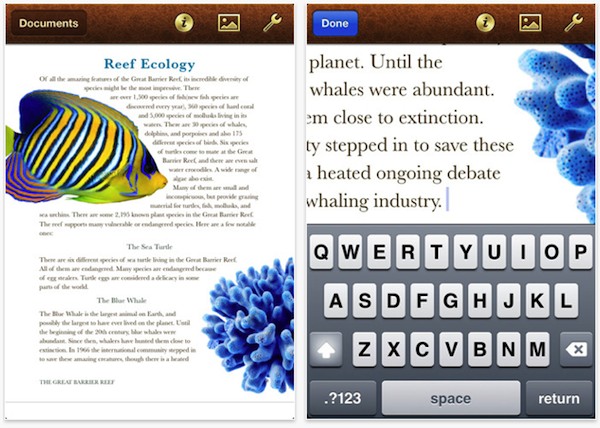
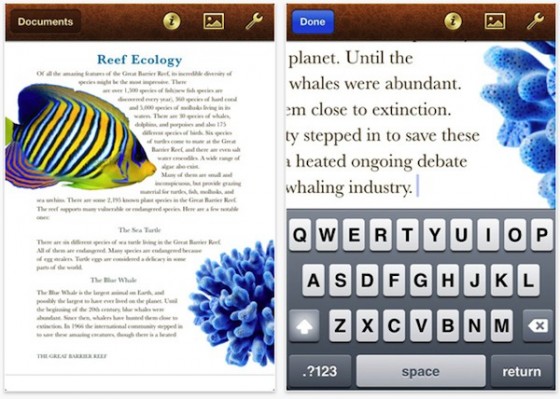
    Being a few of the most successful apps on the iPad online App store since day one of Launch, Apple has finally brought some love to iPhones and iPod Touches. The same apps will now run on all other iOS devices making them universal Apps at US% 9.99


    PRESS RELEASE

    Apple iWork Now Available For iPhone & iPod touch Users

    CUPERTINO, California-May 31, 2011-Apple® today announced that its groundbreaking iWork® productivity apps, Keynote®, Pages® and Numbers®, are now available for iPhone® and iPod touch®, as well as iPad®. Created for the Mac® and then completely redesigned for iOS and Apple’s revolutionary Multi-Touch™ interface, Keynote, Pages and Numbers allow you to create and share stunning presentations, beautifully formatted documents and powerful spreadsheets on the go. iWork apps are available on the App Store™ for $9.99 each to new users and as a free update for existing iWork for iPad customers.

    “Now you can use Keynote, Pages and Numbers on iPhone and iPod touch to create amazing presentations, documents and spreadsheets right in the palm of your hand,” said Philip Schiller, Apple’s senior vice president of Worldwide Product Marketing. “The incredible Retina display, revolutionary Multi-Touch interface and our powerful software make it easy to create, edit, organize and share all of your documents from iPhone 4 or iPod touch.”

    Keynote, Pages and Numbers import and export documents from iWork for Mac and Microsoft Office; print wirelessly using AirPrint™; and include beautiful Apple-designed themes and templates. All iWork apps now include improved document management with thumbnail images that let you find your files quickly, organize them and group them into folders using intuitive gestures. From the Tools button in the toolbar, you can easily share any presentation, document or spreadsheet without leaving the app.

    Keynote makes it easy to create impressive presentations, complete with animated charts and transitions. You can play your presentation in Full Screen view on the stunning, high-resolution Retina™ display or connect to a projector or HDTV for a large audience. Available separately, the Keynote Remote app allows your iPhone or iPod touch to control a Keynote presentation on any iOS device or Mac.

    Pages is the most beautiful word processor ever designed for a mobile device and has everything you need to create amazing documents. Pages takes full advantage of the high-resolution Retina display on iPhone 4 and iPod touch so you can see all the detail and richness of your documents. To make working with text easy on iPhone and iPod touch, Smart Zoom automatically zooms in to follow the cursor while you’re editing and zooms back out when you’re done.

    Numbers uses Multi-Touch gestures and an intelligent keyboard to help you create compelling, great-looking spreadsheets with over 250 easy-to-use functions, flexible tables and eye-catching charts. Just like Pages, Numbers takes advantage of the high-resolution Retina display and Smart Zoom to make working with text and cells on iPhone 4 or iPod touch easy.

    Pricing & Availability
    Keynote, Pages and Numbers are universal apps that run on iPad and iPad 2, iPhone 3GS and iPhone 4, and iPod touch (3rd & 4th generation). Keynote, Pages and Numbers are available from the App Store for $9.99 (US) each for new users, or as a free update for existing iWork for iPad customers. Keynote Remote is sold separately via the App Store for 99 cents (US).

    Apple designs Macs, the best personal computers in the world, along with OS X, iLife, iWork and professional software. Apple leads the digital music revolution with its iPods and iTunes online store. Apple has reinvented the mobile phone with its revolutionary iPhone and App Store, and has recently introduced iPad 2 which is defining the future of mobile media and computing devices.

  • Apple will announce iCloud and iOS5 on June 6th (PR)

    Apple will announce iCloud and iOS5 on June 6th (PR)

    Surprising piece of information from Apple, in almost a first ever in a very long time they have announced what is going to be announced before the actual announcement. According to the Press Release below Apple will announce the much awaited iOS5 and new new could based streaming service iCloud on June 6th 2011 at the WWDC.

    Lets hope that Steve Jobs has something else up his sleeve, or down his pocket, a shiny new iPhone 5 perhaps, even an iPhone 4s. You never know with Apple, But hey at least Jobs is gonna be there delivering the Keynote.


    PRESS RELEASE

    Apple to Unveil Next Generation Software at Keynote Address on Monday, June 6

    CUPERTINO, California-May 31, 2011-Apple® CEO Steve Jobs and a team of Apple executives will kick off the company’s annual Worldwide Developers Conference (WWDC) with a keynote address on Monday, June 6 at 10:00 a.m. At the keynote, Apple will unveil its next generation software – Lion, the eighth major release of Mac OS® X; iOS 5, the next version of Apple’s advanced mobile operating system which powers the iPad®, iPhone® and iPod touch®; and iCloud®, Apple’s upcoming cloud services offering.

    WWDC will feature more than 100 technical sessions presented by Apple engineers. Mac® developers will see and learn how to develop world-class Mac OS X Lion applications using its latest technologies and capabilities. Mobile developers will be able to explore the latest innovations and capabilities of iOS and learn how to greatly enhance the functionality, performance and design of their apps. All developers can bring their code to the labs and work with Apple engineers.

    For more details, visit the Apple Worldwide Developers Conference 2011 website at developer.apple.com/wwdc.

    Apple designs Macs, the best personal computers in the world, along with OS X, iLife, iWork and professional software. Apple leads the digital music revolution with its iPods and iTunes online store. Apple has reinvented the mobile phone with its revolutionary iPhone and App Store, and has recently introduced iPad 2 which is defining the future of mobile media and computing devices.
  • Amazons also launches Mac Download Store

    Amazon on Thursday announced the Mac OS X online application store. The Amazon Mac Download Store will compete directly with Apple’s own Mac App Store.

    Amazon says its store has 250 of the biggest software and game titles available for Mac. In fact, they have some titles that Apple’s store doesn’t. Amazon also features games from Feral Interactive, Electronic Arts and Aspyr, utilities like Roxio Toast and other titles.

    Amazon said the “Mac Download store features an install-less download process where the customer gets just the product without any unwanted extras, making for faster and easier purchases. Plus, downloads are conveniently backed up in your Games and Software Library where you can download an unlimited number of times for personal use.”


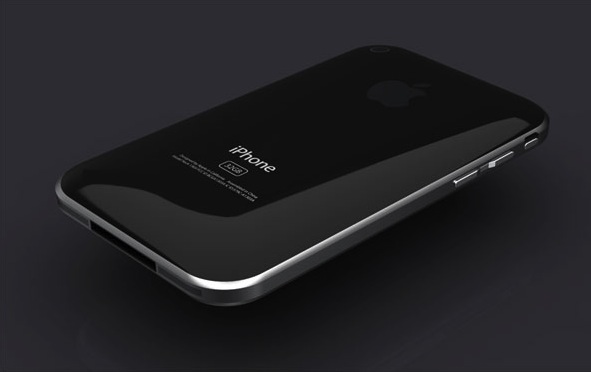
  • The iPhone 5 may have a curved Glass Front

    The iPhone 5 may have a curved Glass Front

    According to a report by DigiTimes, a rumor around the supply chain in Taiwan is that Apple is going to adopt a curved cover glass for the iPhone 5.

    Cover glass makers are reluctant to commit investment to the purchase of glass cutting equipment due to the high capital involved, said the sources. However, in order to push forward the production of curved glass, Apple reportedly has purchased 200-300 glass cutting machines to be used by glass makers, said the sources. The glass slicing machines are currently being stored at associated assembly plants and will be brought online once yield rates for the production of curved glass reaches a satisfactory level, the sources revealed.

  • App of The Day : Kung Fu Panda 2 : Be The Master

    App of The Day : Kung Fu Panda 2 : Be The Master


    Who doesn’t love KungFu Panda? The fact that the second movie is coming out is getting everyone excited. But, wait there is a game to go with that. Enter Kung Fu Panda 2 : Be The Master Game for iOS.


    • Seller: THQ Inc.
    • Genres: Games | Kids | Entertainment | Adventure
    • Released: 19-05-2011
    • Version: 1.0.02
    • Size: 20.44 MB

    DOWNLOAD : Kung Fu Panda 2: Be The Master - THQ Inc.

    Kung Fu Panda 2: Be The Master – THQ Inc.


    The game comes in various different scrolls or Levels

    I LOVE KUNG FU!!!
    Po is finally a real Kung Fu warrior, but to become a true Master, he must dedicate himself to training. Shifu has revealed to him the Secret of the Thousand Scrolls, and Po’s awesome journey begins with the first two:

    PAWS OF POWER – Train with Shifu in the Dojo, swiping and clawing your way through flying training dummies based on all of Po’s greatest foes. But watch out for the bee hives! They’re a major buzz kill.

    FEET OF FURY – Scale the towering Waterfall of Agony, jumping higher and higher with the help of firework-powered chairs, bouncy bamboo stilts, and other special items. Leap to new heights… or else it’ll be one big belly flop below!

    NEW SCROLLS ON THE WAY!!! – Dedicated warriors will be rewarded as two new Scrolls are revealed with coming updates! SKADOOSH!

    KUNG FU TRAINING IS ITS OWN BEST REWARD…
    But there are plenty of other perks, too!
    Unlock collectible action figures of the Furious Five! TOTALLY SWEET!

    Earn special Achievement Badges to guide you through your training.

    Track your progress against other warriors on the Top Trainers leader boards.

  • WiFiPhoto : Share iOS Photos Wirelessly : App A Day

    WiFiPhoto : Share iOS Photos Wirelessly : App A Day

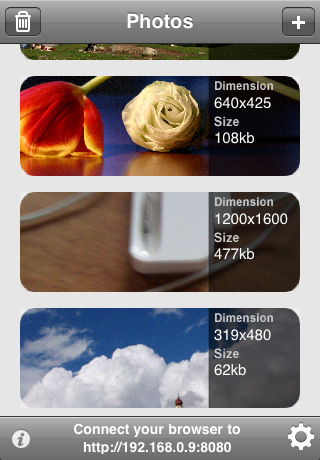
    Ever needed to share photos wirelessly from your iPhone, iPod touch or iPad, well WiFiPhoto does just that with ease.

    This app comes with an easy setup process simply select your WiFi network and point your Browser to the IP address provided by the App and – bam – all your photos are available for download without the need of any wires or iTunes Syncing.  Emailing reduces the size of the image , But with this app you can simply transfer the photos you want quickly and efficiently.


    FEATURES

    • – Simple and elegant interface
    • – Select multiple photos
    • – Change image quality to fit your needs
    • – Download a single picture or a compressed archive of all photos
    • – Autorotate. No need for further adjustments after download
    • – Pick from Camera roll or Photo library


    WiFiPhoto - Matteo Rossi

    WiFiPhoto – Matteo Rossi


    [xrr rating=3.5/5 label=”We Rate WiFiPhoto” imageset=shiny_yellow_star display_as=fraction_stars]

iGyaan Network
Privacy Overview

This website uses cookies so that we can provide you with the best user experience possible. Cookie information is stored in your browser and performs functions such as recognising you when you return to our website and helping our team to understand which sections of the website you find most interesting and useful.