Category: Tech 101

  • Tech 101 – How Touch Screens Work

    Tech 101 – How Touch Screens Work

    Previously, we’ve explained How Liquid Crystal Displays Work as well as How OLED Displays Work. Today, we’re going to explain how Touch Screens Work.

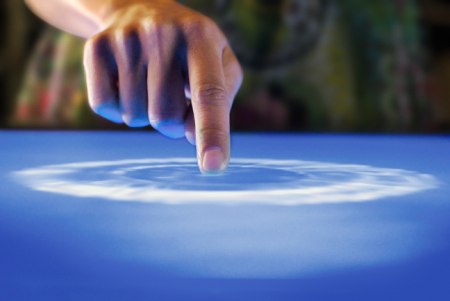
    Touch Screens are all the rage today. You’ll find them in many devices like tablets, smart-phones, computer monitors, PDAs, ATMs, table tops, kiosks etc. A touch screen can use multiple inputs from your fingers to styluses and even sausages! But how does this marvel of technology really work? There are many different types of touch screen displays. You will hear many marketing gimmicks regarding capacitive or resistive technology, but most people just don’t know the difference. Read on to learn more about this fascinating technology.

     The first touch screen was made all the way back in 1965 by E.A. Johnson at the Royal Radar Establishment, Malvern, UK. Since that first prototype, many methods of detecting touch on a display have been developed. The most widely used touch screen technologies are explained below:

    Resistive Touch Screens

    A resistive touch screen is composed of many layers. The two most important layers are made of a flexible polymer which are coated with a resistive material and are separated with an air gap or microdots. The resistive material is applied in lines on each sheet and they are placed perpendicular to each other. When a person touches their finger to a resistive touch screen, the two layers are pressed together, and the points of intersection on the two layers allow the processor to accurately measure the position of the touch.

    When pressure is applied to the screen, a uniform voltage is applied to the first sheet, and the second sheet measures the voltage as distance along the first sheet, which gives the X coordinate. Similarly, when the X coordinate has been ascertained, a voltage is applied to the second sheet, and the first sheet is used to measure the distance, which gives the Y coordinate. These measurements take place in only a few milliseconds, which means that a touch is registered as soon as contact is made.

    Since these types of touch screens rely on a point of contact between the two resistive layers, any pointing device like a finger or stylus can be used on them. These screens are also quite inexpensive to manufacture as they don’t require any specialized components. Due to the design of these screens, registering multiple points of contact was not possible due to vectoring issues. However, new technology is now available that overcomes these vectoring issues and allows multiple points of contact to be measured.


    Capacitive Touch Screens

    Capacitive touch screens can be based on two different technologies:

    Surface Capacitance

    This is the most basic form of capacitive touch screen technology. One side of the insulator is coated with a conductive layer. A voltage is applied to this conductive layer, which results in a uniform electrostatic field. When you bring your finger in contact with the screen, a capacitor is formed dynamically. This changes the electrostatic field across the screen and this change is measured by sensors placed in the four corners of the screen. The point of contact can be accurately measured based on the change in capacitance in the four corners of the screen. The greater the change in any corner, the closer the point of touch is to that corner. As there are no moving parts, these types of capacitive touch screens are very durable and are used in industrial applications as well as kiosks.


    Projected Capacitance

    Projected capacitive touch screens work on a principle similar to the matrix found in Liquid Crystal Displays. There can be either a single layer on which an X-Y grid is etched to form a grid pattern of electrodes or two separate perpendicular layers on which parallel lines are etched to form the grid. There are two basic types of projected capacitance technologies – Mutual capacitance and self capacitance.

    • Mutual Capacitance: These types of capacitive displays have a capacitor at every intersection along the grid. A voltage is applied across the rows or columns which creates a local electric field across the display. When it is touched with a finger or capacitive stylus, the capacitance at each point on the grid changes, which can be measured and gives an accurate location of the point o contact. This technology can measure multiple points of touch.
    • Self Capacitance: This type of capacitive touch screen can have the same grid pattern as a Mutual Capacitance screen but the rows and columns operate independently. With this type of screen, the capacitive load of a finger is measured on each row and column by a current meter which gives the point of touch. These types of screens can only measure one point of touch at a time.

    Projected Capacitance touch screens can operate without direct contact and can have a layer of insulation between the user and the screen itself. However, they require the use of a capacitive input device in the form of a human finger or a specialized stylus with a capacitive foam tip. These types of touchscreens are more expensive to manufacture than resistive touch screens. They also face issues when in contact with any capacitive material like water.


    Infrared Touch Screens

    These types of touch screens work on a very simple principle. Infrared LEDs or lasers are used to form an X-Y grid on the surface of the screen. These transmitters are coupled with receivers that monitor the grid pattern. When a touch event occurs, the infrared light from the transmitters is blocked in that region. The receivers that are no longer detecting an infrared signal are used to measure the exact point of contact.

    Infrared touch screens face many problems from objects that obstruct the infrared grid such as smudges on the screen and dust particles. Any kind of input can be taken on these screen from fingers to gloves to styluses.


    So now that you know how a touch screen works, we hope that you can have a new-found appreciation for all the devices that use this technology. A tremendous amount of research and hard work has been put in to make an input interface for a sense that most of us take for granted – Touch.
  • Tech 101: How OLED Displays Work

    Tech 101: How OLED Displays Work

    In our previous article, we explained How Modern LCDs Work. In this article, we’ll be exploring how the new generation of displays based on OLED technology work.


    What Exactly are OLEDs?

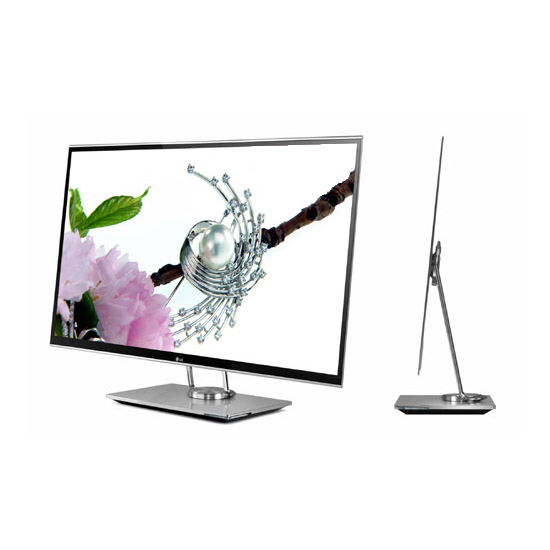
    There are a lot of products in the market today ranging from TV’s to Laptops and even Smart Phones that contain an OLED display. But what are these displays and how do they work? OLED stands for Organic Light Emitting Diode. This technology is named after the organic polymers that are used in its construction. For a long time, organic compounds have been assumed to be electrical insulators but new research and manufacturing techniques have allowed the industry to use these polymers for many applications on a vast scale.

    OLEDs are solid-state devices which are composed of thin films of organic molecules which emit light when a current is applied. OLEDs can provide brighter crisper displays that use less power than conventional Light Emitting Diode (LED) and Liquid Crystal Display (LCD) technologies. Another application for OLEDs is in the form of lights to be used in homes and offices. These lights have a long life and are very efficient.


    The Manufacturing Process

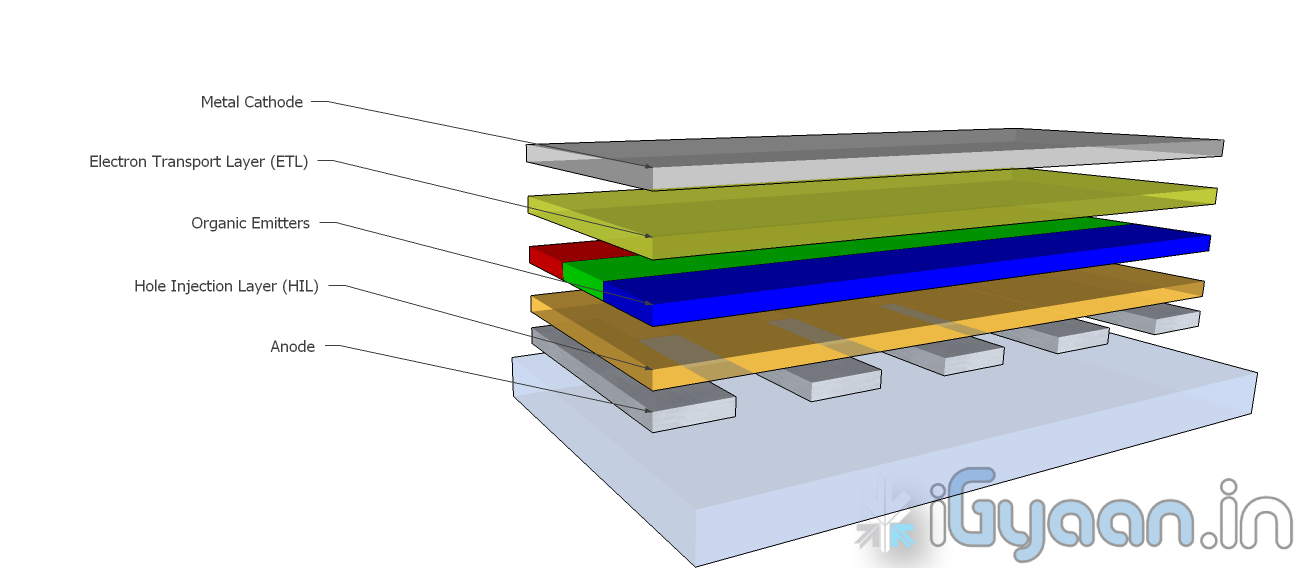
    OLEDs are basically layers of organic material sandwiched between an anode and a cathode and mounted on a substrate. This entire device is usually between 100 to 500 nanometers thick or is about 200 times thinner than a human hair.

    The substrate is usually a sheet of glass which is coated with a transparent conductive oxide which works as the anode. The next layer consists of hole injection material, the organic emitters and the electron transport layer which are together referred to as the organic stack. On top of the organic stack is the inorganic cathode. The device operates as follows:

    • Cathode – The cathode injects electrons into the system when a current flows through the device. It may or may not be transparent.
    • Organic Stack – This layer is made up of different organic polymers that are built up in layers. This is where light is made. The organic stack consists of the following layers:
      • Electron Transport Layer (ETL) – This layer consists of organic polymers or plastics that transport electrons from the cathode to the Organic Emitters.
      • Organic Emitters (OE) – This is a layer that is made up of organic polymers that may or may not be mixed with phosphorescent chemicals.  One polymer used in this layer is polyfluorene.When an electron finds a hole, it falls into the hole and gives up energy in the form of light.
      • Hole Injection Layer (HIL) – This layer is made up of polymers that transport electrons to the anode. This leaves ‘holes’ for electrons transported from the ETL to fill.
    • Anode – The anode removes electrons from the system when a current flows through the device. It is always transparent.

    This is the process by which a single OLED works. To turn them into colour displays, manufacturers place several layers of OEs on a display. There are various methods with which these individual pixels can be turned into a full colour display.


    Types of OLED Displays

    There are several types of OLED Display

    • Passive-matrix OLED
    • Active-matrix OLED
    • Transparent OLED
    • Top-emitting OLED
    • Foldable OLED
    • White OLED
    Passive Matrix OLEDs or PMOLEDs

    PMOLEDs are designed in a hash pattern. The anode and cathode are made in strips that are arranged perpendicular to each other. The points of intersection of the strips of anode and cathode make up the individual pixels where light is emitted. External circuitry is used to control which pixels are on and what colour they emit. The brightness of each pixel is dependent on the amount of current in the system.


    Active Matrix  OLEDs or AMOLEDs

    AMOLEDs have a full layer of anode and cathode materials but they borrow a technology from LCDs to produce a visible display. Sandwiched between the anode and the organic layer is a layer of thin film transistors or TFTs that makes the array. The TFT array is the circuitry that decides which pixel is on and what colour it displays. AMOLEDs are more efficient than PMOLEDs because the external circuitry used to run the PMOLEDs consumes more power. AMOLEDs also have a faster refresh rate which makes them more suitable to larger displays used in televisions and computer monitors.


    Transparent OLEDs or TOLEDs

    TOLEDs are constructed with only transparent  components, and are upto 85% as transparent as the substrate used when they are turned off. When it is turned on, the display still allows light to pass both ways and remains transparent. It can have either an active matrix or a passive matrix. This technology would be perfect for Heads Up Displays and Medical Equipment.


    Top Emitting OLEDs or TEOLEDs

    TEOLEDs are constructed with a substrate that is either opaque or reflective. They are perfectly suited for an active matrix design. They are used in smart-cards.


    Foldable OLEDs or FOLEDs

    FOLEDs are constructed with a highly flexible substrate which could either be a plastic or metallic foil. These types of OLEDs are very lightweight and durable. They are used in cell phones and can reduce breakage. They could also potentially be integrated into fabrics to create smart clothing.


    White OLEDs or WOLEDs

    WOLEDs  emit pure white light that is brighter and more uniform than the light which is emitted by fluorescent lights. . WOLEDs can be made in large sheets and can reduce energy costs massively if used to light homes and buildings due to their low power consumption.


    Advantages and Disadvantages of OLEDs

    OLEDs offer many advantages over the current favorite, LCDs and LEDs.

    • The organic construction of an OLED is much thinner than the many layers required for an LCD or LED display.
    • OLEDs can be built onto a thin plastic substrate which allows them to be flexible instead of the glass used in LCDs and LEDs.
    • Due to its design, an OLED display is much brighter than an LED display. This is because the conductive and emissive layers of an OLED can be stacked several times to produce more light than an LED while still remaining extremely thin.
    • Since OLEDs emit light themselves, they do not require a back-light. LCDs work by selectively  blocking areas of the back-light to produce individual pixels. OLEDs are also much more energy efficient than LCDs because they lack a back-light.
    • As OLEDs are made from plastics, they can be built into large thin sheets which makes them much easier to produce. It is much more difficult to create an LCD display of the same size.
    • OLEDs have a much viewing angle than LCDs because they do not block light in any fashion. Since they produce their own light, they can provide a field of view of upto 170o.

    For all their advantages over LCDs and LEDs, OLEDs have a few problems as well.

    • Red and green OLED films have a very long life of between 46,000 to 230,000 hours while blue OLED films currently have a much shorter lifespan of around 14,000 hours.
    • The manufacturing process for OLEDs is not cheap as of now.
    • OLEDs are not at all water resistant and can easily be damaged on contact with even a few drops of water.


    While LCD and LED technology remains in the mainstream, OLEDs are making headway into the television, computer and mobile segments. Manufacturers and engineers are realizing the potential benefits of using OLED technology for their devices. In the next few years we should see an increase in OLED sales as well as some novel applications of the technology.

    Stay tuned to the Tech 101 segment to learn more about what makes our everyday devices tick.

  • Tech 101: Modern LCD Displays

    Tech 101: Modern LCD Displays


    Displays have come a long way since the old CRT monitors and TVs. Advancements in display technology have made many modern devices possible such as mobile phones, mobile gaming platforms like the Sony PSP, thinner Televisions and Monitors. We use them everyday, for a variety of tasks but do we really know how they work? What is an LCD? What is a TFT Screen? How do they display so many millions of colours? This article will answer these questions and many more.

    What is an LCD?

    The term LCD stands for Liquid Crystal Display. But what exactly are Liquid Crystals? The term is quite confusing. A substance can either be a crystal, like quartz, which is hard as rock, or it can be a liquid which is obviously different. How can it be both? We all learned that matter can exist in 3 states, solid, liquid and gas. Solids have their molecules in a very rigid orientation while liquids and gasses are exactly the opposite. There are a few substances that have properties that are like solids and liquids at the same time. What this means is the the molecules of the substance tend to maintain their orientation, like a solid, but they also tend to move around, like a liquid. This is why they are called Liquid Crystals.

    It takes a lot of energy to convert a solid into this state, and only a little more to convert it into a liquid. This is why LCD’s are so sensitive temperature changes. This property allows them to be used in the making of Mood Rings and Thermometers. There are many types of liquid crystals. The major type used in monitors and other displays are called Twisted Nematic Liquid Crystals. These type of crystals twist and untwist at varying degrees to allow light to pass through when a voltage is applied.

    What is a TFT?

    A Thin Film Transistor LCD or TFT-LCD is named after a very thin layer of transistors that are applied to the back of a Liquid Crystal Display. These transistors allow only one row of pixels to be updated at any given point in time. The speed with which this updation takes place fools your brain into thinking that its viewing a static image.

    In small LCDs such as the ones used in calculators and other devices, a voltage can be applied across one segment without interfering with other segments of the display. This is impractical for a large display with a large number of pixels, since it would require millions of connections, two for each one of the three colors (red, green and blue) of every pixel. To avoid this issue, the pixels are arranged in rows and columns, reducing the connection count from millions to thousands. The column and row wires attach to transistor switches, one for each pixel. The one-way current passing characteristic of the transistor prevents the charge applied to the pixel from draining between refreshes, which creates the persistence of vision.

    What is a Pixel?

    A single pixel is the smallest addressable screen element in a display device, or it is the smallest unit of picture that can be represented or controlled. Each pixel has its own unique address which corresponds to its coordinates on the screen. Pixels are normally arranged in a grid pattern. Each pixel is made up of three Sub-Pixels which have a different color, Red, Green and Blue. The voltage applied to each subpixel decides its colour intensity. There are 256 possible gradations for each subpixel and together all three give a combination of 256 x 256 x 256 = 16,777,216 colours to each pixel on the screen.


    How it Comes Together

    A simple LCD monitor has many layers of technology that make it function. The basic principle behind these types of monitors is the Polarization of Light. What this means is that light is strategically allowed or not allowed to pass through any given point on the screen.

    At the base of a monitor, you have a single line of white LED’s that provide a backlight. There are many layers of films placed on top of these LED’s to create even lighting across the back panel. The next layer consists of a plate of glass. At the back and front of this sheet of glass are two polarization films. Light passes through the back film and is twisted by the glass to be ‘in sync’ with the front film. If the light is ‘in sync’, it passes through, if not, it is blocked by the film.

    The sheet of glass is an amazing piece of technology. It basically consists of a layer of TFT’s and a Liquid Crystal array that is arranged in a grid format. Each point or pixel of the grid consists of three subpixels. These subpixels are what give the pixel its colour. They have a maximum intensity of 255. What this means is that if we set the intensity of the red subpixel to 0, then no light passes through, and it appears black. If the intensity is set to 255, then all the light passes through and it appears bright red. If we wanted to create a single pixel of sky blue colour, the red subpixel would be set at 135/255 intensity, the green subpixel would be set at 206/255 intensity and the blue subpixel would be set at 250/255 intensity. This is how each pixel of your display is updated 60 times a second. Thereore, for a display of 1024 x 768 resolution, the monitor is making 141,557,760 updates per second. If it takes you half a second to flip a switch, making these many updates would take you 819.2 days or 2.24 years. Thats a LOT of updates (and finger cramps).


    To conclude, we would like to point out how much all of us take technology for granted. We have really got no idea what goes in to making most things we use everyday. We bicker and complain about our Tech being too slow or too old. We cant wait for the next big thing. At iGyaan, we have decided to start this section to demystify the basics of technology, so that the end user/consumer understands the true nature of the products that he/she is buying. We hope that you enjoy this section and learn something new from it. We’ll continue to bring you updates on the basics of technology. If you have something specific that you’d like us to talk about, please leave your requests on the comment section below.

    Stay tuned for the next update, continuing along the display line on OLEDs and AMOLEDs.

iGyaan Network
Privacy Overview

This website uses cookies so that we can provide you with the best user experience possible. Cookie information is stored in your browser and performs functions such as recognising you when you return to our website and helping our team to understand which sections of the website you find most interesting and useful.