Category: Social Media

  • Is Google owned Motorola making a Facebook phone?

    Is Google owned Motorola making a Facebook phone?

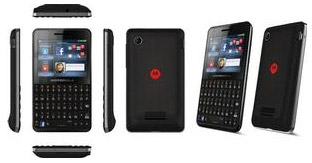
    Dirty Devils – do we all know that Google and Facebook essentially hate each other since the invent of Google Plus? But, new information has come into play : Google’s recent expensive endeavor is making a device dedicated to serve the rival company Facebook. The EX225, likely a feature phone that’s based on BREW OS is being touted as a QWERTY device with a dedicated Facebook button, something quite similar to our friend the ChaCha (sans touch screen and Android) 

    For the technically sound the device includes a 2.4-inch TFT-LCD display, a 3 megapixel camera and five row QWERTY keyboard and will be available in 2 variants dual-sim and single-sim. One this is for sure you can expect this device to do well in India, and you can expect a full feature on this iGyaan style.


  • The End : Apple ends TV Rentals, Google Dissolves Slide and Facebook Kills Deals

    Its looks like clean up time. Last week Apple ended their TV rentals all together, A statement from Fox  suggests that the studio was no longer interested in rentals, either:

    After carefully considering the results of the rental trial, it became clear that content ownership is a more attractive long-term value proposition both for iTunes customers and for our business. To further enhance the value of ownership, we are working with Apple to make content available within their new cloud-based service.”

    Ex- Apple CEO Steve Jobs and his team had worked hard throughout last year to push TV rentals to end users at aggressive pricing. almost 1/3 the buy it price. But looks like lack of support from TV networks means that Apple would no longer be able to push rentals out the door.

    Google on the other hand decided to dissolve Slide, a company that was bought by Google just a year ago for 200 million. Slide CEO Max Levchin decided to leave Google for other opportunities. A google spokesperson commented:

    Max has decided to leave Slide and Google to pursue other opportunities, and we wish him the best. Most of the team from Slide will remain at Google to work on other opportunities.”

    Slide, a social apps company, had an extensive portfolio of not so popular apps including  SuperPoke Pets, Disco and photo-sharing app Photovine, which was released only last week. The apps will be discontinued within the next few months.

    Also Facebook will discontinue its deals product, the company said today in a statement released to Reuters and other outlets.

    The Facebook Deals product, which offered discounted coupons for local businesses, had launched only four months ago. Its shutdown follows Facebook’s discontinuation earlier this week of its location-based check-in feature for mobile users in favor of broader place-tagging tools. Here’s Facebook’s statement:

    After testing Deals for four months, we’ve decided to end our Deals product in the coming weeks. We think there is a lot of power in a social approach to driving people into local businesses. We’ve learned a lot from our test and we’ll continue to evaluate how to best serve local businesses.

    Facebook deals tried to cash in on the public attraction to Groupon, LivingSocial, Google deals etc.

    Looks like the new implementation and acquisitions are not working out for these tech giants. and its time for cleanup.

  • Facebook’s Dedicated iPad app leaked in its iPhone app

    Facebook’s Dedicated iPad app leaked in its iPhone app

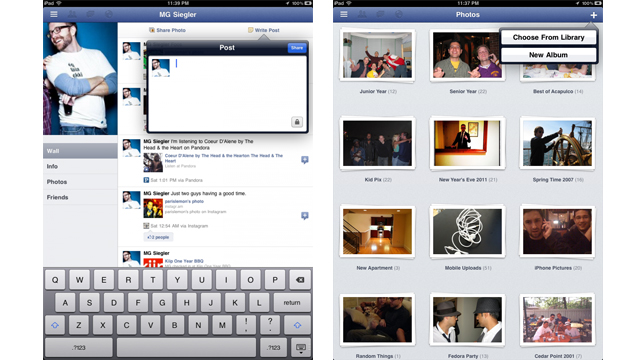
    The much awaited, dedicated iPad app for Facebook has be found in the latest update of the iPhone app.  @AeroEchelon, a Canadian engineering student who first noticed the hidden code says “change the UIDeviceFamily to 2 for iPhone on the Facebook app” . A basic edit of the file structure of the App will allow you to get a preview of the App. 

     The Facebook iPad app uses a left-side menu system that can be accessed by the touch of a button or the flick of the iPad screen. The interface is unlike the other iPad apps for accessing Facebook and TechCrunch calls it “Spectacular”.

    Hit the link for more screenshots and review by TechCrunch.

    [TechCrunch

  • How To : Import Your Facebook Contacts to Google Plus (+) : Step by Step

    How To : Import Your Facebook Contacts to Google Plus (+) : Step by Step

    After getting you an Invite,

    And Telling you

    How to Setup your Account on Google Plus.


    We are now helping you shift your Facebook contacts to Google + .

    It is a tedious, process but it works


    Step 1. Yahoo Mail

    • Create a Yahoo mail account if you don’t already have one.
    • Login and click the contacts tab.
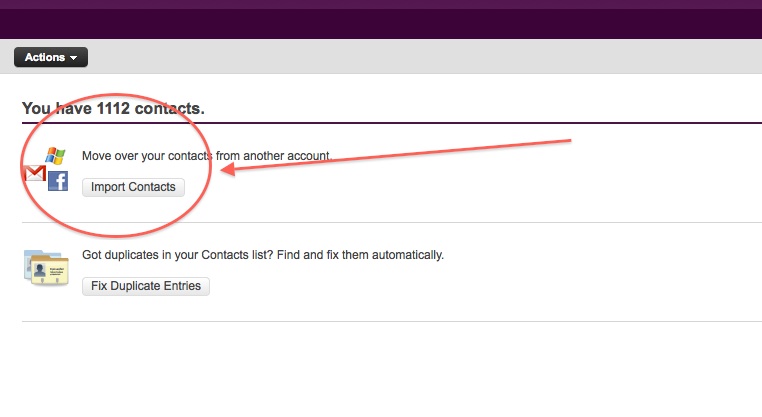
    • Once in the contacts tab you will be able to import contacts from Facebook.
    • Go ahead and do that.
    • After you enter your Facebook details all your contacts will appear in the contacts tab.
    • Next its time to export the contacts.
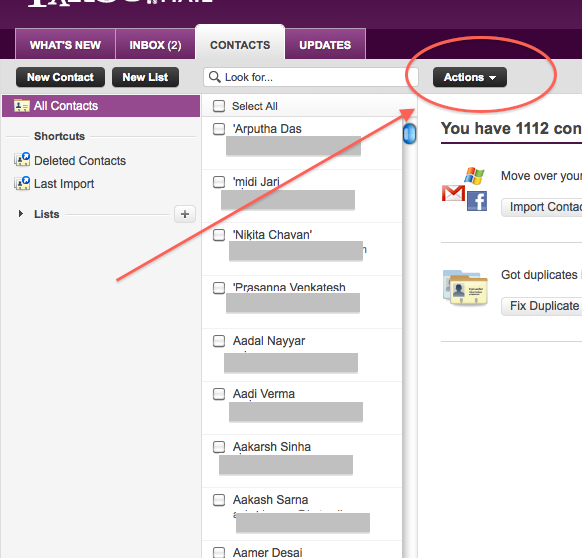
    • Click  the Actions button in the contacts screen.
     
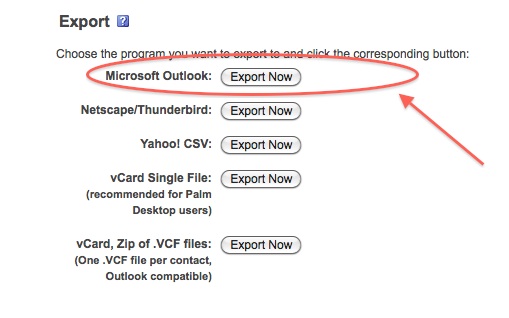
    • Now click Export all and choose the Microsoft Outlook option.
    • Save the file
    • Move on to Step 2
     

    Step 2 : Windows Live Mail

    At this point you would want to say to yourself, Why would i need a windows mail account?

    Answer : Currently Google + supports contact import from Yahoo and Hotmail. But once you import your contacts from Facebook to yahoo mail, Google plus can’t import them. Same is the case with Hotmail/Windows Live Mail. But with our work around Google Plus will import your contacts, So go on ahead:

    • Make sure you have a Windows Live Mail or Hotmail account (if not get one) 
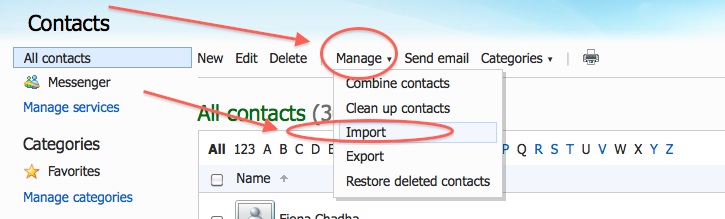
    • Next go into the Contacts Menu
    • Click Manage and then Click Import


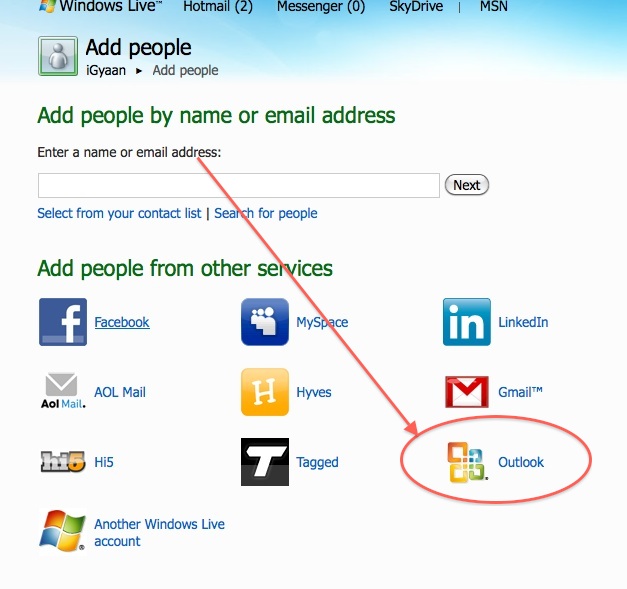
    • Next, Choose  Outlook and import the file you previously exported from Yahoo mail.
    • Now that your contacts are imported in yahoo mail the next step is to add them to Google Plus

    Step 3 : Google Plus

    • Log onto your Google Plus account
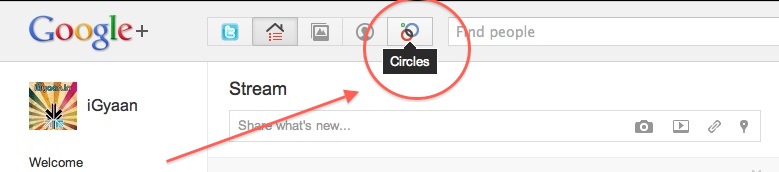
    • Visit the Circles tab
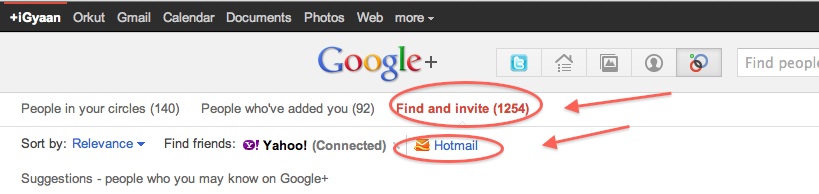
    • Click find and Invite
    • Click on hotmail
    • Enter your details


    You are Done!

    You have successfully imported your Facebook Contacts into Google Plus. 
    Now go ahead and add people to the circles of your choice and invite them.


  • How to : Set up your Google Plus Account Step by Step

    How to : Set up your Google Plus Account Step by Step

    Today we are going to help you set up a Google Plus Account – Step By Step


    Step 1 : Invitations

    If you don’t already have an invitation to Google plus, then you should consider making friends with better people, like us.

    Hit this link to get an Invite 

    Note:

    • You will need a gmail email address or a fully qualified google profile to get this to work.
    • Google apps and associated email addresses  are currently not supported

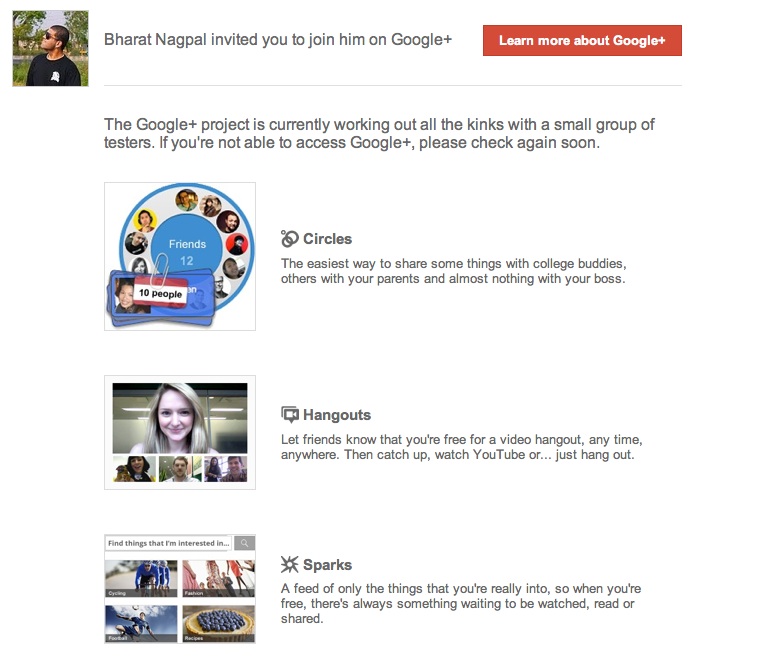
    When you get an invite it should look something like the image below


    After you get an invite  you will need to click the button :  


    Step 2 : Register 

    Once you click on the button you will be redirected to the registration page:


    Add your details, upload and crop your profile Photo.

    And you are all set to CLICK JOIN


    Step 3 : Profile

    Now that you are in, you would want to set up your profile.

    You will be greeted with a similar welcome page : 
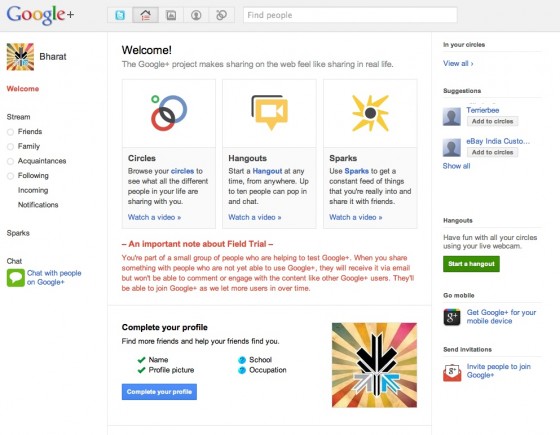
    welcome page
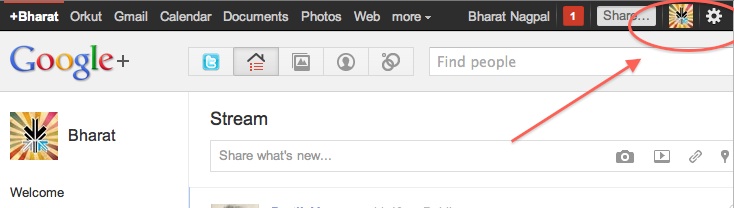
    • Click the sprocket settings button on the top right of you browser to get into Google Plus settings.


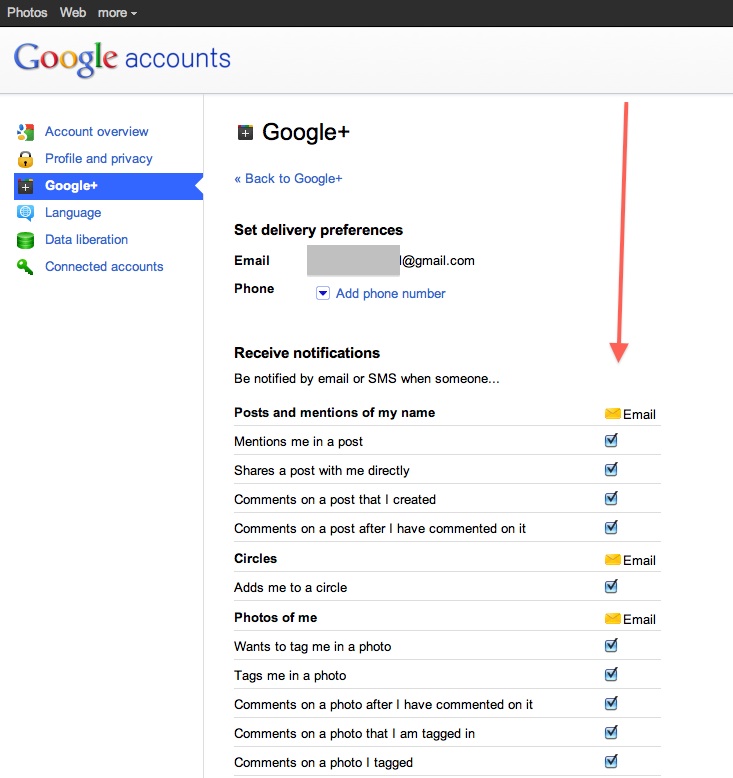
    • Next, Set up your privacy and sharing settings in the page.

    HIT – SAVE, and you are done!


    Step 4 : Setting up Circles

    Hit the circles button on your profile page to set up Circles.


    Once on the circles page you will be able to , find people by email addresses or by searching for them over other networks and email services like yahoo mail or hotmail.

    Simple create circles of your choice, Like Friends, Family, Colleagues, Game Buddies, College, etc.

    You can also add the same person to multiple circles.

    Once you are done finding and adding your friends, its time to start posting!.


    Step 5 : First Post!

    • Simple click on the share bar in your Google Plus homepage and start writing.
    • You can add media like videos or photos or even links and location from where you are posting.
    • Also select what all circles you would like to share this post with.
    • You can also leave it blank to share with everyone
    Once you are done typing click the green Share button.

    Congratulations you have successfully started using Google Plus (+)


    You can now start inviting your friends too!
    Stay tuned for an update to this post where we share details about Sparks, Hangouts and Streams


    We also have a tutorial on how to transfer your Facebook friends to Google + here.
  • How To: Move your Facebook Photos to Picasa

    How To: Move your Facebook Photos to Picasa

    With Google+’s popularity on the rise, a lot of users are looking for an easy way to shift their albums from Facebook to Picasa. The aptly named move2picasa.com website allows you to log in with your Facebook id and copy all your photos to Picasa. Please note that the photos would be moved without captions etc.

    If you have a lot of photos, it could take you a few hours to transfer them. Apparently, the more photos that you and others try to transfer, the slower the service will be. Despite the wait, this seems to be an adequate solution for most people. One other thing, you either move all your photos or you move none. There is no feature to select or filter which images are copied.

    Once your photos are in Picasa, sharing them with your circles is very easy. The web app was built by AmiWorks’ Aman Kumar Jain and Amogh. According to the website, some 300,000 photos have already been moved.

  • Facebook also comes to Skype

    Facebook also comes to Skype

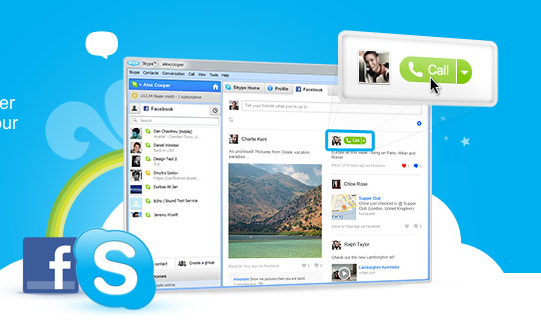
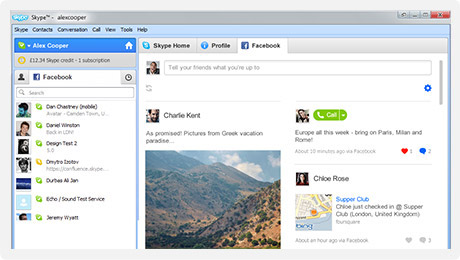
    Skype has also added Facebook live chat to their windows client. Skype 5.3 for windows enables people logged into Skype to talk to their Facbook friends via an easy interface.

    Import your Facebook News Feed to keep up with the latest from your friends. Comment, Like and call them direct from Skype. Update your Facebook status from Skype, too.

    Get all the latest Skype features plus send instant messages direct to Facebook chat. See when your friends on Facebook are online and get in touch in one click.


    Its only available for Windows Right now, But expect a Mac client soon. Hit the link below if you rock a PC.

    [Skype for Windows]

  • Facebook Brings Group Chat and Video Calling – Targets Google +

    Facebook Brings Group Chat and Video Calling – Targets Google +

    Facebook has just announced Facebook Video calls, in partnership with Skype. The Video feature embeds directly into Facebook chat and is a free to use service.

    There were three major announcements today.


    • Group chat(“an easier way to find someone who is online”)
    • Skype-enabled video chat
    • 750 million Facebook members


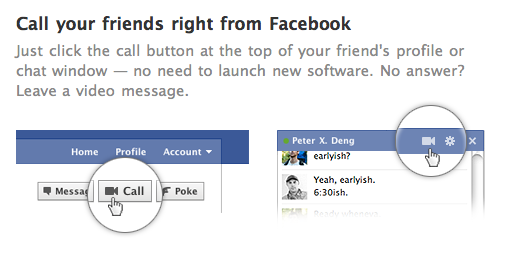
    In a direct approach the Member downloads a tiny Skype applet .jar file and Facebook Video chat becomes available. Users can now click the video button in the chat module to initiate a video call. The user on the receiving side, get a popup, much like a Skype call. The video camera on either side is turned on only when the recipient accepts the call. 

    As Mark pointed out, the interface is buggy. we tested it out and after several repeat failures we were able to get a stable connection.

    The popup is pretty simple and is always on top. The video chat can be made full screen and minimized or muted. Mark also noted that more developments will come as and when improvements are done to the system. 

    Tony Bates from Skype noted that over 150 million video calls are made each month through Skype, and now this feature will be available on Facebook. 

    visit the link below to get started

    [Facebook Videocalling]

  • LIVE BLOG : Facebook Product Announcement is Tonight (plus live feed)

    LIVE BLOG : Facebook Product Announcement is Tonight (plus live feed)

    Bookmark this page for the Facebook Product Announcement 

    Time : 

    US

    • 10:00 am Pacific Standard
    • 1:00 pm Eastern
    India
    • 11:30 pm
    GMT
    • 6:00 pm

    Watch live streaming video from facebookannouncements at livestream.com
  • FaceBook to Earn $1 Billion from Social Gaming This Year

    FaceBook to Earn $1 Billion from Social Gaming This Year

    Kevin Ryan, an entrepreneur and ex-CEO of DoubleClick, predicted that Facebook will generate approximatly $1 billion from its social gaming services this year. He arrived at the figure with the help of his brother Sean Ryan, who is the director of social gaming partnerships for FaceBook.

    FaceBook however, as a private company, has no obligation to disclose such financial information and has refused to comment on the prediction. The company will be going public next year with a very high Initial Public Offering because its valuation has been predicted to be greater than $100 billion.

  • Facebook to launch Facebook Credits for India today

    Facebook to launch Facebook Credits for India today

    Social networking site Facebook will finally introduce a payment system ‘Facebook Credits’ for Indian users. Members can then spend the virtual currency across various games or applications on Facebook.

    Facebook Credits is already a popula virtual currency in many countries.

    Facebook will introduce a new payment system Facebook Credits in India from July 1,” a company spokesperson told media.

    Starting July 1, we will require all social game developers on the Facebook canvas platform to process payments through Facebook Credits. Facebook Credits is currently used in more than 350 applications from 150 developers, representing more than 70 percent of virtual goods transactions volume on Facebook,” Facebook Platform Marketing Manager Deb Liu wrote on the company’s official blog in January

    This will also help various brands, which use the medium of Facebook to retail them goods through their social pages. Many developers such as Zynga, Playfish, CrowdStar , Digital Chocolate, PopCap and Arkadium have already adopted Facebook Credits for in-game virtual goods.

  • Facebook will Launch some thing Awesome Next week

    Facebook will Launch some thing Awesome Next week

    Facebook might launch something in the Mobile or Tablet division next week, if rumors are to be believed. Chief Executive and founder Mark Zuckerberg told reporters that the company planned to “launch something awesome” next week.

    He said the project had been developed at the 40-person Seattle office, Facebook’s only major engineering center outside of its Palo Alto, California headquarters.

    The iPad app and a specialized photo sharing app for the iPhone have been long overdue.

    Facebook, the world’s largest Internet social network with more than 500 million users, is increasingly challenging established online companies like Google Inc and Yahoo Inc for consumers’ time online and for advertising dollars.

    [via reuters]

iGyaan Network
Privacy Overview

This website uses cookies so that we can provide you with the best user experience possible. Cookie information is stored in your browser and performs functions such as recognising you when you return to our website and helping our team to understand which sections of the website you find most interesting and useful.