Category: Apps and Software

Games, Apps, Softwares, Operating Systems and Software Hacks

  • Blackberry 10 devices won’t have physical keyboards

    Blackberry 10 devices won’t have physical keyboards

    Whoops! Something went wrong!

    The first BlackBerry device running Research In Motion’s new operating software will not have a physical keyboard, only a touchscreen one.

    The BlackBerry 10 software will be offered on devices with physical keyboards in the future, but RIM spokeswomen Rebecca Freiburger declined to say when. RIM is expected to start selling BlackBerry 10 touch-screen devices this year.

    RIM’s hopes hang on the BlackBerry 10 system, which is meant to offer the multimedia, Internet browsing and apps experience customers now demand. The Canadian company is preparing to launch the new software later this year, just as North Americans are abandoning BlackBerrys for iPhones and Android devices.

    If those keyboard-loving customers haven’t already jumped ship, I doubt a couple of months is going to make a huge difference. It’s better for RIM to focus one piece of hardware–one that represents where the industry is headed–than launch Blackberry 10 with a lackluster keyboard model just to appease a fraction of its shrinking customer base.

  • Nike + and Flipboard come to Android

    Nike + and Flipboard come to Android

    Whoops! Something went wrong!
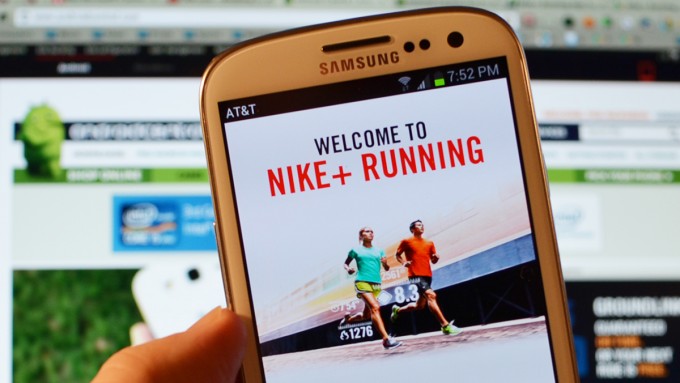
    The Nike+ app lets you keep track of your work outs

    Good news for Android users, the Nike+ and Flipboard apps have finally made their into the OS, after gaining success and popularity on Apple’s iOS. 

    Nike announced the Nike+ Running App for Android, which, as you’d expect, connects you to nikeplus.com, making exercise social. It features a smooth, intuitive user interface – tailored and optimized for Android – that hosts a number of features to enhance the running experience. The in-run navigation is seamless and simple, allowing runners to easily check key run stats, see their in-progress GPS maps, change songs or get audio feedback without missing a stride. It is available for free on Google Play. 

    [quote]The expansion of Nike+ onto multiple mobile platforms will allow us to serve more runners than ever before. This opportunity will give even more athletes the chance to experience Nike+, which makes this an incredibly exciting time for the running community, said Stefan Olander, Vice President, Digital Sport.[/quote]

    Whoops! Something went wrong!
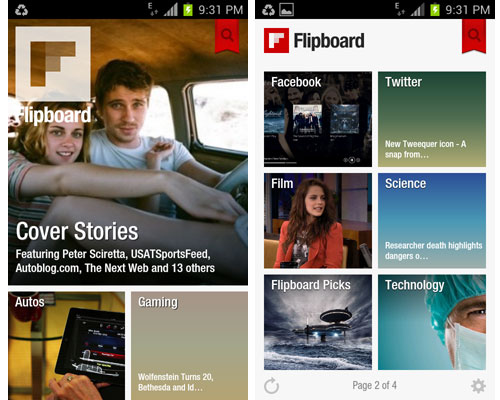
    Flipboard is a free application that turns Web content into a magazine format

    Flipboard is a free application that turns Web content into a magazine format, and it has also been announced the app will be available for the likes of the Kindle Fire, Android tablets, along with Nook tablets and smartphones around the world. and to run the app, consumers will need to be using Android version 2.2 or later on a devices with a chip running at least 800 megahertz. The app will not be available for tablets with larger screen sizes, such as the 10-inch Samsung Galaxy Tab 10.1.  Flipboard also announced that it is adding access to Google+ and YouTube, bringing to 12 the number of social networks users can view within the app. 

  • Sony Xperia S Android 4.0.4 ICS Software Update starts rolling out, Video (PR)

    Sony Xperia S Android 4.0.4 ICS Software Update starts rolling out, Video (PR)

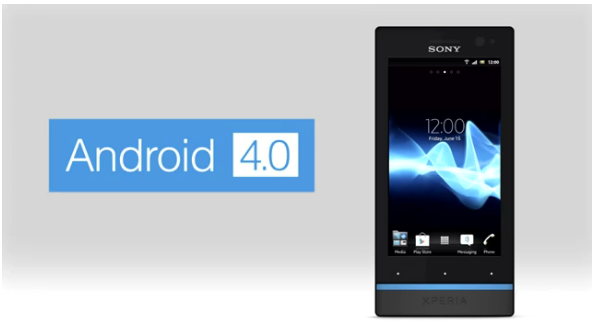
    Sony has started pushing out the new Software update for the Xperia S to Android 4.0.4. Among several features and fixes already included in the Android Ice Cream Sandwich upgrade, will be several add ons from Sony Mobile. The new apps including the “WALKMAN”, “Album” and “Movies” applications will come standard with the update.

    • The “WALKMAN” application blends the best of signature Sony audio technology with social features; to discover the music your friends like and share personal favorites. Facebook integration gives you a visual way to interact with content – accessing album art, artist images and information, directly from Gracenote®
    • The “Album” application brings new intuitive ways to sort and browse high quality photos and videos in blazing speed, as well as providing instant viewing, commenting and sharing of photos on Facebook and other online albums, leveraging the great camera capabilities of Xperia S
    • The “Movies” application streamlines the playback and viewing of movies in high quality audio and video, whilst using intelligent database search to grab movie posters and information for a richer experience

    Some new Android 4 features:

    • Lock screen with improved functionality
    • Resizable widgets (improved personalization)
    • Improved control of your mobile data consumption
    • Recent Apps button for clear overview of your applications

    The update will be directly accessible in your phone over mobile networks and WiFi, but also with the option of upgrading using a computer – either with our web-based Xperia Update, PC Companion or Bridge for Mac.

    However our Xperia S is yet to show an update notification, we will keep you updated, a small hands on video awaits on the other side of the software update.


    [toggle_box title=”Sony Xperia S Blog” width=”Width of toggle box”]


    Today, we bring you some exciting news! As planned, we’re now starting our software rollout for Xperia S including, Ice Cream Sandwich Android 4.0 upgrade and new unique media applications.


    First off, we’re excited to introduce a completely new way to experience your media – your music, images, videos, movies and films – with our new “WALKMAN”, “Album” and “Movies” applications:


    • The “WALKMAN” application blends the best of signature Sony audio technology with social features; to discover the music your friends like and share personal favorites. Facebook integration gives you a visual way to interact with content – accessing album art, artist images and information, directly from Gracenote®
    • The “Album” application brings new intuitive ways to sort and browse high quality photos and videos in blazing speed, as well as providing instant viewing, commenting and sharing of photos on Facebook and other online albums, leveraging the great camera capabilities of Xperia S
    • The “Movies” application streamlines the playback and viewing of movies in high quality audio and video, whilst using intelligent database search to grab movie posters and information for a richer experience


    And now for the software upgrade to Android version 4.0.4 Ice Cream Sandwich– some of the cool features you can look forward to are:


    • Lock screen with improved functionality
    • Resizable widgets (improved personalization)
    • Improved control of your mobile data consumption
    • Recent Apps button for clear overview of your applications


    Be sure to check out our video above for a look at some of this new functionality!


    The update will be directly accessible in your phone over mobile networks and WiFi, but also with the option of upgrading using a computer – either with our web-based Xperia Update, PC Companion or Bridge for Mac.


    If you’d like or need help on installing the software, we’ve pulled together a step-by-step run through video on our Xperia support YouTube channel.


    All Xperia S users will get a notification when the upgrade is ready, but direct availability in the phone may vary across different carriers.


    It’s also worth noting that the software package required for download is around 200MB, so you might want to consider using WiFi, if directly upgrading from your Xperia S.


    The rollout will continue over the next few weeks* and as usual, we will continue to keep you up-to-date with our progress, handling as much of your feedback along the way as possible.


    Just as before, you’ll also be able to see the released software kits (customized software specific to your operator) on our support community; http://talk.sonymobile.com – please continue to check in if yours is not yet listed, as it’ll be updated when new kits become available.


    I’ve enjoyed getting to grips with my Xperia S over the past few weeks and I don’t know about you, but I can’t wait to taste this sweet software treat :-)

    [/toggle_box]

    [Sony Blogs]


  • Swype update brings ‘four kinds of keyboard’, sync-able voice-text dictionaries (PR)

    Swype update brings ‘four kinds of keyboard’, sync-able voice-text dictionaries (PR)

    Swype has now updated its app available for Android adding a host of new features to the mix.  The new version packs the same next-word prediction from Nuance’s XT9 heritage and a new voice-text dictionary sync feature will add new words to both speech and text databases. You can even get the app to crawl around your emails and texts for some extra  personalization. The latest version can now download over 55 languages, while Nuance has crystallize all of its know-how into a four-in-one keyboard.

    New features include:

    · Next Word Prediction: Swype’s next word prediction is amazingly intelligent as Nuance has integrated capabilities from its renowned XT9 portfolio. Swype gets smarter based on historical usage, so prediction becomes more accurate with each use.

    · Voice-Text Dictionary Syncing: Swype now includes a personal dictionary. Every new word a user enters on the keyboard gets added to their personal dictionary for speech and text, and you can even have Swype learn from emails, texts and posts. These updates are then mapped into Swype’s unified language model, so people can immediately speak or write that same word no matter how unique or specialized.

    · Language Downloads: Swypers everywhere can communicate in any language they speak, as Swype now supports the download of over 55 languages right from the device.

    · Four-in-One Keyboard: Swype now delivers a four input modalities in one keyboard. People can swype from letter to letter; type rapidly with predictive text input powered by XT9; speak their text naturally through a fully integrated Dragon button; or, simply write letters, words and symbols using their fingertip. Further, users can switch back and forth between modalities on the fly – providing the ultimate in keyboard personalization.

    “People use their keyboards every day in every way – so input needs to be fast and simple,” said Michael Thompson, executive vice president and general manager, Nuance Mobile. “The new Swype living, learning keyboard ushers in a new era of input, where the keyboard adapts to the users’ unique way of communicating every time they swype, speak, tap or write.”

    [Swype Beta]

  • Windows Phone Marketplace reaches 100,000 apps

    Windows Phone Marketplace reaches 100,000 apps

     Whoops! Something went  wrong

    Along with the release of the latest version of their Windows Phone OS, the WP8, Microsoft has also taken the opportunity to announce that their Windows Phone Marketplace now has more than 100,000 apps. 

    Microsoft’s Joe Belfiore stated that the Windows Phone Marketplace officially hit 100,000 apps and games, a milestone that they have reached faster than Android, and a testament to the thousands of talented developers around the world who have supported Microsoft since its launch. He also goes on to thank the developers and states that Microsoft appreciates their creativity, effort and value they bring to the Windows Phone users.

    Microsoft is now announcing a new batch of marquee titles, with the official Audible app for audiobooks arrives in Marketplace today. Official apps from Chase and PayPal are in the works. Gameloft has Windows Phone versions of Asphalt 7: Heat and N.O.V.A. 3 Near Orbit Vanguard Alliance on the way. 

  • Current line of Windows devices won’t get Windows Phone 8 but 7.8

    Current line of Windows devices won’t get Windows Phone 8 but 7.8

    Whoops! Something went wrong!
    Existing Windows Phone devices will not be updated to Windows Phone 8

    After the launch of Windows Phone 8, Microsoft confirmed that not a single smartphone out right now, not even the Lumia 900, will be able to upgrade to Windows Phone 8. The hardware requirements for WP8 preclude its running on any current WP device.  After all, how can single-core devices with WVGA screens take advantage of multi-core and additional resolution support? That part makes sense, but if you’re a recent customer, you might be frustrated. 

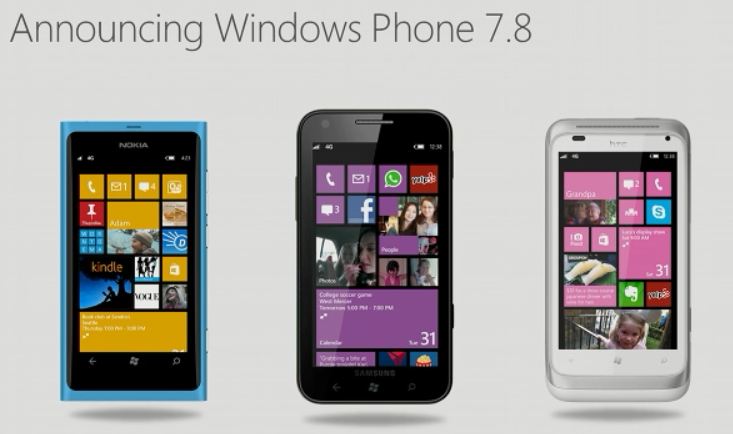
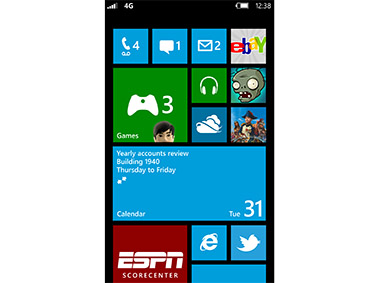
    To keep its existing user happy, Microsoft has launched the Windows Phone 7.8, few software benefits will be included in WP8, and a hearty helping of these killer features (such as the new Start screen) will be available to legacy devices in the form of Windows Phone 7.8. There’ll be support for three tile sizes, with the smallest being fingertip size (a quarter of the standard square). The update will be delivered directly to users, sidestepping carriers, and can be done over WiFi.


  • Microsoft launches Windows Phone 8 and Windows Phone 7.8

    Microsoft launches Windows Phone 8 and Windows Phone 7.8

    Whoops! Something went wrong!
    Windows Phone 8 was revealed at the Windows Phone Summit today

    Just days after announcing its first tablet computer, the Surface, Microsoft Corp. revealed Windows Phone 8,  a dramatic update to its phone software, one that won’t be available to current Windows Phones. 

    If you’re currently holding a Windows Phone device, don’t worry you’d get the Windows Phone 7.8. 

    The hardware requirements for WP8 preclude its running on any current WP device – not even the Lumia 900! The software will bring Windows phones closer to PCs and tablets running the company’s upcoming Windows 8, which is also scheduled to launch later this year. To ensure current Windows Phone users stay happy: a few software benefits will be included in WP8, and a hearty helping of these killer features (such as the new Start screen) will be available to legacy devices in the form of Windows Phone 7.8. There’ll be support for three tile sizes, with the smallest being fingertip size (a quarter of the standard square). The update will be delivered directly to users, sidestepping carriers, and can be done over WiFi.

    Whoops! Something went wrong!
    WP8 would share the same kernel as that of Windows 8 and Windows RT

    Windows Phone 8 requires multi-core processors (up to 64), displays up to WXGA (1280 x 768) and external storage on SD. This better, faster hardware will enable new, faster games and other demanding apps which, for the first time, can be written in native code. (C/C++) All this will run on a kernel shared with Windows 8 and Windows RT. In other words Microsoft has managed to get one platform running on desktops, laptops, tablets and phones, the idea being that apps can be more easily ported from one to the next, promising “games we’ve never seen before” running on your phones, with popular titles like Gameloft’s Nova 3 and Zynga’s Draw Something also coming to Windows Phone.

    There’s also a new wallet functionality thanks to the NFC support, but reliant on an augmented SIM, not hardware on the phone itself. Nokia maps is now built into the OS, including offline map support.

    The OS will be available later this year along with Windows 8 and the new Surface tablets.

  • Adobe launches Creative Suite 6 in India

    Adobe launches Creative Suite 6 in India

    Whoops! Something went wrong!
    Creative Suite 6

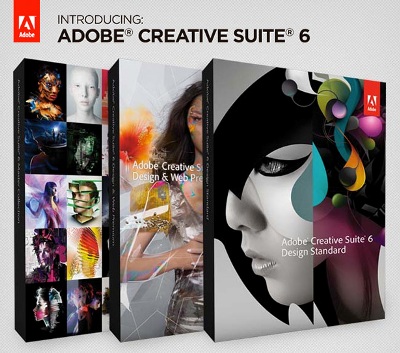
    Adobe Systems Incorporated today announced their toolkit for design, web and video professionals with the unveiling of Adobe® Creative Suite 6 product line in India. Powerful new releases of 14 CS6 applications and four Creative Suites – Adobe Creative Suite 6 Design & Web Premium, Adobe Creative Suite 6 Design Standard, Adobe Creative Suite 6 Production Premium; and Adobe Creative Suite 6 Master Collection – drive home Adobe’s continued innovation across creative markets.

    [quote]Designers get a ton of innovation with CS6 with milestone release across all our flagship products, said David Wadhwani, Senior Vice President, Digital Media at Adobe. With CS6 we’re also introducing new products, new mobile workflows and advanced publishing capabilities that show we are laser-focused on ensuring design, web and video pros have everything they need for the delivery of high-impact content and apps.[/quote]

    Check out the press release below :

    [toggle_box title=”Press Release” width=”Width of toggle box”]

    Adobe Systems Incorporated (Nasdaq:ADBE) today announced the ultimate toolkit for design, web and video professionals with the unveiling of Adobe® Creative Suite® 6 product line in India. Powerful new releases of 14 CS6 applications and four Creative Suites – Adobe Creative Suite 6 Design & Web Premium, Adobe Creative Suite 6 Design Standard, Adobe Creative Suite 6 Production Premium; and Adobe Creative Suite 6 Master Collection – drive home Adobe’s continued innovation across creative markets.

    “Designers get a ton of innovation with CS6 with milestone release across all our flagship products,” said David Wadhwani, Senior Vice President, Digital Media at Adobe. “With CS6 we’re also introducing new products, new mobile workflows and advanced publishing capabilities that show we are laser-focused on ensuring design, web and video pros have everything they need for the delivery of high-impact content and apps.”

    The release is particularly significant for the large Indian creative community, which is riding a wave of digital content, media and connectivity proliferation in the country. India’s Media and Entertainment industry is expected to register a CAGR of 15 percent to reach INR 1,457 billion by 2016, according to a recent FICCI-KPMG Report. The imminent arrival of nationwide 4G network connectivity along with affordable tablet devices are expected to generate significant tailwinds fueling growth in digital content creation and consumption.

    “Adobe CS6 release has come just ahead of what is likely to be a period of unprecedented new opportunities for the Indian creative industry. This release includes what the creative professionals will need to bring their vision to life and manage how and where it is delivered to the end audience – whether on smartphones, tablets, the desktop or through traditional media,” said UmangBedi, Managing Director – South Asia, Adobe Systems. “Adobe is a leading provider of HTML tools, enabling designers to work efficiently and effectively, creating across devices and platforms such as iOS, Android, Windows Mobile or Symbian.”

    Expressing his views on the launch of Creative Suite 6 in India, Naresh Malik, Global COO – Media & Creative Services, Reliance MediaWorks said, “The prospect of being able to produce an outstanding piece of creative work at a much faster pace, for myriad content consumption devices and platforms, and share it with the world at the click of a button, is transforming the creative process across industries. At Reliance MediaWorks, we are leading this transformation to deliver cutting-edge film post production, global imaging, creative as well as production services and have partnered closely with Adobe, leveraging their Creative Suite portfolio. We find ourselves at a very exciting time in the history of entertainment and creativity, and are equally excited about the possibilities Adobe’s Creative Suite 6 holds for taking the creative process into a new realm altogether.”

    “Adobe has a winner on its hands yet again. The upgrades and the new features in Creative Suite 6 are not only innovative but immensely compelling, especially to a diversified media group like ours. Our teams cannot wait to leverage the entire range of exceptional features that this suite of products has to offer,” said KushalRuia, Creative Head, ACK Animation Studio.

    Major CS Upgrades and All-New Muse Anchor Landmark Launch for Designers

    The performance and workflow enhancements in Adobe Photoshop CS6 (see separate press release), InDesign CS6 and Illustrator CS6 will result in significant time savings for print, web and mobile projects.

    • In Photoshop CS6, designers will experience incredible performance, powered by the Adobe Mercury Graphics Engine, enabling near instant results from essential editing tools, including Liquify, Puppet Warp, Transform and Lighting Effects.
    • Adobe has built on Photoshop’s breakthrough Content-Aware capabilities with advanced new Content-Aware Patch and Content-Aware Move features.
    • Illustrator CS6 debuts a revamped modern interface and features include a new Image Tracing Engine, Pattern Creation and Gradient Strokes. The Mercury performance system delivers speed and stability, including 64-bit support for Mac OS and Windows.
    • InDesign CS6 continues to blaze a trail in publishing, streamlining the creation of multiple layouts from a single set of content with new Adaptive Design Tools – Alternate Layout, Liquid Layout, Content Collector Tools and Linked

    Content.

    • A brand new application, Adobe Muse, a radical new tool that enables designers to create and publish HTML5 web sites without writing code, was also announced today.

    Adobe Doubles-Down on HTML5 Tooling for Web Professionals

    Innovative new workflows and capabilities across Adobe tools simplify the creative process for today’s web designers, developers and interactive professionals.

    • Web pros can conveniently integrate HTML5 animations, created with Adobe Edge Preview, into their Dreamweaver projects, driving home Adobe’s leadership in tooling for the HTML5 web standard.
    • Dreamweaver CS6 addresses the challenge of responsive web designs with the ability to build fluid grid layouts replacing the tedious manual process of creating and configuring separate CSS-based interfaces for phone, tablet and desktop.
    • Through direct integration with Adobe’s recently announced PhoneGap Build service, Dreamweaver CS6 helps round out a Web professional’s skillset and enables them to produce native mobile applications for multiple platforms.
    • Flash Professional CS6 users can easily translate and transition their skills to HTML5 using the Flash Professional Toolkit for CreateJS. Flash Professional CS6 also helps designers to create exciting and impactful gaming experiences and advancements include the ability to generate sprite sheets that improve workflows and performance.
    • Pre-built native extensions and new packaging options, leveraging the latest Adobe Flash Player and AIR runtimes, help expand and ease app delivery to Android and iOS devices.

    Production Premium CS6 Pushes Boundaries of Video Creativity

    Redesigned by and for video editors, with major performance enhancements, the tools included in Adobe Creative Suite 6 Production Premium set a new standard in professional video.

    • With dozens of new features Adobe Premiere Pro CS6 is the hub of any professional video workflow, featuring a sleek new editing environment. The powerful Adobe Mercury Playback Engine now supports OpenCL on MacBook Pros.
    • The most significant After Effects release in a decade, After Effects CS6 is faster and more responsive than ever. With Global Performance Cache, previews are saved and ready to go- cutting the time spent bouncing between projects.
    • New to Production Premium are Adobe® Prelude™ CS6, which streamlines logging and ingest workflows in post-production, and Adobe SpeedGrade, which contains powerful finishing tools for film finishing and color grading.
    • Adobe Audition CS6 accelerates audio post-production: real-time clip stretching makes it simple to stretch clips to fit an edit; and Automatic Speech Alignment introduces a powerful new engine for automated dialogue analysis.
    • A new 3rd party API for hardware integration – Adobe Mercury Transmit – allows broadcast video monitoring to connect directly into the Mercury Playback Engine via third-party cards from AJA, Blackmagic Design, and Matrox.

    “The urge to be creative is ubiquitous, and harnessing the creative spark, in everybody from school children to creative pros, has never been more important,” said ShantanuNarayen, CEO at Adobe. “Everyone has the potential to create, and wherever, whenever inspiration strikes, Adobe will be there to help capture, refine and publish your ideas.”

    Pricing and Availability

    Adobe Creative Suite 6 products are available through Adobe Authorised Resellers and the Adobe Online Store athttp://shop.adobe.com/in. The estimated street prices (ESP) for the Creative Suite products are expected to be INR 1,56,577 for CS6 Master Collection, INR 1,14,421 for CS6 Design and Web Premium, INR 1,14,421 for CS6 Production Premium and INR 78,288 for CS6 Design Standard. Upgrade pricing and volume licensing are available.Taxes as applicable.

    Education pricing for students, faculty and staff in K-12 and higher education is available from Adobe Authorized Education Resellers. For more information regarding education volume licensing for higher education and K-12 institutions please visit:http://www.adobe.com/in/education.html

    For more detailed information about features, OS support, upgrade policies, pricing and international versions please visit:

    http://www.adobe.com/in/products/creativesuite.html

    For updates and news about Adobe India, find us on Facebook: www.facebook.com/adobeindia and follow us on Twitter: @AdobeIndia

    Notes to Editor

    About Adobe Systems Incorporated

    Adobe is changing the world through digital experiences. For more information, visit www.adobe.com/in.

    © 2012 Adobe Systems Incorporated. All rights reserved. Adobe, the Adobe logo, Creative Suite,Adobe Muse, Adobe Photoshop CS6 Extended, Adobe Illustrator CS6, Adobe InDesign CS6, Adobe Flash CS6 Professional, Adobe Dreamweaver CS6, Adobe After Effects CS6, Adobe Premiere Pro CS6, Adobe Audition CS6, Adobe Prelude CS6 and Adobe Fireworks CS6 are either registered trademarks or trademarks of Adobe Systems Incorporated in the United States and/or other countries. All other trademarks are the property of their respective owners.

    [/toggle_box]

  • Opera 12 arrives!

    Opera 12 arrives!


    Whoops! Something went wrong!
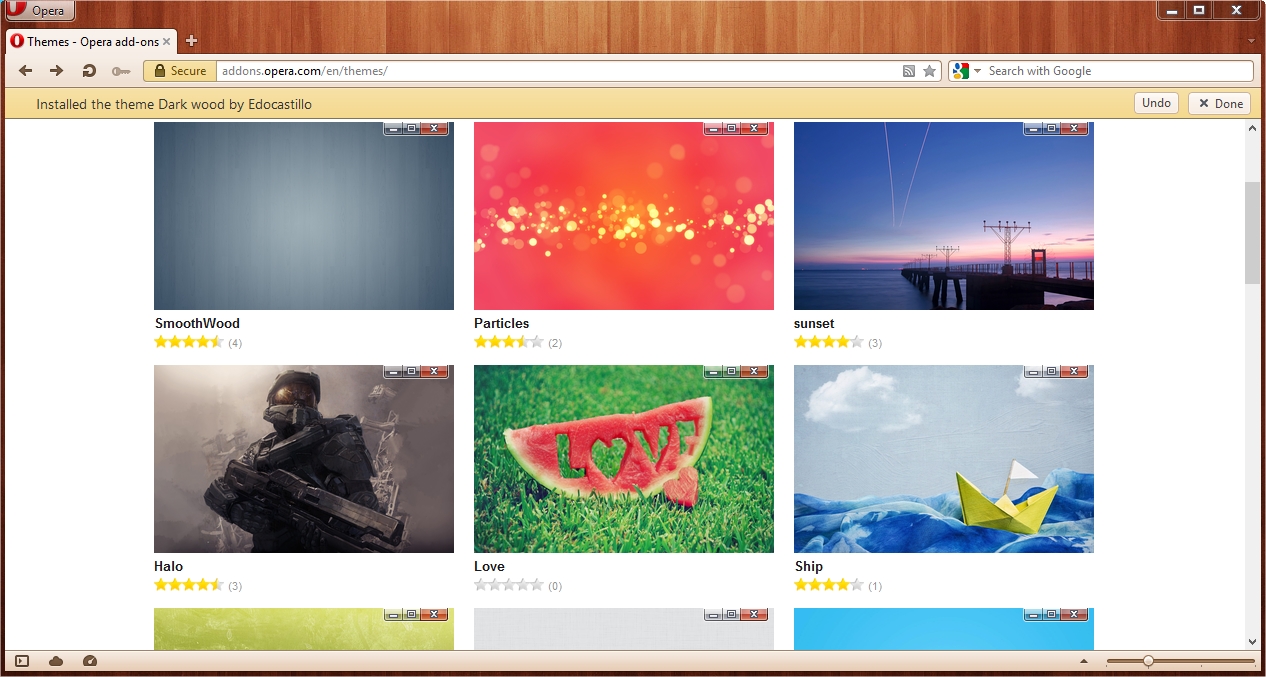
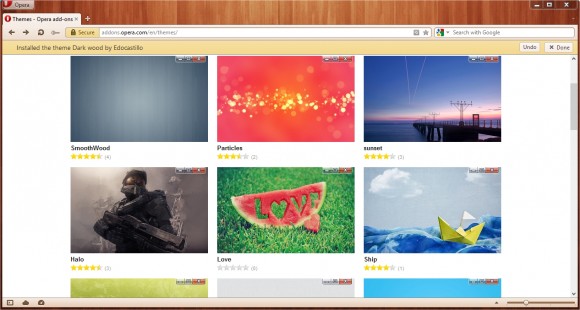
    The new version also brings in the option of using themes!

    Opera 12 made its public debut today with numerous changes that mostly focus on faster browsing. The browser, whose mobile version is more popular than its PC counterpart, with this update brings in themes capability to dress up your browser, Do Not Track privacy support, and lots of performance enhancements. It also brings a couple of completely new ways to experience the Web involving your webcam and paged layouts, and HTML5 drag-and-drop.

    [quote]You spend hours each day in front of a Web browser, said Opera CEO Lars Boilesen. Shouldn’t those hours be as fun and, occasionally, as productive as possible? We think so, so we made Opera 12 the smartest, fastest and most unique browser available.[/quote]

    Opera’s hardware acceleration go beyond just web content, using your graphics processor to boost the rendering speed of the browser’s user interface as well, though we feel that the browser lags behind competition due to delayed updates which means that browsers like Chrome and Firefox already have what new versions of Opera have to offer. 

    Opera released a video to showcase the new version: 

  • Sony’s NXT phones get Transparent Bar Notification Alerts – via third party app

    Sony’s NXT phones get Transparent Bar Notification Alerts – via third party app

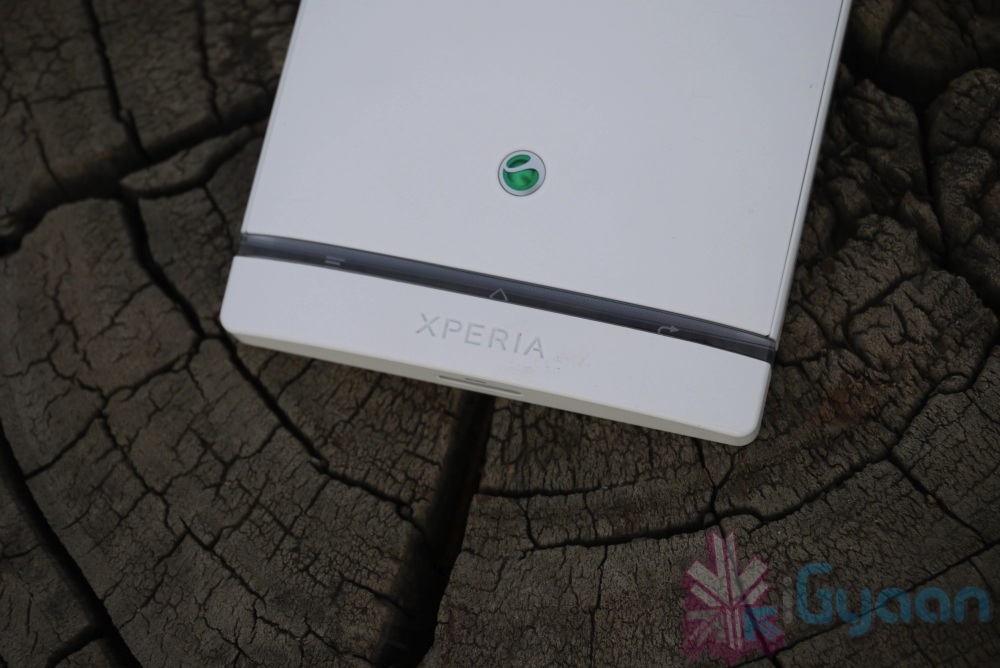
    If you are rocking one of the new Xperia NXT phones then you might like to know about this new app called “Illumination Bar Notification”. The app is meant only for Xperia S, P and U and allows you to set up notification alerts by making the light in the transparent bar flash. 

    The illumination bar can blink with different speeds or have a constant light depending on your preference. This app will only work on the latest range of Sony Xperia mobile phones that have the illumination bar (the transparent bar at the bottom of the phone). Currently this is the following models: Xperia S, Xperia P & Xperia U. On Xperia U multiple colors are available to choose from (Red, Green, Blue, etc).

    Various Settings allow for custom notifications, including the light staying on till the SMS is read, or till the screen is unlocked. Go to the link below to download the app yourself.

    [Google Play]

  • Developer teases iOS apps running on BlackBerry PlayBook

    Developer teases iOS apps running on BlackBerry PlayBook

    A developer working on the Playbook has been able to  run iOS apps on the BlackBerry PlayBook. The developer likens his project to WINE, which doesn’t do hardware emulation, but rather relies on a custom set of APIs to make the apps boot and run on the Playbook. The dependency of the said port is only possible properly if the app does not rely on Apple’s UIWebView or CoreData frameworks. businesscat2000 the developer, has yet to make the software publicly available, although he’s expressed a bit of interest. It remains to be seen whether this project will ever see the light of day.

    check out the demo videos posted by him below.

  • My Xbox Live update turns iPhone into controller

    My Xbox Live update turns iPhone into controller

    Whoops! Something went wrong!
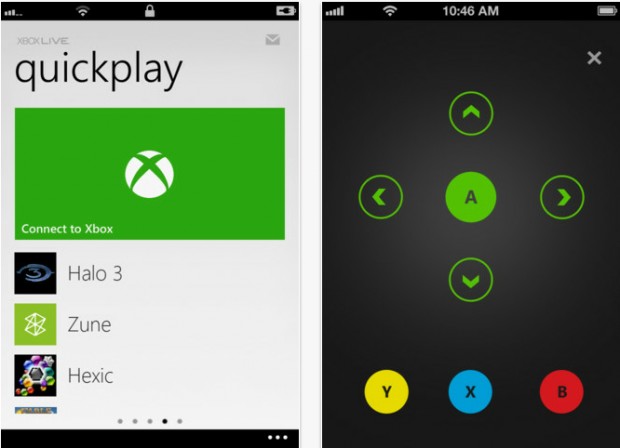
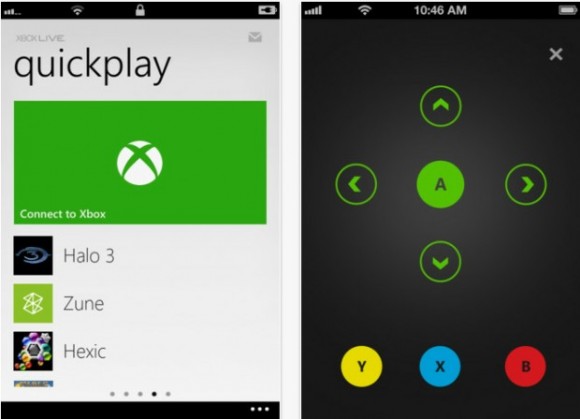
    The app will turn the iPhone into an Xbox controller

    Microsoft on Wednesday released an update for their My Xbox Live application for iOS (4.3 or later) which allows iPhone users to use the app to control their Xbox 360 consoles using a simple touch interface. The app also lets users launch games or apps on the 360 from the app on their phone without having to wade through tons of menus on the Xbox 360.

    Even when the device is not connected to the Xbox, users can make changes to their profile, view their stats etc from their iPhone. Other additions to the iOS My Xbox Live app include improved authentication for increased stability, and high-resolution images for the new iPad. Remote control functionality is not yet available on the iPad.

    The app was also released for Android but with restrictions, that is, users cannot gain any practical control over the Xbox, they can now check their Xbox Live profiles, friend statuses and the highlighted games

  • Amazon Updates Kindle App for Android for improved support of Tablets

    Amazon Updates Kindle App for Android for improved support of Tablets


    If you do a lot of reading on your Tablet and your tablet is an Android one then you will be happy to know that Amazon has pushed out a new version of the Amazon Kindle app for Android. 

    The big addition is the ability to view two pages side-by-side in landscape mode (as seen above). Otherwise, you’ll now find additional options for margin and spacing controls, along with a number of bug fixes . Including the major bug that required you to re-sign in every time you restarted the App. 

    [Google Play]

  • iOS 6 and How : Top 6 Features of iOS 6

    iOS 6 and How : Top 6 Features of iOS 6

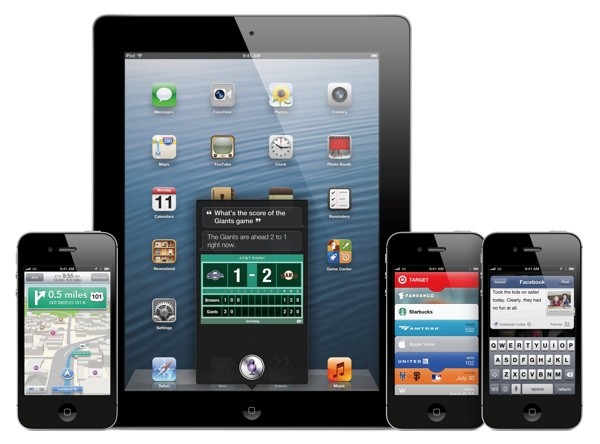
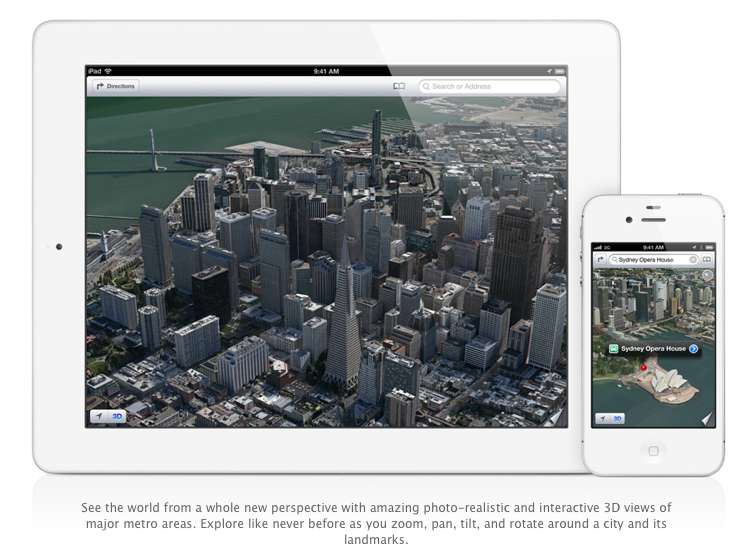
    Apple has just announced the new iOS 6 for their iOS Devices, and incase you have any doubts we have a compiled list of what device gets what features from iOS 6: here. The new iOS 6 has 200 new features. Some are minor, like Mail VIP inbox, and some are intense and exciting, like a brand new Maps app complete with 3D rendering. Now, Apple only showed off ten of the new features and we are taking about the top 6 of those features.

    1.Phone

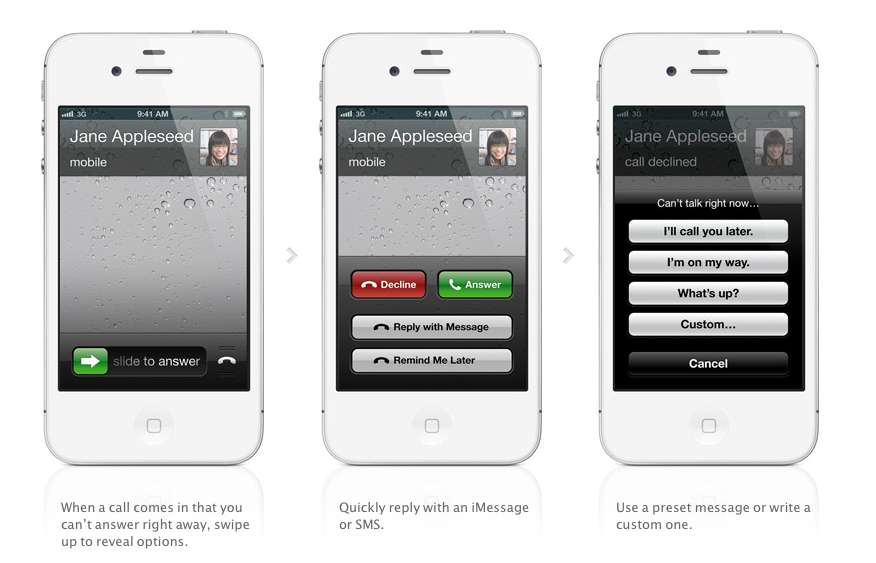
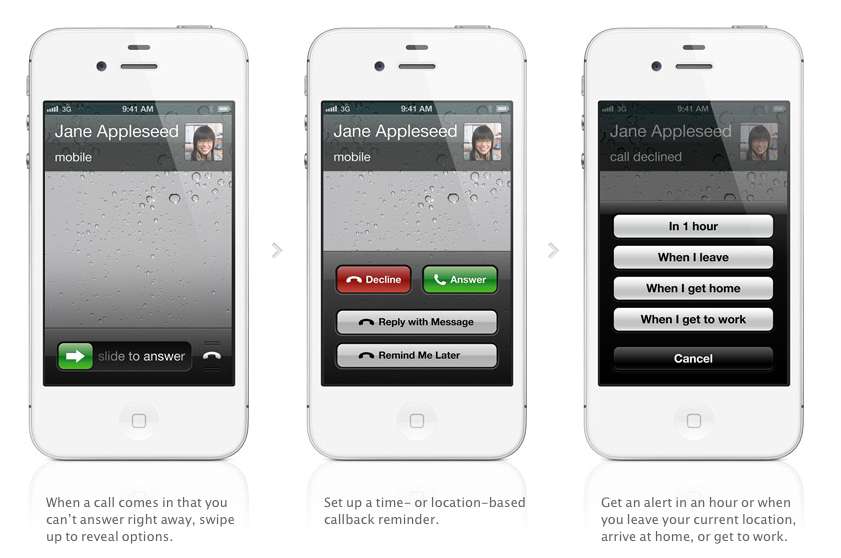
    The biggest new improvement to the iOS has to be the Phone app, if you swipe up during an incoming call (much like the Camera shortcut), two small banners will appear at the bottom of the screen right above the Answer and Ignore buttons. These banners will allow you to either remind yourself to call said person back, or text message them.

    With options for reminders like, when i leave (current location) or when i reach home, etc. Making the phone a completely different device all together. There are also text replies, which Nokia devices have had forever now, there are a couple quick replies like “I’ll call you later” or “What’s up?” which can be sent with the press of a button.

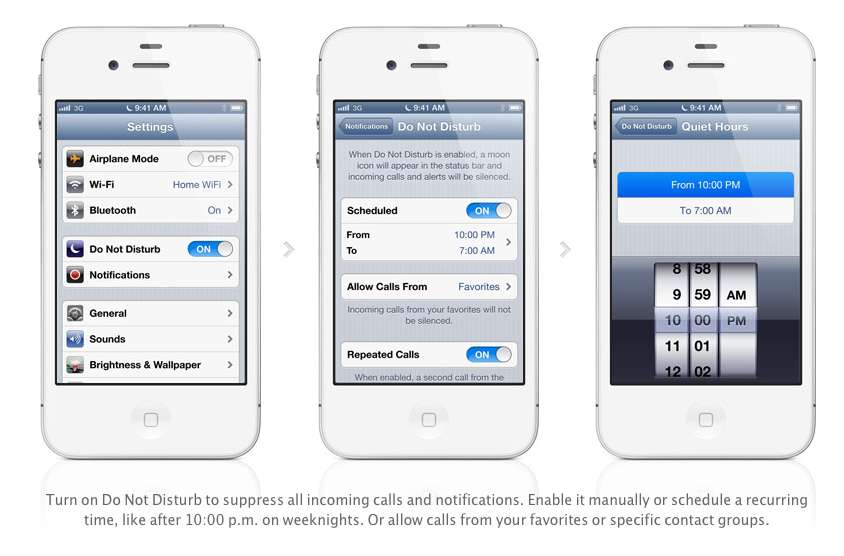
    Apple has also added a Do Not Disturb mode, Users will be able to block out all incoming calls and messages. The messages and notifications will come but the screen will not light up. Also banners, alerts, noises, flashing LED lights will not be a bother. ‘

    2. Maps

    After acquiring three mapping companies over the past few years, Apple has finally released their own Mapping solution for their iOS devices, and bid Google a fair goodbye. This couldn’t have happened sooner, considering the non-reliable Google Maps especially in countries like India.

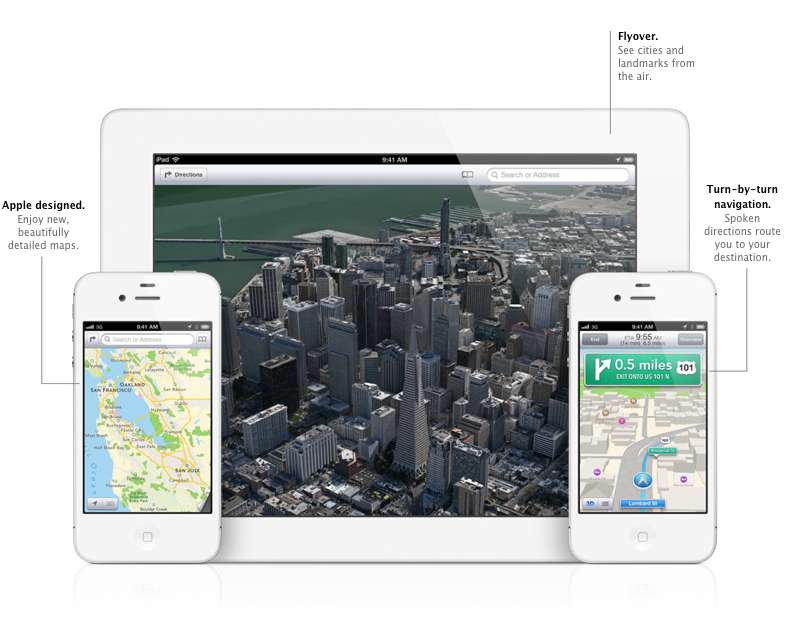
    Apple designed the whole system themselves, including the cartography, which is why you may notice a differently colored icon for Maps come iOS 6 update time. The app will offer turn-by-turn navigation and, most notably, a 3D “Flyover”, You’ll be able to pan, tilt, zoom, and rotate inside Flyover mode.

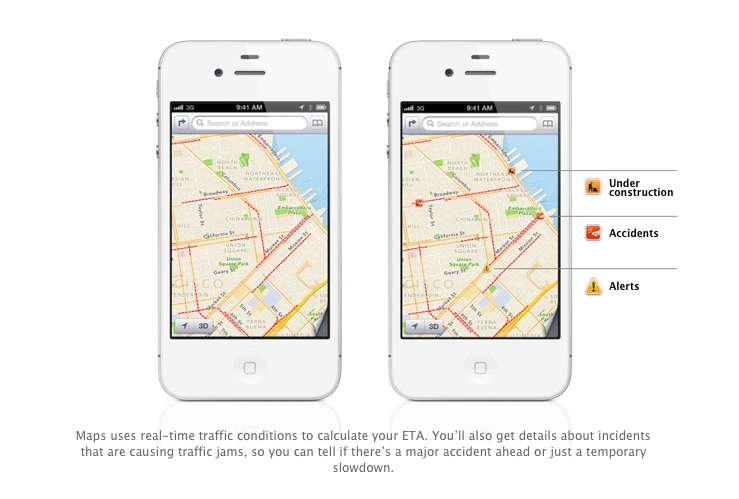
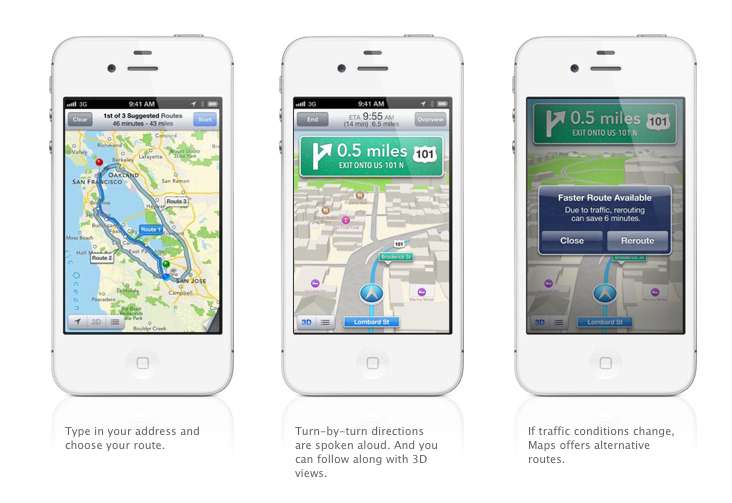
    Turn by Turn directions are said to be made available globally, hopefully in India as-well. They a spoken aloud in the familiar voice of Siri, the maps will be available to be viewed in 3D mode, and will offer different routes should traffic conditions change up the ETA. Traffic conditions will be monitored by crowd sourced updates, (it is known that these updates are powered by Waze, Getchee, Localeze, Urban Mapping, DMTI, MapData Sciences and, of course, TomTom.) 

    The Maps will be available full-fledged for the whole world and according to Apple have listings for over 100 million small businesses, with Yelp listings integrated.


    3. Facebook Integration

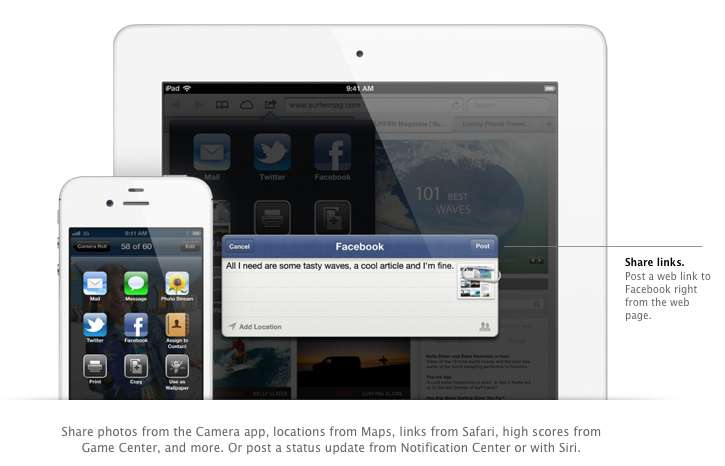
    Although it was already known that Apple was going to implement this add-on in iOS, but the sheer method and deep integration has left us in awe of the OS. After signing in once with your username and password, you’ll be able to post instantly to Facebook from anywhere in the new mobile operating system. In fact, if your hands are busy , Siri can do it for you.

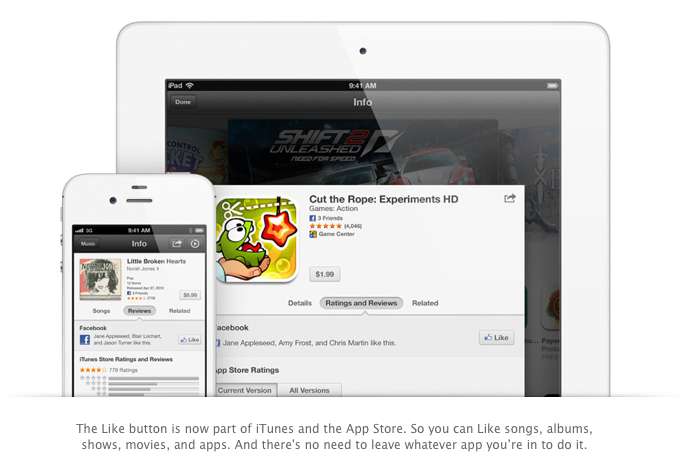
    Photos, links, locations, Game Center content, “and more” can all be posted straight to the Social Network, and you are now able to “Like” different apps and songs in iTunes and App Store. Apple also opened up a public Facebook iOS 6 API, for developers to include integration in their apps.

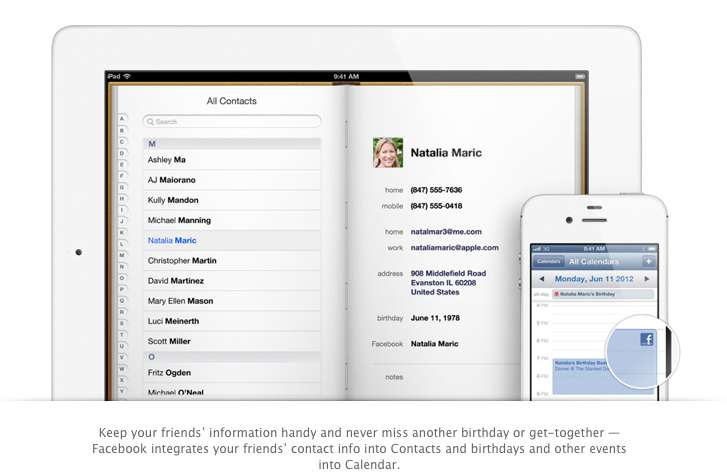
    All your event and Birthdays from your Facebook are seamlessly synchronized with the calendar app to give you updates and reminders in real time on your personal iOS device.

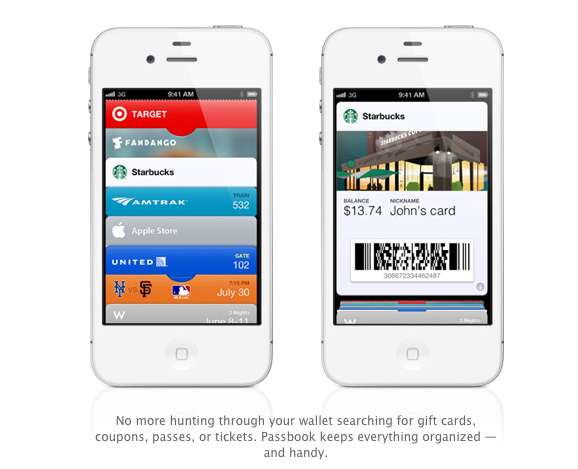
    4. Passbook

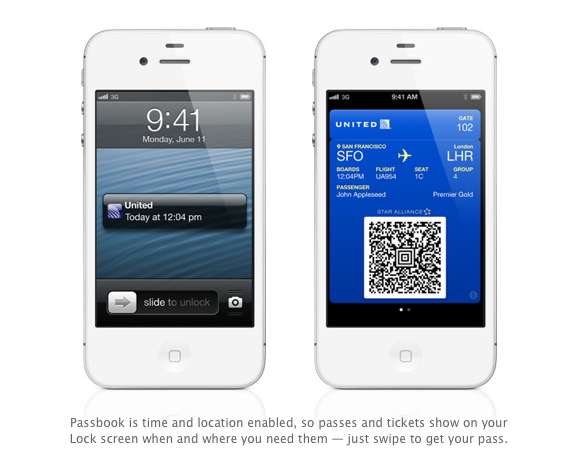
    Imagine a world where you didn’t have a huge stack of promotional membership cards, discount cards, access cards, tickets etc, Just one simple consolidated pass. That may actually come true with Passbook, Apples new app that allows you to store movie tickets, boarding passes, coupons, and retail loyalty cards in one place. You can scan your iPhone to check in for a flight, get in to a movie, or redeem a coupon.

    The App also has geolocations, so the minute you walk into your favorite coffee shop, (example used Starbucks) the card will pop up as a notification, it will display the balance and can be scanned to be redeemed while ordering. Similarly, you arrive at the airport, your boarding pass will appear as a notification on the home screen for easy access.

    The Passbook app can even check to see if your flight is delayed or if your gate has changed, and alerts you immediately. If the Gate number is changed it automatically updates on your Passbook. 

    This service will kick off in the US , but we are pretty sure globally it will become a hit, especially with retailers looking to cut costs. Starbucks, Fandango, Target, Amtrak, United, the Apple Store, MLB.com, and W Hotels are already on board, but none of those are a part of the Indian Businesses list. 

    We are Hopeful that passbook catches on really fast in India. So all your movie tickets show up in your iOS device.


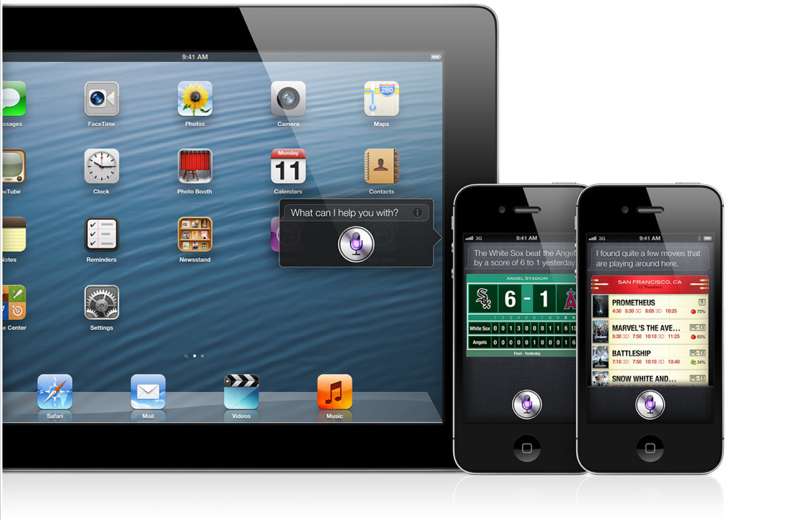
    5. Siri

    Siri comes to the world fully, with local searches and total availability. But, thats not the big news. The big news according to Apple is that Siri can now open apps, so if you are like us and have a ton of Apps on the iOS device. Then you will constantly find yourself searching for the App in spotlight, iOS 6 eliminates that by allowing Siri to open these Apps. Now all you need to do is say ” open Temple Run” and the game starts playing. But , do we really need that?

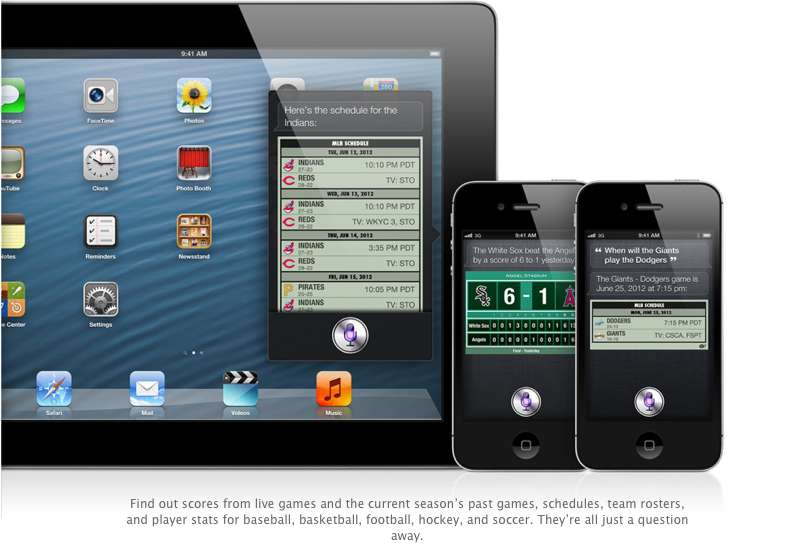
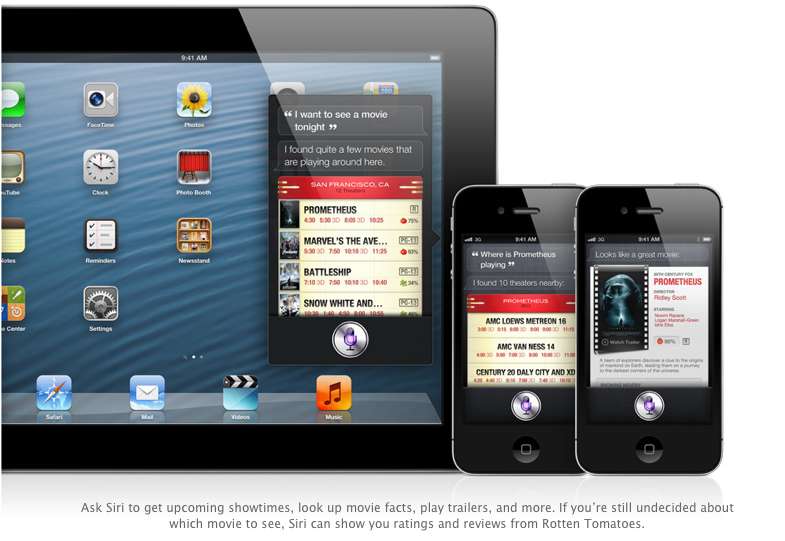
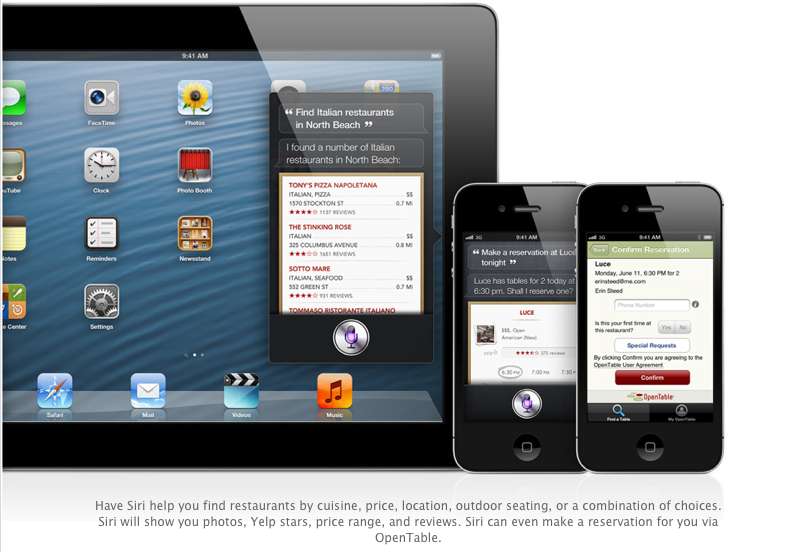
    Siri advancements include access to sports, restaurant, and movie information, with the ability to look up Yelp reviews, ratings and prices along with making reservation on Open Table. Now again most of these features remain US centric, but hopefully they come our side soon. You could then probably look Up IPL rankings by just asking Siri.

    The most interesting reveal was possibly the “Eyes Free” link. This will allow car manufacturers to integrate Siri into their Cars system, by a simple button on the cars steering wheel, which would call up Siri but not light up the display of the phone. Then you can make calls send messages all without taking your eyes off of the road, or hands off of the wheel.

    The other important fact is that Siri will come to the newest gen iPad (launched this year).

    6. Safari

    The major chunk of the mobile internet access comes from iOS devices every year, it was only fair that Apple upgrade their browser, to become even better. iCloud Tabs keeps track of which pages you have open on your devices, so you can start browsing on one device and pick up right where you left off on whatever device is handy.

     Safari now saves web pages, not just links, in your Reading List, so you can catch up on your reading even when you can’t connect to the Internet. The best addition according to us is the ability for the browser to upload images from the photo gallery, when you want to create a listing on Ebay etc, or wanna share a photo on Facebook from the browser.

    You can take photos and video, or choose from your Camera Roll, without leaving Safari. When you really want to see the whole picture, turn your iPhone or iPod touch to landscape and tap the full-screen icon to view web pages without distractions.

    iOS 6 was released as a beta yesterday, but the final version will ship “This Fall”. iOS 6 will also allow FaceTime calls over cellular (Read – 3G – 4G) and new accessibility features, that will allow you to lo

    What is your favorite feature of the new iOS?

  • Which iOS device will get what features of iOS 6 : Here is the roundup

    Which iOS device will get what features of iOS 6 : Here is the roundup

    Do you own an iOS Device? Are you eagerly waiting for the iOS 6 update? 
    If the answer is yes, you will be surprised to know that not all features will come to all iOS devices for iOS 6.  Apple has gone to the trouble of alerting would-be upgraders just what features they’ll get when they check for the update this fall.

    Only if you own an iPhone 4S will you be able to enjoy all the features of the iOS 6 else the most compatible device will be iPAD 3rd Gen. Check out the full list of upgrade features below also see what your device gets.


        iPhone 3GS

    iPod touch

    iPhone 4 iPhone 4S iPad 2  iPad (2012)
    Chinese service integration   X X X X X X  
    Facebook integration   X X X X X X  
    FaceTime over 3G/4G   X X  
    Flyover and turn-by-turn GPS   X X X  
    Guided Access   X X X X X X  
    Made for iPhone hearing aids   X  
    New content stores   X X X X X X  
    Offline Reading List   ? X X X X  
    Passbook   X X X X  
    Phone replies and reminders   X X X  
    Safari tab syncing   X X X X X X  
    Shared Photo Streams   ? X X X X  
    Siri   X X  
    VIP list, flagged/VIP mailboxes   ? X X X X
iGyaan Network
Privacy Overview

This website uses cookies so that we can provide you with the best user experience possible. Cookie information is stored in your browser and performs functions such as recognising you when you return to our website and helping our team to understand which sections of the website you find most interesting and useful.