Tag: App

  • Swype update brings ‘four kinds of keyboard’, sync-able voice-text dictionaries (PR)

    Swype update brings ‘four kinds of keyboard’, sync-able voice-text dictionaries (PR)

    Swype has now updated its app available for Android adding a host of new features to the mix.  The new version packs the same next-word prediction from Nuance’s XT9 heritage and a new voice-text dictionary sync feature will add new words to both speech and text databases. You can even get the app to crawl around your emails and texts for some extra  personalization. The latest version can now download over 55 languages, while Nuance has crystallize all of its know-how into a four-in-one keyboard.

    New features include:

    · Next Word Prediction: Swype’s next word prediction is amazingly intelligent as Nuance has integrated capabilities from its renowned XT9 portfolio. Swype gets smarter based on historical usage, so prediction becomes more accurate with each use.

    · Voice-Text Dictionary Syncing: Swype now includes a personal dictionary. Every new word a user enters on the keyboard gets added to their personal dictionary for speech and text, and you can even have Swype learn from emails, texts and posts. These updates are then mapped into Swype’s unified language model, so people can immediately speak or write that same word no matter how unique or specialized.

    · Language Downloads: Swypers everywhere can communicate in any language they speak, as Swype now supports the download of over 55 languages right from the device.

    · Four-in-One Keyboard: Swype now delivers a four input modalities in one keyboard. People can swype from letter to letter; type rapidly with predictive text input powered by XT9; speak their text naturally through a fully integrated Dragon button; or, simply write letters, words and symbols using their fingertip. Further, users can switch back and forth between modalities on the fly – providing the ultimate in keyboard personalization.

    “People use their keyboards every day in every way – so input needs to be fast and simple,” said Michael Thompson, executive vice president and general manager, Nuance Mobile. “The new Swype living, learning keyboard ushers in a new era of input, where the keyboard adapts to the users’ unique way of communicating every time they swype, speak, tap or write.”
    [Swype Beta]

  • LG launches ‘Quick Voice’ on its phones in Korea, watch out Siri S-Voice

    LG launches ‘Quick Voice’ on its phones in Korea, watch out Siri S-Voice

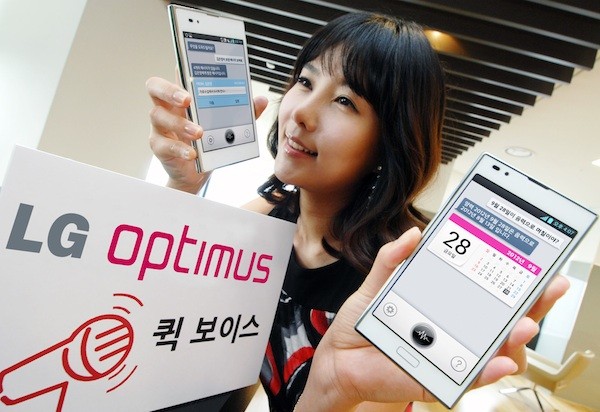
    After Apple and Samsung transformed the Voice features on their flagship products, LG must’ve felt left behind. So enter ‘Quick Voice’  for its Android phones (time for more lawsuits). Just announced in Korea and rolling out soon for various members of the Optimus family like the Vu and Optimus 3D Max and L7, it brings natural voice recognition to commonly used functions like searching, setting up appointments or pulling up videos on YouTube.

    [LG Korea]

  • Sony’s NXT phones get Transparent Bar Notification Alerts – via third party app

    Sony’s NXT phones get Transparent Bar Notification Alerts – via third party app

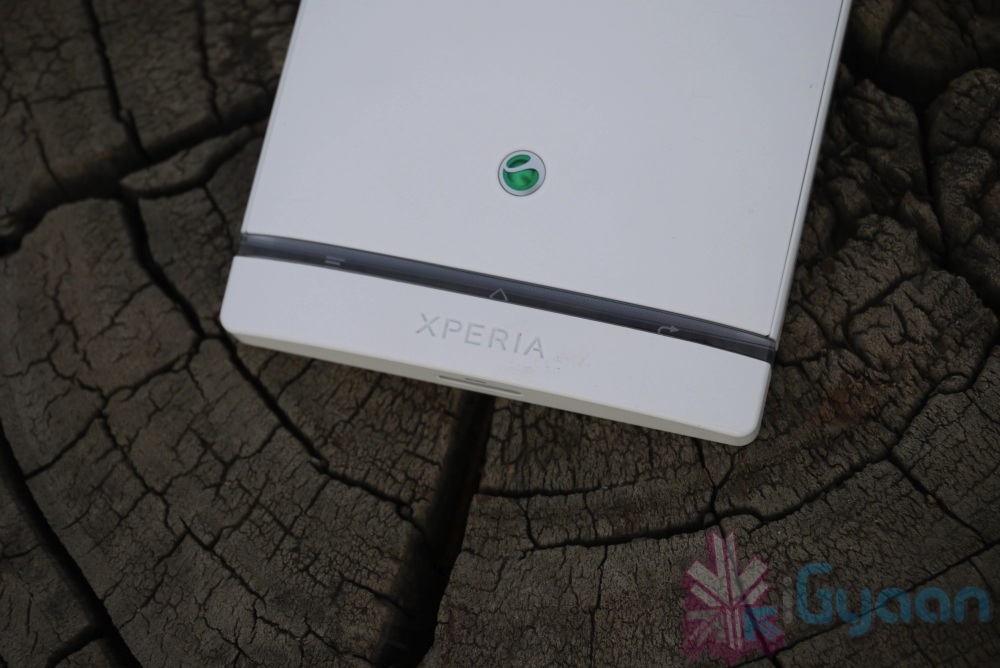
    If you are rocking one of the new Xperia NXT phones then you might like to know about this new app called “Illumination Bar Notification”. The app is meant only for Xperia S, P and U and allows you to set up notification alerts by making the light in the transparent bar flash. 

    The illumination bar can blink with different speeds or have a constant light depending on your preference. This app will only work on the latest range of Sony Xperia mobile phones that have the illumination bar (the transparent bar at the bottom of the phone). Currently this is the following models: Xperia S, Xperia P & Xperia U. On Xperia U multiple colors are available to choose from (Red, Green, Blue, etc).

    Various Settings allow for custom notifications, including the light staying on till the SMS is read, or till the screen is unlocked. Go to the link below to download the app yourself.

    [Google Play]

  • Developer teases iOS apps running on BlackBerry PlayBook

    Developer teases iOS apps running on BlackBerry PlayBook

    A developer working on the Playbook has been able to  run iOS apps on the BlackBerry PlayBook. The developer likens his project to WINE, which doesn’t do hardware emulation, but rather relies on a custom set of APIs to make the apps boot and run on the Playbook. The dependency of the said port is only possible properly if the app does not rely on Apple’s UIWebView or CoreData frameworks. businesscat2000 the developer, has yet to make the software publicly available, although he’s expressed a bit of interest. It remains to be seen whether this project will ever see the light of day.

    check out the demo videos posted by him below.

  • Amazon Updates Kindle App for Android for improved support of Tablets

    Amazon Updates Kindle App for Android for improved support of Tablets


    If you do a lot of reading on your Tablet and your tablet is an Android one then you will be happy to know that Amazon has pushed out a new version of the Amazon Kindle app for Android. 

    The big addition is the ability to view two pages side-by-side in landscape mode (as seen above). Otherwise, you’ll now find additional options for margin and spacing controls, along with a number of bug fixes . Including the major bug that required you to re-sign in every time you restarted the App. 

    [Google Play]

  • Nokia City Lens now available for download on your Lumia Phones

    Nokia City Lens now available for download on your Lumia Phones

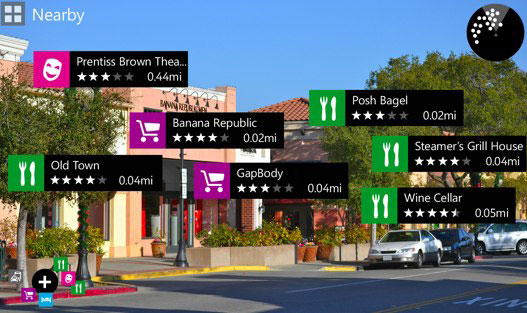
    Nokia’s Augmented Reality app from Symbian called “City Lens” has appeared on Lumia devices for trials. Almost LAYAR like interface, the app allows you to check in real time the points of interests around you, like eating joints etc.

    The app is only available for Beta testers so you will need to register as one if you are itching to try it on for size.

    [Nokia Beta Labs]

  • Netgear updated Genie app will convert any printer into an AirPrint Printer (PR)

    Netgear updated Genie app will convert any printer into an AirPrint Printer (PR)

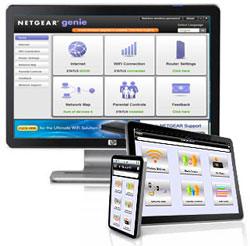
    Always wanted to use your iPad to print report and what not? The new updated Netgear Genie App allows you to do just that. Available for both Mac and PC the app while running on the Computer will convert any attached printer into an AirPrint Printer.

    You will need to let the App run in the background, but its definitely better then dropping a large sum of money for those Apple certified ones.

    [toggle_box title=”Press Release” width=”560″]

    NETGEAR GENIE APP MAKES ANY PRINTER AIRPRINT-COMPATIBLE

    New Upgrade to NETGEAR Genie App enables iPad, iPhone or iPod Touch Users to Print to Any Printer

    SAN JOSE, Calif. – May 7, 2012 – NETGEAR®, Inc. (NASDAQGM: NTGR), a global networking company that delivers innovative products to consumers, businesses and service providers, today announced the release of a new NETGEAR Genie® App upgrade that enables printing from an Apple® iPhone®, iPad® and iPod touch® to any networked or USB printer. With the NETGEAR Genie App upgrade, iOS device users are no longer restricted to a narrow range of AirPrint-compatible printers. The NETGEAR Genie App upgrade dramatically overcomes previous AirPrint compatibility limitations to give users the freedom to print to any USB or networked printer.

    The NETGEAR Genie, available for PCs and MACs, provides a home network dashboard that enables consumers to monitor, connect, and control their home networks and also diagnose and automatically fix network connectivity issues. Now, with this upgrade, the NETGEAR Genie App also renders any printer AirPrint-compatible, whether connected wirelessly to the home network, USB-connected to a PC, or connected through a USB port to a NETGEAR ReadySHARE® print-capable router. While a PC or a Mac is on, the NETGEAR Genie App enables printing from iPad, iPhone and iPod touch devices on the same network.

    “Before today to print from an iPad, iPhone or iPod touch the user needs to buy a new AirPrint-compatible printer,” said Sandeep Harpalani, senior product line manager at NETGEAR. “Now, with the NETGEAR Genie App upgrade, you can simply print to your current printer at home from your iPhone, iPad and iPod touch as you do from your PC and MAC.”

    Pricing and Availability
    The Windows OS and Mac OS NETGEAR Genie App upgrade is now available for download at no charge on netgear.com/genie. NETGEAR Genie is also available to download for iPad, iPhone, Android Smartphones and tablets from the Apple store and Google Play store.

    More Information
    To learn more about the NETGEAR Genie App, please visit www.netgear.com/genie.

    [/toggle_box]

  • Samsung SIII gets exclusive Flipboard App, other Android users need to wait for “coming months”

    Samsung SIII gets exclusive Flipboard App, other Android users need to wait for “coming months”

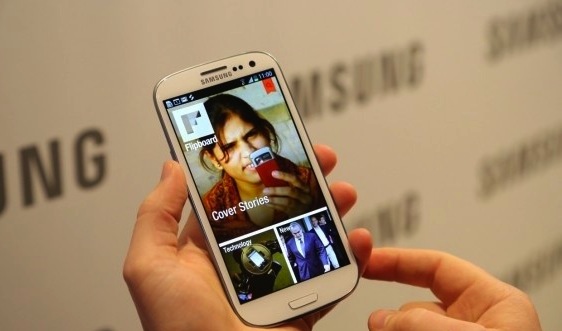
    Uberly popular iOS app “FlipBoard” has made it to the Samsung Galaxy SIII  as an exclusive for a couple of months before the app is released to the Android Google Play store for the public gestation. Apart from its similarities to the iOS version the Android version ( or the Galaxy SIII version) will also add notable widgets for the dashboards of the device.

    [Flipboard]

  • Dropbox adds automatic photo uploads for Windows and Mac : free 500 MB for using it each time

    Dropbox adds automatic photo uploads for Windows and Mac : free 500 MB for using it each time

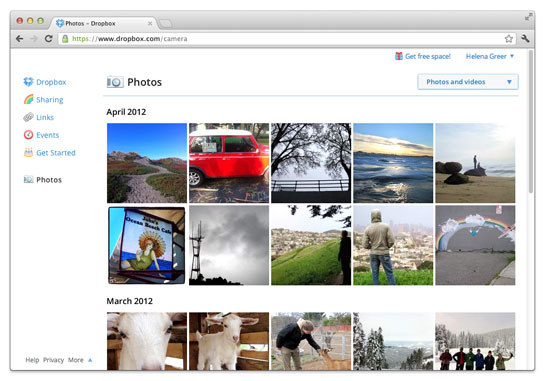
    While Google launched Drive Cloud with free 5 GB Data storage, Dropbox does not want to feel left out at the party. Adding new features for existing users, the company today announced a new app to allow automatic photo uploads from your Windows or Mac computer. 

    Thats not all, Dropbox will also offer upto 3GB free store for using the service, actually 500MB each time you use it to a maximum of 3 GB free.

    [Dropbox]

  • Word, PowerPoint and Excel come to Nokia phones with Symbian Belle

    Word, PowerPoint and Excel come to Nokia phones with Symbian Belle

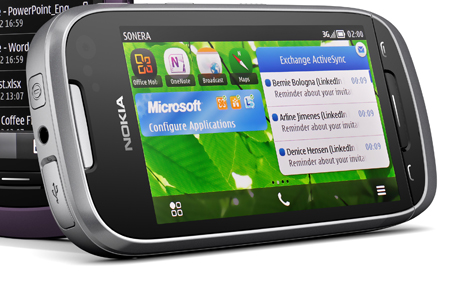
    Nokia and Microsoft have made the mobile versions of Word, PowerPoint and Excel available to select Symbian Belle handsets. The add-on is given through a free software update to those eligible for the update. If you own a  E7, C7, C6-01, X7, Oro, 700, 701 or 603 you can get the apps directly from the Nokia Software Update utility. 

    If you’re a Word user, you’ll appreciate the fact that with Word mobile, you can save or send documents while preserving tables, SmartArt and charts, or the pinch/zoom functionality to easily view and edit documents.

    In PowerPoint mobile, you can edit presentation texts and speaker notes, or use the Outline view to quickly browse through slides. With Excel mobile, you can create charts, or insert formulae and view rich data and charts from anywhere.

    Another really convenient feature of Office Mobile is that it gives you a single view to documents – whether they’re stored on your phone as files, as email attachments, or on your company SharePoint site.

    If you are waiting to get the newer version of Nokia Devices, they might just come preloaded with MS Office goodness.

    [Nokia Conversations]

  • Facebook will buy Instagram (PR)

    Facebook will buy Instagram (PR)

    Talk about big acquisitions! Social networking giant Facebook will buy popular imaging app Instagram for $1 billion in cash and shares. This comes soon after the app was developed for Android. 

    We think the fact that Instagram is connected to other services beyond Facebook is an important part of the experience. We plan on keeping features like the ability to post to other social networks, the ability to not share your Instagrams on Facebook if you want, and the ability to have followers and follow people separately from your friends on Facebook.

    -Instagram CEO Kevin Systrom

    [toggle title_open=”Press Release” title_closed=”Press Release” hide=”yes” border=”yes” style=”default” excerpt_length=”0″ read_more_text=”Read More” read_less_text=”Read Less” include_excerpt_html=”no”]


    Facebook to Acquire Instagram

    MENLO PARK, CALIF.-April 9, 2012-Facebook announced today that it has reached an agreement to acquire Instagram, a fun, popular photo-sharing app for mobile devices.

    The total consideration for San Francisco-based Instagram is approximately $1 billion in a combination of cash and shares of Facebook. The transaction, which is subject to customary closing conditions, is expected to close later this quarter.

    Mark Zuckerberg, founder and CEO of Facebook, posted about the transaction on his Timeline:

    I’m excited to share the news that we’ve agreed to acquire Instagram and that their talented team will be joining Facebook.

    For years, we’ve focused on building the best experience for sharing photos with your friends and family. Now, we’ll be able to work even more closely with the Instagram team to also offer the best experiences for sharing beautiful mobile photos with people based on your interests.

    We believe these are different experiences that complement each other. But in order to do this well, we need to be mindful about keeping and building on Instagram’s strengths and features rather than just trying to integrate everything into Facebook.

    That’s why we’re committed to building and growing Instagram independently. Millions of people around the world love the Instagram app and the brand associated with it, and our goal is to help spread this app and brand to even more people.

    We think the fact that Instagram is connected to other services beyond Facebook is an important part of the experience. We plan on keeping features like the ability to post to other social networks, the ability to not share your Instagrams on Facebook if you want, and the ability to have followers and follow people separately from your friends on Facebook.

    These and many other features are important parts of the Instagram experience and we understand that. We will try to learn from Instagram’s experience to build similar features into our other products. At the same time, we will try to help Instagram continue to grow by using Facebook’s strong engineering team and infrastructure.

    This is an important milestone for Facebook because it’s the first time we’ve ever acquired a product and company with so many users. We don’t plan on doing many more of these, if any at all. But providing the best photo sharing experience is one reason why so many people love Facebook and we knew it would be worth bringing these two companies together.

    We’re looking forward to working with the Instagram team and to all of the great new experiences we’re going to be able to build together.

    [/toggle]

  • Update for Instagram adds support for tablets, WiFi handsets and SD card installation

    Update for Instagram adds support for tablets, WiFi handsets and SD card installation

    The new 1.0.3 update for photo popular app Instagram is out. This new update allows users to move the installation of the Instagram app to the SD Card allowing for a much lower space requirement and larger handset compatibility. The new update also adds support for Tablet installation and and wifi only devices that seemed to have been left out earlier. 

    If you hesitated in downloading the previous version due to the above issues, go ahead and hit the link below to get your Instagram fix.

    [Google Play]

  • Evernote for Android app brings Customizable Widgets and Voice to text.

    Evernote for Android app brings Customizable Widgets and Voice to text.

    All this Siri business has led to an evolution of the voice dictation on mobile phones. With more and more developers adding to the speech to text frenzy. Evernote is the next major app to bring the Speech to Text engine into their Android App, with a catch that only devices with Android 4.0 or above will be able to access said feature.

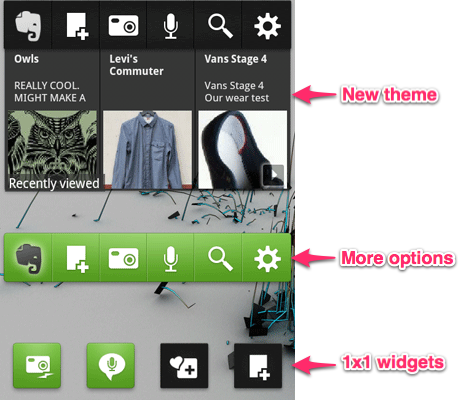
    The new Widgets are full of tweak-able features that allow you to customize color, buttons and exactly which notes appear in the large widget.A new feature called Quick Snapshot also allows you to save captures to your account.

    [Evernote]


  • Download the iGyaan Android App Today

    Download the iGyaan Android App Today

    Want all the latest tech buzz on your Android Phone ? Check out the iGyaan App on the Google Play Marketplace on your Android Smartphone. Get all our latest videos, Facebook feeds and updates all in one place. Search for iGyaan in Google Play or simply click the link below.

    Download it today for Free.

  • Dolphin Browser arrives in BlackBerry App World

    Dolphin Browser arrives in BlackBerry App World

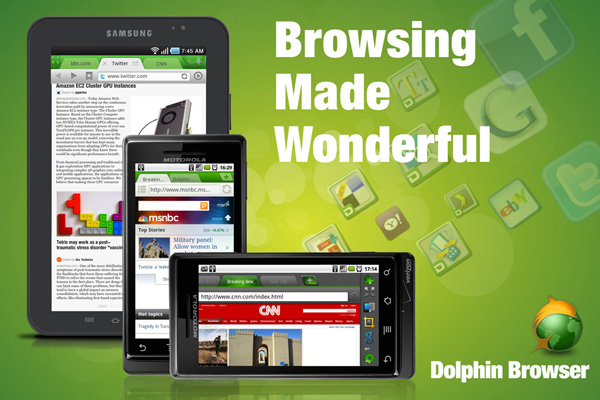
    Dolphin Browser is one of the most popular mobile browsers on iOS and on Android, and now its available with dev permissions on the Blackberry App World. Now you can finally replace the controversial Blackberry browser.

    Currently only supported on the Playbook, and an older version of 7.2 vs the 7.5 available on Android, You can hit the App world on your tab to download it today.

    [BlackBerry App World]

iGyaan Network
Privacy Overview

This website uses cookies so that we can provide you with the best user experience possible. Cookie information is stored in your browser and performs functions such as recognising you when you return to our website and helping our team to understand which sections of the website you find most interesting and useful.