Tag: Blue ticks

  • Next WhatsApp Update Adds the Option to Disable the Blue Tick

    Next WhatsApp Update Adds the Option to Disable the Blue Tick

    WhatsApp’s last update included a new, controversial, ‘blue tick’ feature which indicated that the recipient had read the message you sent. The addition of the blue check marks was utterly unwanted in our opinion, given that it brought with it the social pressure to reply – which most users considered as an interruption of privacy.

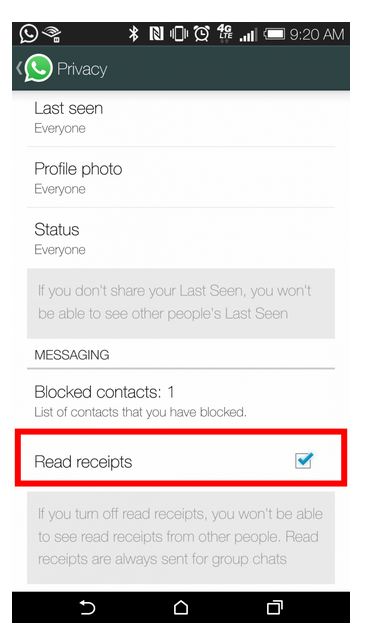
    Earlier, in the interest of privacy, WhatsApp added the choice to conceal the ‘last seen’ notification that informs the other party when that person was last available on the messaging platform. Same has happened with the new ‘blue tick’ feature. The instant messaging app has quickly done some damage-control and added the option to hide ‘Read Receipts’ feature.
    whatsapp

    Once enabled, the ‘blue ticks’ will not show up on the sender’s window. One needs to simply go to the ‘Privacy Settings’ and enable/disable the feature. Obviously, this is a huge sigh of relief for many users.

    We still haven’t received this update on our smartphones as yet. But from what we hear, it’s on its way. Stay tuned for more.

  • Here’s How You Can Deceive WhatsApp’s Blue Tick

    Here’s How You Can Deceive WhatsApp’s Blue Tick

    In a recent attempt to intrude our private lives, WhatsApp added another layer of unnecessary information in the form of blue check marks, indicating that the recipient has indeed read the message.

    The addition of the blue check marks is utterly unwanted in our opinion, given that this brings back the social pressure to reply – what most users consider an interruption of privacy. In the interest of privacy, WhatsApp earlier added the choice to conceal the ‘last seen’ notification that informs the other party when that person was last available on the messaging platform.

    Well, there is a way around to avoid this new feature. Rahul Banker, a blogger and head of India’s Google Developers Group, has revealed the method to avoid this feature in a blogpost.

    whatsapp-convo

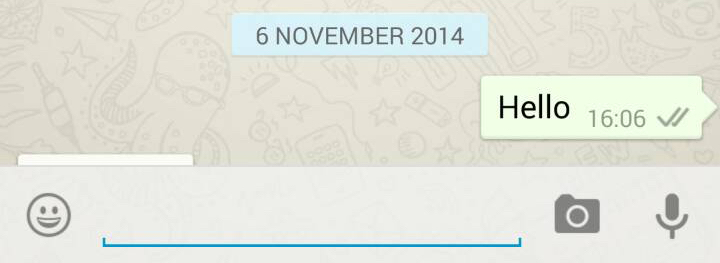
    Basically, when you read the message you received on WhatsApp, the app uses your Wi-Fi or Data connection to notify the sender that the message has been read via blue tick marks. So, if you read the message offline, the app won’t be able to send the information to the sender.

    So, if you don’t want the sender to know whether you have read the message or not, you just need to switch off your internet and Wi-Fi connections, then open WhatsApp and read the message. Close the app, reconnect to your data or Wi-Fi, and the check marks remain grey.

iGyaan Network
Privacy Overview

This website uses cookies so that we can provide you with the best user experience possible. Cookie information is stored in your browser and performs functions such as recognising you when you return to our website and helping our team to understand which sections of the website you find most interesting and useful.