Tag: Facebook feature

  • WhatsApp Coloured Text Status Now Rolling Out to Android and iPhone

    WhatsApp Coloured Text Status Now Rolling Out to Android and iPhone

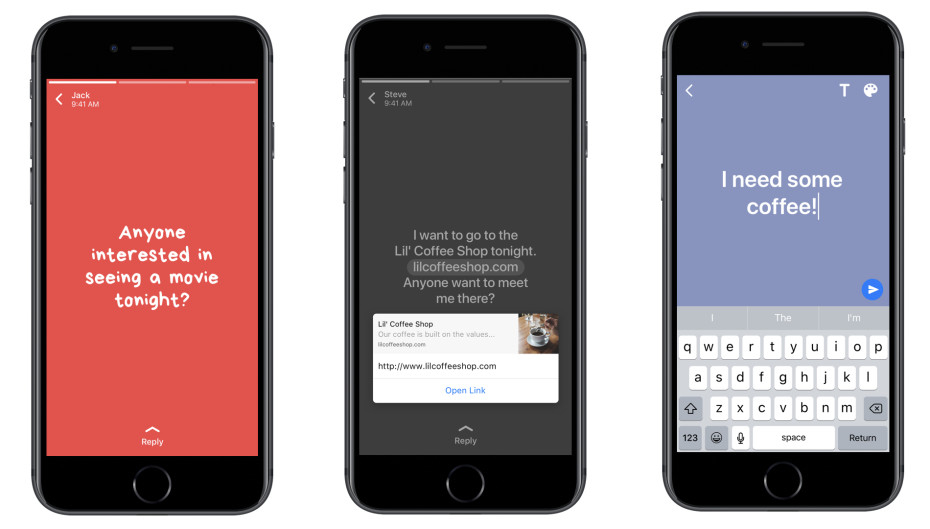
    WhatsApp has added a new feature to its ranks, quite similar to Facebook’s colourful status update. Apparently, now you can change our WhatsApp status update to suit your mood. The Users will now be able to update their statuses with more than just images or videos, and use colourful meme-like text posts.

    The new feature which is rolling out to Android and iOS devices, lets you write a snippet of text, choose a background color, and customize the font. This feature is specifically for WhatsApp’s Snapchat Stories clone. The Snapchat-like status update which disappears in 24 hours, was first introduced in February. Last month, Facebook announced that WhatsApp status feature has hit 250 million daily users, exceeding the Snap’s main product.

    Much like Facebook, the new WhatsApp update allows you to link out to other websites from within a text post. Seems like Facebook is handing down similar upgrades to its messaging app, which the social networking website acquired for 19 Billion dollars in 2014.

    Though WhatsApp has confirmed the new colourful text update, all may not be able to use the new feature as it has been remotely activated, and full-fledged rollout is still awaited.

    For iPhone users, the pen icon appears next to the camera icon in the new Status bar. For Android users, the floating pen icon shows up at the bottom of the Status tab, above the camera icon.

     The option to type a status, choose a font, emoji, and the background colour as well shows up by clicking on the pen icon. After writing the status and making necessary changes, press the green arrow key to send the text status. The status will then be published on WhatsApp for all your contacts to see. As usual, you can control who sees your status and know who viewed it by clicking on the ‘eye’ icon at the bottom of the screen.
  • Facebook Activates ‘Safety Check’ Feature Amid Paris Terror Attacks

    Facebook Activates ‘Safety Check’ Feature Amid Paris Terror Attacks

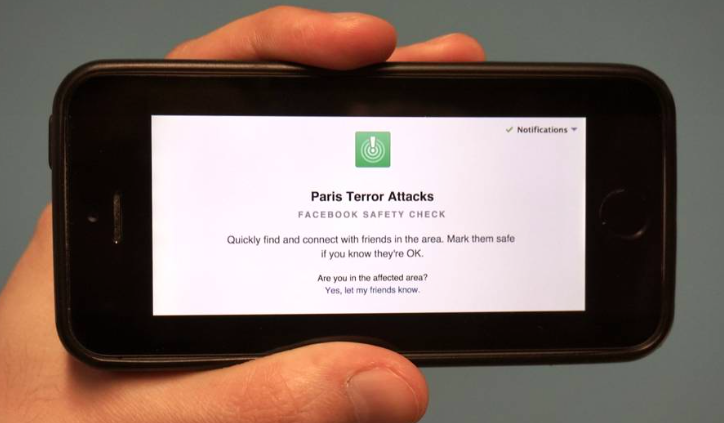
    Today, the world woke up to one of the worst terror attacks in recent times. The Paris massacre last night killed dozens of people and left many more severely injured. In times of such crisis one needs to stay connected to those closest to them, especially if they happen to be near the crisis zone, and Facebook lets you do that with its ‘Safety Check’ feature.

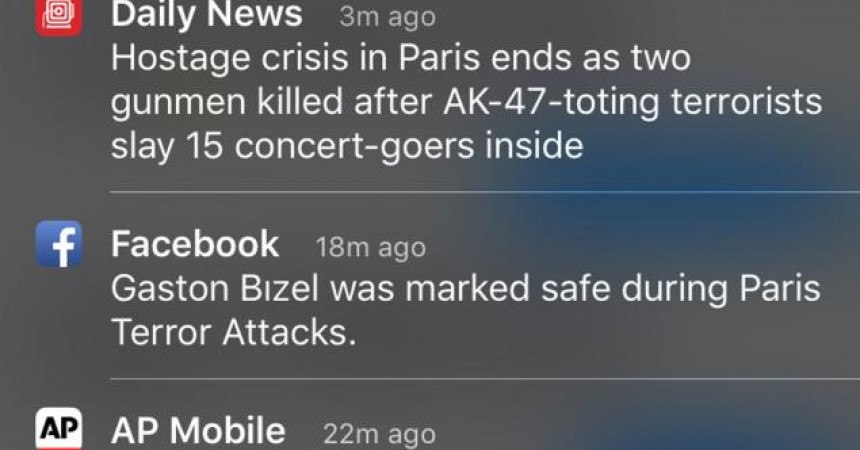
    On Friday, Facebook activated its safety check feature during the Paris crisis to allow users to notify friends and family that they were safe through the site’s ‘Safety Check’ tool. Users began getting notifications telling them that their friends who were in Paris during the attacks were safe.

    Safety check

    The ‘Safety Check’ feature was launched in 2014 and has been activated five times so far. This is the first time the feature has been used in a non-natural disaster setting. in the wake of the attacks, Facebook promptly activated the feature and also released a statement:

    “We are shocked and saddened by the events unfolding in Paris. Communication is critical in these moments both for people there and for their friends and families anxious for news. People turn to Facebook to check on loved ones and get updates which is why we created Safety Check and why we have activated it today for people in Paris.”

    Facebook hasn’t yet shared how many people were marked safe. According to its site, Facebook determines the location of a user by “looking at the city you have listed in your profile, your last location if you’ve opted in to the Nearby Friends product, and the city where you are using the internet.”


  • How to Post GIFs on Facebook

    How to Post GIFs on Facebook

    Facebook is gung ho about videos and animated pictures taking over the social networking site. Today, GIFs are the new way to greet and add some humour to your News Feed (because words were so 5 years ago). And it’s time people caught up with the trend. GIFs are short animated videos that say what you want to say in a funny, ‘pop culture’ referenced way, only minus the need to use words. To put it simply, GIFs are the new emojis.

    Memes have been around for a while now. But Facebook felt that memes and smileys weren’t enough to convey ones feelings anymore. Initially, Facebook was against using GIFs, fearing that along with its autoplaying video feature the News Feed would become too cluttered. But the company had to cater to the users love for meme’s and GIFs. So, without further ado, here’s how you can post GIFs on Facebook.

    Posting a GIF on Facebook

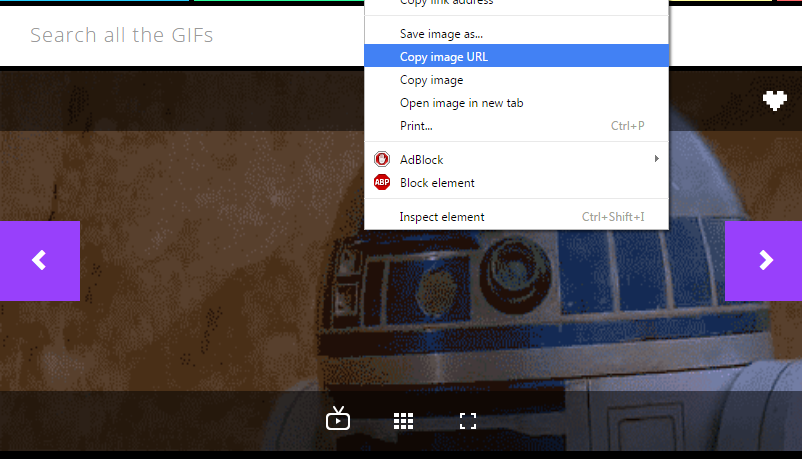
    Posting a GIF is simple, however, you won’t be allowed to upload your own GIF files to your post as you would a photo. You’ll either need to create one and upload it on another hosting site or simply find a GIF that aptly describes your Monday morning blues, for example, from sites like Giphy, Imgur and Tumblr. Open the GIF and right-click on the image.

    If you’re using Google Chrome, select the option ‘Copy Image URL’. For Firefox, the option is ‘Select Image Location’. And for Opera it’s ‘Copy Image Address’. Basically, every browser will have a similar option that allows you to copy the URL.

    Gif 1

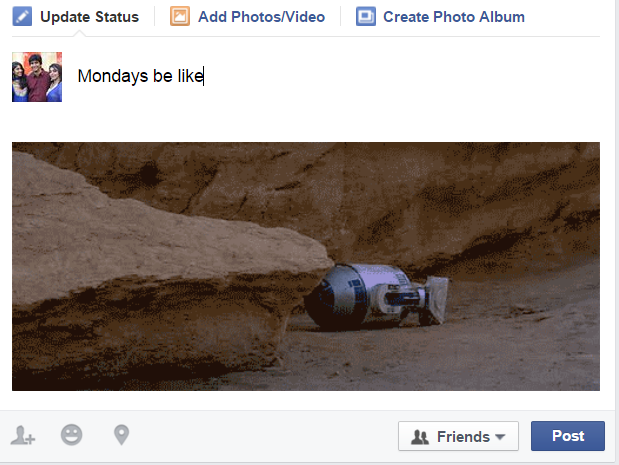
    Next, log into your Facebook account and simply paste the URL in the ‘What’s on your mind?’ status field. Once the image appears, you can edit the status and write something so that people understand what the GIF is trying to convey. Hit Post and you’re done.

    GIF

    Now that you know how simple it is, go ahead and find your perfect GIF for the day and share it with your gang on Facebook. It’s all about spreading the joy and knowing that there are people out there who feel the same way about Mondays. Sigh.

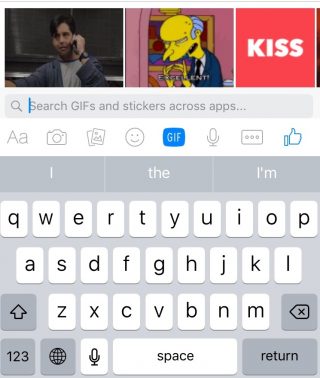
    You may have also noticed a GIF option in your Messenger and chat as well. Facebook has been testing the GIF and attachment buttons for the Messenger, though not all users have the feature yet. Open a chat window on the Facebook site or through the Messenger app and you’ll find a new GIF button next to the smileys icon.

    GIF Messenger

    The GIF option will show you some trending GIFs and it also lets you search for the GIF you want. Now you can have more animated discussions with your friends when you feel words just don’t cut it.

iGyaan Network
Privacy Overview

This website uses cookies so that we can provide you with the best user experience possible. Cookie information is stored in your browser and performs functions such as recognising you when you return to our website and helping our team to understand which sections of the website you find most interesting and useful.