Update : Oct 9th 2011
The Guide has been updated to include the latest rom update. For those who have already used this guide and are on the Madteam rom v1.0 (those who used the guide from Aug 15th) use the steps at the bottom of the page to upgrade.
New iGyaan Guide
Did you think it was possible?, we didn’t either!. But following various guides and tweaks we were able to get Cyanogen mod 7.1 running on the Samsung Galaxy 5, Yes the 1.5 year old device from Samsung.
The big differences we saw:
- Tremendous improvement in battery life, almost fixes any battery leaks.
- Fast and responsive OS Android 2.3, no lag and no jitters.
- Clean looking UI + Cyanogen mod tweaks
- Best Part : Nexus S style : CRT TV lock animation

This Guide was put together using our own experience, and its here to help you out.
Note: Like any other unofficial guide, there is a high chance that you might brick your phone. iGyaan is in no way responsible for that and you are following this at your own risk.
Okay so lets begin!
Here is what you need
- The iGyaan Galaxy 5 Pack : Download Here
- A Galaxy 5 : Duh!
- Widows PC
- USB – Micro USB data cable
- Patience and Humility.
- A MicroSD card with over 1GB free space.
Step 1 (Important)
- Backup all your contacts and files.
- Sync your device to your Gmail Accounts
Step 2 (Device Prep)
- Time to put your Galaxy 5 in download mode
- Power off your Galaxy 5
- Hold Volume Down + Home + Power Button
- You should see the Download Screen
Step 3 (Install Recovery)
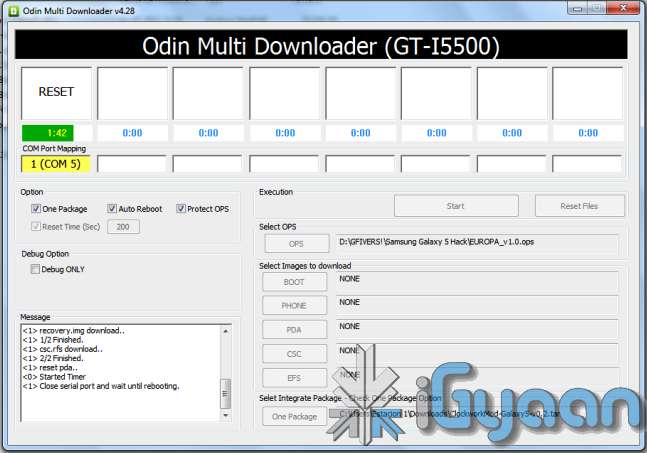
- Fire up ODIN (found in the iGyaan Galaxy 5 pack)
- Select the EUROPA_v1.0.ops in the OPS field ( also in the iGyaan Pack)
- Select One Package and ClockworkMod-Galaxy5-v0.4.tar in the one package Field
(Also in the iGyaan Package downloaded earlier.)
- Connect your phone to your pc via usb cable, wait for it to show up in ODIN
- Once it shows up click START ( follow the images below)
IMPORTANT
Your Device Should now boot up in Clockwork Recovery like the image below.
WARNING : DONT UNPLUG OR REBOOT your PHONE HERE.
Step 4 (Copy files)
- Using the D pad or Volume +/- buttons browse to Mounts and storage
- Once in mounts and storage select “Mount USB Storage”
- Your memory card will show up on your PC
- Copy the “update-cm-7.1.0-RC1-MADTEAM-v1.6-signed.zip” to the memory card ( found in the iGyaan package)
- Once copied, Safely remove /eject the memory card mount from your PC
(Do not remove it from the phone and do not reboot the phone)
- Press the back button several times, till you reach the main screen as the image above.
Step 5 (Backups)
- Browse to Backup and Restore
- and select backup ( let the device backup your existing rom on the memory card)
- Once done press the back button to come back to the main recovery screen.
Step 6 (Install Prep)
- Browse to Wipe date /factory reset and initiate it by selecting “yes”
- Browse to wipe cache / initiate it by selecting “yes.”
- Browse to advanced : Wipe dalvik cache.
Step 7 (Install the Rom)
- Browse to “Install zip from SD card”
- Choose “Select zip from SD card”
- Select the “update-cm-7.1.0-RC1-MADTEAM-v1.6-signed.zip” we copied to the memory card earlier.
- Initiate it by selecting “yes”
Step 8 (One more thing!)
- Once its done Reboot by selecting reboot system now from the main menu
- At this moment your device will boot in Cyanogen Mod 7.1 for Galaxy 5. on Android 2.3.4
- Its not over yet!
You will still need the Google Apps package to get the Market , Gmail, etc
Step 9 (Install Google Apps)
- Once your phone is booted press the power button
- Select “reboot”
- Select “recovery”
- You will boot back into Clockwork Recovery
- Go to Mounts and Storage and select “Mount USB storage”
- Connect your device to a PC
- Download and copy the following file to the memory card of your phone : Google Apps iGyaan.zip
- Once copied : come back to main recovery screen and select “Install zip from SD car”
- Select the “select zip from sd card” and choose “google apps iGyaan.zip” : install by selecting “Yes”
Step 10 ( Final Steps)
- Once all the above is done : reboot your phone
- You will be boot into Cyanogen Mod 7.1 , but this time you will get the “Tap Android to Start” screen.
- Follow the directions on the screen.
Enjoy your newly revamped Galaxy 5.!
This rom comes highly recommended, we installed it on our Galaxy 5 and its almost like a new phone, its much faster cleaner and much more stable than the Samsung Official Rom. this rom also improves the battery life by more than three times.
Leave your feedback below, and if you were able to do it properly.
Steps to Upgrade if you have used the Old Guide
Step One
- Download the new iGyaan Package : Here
Step Two
- Use a usb cable / sd card reader to copy the file “update-cm-7.1.0-RC1-MADTEAM-v1.6-signed.zip” to the SD Card root folder (the file is in the iGyaan Package)
Step Three
- Reboot into recovery using the Rom Manager And choose “backup and restore”
Next Create a new Backup.
Step Four
- From the Recovery main screen select “install zip from SD Card”
and choose the file you copied above
Step 5
- Once the install is complete reboot the device and wait for it to load : first boot can take upto 15 minutes
Enjoy the update with tons of bug fixes !
As always the guide here is for informational purposes, iGyaan is not responsible for any softwares being used here and are courtesy their original developers. We therefore take no responsibility for any damages that may occur to your device.