Tag: google chrome extensions

  • Google’s New Extension Tells You If Your Password Is Unsafe

    Google’s New Extension Tells You If Your Password Is Unsafe

    In this day and age where Internet has taken over everything, one can never be too careful. There have been several data breaches over the past few months which have made people anxious about privacy on internet. Google aims to minimize that anxiety by launching an extension called Password Checkup. The tool will help you check if your data credentials have been compromised in a previous data leak.

    Password Checkup: How Does It Work?
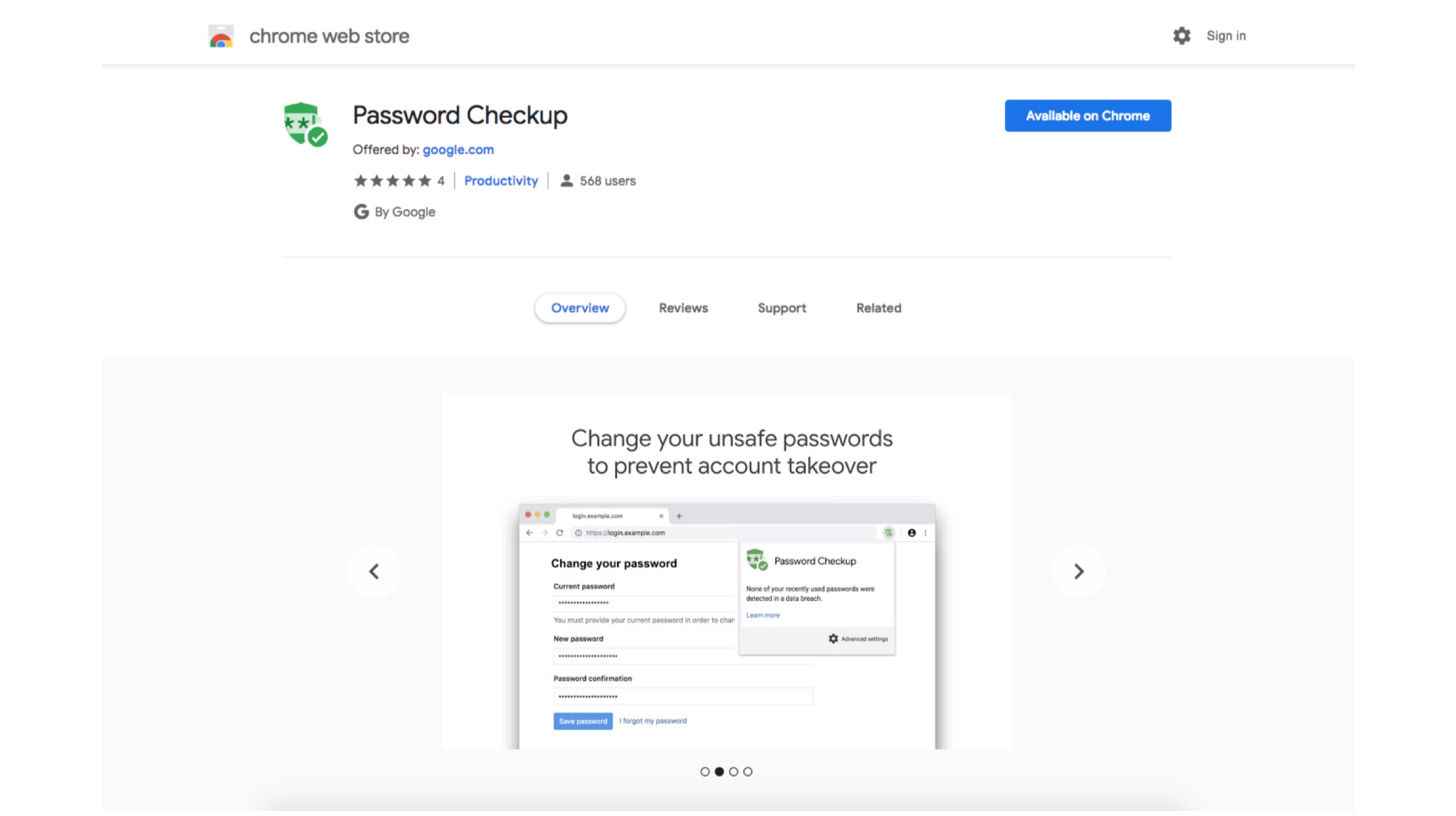
    The extension can be added to the Chrome browser to track login details every time a sign in occurs. It then searches through approximately 4 billion compromised credentials. The extension will then alert if the credentials have been part of a breach and if a password change is required. Google says that it won’t store any of the users data and that the extension will never reveal the credentials to Google. The aim of this added security is to prevent hijack of the extension’s functionality, which could then be used to gain access to a users private info.
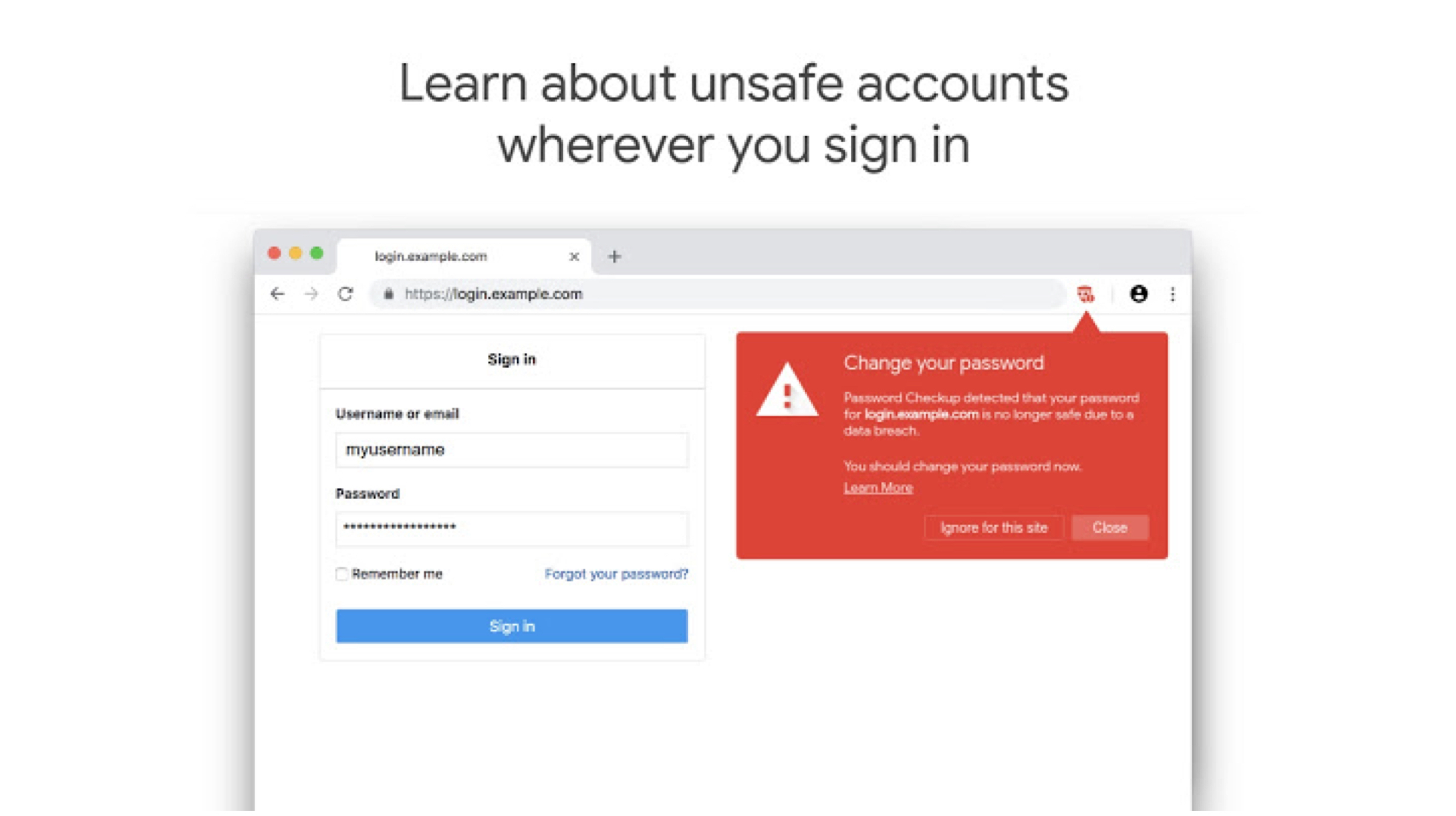
     

    According to the description of the extension, it will anonymously report information on the number of look-ups. Google is also looking to improve the way the extension works over time; hopefully it’ll be embedded into a future version of the Chrome browser so more users can take the necessary steps to protect their accounts. This seems like a great initiative by Google. 

    Also read: Mi Men’s Sports Shoes 2 Launched In India

    Google hasn’t had the best reputation when it comes to data security. But, if their claims are true about not harvesting this data, this could be a great new add-on for people who are concerned about their privacy on the internet. If you are interested in checking out the extension, you can head to the Chrome Extension store, or alternatively click here. 
  • Google Chrome Will Let You Permanently Mute Auto-Playing Videos On Websites

    Google Chrome Will Let You Permanently Mute Auto-Playing Videos On Websites

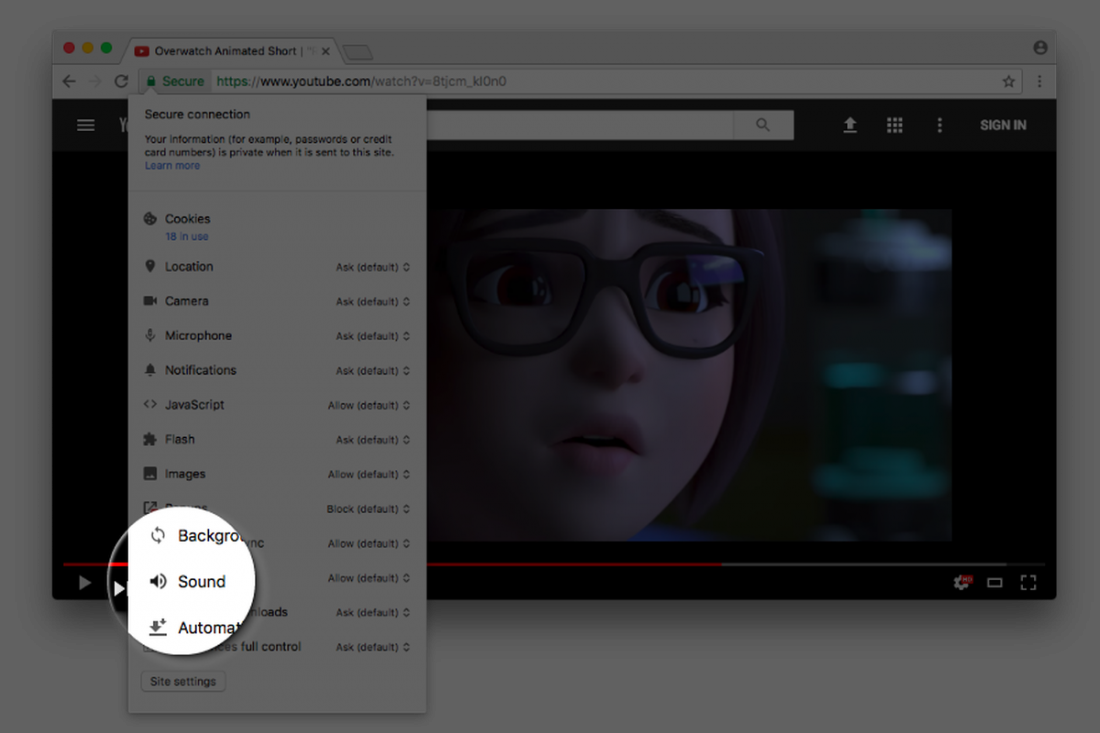
    Google Chrome will soon allow users to permanently mute websites, a long awaited feature that will cheer millions who suffer from auto-playing videos on websites. According to a report, the feature is currently available in the experimental Canary build of the browser and will soon roll out with future Google Chrome update. For those of you who want to give this feature a try, run it with the –enable-features=SoundContentSetting switch, as the feature is off by default.

    Google’s François Beaufort announced on his Google Plus account, that the Chrome team is still “experimenting with a setting to mute/unmute a website directly from the Page Info bubble.”  explaining that “This will give you more control about which website is allowed to throw sound at you automatically.”

    As of now, a user can mute tabs in Chrome by right clicking on them, but the process is canceled out once you close the tab or the Chrome window. But with this feature, a user will be able to permanently block sound on a particular domain. In short, websites on which you disable sound will remain disabled or muted until you turn them back on.

    Google Chrome already has various toggles for Flash, JavaScript, notifications, etc. and the soon-to-be-added sound toggle will work in a similar way.

    According to the update given by François Beaufort, it might be a few weeks or months before we see the feature on Google Chrome.

  • Google’s New Policy Bans Unofficial Chrome Extensions

    Google’s New Policy Bans Unofficial Chrome Extensions

    Next time you might not find your favourite extension on Chrome unless it is available on the official Chrome Web Store. Yes, in a bid to protect its users from malicious add-ons, Google will force them to use only those hosted on the Chrome Web Store.

    This policy was first announced in November 2013 and was supposed to go live in January 2014. The plan finally went into effect on May 2014 but was left open to people using the developer version of Chrome, to install their choice of extensions. Google said that this action led hackers tricking users into using the malicious malware.

    Extensions manager, Jake Leichtling says:

    Affected users are left with malicious extensions running on a Chrome channel they did not choose.

    The FAQ page gives more details:

    • Users can only install extensions hosted in the Chrome Web store, except for installs via enterprise policy or developer mode.
    • Extensions that were previously installed, but not hosted on the Chrome Web Store will be hard-disabled (i.e., the user cannot enable these extensions again), except for installs via enterprise policy or developer mode.

    Further, Google said the extensions that are not on the Chrome Web Store and are already installed on Chrome will automatically be disabled and cannot be re-enabled or reinstalled. Unless, of course, Chrome Web Store includes that particular extension to its store.

    Google’s new policy may finally help in lowering malicious extensions on Chrome, however, limiting the user’s choices of add-ons.

  • Chrome Extension Streamus Adds a Super Convenient Music Player to Your Browser

    Chrome Extension Streamus Adds a Super Convenient Music Player to Your Browser

    Late last year, YouTube launched its highly anticipated music service YouTube Music Key. Unfortunately, not everyone had access to it as the service was invite-based. The ad-free service was available to selected users at the cost of $7.99 per month. Other options trim down to inconvenient apps that require you to sign in to websites or don’t allow background listening. However, there will be no longer a need for any of them.

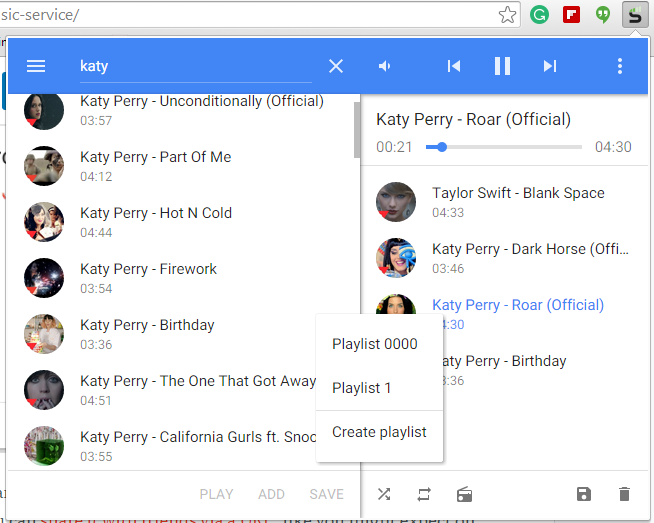
    Streamus, a Chrome extension, is a new music service that simply uses YouTube content and plays it through a convenient music player. The extension sits on the top right corner of the address bar and pops up when chosen. It is very simple, and cuts off the need to visit YouTube to search for music.

    streamus2

    You can also make a playlist, hear your favourite tracks, and can share the same with your friends via a URL. There is also an option of radio from where you can listen to the national and international stations. All in all, it’s an amazing player to get a quick access of your favourite tracks.

  • Top 5 Chrome Extensions Everyone Should Add

    Top 5 Chrome Extensions Everyone Should Add

    Many people use Google Chrome as their major web-browser on their PCs, tablets and phones these days. It’s a great, swift and feature-packed cross-platform browser that’s easy. Google Chrome also provides abundant apps and extensions to make your internet experience even more pleasant. Though picking the ones you need may be tricky. Most people never even hear about the extensions that may work extremely well for them. Well, we’ve listed 5 really useful Google Chrome extensions for you to check out:

    1. Clearly

    clearly‘Cleary’ by Evernote is a very helpful extension, particularly if you’re a student, writer or just someone who spends a lot of time doing research on the internet. It helps you focus only on the reading the important part of the article, blog or news; blocking out everything that is redundant. You can even save the sources to Evernote for later study. ‘Clearly’ also makes it probable to put in order the saved articles by tags, add footnotes or even let the extension read the material back to you. You can even change the background or font size of the materials. It is a very useful app, but you should know that it might not work on all websites.

    2. Faces.im

    Get-Facebook-Chat-Head-Notifications-To-Google-Chrome-With-Faces.im-ExtensionThis handy little tool brings Chat Heads to the desktop, enabling you to keep track of your Facebook messages in the simplest manner. It offers you notifications with small, modest head popups like the mobile app. And when they do show up , this could simply mean a new Facebook message is pending. The pop up circle displays your friend’s photo just like the Messenger app, their name, and recent message they sent when you hover the mouse pointer over their photo.

    3. Agora

    unnamed (1)If you want to get the most out of your money, then use this comparison shopping service. Agora for Chrome aims to provide a clever solution. It gives you your personal workstation where you can append products to your dashboard, put them in order and make comparisons in order to make the best purchasing choice. Although still in early beta, the service works absolutely flawlessly.

    4.TL;DR

    tldr-tldrlogo-2TL;DR (Too Long; Didn’t Read) is a clever extension, it creates a summary of any web article you don’t have time to read fully. It allows you to choose between four different summary lengths, depending on the amount of time you have. With the summaries found on tl;dr, you can easily select what you really want to read and save precious time. Read only what matters, skim the rest.

    5. Ginger

    Ginger_Software_LogoIt is an online spelling and grammar checker extension. Ginger proofreads your typing and cleans up your mistakes with a simple click. The extension integrates itself with the browser’s interface and works in text input fields. Whether you type in a misspelled word or use bad grammar, the extension underlines the mistake. Right-click the word, and a small popup will open, listing alternate word suggestions for incorrectly spelled words or the correct word itself, in the event that you’ve used the wrong tense.

  • Google Will Ban Windows Chrome Extensions Which Don’t Belong to Web Store

    Google Will Ban Windows Chrome Extensions Which Don’t Belong to Web Store

    Google will block third-party browser extensions that aren’t hosted in the Chrome Web Store, in order to battle malware.

     “We’re announcing a stronger measure to protect Windows users: starting in January on the Windows stable and beta channels, we’ll require all extensions to be hosted in the Chrome Web Store”, states Erik Kay, Engineering Director at Google.

    Usually, Chrome will ask for permission before installing extensions on a user’s browser. But scammers have figured out how to silently install extensions without a user knowing.

    These extensions can “override browser settings and alter the user experience in undesired ways, such as replacing the New Tab Page without approval,” Google said in a blog post. “In fact, this is a leading cause of complaints from our Windows users.”

    Google recommends that developers who have extensions hosted outside the Chrome Web Store migrate them “as soon as possible.” If developers don’t make the change, their users will not be able to install their extensions nor will they be able to keep using extensions that have already been installed.

    “Protecting our users is a key priority, and we believe this change will help those whose browser has been compromised by unwanted extensions.” 

    The news comes shortly after Google said it will add automatic malware blocking to Chrome and the option to reset browser settings.

iGyaan Network
Privacy Overview

This website uses cookies so that we can provide you with the best user experience possible. Cookie information is stored in your browser and performs functions such as recognising you when you return to our website and helping our team to understand which sections of the website you find most interesting and useful.