Tag: Google+ for Android

  • Google Adds ‘Find my Phone’ Support to Help Locate Your Missing Android Device

    Google Adds ‘Find my Phone’ Support to Help Locate Your Missing Android Device

    Google has volunteered to lend a hand in searching for our missing devices. The search giant has added a new super-useful feature called ‘Find My Phone’ that helps Android users google their smartphone.

    Google hasn’t gone for a tangled tracing process and has kept it straight and simple. Just log in to your Gmail account fro your computer’s browser and type ‘Find my phone’ on a Google omnibox. Make sure that you are logged in to the same account as on the device. You will be directed to a page with a map view, depicting the location of your phone. While the map appears on the screen, and it may ask you to log in again. Once logged in, call your device with the ‘Ring’ option provided below.
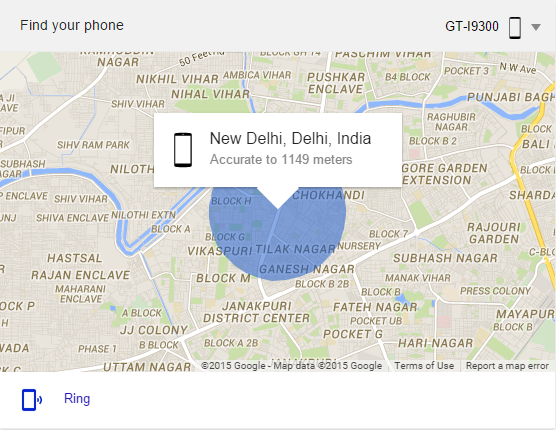
    google find my phone

    Google will call your handset within a few seconds and user can track the location of the handset. The loud ringing bell can be turned off by pressing the power button on the handset.

    Though it’s a hassle-free approach to find your phone, one should have the latest version of Google app installed to access the benefits. The latest feature shows the location of your phone on the map, but to erase the content of your phone, one needs to have Android Device Manager installed.

  • Google+ For Android Update Removes Messenger, Adds Drive Integration

    Google+ For Android Update Removes Messenger, Adds Drive Integration

    Are you one of the millions of people who use Google+ everyday on your Android device. If so, Google has a treat for you in the form of new updates.

    Google’s Virgil Dobjanschi took to the website this morning to announce five upcoming updates for Google+ on Android. The updates range from usability improvements to the Google killing off certain features in favor of new ones.

    First, Messenger is gone, so no more confusion between the built-in messaging service and the better, independent Hangouts client.

    Users can also share their location with friends and family — or anyone in a circle, really — at a precise or city-wide level, and can differentiate based on Circles. It’s not a huge change, and we doubt a lot of people use the service, but since Latitude shut down last week this is now Google’s version of Find My Friends.

    Perhaps most important in this update is the ability to access Google Drive photos and videos from within Google+, and they’ll be given the Awesome treatment with no user input. This means photos uploaded to Google+ from Drive will be auto-enhanced and perhaps even animated.

    Users can also switch between Google accounts more easily, something that was a bit cumbersome in the past. Lastly, Google Apps for Business features are all supported in Google+ now.

    No word on when these changes are coming to iOS.

iGyaan Network
Privacy Overview

This website uses cookies so that we can provide you with the best user experience possible. Cookie information is stored in your browser and performs functions such as recognising you when you return to our website and helping our team to understand which sections of the website you find most interesting and useful.