Tag: iOS

  • Edit : Why I Use An iPhone

    Edit : Why I Use An iPhone

    Ok, so before I begin with this article, let me clarify that I haven’t been paid by Apple to write this, I don’t hate Android phones, and I most certainly am not a “fanboy”. Also, I am not Bharat Nagpal (I know most of you came here expecting Bharat to finally reveal why he uses an iPhone). 

    The question is simple yet one of the most debatable one this side of the century, “Why do you use an iPhone?” 

    Some background details first

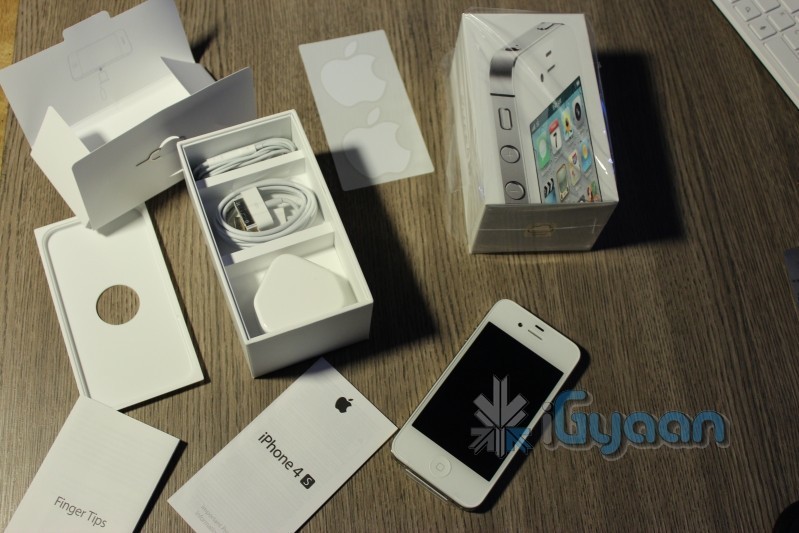
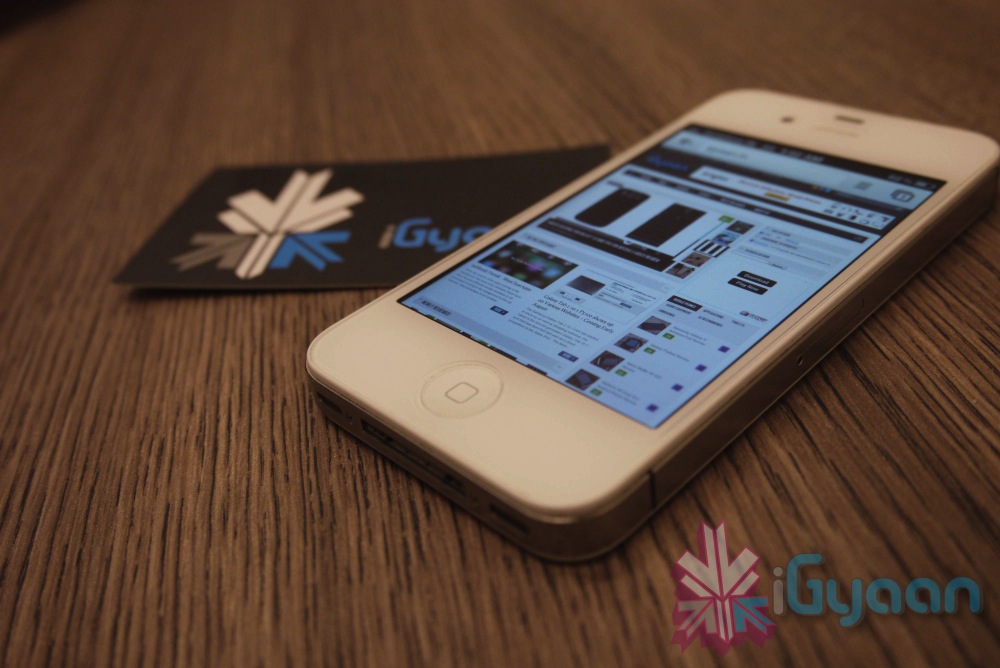
    [pullquote_right]working at iGyaan has its perks![/pullquote_right]I currently use a 16GB iPhone 4s, my first iPhone, which I’ve been using since January, 2012. Before this I had a Nokia 5230 “Express Music”, a Samsung Corby, a Samsung Metro, a Motorola flip phone (don’t remember its name now) and a Nokia 1100 (which I had to crush with a brick and then drown in a bucket full of water to make sure it was dead). Oh, and a couple of Android devices here and there (working at iGyaan has its perks!). 

    iPhone

    Now the Crux

    So, it took me only 1 day to realize that I had a phone in my hand that is perfect for me. Why so? Easy, because it’s is simple and uncomplicated!  I work around technology on a daily basis, but that doesn’t mean I want my products and services to be unnecessarily complex.  In fact, I tend to go the opposite way – I spend a lot of time working with wireless devices, dealing with random issues, playing with settings, and the likes.  In my time off, I’ll always migrate to the solution that’s the easiest.

    I want a device that works the same way every single time.  When I open an app, I expect it to take the same amount of time to open each and every time, when it doesn’t, it aggravates me. [pullquote_left]Having a sluggish phone with a 1.5 GHz dual-core is like having a Pulsar that moves like a Rajdhoot.[/pullquote_left] The iPhone is consistent, fast and ridiculously smooth! While you’ll never have a device that’s 100 percent fail-free, I’ve yet to find another device that performs as fluidly as the iPhone 4S. 

    One of the primary reasons I love the iPhone is the large selection of high quality apps. Even though more apps come to Android every day, I still prefer to buy (cough!) most of my apps and games on the iPhone.

    Not only do most of these apps look better, but i don’t have the same buyer’s (cough again!) remorse as I do with many Android apps I purchase. When given the choice between the same app on Android and on iPhone, I choose the iPhone app. I can’t recall looking at an Android app and complimenting its looks in comparison to its iOS and Windows Phone counterparts. 

    Daily Usage

    iPhoneTyping is a breeze with the auto-correct (though i have suffered some more than embarrassing moments due to it). The phone literally learns as you use it. Overtime Siri picked up on my “Indian Accent”and autocorrect started suggesting Hinglish words. I use dictation on the iPhone 4S to write entire articles with enough accuracy that only minimal editing needed. In fact, I am writing this article through the WordPress app on my phone! The new Voice Actions in Android 4.0 include many of the same features and work just as well as Siri and Dictation on the iPhone, but it is less polished. There is no use of relationships and Voice Actions doesn’t prompt for the message, requiring taps on-screen instead.

    Through iCloud, I have all my emails, contacts, data backed up effortlessly and accessible from anywhere. I don’t have to worry about subscription renewal or periodic updates. All I had to do was create an iCloud account and I was good to go!

    Camera and portability

    iPhoneThe camera is definitely the best I’ve seen on a mobile phone (do not mention the PureView!). It has eliminated the need to carry a separate camera while on a vacation. I am more than satisfied with it!

    One of the biggest feature of a phone for me is the screen, and the iPhone delivers in that aspect! The Retina display is a treat to use! Bright, vivid colours, great viewing angles, outdoor visibility and no pixilation at all! Texts are as crisp as they can be and even though the screen may not be the biggest, it definitely is the best for my needs.


    Jailbreak

    [pullquote_right]For all the things that Apple didn’t include in the iOS, there’s JailBreak![/pullquote_right] You can do anything, literally, once you’ve jailbroken your phone! Be it applying a custom theme (I am using the Windows 8 theme currently), add toggles to the homescreen and download unlimited apps for free!

    Out of all of the smartphones I’ve used, battery life continues to shine on the iPhone 4S in comparison to Android and Windows Phone equivalents.  It has taken a hit for sure with iOS 5 and the 4S’ dual-core processor, but it still outperforms other smartphones I’ve used. It charges ridiculously fast!

    Conclusion (The Only Answer)

    So basically, the iPhone has a smooth and fluid OS (I cannot emphasize this enough!), adequately powerful hardware, and tons of great features! Not to mention it looks great and I don’t have to deal with “minor bug fixes” now and then! So why should I switch to some other phone just because it has ridiculously speedy quad-core processor and an awfully powerful GPU when at the end of the day I have a phone which does what I need perfectly!

    Is it the best phone ever? Nope.  Would I go around recommending it to everyone?  Nope.  I can go off on a tirade of things I don’t like about it.  Email management has been especially bugging me. There’s a ton of features on the Android that I wish I had access to on my iPhone, and there’s no doubt that Android will continue to develop over time, but right now, I just want a phone that pretty much manages itself, so I can enjoy it, without having to worry about if I need to update permissions on my phone.  But for today, it’s the device that allows me to check off the most number of features on my list, so it stays!

  • Apple Mac App Store gets Mountain Lion for Download – US $ 19.99 – 4.05 GB – LION Extinct (PR)

    Apple Mac App Store gets Mountain Lion for Download – US $ 19.99 – 4.05 GB – LION Extinct (PR)

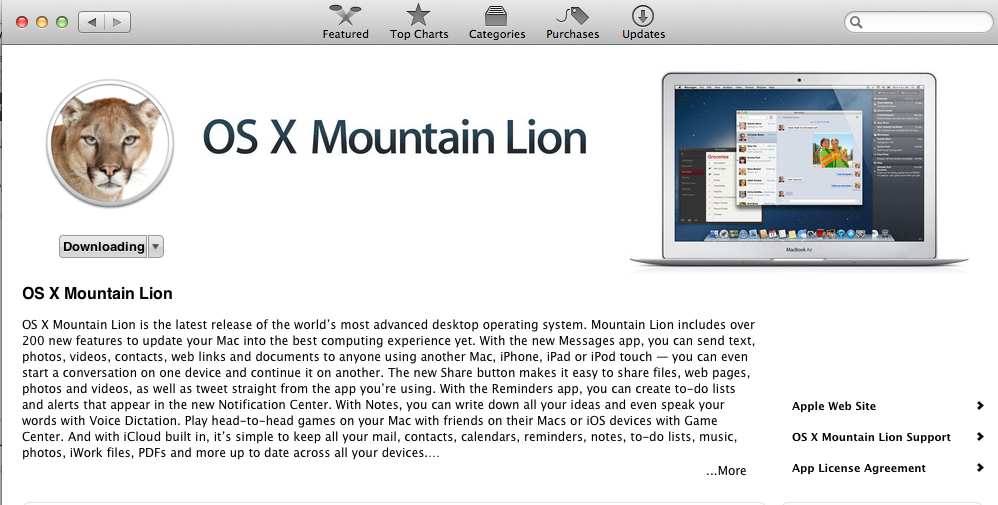
    The Mac App Store gets its own dose of Lion, and you can get it too for a mere US $ 19.99. The new Operating system adds over 200 new features including voice dictation, notification centre, new advanced sharing, ui fixes, customizations to Spotlight, AirPlay Mirroring etc. 


    While we download this 4.05 GB update, and sum it up for you. You can get your own version, at the link below.


    [toggle_box title=”Press Release” width=”Width of toggle box”]


    Mountain Lion Available Today From the Mac App Store


    Apple® today announced that OS X® Mountain Lion, the ninth major release of the world’s most advanced desktop operating system, is available as a download from the Mac® App Store?. With more than 200 innovative new features, Mountain Lion includes iCloud® integration, the all new Messages app, Notification Center, system-wide Sharing, Facebook integration*, Dictation, AirPlay® Mirroring and Game Center. Mountain Lion is available as an upgrade from Lion or Snow Leopard for $19.99.


    “With iCloud integration, Mountain Lion is even easier to set up, and your important information stays up to date across all your devices so you can keep editing documents, taking notes, creating reminders, and continue conversations whether you started on a Mac, iPhone or iPad.”


    “People are going to love the new features in Mountain Lion and how easy it is to download and install from the Mac App Store,” said Philip Schiller, Apple’s senior vice president of Worldwide Marketing. “With iCloud integration, Mountain Lion is even easier to set up, and your important information stays up to date across all your devices so you can keep editing documents, taking notes, creating reminders, and continue conversations whether you started on a Mac, iPhone or iPad.”


    With more than 200 innovative new features, Mountain Lion includes:


    iCloud integration, for easy set up of your Mail, Contacts, Calendar, Messages, Reminders and Notes, and keeping everything, including iWork® documents, up to date across all your devices;
    the all new Messages app, which replaces iChat® and brings iMessage™ to the Mac, so you can send messages to anyone with an iPhone®, iPad®, iPod touch® or another Mac;
    Notification Center, which streamlines the presentation of notifications and provides easy access to alerts from Mail, Calendar, Messages, Reminders, system updates and third party apps;
    system-wide Sharing, to make it easy to share links, photos, videos and other files quickly without having to switch to another app, and you just need to sign in once to use third-party services like Facebook, Twitter, Flickr and Vimeo;
    Facebook integration, so you can post photos, links and comments with locations right from your apps, automatically add your Facebook friends to your Contacts, and even update your Facebook status from within Notification Center;
    Dictation, which allows you to dictate text anywhere you can type, whether you’re using an app from Apple or a third party developer;
    AirPlay Mirroring, an easy way to wirelessly send an up-to-1080p secure stream of what’s on your Mac to an HDTV using Apple TV®, or send audio to a receiver or speakers that use AirPlay; and
    Game Center, which brings the popular social gaming network from iOS to the Mac so you can enjoy live, multiplayer games with friends whether they’re on a Mac, iPhone, iPad or iPod touch.


    Additional features in Mountain Lion include the revolutionary new Gatekeeper, which makes downloading software from the Internet safer; Power Nap, which automatically updates your apps and system while your Mac is asleep; and a faster Safari® browser. New features for China include significantly improved text input, a new Chinese Dictionary, easy setup with popular email providers, Baidu search in Safari, and built-in sharing to Sina Weibo and popular video websites Youku and Tudou.


    Pricing & Availability


    OS X Mountain Lion is available from the Mac App Store for $19.99 (US). Mountain Lion requires Lion or Snow Leopard (OS X v10.6.8 or later), 2GB of memory and 8GB of available space. For a complete list of system requirements and compatible systems, please visit: apple.com/osx/specs. OS X Server requires Mountain Lion and is available from the Mac App Store for $19.99 (US). The OS X Mountain Lion Up-to-Date upgrade is available at no additional charge from the Mac App Store to all customers who purchased a qualifying new Mac system from Apple or an Apple Authorized Reseller on or after June 11, 2012.

    [/toggle_box]

    [iTunes]


  • Apple Announces Q3 results : $35 billion revenue, $8.8 billion in net profits

    Apple Announces Q3 results : $35 billion revenue, $8.8 billion in net profits

    Apple has announced their Q3 results and as always the company has posted a massive profit. The company pulled in $35 billion in revenue, pocketing $8.8 billion of pure profit, a record for both in Q3. Profits were up $1.5 billion from Q3 of 2011. During the last three months the company shipped 17 million iPads, an 84 percent increase when compared to the same quarter in 2011.

    More than $16 billion of the total revenue is directly attributable to the smaller member of the iOS family, the iPhone. The iPad is also not behind getting over $9 billion in this quarter alone. As an up, Apple is able to award its investors a $2.65 per-share dividend.For the next quarter Apple actually expects a small drop in both revenue and earnings per-share.

    Tim Cook also discussed how China has instrumental in Apple’s continued growth. While revenues were down $2.2 billion from the previous quarter in the country they were up roughly 48 percent year-over-year to $5.7 billion.


    [toggle_box title=”Apple Q3 Earnings Report” width=”Width of toggle box”]

    Apple Reports Third Quarter Results
    17 Million iPads Sold


    CUPERTINO, Calif., Jul 24, 2012 (BUSINESS WIRE) — –Board Declares Quarterly Dividend of $2.65 per Common Share


    Apple(R) today announced financial results for its fiscal 2012 third quarter ended June 30, 2012. The Company posted quarterly revenue of $35.0 billion and quarterly net profit of $8.8 billion, or $9.32 per diluted share. These results compare to revenue of $28.6 billion and net profit of $7.3 billion, or $7.79 per diluted share, in the year-ago quarter. Gross margin was 42.8 percent compared to 41.7 percent in the year-ago quarter. International sales accounted for 62 percent of the quarter’s revenue.


    The Company sold 26.0 million iPhones in the quarter, representing 28 percent unit growth over the year-ago quarter. Apple sold 17.0 million iPads during the quarter, an 84 percent unit increase over the year-ago quarter. The Company sold 4.0 million Macs during the quarter, a two percent unit increase over the year-ago quarter. Apple sold 6.8 million iPods, a 10 percent unit decline from the year-ago quarter.


    Apple’s Board of Directors has declared a cash dividend of $2.65 per share of the Company’s common stock. The dividend is payable on August 16, 2012, to stockholders of record as of the close of business on August 13, 2012.


    “We’re thrilled with record sales of 17 million iPads in the June quarter,” said Tim Cook, Apple’s CEO. “We’ve also just updated the entire MacBook line, will release Mountain Lion tomorrow and will be launching iOS 6 this Fall. We are also really looking forward to the amazing new products we’ve got in the pipeline.”


    “We’re continuing to invest in the growth of our business and are pleased to be declaring a dividend of $2.65 per share today,” said Peter Oppenheimer, Apple’s CFO. “Looking ahead to the fourth fiscal quarter, we expect revenue of about $34 billion and diluted earnings per share of about $7.65.”


    Apple will provide live streaming of its Q3 2012 financial results conference call beginning at 2:00 p.m. PDT on July 24, 2012 at www.apple.com/quicktime/qtv/earningsq312 . This webcast will also be available for replay for approximately two weeks thereafter.


    This press release contains forward-looking statements including without limitation those about the Company’s estimated revenue and diluted earnings per share. These statements involve risks and uncertainties, and actual results may differ. Risks and uncertainties include without limitation the effect of competitive and economic factors, and the Company’s reaction to those factors, on consumer and business buying decisions with respect to the Company’s products; continued competitive pressures in the marketplace; the ability of the Company to deliver to the marketplace and stimulate customer demand for new programs, products, and technological innovations on a timely basis; the effect that product introductions and transitions, changes in product pricing or mix, and/or increases in component costs could have on the Company’s gross margin; the inventory risk associated with the Company’s need to order or commit to order product components in advance of customer orders; the continued availability on acceptable terms, or at all, of certain components and services essential to the Company’s business currently obtained by the Company from sole or limited sources; the effect that the Company’s dependency on manufacturing and logistics services provided by third parties may have on the quality, quantity or cost of products manufactured or services rendered; risks associated with the Company’s international operations; the Company’s reliance on third-party intellectual property and digital content; the potential impact of a finding that the Company has infringed on the intellectual property rights of others; the Company’s dependency on the performance of distributors, carriers and other resellers of the Company’s products; the effect that product and service quality problems could have on the Company’s sales and operating profits; the continued service and availability of key executives and employees; war, terrorism, public health issues, natural disasters, and other circumstances that could disrupt supply, delivery, or demand of products; and unfavorable results of other legal proceedings. More information on potential factors that could affect the Company’s financial results is included from time to time in the “Risk Factors” and “Management’s Discussion and Analysis of Financial Condition and Results of Operations” sections of the Company’s public reports filed with the SEC, including the Company’s Form 10-K for the fiscal year ended September 24, 2011, its Forms 10-Q for the fiscal quarters ended December 31, 2011 and March 31, 2012, and its Form 10-Q for the quarter ended June 30, 2012 to be filed with the SEC. The Company assumes no obligation to update any forward-looking statements or information, which speak as of their respective dates.


    Apple designs Macs, the best personal computers in the world, along with OS X, iLife, iWork and professional software. Apple leads the digital music revolution with its iPods and iTunes online store. Apple has reinvented the mobile phone with its revolutionary iPhone and App Store, and is defining the future of mobile media and computing devices with iPad.


    NOTE TO EDITORS: For additional information visit Apple’s PR website ( www.apple.com/pr ), or call Apple’s Media Helpline at (408) 974-2042.


    (C) 2012 Apple Inc. All rights reserved. Apple, the Apple logo, Mac, Mac OS and Macintosh are trademarks of Apple. Other company and product names may be trademarks of their respective owners.


    Apple Inc.
    UNAUDITED CONDENSED CONSOLIDATED STATEMENTS OF OPERATIONS
    (In millions, except number of shares which are reflected in
    thousands and per share amounts)
    Three Months Ended Nine Months Ended
    ——————————- ——————————-
    June 30, 2012 June 25, 2011 June 30, 2012 June 25, 2011
    ————— ————— ————— —————
    Net sales $ 35,023 $ 28,571 $ 120,542 $ 79,979
    Cost of sales (1) 20,029 16,649 66,281 47,541
    ——- ——- ——- ——-
    Gross margin 14,994 11,922 54,261 32,438
    ——- ——- ——- ——-
    Operating expenses:
    Research and development (1) 876 628 2,475 1,784
    Selling, general and administrative (1) 2,545 1,915 7,489 5,574
    ——- ——- ——- ——-
    Total operating expenses 3,421 2,543 9,964 7,358
    ——- ——- ——- ——-
    Operating income 11,573 9,379 44,297 25,080
    Other income and expense 288 172 573 334
    ——- ——- ——- ——-
    Income before provision for income taxes 11,861 9,551 44,870 25,414
    Provision for income taxes 3,037 2,243 11,360 6,115
    ——- ——- ——- ——-
    Net income $ 8,824 $ 7,308 $ 33,510 $ 19,299
    ======= ======= ======= =======
    Earnings per common share:
    Basic $ 9.42 $ 7.89 $ 35.89 $ 20.91
    Diluted $ 9.32 $ 7.79 $ 35.48 $ 20.63
    Shares used in computing earnings per share:
    Basic 936,596 926,108 933,672 922,917
    Diluted 947,059 937,810 944,440 935,688
    (1) Includes stock-based compensation expense as follows:
    Cost of sales $ 70 $ 52 $ 196 $ 155
    Research and development $ 172 $ 119 $ 500 $ 336
    Selling, general and administrative $ 206 $ 113 $ 596 $ 379


    Apple Inc.
    UNAUDITED CONDENSED CONSOLIDATED BALANCE SHEETS
    (In millions, except number of shares which are reflected in
    thousands)
    June 30, 2012 September 24, 2011
    ——————– ——————–
    ASSETS:
    Current assets:
    Cash and cash equivalents $ 7,945 $ 9,815
    Short-term marketable securities 19,709 16,137
    Accounts receivable, less allowances of $94 and $53, respectively 7,657 5,369
    Inventories 1,122 776
    Deferred tax assets 2,309 2,014
    Vendor non-trade receivables 6,641 6,348
    Other current assets 6,560 4,529
    ———- ———-
    Total current assets 51,943 44,988
    Long-term marketable securities 89,567 55,618
    Property, plant and equipment, net 10,487 7,777
    Goodwill 1,132 896
    Acquired intangible assets, net 4,329 3,536
    Other assets 5,438 3,556
    ———- ———-
    Total assets $ 162,896 $ 116,371
    ========== ==========
    LIABILITIES AND SHAREHOLDERS’ EQUITY:
    Current liabilities:
    Accounts payable $ 16,808 $ 14,632
    Accrued expenses 10,430 9,247
    Deferred revenue 5,822 4,091
    ———- ———-
    Total current liabilities 33,060 27,970
    Deferred revenue – non-current 2,530 1,686
    Other non-current liabilities 15,560 10,100
    ———- ———-
    Total liabilities 51,150 39,756
    ———- ———-
    Commitments and contingencies
    Shareholders’ equity:
    Common stock, no par value; 1,800,000 shares authorized; 937,266 and 15,573 13,331
    929,277 shares issued and outstanding, respectively
    Retained earnings 95,641 62,841
    Accumulated other comprehensive income 532 443
    ———- ———-
    Total shareholders’ equity 111,746 76,615
    ———- ———-
    $ 162,896 $ 116,371
    Total liabilities and shareholders’ equity
    ========== ==========


    Apple Inc.
    UNAUDITED CONDENSED CONSOLIDATED STATEMENTS OF CASH FLOWS
    (In millions)
    Nine Months Ended
    —————————————–
    June 30, 2012 June 25, 2011
    ——————– ——————–
    Cash and cash equivalents, beginning of the period $ 9,815 $ 11,261
    ——— ———
    Operating activities:
    Net income 33,510 19,299
    Adjustments to reconcile net income to cash generated by operating
    activities:
    Depreciation, amortization and accretion 2,296 1,271
    Share-based compensation expense 1,292 870
    Deferred income tax expense 4,066 2,232
    Changes in operating assets and liabilities:
    Accounts receivable, net (2,278) (592)
    Inventories (346) 162
    Vendor non-trade receivables (293) (955)
    Other current and non-current assets (3,238) (1,551)
    Accounts payable 2,450 2,480
    Deferred revenue 2,575 1,276
    Other current and non-current liabilities 1,686 2,608
    ——— ———
    Cash generated by operating activities 41,720 27,100
    ——— ———
    Investing activities:
    Purchases of marketable securities (121,091) (75,133)
    Proceeds from maturities of marketable securities 10,344 16,396
    Proceeds from sales of marketable securities 73,140 34,301
    Payments made in connection with business acquisitions, net of cash (350) 0
    acquired
    Payments for acquisition of property, plant and equipment (4,834) (2,615)
    Payments for acquisition of intangible assets (1,067) (266)
    Other (56) 34
    ——— ———
    Cash used in investing activities (43,914) (27,283)
    ——— ———
    Financing activities:
    Proceeds from issuance of common stock 433 577
    Excess tax benefits from equity awards 1,036 915
    Taxes paid related to net share settlement of equity awards (1,145) (479)
    ——— ———
    Cash generated by financing activities 324 1,013
    ——— ———
    (Decrease)/increase in cash and cash equivalents (1,870) 830
    ——— ———
    Cash and cash equivalents, end of the period $ 7,945 $ 12,091
    ========= =========
    Supplemental cash flow disclosure:
    Cash paid for income taxes, net $ 5,901 $ 2,563


    Apple Inc.
    Q3 2012 Unaudited Summary Data
    (Units in thousands, Revenue in millions)
    Q2 2012 Q3 2011 Q3 2012
    ———————- ———————- ———————-
    Sequential Change Year/Year Change
    ——————- ——————-
    Operating Segments Mac Units Revenue Mac Units Revenue Mac Units Revenue Mac Units Revenue Mac Units Revenue
    ——— ———– ——— ———– ——— ———– ——— ——- ——— ——-
    Americas 1,214 $ 13,182 1,487 $ 10,126 1,522 $ 12,806 25% – 3% 2% 26%
    Europe 1,048 8,807 922 7,098 941 8,237 – 10% – 6% 2% 16%
    Japan 158 2,645 150 1,510 173 2,009 9% – 24% 15% 33%
    Asia Pacific 771 10,153 620 6,332 593 7,887 – 23% – 22% – 4% 25%
    Retail 826 4,399 768 3,505 791 4,084 – 4% – 7% 3% 17%
    ——— —— ——— —— ——— ——
    Total Operating Segments 4,017 $ 39,186 3,947 $ 28,571 4,020 $ 35,023 0% – 11% 2% 23%
    ========= === ====== ========= === ====== ========= === ======
    Sequential Change Year/Year Change
    ——————- ——————-
    Product Summary Units Revenue Units Revenue Units Revenue Units Revenue Units Revenue
    ——— ———– ——— ———– ——— ———– ——— ——- ——— ——-
    Mac Desktops (1)(9) 1,199 $ 1,563 1,155 $ 1,580 1,010 $ 1,287 – 16% – 18% – 13% – 19%
    Mac Portables (2)(9) 2,818 3,510 2,792 3,525 3,010 3,646 7% 4% 8% 3%
    ——— —— ——— —— ——— ——
    Subtotal Mac 4,017 5,073 3,947 5,105 4,020 4,933 0% – 3% 2% – 3%
    iPod (3)(9) 7,673 1,207 7,535 1,325 6,751 1,060 – 12% – 12% – 10% – 20%
    Other Music Related Products and Services (4) 2,151 1,571 2,060 – 4% 31%
    iPhone and Related Products and Services (5)(9) 35,064 22,690 20,338 13,311 26,028 16,245 – 26% – 28% 28% 22%
    iPad and Related Products and Services (6)(9) 11,798 6,590 9,246 6,046 17,042 9,171 44% 39% 84% 52%
    Peripherals and Other Hardware (7) 643 517 663 3% 28%
    Software, Service and Other Sales (8) 832 696 891 7% 28%
    —— —— ——
    Total Apple $ 39,186 $ 28,571 $ 35,023 – 11% 23%
    === ====== === ====== === ======
    (1) Includes revenue from iMac, Mac mini and Mac Pro sales.
    (2) Includes revenue from MacBook, MacBook Air and MacBook Pro sales.
    (3) Includes revenue from iPod sales.
    (4) Includes revenue from sales from the iTunes Store, App Store and
    iBookstore in addition to sales of iPod services and Apple-branded
    and third-party iPod accessories.
    (5) Includes revenue from sales of iPhone, iPhone services, and
    Apple-branded and third-party iPhone accessories.
    (6) Includes revenue from sales of iPad, iPad services, and
    Apple-branded and third-party iPad accessories.
    (7) Includes revenue from sales of displays, networking products and
    other hardware.
    (8) Includes revenue from sales of Apple-branded and third-party Mac
    software, and services.
    (9) Includes amortization of related revenue deferred for non-software
    services and embedded software upgrade rights.

    [/toggle_box]

    [Apple]
     

  • Chrome No. 1 free app on iTunes

    Chrome No. 1 free app on iTunes

    Whoops! Something went wrong!
    Chrome for iOS features tab-syncing and incognito mode.

    Within days of it being announced for Apple’s iOS, Google Chrome rocketed to the top by becoming the no. 1 free app on the iTunes app store. 

    It’s getting decent reviews from users who so far have cumulatively ranked it at 4.5 stars, although the biggest complaint they seem to have is the browser is slow compared with Apple’s Safari which is due to the fact that Apple restricts the use of its Nitro JavaScript engine to Safari and other apps don’t have access to it.

    We will be coming out with the Chrome’s review soon, stay tuned. 

  • Apple Starts seeding iOS 6 Beta 2 to Devs

    Apple Starts seeding iOS 6 Beta 2 to Devs

    While everyone waits the arrival of the next big OS for your iDevice, Apple is working hard to get it ready. The company has pushed out Beta 2 to the developers for testing, there are no special additions the primarily focus is on the bug fixes leading the software closer to a final release. There are still other betas expected before the final release comes out, So, hold on to your horses. 

    Those who have active developer accounts can download the latest betas from their accounts now.

    [9to5 Mac]

  • Nike + and Flipboard come to Android

    Nike + and Flipboard come to Android

    Whoops! Something went wrong!
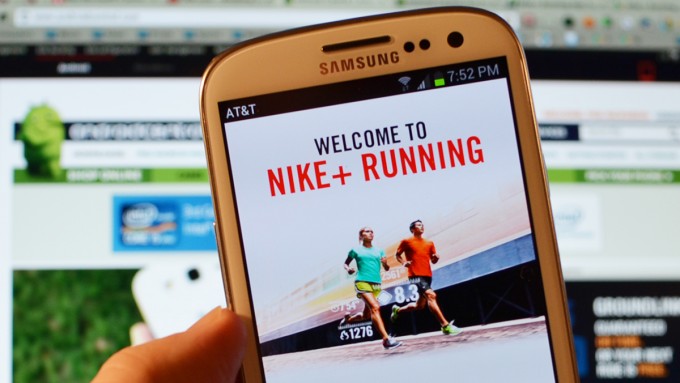
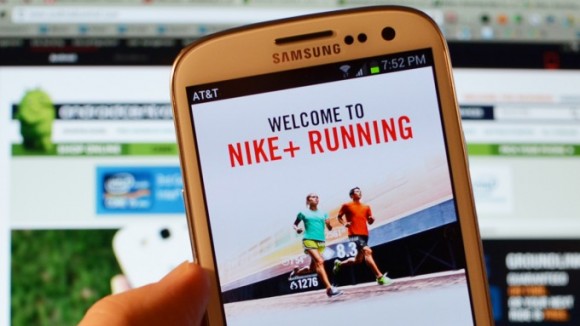
    The Nike+ app lets you keep track of your work outs

    Good news for Android users, the Nike+ and Flipboard apps have finally made their into the OS, after gaining success and popularity on Apple’s iOS. 

    Nike announced the Nike+ Running App for Android, which, as you’d expect, connects you to nikeplus.com, making exercise social. It features a smooth, intuitive user interface – tailored and optimized for Android – that hosts a number of features to enhance the running experience. The in-run navigation is seamless and simple, allowing runners to easily check key run stats, see their in-progress GPS maps, change songs or get audio feedback without missing a stride. It is available for free on Google Play. 

    [quote]The expansion of Nike+ onto multiple mobile platforms will allow us to serve more runners than ever before. This opportunity will give even more athletes the chance to experience Nike+, which makes this an incredibly exciting time for the running community, said Stefan Olander, Vice President, Digital Sport.[/quote]

    Whoops! Something went wrong!
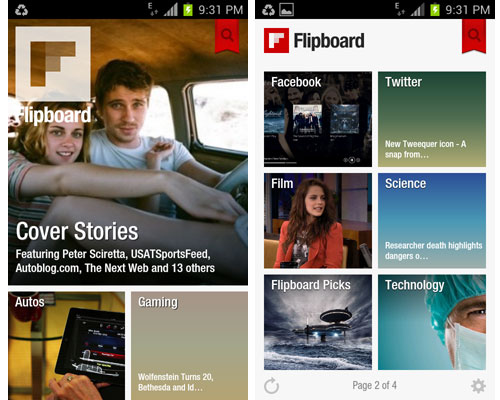
    Flipboard is a free application that turns Web content into a magazine format

    Flipboard is a free application that turns Web content into a magazine format, and it has also been announced the app will be available for the likes of the Kindle Fire, Android tablets, along with Nook tablets and smartphones around the world. and to run the app, consumers will need to be using Android version 2.2 or later on a devices with a chip running at least 800 megahertz. The app will not be available for tablets with larger screen sizes, such as the 10-inch Samsung Galaxy Tab 10.1.  Flipboard also announced that it is adding access to Google+ and YouTube, bringing to 12 the number of social networks users can view within the app. 

  • What happens when an iPhone mates with a Galaxy S2? A “VOX” is born!

    What happens when an iPhone mates with a Galaxy S2? A “VOX” is born!

    Whoops! Something went wrong!
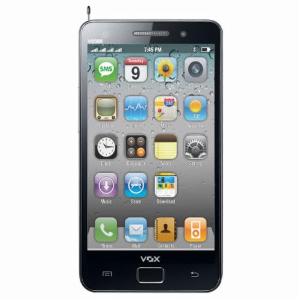
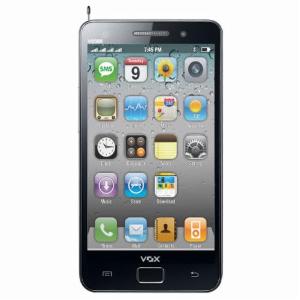
    Exteriors of a Galaxy S2 with iOS like icons.

    When we saw this phone, we were left dumbstruck. In front of us was a device, the v9500, which had the exteriors of a Galaxy S2 but an OS notoriously similar aesthetically to Apple’s iOS. Wait, it doesn’t end here. 

    It has 1.3MP Camera, analog TV, stereo wireless FM and expandable memory up to 8 GB (4GB + 4GB) along with long battery back-up for uninterrupted usage. It has 3.5 Inches wide touch screen and has 4 sim card slots!!!! FOUR!!! It’s available for purchase online at a price of Rs 3,999!

    We would surely be reviewing this “phone” as soon as we get our hands on it! 

  • Developer teases iOS apps running on BlackBerry PlayBook

    Developer teases iOS apps running on BlackBerry PlayBook

    A developer working on the Playbook has been able to  run iOS apps on the BlackBerry PlayBook. The developer likens his project to WINE, which doesn’t do hardware emulation, but rather relies on a custom set of APIs to make the apps boot and run on the Playbook. The dependency of the said port is only possible properly if the app does not rely on Apple’s UIWebView or CoreData frameworks. businesscat2000 the developer, has yet to make the software publicly available, although he’s expressed a bit of interest. It remains to be seen whether this project will ever see the light of day.

    check out the demo videos posted by him below.

  • My Xbox Live update turns iPhone into controller

    My Xbox Live update turns iPhone into controller

    Whoops! Something went wrong!
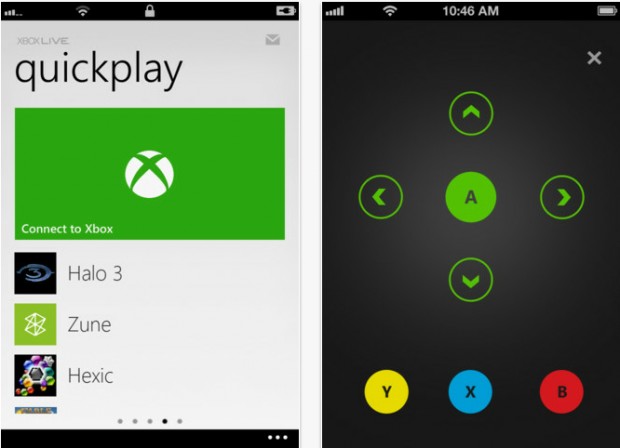
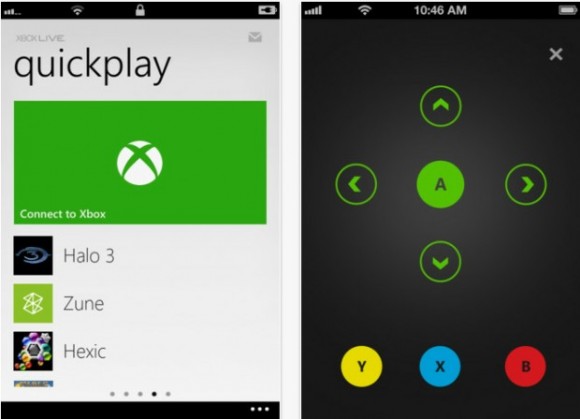
    The app will turn the iPhone into an Xbox controller

    Microsoft on Wednesday released an update for their My Xbox Live application for iOS (4.3 or later) which allows iPhone users to use the app to control their Xbox 360 consoles using a simple touch interface. The app also lets users launch games or apps on the 360 from the app on their phone without having to wade through tons of menus on the Xbox 360.

    Even when the device is not connected to the Xbox, users can make changes to their profile, view their stats etc from their iPhone. Other additions to the iOS My Xbox Live app include improved authentication for increased stability, and high-resolution images for the new iPad. Remote control functionality is not yet available on the iPad.

    The app was also released for Android but with restrictions, that is, users cannot gain any practical control over the Xbox, they can now check their Xbox Live profiles, friend statuses and the highlighted games

  • Which iOS device will get what features of iOS 6 : Here is the roundup

    Which iOS device will get what features of iOS 6 : Here is the roundup

    Do you own an iOS Device? Are you eagerly waiting for the iOS 6 update? 

    If the answer is yes, you will be surprised to know that not all features will come to all iOS devices for iOS 6.  Apple has gone to the trouble of alerting would-be upgraders just what features they’ll get when they check for the update this fall.

    Only if you own an iPhone 4S will you be able to enjoy all the features of the iOS 6 else the most compatible device will be iPAD 3rd Gen. Check out the full list of upgrade features below also see what your device gets.


        iPhone 3GS

    iPod touch

    iPhone 4 iPhone 4S iPad 2  iPad (2012)
    Chinese service integration   X X X X X X  
    Facebook integration   X X X X X X  
    FaceTime over 3G/4G   X X  
    Flyover and turn-by-turn GPS   X X X  
    Guided Access   X X X X X X  
    Made for iPhone hearing aids   X  
    New content stores   X X X X X X  
    Offline Reading List   ? X X X X  
    Passbook   X X X X  
    Phone replies and reminders   X X X  
    Safari tab syncing   X X X X X X  
    Shared Photo Streams   ? X X X X  
    Siri   X X  
    VIP list, flagged/VIP mailboxes   ? X X X X
  • DIY : How to set-up tethering on your phone!

    DIY : How to set-up tethering on your phone!

    First and foremost : What is tethering?  Tethering refers to using a cell phone as a modem for your laptop or any other device. Creating a connection either with cables or wirelessly “tethers” your cell phone to your other mobile device. 

    Basically it’s using the internet on your phone for other devices. 

    Now, how is it done? Do you need to jailbreak/root your phone? Read-on!

    [tabgroup][tab title=”iOS”]

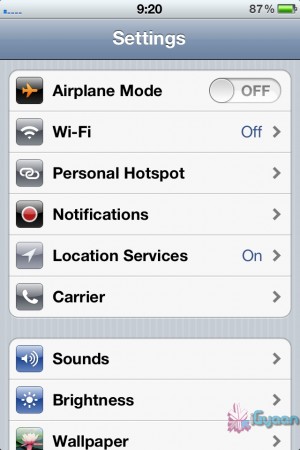
    Tethering on iDevices was more of a hassle in the past, but come iOS 5, that changed! It can be done in 3 ways. Each requiring a data package from your carrier for your iDevice.  We tethered our iPhone 4s on AirTel. 

    Whoops! Something went wrong!
    Click on Personal Hotspot
    Whoops! Something went wrong!
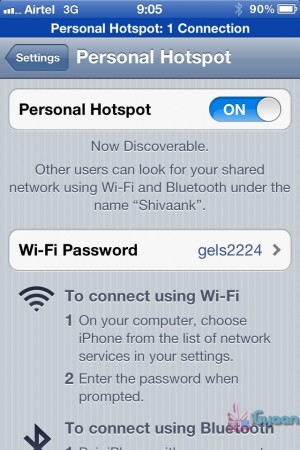
    Set your password and turn it on

    Through WiFi 

    Probably the most convenient of the 3.  Go to Settings->Personal Hotspot->On. Set your password and it’ll prompt you to turn on your WiFi and Bluetooth. Once this is done, your device becomes a Wifi Hotspot for other devices to connect to. 

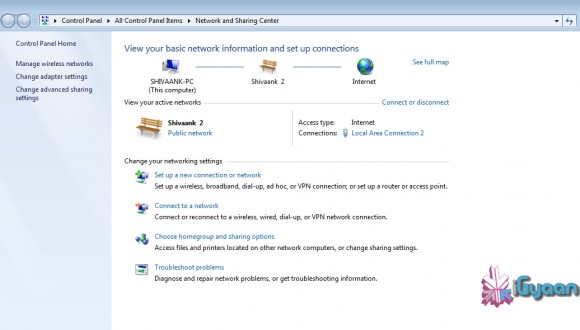
    As shown in the screenshot, the name of your device, in this case “Shivaank”, shows up as a WiFi network on your other device. Just click on connect and you’re connected to the internet via your iDevice’s network. 

    Whoops! Something went wrong!
    Your device name comes up as a WiFi connection

    Through USB 

    The basic steps for tethering through USB are the same as above. Go to Settings->Personal Hotspot->On. To save battery, turn off your WiFi and Bluetooth as you won’t be needing them. 

    Whoops! Something went wrong!
    Your device serves as an Ethernet connection

    Connect your device to your laptop and turn on your Hotspot toggle. Then go to your network settings of your laptop and you’ll see  your devices name as an Ethernet connection. Just click on connect and you’re good to go!

    Through Bluetooth

    Now, we were only able to tether our device to a MacBook using Bluetooth. The name of your device simply shows up on Bluetooth devices list. Click on pair to get going!!
     
     
    Apps like MiWi and Tether Me are viable options for those running an older version of iOS but these are paid apps.


    [/tab][tab title=”Android”]

    On Android, the tethering process is a breeze! Tethering feature is inbuilt into Android and to activate follow these steps.


    Through WiFi

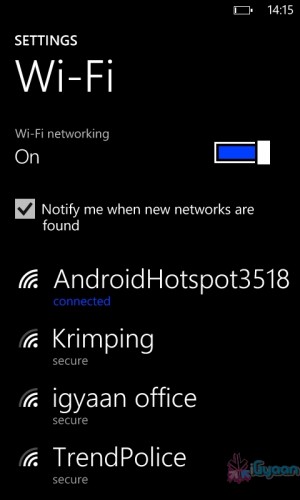
    Go to Setting->Wireless and Network->Tethering and Portable Hotspot->Portable Wi-Fi hotspot and turn it on. The name of your connection (which you can configure) shows up on other device’s to connect and voila! You’re connected!

    Whoops! Something went wrong!
    You can change the name of your WiFi by configuring it.
    Whoops! Something went wrong!
    Windows Phone connected to Android Hoptspot

    Through USB

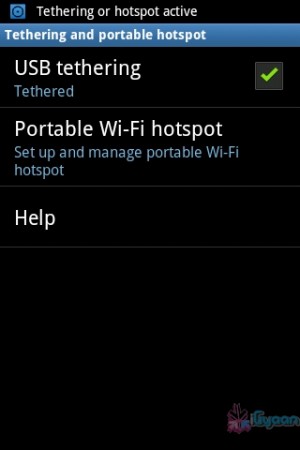
    Go to Setting->Wireless and Network->Tethering and Portable Hotspot->USB Tethering. Click on it to turn it on and the computer you’re connected to shows your devices network as an ethernet connection. Click on connect to start using it.

    Whoops! Something went wrong!
    Tethered through USB
    Whoops! Something went wrong!
    Device comes up as Ethernet connection

    [/tab]

    [tab title=”Windows Phone”]

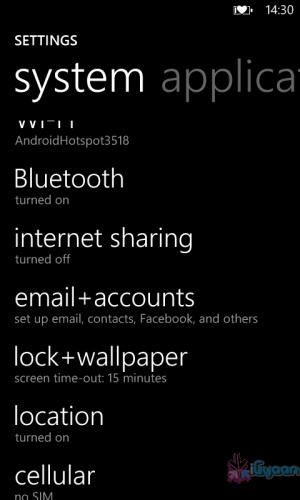
    Possibly the easiest of the three! Just go to Settings->Internet Sharing and turn it on! That’s it! You’re device shows up as an internet hotspot, click on connect and you’re done.
    Whoops! Something went wrong!
    Click on Internet sharing
    Whoops! Something went wrong!
    Turn it on and you're done!

    [/tab][/tabgroup]


  • iOS 6 announced at WWDC,  launch apps with SIRI, Facebook integration, Apple Maps (PR)

    iOS 6 announced at WWDC, launch apps with SIRI, Facebook integration, Apple Maps (PR)

    Apple at the World Wide Developer Conference 2012 has unveiled a new revision to their most popular OS, calling it iOS 6. Siri has been updated with more ability, most notably Siri will now launch Apps, talk about sports, restaurants and movie times, it’s also coming to iPad 3rd Gen. Apple is also finally expanding Siri’s local search functionality from just the US to no less than 60 difference countries which includes India.

    Siri will also even come to cars via Apple’s new Eyes Free integration, but this is at least a year away.

    There’s better Facebook integration with photos, websites, maps and instant share option. Other tweaks on the phone side of things let you dismiss incoming calls with  swipe, or send a pre-written SMS, even set it to give you a reminder once you change location.

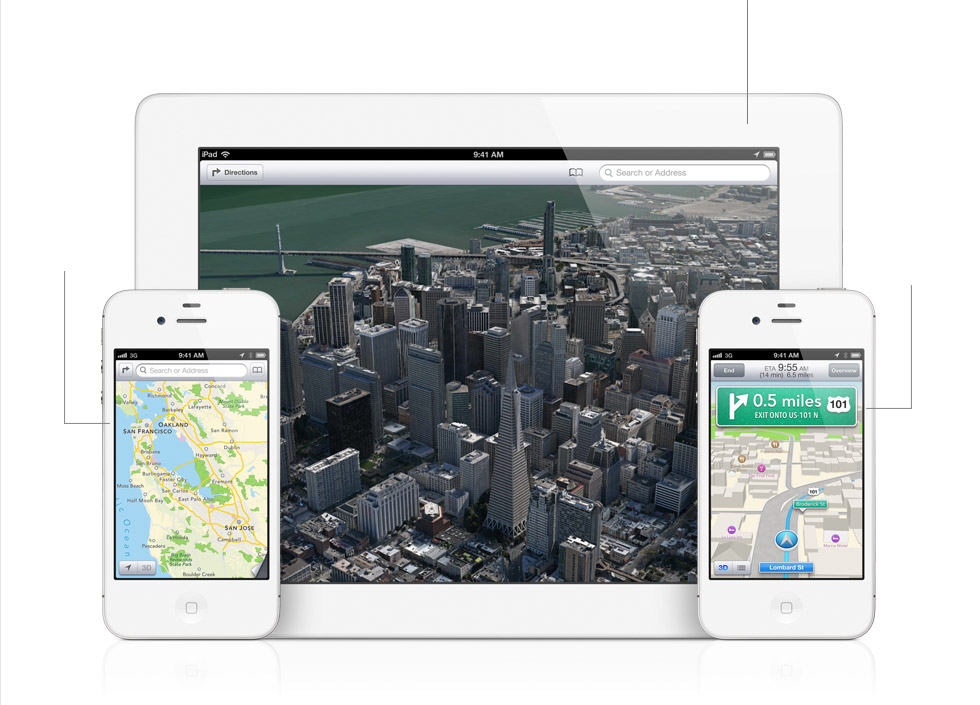
    iOS 6 will also get the new version of Apple’s own Maps,  Google maps is dropped from the equation. The new maps app is based on a vector base so is more vivid, Maps gives you turn-by-turn spoken directions and interactive 3D views.

    We like “Do Not Disturb” which holds off all those notifications, You’ll still get them, but the won’t alert, or light up the screen. For FaceTime lovers, they will be happy to know that it will be now available over 3G and Cellular as well. 

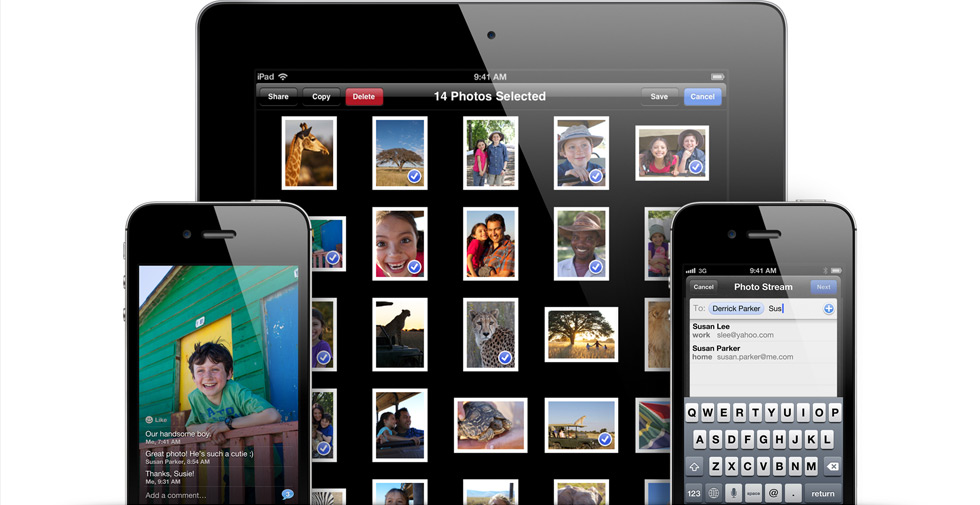
    Apple has Social networking built right into the new iOS 6 with Photo Streams — choose the pictures, choose the friends and send. The new iOS 6 is supported by iPhone 3GS through iPhone 4s, that includes the second and third generation iPads, plus fourth-gen iPod touches.

    Beta is going out today, with a full release in the fall.


    [toggle_box title=”Press Release” width=”Width of toggle box”]


    Apple Previews iOS 6 With All New Maps, Siri Features, Facebook Integration, Shared Photo Streams & New Passbook App


    Available to iPhone, iPad & iPod touch Users This Fall


    SAN FRANCISCO–(BUSINESS WIRE)–Apple® today previewed iOS 6, introducing over 200 new features to the world’s most advanced mobile operating system, and released a beta version to iOS Developer Program members. iOS 6 will be available to iPhone®, iPad® and iPod touch® users this fall as a free software update. New iOS 6 features include: an all new Maps app with Apple-designed cartography, turn-by-turn navigation and an amazing new Flyover view; new Siri® features, including support for more languages, easy access to sports scores, restaurant recommendations and movie listings; Facebook integration for Contacts and Calendar, with the ability to post directly from Notification Center, Siri and Facebook-enabled apps like Photos, Safari® and Maps; Shared Photo Streams via iCloud®; and Passbook, the simplest way to get all your passes in one place.


    “iOS 6 continues the rapid pace of innovation that is helping Apple reinvent the phone and create the iPad category, delivering the best mobile experience available on any device”
    “iOS 6 continues the rapid pace of innovation that is helping Apple reinvent the phone and create the iPad category, delivering the best mobile experience available on any device,” said Scott Forstall, Apple’s senior vice president of iOS Software. “We can’t wait for hundreds of millions of iOS users to experience the incredible new features in iOS 6 including the new Maps app, expanded Siri support, deep Facebook integration, Shared Photo Streams and the innovative new Passbook app.”


    iOS 6 includes an all new Maps app with vector-based map elements that make graphics and text smooth, and panning, tilting and zooming incredibly fluid. New turn-by-turn navigation guides you to your destination with spoken directions, and the amazing Flyover feature has photo-realistic interactive 3D views. Real-time traffic information keeps you updated on how long it will take to get to your destination and offers alternate time-saving routes if traffic conditions change significantly. Additionally, local search includes information for over 100 million businesses with info cards that offer Yelp ratings, reviews, available deals and photos.


    Siri, now available for the new iPad as well as iPhone 4S, includes language support for English, French, German and Japanese, and adds support for Spanish, Italian, Korean, Mandarin and Cantonese. Siri is optimized for use in 15 countries and helps you get even more done with just your voice, whether it’s finding the latest sports scores or making restaurant reservations. You also can ask Siri to update your status on Facebook, post to Twitter or launch an app. Additionally, Siri takes hands-free functionality even further with a new Eyes Free mode, enabling you to interact with your iPhone using nothing more than your voice.


    Built-in Facebook integration is the best ever in a mobile device, allowing you to sign in once and post from Notification Center, Siri and Facebook-enabled apps, including Photos, Safari and Maps. Your Facebook friends’ information is kept up to date across all your iOS devices, automatically updating details in Contacts when they change, and scheduling events and birthdays in your Calendar. You can also “Like” content directly from the App Store™ and iTunes® and see what your friends recommend.


    With more than 125 million users already enjoying iCloud, iOS 6 introduces new ways to share photos with friends and family using Shared Photo Streams. Simply select the photos you want to share, pick which friends you want to receive the album, and the Shared Photo Stream album is instantly available on their iOS devices, iPhoto® and Aperture® on their Mac®, via the web or even through Apple TV®. You and your friends can leave comments on or “Like” any photo in a shared album.


    The new Passbook app is the simplest way to get all your passes in one place, such as boarding passes and baseball tickets. Passbook lets you scan your iPhone or iPod touch to use a coupon, get into a concert or check into your hotel. Passbook automatically displays your passes on your Lock Screen based on a specific time or location, so when you walk into your favorite coffee shop your loyalty card appears and you can scan it to buy a coffee or check your balance. Passbook can even alert you to last minute gate changes or flight delays at the airport.


    Building on Apple’s commitment to provide innovative solutions for education and accessibility, iOS 6 introduces Guided Access. This new feature allows a parent, teacher or administrator to disable hardware buttons to lock an iOS device into a single app, especially useful for test taking or helping someone with a disability stay focused on learning. Guided Access also includes the ability to confine touch input to certain parts of the screen.


    Additional new iOS 6 features include:


    • enhancements to Safari, the world’s most popular mobile browser, such as iCloud tabs, offline reading lists, photo uploads and full screen view;


    • support for FaceTime® calls over cellular networks;


    • the ability to set up a VIP Mailbox, making it easier to quickly view messages from important people you designate as VIPs;


    • the option to decline incoming calls with a quick message, set a callback reminder and enable a new Do Not Disturb option; and


    • a whole new set of improvements and services specifically for iOS users in China, such as improved text input and built-in support for popular Chinese services including Baidu, Sina Weibo, Youku and Tudou.


    Availability


    The iOS 6 beta software and SDK are available immediately for iOS Developer Program members at developer.apple.com. iOS 6 will be available as a free software update for iPhone 4S, iPhone 4, iPhone 3GS, the new iPad, iPad 2 and iPod touch (fourth generation) this fall. Some features may not be available on all products.


    Apple designs Macs, the best personal computers in the world, along with OS X, iLife, iWork and professional software. Apple leads the digital music revolution with its iPods and iTunes online store. Apple has reinvented the mobile phone with its revolutionary iPhone and App Store, and is defining the future of mobile media and computing devices with iPad.


    [/toggle_box]


  • Apple App Store gets 650,000 apps, $5 Billion payed to Devs

    Apple App Store gets 650,000 apps, $5 Billion payed to Devs

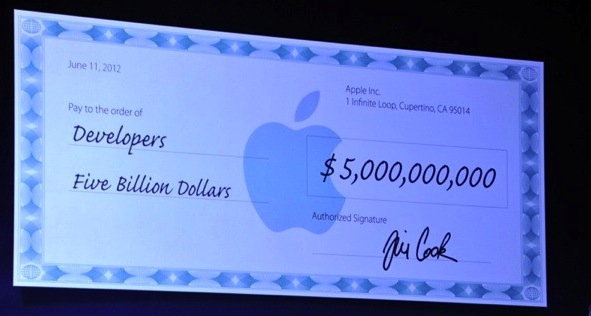
    Apple’s WWDC Event has just kicked off and Tim Cook has just announced that the Apple App Store has hit 650,000 apps and over $5 billion have been payed out to App Developers. 225,000 of these apps  are specific to the iPad. Customers have downloaded 30 billion of the apps since they became an option four years ago. 

    Apple also wants its developers to know that they are taken care of.


    More developing ….

  • Apple will announce iOS 6 at WWDC 2012 , Confirms spotted Banner/s

    Apple will announce iOS 6 at WWDC 2012 , Confirms spotted Banner/s

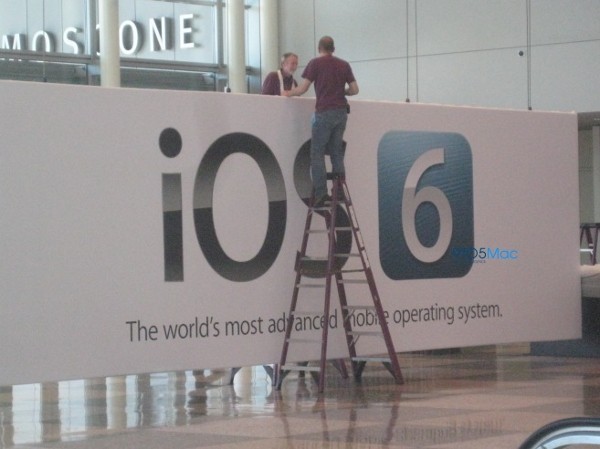
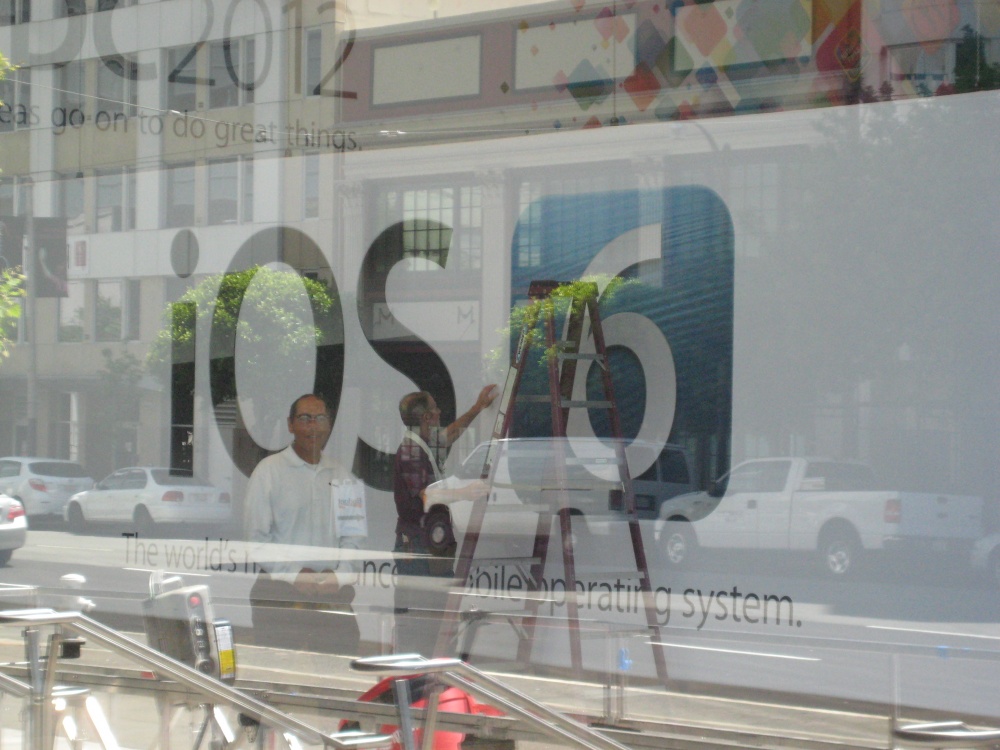
    A banner being put up by ground staff at the WWDC event being held this year at Moscone West. There have been other leaks of high res MacBooks with Retina displays and a new design. But the above image pretty much confirms the announcement of iOS 6, below which if you read correctly you will find the moniker ” World’s most Advanced Mobile Operating System” (Proud much Apple? ) 

    The event happens on Monday, so stay tuned for the whole low down.

  • Facebook launches App Center

    Facebook launches App Center

    Whoops! Something went wrong!
    The App Center will be made available for Android and iOS

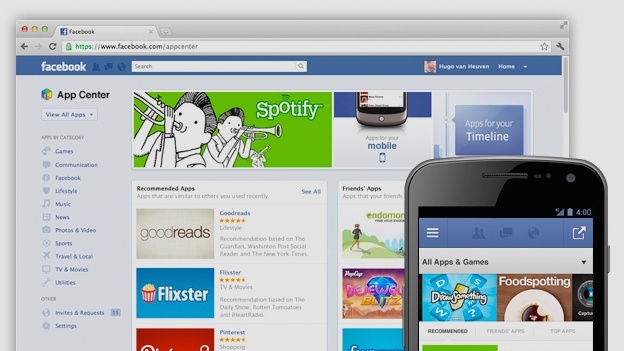
    Facebook on Thursday launched it’s App Center to enable it’s billions of users to find and play games and use other apps. The App Center  will be made available on it’s website and to Android and iOS, where users can send apps to their phones and then get redirected to the App Store / Google Play to download it if necessary.

    Most users are introduced to new apps through the irritating requests that fill up the notifications panel, but looks like that will change now. The app center helps you find new games based on searches or your preferences. 

    The new App Center will initially feature about 600 Facebook apps, mostly games, which will undergo a quality check first by the company to maintain a particular standard. Games, such as Zynga’s “CityVille” and Electronic Arts’ “The Sims,” are the most popular types of apps on Facebook.

    It will be made available to users from the US first, with the rest to follow later. 

iGyaan Network
Privacy Overview

This website uses cookies so that we can provide you with the best user experience possible. Cookie information is stored in your browser and performs functions such as recognising you when you return to our website and helping our team to understand which sections of the website you find most interesting and useful.