Tag: ipod

  • Apple Confirms iPhone Event on Sep 12, 10:30 PM IST

    Apple Confirms iPhone Event on Sep 12, 10:30 PM IST

    Apple has invited members of the Press and media to attend, what is supposedly going to be the next iPhone Launch, at San Francisco. Several rumors and leaks despite the lock downs by Apple, seem to have shaken the world of technology. Apple products have by far been the best kept secret, but this time around it just seems everyone knows what to expect. Although rumours of a separate iPad -Mini event seem to be doing rounds, we are still skeptical of any such announcement. 

    The event starts at 10:30:00 PM IST on 12 September 2012 , we will bring you all the dirt and coverage as we can.

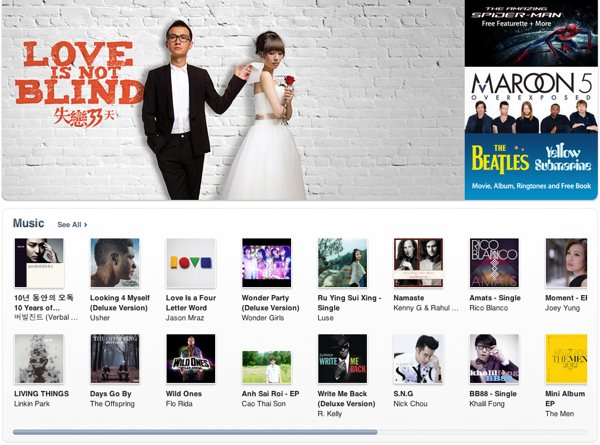
  • Apple Brings iTunes to Hong Kong, Singapore and 10 others in Asia, India left Out!

    Apple Brings iTunes to Hong Kong, Singapore and 10 others in Asia, India left Out!

    Apple has finally started to branch out into what is a major chunk of their earning region. Hong Kong, Taiwan and Vietnam are among the dozen new countries where Apple has just launched their iTunes store for music and movies. Other countries include Brunei, Cambodia, Laos, Macau, Malaysia, the Philippines, Sri Lanka and Thailand. If you are asking then the answer is no, India was not included. 

    The company has left out India from the mix, possibly in comparison to the number of account holders. Hopefully, they can roll out the store in the coming months.

    [Apple]

  • Apple Starts seeding iOS 6 Beta 2 to Devs

    Apple Starts seeding iOS 6 Beta 2 to Devs

    While everyone waits the arrival of the next big OS for your iDevice, Apple is working hard to get it ready. The company has pushed out Beta 2 to the developers for testing, there are no special additions the primarily focus is on the bug fixes leading the software closer to a final release. There are still other betas expected before the final release comes out, So, hold on to your horses. 

    Those who have active developer accounts can download the latest betas from their accounts now.

    [9to5 Mac]

  • iOS 6 and How : Top 6 Features of iOS 6

    iOS 6 and How : Top 6 Features of iOS 6

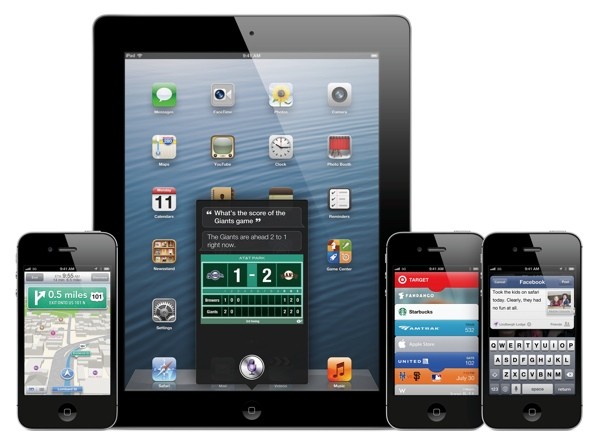
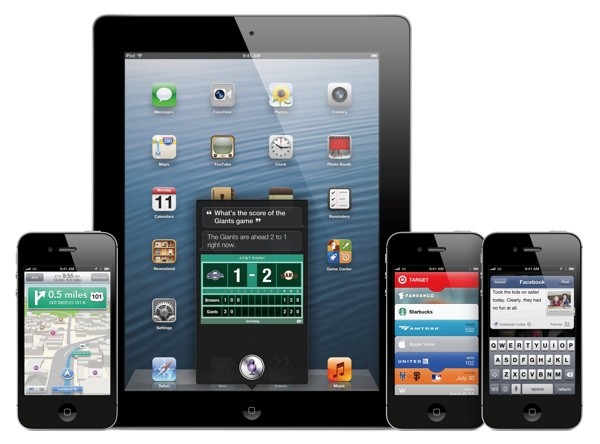
    Apple has just announced the new iOS 6 for their iOS Devices, and incase you have any doubts we have a compiled list of what device gets what features from iOS 6: here. The new iOS 6 has 200 new features. Some are minor, like Mail VIP inbox, and some are intense and exciting, like a brand new Maps app complete with 3D rendering. Now, Apple only showed off ten of the new features and we are taking about the top 6 of those features.

    1.Phone

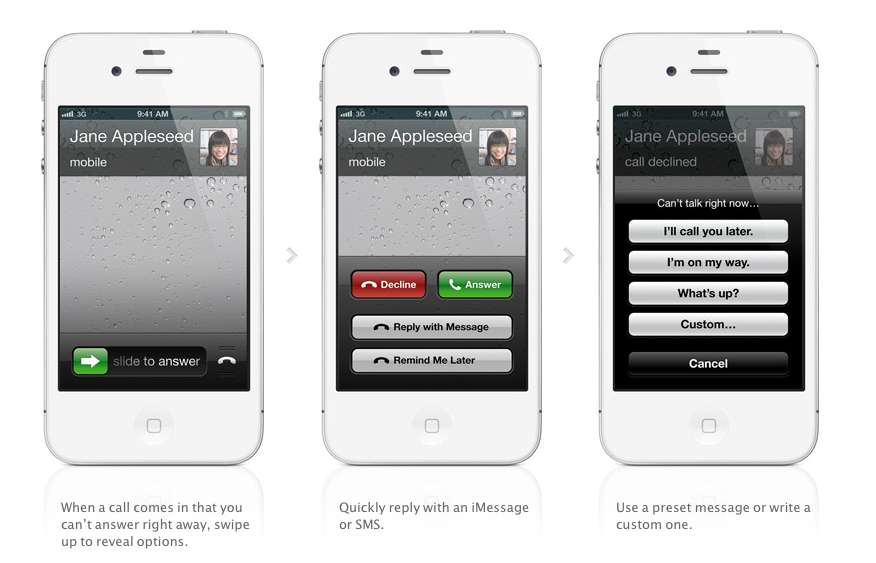
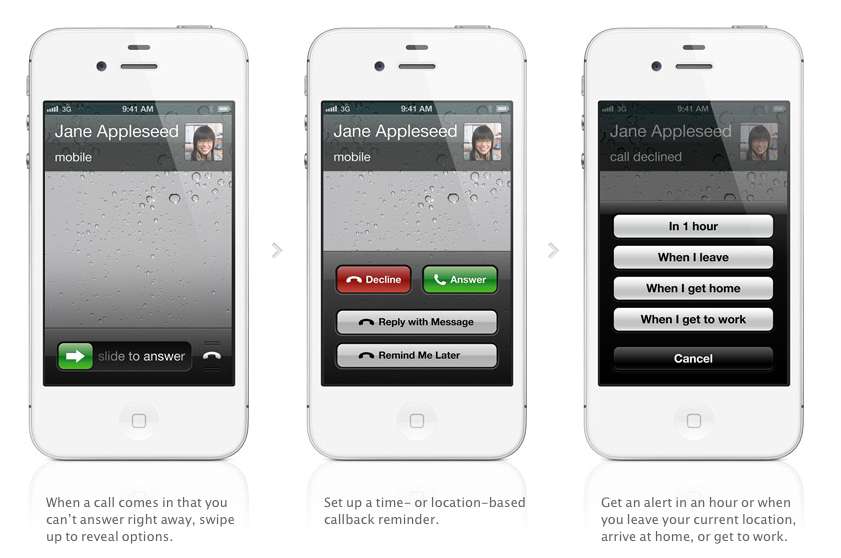
    The biggest new improvement to the iOS has to be the Phone app, if you swipe up during an incoming call (much like the Camera shortcut), two small banners will appear at the bottom of the screen right above the Answer and Ignore buttons. These banners will allow you to either remind yourself to call said person back, or text message them.

    With options for reminders like, when i leave (current location) or when i reach home, etc. Making the phone a completely different device all together. There are also text replies, which Nokia devices have had forever now, there are a couple quick replies like “I’ll call you later” or “What’s up?” which can be sent with the press of a button.

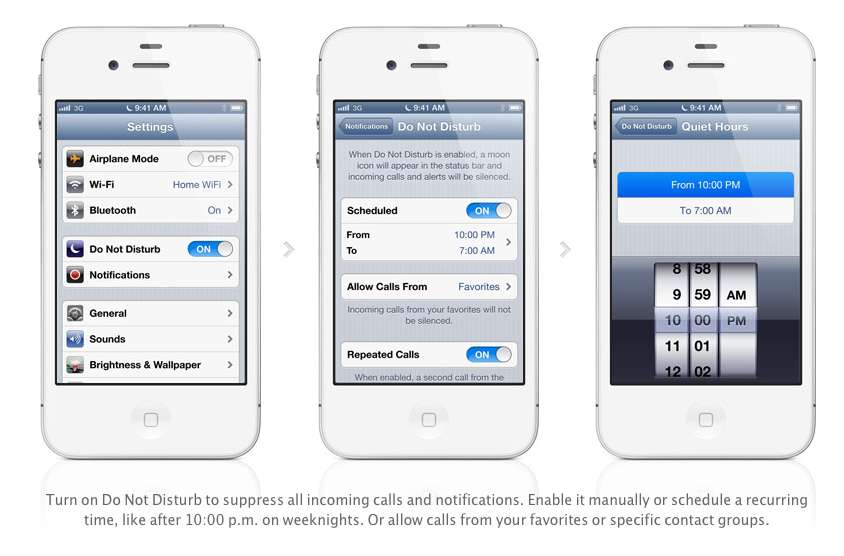
    Apple has also added a Do Not Disturb mode, Users will be able to block out all incoming calls and messages. The messages and notifications will come but the screen will not light up. Also banners, alerts, noises, flashing LED lights will not be a bother. ‘

    2. Maps

    After acquiring three mapping companies over the past few years, Apple has finally released their own Mapping solution for their iOS devices, and bid Google a fair goodbye. This couldn’t have happened sooner, considering the non-reliable Google Maps especially in countries like India.

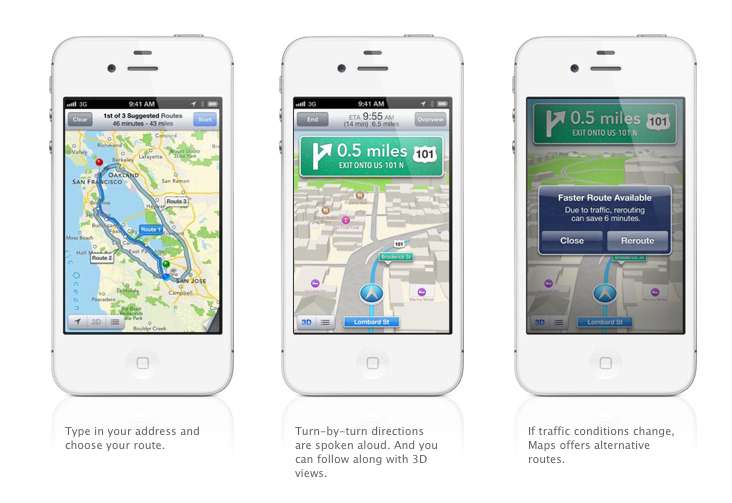
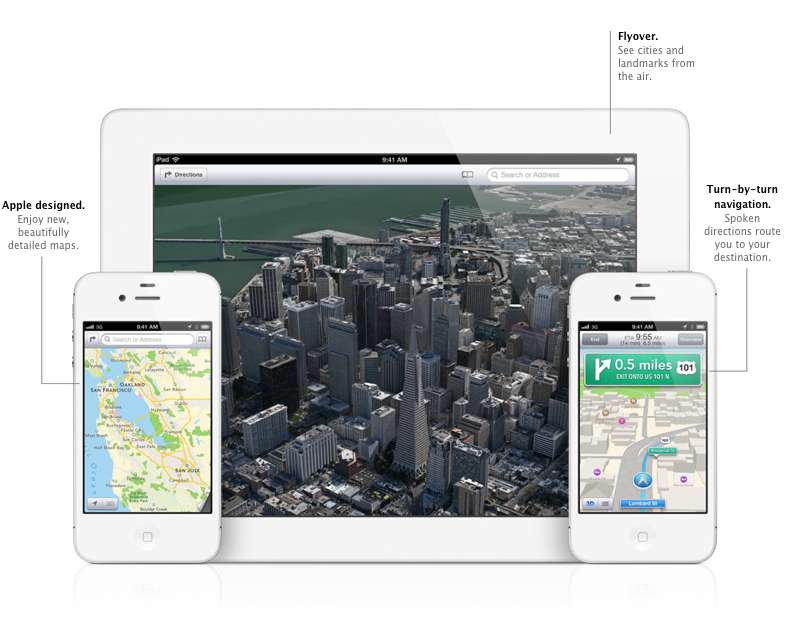
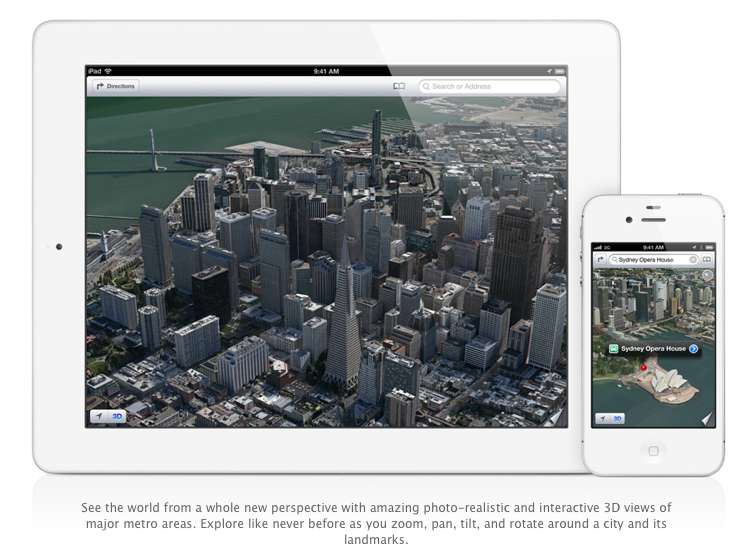
    Apple designed the whole system themselves, including the cartography, which is why you may notice a differently colored icon for Maps come iOS 6 update time. The app will offer turn-by-turn navigation and, most notably, a 3D “Flyover”, You’ll be able to pan, tilt, zoom, and rotate inside Flyover mode.

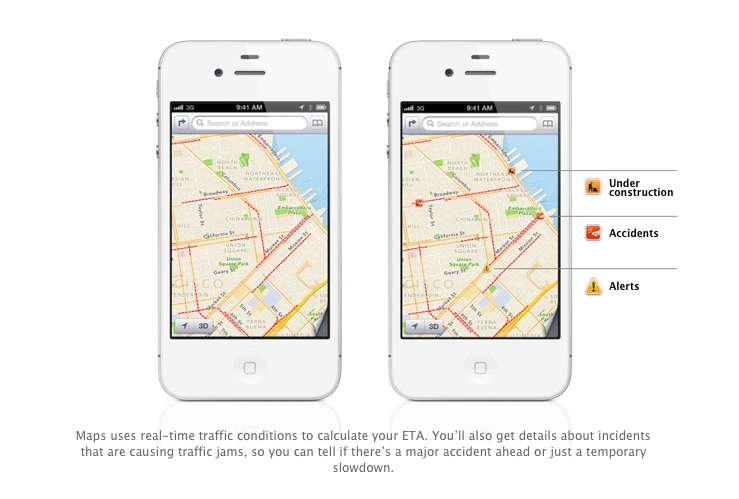
    Turn by Turn directions are said to be made available globally, hopefully in India as-well. They a spoken aloud in the familiar voice of Siri, the maps will be available to be viewed in 3D mode, and will offer different routes should traffic conditions change up the ETA. Traffic conditions will be monitored by crowd sourced updates, (it is known that these updates are powered by Waze, Getchee, Localeze, Urban Mapping, DMTI, MapData Sciences and, of course, TomTom.) 

    The Maps will be available full-fledged for the whole world and according to Apple have listings for over 100 million small businesses, with Yelp listings integrated.


    3. Facebook Integration

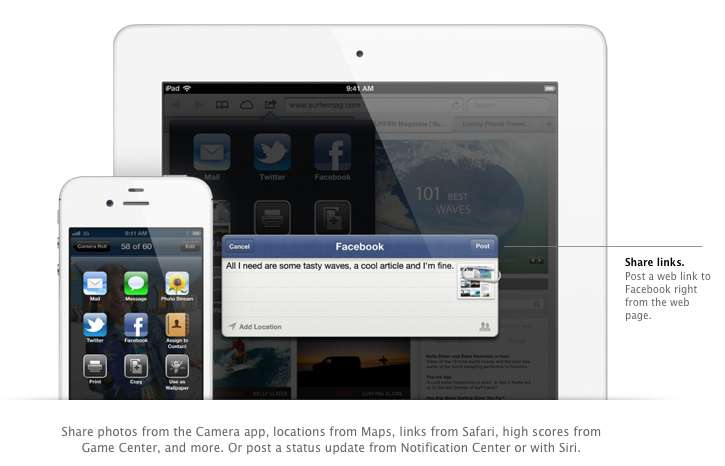
    Although it was already known that Apple was going to implement this add-on in iOS, but the sheer method and deep integration has left us in awe of the OS. After signing in once with your username and password, you’ll be able to post instantly to Facebook from anywhere in the new mobile operating system. In fact, if your hands are busy , Siri can do it for you.

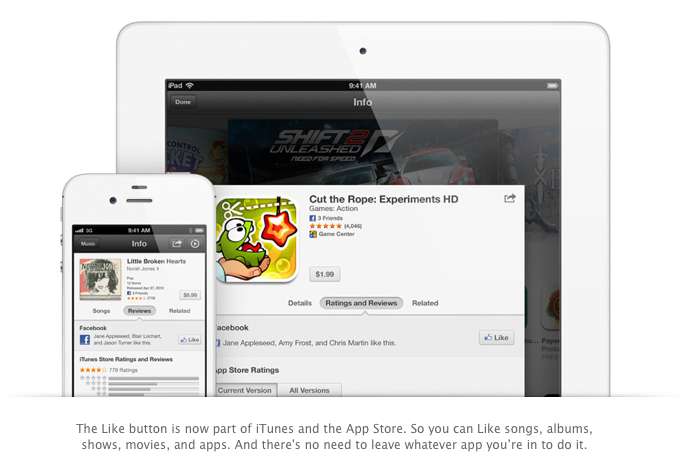
    Photos, links, locations, Game Center content, “and more” can all be posted straight to the Social Network, and you are now able to “Like” different apps and songs in iTunes and App Store. Apple also opened up a public Facebook iOS 6 API, for developers to include integration in their apps.

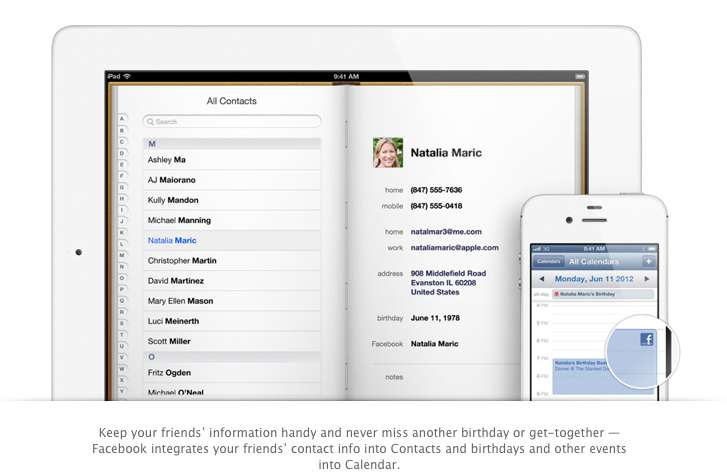
    All your event and Birthdays from your Facebook are seamlessly synchronized with the calendar app to give you updates and reminders in real time on your personal iOS device.

    4. Passbook

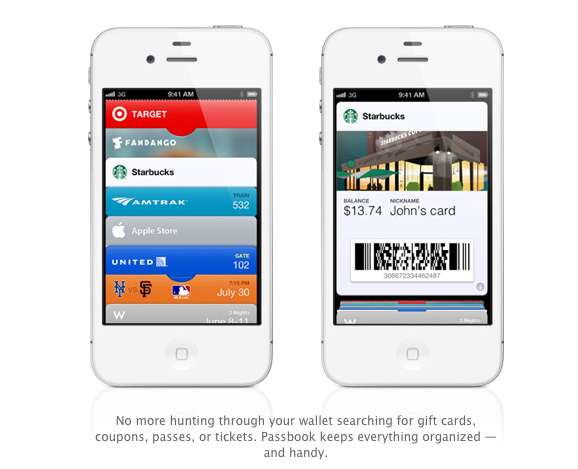
    Imagine a world where you didn’t have a huge stack of promotional membership cards, discount cards, access cards, tickets etc, Just one simple consolidated pass. That may actually come true with Passbook, Apples new app that allows you to store movie tickets, boarding passes, coupons, and retail loyalty cards in one place. You can scan your iPhone to check in for a flight, get in to a movie, or redeem a coupon.

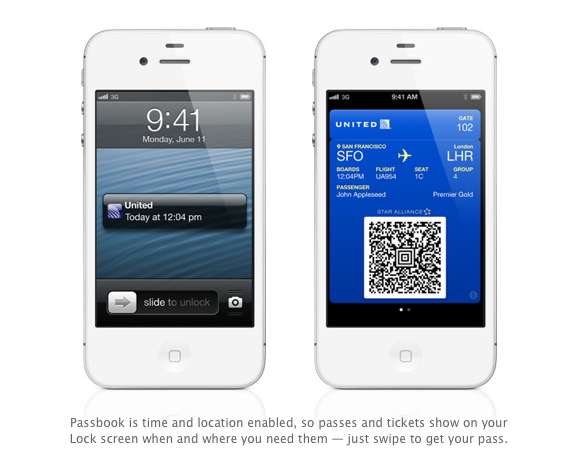
    The App also has geolocations, so the minute you walk into your favorite coffee shop, (example used Starbucks) the card will pop up as a notification, it will display the balance and can be scanned to be redeemed while ordering. Similarly, you arrive at the airport, your boarding pass will appear as a notification on the home screen for easy access.

    The Passbook app can even check to see if your flight is delayed or if your gate has changed, and alerts you immediately. If the Gate number is changed it automatically updates on your Passbook. 

    This service will kick off in the US , but we are pretty sure globally it will become a hit, especially with retailers looking to cut costs. Starbucks, Fandango, Target, Amtrak, United, the Apple Store, MLB.com, and W Hotels are already on board, but none of those are a part of the Indian Businesses list. 

    We are Hopeful that passbook catches on really fast in India. So all your movie tickets show up in your iOS device.


    5. Siri

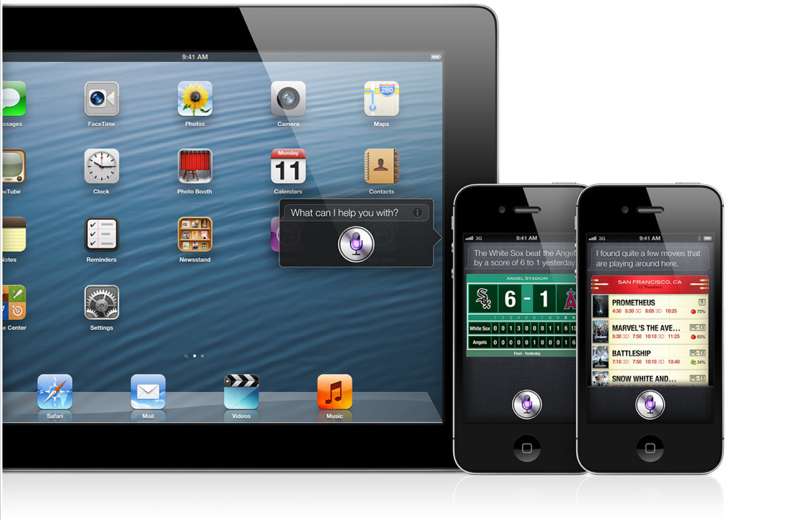
    Siri comes to the world fully, with local searches and total availability. But, thats not the big news. The big news according to Apple is that Siri can now open apps, so if you are like us and have a ton of Apps on the iOS device. Then you will constantly find yourself searching for the App in spotlight, iOS 6 eliminates that by allowing Siri to open these Apps. Now all you need to do is say ” open Temple Run” and the game starts playing. But , do we really need that?

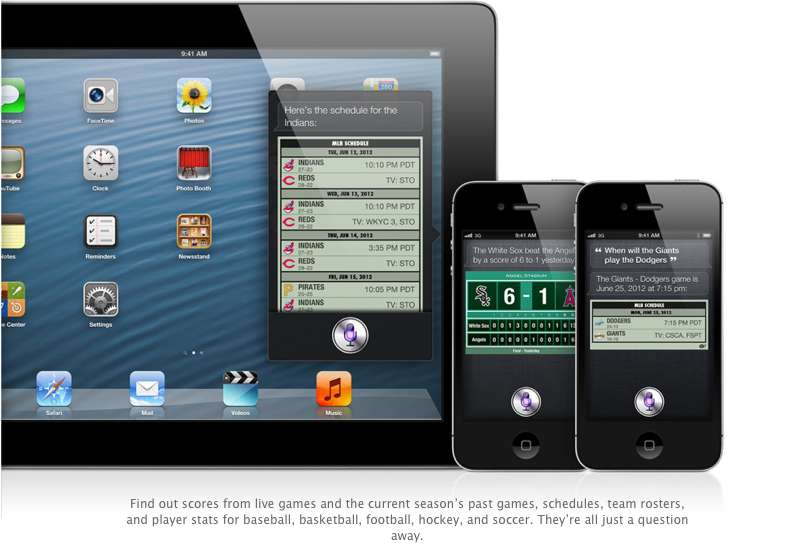
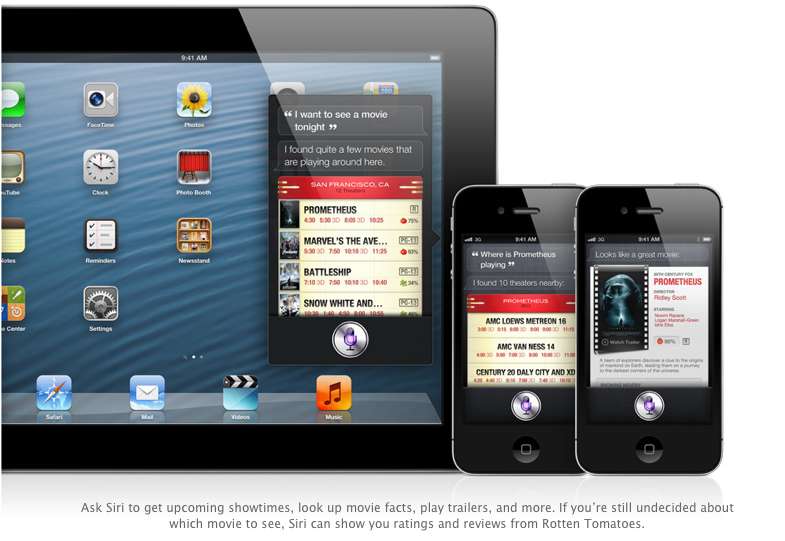
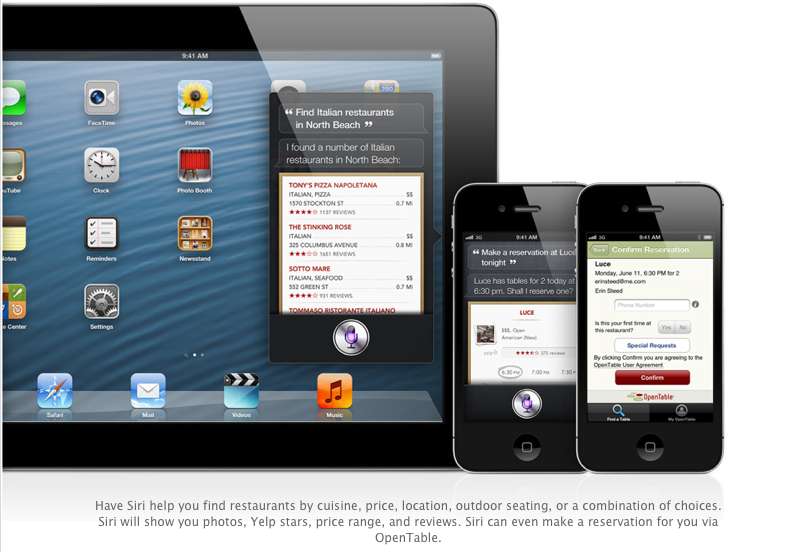
    Siri advancements include access to sports, restaurant, and movie information, with the ability to look up Yelp reviews, ratings and prices along with making reservation on Open Table. Now again most of these features remain US centric, but hopefully they come our side soon. You could then probably look Up IPL rankings by just asking Siri.

    The most interesting reveal was possibly the “Eyes Free” link. This will allow car manufacturers to integrate Siri into their Cars system, by a simple button on the cars steering wheel, which would call up Siri but not light up the display of the phone. Then you can make calls send messages all without taking your eyes off of the road, or hands off of the wheel.

    The other important fact is that Siri will come to the newest gen iPad (launched this year).

    6. Safari

    The major chunk of the mobile internet access comes from iOS devices every year, it was only fair that Apple upgrade their browser, to become even better. iCloud Tabs keeps track of which pages you have open on your devices, so you can start browsing on one device and pick up right where you left off on whatever device is handy.

     Safari now saves web pages, not just links, in your Reading List, so you can catch up on your reading even when you can’t connect to the Internet. The best addition according to us is the ability for the browser to upload images from the photo gallery, when you want to create a listing on Ebay etc, or wanna share a photo on Facebook from the browser.

    You can take photos and video, or choose from your Camera Roll, without leaving Safari. When you really want to see the whole picture, turn your iPhone or iPod touch to landscape and tap the full-screen icon to view web pages without distractions.

    iOS 6 was released as a beta yesterday, but the final version will ship “This Fall”. iOS 6 will also allow FaceTime calls over cellular (Read – 3G – 4G) and new accessibility features, that will allow you to lo

    What is your favorite feature of the new iOS?

  • Which iOS device will get what features of iOS 6 : Here is the roundup

    Which iOS device will get what features of iOS 6 : Here is the roundup

    Do you own an iOS Device? Are you eagerly waiting for the iOS 6 update? 

    If the answer is yes, you will be surprised to know that not all features will come to all iOS devices for iOS 6.  Apple has gone to the trouble of alerting would-be upgraders just what features they’ll get when they check for the update this fall.

    Only if you own an iPhone 4S will you be able to enjoy all the features of the iOS 6 else the most compatible device will be iPAD 3rd Gen. Check out the full list of upgrade features below also see what your device gets.


        iPhone 3GS

    iPod touch

    iPhone 4 iPhone 4S iPad 2  iPad (2012)
    Chinese service integration   X X X X X X  
    Facebook integration   X X X X X X  
    FaceTime over 3G/4G   X X  
    Flyover and turn-by-turn GPS   X X X  
    Guided Access   X X X X X X  
    Made for iPhone hearing aids   X  
    New content stores   X X X X X X  
    Offline Reading List   ? X X X X  
    Passbook   X X X X  
    Phone replies and reminders   X X X  
    Safari tab syncing   X X X X X X  
    Shared Photo Streams   ? X X X X  
    Siri   X X  
    VIP list, flagged/VIP mailboxes   ? X X X X
  • Absinthe 2.0 arrives with less fanfare, jailbreaks all in one click , except iPad 2 35nm

    Absinthe 2.0 arrives with less fanfare, jailbreaks all in one click , except iPad 2 35nm

    Absinthe 2.0 has been released,  this tool developed by the “Jailbreak Dream Team” (Chronic-Dev and iPhone Dev), and will support all iPhone and iPad versions, with the exception of iPad2,4.

    The jailbreak tool can also be installed on iPod3,1 and 4,1 models. Assuming your iOS device is up and running with firmware 5.1.1 , you can download the latest tool for Mac or PC from the links below.

    Let us know if you want a quick tutorial video, in the comments section below.

    [greenpois0n]

  • Facebook Pages Manager gets soft launch in select iOS App Stores

    Facebook Pages Manager gets soft launch in select iOS App Stores

    If you are a Page owner, you will know the importance of stats, then the new app from Facebook on the Apple iOS AppStore might just be what you need. If you live in Australia, New Zealand or Ireland, or have an account in any of those countries, you can download the app which was secretly launched yesterday.

    Page Manager app lets administrators keep an eye on page-specific notifications and Page Insights, including likes, reach etc. The app is currently only iOS specific, and we are unaware when the app will be fully launch.

    [iTunes Store]

  • Apple Q2 Earnings show net profit of $11.6 billion, $39.2 billion in revenue

    Apple Q2 Earnings show net profit of $11.6 billion, $39.2 billion in revenue

    Talk about big bucks, while companies stubble to hit the million mark, Apple continues to show good results Quarter over Quarter. The new numbers rank in at US $ 39.2 Billion in Revenue for the company , with upwards of 30 million iPhones sold and 12 million iPads sold.

     The new $12.30 earnings per share, compared to an estimated $10.04 earnings per share – adds up to $39.2 billion in revenue and $11.6 billion in profit. The iPhone sales show an 88% growth from the previous years quarter and the iPad sales show a whopping 151% increase over the last years same quarter. 

    Apple also sold over 4 million Mac units, making it a 7 % increase, with the same quarter last year.


    We’re thrilled with sales of over 35 million iPhones and almost 12 million iPads in the March quarter. The new iPad is off to a great start, and across the year you’re going to see a lot more of the kind of innovation that only Apple can deliver.”

    -Tim Cook , CEO Apple

    In a comparison with the last 2 years, Apple’s profits ar double compared to Q2 2011, and Four times compared to Q2 2010.

    [Apple]

  • Apple iOS 5.1 goes live today

    Apple iOS 5.1 goes live today

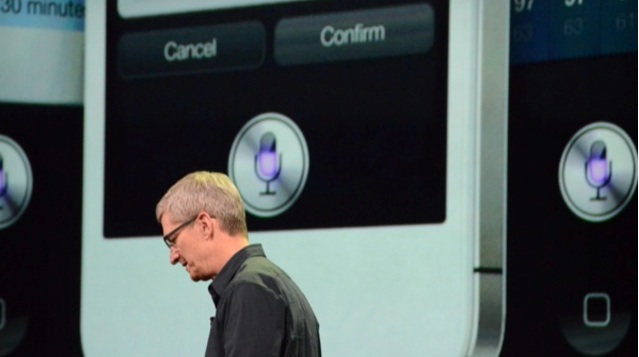
    A very convenient time to announce new OS updates, at the next gen iPad launch. Apple CEO Tim Cook has just announced that iOS 5.1 is going live today. It will bring Japanese language support for Siri. The update is available today and will be rolling out in Japan over the next few weeks.

  • App A Day: Tiny Tower

    App A Day: Tiny Tower

    Do you remember when you were younger, there used to be a game called SimTower? Today we bring you another free game for your iDevice called Tiny Tower which is kind of a remake of the older game. Tiny Tower lets you build a tiny tower and manage the businesses and bitizens that inhabit it. The objective is to build the highest most revenue generating tower that you can.

    The game starts out very simply. You have a lobby on which you have to construct a new floor. You start with a simple residential floor. It can hold 5 “Bitizens” who pay you rent every day and work for you in your tower. Once your residential floor is completed, you can build your first business!

    All businesses require employees. While playing, you’ll come across many different bitizens with a variety of strengths and weaknesses, It is up to you to assign the right bitizen to the right job. Along the way, you may just give a few people their dream jobs.

    When you tap a business floor, a new interface pops up that allows you to hire and fire people as well as to produce items for sale. Different businesses produce different items, and each item is prepared in a different quantity and in a different amount of time. Each business can produce three levels of products. The first level sells the cheapest and is produced in the least amount of quantity, time and money, while the third level sells for the highest price and is produced in a higher quantity but is more expensive and takes the maximum amount of time to produce. To produce a level 1 item, you need to have one employee, two employees for level 2 and three employees for level 3. Once items are ready, the business has to be “stocked” by tapping the business again. Once a business is stocked, it will continue to sell products even if you aren’t playing the game while it still has stock remaining. Once it is sold out, the business will close down and you start the whole process again.

    A really easy, though low paying, way to make money is to do the job of the elevator attendant. From time to time, different people will walk into the lobby and request to be dropped to a specific floor. While this sounds easy, when your tower reaches 20+ floors, you’ll realize that it starts to take a while for you to get from the lobby to the floor and back.

    Sometimes special bitizens with a large VIP label show up. VIPs provide various advantages to your tower. They range from a real estate agent who can instantly fill up a residential floor to a rich tycoon who buys out all of one item from the business that you take him to. When a VIP appears, you can drop them to the floor that you feel will provide you the most advantage. Choose carefully though.

    As your tower starts to grow, you can reorganize floors by moving them and you can also customize the look and feel of each floor by repainting it. Has your tower grown too tall? Relax. You can upgrade your elevator too.
    As with most free to play games, there are various in-app purchases that allow you to buy various “TowerBux” packages. TowerBux can be spent on speeding everything up in your tower, from construction to item production.

    All in all this game isn’t one that you’ll be playing for hours at a stretch, but it is the game that you’re gonna come back to for five minutes every hour.


    Tiny Tower - NimbleBit LLC

  • Airtight brings Airplay features Google TV

    Airtight brings Airplay features Google TV

    Have an iOS device but miss the Airplay feature because you didn’t get the Apple TV ? Well Airtight is the answer, considering you got Google TV instead. A simple app that costs only 99 cents allows you to use any Airplay enabled device like an iPad or iPhone to share with a Google TV on the same network. It currently works with only sharing of Non-DRM Movies, and Music and direct mirroring is not yet supported. So a US $ 99 Apple TV seems like a better option if you still haven’t invested in a Google TV.

    [Airtight]

  • App A Day : Asphalt 6 Adrenaline Free on iOS for today : iPad, iPod & iPhone

    App A Day : Asphalt 6 Adrenaline Free on iOS for today : iPad, iPod & iPhone

    Shocker : Gameloft has made Asphalt Adrenaline 6 full version free for 24 hours on the App Store. The game is one of the most played games on both Android and iOS platforms. You can even take on friends in Online and Local Multiplayer mode for up to 6 racers.  The game is only free for today so make sure you get it before the offer runs out.

    The total download is 515.4 MB so make sure you have a decent connection.

    [Download here]

  • Apple new ‘digital handshake’ will be powered by invisible ink, according to patent

    Apple new ‘digital handshake’ will be powered by invisible ink, according to patent

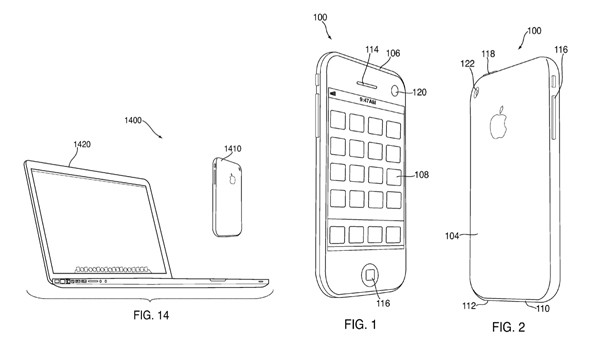
    Apple has filed a new patent that will enable the use of next-generation cameras and invisible ink to negotiate digital handshakes. 

    Snap a picture of a cash register with a barcode and your iDevice will generate a unique ID to pair up. but in order to keep the technology secure, the codes would have to be painted on with “invisible” fluorescent coatings. Similarly to share information between 2 iPhones or iDevices, the screen  of one will display the information while the camera from the other will simply click to transfer the info.

    While the whole world is looking forward to NFC, you can leave it up to Apple to think of a different standard. Remember the whole  world was using regular size sim cards before apple managed to make the Micro-sim a standard. 

    USPTO (1)USPTO (2)

  • GarageBand comes to iPod Touch and iPhone (PR)

    GarageBand comes to iPod Touch and iPhone (PR)

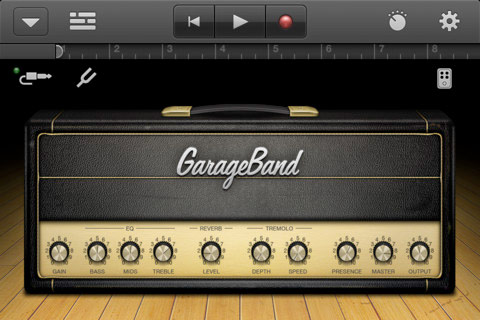
    This is one of those moments where some of you go like “whatever” and some are like “awesome”. The popular Apple official GarageBand app for the iPad has been converted to fit the iPhone and iPod Touch.  The app enables users to record and mix up to eight tracks and then share the finished product with friends or send it to your Mac to keep working on it in GarageBand for Mac or other softwares like Logic Pro.

    The App costs $4.99 and costs nothing if you already bought it for the iPad.

    Get it Here

    US Store:

    GarageBand - Apple

    India Store:

    GarageBand - Apple


    [toggle title_open=”Press Release” title_closed=”Press Release” hide=”yes” border=”yes” style=”default” excerpt_length=”0″ read_more_text=”Read More” read_less_text=”Read Less” include_excerpt_html=”no”]


    GarageBand Now Available for iPhone and iPod touch Users

    CUPERTINO, California-November 1, 2011-Apple® today announced that GarageBand®, its breakthrough music creation app, is now available for iPhone® and iPod touch® users. Introduced earlier this year on iPad®, GarageBand uses Apple’s revolutionary Multi-Touch™ interface to make it easy for anyone to create and record their own songs, even if they’ve never played an instrument before.

    “GarageBand on iPad has been a big hit and we think customers will love using it on their iPhone or iPod touch,” said Philip Schiller, Apple’s senior vice president of Worldwide Product Marketing. “The innovative Multi-Touch interface combined with Smart Instruments makes it easy to create great sounding music, even if you’ve never studied music or played an instrument before.”

    GarageBand features a collection of fun Touch Instruments that sound great and make it easy for beginners or experienced musicians to play and record keyboards, guitars, drums and basses in a wide variety of styles. Smart Instruments now allow you to choose from an extensive new library of custom chords so you can play and strum along with your favorite songs.

    You can plug your electric guitar into iPad, iPhone or iPod touch to play and record through classic amps and stompbox effects, or record your voice or any acoustic sound using the built-in microphone. GarageBand allows you to record and mix up to eight tracks and then share your finished song with friends or send it to your Mac® to keep working on it in GarageBand or Logic® Pro.

    Pricing & Availability
    GarageBand 1.1 for iPad, iPhone and iPod touch is available on the App Store™ for $4.99 (US) to new users, or as a free update for existing GarageBand for iPad customers. GarageBand is a universal app that runs on iPad, iPad 2, iPhone 3GS, iPhone 4, iPhone 4S and iPod touch (3rd & 4th generation).

    [/toggle]


  • Apple updates iPod nano with multitouch display starting US$ 129 (PR)

    Apple updates iPod nano with multitouch display starting US$ 129 (PR)

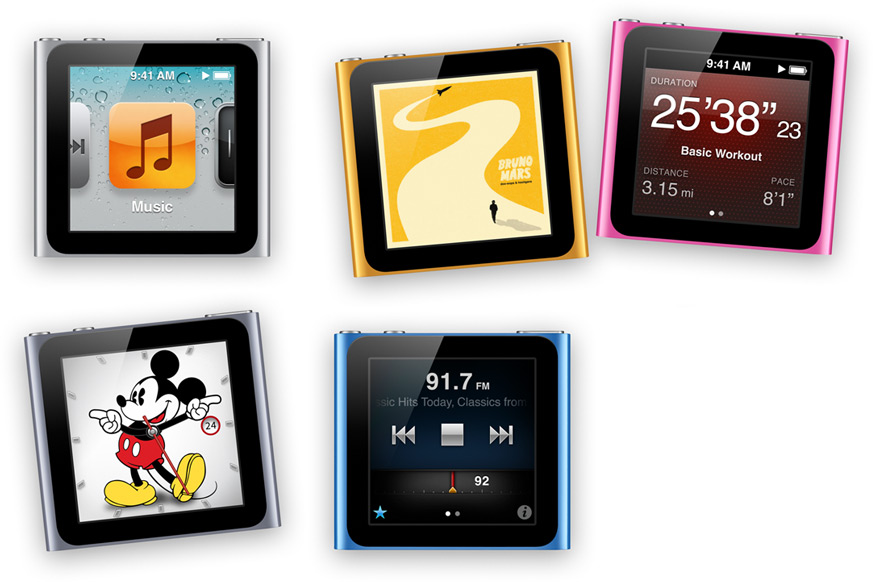
     Apple has updated the iPod nano with a new touchscreen display.

    With tons of watchband accessories that were made available for the last-generation nano.

    Apple has also created 16 new clock faces on the media player.

    The new Nano will automatically begin tracking your walk or run.thanks to the new fitness trainer.

    The new nano is available now and Apple is stocking 7 different colors. The 8GB model is priced at $129 and the 16GB mode is priced at $149.


    [toggle title_open=”Press Release” title_closed=”Press Release” hide=”yes” border=”yes” style=”default” excerpt_length=”0″ read_more_text=”Read More” read_less_text=”Read Less” include_excerpt_html=”no”]Apple Brings Great New Features & More Affordable Pricing to iPod touch & iPod nano

    CUPERTINO, Calif.–(BUSINESS WIRE)–Apple® today announced great new features and more affordable pricing for both iPod touch® and iPod nano®. iPod touch will be available in new black and white models starting at just $199, including Apple’s new iOS 5 and iCloud® services. The new iPod nano is available today starting at just $129 and features a redesigned user interface, 16 new digital clock faces and improved built-in fitness features.

    “iPod has revolutionized the way we listen to music and with over 320 million sold is the world’s most popular music player,” said Philip Schiller, Apple’s senior vice president of Worldwide Product Marketing. “iPod touch, now available in both black and white, is the best selling iPod ever, and with iOS 5 and iCloud it is better than ever.”

    The new iPod touch includes iOS 5, the world’s most advanced mobile operating system, which includes over 200 new features including iMessage™, Game Center, Notifications and Wi-Fi Syncing to iTunes®. iMessage brings the functionality of iPhone® messaging to your iPod touch, so you can easily send text messages, photos, videos and contact information to an individual or group on other iOS 5 devices. It also allows you to easily maintain one conversation across all your iOS devices-for free-with notifications, read receipts and typing indication.* Game Center enhancements include the ability to add photos to your profile, purchase new games from within the Game Center app, and even easier ways to find friends and new games.

    iPod touch also works with iCloud, Apple’s breakthrough set of free cloud services, including iTunes in the Cloud, Photo Stream and Documents in the Cloud, that work seamlessly with your iPhone, iPad®, iPod touch, Mac® or PC to automatically and wirelessly store your content and push it to your devices. When content changes on one device, all your other devices are updated automatically and wirelessly.

    iPod nano now features larger icons for even easier navigation of its intuitive Multi-Touch™ user interface, and you can choose from 16 new digital clock faces, ranging from classic analog looks to your favorite Disney characters including Mickey Mouse and Minnie Mouse. iPod nano now tracks your runs and walks right out of the box with no accessory required, making it even easier to get your fitness program up and running. iPod nano can track the time, pace and distance of your run, the calories you burn, and the number of steps you walk. iPod nano encourages you with motivational real-time voice feedback during your run, available in seven languages, while listening to your favorite music or FM radio station. You can also easily upload workouts to the Nike+ website to set goals, track your progress and challenge friends. The ultra portable iPod nano is available in seven colors including silver, graphite, blue, green, orange, pink and (PRODUCT) RED.

    With the App Store™ on iPod touch, users have access to the world’s largest and best collection of over 500,000 apps, including over 100,000 game and entertainment titles. Customers also have the iTunes Store® at their fingertips, giving them instant access to the world’s largest catalog of over 20 million songs, 85,000 TV shows and 14,000 movies to purchase and download directly to their iPod touch.

    iPod is the world’s most popular family of music players. Apple’s holiday lineup includes iPod shuffle® for just $49; iPod nano with Multi-Touch starting at just $129; iPod touch available in black or white, including iOS 5 and iCloud, starting at just $199; and iPod classic® in a 160GB model for $249.

    Pricing & Availability

    iPod nano is available today for a suggested price of $129 (US) for the 8GB model and $149 (US) for the 16GB model. Both models are available in silver, graphite, blue, green, orange and pink through the Apple Store® (www.apple.com), Apple’s retail stores and Apple Authorized Resellers. The 8GB and 16GB iPod nano (PRODUCT) RED is available through the Apple Store (www.apple.com) and Apple’s retail stores. iPod nano requires a Mac with a USB 2.0 port, Mac OS® X v10.5.8 or later and iTunes 10 or later; or a Windows PC with a USB 2.0 port and Windows Vista or Windows XP Home or Professional (Service Pack 3) or later and iTunes 10 or later.

    iPod touch with iOS 5 and iCloud will be available October 12 in black and white for a suggested price of $199 (US) for the 8GB model, $299 (US) for the 32GB model and $399 (US) for the 64GB model through the Apple Store (www.apple.com), Apple’s retail stores and Apple Authorized Resellers. iPod touch requires a Mac with a USB 2.0 port, Mac OS X v10.5.8 or later and iTunes 10 or later; or a Windows PC with a USB 2.0 port and Windows Vista or Windows XP Home or Professional (Service Pack 3) or later and iTunes 10.5 or later. iOS 5 will also be available as a free software update for iPod touch (third and fourth generations) customers allowing them to experience the amazing new features including iMessage, Game Center, Notifications and Wi-Fi Syncing to iTunes.

    *iMessage requires Wi-Fi.

    Apple designs Macs, the best personal computers in the world, along with OS X, iLife, iWork and professional software. Apple leads the digital music revolution with its iPods and iTunes online store. Apple has reinvented the mobile phone with its revolutionary iPhone and App Store, and has recently introduced iPad 2 which is defining the future of mobile media and computing devices.

    NOTE TO EDITORS: For additional information visit Apple’s PR website (www.apple.com/pr), or call Apple’s Media Helpline at (408) 974-2042.

    © 2011 Apple Inc. All rights reserved. Apple, the Apple logo, Mac, Mac OS, Macintosh, iPod touch, iPod nano, iCloud, iMessage, iTunes, iPhone, iPad, Multi-Touch, App Store, iTunes Store, iPod shuffle, iPod classic and Apple Store are trademarks of Apple. Other company and product names may be trademarks of their respective owners.

    Photos/Multimedia Gallery Available: http://www.businesswire.com/cgi-bin/mmg.cgi?eid=50017267&lang=en[/toggle]

iGyaan Network
Privacy Overview

This website uses cookies so that we can provide you with the best user experience possible. Cookie information is stored in your browser and performs functions such as recognising you when you return to our website and helping our team to understand which sections of the website you find most interesting and useful.