Tag: office

  • Dropbox Gets Exclusive Real Estate on Microsoft Office Apps

    Dropbox Gets Exclusive Real Estate on Microsoft Office Apps

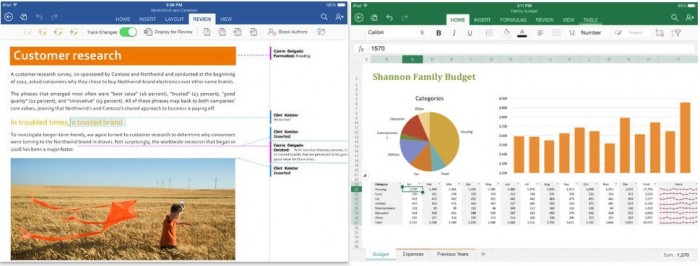
    Couple of weeks ago, Microsoft and Dropbox announced the plan to integrate Office and Dropbox within their web and mobile apps. The feature is now available in its latest app updates for iOS and Android. The move has come as a great surprise for Office users as they can access and edit Office documents from within the Dropbox.

    iOS-and-Android-version-1

    Along with the ability to edit documents right from the Dropbox, users can also access Dropbox from Office apps and share new or edited files from the Office apps using Dropbox’s Share functionality. Dropbox has instructions on how to use the new integration with Microsoft’s Office apps on its website.

    To get started, make sure your Dropbox app is up to date on your iPhone, iPad, or Android phone, then open any Office doc, spreadsheet, or presentation in your Dropbox. Tap the new Edit icon (shown above) to start editing in the latest Office apps. When you’re done, your changes will be saved back to Dropbox automatically.

    Under the partnership, Dropbox gets a prime space that is used by more than a billion people, and the potential to make an even bigger name for itself particularly in the business enterprises. Notably, Microsoft has its own cloud service called OneDrive which will co-exist with Dropbox in the Office for iPad apps, letting users natively browse, open and edit Office documents uploaded on the Dropbox directly within the app.

    You can get the new features through the latest Dropbox app for iOS starting today and the latest versions of Microsoft’s Word, Excel, and PowerPoint Office apps. The integration is also expected to arrive for web users early next year.

  • Microsoft Rolls Out Major Updates of it Office Suite for iPad Users

    Microsoft Rolls Out Major Updates of it Office Suite for iPad Users

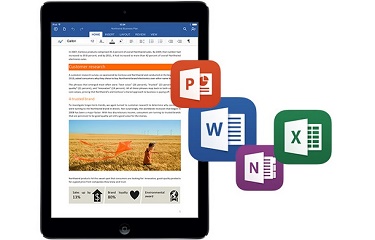
    Microsoft released the first major update to its Office suite for the iPad. Labeled as version 1.1, Word, Excel, and PowerPoint each received several new features that were widely requested since the suite was released on March 27, 2014.

    office-for-ipad-700x266

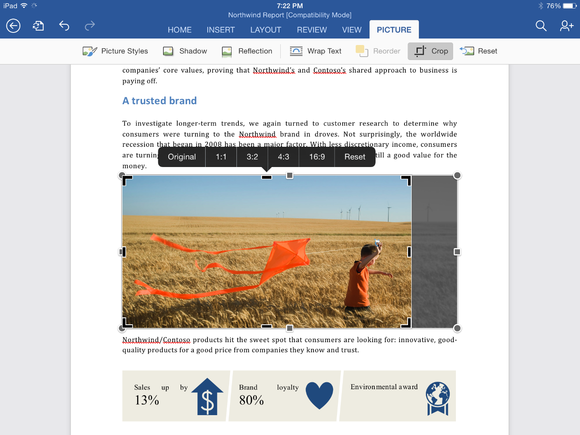
    Although both PowerPoint and Excel received their own unique updates, several features were added to all three apps, including the frequently requested ability to export documents as PDF files. Users can also manually crop photos and images in all three apps using a new crop tool that allows you to choose from a list of popular preset sizes, or create your own. (A reset button is also included.) Finally, Office for iPad also has the ability to import external fonts.

    Word for iPad (1.1 update):

    • Now you can send Word files as PDFs.
    • Picture Tools: Crop to focus on just the right part of a photo, or reset to undo your changes.
    • Fonts: Third-party fonts are now available in the Fonts menu.

    Excel for iPad (1.1 update):

    • Now you can send Excel files as PDFs.
    • Flick to Select: Flick a cell’s selection handle in any direction to quickly and easily select all the data in a row or column.
    • External Keyboard Support: Using an external keyboard is even easier. Use the same keys to input data and move around a worksheet as you would on your PC or Mac.
    • PivotTables: Interact with PivotTables that have source data in the same workbook.
    • Print Options: More paper sizes and scaling options give you more control over the layout when printing your workbooks.
    • Picture Tools: Crop to focus on just the right part of the photo, or reset to undo your changes.
    • Fonts: Third-party fonts are now available in the Fonts menu.

    cropping-a-photo-in-word-for-ipad

    PowerPoint for iPad (1.1 update):

    • Presenter View: View and edit speaker notes, see your next slide, or jump to other slides while presenting.
    • Play Media: Play videos, sound effects, and background music while presenting.
    • Insert Video: Insert videos from your Camera Roll.
    • Picture Tools: Crop to focus on just the right part of the photo, or reset to undo your changes.
    • Presenter Tools: Now you can erase highlights and drawings on your presentation.
    • Send PDFs: Send PowerPoint files as PDFs.
    • Hyperlinks: Add links to your presentation or edit existing ones.
    • Fonts: Third-party fonts are now available in the Fonts menu.

    This update is the second major update the Office software has gotten since its March release. Back in April, the three apps gained some important features that had been missing since the launch, including the ability to print directly from the apps. Microsoft’s Office for iPad apps have proven to be highly successful for the company. During its Q4 earnings call in July, Microsoft announced that its Office for iPad software had been downloaded more than 35 million times.

    microsoft-office-for-ipad

    Microsoft has committed to continually improving its Office for iPad apps, which now directly compete with Apple’s own iWork suite including Numbers, Keynote, and Pages. “As this wave of updates hopefully shows, we’re making good on our commitment to delivering continuous updates and improvements to the Office for iPad apps,” reads the company’s blog post on the new update.

    All of the updates to the new Office apps are currently available and can be downloaded from the App Store for free. While the apps can be accessed for free, unlocking full capabilities, including editing and creating documents, requires an Office 365 subscription. Adding to that, Microsoft’s OneNote app for iPad has also been updated.

  • Microsoft To Launch Office For iPad on 27th March in San Francisco

    Microsoft To Launch Office For iPad on 27th March in San Francisco

    Satya Nadella was recently appointed as the CEO of Microsoft, and he is now all set to host his first press event as a CEO. Microsoft has scheduled an event on March 27 2014,  which will be a special cloud- and mobile-focused event. 

    According to reports, Microsoft is all set to launch the Office for iPad. Having said that, the Office app for iPad should not be any different than the Office for iPhone which was launched last year. The features and the user interface is expected to be the same as seen on the office app for iPhone. 

    This event will work as a warm up for the upcoming events, Microsoft has also scheduled the Build conference next month followed by another anticipated launch of a new version of Windows. 


  • Microsoft Office Mobile For iPhone Is Now Official

    Microsoft Office Mobile For iPhone Is Now Official

    Microsoft has released the Office Mobile application for the iPhone, enabling users to view and edit Microsoft Word, Excel and PowerPoint documents from virtually anywhere.  It is free to download but requires an Office 365 subscription.

    Microsoft Office

    According to the Office Mobile app page on iTunes, Microsoft has carefully optimised the app for the iPhone’s 4-inch display and, as usual with Microsoft’s software, it features full integration with SkyDrive and Sharepoint.

    It’s also synchronised to the extent that there is a ‘Recent Documents’ list for quick access and if you left reading a document on a computer or tablet the iOS app will pick up on exactly the same page via SkyDrive.

    Offline editing will sync with your documents saved in the cloud when a connection becomes available. The app is also tailored to work with documents sent as email attachments.

    Microsoft believes iPad users are better served by the Office 365 web apps anyway and hasn’t (yet) announced this app for the tablet.

    The new app might suggest a closer collaboration between Microsoft and Apple, especially following the slightly hidden announcement at WWDC that the default search engine for Siri will be Bing, not Google.

    Subscribers to Office 365 will get the Office Mobile app to use on up to five iPhones for free, although the service is currently only available in the US. Microsoft have confirmed that they will continue to roll out the service across 136 markets in 29 different languages in the coming days.

  • Microsoft Touts Office 2013 Integration With Skype, Yammer, Cloud

    Microsoft Touts Office 2013 Integration With Skype, Yammer, Cloud

    Whoops! Something went wrong!

    At a press event in San Francisco, Microsoft has unveiled the new Office suite, sporting a new look in line with Windows 8 and Windows Phone 8.

    One of the key features of the new Office is cloud integration using SkyDrive. Users will be able to sync key settings across multiple devices after logging in to SkyDrive. You can continue working on the same document using a different device, as well as share it with others.

    Microsoft also showed off how users can collaborate on Office through social network integration. For example, you can see if your Skype contacts are available from any application in the new Office suite and make Skype calls directly from within Outlook. There’s also the ability to collaborate on documents through Microsoft’s Lync application.

    Good news for tablet users: A Microsoft RT version of Office for ARM-based tablets will be included for free on RT devices, including the Surface. 

    The new Office will have touchscreen capabilities, where users can use taps, swipes, and other gestures to create presentations. You can also draw on your presentations using a stylus.

    Meanwhile, the subscription-based Office 365 will now come with three tiers–Office 365 Home Premium, Office 365 Small Business Premium and Office 365 ProPlus–with pricing information to be announced later.

    Microsoft also unveiled a new version of its notetaking app, OneNote, which will have touch, pen and keyboard input.

    Although Office is currently being used by more than one billion people, it faces stiff competition from cheaper alternatives, such as Google’s suite of Web-based office applications.

  • Word, PowerPoint and Excel come to Nokia phones with Symbian Belle

    Word, PowerPoint and Excel come to Nokia phones with Symbian Belle

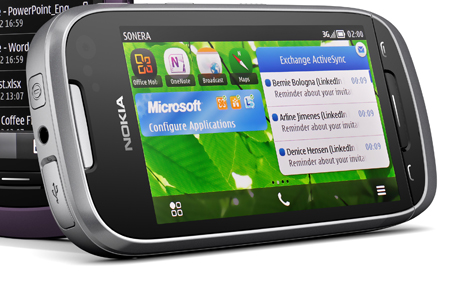
    Nokia and Microsoft have made the mobile versions of Word, PowerPoint and Excel available to select Symbian Belle handsets. The add-on is given through a free software update to those eligible for the update. If you own a  E7, C7, C6-01, X7, Oro, 700, 701 or 603 you can get the apps directly from the Nokia Software Update utility. 

    If you’re a Word user, you’ll appreciate the fact that with Word mobile, you can save or send documents while preserving tables, SmartArt and charts, or the pinch/zoom functionality to easily view and edit documents.

    In PowerPoint mobile, you can edit presentation texts and speaker notes, or use the Outline view to quickly browse through slides. With Excel mobile, you can create charts, or insert formulae and view rich data and charts from anywhere.

    Another really convenient feature of Office Mobile is that it gives you a single view to documents – whether they’re stored on your phone as files, as email attachments, or on your company SharePoint site.

    If you are waiting to get the newer version of Nokia Devices, they might just come preloaded with MS Office goodness.

    [Nokia Conversations]

  • BFRA: Microsoft is preparing a new “Office” for Lion and iPad

    BFRA: Microsoft is preparing a new “Office” for Lion and iPad


    This one is a Blunt Force Rumor Attack.

    According to The Daily, Microsoft may be preparing a series of apps, or a single suite of Office apps to target the iPad market. These apps would directly take on Keynote, Pages and Numbers from the Apple software arsenal. The company is also reportedly prepping an Office Suite update that will add official support for Lion and may be available from the Mac App Store. Apps for the iPad and Mac App store could cost upto US $ 9.99 (the same Apple Charges for its apps) these apps will support sync with Office 360 and will be available before the end of the year 2011

    We already deliver Office on multiple platforms and devices and are committed to expanding in the future, but have nothing further to share today,

    Microsoft in a statement to CNET

     [The Daily] [CNET]

  • Apple – Stylus Patents Approved

    Apple – Stylus Patents Approved

    Apple had applied for two patents for styluses for capacitive touchscreens and other surfaces last year, but the US Patent office has approved them only yesterday. The first patent is for a stylus with a heated conductive tip which would be charged when it is inserted back into the phone to be used with touchscreen devices.

    The second patent is for a stylus which could be used to write on any surface, with the results appearing on a computing device; a phone, tablet or computer, which is programmed to receive the input. This would be similar to the already existing Livescribe pen. These patents leave us wondering just what kind of devices does Apple have is store for release.

  • Microsoft gets Green Signal from Antitrust for Skype Acquisition

    Microsoft gets Green Signal from Antitrust for Skype Acquisition

    Microsoft has been given the US antitrust approval for the large acquisition of Skype for its VOIP integrations within all of its offerings including, and not limiting to, Windows, Xbox and Zune. The total cost of this is set at US $8.5 Billion and the transfer of funds will commence and end in one single sweep.

    Microsoft will be updating the Skype APIs to make them usable within their own infrastructure, and should be updating the end user clients very very soon. Microsoft has constantly repeated that existing Skype users will and should  not be affected by the new changes.

  • Youtube Box Office – Bollywood Online

    Youtube Box Office – Bollywood Online


    The Internets Largest Video sharing website, YouTube, is launching a new channel called YouTube Box Office, which will be showing a new Bollywood blockbuster every month. The best part? You don’t have to pay to watch. The service will be launched with Yash Raj Films’ Band Baaja Baaraat.

    This channel is available to users in India only. It will be blocked to the rest of the world. Other than Bollywood movies, the channel will also showcase regional films, which are already available on the channel.

    This channel could have been created based on the success of the IPL broadcast on Youtube which recieved tremendous response. Recently, the movie Dabaang received 1.3 million hits which just goes to show that the Indian Market is ripe for the picking.

    You can view the channel HERE.

iGyaan Network
Privacy Overview

This website uses cookies so that we can provide you with the best user experience possible. Cookie information is stored in your browser and performs functions such as recognising you when you return to our website and helping our team to understand which sections of the website you find most interesting and useful.