Tag: OPERA

  • Tips to Reduce Data Usage on Android

    Tips to Reduce Data Usage on Android

    In this age of streaming and downloading, where our hunger for data is exponentially growing, most users often find themselves struggling with this ever losing battle of trying to not exceed or finish up their data allowances.

    Data plans have become so expensive that most of us live in constant fear of exceeding our monthly smartphone data allowance, forcing us  to run from one Wifi hotspot to another just to conserve as much data as possible.

    Today, iGyaan brings to you tips and tricks for Android users to conserve data, and help them keep more of their hard earned money away from the clutches of the evil ISPs.

    Chrome Webpage Compression
    screenshot_04


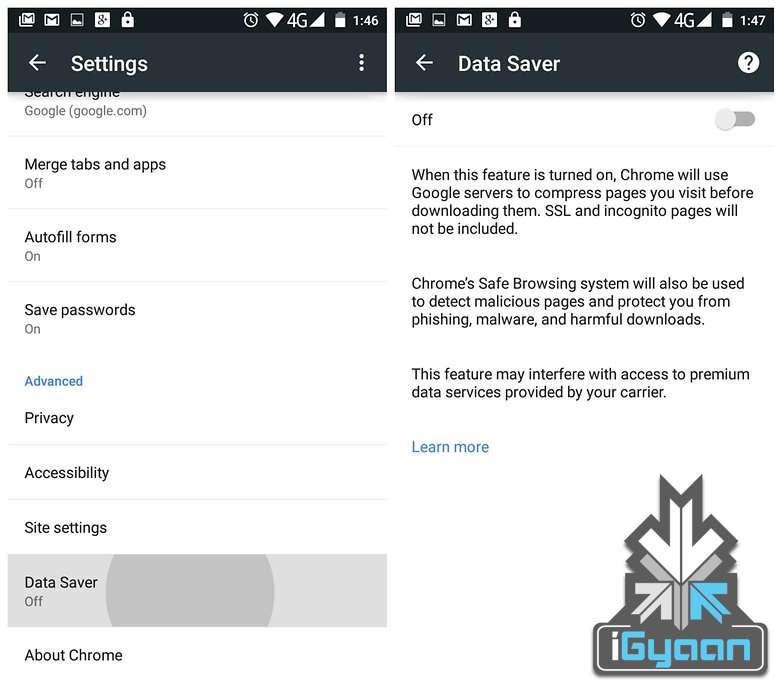
    For users who use Google Chrome for browsing the Internet this tip can help them cut down significantly on data used for browsing. Google claims you can save upwards of 35% of data while using Chrome’s Data Saver feature. When enabled, Google’s servers reduce the amount of data that is downloaded when you visit a web page.

    But such extreme data saving comes at a cost. When the data saver is enabled, certain websites might load slow, while ones with a lot of images displayed not at their best, but to us it seems like a fair trade for the major data savings that this feature provides.

    To activate this feature, the user needs to launch Chrome, tap the three dots in the top right-hand corner, scroll down to the settings button and then click om Data Saver. Just to see the results for yourself monitor Chrome’s data usage after switching the data saver feature on.

    Use Opera for Saving Data on Watching Videos
    screenshot_03

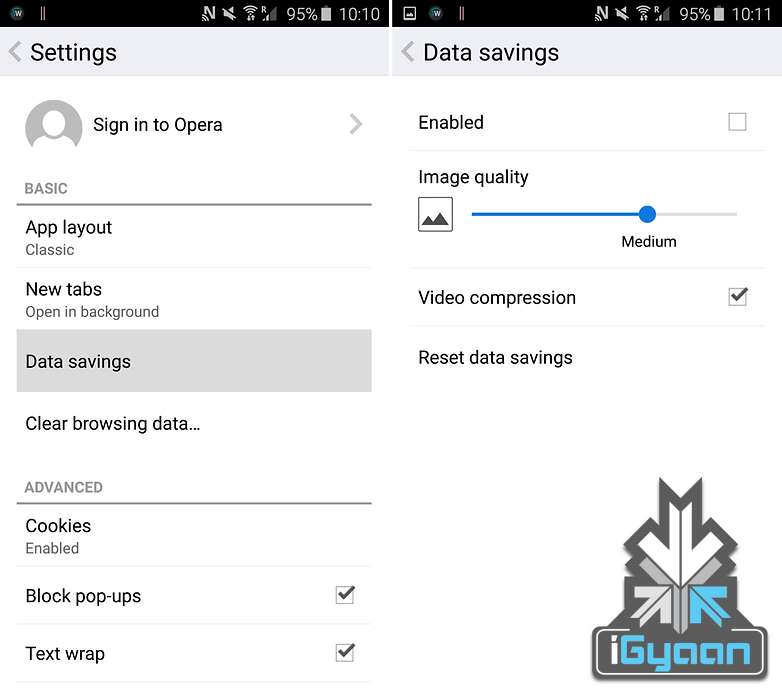
    Much like the Chrome browsers compression technology for web pages Opera for Android provides users with a very nifty trick that allows them to watch compressed videos, resulting in almost similar quality content, but greatly reduced size.

    The end result being reduced data usage for a very faster loading videos. Can’t say we don’t approve. the Opera browser, go to Settings > Data savings and tick the box that says Video compression.

    Restrict Background Data
    screenshot_02

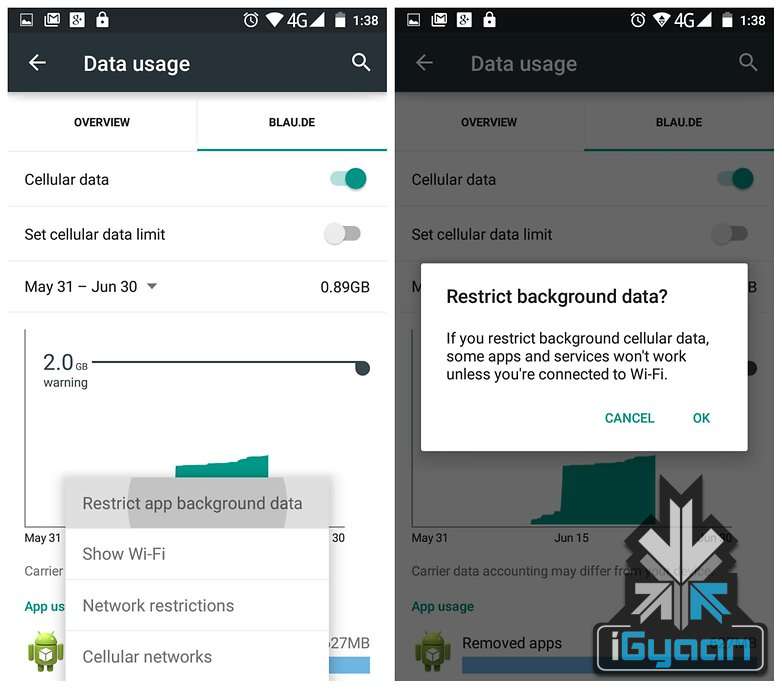
    One of the best ways to conserve data that Google provides Android users is with the option of restricting background data using the inbuilt data saving mechanism of the Android operating system.

    With this feature users can tell Android to restrict background data usage of specific apps, hence helping in greatly reduce data usage. Apps and tasks such as email syncing, feeds updating, weather widgets and so on can be stopped temporarily, and be taken care of when in a Wifi Hotspot area.

    Turn Auto Update Off for Apps
    screenshot_01

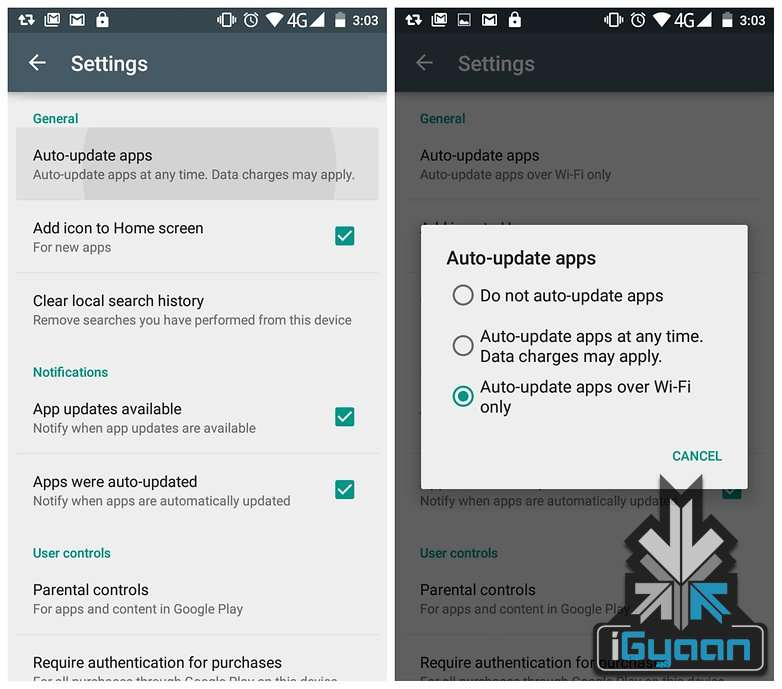
    Android by default sets the Play Store to download updates to apps the moment they are available. Depending on your internet speed, this particular feature if left unattended, can eat through your phone’s data pack very quickly. Switching this to Auto Update Apps Over Wifi Only is recommended.

    Head to the Play Store and head towards the Settings button. On the page you’ll see Auto-Update Apps. Tap this and make sure you either have it set to ‘Do not auto-update apps’ or ‘Auto-update apps over Wi-Fi only’.

    For users looking for more customization, and want to manage individual apps, they can make way to the My Apps page, select an app and then tap the overflow menu to un-check Auto-Update.

    Say Bye to the Facebook App

    Facebook-buys-WhatsApp-feature1

    The Facebook App is infamous for its habit of eating through mobile data for fun. Several reports have found that Facebook’s recommended app is a great drain on mobile data on the Android System along with being a dreaded enemy of your battery life. As such, uninstalling it in favour of the Facebook Lite App is highly recommended.


  • Check Out Vivaldi, a New Browser Aimed at Power Users

    Check Out Vivaldi, a New Browser Aimed at Power Users

    Former CEO and Co-Founder of Opera, Jon von Tetzchner has announced the first preview of ‘Vivaldi’, a new Chromium based browser built primarily for power users. The new browser is still in its Beta phase, and is available for Windows, Mac and Linux.

    It features utilities like Quick Commands, the familiar Speed dial that shows your favourite tabs on the new tabs page along with gesture-based mouse controls. In addition, it gets some new nifty tricks like organising multiple tabs into one stack for easy and clutter free browsing. Another new feature allows users to take notes right in the browser along with taking screenshots.

    vivaldi_browser_teaser_page

    The new browser takes a lot of inspiration from Opera, and von Tetzchner duly acknowledges that.  Vivaldi uses the Chromium (Blink) rendering engine found in Chrome and is built entirely using the latest web technologies including React, Node.js along with a number of node modules.

    As of now, only the technical preview for the browser is available. Though in the coming months, it is likely to add sync, mail support, improved performance and extensions. In addition, the browser will be shaped by the community; hence it will be driven by user demands.

    You can download a technical preview of the Vivaldi browser here. We tried it out for a while, and it seems to be a rather snappy browser that pays homage to Opera. The browser’s interface subtly changes colors as you navigate from one site to another to match the dominant color on the page. It’s certainly got a potential for power users, with nifty features like ‘quick commands’ that helps you search or run commands, identical to OS X’s Spotlight.

  • Opera App Store Reaches 200,000 Apps and 105 Million Monthly Visitors

    Opera App Store Reaches 200,000 Apps and 105 Million Monthly Visitors

    Opera says its effort to build an app store are starting to show traction, with the site now garnering more than 100 million visitors per month with a catalog of more than 200,000 apps for Android, BlackBerry, Symbian, iOS and Java.

    As it stands the store currently plays host to over 200,000 apps and has also undergone a redesign back in 2013 which presumably helped play a part in seeing its user base grow. According to Lars Boilesen, the CEO of Software, “In just over two years, the Mobile Store has shown strong growth – from 18 million monthly visitors to 100 million, and has seen a fivefold increase in the number of apps offered. The compression technology in Opera’s browsers, combined with the broad portfolio of apps in the Opera Mobile Store across many different platforms, have resulted in massive adoption of the store worldwide.”

    Users can access the Mobile Store via Opera’s flagship Mini, Mobile Classic and Opera for Android mobile browsers. The store has been proven as an effective mobile-content distribution platform in several of the world’s fastest-growing mobile markets including India, Russia, Brazil, Indonesia and South Africa

  • Opera Partners With 7 Mobile Makers in India

    Opera Partners With 7 Mobile Makers in India

    Opera announced that the company is focusing on further expanding its India business to drive growth in the South Asian region and has partnered with seven new handset makers, including Micromax, Spice and Wynncom as part of these efforts.

    The companies include Micromax, Videocon, Spice, MoMagic Technologies, Wynncom, Lemon Mobiles and iBall, the original equipment manufacturer will preinstall Opera Mini browser as an exclusive, third-party mobile browser across their upcoming Android devices, the company said in a statement. Opera has also signed two similar OEM partnerships with Symphony Mobile in Bangladesh and Colors Mobile in Nepal.

    India is home to the largest number of Opera Mini users in the world. Partnering with local OEMs in India and neighboring countries is part of our growth strategy to take Opera Mini’s user numbers in the region from strength to strength,” Sunil Kamath, Vice President – South Asia, Opera Software said.

    opera

    He further said, since the beginning of this year, more than 100 Android devices with the browser preinstalled on them have been launched in India, Bangladesh and Nepal.


iGyaan Network
Privacy Overview

This website uses cookies so that we can provide you with the best user experience possible. Cookie information is stored in your browser and performs functions such as recognising you when you return to our website and helping our team to understand which sections of the website you find most interesting and useful.