Tag: screen

  • iPhone 4S Parts leak, promises for a budget iPhone flourish

    iPhone 4S Parts leak, promises for a budget iPhone flourish

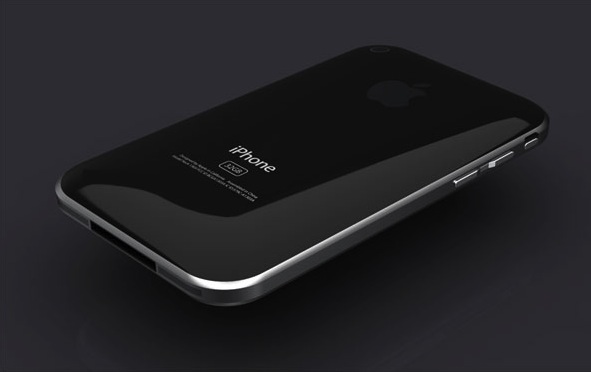
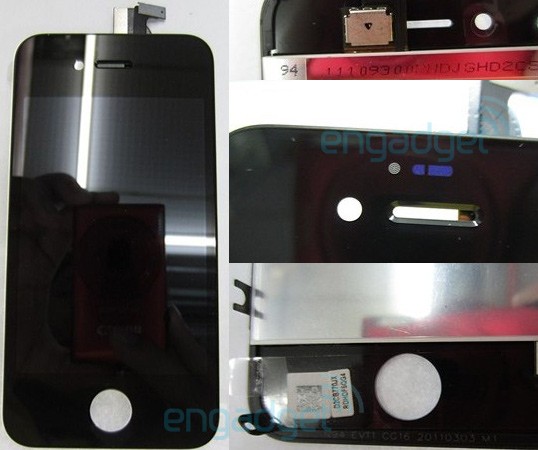
    There have been several news stories speculating the release of a budget version of the iPhone 4 to tap the market. But engadget has been able to get hold of some images of spare from ubreakifix that pertain to the upcoming iPhone model the iPhone 4S. Lots of indications point towards this device being a 8GB variant of the iPhone 4 offered at a much cheaper price. There is also speculation of the top grill sensor placement, this could mean a led notification light?


    Looks like Apple is unto something mischievous this year. Hopefully the device is worth the added wait Apple has caused its followers.

  • Tech 101 – How Touch Screens Work

    Tech 101 – How Touch Screens Work

    Previously, we’ve explained How Liquid Crystal Displays Work as well as How OLED Displays Work. Today, we’re going to explain how Touch Screens Work.

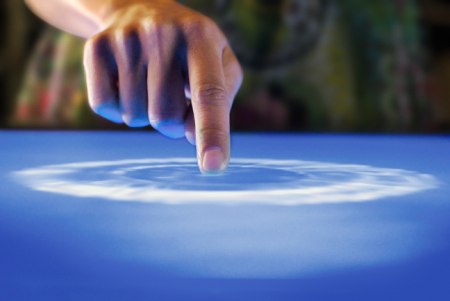
    Touch Screens are all the rage today. You’ll find them in many devices like tablets, smart-phones, computer monitors, PDAs, ATMs, table tops, kiosks etc. A touch screen can use multiple inputs from your fingers to styluses and even sausages! But how does this marvel of technology really work? There are many different types of touch screen displays. You will hear many marketing gimmicks regarding capacitive or resistive technology, but most people just don’t know the difference. Read on to learn more about this fascinating technology.

     The first touch screen was made all the way back in 1965 by E.A. Johnson at the Royal Radar Establishment, Malvern, UK. Since that first prototype, many methods of detecting touch on a display have been developed. The most widely used touch screen technologies are explained below:

    Resistive Touch Screens

    A resistive touch screen is composed of many layers. The two most important layers are made of a flexible polymer which are coated with a resistive material and are separated with an air gap or microdots. The resistive material is applied in lines on each sheet and they are placed perpendicular to each other. When a person touches their finger to a resistive touch screen, the two layers are pressed together, and the points of intersection on the two layers allow the processor to accurately measure the position of the touch.

    When pressure is applied to the screen, a uniform voltage is applied to the first sheet, and the second sheet measures the voltage as distance along the first sheet, which gives the X coordinate. Similarly, when the X coordinate has been ascertained, a voltage is applied to the second sheet, and the first sheet is used to measure the distance, which gives the Y coordinate. These measurements take place in only a few milliseconds, which means that a touch is registered as soon as contact is made.

    Since these types of touch screens rely on a point of contact between the two resistive layers, any pointing device like a finger or stylus can be used on them. These screens are also quite inexpensive to manufacture as they don’t require any specialized components. Due to the design of these screens, registering multiple points of contact was not possible due to vectoring issues. However, new technology is now available that overcomes these vectoring issues and allows multiple points of contact to be measured.


    Capacitive Touch Screens

    Capacitive touch screens can be based on two different technologies:

    Surface Capacitance

    This is the most basic form of capacitive touch screen technology. One side of the insulator is coated with a conductive layer. A voltage is applied to this conductive layer, which results in a uniform electrostatic field. When you bring your finger in contact with the screen, a capacitor is formed dynamically. This changes the electrostatic field across the screen and this change is measured by sensors placed in the four corners of the screen. The point of contact can be accurately measured based on the change in capacitance in the four corners of the screen. The greater the change in any corner, the closer the point of touch is to that corner. As there are no moving parts, these types of capacitive touch screens are very durable and are used in industrial applications as well as kiosks.


    Projected Capacitance

    Projected capacitive touch screens work on a principle similar to the matrix found in Liquid Crystal Displays. There can be either a single layer on which an X-Y grid is etched to form a grid pattern of electrodes or two separate perpendicular layers on which parallel lines are etched to form the grid. There are two basic types of projected capacitance technologies – Mutual capacitance and self capacitance.

    • Mutual Capacitance: These types of capacitive displays have a capacitor at every intersection along the grid. A voltage is applied across the rows or columns which creates a local electric field across the display. When it is touched with a finger or capacitive stylus, the capacitance at each point on the grid changes, which can be measured and gives an accurate location of the point o contact. This technology can measure multiple points of touch.
    • Self Capacitance: This type of capacitive touch screen can have the same grid pattern as a Mutual Capacitance screen but the rows and columns operate independently. With this type of screen, the capacitive load of a finger is measured on each row and column by a current meter which gives the point of touch. These types of screens can only measure one point of touch at a time.

    Projected Capacitance touch screens can operate without direct contact and can have a layer of insulation between the user and the screen itself. However, they require the use of a capacitive input device in the form of a human finger or a specialized stylus with a capacitive foam tip. These types of touchscreens are more expensive to manufacture than resistive touch screens. They also face issues when in contact with any capacitive material like water.


    Infrared Touch Screens

    These types of touch screens work on a very simple principle. Infrared LEDs or lasers are used to form an X-Y grid on the surface of the screen. These transmitters are coupled with receivers that monitor the grid pattern. When a touch event occurs, the infrared light from the transmitters is blocked in that region. The receivers that are no longer detecting an infrared signal are used to measure the exact point of contact.

    Infrared touch screens face many problems from objects that obstruct the infrared grid such as smudges on the screen and dust particles. Any kind of input can be taken on these screen from fingers to gloves to styluses.


    So now that you know how a touch screen works, we hope that you can have a new-found appreciation for all the devices that use this technology. A tremendous amount of research and hard work has been put in to make an input interface for a sense that most of us take for granted – Touch.

  • Android 3.2 All Set For Release On A Tablet Near You

    Android 3.2 All Set For Release On A Tablet Near You

    Google’s latest update to its Android Platform is all set to come to a tablet near you. The new version is an incremental release which adds several new updates for developers as well as users. The new version includes many changes to the Android API.

    A few highlights for the new version:

    • Support for multiple screen sizes which allows developers to create apps for various screen sizes, not just 10.1 inch.
    • A new compatibility mode which renders applications in a smaller screen area and then stretches the rendered image to fill the screen.
    • Media files can be directly loaded from the SD Card in apps that use them and a new module that allows applications to use the system media library.
    • An extended screen support API that allows developers to have precise control over the user interface across the range of Android powered devices. It also allows developers to target specific screens based on their dimensions.

    Motorola has already begun to roll out the 3.2 update to its Xoom tablet. Other tablet candidates for the 3.2 update include Samsung’s Galaxy Tab 10.1, Acer’s Iconia Tab 500 and Toshiba’s Thrive. Huawei made an announcement last month for what it claims to be the worlds first 7 inch Android 3.2 Honeycomb Tablet which has a dual-core processor.

  • Ideum Takes On The Microsoft Surface With Its Ultrathin Multitouch Table

    Ideum Takes On The Microsoft Surface With Its Ultrathin Multitouch Table

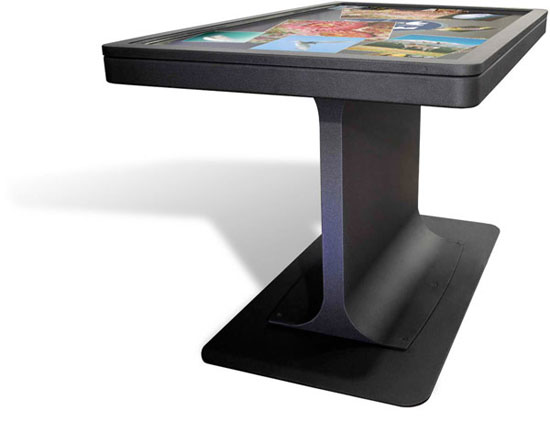
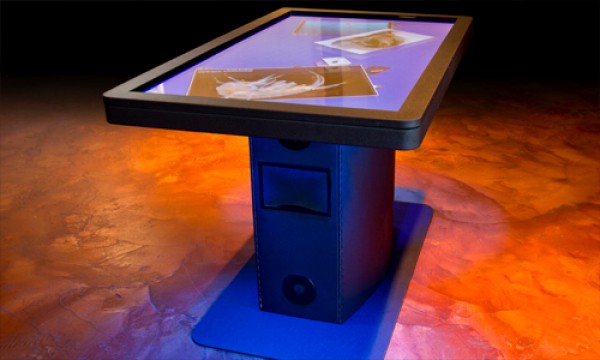
    Microsoft’s Surface Table hasen’t quite taken the world by storm. This is probably due to the table’s bulky size and hefty price tag. I you are one of those people who was more upset with the table’s size than its price tag, Ideum hopes that you will be interested in its MT-55 multi-touch table.

    Instead of sitting in a box, Ideum’s table is more like a flat-screen TV mounted on a stand. The table, which is only 3 inches thick, costs a whopping $18,000. The screen features a 5,000,000:1 contrast ratio and has a 178o viewing angle and supports a 64-bit copy of Windows 7. The viewing angle is important because it means that even someone whose peeking over the edge of the table will be able to see the display clearly.

    Multi-touch table’s may become the rage someday, but until the price comes down, and they create more software specifically for this kind of application, we don’t think that they’re going to sell too many.

  • 3-in-1 Computer – Gigabyte’s Booktop

    3-in-1 Computer – Gigabyte’s Booktop

    With the earliest models debuted last fall, Gigabyte has just officially announced at Computex 2011 the  Booktop T1125P 3-in-1 computer: a laptop whose rotating screen can convert the machine into a tablet-like device, and which when docked into a special station can be used in a desktop configuration.

    On the T1125P, is a 11.6-inch capacitive multi-touch display that is fixed to a 180-degree hinge, which lets the laptop be closed with the screen facing outward for use as a tablet. The device itself contains a USB 3.0 and HDMI ports, as well as two dual-channel stereo speakers and two woofers. an ultra low voltage intel core i5/i3 processor plus Nvidia GPU with 1GB dedicated visual RAM translates to a responsive, high-quality multimedia experience. a built/in 3.5G modem facilitates mobile internet connectivity, while the docking station features a DVD drive. when docked (which is necessarily in the vertical position), the device in addition to charging can be used for processing power and as a second screen to an external monitor.

    Gigabyte also announced the Booktop M2432 which features a 14 inch backlit LCD and has a Core i3/i5 sandy-bridge processor. This allows the device to function as a laptop or a desktop when docked, but not as a tablet. The dock contains an in-built Nvidia GPU.

  • Apple – Stylus Patents Approved

    Apple – Stylus Patents Approved

    Apple had applied for two patents for styluses for capacitive touchscreens and other surfaces last year, but the US Patent office has approved them only yesterday. The first patent is for a stylus with a heated conductive tip which would be charged when it is inserted back into the phone to be used with touchscreen devices.

    The second patent is for a stylus which could be used to write on any surface, with the results appearing on a computing device; a phone, tablet or computer, which is programmed to receive the input. This would be similar to the already existing Livescribe pen. These patents leave us wondering just what kind of devices does Apple have is store for release.

  • iPad 3 to have a Double Resolution Screen?

    iPad 3 to have a Double Resolution Screen?

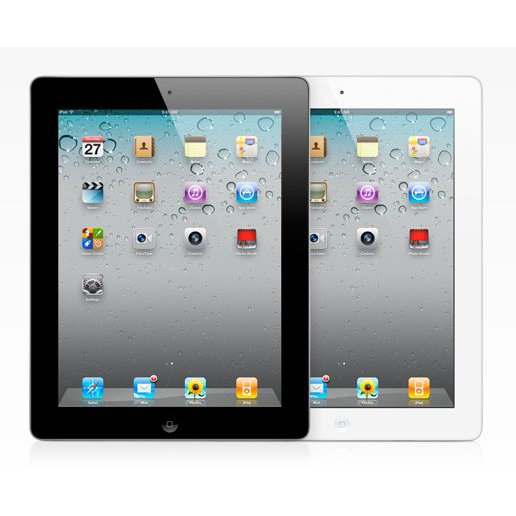
    Rumors abound that the iPad 3 will have twice the resolution of the iPad 2. While the current device has a 1024×768 resolution, images discovered by a person familiar with the beta release of iOS 5 have a resolution of 1536 x 2048 and have created further speculation on wheather Apple will increase the resolution on the device.

    Doubling the resolution of the iPad 3 will quadruple the number of pixels over the iPad and iPad 2. This would be similar to the introduction of the Retina Display on the iPhone 4 which allowed the phone to jump from a resolution of 480x320px to 960x640px. According to Apple CEO Steve Jobs, the limit of the human retina to discern pixels is 300ppi at 10 to 12 inches. The new iPad 3 display at 2048x1536px would still fall short of the ‘Retina Display’ as it would still have a pixel density of 264 ppi.

    Rumors of an enhanced display for the iPad have persisted since before the release of the iPad 2, with some reports suggesting that Apple planned to include a 2048 x 1536 display on the iPad 2, but ran into last-minute “engineering issues” that prevented it.

  • Tech 101: Modern LCD Displays

    Tech 101: Modern LCD Displays


    Displays have come a long way since the old CRT monitors and TVs. Advancements in display technology have made many modern devices possible such as mobile phones, mobile gaming platforms like the Sony PSP, thinner Televisions and Monitors. We use them everyday, for a variety of tasks but do we really know how they work? What is an LCD? What is a TFT Screen? How do they display so many millions of colours? This article will answer these questions and many more.

    What is an LCD?

    The term LCD stands for Liquid Crystal Display. But what exactly are Liquid Crystals? The term is quite confusing. A substance can either be a crystal, like quartz, which is hard as rock, or it can be a liquid which is obviously different. How can it be both? We all learned that matter can exist in 3 states, solid, liquid and gas. Solids have their molecules in a very rigid orientation while liquids and gasses are exactly the opposite. There are a few substances that have properties that are like solids and liquids at the same time. What this means is the the molecules of the substance tend to maintain their orientation, like a solid, but they also tend to move around, like a liquid. This is why they are called Liquid Crystals.

    It takes a lot of energy to convert a solid into this state, and only a little more to convert it into a liquid. This is why LCD’s are so sensitive temperature changes. This property allows them to be used in the making of Mood Rings and Thermometers. There are many types of liquid crystals. The major type used in monitors and other displays are called Twisted Nematic Liquid Crystals. These type of crystals twist and untwist at varying degrees to allow light to pass through when a voltage is applied.

    What is a TFT?

    A Thin Film Transistor LCD or TFT-LCD is named after a very thin layer of transistors that are applied to the back of a Liquid Crystal Display. These transistors allow only one row of pixels to be updated at any given point in time. The speed with which this updation takes place fools your brain into thinking that its viewing a static image.

    In small LCDs such as the ones used in calculators and other devices, a voltage can be applied across one segment without interfering with other segments of the display. This is impractical for a large display with a large number of pixels, since it would require millions of connections, two for each one of the three colors (red, green and blue) of every pixel. To avoid this issue, the pixels are arranged in rows and columns, reducing the connection count from millions to thousands. The column and row wires attach to transistor switches, one for each pixel. The one-way current passing characteristic of the transistor prevents the charge applied to the pixel from draining between refreshes, which creates the persistence of vision.

    What is a Pixel?

    A single pixel is the smallest addressable screen element in a display device, or it is the smallest unit of picture that can be represented or controlled. Each pixel has its own unique address which corresponds to its coordinates on the screen. Pixels are normally arranged in a grid pattern. Each pixel is made up of three Sub-Pixels which have a different color, Red, Green and Blue. The voltage applied to each subpixel decides its colour intensity. There are 256 possible gradations for each subpixel and together all three give a combination of 256 x 256 x 256 = 16,777,216 colours to each pixel on the screen.


    How it Comes Together

    A simple LCD monitor has many layers of technology that make it function. The basic principle behind these types of monitors is the Polarization of Light. What this means is that light is strategically allowed or not allowed to pass through any given point on the screen.

    At the base of a monitor, you have a single line of white LED’s that provide a backlight. There are many layers of films placed on top of these LED’s to create even lighting across the back panel. The next layer consists of a plate of glass. At the back and front of this sheet of glass are two polarization films. Light passes through the back film and is twisted by the glass to be ‘in sync’ with the front film. If the light is ‘in sync’, it passes through, if not, it is blocked by the film.

    The sheet of glass is an amazing piece of technology. It basically consists of a layer of TFT’s and a Liquid Crystal array that is arranged in a grid format. Each point or pixel of the grid consists of three subpixels. These subpixels are what give the pixel its colour. They have a maximum intensity of 255. What this means is that if we set the intensity of the red subpixel to 0, then no light passes through, and it appears black. If the intensity is set to 255, then all the light passes through and it appears bright red. If we wanted to create a single pixel of sky blue colour, the red subpixel would be set at 135/255 intensity, the green subpixel would be set at 206/255 intensity and the blue subpixel would be set at 250/255 intensity. This is how each pixel of your display is updated 60 times a second. Thereore, for a display of 1024 x 768 resolution, the monitor is making 141,557,760 updates per second. If it takes you half a second to flip a switch, making these many updates would take you 819.2 days or 2.24 years. Thats a LOT of updates (and finger cramps).


    To conclude, we would like to point out how much all of us take technology for granted. We have really got no idea what goes in to making most things we use everyday. We bicker and complain about our Tech being too slow or too old. We cant wait for the next big thing. At iGyaan, we have decided to start this section to demystify the basics of technology, so that the end user/consumer understands the true nature of the products that he/she is buying. We hope that you enjoy this section and learn something new from it. We’ll continue to bring you updates on the basics of technology. If you have something specific that you’d like us to talk about, please leave your requests on the comment section below.

    Stay tuned for the next update, continuing along the display line on OLEDs and AMOLEDs.
  • The Nextep Computer: Sony Concept

    The Nextep Computer: Sony Concept


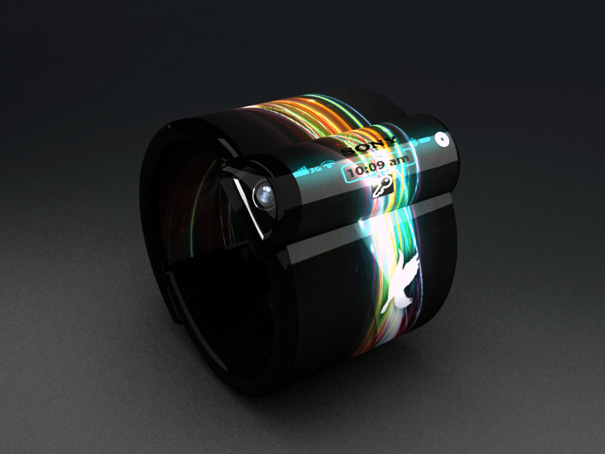
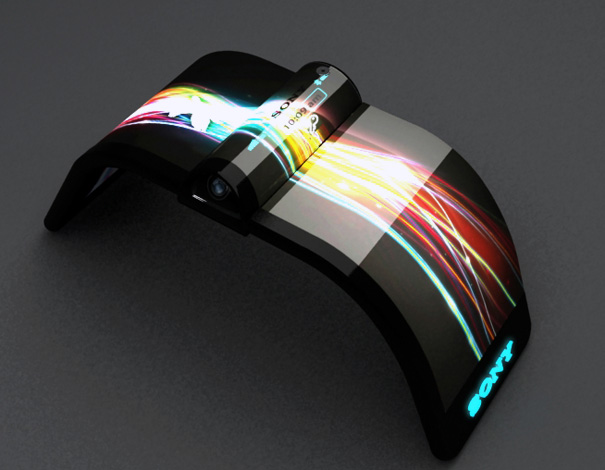
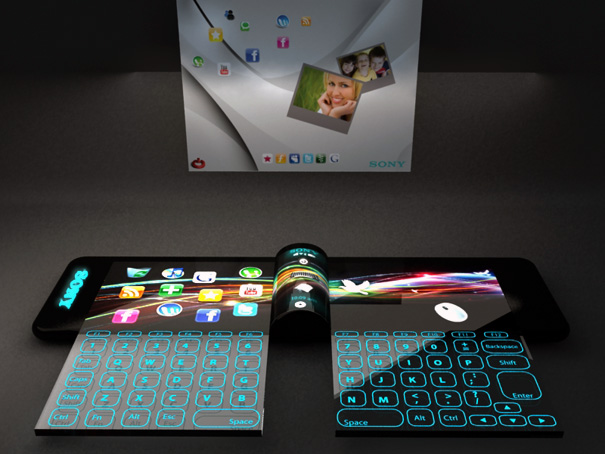
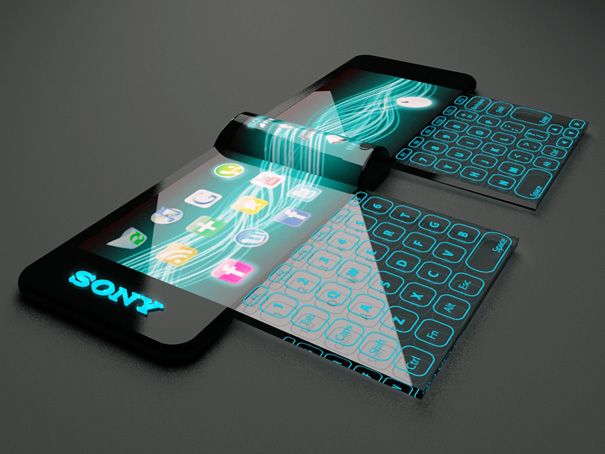
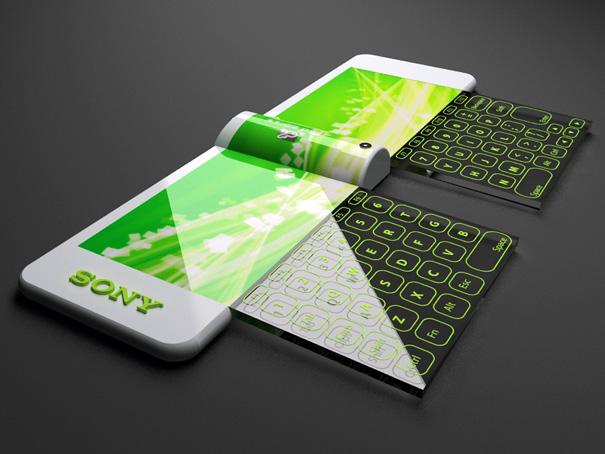
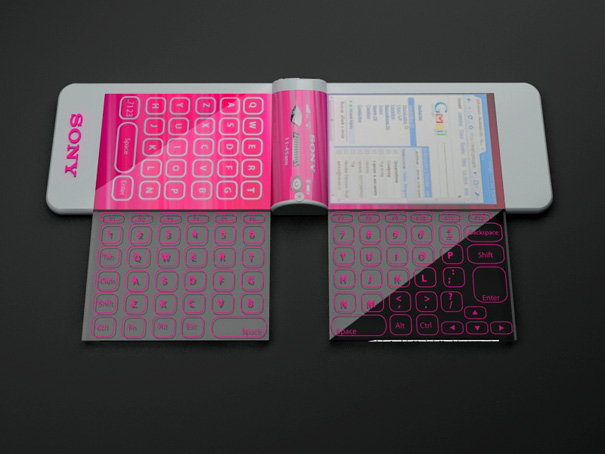
    Our present need for internet connectivity is so profound that secondary devices like the Nextep Computer are bound to happen. Developed to be worn as a bracelet, this computer concept is constructed out of a flexible OLED touchscreen. Earmarked for the year 2020, features like a holographic projector (for screen), pull-out extra keyboard panels and social networking compatibility, make the concept plausible. Nine years from now is not too far away, so how many of you think we’d be buying such gadgets?


  • Nesting PC Virtual Tablet

    Nesting PC Virtual Tablet


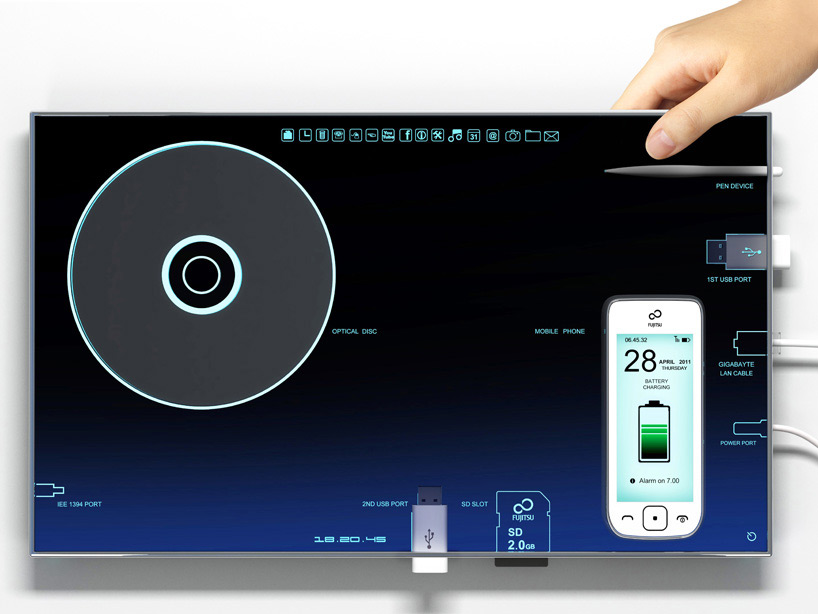
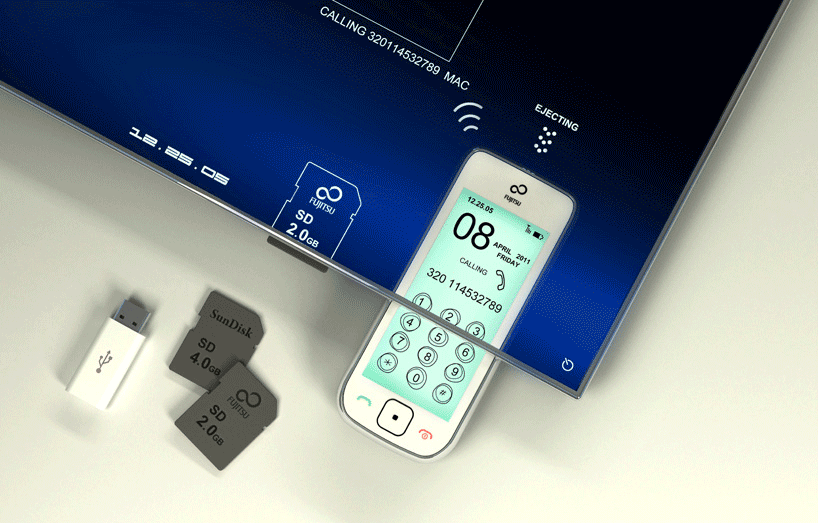
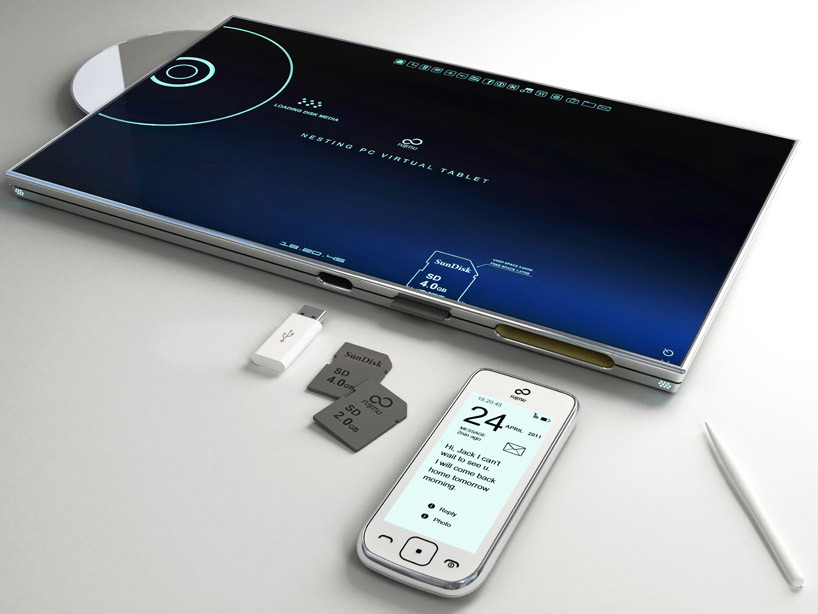
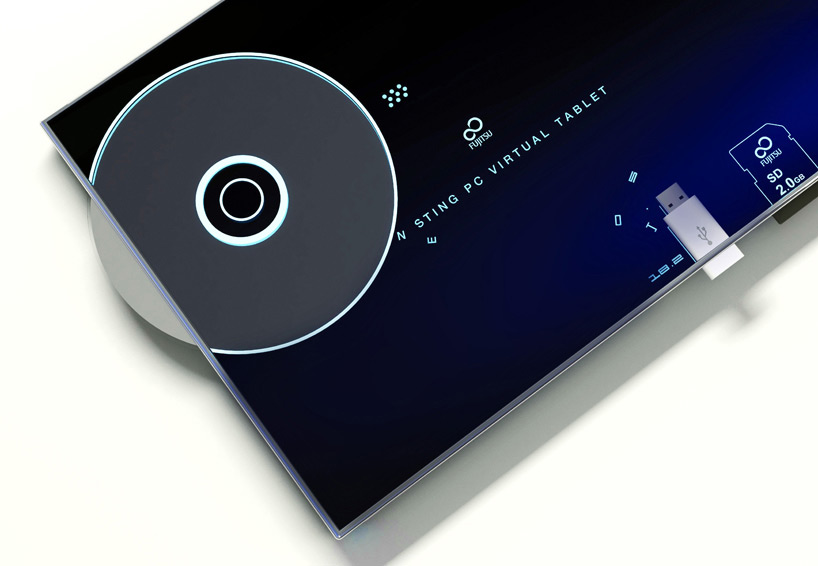
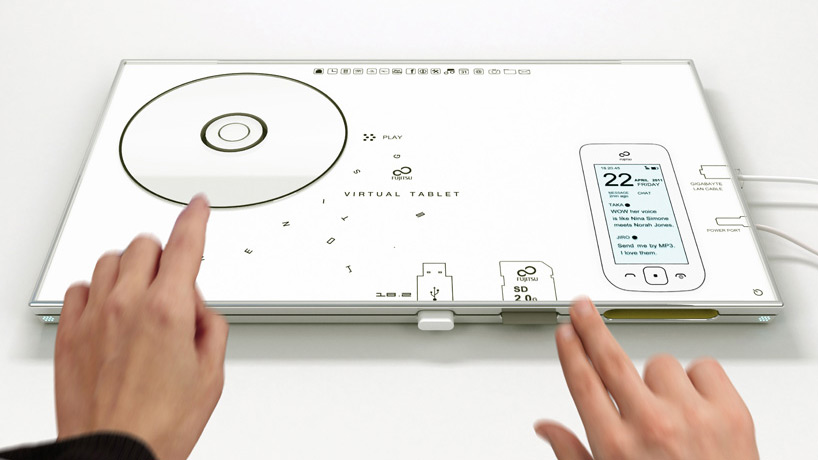
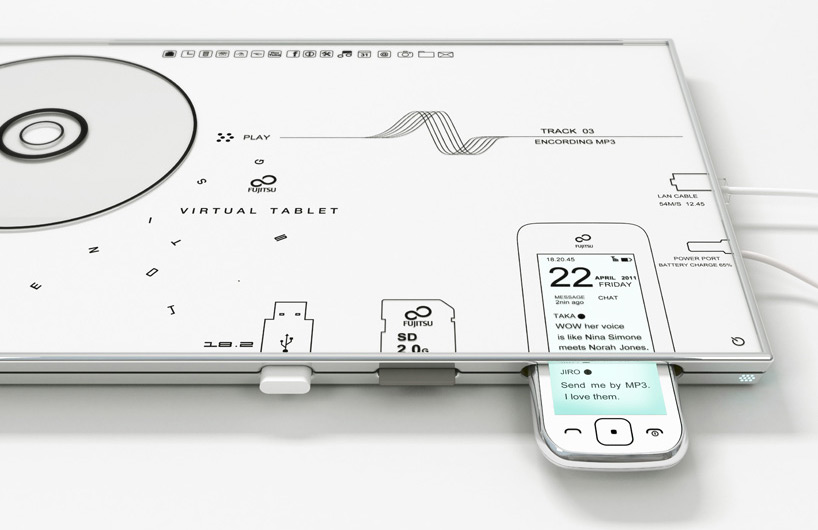
    The 13-inch concept tablet features a dedicated dock for mobile phones and other devices. When inserted, a visualization of the phone onscreen works in the same manner as would the device itself, permitting dialing, calling, texting, and other use. the loading of disk media or flash drives offers a similar intuitive functionality. Integrated charging eliminates the need for AC or outlet-specific adapters for these kinds of devices.


    This device has been created by Japanese Born, Italy Based designer Sono Mocci. He defines the device as a combination tablet and data visualization interface with automatic battery charging and data syncing. Phones, memory cards, CDs, USB ports, and I/O cables can be plugged directly into the device, where they will show up as images on the touchscreen for easy manipulation and access.


  • Sony Demonstrates Foldable / Flexible Organic TFT displays

    Sony Demonstrates Foldable / Flexible Organic TFT displays

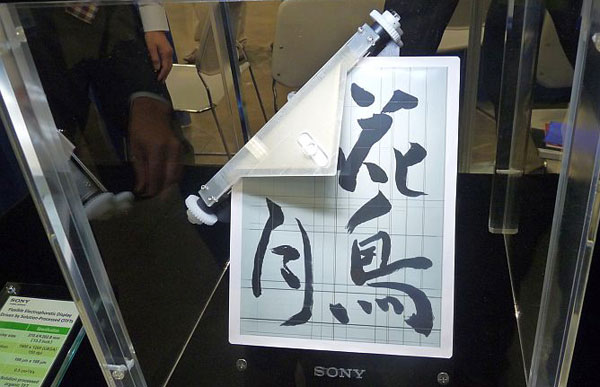
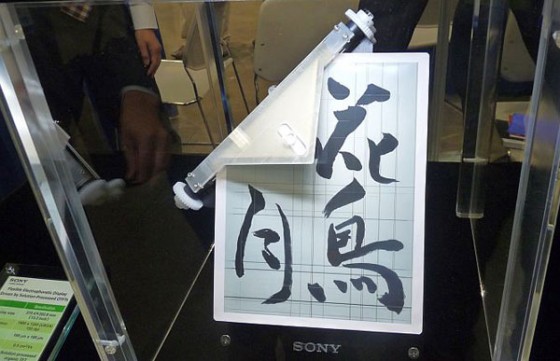
    While woes for Sony’s loss and security breaches continue. They have just showcased their new foldable and super-flexible Organic TFT display. The displays like the one above can be bent to a 5mm curvature radius. The 13.3-inch sheet has a 1,600 x 1,200 (150ppi) resolution and is powered by organic TFTs.

    [Tech-On]

  • The iPhone 5 may have a curved Glass Front

    The iPhone 5 may have a curved Glass Front

    According to a report by DigiTimes, a rumor around the supply chain in Taiwan is that Apple is going to adopt a curved cover glass for the iPhone 5.

    Cover glass makers are reluctant to commit investment to the purchase of glass cutting equipment due to the high capital involved, said the sources. However, in order to push forward the production of curved glass, Apple reportedly has purchased 200-300 glass cutting machines to be used by glass makers, said the sources. The glass slicing machines are currently being stored at associated assembly plants and will be brought online once yield rates for the production of curved glass reaches a satisfactory level, the sources revealed.

  • Triple Screen Android Phone Concept

    Triple Screen Android Phone Concept

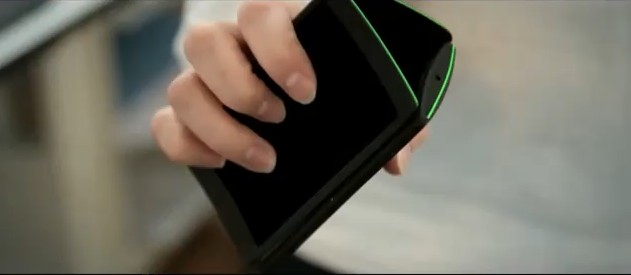
    When we first saw this video we were quite impressed with the concept of a triple screen phone. It has a few features we found very interesting such as the rolodex and the book reader app. However, after some heated discussion we came to the conclusion that the third screen doesn’t bring much to the  phone as most functions that it performs can be achieved with just 2 screens. The third screen seems a little over the top and reminds us of the old Paan Parag add when Jalal Agha pulls out a strip of sachets when asked ‘Ek se mera kya hoga?’

  • Ideum MT55 HD multitouch table released, Answers to the Microsoft Surface : Featuring Microsoft Surface

    Ideum MT55 HD multitouch table released, Answers to the Microsoft Surface : Featuring Microsoft Surface

    Ideum has just announced the availability of its brand new MT55 HD multitouch Table. This monstrous touchscreen will be used in commercial applications like an Advertising Signage, Museum guide and even a mapping and information system for complicated malls and buildings. Key Specs include

    • 55-inch LCD display
    • LED-backlit
    • 1920×1080 HD resolution
    • 5-mm  tempered glass
    • Aluminum and Steel Frame
    • Intel Quad Core i7 CPU
    • 4GB of RAM
    • 250GB SATA hard drives
    • NVIDIA Quadro 600 video card.
    • Windows 7 Professional 64-bit
    • GestureWorks multitouch software for both Flash and Flex
    • Bose Audio system
    • Support up to 32 simultaneous touch points

    Check out the Video Below:

    Also Check out our Hands on with the Microsoft Surface (Samsung Sur40)

    iGyaan Hands on Samsung SUR40

    FULL PR

    Ideum Releases New HD LCD Ruggedized Multi- touch Table

    CORRALES, New Mexico (April 20, 2011) Ideum has announced the release of its new MT55 HD 55″ multitouch table. A newly released video shows all of the table’s features. 

    http://www.youtube.com/user/multitouchexhibits 

    The MT55 HD is a fully integrated system with an LCD, multitouch overlay, ultra clear tempered glass, powerful computer, UPS battery backup, and integrated cooling cell. The table even has an integrated Bose Audio system. It has single- ? button operation. 

    The MT55 has a large 55″ LCD with full 1920×1080 HD resolution. Its unique pedestal design houses a powerful computer while the surface is only 3″ inches thick. The pedestal and top surface are built with aluminum and steel. The entire unit stands 31? tall, matching ADA (Americans with Disabilities Act) requirements. 

    The integrated HP computer system is packed with power. The CPU is an Intel® Quad Core i7 with 4GB of RAM, dual 250GB SATA Hard Drives and NVIDIA Quadro 
    600 PCI video card. The system is multitouch- ?enabled from start up and runs 
    Windows 7 Professional 64- ?bit. The computer system is backed with a three- ?year HP warranty. 

    The LCD has an LED backlight and is rated for 50,000 hours. The screen is protected 
    by hardened, 5mm tempered glass. The table supports up to 32 simultaneous touch 
    points. A lockable cabinet protects the computer and all of the other components. 

    The table comes complete with WIFI, Bluetooth, and Ethernet capability. It also has HDMI output to allow you to easily mirror the table’s display. “Hidden” Ethernet 
    (CAT5), HDMI, and USB 2.0 ports are included. 

    “A large, maintenance- ?free, all- ?in- ?one solution is what our customers have been 
    asking for,” said Jim Spadaccini, Director of Ideum. “The MT55 HD–which comes with a huge LCD display, a full warranty, and integrated software and is a complete package that cannot be found anywhere else.” 

    The MT55 HD ships with GestureWorks for Flash and Flex. With support for more 
    than 200 gestures, GestureWorks is the most advanced multitouch SDK available. The package includes nearly a dozen pre- ?built Open Exhibits multitouch components. 

    The new video features music by Moby, the track Lacrimae will be released on his 
    upcoming album, Destroyed, to be released on May 17th.

  • LG G-Slate may have a 8.9 inch 3D display – Will also capture 3D video

    LG G-Slate may have a 8.9 inch 3D display – Will also capture 3D video

    Its the year of the tablets and LG is prepping its own G-Slate. An LG France spokesman disclosed that the Tegra 2-based tablet’s 8.9-inch LCD will not only be accompanied by a glasses-free 3D display, but is also more than able to record 3D video. Having said that, it ought to be accompanied by an HDMI output, but it remains to be seen whether this is HDMI 1.4 and can output 3D to a connected TV.

    This means that the device will ship with dual back cameras for steroscopic 3d vision and a powerful processor. But, using a Tegra 2 would entail that the device use less of its power for resolution. Intrigued? We are!

    We are also waiting.

    Source : UberGizmo

iGyaan Network
Privacy Overview

This website uses cookies so that we can provide you with the best user experience possible. Cookie information is stored in your browser and performs functions such as recognising you when you return to our website and helping our team to understand which sections of the website you find most interesting and useful.