Tag: video

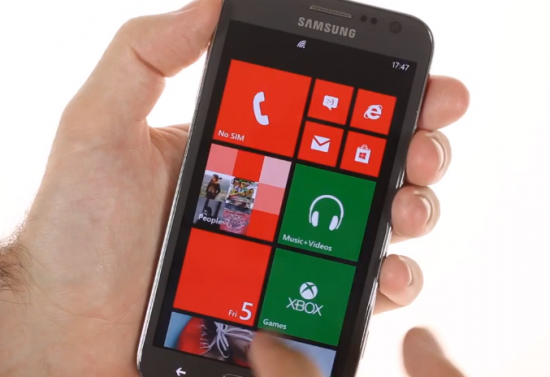
  • Samsung ATIV S gets a very early Hands on (Video)

    Samsung ATIV S gets a very early Hands on (Video)

    Samsung is ready to launch the new Windows Phone 8 Lineup, with the ATIV S taking center stage. GSMArena managed to get a hands on with the product, they uploaded the video then removed it. But luckily enough the video landed up on Youtube so check it out.

    Important details include

    • 4.8” Super AMOLED display with Gorilla Glass 2
    • dual-core 1.5GHz Snapdragon S4 CPU
    •  2300 mAh battery on board
    • MicroSD card Slot

  • Nokia brings the Xpress browser compression to the Lumia Line

    Nokia brings the Xpress browser compression to the Lumia Line

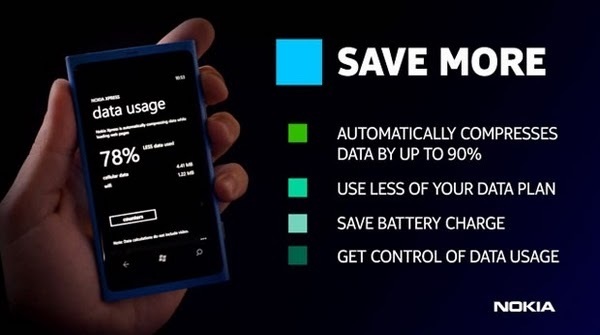
    Nokia has launched a new Xpress browser of or the Lumia line that is identical to the browser found n the new Asha phones.

    Announced today via the company’s Beta Labs site, Nokia Xpress leverages the cloud to compress internet data up to 85 percent, help users keep tabs on their consumption habits and even reformats favorited sites into a magazine-like layout.

    The app also allows for simple searches for items across Bing and YouTube from within the browser.

    Its not available in the marketplace as of now but can be downloaded from the source below.

    [Nokia BetaLabs]

  • Live Coverage : Samsung will Launch the Galaxy Note 2 in India Today  (Video)

    Live Coverage : Samsung will Launch the Galaxy Note 2 in India Today (Video)

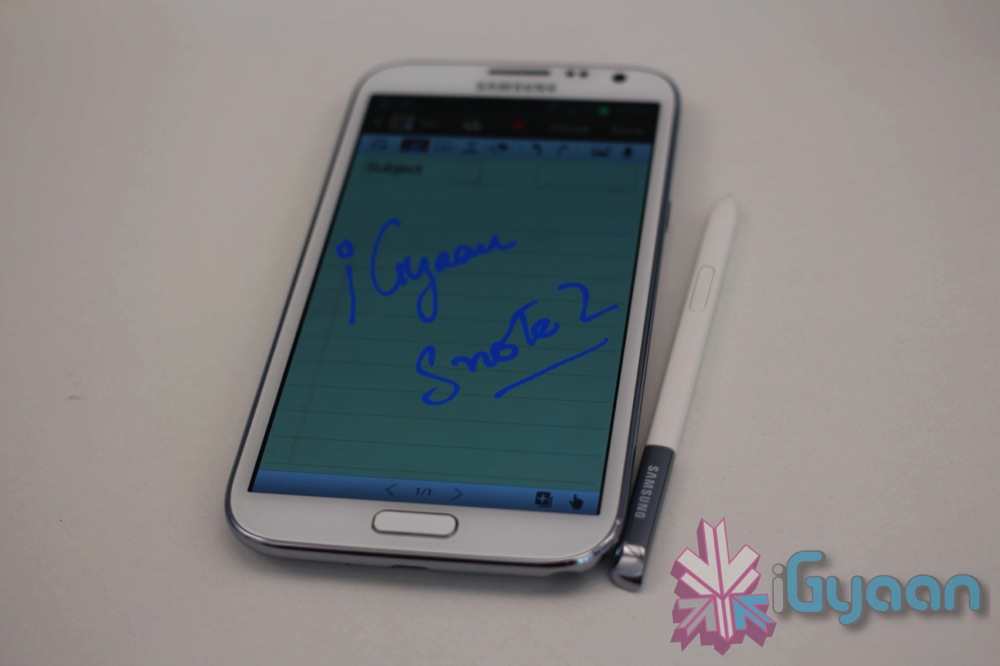
    Samsung will Launch the new Galaxy Note 2 in India at 2:00 PM IST at an even that will be held in Hyderabad. Make sure you bookmark this page to get the latest updates and watch the Live Video stream. 


  • Motorola and Intel announce the new Droid Razr i (PR)

    Motorola and Intel announce the new Droid Razr i (PR)

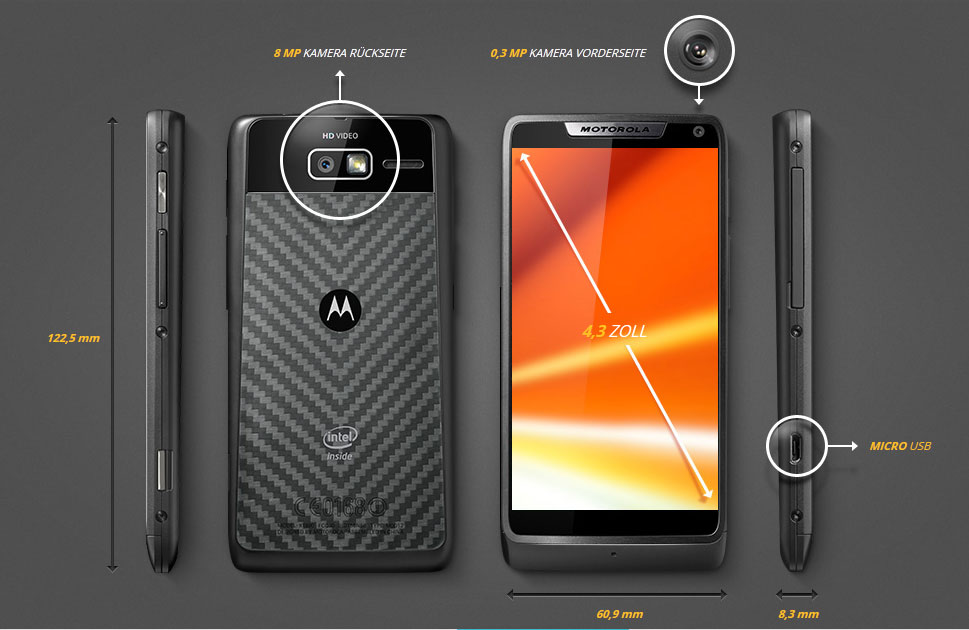
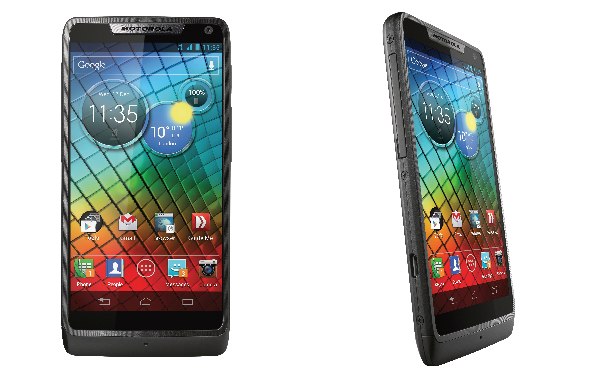
    The Motorola and Intel mating has delivered the RAZR i , and it runs on ntel’s latest mobile chips (2GHz processor),Motorola calls it their biggest phone since the Razr.

    Motorola Razr i features:

    • “Edge-to-edge”4.3-inch AMOLED display
    • 2,000mAh of battery a
    • Kevlar coating + water repellent design
    • Intel’s 2GHz processor inside
    • 8-megapixel camera
    • New User interface
    • One second start-up to get the camera with dedicated camera butto
    • NFC 
    • Android Beam
    • Unlocked bootloader

    The phone will come with Android Jelly Bean out of the box and will be available starting next month in Europe. We doubt it will hit the Indian market anytime soon, especially since Motorola started shutting shop in India.


    [toggle_box title=”Press Release” width=”Width of toggle box”]

    Introducing the Powerful Motorola RAZR i with Intel Inside® and an Edge-to-Edge Display


    Say hello to the full-screen phone


    Motorola Mobility in partnership with Intel Corporation introduced the powerful Motorola RAZR™ i with Intel Inside®: the new full-screen smartphone that fits in the palm of your hand. Its Super AMOLED Advanced 4.3-inch display spans from edge-to-edge with virtually no border – giving you more screen with less phone. RAZR i is the first smartphone that can achieve speeds of 2.0 GHz thanks to a fast Intel® Atom™ processor. Jump from a game to a text and over to a playlist, then off to browse the Web – all without stopping and on a long-lasting battery that is 40 percent more powerful than the competition1.

    The power of Intel Inside means you also get an instant-launch 8-megapixel camera that can load in less than a second2. Just use the dedicated camera key so you get the shot you want. When there’s action involved, multi-shot mode lets you snap 10 pictures in less than a second. And with the illuminated sensor located on the back and High Dynamic Range (HDR) capabilities, you’ll get a great shot, even in challenging lighting conditions.

    “Together with Intel, we’re redefining what people can expect from a mobile device. A camera that launches in an instant, Web pages that load blazingly fast and a device that’s the perfect balance of screen size and fit in hand,” said Jim Wicks, senior vice president, Consumer Experience Design, Motorola Mobility. “RAZR i delivers just that when you put an Intel-fast processor in a beautifully designed phone and add in extra long battery life.”

    “Motorola RAZR i with Intel Inside naturally blends together the value propositions of high performance Intel Architecture and great battery life, Motorola Mobility device innovation and the Android™ platform,” said Erik Reid, general manager, Intel’s Mobile and Communications Group. “Intel’s goal is to provide compelling technology options that translate into great user benefits and experiences. RAZR i is a great proofpoint in the collaboration and we’re thrilled to be working with Motorola to bring this edge-to-edge experience enhanced with Intel Inside to people around the world.”

    Powered by Android™ 4.0, Ice Cream Sandwich (upgradeable to Jelly Bean), RAZR i puts the Google universe in your hand. Google Play™ gives you access to more than 600,000 apps and games, millions of books and thousands of movies. Get where you need to go with Google Maps for Android™ with free turn-by-turn directions and voice guidance. And when your hands are full, use Voice Actions for Android™ on RAZR i to compose a text, get directions, make a call, play a song…or simply Google something. RAZR i also features near field communication (NFC) technology so you can send contacts, links, maps and more directly to compatible phones with Android Beam™. Just hold the phones together and tap the screen.

    Designed with premium protective materials, RAZR i is built to go everywhere. A diamond cut aircraft-grade aluminum4 frame surrounds the display, which is made of Corning® Gorilla® Glass, to deflect both scratches and scrapes. On the back, RAZR i is made DuPont™ KEVLAR® strong3. Spilled coffee? Caught in the rain? Don’t worry. RAZR i is protected with a splash-guard coating-even on the electrical boards inside.

    RAZR i already has a long battery – and when you set up the SMARTACTIONS™ battery savings rule your phone will automatically adjust to squeeze more out of each charge. Whether you want to maximize your last ounce of power, or prevent your phone from ringing during a meeting, SMARTACTIONS will automatically trigger specific actions. Motorola’s exclusive Guide Me app comes preloaded with interactive, swipe-by-swipe tutorials for tons of features – no instruction manual required. Also unique to Motorola, the interactive Circles Widget allows quick access to notifications, weather, time and more.

    Availability and pricing
    Motorola RAZR i will be available in black beginning in October in select European and Latin American markets including the U.K., France, Germany, Argentina, Brazil and Mexico with more to be announced. A stand out white version will also be coming to select markets. Pricing and availability will vary by country, so please visit www.motorola.com/razri for the latest information.

    [/toggle_box]


  • Nikon launches cheaper Full Frame D600 DSLR with 24-megapixel Sensor (PR)

    Nikon launches cheaper Full Frame D600 DSLR with 24-megapixel Sensor (PR)

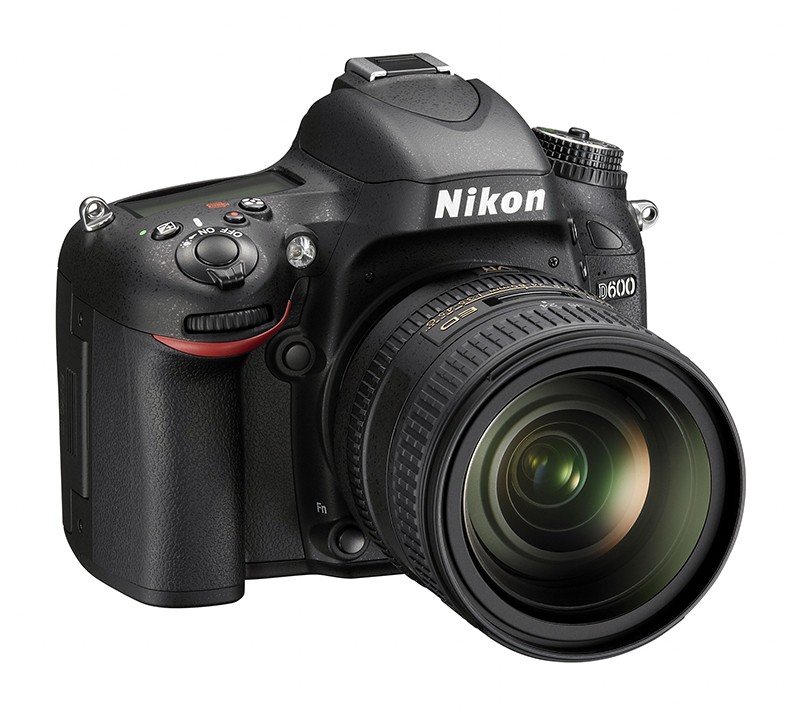
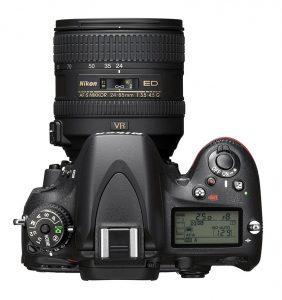
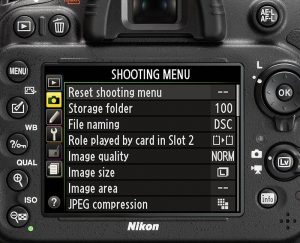
    Nikon has jiust unleashed another Full Frame DSLR into the market the D600, Priced at US $ 2100 (or IN Rs 1,14,000 approx) the camera is relatively cheaper than its 36 MP elder sibling the D800. What’s more its also cheaper than Sony’s full frame SLT A99 launched yesterday. 
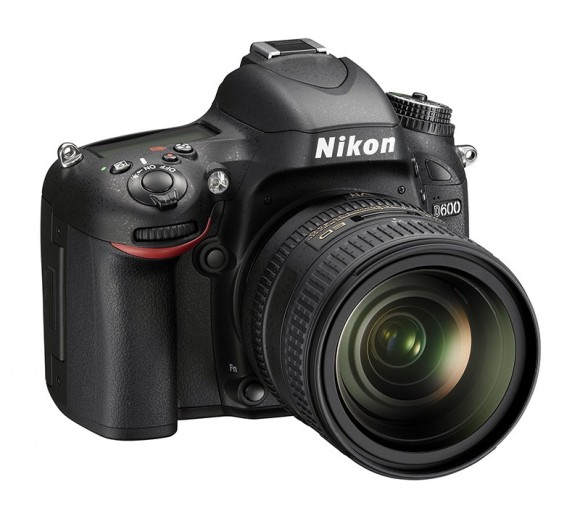
    The new camera has a weather-sealed magnesium alloy build, fast Exspeed III processor, and AF that works down to f/8, its also 15 % lighter than the D800 and slightly smaller in size.
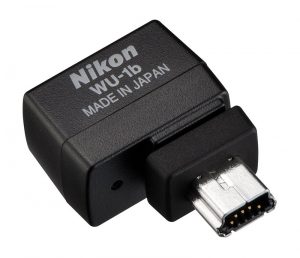
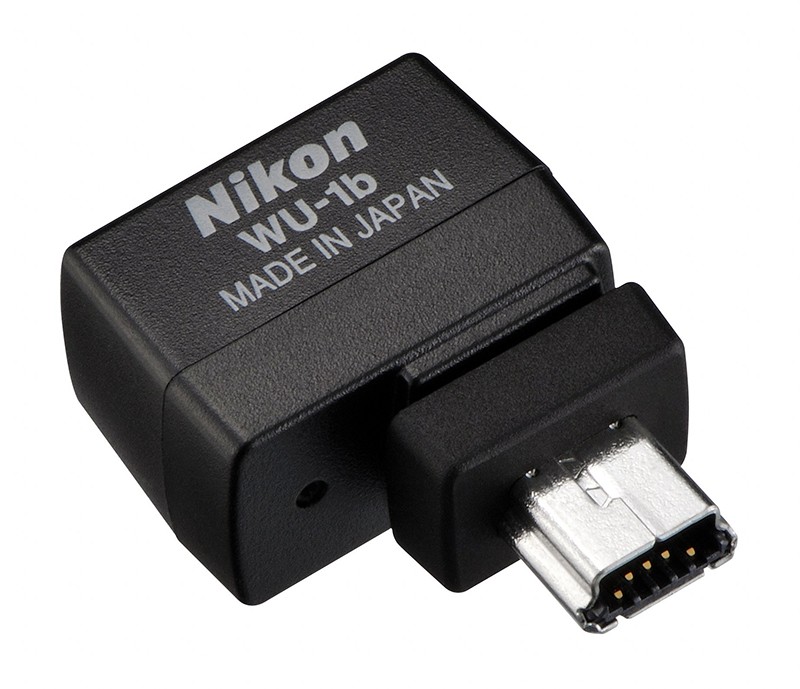
    The D600 handles wireless transfers and triggers using the new WU-1b widget accessory, that plugs into the mini USB port, so now you can remotely control your camera. You can even control the camera using a proprietary android app.


    [toggle_box title=”Press Release” width=”Width of toggle box”]

    PERFORMANCE THAT FUELS THE PASSION: THE NEW NIKON D600 PUTS FX-FORMAT IN FOCUS FOR PHOTO ENTHUSIASTS


    As Nikon’s Smallest, Lightest and Most Affordable Full-Frame HD-SLR, the D600 Packs in Powerful, Pro-Grade Photo and Video Features with Wireless Sharing and Capture Capabilities


    MELVILLE, N.Y. (September 13, 2012) – Today, Nikon Inc. announced the 24.3-megapixel (MP) D600, a camera that is designed to deliver the image quality and performance benefits of a full frame FX-format sensor to the enthusiast looking to take their dedication to the next level. The Nikon D600 offers a remarkable value, merging the perfect combination of a lightweight, compact form factor and superior image quality, making the leap into FX-format photography more attractive than ever.


    Whether shooting stills or Full HD video, advanced features and Nikon technologies like the newly developed high resolution CMOS sensor and EXPEED 3 image processing engine are designed to meet the needs of the most demanding creative vision. Additionally, Nikon’s new optional WU-1b wireless adapter allows users to shoot high quality HD-SLR images and transfer them to their mobile device, making it easier to stay connected, without the need for wires.


    “For many, image making is so much more than a hobby; it is a way of life that changes the way the world is perceived. The Nikon D600 represents a new category of camera for this user and demonstrates Nikon’s devotion to the passionate photographer who is always looking for new ways to express their creativity through their photos and HD videos,” said Bo Kajiwara, Vice President of Marketing, Planning and Customer Experience, Nikon Inc. “By offering users the advanced FX-format and key features inherited from our professional cameras, along with new functions like optional wireless capabilities, Nikon is inspiring photographers by providing an imaging experience that satisfies like never before.”


    Superior Image Quality
    Nikon’s FX-format offers photographers exciting image quality possibilities, from dazzling dynamic range and exacting detail to stellar low-light ability. The D600 employs Nikon’s newly developed, large 24.3 MP FX-format CMOS Sensor (35.9 x 24mm) to offer photographers a versatile camera that provides amazing image quality and sharpness, with ample resolution to tackle almost any project. Because the needs of the advanced amateur varies widely, the new CMOS sensor provides a wide ISO range from 100-6400 (expandable from 50-25,600) to give photographers maximum low-light flexibility yielding clean images with minimal noise and accurate color. The full ISO range can also be used while capturing HD video in challenging light. Nikon’s exclusive EXPEED 3 image processing engine interprets the massive amount of image data flowing from the sensor to quickly process images and HD video. The result is striking images and impressive HD video that exhibits faithful color reproduction and tonal range throughout the frame.


    Precision Technology Engineered for the Enthusiast
    Enthusiasts of all types demand the best from their gear, and the Nikon D600 is a camera engineered with intuitive features that give photographers an edge in the field. Whether shooting lush landscapes, action sports or the elusive animals of the Serengeti, Nikon’s Scene Recognition System and 2,016 pixel RGB sensor excels in any situation. By recognizing the scene prior to capture, the system meticulously analyzes factors such as color and brightness with extraordinary precision and compares all the data using Nikon’s exclusive 30,000 image database. The result is enhanced AF performance and flattering exposures.


    For precise AF performance in a wide variety of shooting conditions, the D600 features a 39 point AF system with the new MultiCAM 4800FX AF module. This AF array is well suited to a wide variety of shooting styles and disciplines, offering AF modes to let users select a single point, continuous AF, Dynamic AF or use 3D tracking to keep pace with a moving subject throughout the frame. Additionally, the system features nine cross type sensors for maximum accuracy, while seven AF points are fully functional when using compatible NIKKOR lenses and teleconverters with an aperture value up to f/8 for extreme telephoto applications.


    To keep up with action sports, active wildlife or the photo opportunity that unexpectedly arises, the D600 is ready to shoot in 0.13 seconds, with a 0.052 second shutter release. The camera emphasizes speed and performance, from overall operation and image processing, helped in part by the exceptional EXPEED 3 processing engine. The camera is also capable of bursts of images at 5.5 frames per second (fps) at full resolution with full AF, to capture decisive moments. To further enhance speed and workflow, images and video can also be rapidly transferred to dual SD card slots that are compatible with the latest SDXC and UHS-1 high speed standards.


    Enthusiasts will also appreciate other thoughtful features made to appeal to more advanced photographers, such as the 100% frame coverage seen through optical viewfinder. The wide and bright view makes it easy to compose in a variety of conditions, and affords the ability to enjoy shooting for hours on end with minimal eye fatigue. Additionally, the D600 features several scene modes and features to enhance creativity, including one-touch access to Picture Control functions through a new dedicated button. Photographers can also shoot images in High Dynamic (HDR) mode for amazing highlights, and create awe-inspiring time lapses with ease.


    Experience Full HD
    The Nikon D600 has advanced video features that are ideal for those ready to embrace the world of HD-SLR video, as well as those already enjoying its benefits such as manual control, depth of field, low-light ability and lensing options. This camera gives users the ability to record Full HD at varying frame rates and resolutions including 1080p video at 30, 25 or 24p, and 720p video at 60, 50 and 30p. When shooting HD video at the highest quality setting, up to 20 minutes can be recorded, or up to 29 minutes and 59 seconds in normal quality for added convenience when shooting static shots such as interviews and events. The large 3.2-inch 921K dot LCD screen makes it easy to preview images or video captured, navigate the menu system or confirm critical HD focus, while automatic brightness control adapts seamlessly to changing lighting conditions.


    Sophisticated video features help to increase the production value on any project, including full manual control of exposure, and the ability to switch between FX and DX-format (1.5X) at Full HD for a telephoto boost and alter depth of field. Users can opt to focus manually or can take advantage of the full-time AF while recording to help ensure faces are in focus or track a moving subject. Additionally, videographers have the ability to capture audio with the onboard microphone or record stereo audio externally using the mic input. Audio can be monitored through the headphone jack and levels can be displayed on the LCD with peaking.


    In addition to the ability to play back HD video and images through the HDMI terminal, users are also able to experience pro-grade video features in the Nikon D600. For monitoring and streaming applications, the image can be displayed on the LCD screen while simultaneously shown on another monitor through the HDMI, with or without shooting data. What’s more, the D600 adds the ability to transfer uncompressed video via the HDMI connection, which can then be routed to a digital recorder or similar device.


    Remote Sharing and Capture
    Photography is a form of expression, which can now be shared more ways than ever before through social networks and online communities. To accompany the D600, Nikon has also announced the optional WU-1b Wireless Adapter that allows users to connect wirelessly to the camera. A companion Wireless Mobile Adapter Utility application for Android™ based mobile devices is also available at no additional cost. 1 Furthermore, an application for the iPhone® and iPad® mobile digital devices will be available on September 15, 2012.2


    When connected, users are able to share their images taken with the D600 through their mobile device to their social circles, as well as send and download images from their camera to a compatible device.3 The adapter also allows users to remotely fire the D600’s shutter from up to 50 feet from the camera, which is ideal for capturing photos from unique vantage points.


    NIKKOR, Speedlight and System Compatibility
    Supporting the D600 is Nikon’s heritage in optical excellence, more than 70 NIKKOR AF and AF-S compatible lenses for maximum versatility. Those with DX-format lenses will also be happy to know that these lenses can also be used on the camera as well as the ability to set DX crop for stills or video to extend the reach of telephoto or telephoto zoom lenses.


    The new Nikon HD-SLR is also a gateway to Nikon’s renowned Creative Lighting System (CLS) which illuminates a whole new world of creative image making using multiple Speedlights. A built-in Speedlight commander can control multiple Speedlights such as Nikon’s SB-700, SB-910 or Wireless Close Up Speedlight System, and the camera can also control up to two individual speedlight groups for further creative control.


    Constructed to Inspire
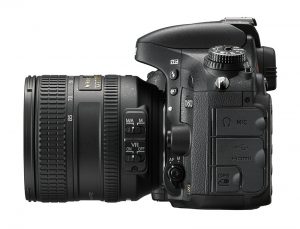
    Built to withstand the wide variety of shooting conditions enthusiasts face, the body of the D600 is sealed and gasketed against dirt and moisture. The camera uses magnesium alloy top and rear construction to provide a lightweight camera with maximum durability. The shutter has been tested for 150,000 cycles, and sensor cleaning is also employed. The battery is rated for approximately 900 shots, affording photographers the ability to shoot all day. Additionally, the optional MB-D14 Multi Power Battery Pack extends the grip for comfort and can effectively double the battery capacity when using two batteries.


    The D600 is also built with an emphasis on handling with thoughtful ergonomics and button placement, in a body that is compact enough to carry comfortably on any excursion. The hand grip has been improved for comfort, while the overall impression from using the camera is reassuringly solid. To avoid accidental engagement, the shutter button has been recessed, while the Mode Dial can be locked.


    Price and Availability The Nikon D600 will be available on September 18, 2012 for the suggested retail price (SRP) of $2,099.95*, for body only, or with the AF-S NIKKOR 24-85mm f/3.5-4.5G ED VR for the SRP of $2,699.95*. The WU-1b will be also available on September 18, 2012 for an SRP of $59.95*. The MB-D14 Multi Power Battery Pack will be available in late September for an SRP of $322.00*. For more information on the new Nikon D600 and other Nikon products, please visit HYPERLINK “http://www.nikonusa.com”www.nikonusa.com.

    [/toggle_box]
     

  • LG shows off teaser of a Quad Core phone, 13MP camera, 2GB RAM and Leprechauns

    LG shows off teaser of a Quad Core phone, 13MP camera, 2GB RAM and Leprechauns

    LG has launched a Korean website for their next gen quad core phone running on the latest gear. A second-generation quad-core experience, the new flagship device will offer better power management and graphics performance thanks to the Snapdragon S4 Pro chipset. Other specs include a 13MP camera, 2Gb Ram and a MDM 96q5 chipset. The device is supposed on a 5 inch form factor.

    [LG Korean]

  • Evernote introduces Evernote Business, Updates its applications on iOS

    Evernote introduces Evernote Business, Updates its applications on iOS

    Evernote today announced their new revision, Evernote has now been designed to work with companies, small and medium, right out to the system. Evernote Business will be launching later this December, but the company is taking active early applicants 


    [Evernote Business]

  • Samsung will launch the Galaxy Note 10.1 N800 / N8000 in India Watch it Live. 12:00 PM IST

    Samsung will launch the Galaxy Note 10.1 N800 / N8000 in India Watch it Live. 12:00 PM IST

    The Event to launch the Galaxy Note tab 10.1 will be broadcast live. Catch it first on iGyaan.

    An dont forget to check out our exclusive Hands on Video 

    [liveblog]

  • Sony announces NEX-EA50EH pro camcorder in India

    Sony announces NEX-EA50EH pro camcorder in India

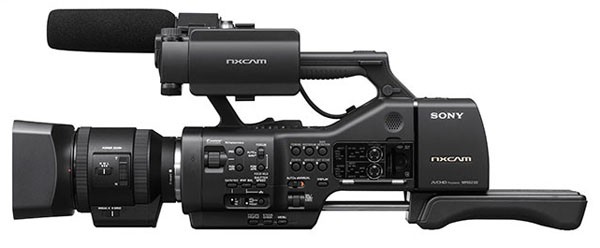
    Sony has announced that the NEX-EA50EH will be coming to India, It has a APS-C Exmor CMOS sensor seen in the NEX lineup of cameras. The biggest difference in this camera has to be the powered zoom lens with a rocker style zoom, the  SEL18-200PZ 11x is an E mount so should be easily compatible with most NEX cameras. The lens packs variable isis, auto focus and “Optical Steady Shot” active image stabilization. The camera has the ability to shoot 16mp RAW images, thanks to a mechanical shutter with its own release button and a flash hot-shoe which is all pre-equipped on the camcorder. Video capture up to 60fps at 1080P in AVCHD 2.0, 28 or 17 Mbps, to SD/SDHC/SDXCcards, Sony Memory Sticks or Sony’s dedicated external SSD unit, which attaches to the camera.

    Although no price has been announced for the Indian counterpart, the US version ships in October for US $ 4500 (IN Rs. 2,50,000 approx) , and should reach India by November boasting a similar price.

    • Includes 18-200mm Servo Zoom Lens
    • Records Full HD 1080p up to 60 fps
    • Exmor APS-C CMOS Sensor
    • Lossless Digital Zoom Effect
    • Accepts E-mount Lenses
    • Two XLR Audio Inputs
    • SD/MS Memory Card Slot
    • FMU Slot for Flash Memory Unit
    • Still Photographs at 16 Megapixels
    • Hot Shoe for Traditional Flash Units


    [toggle_box title=”Press Release” width=”Width of toggle box”]

    Sony expands NXCAM range with an affordable and versatile interchangeable lens camcorder


    The new NEX-EA50EH offers creative, high quality images for a range of applications, featuring a large format sensor, E-mount lens system and a new form factor


    Basingstoke, UK, August 17th, 2012: Sony is pleased to unveil the latest addition to the professional NXCAM range of camcorders, the NEX-EA50EH. This versatile new camcorder offers the ultimate flexibility in lens selection thanks to its interchangeable E-mount lens system.


    The large format Exmor APS HD CMOS sensor gives the user creative freedom when shooting Full HD movies and high-quality still photos. The new form factor enables users to shoot in a way that suits them best, allowing them to switch quickly between handheld and shoulder configuration without the need for additional accessories.


    “This all-in-one camcorder brings a new level of creativity to a wider range of professional users than ever before,” said Bill Drummond, Sony Europe. “It combines affordability and high performance with a range of versatile, professional features for many applications, including event production, budget movie making and corporate production.”
    The Exmor APS HD CMOS sensor produces high quality, creative movie images with low noise and high sensitivity in low light conditions. It also enables 1080 progressive and interlace recording with 60/50Hz selection (50p/25p/50i or 60p/30p/24p/60i)*.


    By capturing 16.1 megapixel still pictures with higher picture quality and rich post-processing capabilities. In addition, the NEX-EA50EH has a built-in mechanical shutter to realize high-speed shutter while capturing still pictures.


    The NEX-EA50EH incorporates the Sony E-mount interchangeable lens system, which enables auto focus, auto exposure and stabilisation during shooting. With its short flange back distance, it is possible to attach both established A-mount lenses via the LA-EA2 lens mount adapter, and an unrivalled choice of other brands lenses using third-party adapters.
    The unique design of the NEX-EA50EH further adds to the camcorders versatility. When the shoulder pad is extended, the camcorder can be balanced on the shoulder giving added stability for longer shooting times. Alternatively, when the shoulder pad is returned to the original position, the camcorder becomes compact enough to use in various handheld styles allowing users to capture a wide variety of shots.


    The NEX-EA50EH camcorder comes with the newly developed Power Zoom E-mount lens E PZ 18-200mm F3.5-6.3 OSS SELP18200. It features auto focus, continuous variable iris and Optical Steady Shot image stabilisation with Active Mode, making it ideal for shooting moving images. It is electronically controlled by both the zoom rocker lever on the camcorder grip and top handle. Film-makers can achieve a constant zoom speed and smooth, slow zoom, both of which can be difficult to accomplish with manual zoom lenses. In addition, using fixed focal length lenses users can simulate a zoom effect using the smart digital zoom function, ensuring fast-paced shots are never missed.


    The NEX-EA50EH features a range of professional functions usually associated with NXCAM camcorders, such as 2-channel XLR audio (the ECM-XM1 Shotgun microphone is included with the NEX-EA50H), Linear PCM audio, time code, user bit and built-in GPS. In addition, Sony’s HXR-FMU128 flash memory unit can dock directly to the camcorder for simultaneous backup recording. The camcorder is compatible with the new Mirroring Memory Stick (MS-PX64/32/16) which is the world’s first memory card featuring a “Mirroring” function. This enables the card to deliver high reliability and data security through a dual recording (mirroring) function. This new professional memory card will be available in 3 different capacities: 16GB; 32GB and 64GB.


    The NEX-EA50EH will be available from Sony Professional Solutions Specialists in October 2012.
    For more information on the PX Series, please visit:
    http://www.sony.net/Products/memorycard/en_eu/px/index.html.

    [/toggle_box]
     

  • Instagram updates apps to 3.0 adds Photo Maps, infinite scrolling and speed improvements

    Instagram updates apps to 3.0 adds Photo Maps, infinite scrolling and speed improvements

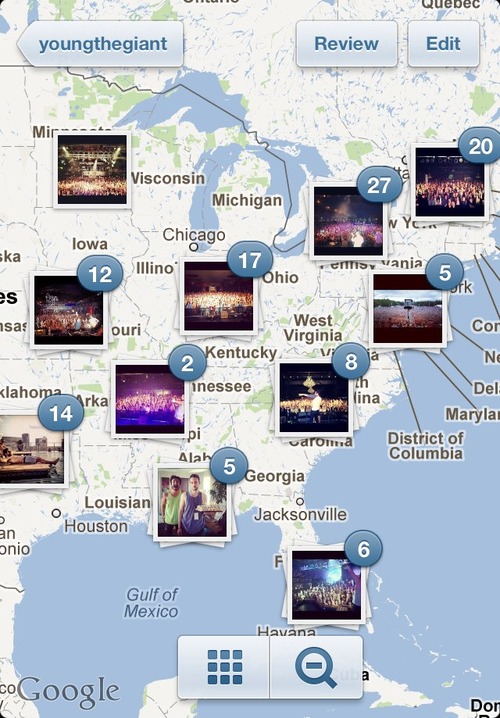
    Instagram has updated their iOS and Android Apps to major V. 3.0 . Now Using the geotagged images Instagram allows you to look at your photo map. It overlays photos with a map underneath, giving people a far more visual look at what they were seeing at a given point on Earth.

    The app now displays bigger grid photos to make it easier to browse large collections of photos and see them too. You’ll find bigger grid photos on user profiles, the Explore tab, as well as on hashtag and location pages.

    Also a lot of UI changes allow users to enjoy the new refreshed upload screen, and security allows you to moderate comments and flag users.


  • What is the Galaxy Note 10.1 ?

    What is the Galaxy Note 10.1 ?

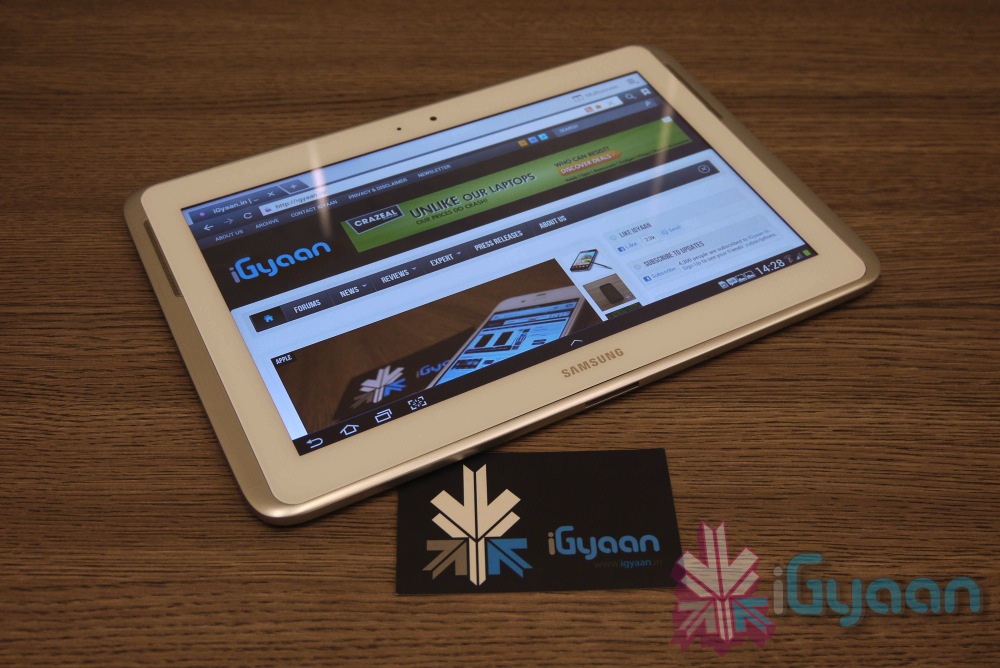
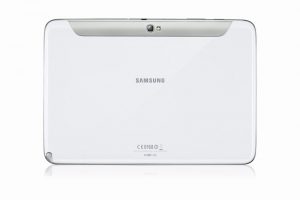
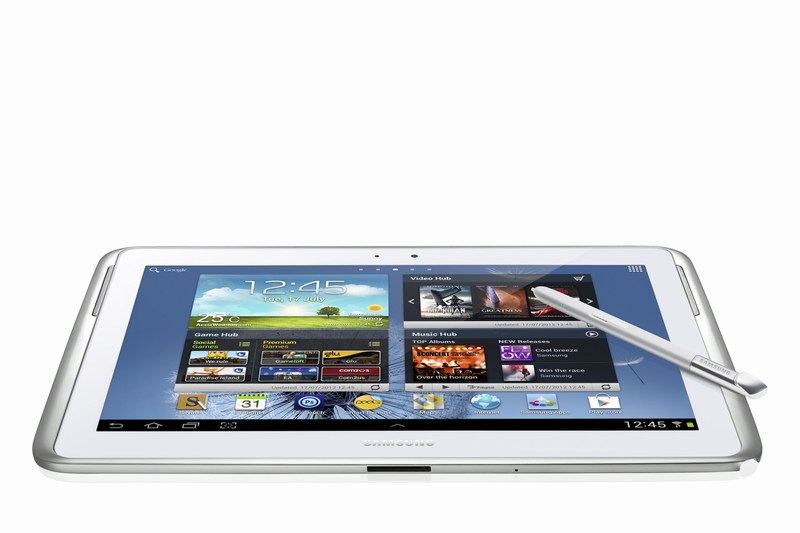
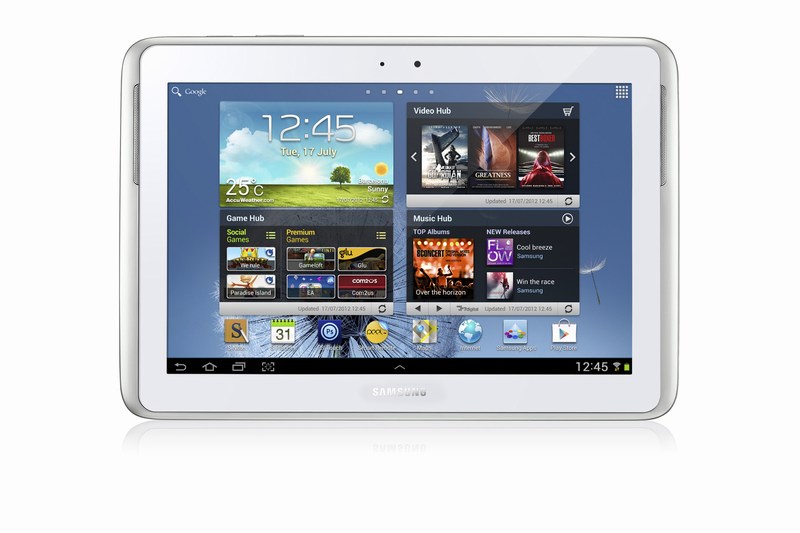
    The Samsung Galaxy Note 10.1 is a larger version of the Galaxy Note smartphone launched in Nov 2011. The Note 10.1 smart tablet was announced at the Mobile World Congress 2012 and has some exciting features that should intrigue a lot of potential customers. 

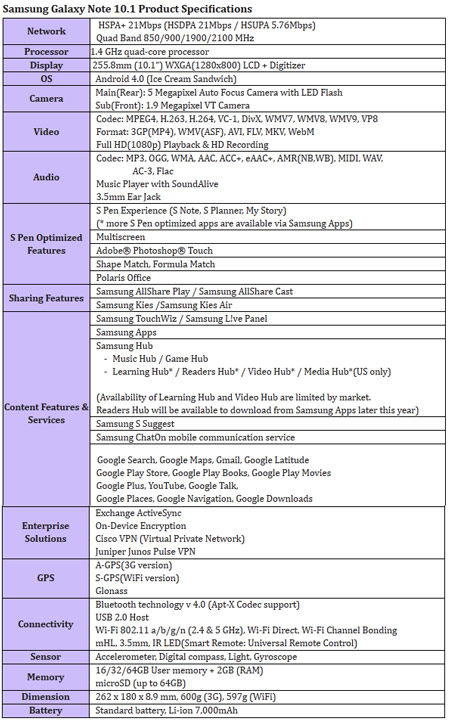
    The device runs Android 4.0 (Ice Cream Sandwich) operating system. It is powered by a 1.4GHz quad-core processor and 2GB RAM, and It also comes packed with a 7,000mAh Li-ion battery. But that is not what makes the Note 10.1 special. The tablet features a  6.5mm S Pen, similar to the one on the original Galaxy Note, which is optimised for the creation of personalised and expressive content. The S Pen is embedded directly in the device and, when removed, automatically launches specially-optimised applications, including S Note and S Planner

    New level of multitasking can be achieved on the Note 10.1 thanks to a new multiscreen feature, users can effortlessly utilise two different applications side-by-side. Galaxy Note 10.1 also incorporates Learning Hub for accessing educational curricula and Adobe’s premium creative application Photoshop Touch.

    Optics are there : The device also includes a 5-megapixel main camera and a 1.9-megapixel front-facing camera. both capable of HD video. The Galaxy Note 10.1 comes in three connectivity options: WiFi-only and WiFi-and-3G HSPA-Plus connectivity, which are both available at launch, and WiFi-and-LTE which will be available later this year.

    The Tablet is supposedly going to be announced in India a day or two. Expect a full iGyaan Treatment soon after.


    [toggle_box title=”Press Release of the Note 10.1″ width=”Width of toggle box”]

    SAMSUNG GALAXY NOTE 10.1 AVAILABLE GLOBALLY IN AUGUST


    Samsung inspires a culture of active content creation, productivity and learning


    London UK, August 6 2012 – Samsung today announced the launch of the Galaxy Note 10.1, an extension of the Galaxy Note category. The Galaxy Note 10.1 offers the functionality and precision of a pen and paper on a 10.1-inch large display, which will enable people to amplify their creativity, productivity, and learning ability.


    Providing an intuitive experience and armed with a 1.4 GHz quad-core processor and 2GB RAM for enhanced performance, the Galaxy Note 10.1 is designed to simplify the process of capturing ideas, accessing information and multi-tasking, making each easier and faster and allowing people to express their ideas in an efficient way.


    Simon Stanford, Vice President, UK & IRE Telecommunications & Networks Division, Samsung UK and Ireland said: “Following the success of the very first Galaxy Note which we launched at the end of last year, we’re delighted that our UK customers will now be able to experience the evolution of this device for themselves. The Galaxy Note 10.1 is a product we are very excited about and will offer our customers a new way to use and experience a tablet device. As well as being able to consume content such as videos, photos, document and the Internet, the Galaxy Note 10.1 also gives them the power to produce, create and customise that same content – something they won’t get from any other product on the market.”


    The Galaxy Note 10.1 incorporates key intuitive features and capabilities such as side-by-side multitasking. This is thanks to its ‘Multiscreen’ on a 10.1-inch large screen; unique S Pen with a variety of S Note templates and productive tools (Shape Match and Formula Match); Learning Hub* for accessing educational curricula and Adobe’s premium creative application Photoshop® Touch.


    True Multi-Tasking with Multiscreen feature


    With the Galaxy Note 10.1’s Multiscreen feature, it’s possible to use two different applications side-by-side simultaneously. So Web pages and videos can be viewed, or applications launched using one half of the screen, at the same time as the other half is used for writing or sketching ideas with the S Pen. What’s more, customers can capture and crop images, and paste them onto the other screen to make personal notes. The Multiscreen feature allows people to be more productive and efficient whilst also enjoying multimedia content. Galaxy Note 10.1 brings a new culture of creation through the owner’s own notes, and enables an entirely new experience to improve productivity and enjoyment.


    S Pen & S Note for Personalised and Organised Note-taking


    Featuring its advanced 6.5mm S Pen, the Galaxy Note 10.1 is optimised for the creation of personalised and expressive content in the most natural and intuitive way. The S Pen’s feel and functionality are specifically designed for an optimal experience on the 10.1-inch screen. The S Pen is embedded directly in the device and, when removed, automatically launches specially optimised applications, including S Note, S Planner, Crayon physics, Adobe® Photoshop® Touch, and Polaris Office.


    Alternatively, people can easily set their preferred application to be launched instantly. For example, S Note can be launched instantly when the S Pen is taken out from the device. Owners can also tap the screen twice while pressing the S Pen button for quick S Note access via the S Note-dedicated widget, which can be easily moved anywhere on the display, never hindering or obstructing creativity or productivity.


    The S Note is a unique tool that enables notes and sketches to be combined with other digital content in ready-to-use templates. The Shape Match and Formula Match features help correct and digitise geometric shapes and solve numeric formulas hand-written with the S Pen. The S Note is also integrated with knowledge search engines so that content can be searched for and information obtained, and then easily drag and dropped onto S Notes without having to switch between screens. Exclusively pre-loaded on Galaxy Note 10.1, the Adobe® Photoshop® Touch application means owners can professionally edit photos with the ease and precision of the S Pen.


    Active Learning Experience


    The Galaxy Note 10.1 is an ideal learning tool that allows students to take notes directly on an eTextbook whilst in lectures, or research the Web at the same time as writing an essay. Samsung’s Learning Hub service is optimised for Galaxy Note 10.1 allowing owners to access extensive multimedia educational content whatever their age. This content includes eTextbooks, video lectures, interactive coaching and much more, and can be shared with multiple Samsung devices. Furthermore, Learning Hub comes with a learning management system providing schedule management and performance and achievement management tools so students of any age can learn at their own pace.


    Superior Hardware Performance


    Galaxy Note 10.1 is designed with advanced hardware technology, including a 1.4GHz quad-core processor and 2GB of internal RAM. Seamless multi-tasking, high-standard graphics, and blazing-fast performance without any lag are essential features of the device. The Galaxy Note 10.1 also includes a 5- megapixel main camera and a 1.9 megapixel front-facing camera.


    Several other features have been added to the Galaxy Note 10.1, including Smart Stay, which tracks the owner’s eye to ensure that the screen is always on while being looked at; and Pop Up Play, which allows a video to be watched anywhere on the screen while simultaneously running other tasks. With AllShare® Play, content can be shared with a large group in real-time by connecting the Galaxy Note 10.1 to Samsung HD TVs, mobile tablets, laptops, and other consumer electronic devices on the same network. With AllShare Group Cast, people can also share and collaborate on documents, presentations, or images without loading the files separately.


    The Galaxy Note 10.1 comes in three connectivity options: WiFi-only and WiFi-and-3G HSPA-Plus connectivity, which are both available at launch, and WiFi-and-LTE which will be available later this year.

    [/toggle_box]
     

  • Google to shut down podcast app Listen, Video for Business & Apps for Teams

    Google to shut down podcast app Listen, Video for Business & Apps for Teams

    Google will be shuttering Apps for Teams, Google Listen, Google Video for Business and an unspecified number of its more than 150 blogs.

    [quote]“Technology has the power to change people’s lives. But to make a difference, we need to carefully consider what to focus on, and make hard decisions about what we won’t pursue,” Google wrote in a blog post. “This enables us to devote more time and resources giving you products you love, and making them better for you.”[/quote]

    Google says it’s made changes to around 50 products, features and services in the past year. By eliminating products, it says, it can better allocate its time to more popular products, which will be used by more people.

    Google Apps for Teams was launched in 2008 to allow people with school or business email addresses to collaborate on non-email applications, such as Google Docs, Google Calendar and Google Talk. Come Sept. 4, Google will turn Team accounts into regular Google accounts.

    In 2009, Google Listen was launched for improved podcast discovery, which the company says has been made irrelevant because of Google Play. The podcast search function will be discontinued Nov. 1, though people who’ve already downloaded specific tracks will still be able to listen. Podcast subscriptions will be available in Google Reader, under the “Listen Subscription” folder.

    Google Video for Business has allowed Apps for Business and Apps for Education users to use video for internal communications. Stored videos will be migrated this fall into Google Drive, but will not count against a user’s storage quota.

    Though Google did not elaborate on which of its more than 150 blogs it would be terminating, the company says it won’t reduce post quantity, rather it will consolidate its communications in its most popular blogs.

  • Now Google Plus Hangout directly from GMail

    Now Google Plus Hangout directly from GMail

    Google has really begun to promote their new Hangouts. You can now start a Hangout with up to nine friends or colleagues straight from Gmail with a click of a button. It provides access to people with an Android or iOS device and those on Google+ in a web browser.


    [toggle_box title=”Google Hangouts” width=”Width of toggle box”]


    Since the introduction of Gmail video chat back in 2008, many of you have told us that you love the direct, personal communication it provides. That’s why we’re excited to announce that video chat is being upgraded to a more modern video calling technology — Google+ Hangouts. 

    Unlike the old video chat, which was based on peer-to-peer technology, Hangouts utilize the power of Google’s network to deliver higher reliability and enhanced quality. You’ll be able to chat with all the same people you did before and, in fact, with Hangouts you’ll now be able to reach them not only when they are using Gmail but also if they are on Google+ in the browser or on their Android or iOS devices.

    All Gmail users will benefit from this upgrade, but if you and the person you’re chatting with also use Google+, you’ll get even more from the Hangouts experience. You’ll be able to video chat with up to nine people at once, watch YouTube videos together, collaborate on Google documents and share your screen. Plus, Hangouts has a bunch of fun effects that you can try out…because any conversation is better when you’re wearing a virtual mustache or pirate hat.

    [/toggle_box]
    [Official Gmail Blog]


  • Apple OS X Mountain Lion Quick Overview

    OS X Mountain Lion is here, and there are quite a few new features to learn all about, so we sum it up listing the best out of all of them .

    Notification Center

    Just like on iOS , Notification centre gives you all your  alerts and messages under one bar, instead of all over the place. You can access your notification history by clicking the list icon all the way in the top right corner of the OS X menubar. If you want to edit your notification center settings, you can do so in the Notifications section of System Preferences. You’ll be able to decide what kind of notifications individual apps provide, or turn them off entirely.

    Notes and Reminders

    The Notes app lets you save and organize text and images. Reminders allows you to create reminders so you don’t forget to do things. Again they are just like on iOS and sync well with your iDevices.


    Voice Dictation

    Just like on the iPad and iPhone you get voice dictation on Macs, in Mountain Lion (sadly no Siri).  To start dictating, just press the function (fn) key twice. When you’re done dictating, you can click the “done” button or press the function (fn) key twice again. OS X will take a moment and then provide you with the transcribed text. In addition to just offering words, you can say things like “period” or “comma” for punctuation and “new line” to make a new line.

    This feature works in any App or window that accepts text input via keyboard, also in online websites, like in GMAIL, as long as they are accessed in the new Safari.

    AirPlay Mirroring

    If you have an Apple TV, You can now mirror your display on an Apple TV (2nd or 3rd generation) with AirPlay if you enable it in Displays section of System Preferences. Down at the bottom there’s a checkbox beside “Show mirroring options in the menu bar when available.” Check it and you’ll be able to send your display to any detected Apple TV via the menu item in your menubar.

    Messages

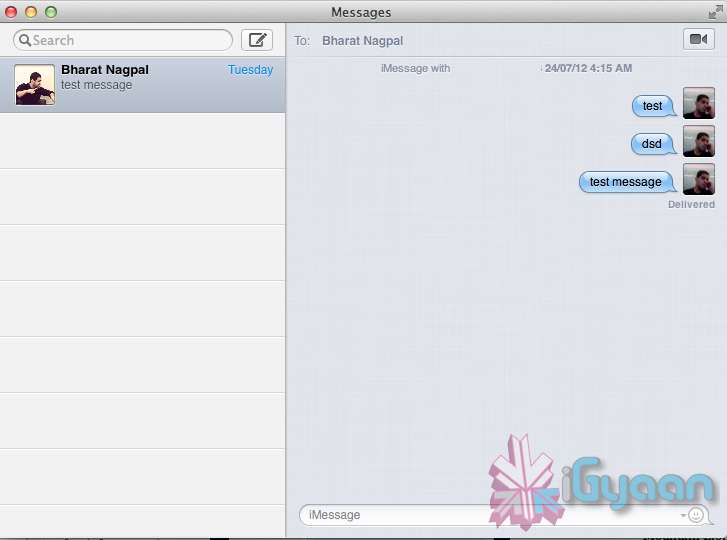
    Messages is the iMessage of OS X. It’s been around in beta since Lion and hasn’t changed much in Mountain Lion. You can add your iCloud account to sync messages with an iPhone, iPad, or iPod touch. You can set up various instant messaging accounts, however, so Messages on the Mac is a little bit more functional than it is on iOS. That’s because it replaces iChat. Messages also now pulls out of Beta, so those of you who were experiencing slow takes may enjoy the new experience. 

    iCloud (Documents in the Cloud)

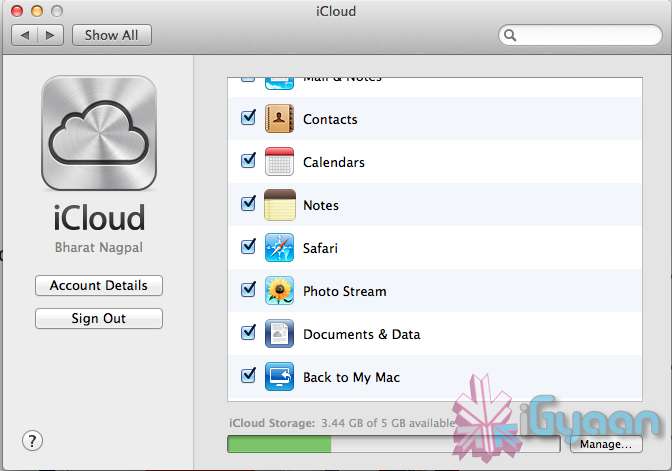
    iCloud has been upgraded significantly in Mountain Lion, you can access it in the same panel in System Preferences. If you turn on “Documents & Data” your documents (including versions of them) will be synced with iCloud, making them available on other iCloud-enabled devices.


    Share

     There is a new button in Mountain Lion, its the Share Button. Not every app has it yet, but many apps will be adding it to allow you to share content easily. In the meantime, Safari is one app that makes sharing sites easy to Messages, Twitter, and Email. If you click an image and then the sharing icon in a window’s toolbar, you’ll be able to share it on Twitter or Flickr. You’ll find other options for other file types as well. If you want to set up sharing accounts, visit the Mail, Contacts, & Calendars section of System Preferences.

    Security and Privacy

    In this new panel available in the System Preferences panel , a new checkbox “Allow applications downloaded from” , which once checked will give option “Mac App Store and identified developers” . This will prevent apps that aren’t signed through Apple’s developer center or downloaded through the Mac App Store from running

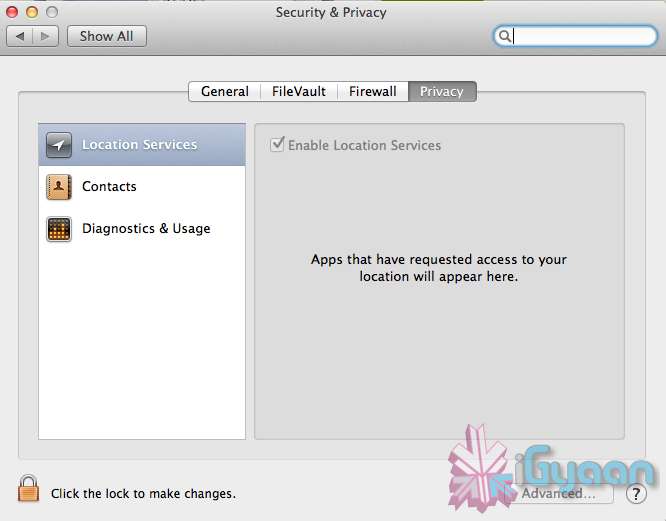
    Under Privacy, you get new privacy settings. This is where you can approve or deny an app’s permission to access certain things like your contacts, location, Twitter account, and more. 

  • YouTube offers face-blurring tool

    YouTube offers face-blurring tool

    Whoops! Something went wrong!

    YouTube has launched a feature which blurs the faces of people in videos uploaded to the site.

    According to a Wednesday blog post by the video sharing site, this application is its first step toward providing visual anonymity for YouTube videos, enabling the sharing of “sensitive protest footage” without showing the faces of activists involved, or protecting the identities of people in the videos.

    [quote]“Whether you want to share sensitive protest footage without exposing the faces of the activists involved, or share the winning point in your 8-year-old’s basketball game without broadcasting the children’s faces to the world, our face blurring technology is a first step towards providing visual anonymity for video on YouTube,” wrote Amanda Conway, a YouTube policy associate, on the company blog post.[/quote]

    The technology is similar to the one deployed by Google across several of its services such as StreetView and Google goggles.

    People can check if the blurring has worked frame by frame through a preview function.

    [quote]Conway added: “This is emerging technology, which means it sometimes has difficulty detecting faces depending on the angle, lighting, obstructions and video quality. It’s possible that certain faces or frames will not be blurred. If you are not satisfied with the accuracy of the blurring as you see it in the preview, you may wish to keep your video private.[/quote]

iGyaan Network
Privacy Overview

This website uses cookies so that we can provide you with the best user experience possible. Cookie information is stored in your browser and performs functions such as recognising you when you return to our website and helping our team to understand which sections of the website you find most interesting and useful.