Tag: whatsapp

  • WhatsApp Speeds Up Roll Out of Voice Calling On all Android Devices

    WhatsApp Speeds Up Roll Out of Voice Calling On all Android Devices

    WhatsApp’s voice calling features has been a long awaited feature. The messaging app has virtually replaced SMS and now it is set to take its aim at the core business of mobile operators. The company had already begun offering the feature for some users through an invite system. It is being reported that WhatsApp has broadened the roll out process for voice calling, and it is available for all Android device.

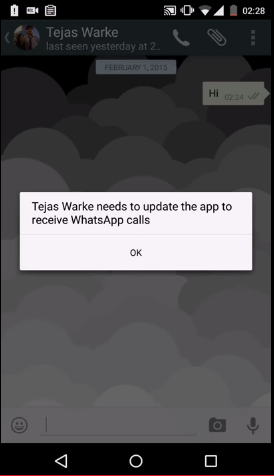
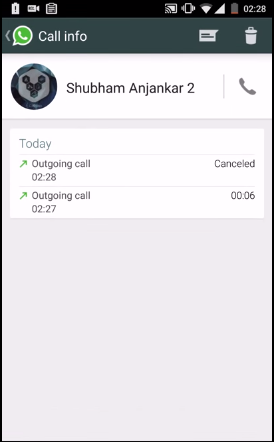
    This would be an exciting news for the users of the app. To get the update, users will have to receive a call from someone with the feature activated on their device. Once the user receives the call, the user interface will change, and three tabs will be introduced which represent calls, chats and contacts. The call section will feature call records like incoming, outgoing and missed calls.

    WhatsApp has been offering the calling feature unofficially. It was reported a few days back that WhasApp had started offering invites for the feature. Those invites were time limited to a few hours. That time limit has been extended now.

    Recently a malware was doing rounds that claimed to offer voice calling feature but simply directed the users to a malicious website. The website asks people to take part in a survey but ends up installing malware on the victim’s smartphone. So it’s advisable to not click on any random link and wait for the invite call to come to your device.

  • WhatsApp Says WhatsApp Plus Users Will Face Temporary Bans, Not Permanent

    WhatsApp Says WhatsApp Plus Users Will Face Temporary Bans, Not Permanent

    A few days WhatsApp began banning those users who had been using third party applications like WhatsApp+. The messaging app stated privacy concerns for the ban. WhatsApp has come out and said that the move is just temporary, and users can follow some easy steps to start using their service again.

    The bans were handed down for a 24 hour period. Users could uninstall the third party app and install a fresh version of the official app from the app store, and they would be re-instated back. But recently a Google+ post saying that Whatsapp is starting a Permanent Account Disable purge caused a lot of concerns amongst the users.

    WhatsApp has come out to clear the air. Earlier, WhatsApp used to ban the third party app users for a period of 24 hours, and the message showed up with a countdown clock, but now it’s extended indefinitely and the countdown clock has been removed. The company said that the third party app users will be unblocked only after they have uninstalled the third party app. They are not permanently banned from the service.

    WhatsApp had claimed piracy and security concerns for the ban. It cited the case of Snapchat where users’ personal content were hacked in through third party app. So if you want to use the official WhatsApp app, you would have to delete WhatsApp+, WhatsApp Reborn, OgWhatsapp or any other third-party client from your smartphone.

    This feels like a case of arm-twisting by the messaging giant, but it sure is needed to increase security. There is accountability with the official app, but there is none with third party apps. It’s better to take the safer approach than trade your personal information for a few new emoticons on a third party app. WhatsApp is anyways introducing features such as voice calling soon, so you would be better off sticking with the official WhatsApp.

  • WhatsApp Web Now Comes to Firefox and Opera Browsers

    WhatsApp Web Now Comes to Firefox and Opera Browsers

    The social networking service WhatsApp gave users a reason to switch to desktop when they introduced WhatsApp Web. Unfortunately, it was limited to Google Chrome to date, but now WhatsApp has extended its reach to Firefox and Opera too.

    Today, the company confirmed the same on Twitter –

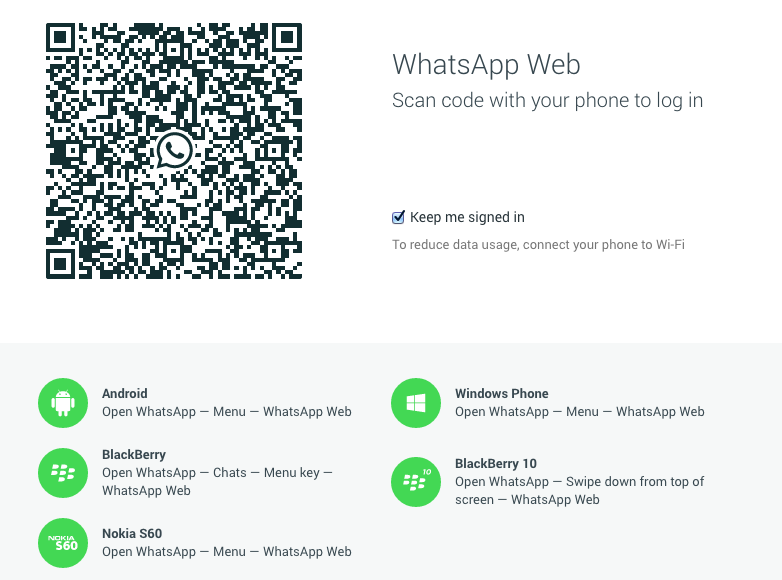
    To launch the same on your desktop, go to WhatsApp Web on your device and scan the QR code on web.whatsapp.com. For now, the desktop version is compatible with devices running on Android, Windows and BlackBerry. The iOS handsets are yet to join the league.

  • WhatsApp’s Voice Calling Feature Now Coming to All Android Devices

    WhatsApp’s Voice Calling Feature Now Coming to All Android Devices

    A few days back it was being reported that WhatsApp was testing voice calling feature on select devices. The messaging giant is now all set to bring the feature to all its Android subscribers. This will be a fantastic news for the users but will also be a major cause of concern for the network operators who have already lost tremendous amount of SMS revenue to messaging apps.

    The update seems to get activated when a user with voice calling capability calls his WhatsApp contacts. Once the update is activated, the user interface also changes to feature a separate voice calling screen. A phone icon also appears next to the WhatsApp contacts, and you can also see the call logs of your device.

    It seems like the update procedure isn’t working for all users yet. There might also be a possibility that the developers might have restricted the number of people a person can invite by voice calling them. WhatsApp hasn’t officially announced the roll-out but with the number of devices supporting the feature, we can anticipate an announcement any time soon.

    With this offering, Facebook owned WhatsApp will also direct an assault at voice calling apps like Viber, WeChat and others. You can even expect a backlash from the phone companies in the form of increased data pack costs. But no matter what, the 700 Million WhatsApp users are going to get a reason to celebrate real soon.

  • Check Out Flipboard’s Cool New Web Version

    Check Out Flipboard’s Cool New Web Version

    Mobile apps are being pushed to the desktop. Lately, WhatsApp made its way to the web and now Flipboard is joining the league. The news-reading app stepped into the desktop world and launched the web version of the digital magazine service. It is functional now and looks brilliant.

    Flipboard hopes to attract the broader spectrum of web readers, which don’t prefer to browse on mobile. Flipboard CEO Mike McCue said in a meeting:

    There is a whole group of people who don’t do that much browsing on their phones. That’s what they use their computer for.

    Mike says that the thing they are doing is very retro, by which he means shifting the app from a handy and anytime access device to a desktop which is not mobile.

    Let’s have a look at how the application works and appears on the desktop:

    If you are a Flipboard user then sign in to Flipboard, else make a new account. Once you’re in, make your choice and flip the article in your magazine through the + icon at the extreme right corner below the post. You can also like the post, report it as inappropriate, share it via email, Twitter, and Facebook. Then you have the same option to search for your favourite topics as it’s on mobile.

    Flipboard

    Flipboard has worked extensively on responsive design, which makes it easier and prettier. Also, it has responsive layouts for diverse screen sizes and has a new scrolling interface as well.

    Flipboard 2

    By bringing the web version of Flipboard, the 15 million magazines that could only be read through mobile app until now, can now be browsed on desktop. This gives readers the time to read their personalised magazines on their workstations when in office.

  • WhatsApp Adds Voice-Calling Button on iOS, Tests Voice Calls on Select Android Devices

    WhatsApp Adds Voice-Calling Button on iOS, Tests Voice Calls on Select Android Devices

    WhatsApp’s big plans for the new voice calling feature have been received well by the crowds. After receiving news that the instant messaging service is being tested for Android devices, the company has released a voice-calling button for iOS users.

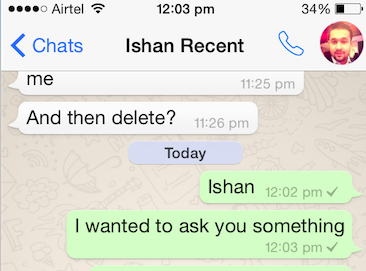
    The news broke out yesterday evening and it is very easy to use. A calling button in WhatsApp appears on iOS handsets within the chat window. This button is placed next to the contact name and profile picture. The app uses phone’s dialler for making outgoing calls.

    Whatsapp Voice calling
    The voice calling button, next to the profile picture.


    Though, the changelog of the update doesn’t notify about the calling feature and mentions addition of Dynamic Type support throughout the app, quick camera button in chat that let’s you quickly choose a recent camera roll photo, but it’s there in the new update.

    For Android, WhatsApp is currently passing on the feature to a select number of users, so we’d recommend you to keep a lookout for the update. Once WhatsApp is satisfied with the response of the service, it would be available for everyone to use.

    The reason that this upcoming feature is so popular is that it would allow users to make calls without having to pay for the call (only for their data service.) Few days back, WhatsApp rolled out the voice-calling feature to select users became viral and only people with invite could use the new tool. But it was barely useful as other people with the same feature could only be contacted.

  • Things to Know About the New WhatsApp Voice Calling Feature

    Things to Know About the New WhatsApp Voice Calling Feature

    After launching WhatsApp on the Desktop, the instant messaging service WhatsApp has finally started rolloing out the much-awaited voice calling feature to select users for beta testing.

    Here are three things you should know about the recently added voice calling tool:

    Invite System

    whatsapp voice calling2

    As the voice calling feature on WhatsApp is releasing to selected customers, all the users will not be able to enjoy it on their devices as of now. The company said that there is an invite system and a person with the update can send invites to their friends by giving them a call.

    Easy calling

    whatsapp voice calling1

    The instant messaging service has kept things simple. Until now there was an attachment option in the chat record of every person, but now a call icon has been added to make a call. Also, there would be an option to put the phone on speaker while calling.

    Call Log

    whatsapp voice calling

    If you think you can just make and receive a call, then this may surprise you. WhatsApp has an organised call log system where the app keeps a track of your recent calling history. That means you will be notified of the missed calls as well.

    Have a look at this video to better understand the voice calling feature:

  • Get WhatSIM to Use WhatsApp Anywhere in the World Without the Internet

    Get WhatSIM to Use WhatsApp Anywhere in the World Without the Internet

    WhatsApp has all but replaced SMS. The service has gained a massive following and has about 700 million monthly users. The hitch with the service is that you always need the internet to stay connected with your contacts. But a new SIM called WhatSIM will let you access WhatsApp anywhere in the world without the need of the internet.

    Sounds too good to be true? Well, this is for real. WhatSIM has been invented by Manuel Zanella, who is also the founder of ZeroMobile, Italy’s first Global Mobile Operator for low-cost roaming. The company offers the SIM for a price of €10 with an additional €5 shipping charge. Once purchased, the SIM can be used for an entire year without any subscription fee.

    WhatSIM finds the best network in the region and automatically shifts to it thus giving you non stop connectivity to whatsapp.
    WhatSIM finds the best network in the region and automatically shifts to it thus giving you non stop connectivity to WhatsApp.

    The company claims that WhatSIM can be used anywhere in the world as it connects to the provider with the best coverage and signal wherever you are. If you change your position, it automatically searches for a new provider. If a better one is available, it connects by itself without you even noticing.

    The service only takes care of texts. For other features such as videos, images, audio, etc, you would need to buy credits. These credits start from €5. You will require 150 credits to send photos, 600 credits to send videos and 30 credits to send voice texts. The recharge will begin February 26. So if you are a globetrotter or simply living in a land with awful internet connectivity, then WhatSIM may be a good option for you.

  • Desktop Version of WhatsApp is Now a Reality

    Desktop Version of WhatsApp is Now a Reality

    There are rumours and then there are premeditated rumours. WhatApp’s web version was the second one. We have been hearing about the web client of the the popular messaging app for a long time now. Yesterday, the company officially announced a web app that will turn your Google Chrome browser into a WhatsApp window.

    whatsapp web

    It is a web app not a native client for your desktop, that means you need to be connected to the internet on your phone for the web app to work. It basically mirrors the app on your phone onto the web site. To use it, you need log onto the WhatsApp web page, scan a QR code with the WhatsApp mobile app, then get to typing your messages from there.

    This is necessary, presumably, because WhatsApp uses your phone number and SMS verifications rather than usernames/passwords. This currently works on Android, Windows Phone, and BlackBerry, but not on iOS.

    whatsapp web1

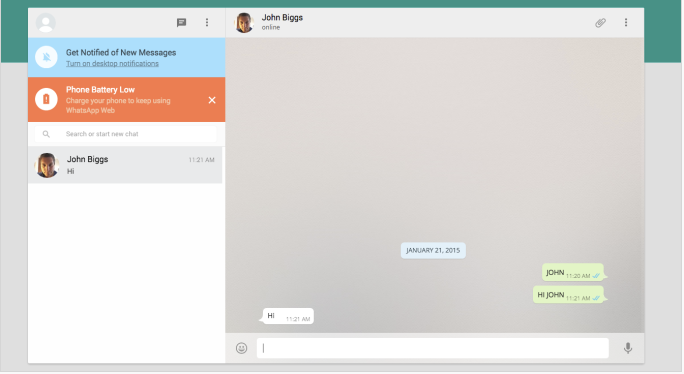
    One of the main limitations of the app is its dependence on the mobile network, so if your phone dies because of the low battery, the web client won’t work either. However, it is just a start, we expect the company to add more feature and support for other browsers as well as iOS in coming months.

    We tried to connect our Android device with the web client, but it seems the update hasn’t reached the Indian shores yet.

  • Using WhatsApp Plus Might Cost You a Temporary Ban from WhatsApp

    Using WhatsApp Plus Might Cost You a Temporary Ban from WhatsApp

    Every now and then, you see a pop up notification warning you not to use apps from outside the Play Store; when you side-load apps you open yourself up to all sorts of malware.

    WhastApp Plus is an unofficial app which uses WhatsApp’s name and server to get downloads without the company’s permission. There have been various rumors that the company is actually buying the unofficial app because of its popularity. However, WhatsApp has recently cleared the air by initiating a 24-hour ban on users of WhatsApp Plus.

    whatsapp plus1

    WhatsApp, via FAQ section of it’s website, explained the situation and how the Plus version of messaging service has been running in bad faith.

    WhatsApp Plus is an application that was not developed by WhatsApp, nor is it authorized by WhatsApp. The developers of WhatsApp Plus have no relationship to WhatsApp, and we do not support WhatsApp Plus. Please be aware that WhatsApp Plus contains source code which WhatsApp cannot guarantee as safe and that your private information is potentially being passed to 3rd parties without your knowledge or authorization.

    Please uninstall your application and install an authorized version of WhatsApp from our website or Google Play. Then, you will be able to use WhatsApp.

    The company cleared that the WhatsApp Plus was using its server and that it has banned the unofficial version completely. If you are banned, you have to uninstall the Plus version and  have to reacquaint yourself with WhatsApp’s official app from their website or Play Store.

  • With More Than 700 Million Users, WhatsApp is Growing Strong

    With More Than 700 Million Users, WhatsApp is Growing Strong

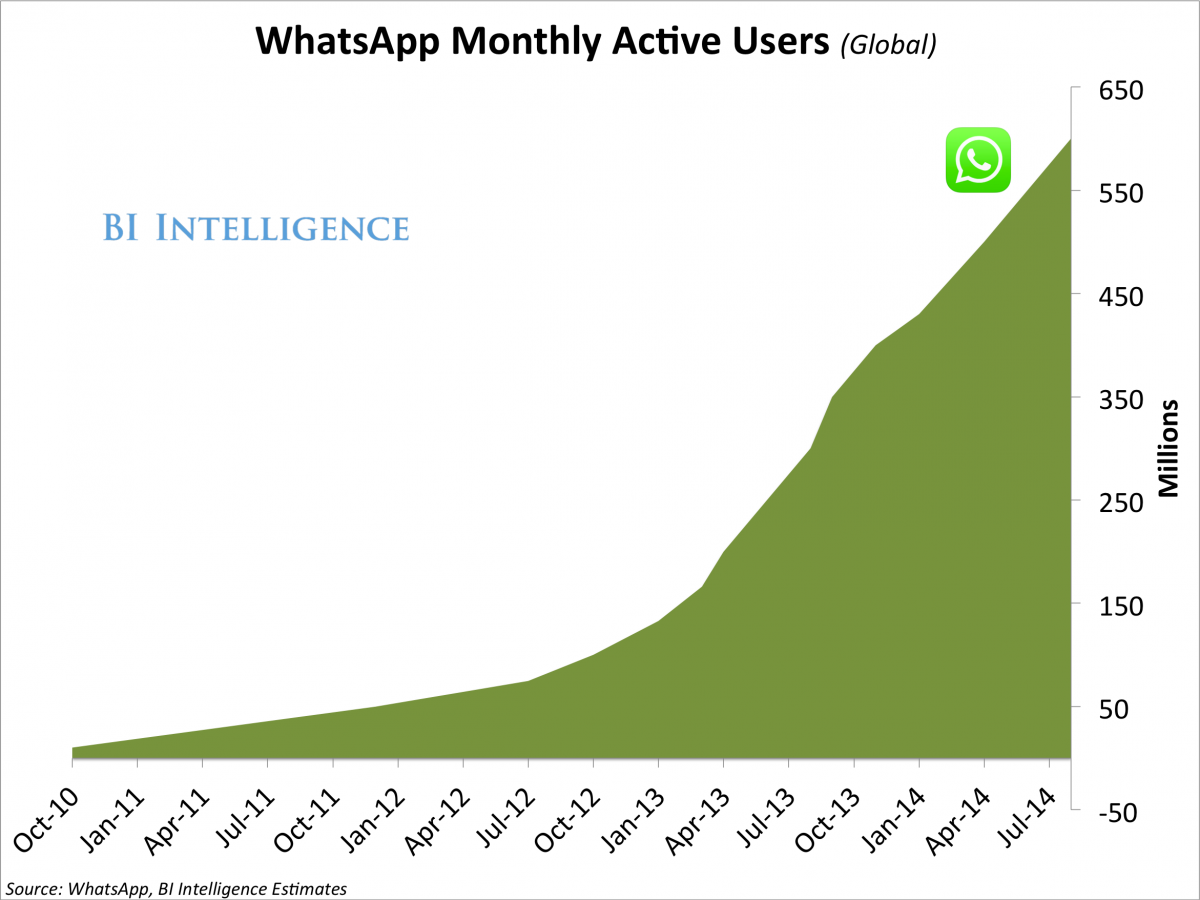
    WhatsApp has rapidly grown from a meager messaging app to a formidable force that has made SMS nearly obsolete. The app is available on all the prominent mobile platforms. The app is rapidly gaining a massive user base and a new report by BI Intelligence shows, at present, it is being used by over 700 Million folks.

    WhatsApp co-founder and CEO Jan Koum wrote a Facebook post where he made the announcement of the 700 million strong user base. He also mentioned that the users of WhatsApp send over 30 Billion messages every single day. This clearly shows why the network providers are so infuriated by the free messaging services as these apps are causing a massive dent in their revenues.

    In four months since August last year Whatsapp has added 100 Million new users
    In four months since August last year Whatsapp has added 100 Million new users

    The rate of growth of WhatsApp is exponential too. Just last August the company had announced that it had gathered 600 Million subscribers. The speed of adoption is similar to its parent company, Facebook, which now hosts the profile of over 1.28 Billion monthly users and which is rapidly growing.

    WhatsApp is not just a messaging app anymore. It is being utilized for political, marketing, spreading information and even entrepreneurial collaboration. It will, in the coming future face some challenges from the network providers and vested interests, but if the past and the latest report is any indication, WhatsApp is only going to get stronger.

  • WhatsApp’s Free Voice Calling Feature Captured in a Leaked Screenshot

    WhatsApp’s Free Voice Calling Feature Captured in a Leaked Screenshot

    At the commencement of year 2014, it was learnt that WhatsApp was planning on diminishing the dependability of its users on other calling services and had glad plans of introducing a voice calling feature. Months passed, but there was no sign of the said feature on the cross-platform mobile messaging service. However, a reliable source has come up with some interesting screenshots that depict the calling feature on WhatsApp.


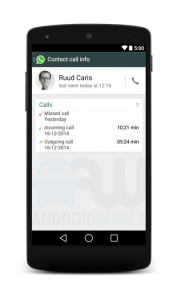
    The website Androidworld.nl posted some pictures of the new version of WhatsApp that shows voice calling. The screenshots also suggest that the upgraded version will have a separate window for making calls to WhatsApp contacts and a dedicated call log. Users can keep a tab on missed calls, ongoing calls and received calls through this window. Additionally, it can also include options like call mute, switch to text message, and hang up.

    However, these are just leaks and there is no proof of its authenticity. Jan Koum, WhatsApp CEO, said in an industry conference that the company will surely be rolling out voice calling feature in Q1 2015. The delayed release has been due to some technical complications faced by the development team.

    If WhatsApp succeeds in overcoming all the said hurdles and brings out a version featuring voice calling, it can prove to be a threat for the other services like Viber, Line, Facebook Messenger and more.

  • WhatsApp on Web Might be a Reality Soon

    WhatsApp on Web Might be a Reality Soon

    The popular cross-platform mobile messaging tool WhatsApp has made a mark in the smartphone arena and now the service is planning to make its grip on the web platform as well. If the rumours are to be believed, WhatsApp may soon come up with a web version of its widely-accepted messaging app.

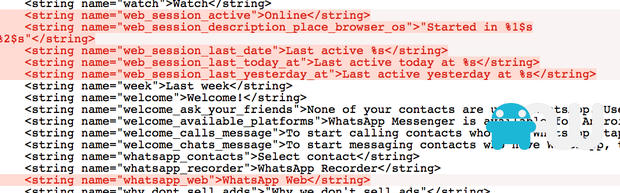
    As per a report by AndroidWorld.nl, the screenshot of the HTML programme above encodes word ‘WhatsApp Web’. In addition to that, the code also embeds logging into a web service and checking online status, the later feature is seen on the mobile version. However, there is no definite evidence in support to the report, and an official announcement from the largest mobile service is still awaited.

    whatsapp web

    In today’s day, where everything is about seamless interconnectivity between web and mobile, WhatsApp shouldn’t remain constricted to smartphones.

    Meanwhile, WhatsApp is the only popular messaging service which doesn’t have a web version. Its competition such as Line, Viber, Telegram and WeChat allow users to text both via phone and web. With a user base of over 600 million, the tool definitely needs a web version.

  • Next WhatsApp Update Adds the Option to Disable the Blue Tick

    Next WhatsApp Update Adds the Option to Disable the Blue Tick

    WhatsApp’s last update included a new, controversial, ‘blue tick’ feature which indicated that the recipient had read the message you sent. The addition of the blue check marks was utterly unwanted in our opinion, given that it brought with it the social pressure to reply – which most users considered as an interruption of privacy.

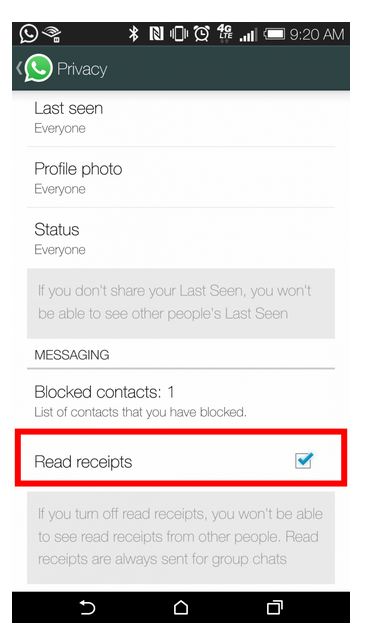
    Earlier, in the interest of privacy, WhatsApp added the choice to conceal the ‘last seen’ notification that informs the other party when that person was last available on the messaging platform. Same has happened with the new ‘blue tick’ feature. The instant messaging app has quickly done some damage-control and added the option to hide ‘Read Receipts’ feature.

    whatsapp

    Once enabled, the ‘blue ticks’ will not show up on the sender’s window. One needs to simply go to the ‘Privacy Settings’ and enable/disable the feature. Obviously, this is a huge sigh of relief for many users.

    We still haven’t received this update on our smartphones as yet. But from what we hear, it’s on its way. Stay tuned for more.

  • Here’s How You Can Deceive WhatsApp’s Blue Tick

    Here’s How You Can Deceive WhatsApp’s Blue Tick

    In a recent attempt to intrude our private lives, WhatsApp added another layer of unnecessary information in the form of blue check marks, indicating that the recipient has indeed read the message.

    The addition of the blue check marks is utterly unwanted in our opinion, given that this brings back the social pressure to reply – what most users consider an interruption of privacy. In the interest of privacy, WhatsApp earlier added the choice to conceal the ‘last seen’ notification that informs the other party when that person was last available on the messaging platform.

    Well, there is a way around to avoid this new feature. Rahul Banker, a blogger and head of India’s Google Developers Group, has revealed the method to avoid this feature in a blogpost.

    whatsapp-convo

    Basically, when you read the message you received on WhatsApp, the app uses your Wi-Fi or Data connection to notify the sender that the message has been read via blue tick marks. So, if you read the message offline, the app won’t be able to send the information to the sender.

    So, if you don’t want the sender to know whether you have read the message or not, you just need to switch off your internet and Wi-Fi connections, then open WhatsApp and read the message. Close the app, reconnect to your data or Wi-Fi, and the check marks remain grey.

iGyaan Network
Privacy Overview

This website uses cookies so that we can provide you with the best user experience possible. Cookie information is stored in your browser and performs functions such as recognising you when you return to our website and helping our team to understand which sections of the website you find most interesting and useful.