Tag: Windows 8.1

  • Toshiba Encore 8 Inch Windows Tablet Launched

    Toshiba Encore 8 Inch Windows Tablet Launched

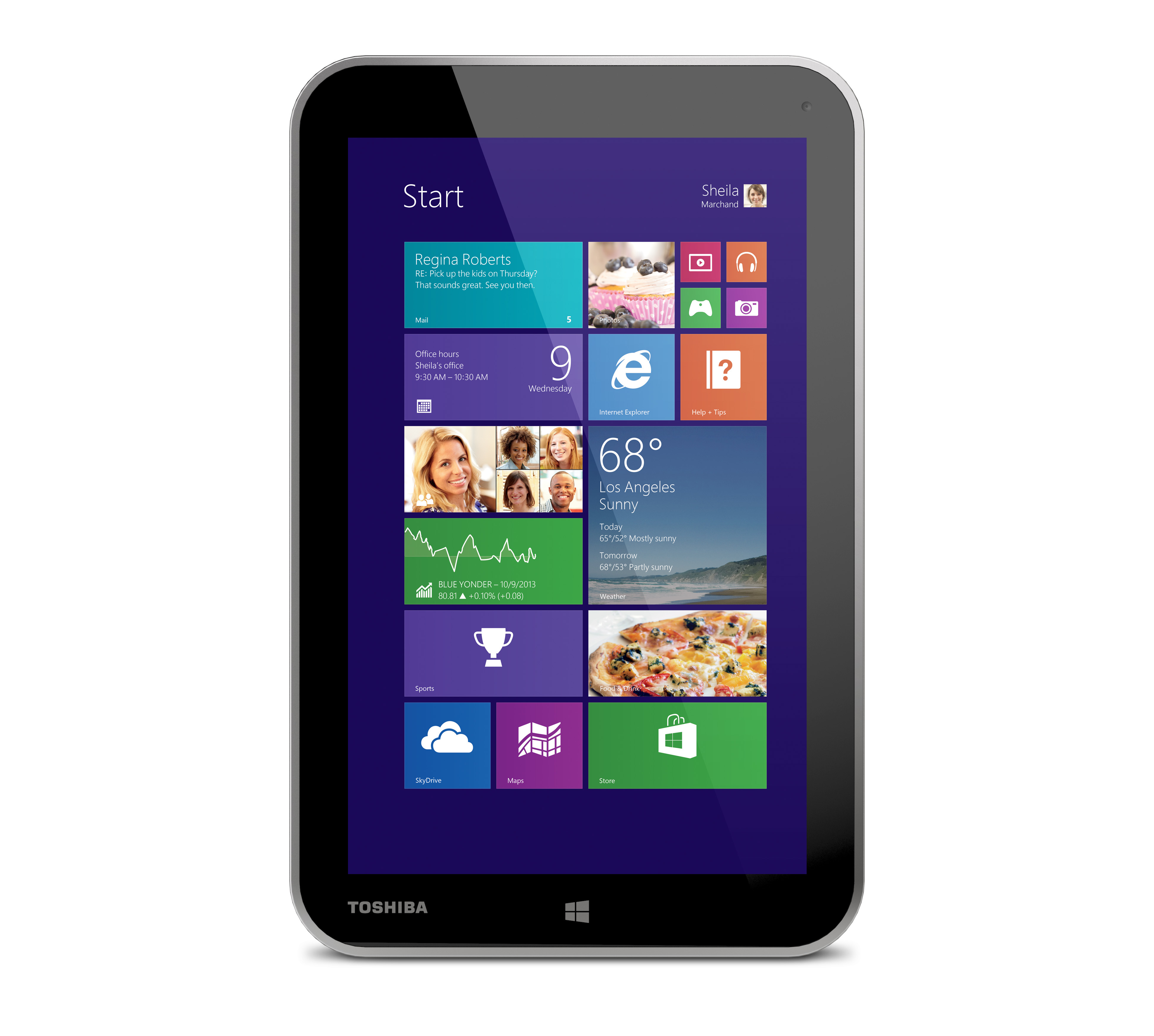
    Toshiba has always been more active in its laptop segment, but this time the company has launched a new tablet called the Toshiba Encore.

    The Toshiba Encore has an 8-inch multi-touch display with a resolution of 1280 x 800 pixels. The device is powered by an Intel Bay Trail Atom processor. The company says that Encore has been developed in collaboration with Microsoft and has been optimized for Windows 8.1. It includes an 8 MP rear camera and a 2 MP front camera. The tablet weighs about 479 grams. The Toshiba Encore includes 2GB of RAM and 32GB of internal storage which can be further expanded by a a micro SD card. Micro-USB port, Micro-HDMI port and Wi-Fi are some connectivity options for this device. 
    “Encore is poised to re-energize the opportunity for Windows tablets in the market,” said Carl Pinto, vice president of marketing, Toshiba America Information Systems, Inc., Digital Products Division. “Our fundamental approach to designing Encore was to create a better convergence of hardware and software so the overall app experience and capabilities on a Windows-based device is better than ever. Windows has a lot to offer for a tablet user, and with the new features that Windows 8.1 brings, we believe that Encore will deliver more choice against a range of competitive tablets.”

    The Encore tablet will hit the market in November for a price of $330.

    [toggle title=”Press Release “]TOSHIBA REVEALS ENCORE, A POCKET-SIZED TABLET SET TO DELIVER A FULL WINDOWS 8.1 EXPERIENCE
    All-new Encore Tablet With an 8-inch Multi-touch Display and Intel Atom Processor Delivers Fast, Full-screen Web Browsing, Best-in-class Skype Experience, Xbox Second-screen Capabilities and Much More
    NEWS HIGHLIGHTS
    – Optimized for Windows® 8.1 and developed in close collaboration with Microsoft, the Encore hardware features are designed to support a full-spectrum software and apps experience.
    – Equipped with dual microphones for a best-in-class Skype experience.
    – Powered by the latest-generation Intel® Atom processor with InstantGo, unleashing fast, fluid
    performance with connected standby capabilities and long battery life.
    – Includes full version of Office Home & Student 2013, Xbox SmartGlass app, free streaming pass
    to Xbox Music, Norton Anti-Theft and more.

    IRVINE, Calif. – Sept. 5, 2013 – Toshiba’s Digital Products Division (DPD), a division of Toshiba America Information Systems, Inc., today unveiled the Encore tablet, a consumer device designed to deliver an exceptional Windows 8.1 experience in a pocket-sized form factor. Developed in close collaboration with Microsoft and built for consumers seeking a versatile small-screen tablet for home, work and play, Encore is well-positioned to accelerate the market for Windows-based tablets by delivering software- optimized features and sleek hardware design at a competitive price point.

    “Encore is poised to re-energize the opportunity for Windows tablets in the market,” said Carl Pinto, vice president of marketing, Toshiba America Information Systems, Inc., Digital Products Division. “Our fundamental approach to designing Encore was to create a better convergence of hardware and software so the overall app experience and capabilities on a Windows-based device is better than ever. Windows has a lot to offer for a tablet user, and with the new features that Windows 8.1 brings, we believe that Encore will deliver more choice against a range of competitive tablets.”

    Smart, Small-screen Design
    Designed to be held in one hand, the 8-inch1 Encore tablet is optimized for use at home or on the go. A high-resolution (1280 x 800) multi-touch HFFS display is well-suited for entertainment with wide viewing angles, while the new scaling capabilities of Windows 8.1 maximizes the screen real estate, making room for full-screen web browsing and an unencumbered Start screen view in both portrait and landscape orientations. Encased in a stylish silver textured backplate, Encore is both slim and lightweight, measuring 0.42 inches (10.68mm) and weighing just 16.9 ounces (479g)2.
    Encore is powered by the power-efficient Intel® Atom processor, which delivers great performance, fast start-up and page loads, and exceptional battery life. It also includes the connected standby capabilities of InstantGo, enabling the device to receive updates while sleeping so content is always up to date when use is resumed. In addition, Encore includes top quality features, such as an 8-megapixel camera, a full suite of sensors, including a gyroscope, accelerometer and GPS, as well as stereo speakers.
    ?
    “Toshiba continues to drive touch innovation by bringing new and exciting Windows 8 form factors to life,” said Jordan Chrysafidis, vice president of Worldwide OEM Marketing, Microsoft Corp. “We look forward to working with Toshiba on the launch of Windows 8.1 and seeing its holiday 2013 devices delight customers worldwide.”

    Optimized for Skype
    Encore is optimized for Skype, making high-quality video chatting and calling possible. Utilizing on-board dual microphones with beam forming technology and integrated 2-megapixel front camera – consumers can chat with clarity with friends and family throughout the world.

    Easy Sharing and Streaming with Windows 8 Devices
    Completely compatible with both Windows 8 apps and Windows 7 programs, Encore offers seamless integration and content sharing with other Windows devices, giving the device an edge for multi-device home users looking to stream and share content from room to room.
    Great for play. Ideal for work.

    The Encore tablet supports a wide range of applications – from books, games, movies, music and photos to productivity – making it a versatile device that can be used and enjoyed at home, at work or on the go. Ready to go right out of the box, Encore will feature Xbox Movies, Music and Games entertainment services, Amazon’s Kindle e-reading app, as well as the Xbox SmartGlass app which turns the tablet into a secondary screen for the Xbox 360 and Xbox One game consoles. Also included is a full version of Office Home & Student 2013 for convenient viewing and creation of Word, Excel® and PowerPoint® documents.

    Equipped with Tablet Essentials
    Encore includes 32GB of storage4 and is equipped with essential ports including a Micro USB 2.0 port, Micro HDMI® port and a microSDTM slot for up to 32GB more storage. Ultrafast dual-band 802.11 a/b/g/n Wi-Fi® enables easy wireless media streaming.

    Pricing and Availability
    The Toshiba Encore tablet will be available for purchase in November at major retailers, e-tailers and direct from Toshiba at ToshibaDirect.com for $329.99 MSRP5.[/toggle]
  • Confirmed : Windows 8.1 Will Launch On October 17th, Free For Existing Users

    Confirmed : Windows 8.1 Will Launch On October 17th, Free For Existing Users

    Microsoft has just made Windows 8.1 release date official, and it is right on schedule for the operating system’s one-year anniversary.

    Windows 8.1, a free upgrade to existing users, will be available on October 17th digitally, and for purchase in stores on October 18th.

    As we reported yesterday, preview of the first major update to operating system has been available since June, and Microsoft is said to be now testing near-final versions of new OS.

    Windows 8.1 includes a number of concessions for desktop users, as well as new features for the modern interface. Users will be able to boot straight to the desktop, disable modern-style “hot corners” and access key desktop functions by right-clicking on the newly-restored Start button. The modern interface includes major improvements to built-in apps, the ability to use three apps side-by-side, overhauled Bing search and more. The net effect is that it’s easier to stay on the desktop if you want, but not unthinkable to switch to the modern UI.

    We already know that the upgraded operating system Windows 8.1 will run Internet Explorer 11, the new version of the web browser which Microsoft have claimed is “fast, fluid and perfect for touch,” providing “the best web experience across the full range of Windows devices and screen sizes”.

    Windows 8.1 will also allow users to circumvent the ‘Live tile’ interface built for touch screens and go directly to the desktop mode. And there will be direct support for 3D printers – signalling a hope that the new technology will become mainstream in the near future.

    A number of tutorials and explanatory menus will be added to the operating system, Microsoft said, to help users adjust to the updates.

  • Report : Windows 8.1 Will Launch In October

    Report : Windows 8.1 Will Launch In October

    The latest version of Microsoft Windows, Windows 8.1, will not be available to the public until October, according to reports.

    A preview of the first major update to operating system has been available since June, and Microsoft is said to be now testing near-final versions of new OS.

    Windows 8.1 includes a number of concessions for desktop users, as well as new features for the modern interface. Users will be able to boot straight to the desktop, disable modern-style “hot corners” and access key desktop functions by right-clicking on the newly-restored Start button. The modern interface includes major improvements to built-in apps, the ability to use three apps side-by-side, overhauled Bing search and more. The net effect is that it’s easier to stay on the desktop if you want, but not unthinkable to switch to the modern UI.

    We already know that the upgraded operating system Windows 8.1 will run Internet Explorer 11, the new version of the web browser which Microsoft have claimed is “fast, fluid and perfect for touch,” providing “the best web experience across the full range of Windows devices and screen sizes”.

    Windows 8.1 will also allow users to circumvent the ‘Live tile’ interface built for touch screens and go directly to the desktop mode. And there will be direct support for 3D printers – signalling a hope that the new technology will become mainstream in the near future.

    A number of tutorials and explanatory menus will be added to the operating system, Microsoft said, to help users adjust to the updates.

    [Via]

  • Microsoft Launches Windows 8.1 Preview

    Microsoft Launches Windows 8.1 Preview

    Microsoft has launched its long-awaited “Blue” update for Windows 8, now dubbed Windows 8.1, in Preview form today for early adopters. Major improvements include improvements to the Start Screen, the addition of a permanent Search button in the Charms menu, new versions of Internet Explorer, Xbox Music and Windows Store.

    windows 8.1

    “Refinement” is the word of the day here, with many changes being seen as necessary to fix the majority of user complaints from Windows 8. The new version is rolling out to x86- and ARM-based users in the form of Windows 8 and Windows RT, and users of the Surface RT especially will find some of these changes useful.

    Microsoft now allows variations in the way two apps can coexist side-by-side — it’s no longer limited to 80/20 — and apps, such as Mail, can open others, such as IE or Gallery, to work in tandem, without user input. The virtual keyboard has also been overhauled, allowing users to swipe horizontally on the spacebar to choose between words in autocorrect.

    windows 8.1

    Ahead of the official unveiling, there had been rumors that Windows 8. 1 would also allow users to customize how the OS would handle corner navigation, but so far, it only looks as if the only options are to turn this feature off.

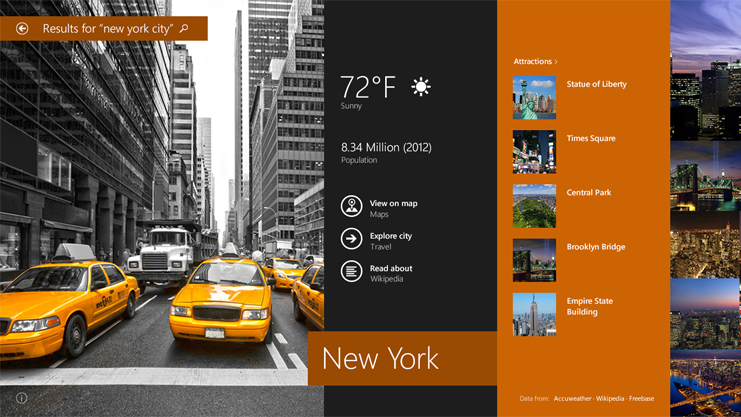
    Another marquee feature of Windows 8.1 is the new search tool. As Microsoft previously revealed, the built-in search tool can now look for way more than files and settings. Instead, it’s now a universal search tool that looks for results on the web (using Bing), your hard drive, SkyDrive, inside your documents and in apps that support this feature.

    windows 8.1

    Bing Search, which has been more tightly integrated into the OS, is a show-stopper here, with big, dynamic search results that users will actually want to use. Whether it will encourage people to use Bing on a regular basis remains to be seen, but it certainly rivals Google’s Knowledge Graph from an aesthetic perspective.

    For Windows 8.1, SkyDrive is the cloud. This new version deeply integrates SkyDrive, so you don’t need a separate app for syncing your files with SkyDrive anymore. Many of your PC’s settings are also now stored on SkyDrive, so when you log in to a new PC, everything should quickly feel at home.

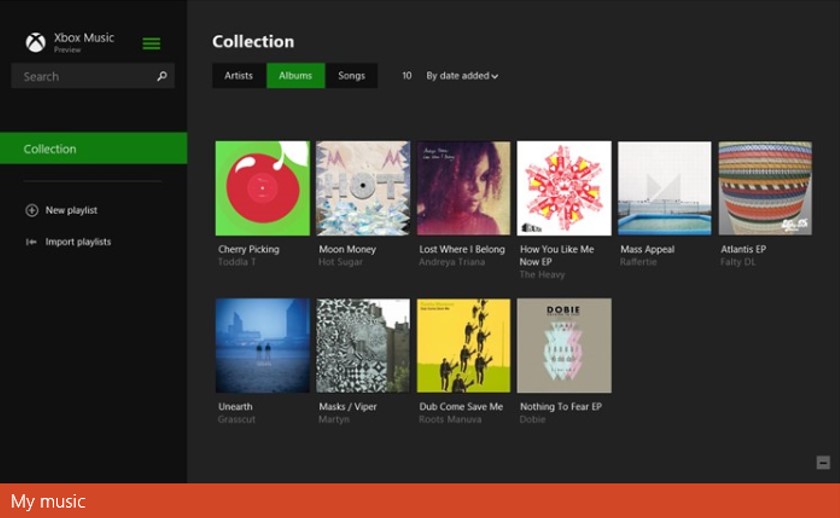
    Xbox Music is now organized around your music collection in Windows 8.1. Before, it was organized around helping you discover new music.

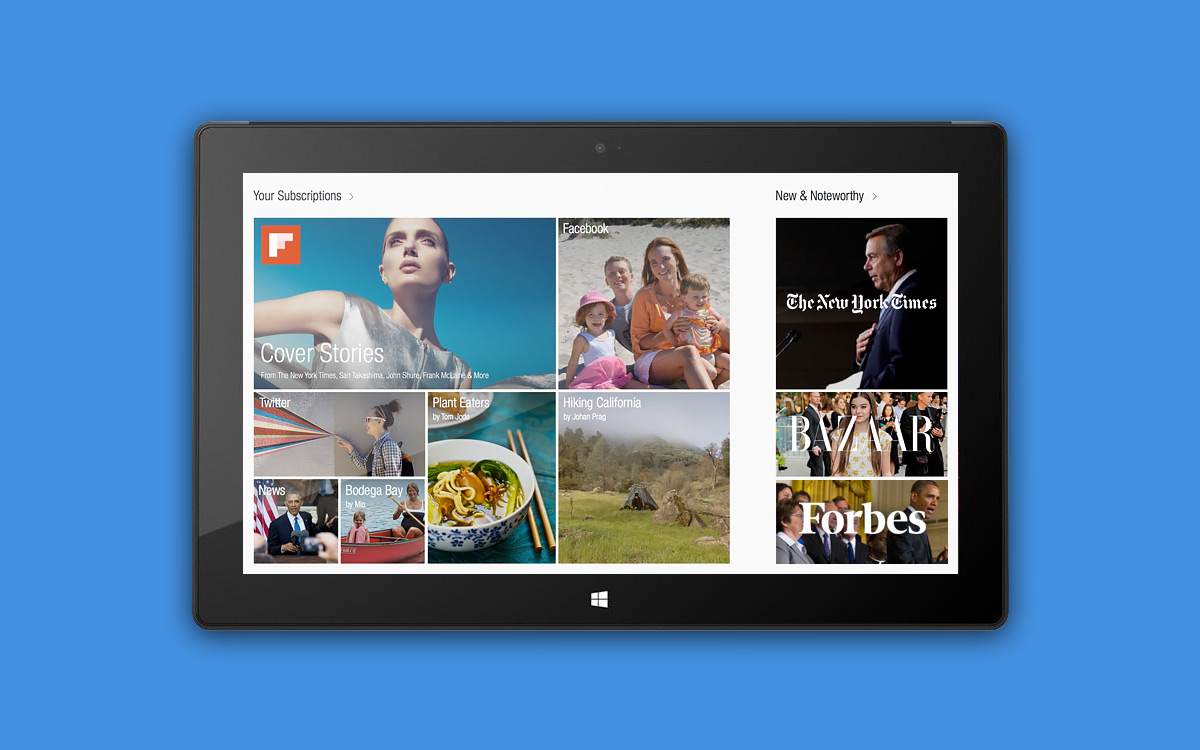
    Microsoft also announced that, among others, Facebook and Flipboard would be creating apps for the Windows Store. Both apps will be designed custom for the Windows “Modern UI” experience, so users can expect more than mere iPad or Android ports.

    Existing users of the Surface Pro, Surface RT or any other Windows 8-based device can download the Windows 8.1 Preview for free.

  • Microsoft Giving Away $100,000 Rewards For Finding Windows 8.1 Security Flaws

    Microsoft Giving Away $100,000 Rewards For Finding Windows 8.1 Security Flaws

    If you’re good enough with code, perhaps you can make some good money digging up bugs for Microsoft.

    Microsoft is offering what it calls a ‘Bounty Program’ to finding exploits and vulnerabilities for Windows 8.1.  Google has had a similar program for its Chrome web browser for quite some time now, though not offering as much money.

    The new exploitation method must not be one that Microsoft already knows or that has been described in prior works and the submission must also include a white paper explaining the method.

    The biggest one is the Mitigation Bypass Bounty, which will pay up to $100,000 to developers who find “truly novel exploitation techniques” in Windows 8.1.

    Any successful hacker can earn an additional $50,000 “BlueHat Bonus” if they can tell Redmond how to fix a major flaw in the operating system. In addition, there’s an $11,000 bounty on Internet Explorer 11 Preview Edition vulnerabilities – but with a 30 day time limit – presumably so that any new problems can be fixed in time for the final release.

    “Microsoft will pay up to $100,000 for truly novel exploitation techniques against protections built into the latest version of our operating system (Windows 8.1 Preview). Learning about new exploitation techniques earlier helps Microsoft improve security by leaps, instead of capturing one vulnerability at a time as a traditional bug bounty alone would,” the company explained.

    That program begins on June 26 but will end 30 days later on July 26th. More details on all three bounty programs, including some advice on how to submit a good exploit report, can be found here.

    The company is set to introduce the new Windows 8.1 Preview at the BUILD developer conference in San Francisco on June 26th as well.

  • Leaked : Windows 8.1 Screenshots

    Leaked : Windows 8.1 Screenshots

    As you probably found out by now, the new Windows 8.1 Preview will come with enhanced support for smaller tablets, so some of the built-in features will be specifically tweaked to look good on 7- and 8-inch units.

    Today a collection of screenshots, showcasing redesigns within key Windows 8.1 applications, were leaked online. The shots showcase changes in the Windows Store and Xbox Music, along with brand new apps including a calendar, alarm clock, and voice recorder.

    Beta user Bavo Luysterborg sent the screenshots of Windows 8.1 on Twitter earlier today. 

    windows 8.1

    From the screenshots, we can see that the Xbox Music app will be receiving a complete UI overhaul in the Windows 8.1 update. It’s unclear whether this app will be included with the Windows 8.1 Preview, or if it will need to be downloaded as an update through the Windows Store.

    windows 8.1

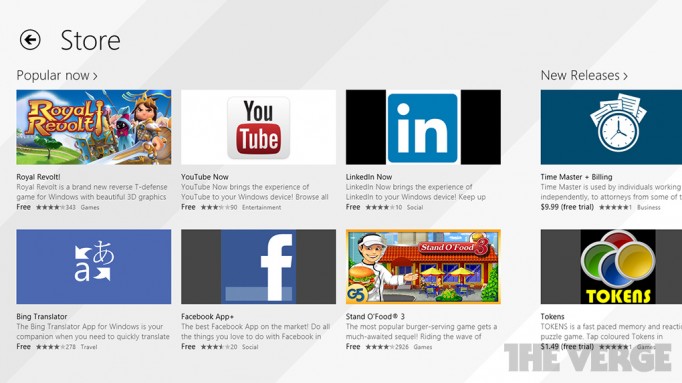
    The new Store interface (as The Verge reports) finally gives recommendations to similar apps based on what you are currently browsing. For example: If you are looking at the Xbox Music app, the store might also recommend Pandora or Slacker Radio.

    windows 8.1

    Frank X Shaw, Microsoft’s corporate vice-president of communications, said the “continuous development cycle” introduced by Windows 8.1 will become “the new normal across Microsoft”, confirming the update model will apply to products beyond Windows 8 and RT, including Windows Phone and Server.

    Windows 8.1 will be a free update available from the Windows Store, for both Windows 8 and Windows RT.

    Via @BAVO on Twitter.

  • Rumour : Start Button To Make A Return In Microsoft Windows 8.1

    Rumour : Start Button To Make A Return In Microsoft Windows 8.1

    Microsoft, which is being berated for taking out the Start button from Windows 8, may put it back in the next major Windows update known as Windows Blue.

    The classic Start menu which Windows users have come to know and love over the years, was missing in Windows 8, which was released in October 2012, resulting in an unprecedented backlash.

    microsoft

    The Verge is also reporting that plans have been revealed to them to indeed bring back the Windows 8 start button together with the boot to desktop option also rumoured earlier this month.

    According to another report by Microsoft insider Paul Thurrott, Microsoft’s Executives are the ones who are overruling objections from the Windows team about bringing back the Start button. “And I’ve separately confirmed that this is really happening, with the Start button, in particular, driven by upper management, which overruled objections from the Windows team,” Thurrott added.

    It turns out, however, that Windows 8.1’s Start button will have a different behavior as compared to the traditional one, according to a report by The Verge. Microsoft is looking to bring us a Start button that would launch the Start Screen, instead of a Start Menu.

    Microsoft hasn’t said a thing about such a feature, so more details will most likely be provided in June at the BUILD developer conference when the company is expected to unveil the public beta of the new OS.

    Recent reports are that the global computer market fell 14% in the first quarter of 2013 with market analysts IDC putting the blame squarely on Microsoft’s shoulders with a lacklustre launch of Windows 8.

    But if Microsoft brings the Start button back and adds in a few new tricks into Windows 8.1, combine that with the new Intel Haswell chips on the way and it could make for a very different second-half of the year for computer fans.

    [The Verge, Geeky Gadgets]

iGyaan Network
Privacy Overview

This website uses cookies so that we can provide you with the best user experience possible. Cookie information is stored in your browser and performs functions such as recognising you when you return to our website and helping our team to understand which sections of the website you find most interesting and useful.