Google has recently added another feature to the web-version of its popular email service, Gmail. Now, Gmail inbox allows users to edit Microsoft Office documents sent as email attachments. With Microsoft increasing its popularity in cloud space, Google has taken a right step forward.
This doesn’t seem like a major update, however, the new feature is a part of Google’s strategy to make its cloud service more universal and make it a one-stop from enterprise workspace. The new feature adds a Google Drive edit icon to Gmail attachments that says ‘Edit with Google Docs’. By clicking on this, the Office files get automatically converted into Google Docs, Sheets, or Slides.
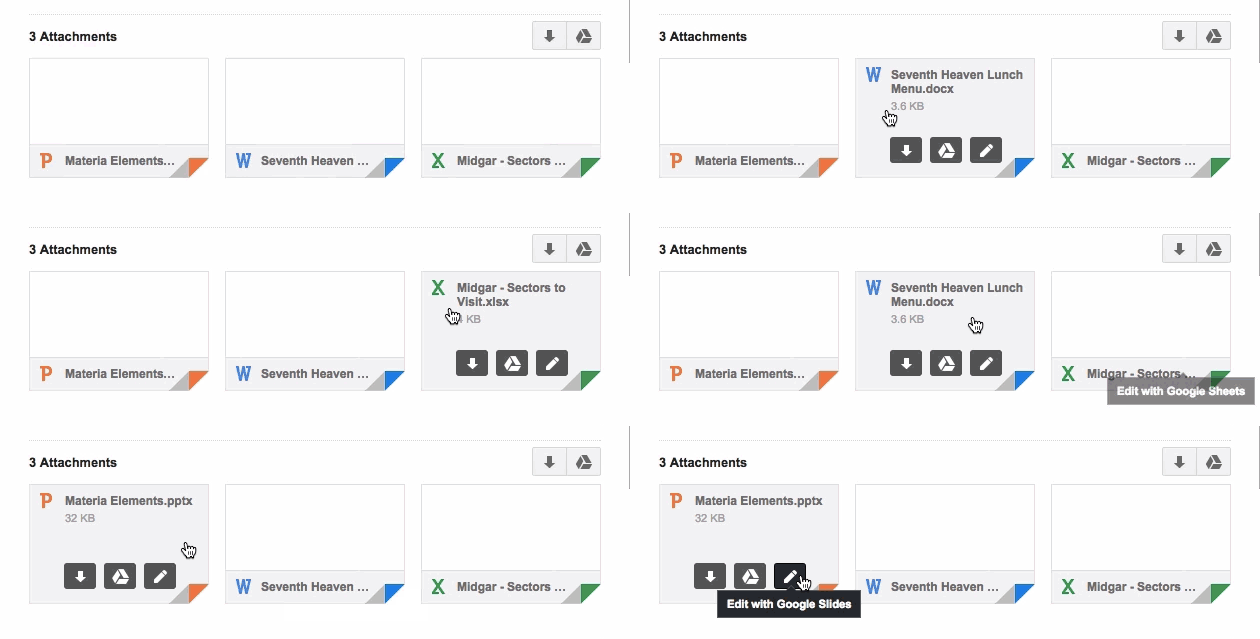
Clicking this ‘edit’ option on an Office file attachment will convert the file to the preferred Google format, saving it in Google Drive to allow for continuous editing and sharing. Google has also increased the amount of Office file formats so as it can be imported to Docs to make the process easier. The list now includes 15 less-used Office formats including .pps and .ppsx.
The formats will be converted into Google formats according to their extensions such as dot, dotx, dotm*, docm* will convert into Google Docs; xlt, xltx, xltm*, xlsm* into Google Sheets and pot, potx, potm*, pptm*, pps, ppsx, ppsm* into Google Slides.
If you don’t want to change your file type, Google has a solution for that too. Google suggests you to use its Office Editing Chrome extension. It is also promising ‘improved charts, images, and tables support for these file formats, but didn’t go into detail.

Leave a Reply