Category: Microsoft

  • Nokia Launching more Dual Sim Phones- especially for the Indian Market this year

    Nokia Launching more Dual Sim Phones- especially for the Indian Market this year

    Nokia was announcing its Microsoft alliance at the Mobile World Congress today, and in a Q&A session related to Symbian the Company’s CEO Stephen Elop Said

    “We have fresh new products [on the low end] that we’re introducing into the Indian market that have features like dual-SIM.”

    That means Nokia doesn’t essentially want to get rid of Symbian altogether but use it in budget phones, that will target the India’n market especially.

    This is possibly the only thing Nokia needs to revive its standing in our country, as a mass market product, the masses are in for Dual Sim phones! The interesting thing to see however is that weather or not Nokia will be able to give a product that beats the quality of the existing Indo-China companies. And Symbian is definitely better than the generic Chinese OS on each of those devices.

  • Leaked : Nokia’s Windows Phone 7 concept revealed!

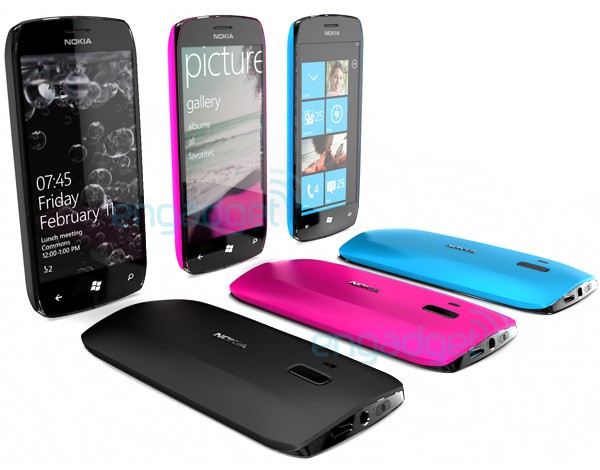
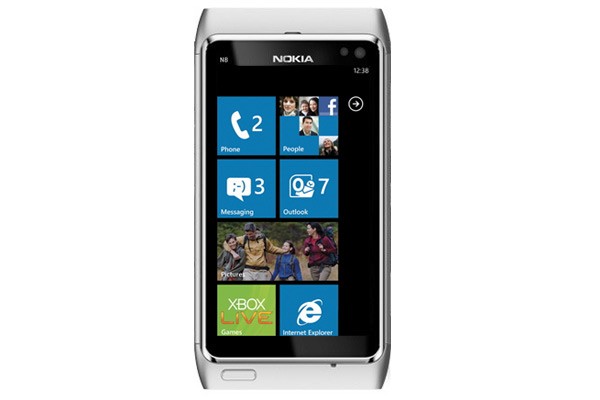
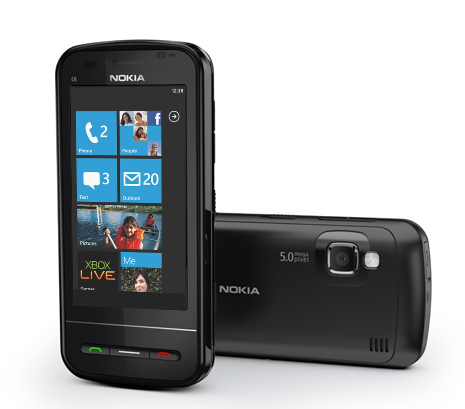
    Leaked : Nokia’s Windows Phone 7 concept revealed!

    Folks over at Engadget have caught hold of an image that showcases the upcoming Windows Phone Device from Nokia. At the announcement Nokia said that engineers from both Microsoft and Nokia have already spent a lot of time together developing on this. This could mean that, this may as well be the first phone from the Nokia-Microsoft alliance.

  • Everything you need to know about the Nokia + Windows Phone alliance.

    Everything you need to know about the Nokia + Windows Phone alliance.

    So, Nokia has joined hands with Microsoft to develop future products, what does this mean? We have the details and will be shedding light on the insides and out of the alliance and what it does for us.

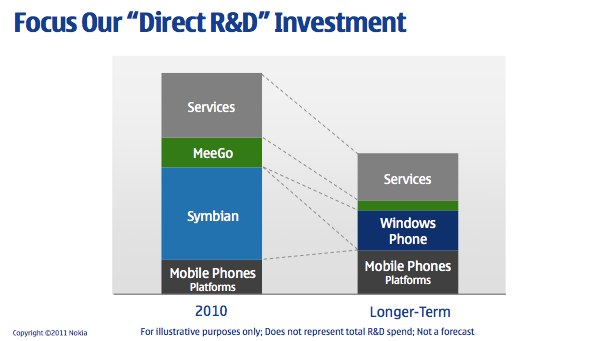
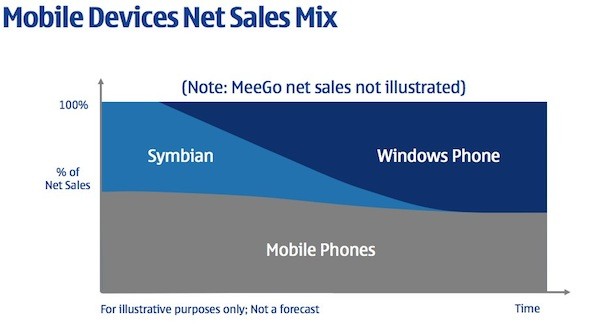
    To start off, we expected Symbian to either be completely re-invented or be completely exterminated. Nokia choose the latter, they probably thought it was much easier than to invent an OS in a market that was way ahead of them. This alliance comes with the death of Symbian in a slow and steady manner. In the presentation created by Stephen Elop (ceo of Nokia) t it’s clear that Symbian which is claimed to be a “franchise” OS that Nokia will “harvest” and will be taken over by Windows Phone on Nokia devices just as soon as Nokia and Microsoft can complete the transition.

    The transition as Nokia and Microsoft stated, would go on through 2011-2012, and by 2013 Nokia will be shipping only Windows Phone 7 or 8 or whatever version Microsoft throws out to the world. In simple words : Nokia will only ship Windows Phone devices 2013 onwards.

    “Nokia expects 2011 and 2012 to be transition years, as the company invests to build the planned winning ecosystem with Microsoft. After the transition, Nokia targets longer-term: (1) Devices & Services net sales to grow faster than the market. (2) Devices & Services non-IFRS operating margin to be 10% or more.”

    Stephen Elop says that he expects Nokia to ramp up the transition this year and be ready to ship Windows Phone 7 devices in significant volume in 2012.

    With the arrival of Windows Phone to Nokia devices, there are substantial changes that will go on in Nokia’s infrastructure. When Elop was asked by a concerned Finnish reporter, “What happens to Finland,” Stephen responded that a successful Nokia is good for Finland but there will be “substantial reductions in employment” in Finland and around the world. That does mean a lot of frustrated Nokia employees, and a lot of anxiety for them. This may also be a great blow to investors or stock holders, as this may ruin Nokia’s market value on the long run.

    Nokia has also been on the Qt warpath for years after purchasing the developer framework from Trolltech back in January of 2008. While Qt will continue on as the development framework for Symbian and MeeGo,  Microsoft will give for free Windows Phone Developer Tools (Visual Studio 2010, Expression, Silverlight and the XNA Framework) to developers interested in the platform and exclusively developing for it. Qt will not be adapted for Windows Phone 7 APIs.

    Whatever said and done, We personally believe, Nokia’s focus on hardware development will improve the outcome and toss Nokia back up on the anticipated phones / devices list. Also we believe Nokia will be launching a tablet later this year. A tablet that will run a mix of operating systems and an interesting hardware speck at a price that will remain unrivaled. There are only good things to see from Nokia now (or at-least we want them).

    Elop also expressed the fact that, Nokia will be allowed to alter anything in the WP7 platform, including layouts and skinning. But, Elop also mentioned that Nokia likely won’t make extensive use of this freedom to tailor Microsoft’s OS. This is a major shift for Microsoft, who forbade HTC from skinning Windows Phone 7 with Sense, the proprietary skin from HTC.

    Read the Q&A below from the post announcement session.

    • No specific announcement for when we’ll see the first Nokia Windows Phone. Ballmer mentioned that the engineering teams have spent a lot of time together already.
    • Elop confirmed that Nokiawill not be moving to Silicon Valley or anywhere else.
    • Ballmer said that the partnership is “not exclusive” but some things that Microsoft is doing with Nokia are “unique” allowing Nokia to differentiate itself in the market. Elop added that it’s important for the Windows Phone 7 ecosystem to thrive, which means that multiple vendors must succeed.
    • Elop didn’t believe that Nokia could create a new ecosystem around MeeGo fast enough.
    • Nokia will “substantially reduce” R&D expenditures while increasing R&D productivity moving forward.
    • Nokia did consider adopting Android but decided that it “would have difficulty differentiating within that ecosystem” and the “commoditization risk was very high — prices, profits, everything being pushed down, value being moved out to Google which was concerning to us.” Microsoft presented the best option for Nokia to resume the fight in the high end smarpthone segment.
    • Elop clarified that MeeGo will ship this year but “not as part of another broad smarpthone platform strategy, but as an opportunity to learn.” Something that sounds very similar to position Nokia took with its so-called “experimental” Maemo-based N900 last year. After the first (and apparently, only) MeeGo device ships this year, the MeeGo team will then “change their focus into an exploration of future platforms, future devices, future user experiences.” Trying to determine the “next disruption” in smartphones.
    • Responding to “hope for a broad MeeGo-based ecosystem,” Elop said that Nokia simply wasn’t moving fast enough to effectively win and compete against Apple and Google. Windows Phone makes it a “three-horse race,” something that Elop says is pleasing to the carriers he’s been speaking with.
    • Nokia has different options for its tablet strategy including using something from Microsoft or something that Nokia has developed internally.

    Watch the Video of the whole event below


    Click on the Next Link Below to read Press Releases

  • Nokia and Microsoft enter strategic alliance on Windows Phone, Bing, Xbox Live and Office

    Nokia and Microsoft enter strategic alliance on Windows Phone, Bing, Xbox Live and Office

    Nokia and Microsoft have finally Announced Nokia – Windows Phone 7 devices. But in this “Strategic Alliance” a lot more is going down, namely linkages in Bing, Xbox Live and Office products.

    Check out the Full PR Below

    Nokia and Microsoft Announce Plans for a Broad Strategic Partnership to Build a New Global Mobile Ecosystem
    Companies plan to combine assets and develop innovative mobile products on an unprecedented scale.

    LONDON – Feb. 11, 2011 – Nokia and Microsoft today announced plans to form a broad strategic partnership that would use their complementary strengths and expertise to create a new global mobile ecosystem.

    Nokia and Microsoft intend to jointly create market-leading mobile products and services designed to offer consumers, operators and developers unrivalled choice and opportunity. As each company would focus on its core competencies, the partnership would create the opportunity for rapid time to market execution. Additionally, Nokia and Microsoft plan to work together to integrate key assets and create completely new service offerings, while extending established products and services to new markets.

    Under the proposed partnership:

    Nokia would adopt Windows Phone as its principal smartphone strategy, innovating on top of the platform in areas such as imaging, where Nokia is a market leader.

    Nokia would help drive the future of Windows Phone. Nokia would contribute its expertise on hardware design, language support, and help bring Windows Phone to a larger range of price points, market segments and geographies.

    Nokia and Microsoft would closely collaborate on joint marketing initiatives and a shared development roadmap to align on the future evolution of mobile products.

    Bing would power Nokia’s search services across Nokia devices and services, giving customers access to Bing’s next generation search capabilities. Microsoft adCenter would provide search advertising services on Nokia’s line of devices and services.

    Nokia Maps would be a core part of Microsoft’s mapping services. For example, Maps would be integrated with Microsoft’s Bing search engine and adCenter advertising platform to form a unique local search and advertising experience

    Nokia’s extensive operator billing agreements would make it easier for consumers to purchase Nokia Windows Phone services in countries where credit-card use is low.

    Microsoft development tools would be used to create applications to run on Nokia Windows Phones, allowing developers to easily leverage the ecosystem’s global reach.

    Nokia’s content and application store would be integrated with Microsoft Marketplace for a more compelling consumer experience.

    “Today, developers, operators and consumers want compelling mobile products, which include not only the device, but the software, services, applications and customer support that make a great experience,” Stephen Elop, Nokia President and CEO, said at a joint news conference in London. “Nokia and Microsoft will combine our strengths to deliver an ecosystem with unrivalled global reach and scale. It’s now a three-horse race.”

    “I am excited about this partnership with Nokia,” said Steven A. Ballmer, Microsoft CEO. “Ecosystems thrive when fueled by speed, innovation and scale.The partnership announced today provides incredible scale, vast expertise in hardware and software innovation and a proven ability to execute.”

    Please visit www.nokia.com/press for press materials.

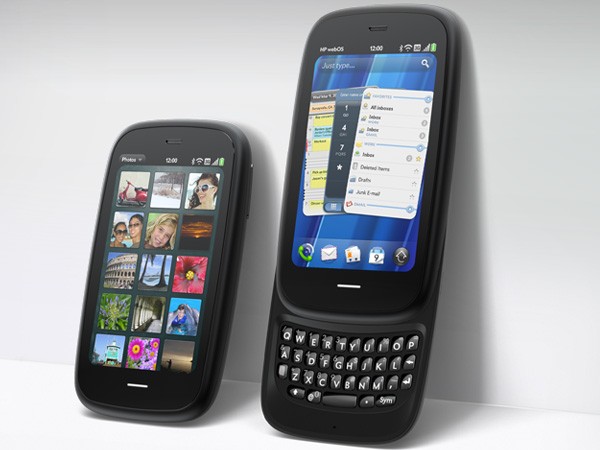
  • Breaking : The HP Pre 3: With1.4GHz Qualcomm CPU, 3.6-inch WVGA Released

    Breaking : The HP Pre 3: With1.4GHz Qualcomm CPU, 3.6-inch WVGA Released

    Just as soon as HP as dropped Palm , announced the HP TouchPad. Here is the big news about WebOs based HP Pre 3 (Read : Palm’s baby)

    Top specs include

    • 3.6-inch 800 x 480 display
    • 5 megapixel camera with AF and LED flash
    • 720p HD video
    • Front-facing camera for video calling
    • Mobile hotspot
    • WebOS 2.2
    • A Qualcomm MSM 8×55 CPU running at 1.4GHz
    • 802.11a/b/g/n 5GHz, Bluetooth 2.1 + EDR, A-GPS
    • 1230 mAh battery
    • HSPA+ and EVDO Rev A
    • 512MB DRAM
    • Touchstone compatible,
    • TouchPad tablet can take Pre 3’s phone calls
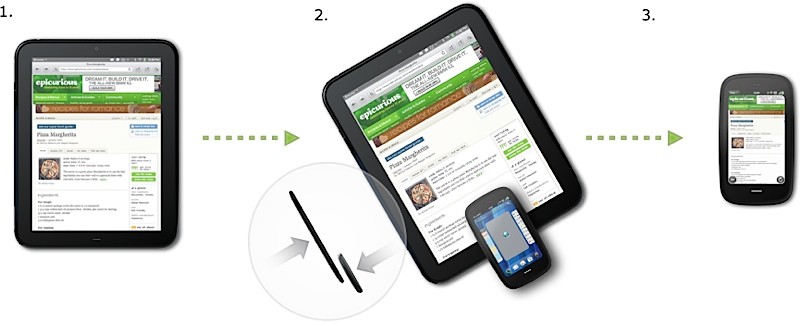
    • Touching the two devices together will let you share URLs (aptly titled touch-to-share)
    • Availability is this summer with both 8GB and 16GB storage options.

    We are itching to test drive this baby!

    FULL PRESS RELEASE

    HP Pre3 Introduces the New Look of Business for the 24-hour Life

    Bigger and better touchscreen, more processing power and all-new keyboard deliver professional productivity and personal connectivity

    PALO ALTO, Calif., Feb. 9, 2011

    For professionals who require powerful mobile productivity with an eye on personal connectivity, HP today announced the versatile HP Pre3 smartphone running HP webOS.

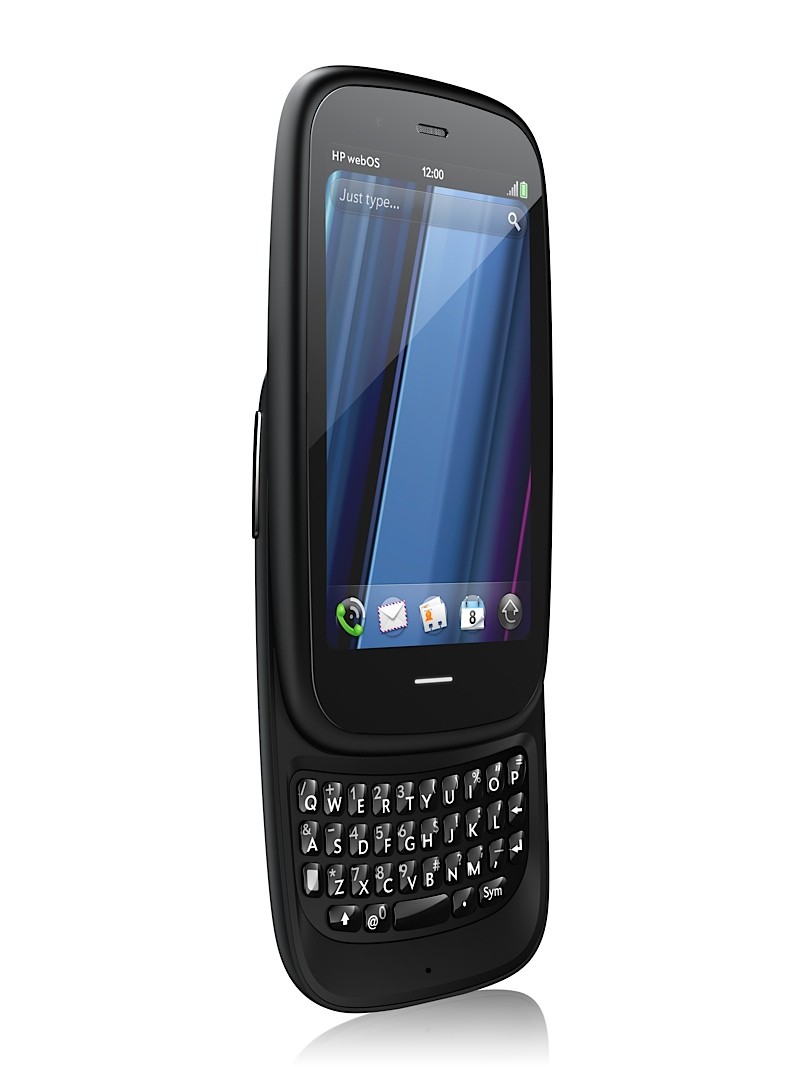
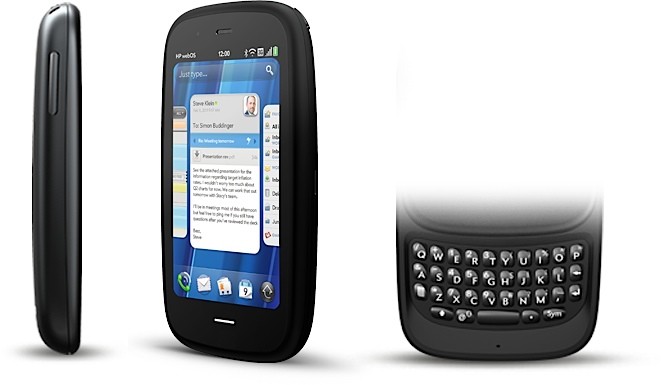
    With a large 3.58-inch touchscreen, fast 1.4-GHz processor and a full slide-out keyboard, Pre3 is a multitasking professional workhorse that’s perfectly balanced for speed and serious fun.

    Pre3 is one of the products HP announced today to introduce a unique experience for customers around connected mobility. It’s one of the building blocks in HP’s vision to seamlessly connect all your worlds through the power of HP webOS.

    “In the suite of webOS products we’re introducing today, Pre3 is our premier phone, designed for the speed of business,” said Jon Rubinstein, senior vice president and general manager, Palm Global Business Unit, HP. “It enables professionals to accomplish more of their important workday tasks while easily keeping their fingers on the pulse of their personal lives.”

    Pre3 is the ideal smartphone for multitasking professionals who rely on advanced messaging and voice capabilities to stay connected with all aspects of their busy lives.(1) With a slim design and high-capacity battery,(2) it is comfortable to carry and use all day. The phone’s fast performance and large, high-resolution display accentuate the unique webOS experience for both professional and personal use.

    The portrait layout enables optimal readability for email, attachments and web, and the new vertical slide-out keyboard – the widest and largest keyboard on any webOS phone to date – helps ensure quick and comfortable error-free typing. It’s ideal for heavy email and messaging needs, web browsing, enjoying multimedia and for staying in touch with business and social circles.(1,3)

    For professionals who demand more than productivity

    With an array of features that are critical for professionals balancing work and personal use – including the speed of 3G and Wi-Fi,(1) a comfortable keyboard for typing and a large vivid touchscreen – Pre3 offers the best of both worlds on the powerful HP webOS platform:

    Business-class email – Pre3 offers business-class email and encrypted data storage to protect critical information and supports industry-standard VPN to connect to corporate networks. You can read and write email with ease, view your email accounts together or easily toggle between them.(1,3)
    More ways to connect – With the HP Synergy feature, you just have to sign in to your Facebook®, Google, Microsoft® Exchange, LinkedIn and Yahoo!® accounts. Your information – email, contacts, calendars – automatically populates your phone and stays updated so it’s always at your fingertips.(3) Integrated messaging conveniently combines all your text messages, picture messages and IM conversations with one person into a single view, and you can connect through SMS, MMS, Google Talk, AIM and Yahoo! Messenger.
    The whole web – Pre3’s high-performance web browser offers support for HTML5 features and Adobe® Flash® Player 10.1 beta for access to rich, Flash-based web content on the phone’s big, vivid display.(1)
    Video calling – Pre3 has a front-facing camera, a great speaker and noise cancellation for a state-of-the-art video calling experience.(1,4)
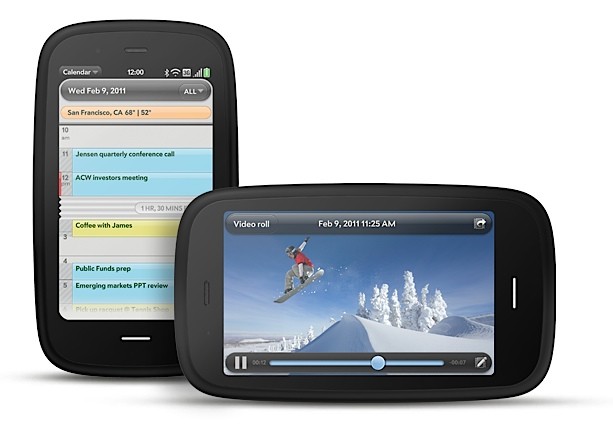
    True Multitasking – webOS works the way you do. Begin an email, pause to answer a call, check your calendar, send a text, then switch back to your email without closing anything. Pre3 lets you easily manage multiple open applications and notifications using natural touch gestures. Whether you’re planning a meeting or a night on the town, webOS keeps related items together so managing multiple tasks is easy.(5)
    Just Type – Start an email, create a message, update your status and search your favorite websites – all before you’ve even opened an app. Because webOS works the way you do, whenever you want to do something on your Pre3 – whether it’s emailing, texting, searching or almost anything – just type.
    Quickoffice Connect Mobile Suite – HP is working with Quickoffice to include the Quickoffice Connect Mobile Suite, which offers support for viewing Microsoft Office Word and Excel and provides integration with a variety of services, including Google Docs and Box.net.
    Touch-to-share – With HP’s new and exclusive touch-to-share feature, you’ll be able to simply tap your Pre3 phone to the new HP TouchPad to share web addresses between devices.(6)
    GPS – Get where you need to be with built-in GPS on Pre3. Apps such as Fandango and OpenTable work with GPS to pinpoint your exact location, get directions, find nearby places of interest and provide turn-by-turn directions.(7)
    Apps to keep you connected – The webOS App Catalog features thousands of apps for fast and easy access to all the things you need to keep your day moving, such as weather, news, hotel and restaurant reviews and reservations, flight info and games.(8) Mobile social networking apps such as Facebook and Twitter allow you to stay connected throughout your hectic day and update your status and upload pictures in real time.
    HP mobile hotspot – Pre3 also supports the HP mobile hotspot, enabling your phone to act as a mobile Wi-Fi router so you can share wireless internet connectivity with up to five Wi-Fi-enabled devices, including the new HP TouchPad, as well as notebooks, gaming devices and portable media players.(9)
    Pre3 is compatible out of the box with HP Touchstone (sold separately). The webOS Exhibition feature lets you run apps designed specifically for HP Touchstone – showing you anything from today’s agenda to a slideshow of your photos – turning charge time into useful time.(10)

    Pre3 is one of three webOS products announced today (see separate announcements for HP Veer and HP TouchPad). Each product plays a distinct role in the growing webOS family, designed to meet the varying needs of customers in a rapidly evolving mobile landscape.

    Availability

    The HP Pre3 smartphone is scheduled to be available in the summer. Exact pricing and availability will be announced at a later date.

    HP Pre3 features and specs
    HP webOS
    High-speed connectivity(1)
    Qualcomm Snapdragon MSM8x55 1.4-GHz processor
    3.58-inch multitouch screen with a vibrant, 24-bit color, 480 x 800 resolution display
    Gesture area, which enables simple, intuitive gestures for navigation
    Redesigned vertical slide-out QWERTY keyboard with backlight
    8 or 16 gigabytes (GB) of internal storage(11)
    High-performance browser with full access to the web, including support for Adobe Flash Player 10.1 beta for access to rich, Flash-based web content(1)
    Wireless connectivity:
    Wi-Fi 802.11b/g/n with WPA, WPA2, WEP, 802.1X authentication(1)
    Integrated GPS (and A-GPS)(7)
    Bluetooth® wireless technology 2.1 + EDR with A2DP stereo Bluetooth support
    Wi-Fi router functionality for up to five devices using HP mobile hotspot(9)
    Multimedia options, including music, photos, video recording and playback, a 5-megapixel autofocus camera with LED flash and a 3.5 mm stereo headset jack
    Rear-facing autofocus camera with flash, HD camcorder (capable up to 720p video recording)
    Front-facing VGA fixed-focus camera for live video calling(4)
    Email, including EAS (for access to corporate Microsoft Exchange servers) and personal email support (Google Gmail push, Yahoo!, POP3, IMAP)(3)
    Robust messaging support (combining IM, SMS and MMS capabilities)(12)
    Proximity sensor, light sensor, accelerometer and compass
    Removable, rechargeable 1,230 mAh battery
    USB mass storage mode to transfer media and other files quickly between desktop and device
    Ringer switch, which easily silences the ringer with one touch
    Compatible with HP Touchstone (sold separately)
    Dimensions: 111 mm x 64 mm x 16 mm (4.37 inches x 2.52 inches x .63 inches)
    Weight: 156 grams (5.5 ounces)
    More information about HP Pre3 is available at www.palm.com/Pre3.

    About HP

    HP creates new possibilities for technology to have a meaningful impact on people, businesses, governments and society. The world’s largest technology company, HP brings together a portfolio that spans printing, personal computing, software, services and IT infrastructure to solve customer problems. More information about HP (NYSE: HPQ) is available at http://www.hp.com/.

    (1) Within wireless coverage area only. Actual speeds may vary. Email, mobile number and related information required for setup and activation. Required data services sold separately; unlimited plan recommended and may be required. Not all web content may be available.

    (2) Talk, standby and usage times are approximate and depend on the network configuration, the usage pattern of an individual user and the configuration of the handheld. Use of some internal wireless capabilities and backlight will significantly decrease battery run time.

    (3) Within wireless coverage area only. Microsoft Exchange email, contacts and calendars available for ActiveSync only; requires Microsoft Outlook using Exchange Server 2003 with SP2, Exchange Server 2007 or Exchange Server 2010.

    (4) Check with carrier for video calling availability and restrictions.

    (5) Performance varies bases on actual usage.

    (6) Requires TouchPad with webOS 3.0 and Pre3 or Veer with webOS 2.2 or higher, both products having same HP webOS Account. Viewing URL web page content requires data connection via Wi-Fi or cellular connection.

    (7) Within wireless coverage area only. Voice-activated, as-you-go, turn-by-turn directions sold separately.

    (8) Third-party software available separately. Within wireless coverage area only. Requires data services at additional cost. Availability will vary by region.

    (9) The mobile hotspot application requires a special data plan and is separate from the smartphone data feature. While HP mobile hotspot is active, on-device applications will continue to work and will use the same data plan as the mobile hotspot. Mobile hotspot data usage may incur additional charges. Check with carrier for plan details.

    (10) Displayed preferences require user setup.

    (11) 8 GB or 16 GB maximum storage. User-available memory subject to change based on system software and application usage.

    (12) Within wireless coverage area only. SMS, MMS and IM require data services at additional cost. Availability of IM functionality may vary by carrier.

    Adobe is a trademark of Adobe Systems Incorporated. Microsoft is a trademark of the Microsoft group of companies. Bluetooth is a trademark owned by its proprietor and used by Hewlett-Packard Company under license. Facebook is a registered trademark of Facebook, Inc. Google is a trademark of Google, Inc. LinkedIn and the LinkedIn logo are registered trademarks of LinkedIn Corporation in the United States and/or other countries. Yahoo! is a trademark of Yahoo! Inc.

    This news release contains forward-looking statements that involve risks, uncertainties and assumptions. If such risks or uncertainties materialize or such assumptions prove incorrect, the results of HP and its consolidated subsidiaries could differ materially from those expressed or implied by such forward-looking statements and assumptions. All statements other than statements of historical fact are statements that could be deemed forward-looking statements, including but not limited to statements of the plans, strategies and objectives of management for future operations; any statements concerning expected development, performance, features, available applications or market share relating to products and services; any statements regarding anticipated operational and financial results; any statements of expectation or belief; and any statements of assumptions underlying any of the foregoing. Risks, uncertainties and assumptions include macroeconomic and geopolitical trends and events; the competitive pressures faced by HP’s businesses; the development and transition of new products and services (and the enhancement of existing products and services) to meet customer needs and respond to emerging technological trends; the execution and performance of contracts by HP and its customers, suppliers and partners; the achievement of expected operational and financial results; and other risks that are described in HP’s filings with the Securities and Exchange Commission, including but not limited to HP’s Annual Report on Form 10-K for the fiscal year ended October 31, 2010. HP assumes no obligation and does not intend to update these forward-looking statements.

    © 2011 Hewlett-Packard Development Company, L.P. The information contained herein is subject to change without notice. The only warranties for HP products and services are set forth in the express warranty statements accompanying such products and services. Nothing herein should be construed as constituting an additional warranty. HP shall not be liable for technical or editorial errors or omissions contained herein.
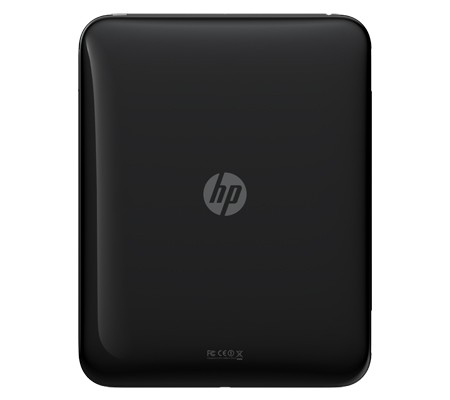
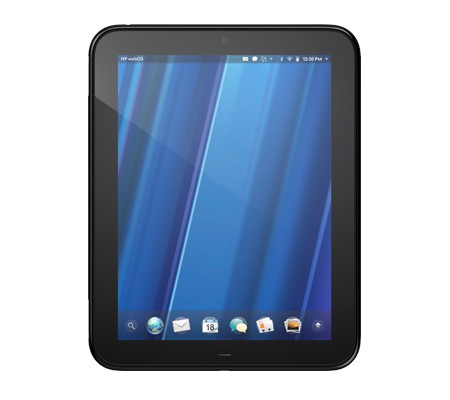
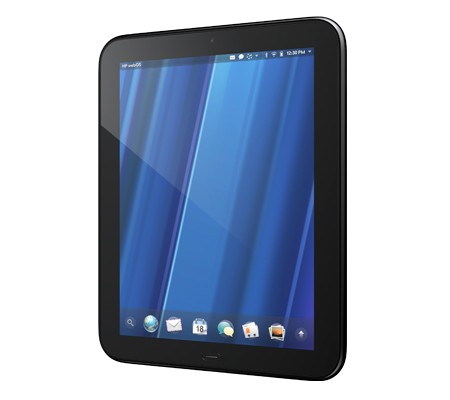
  • Breaking : HP Announces the Hp TouchPad 9.7-inch, Web OS3 Tablet with 1.2 GHZ of Power

    Breaking : HP Announces the Hp TouchPad 9.7-inch, Web OS3 Tablet with 1.2 GHZ of Power

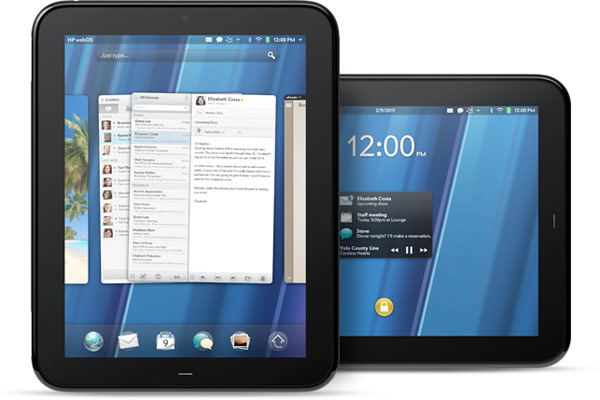
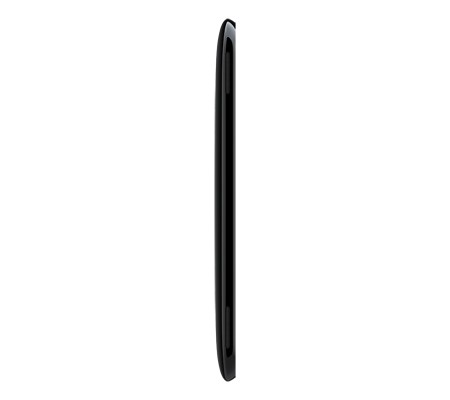
    HP has just announced the new HP TouchPad Slate from their stable at just 1.6 pounds and measures 13.7mm thick major features include

    • Beats audio engine
    • Touch-to-Share
    • webOS 3.0
    • 9.7-inch display (1024 x 768 screen resolution)
    • A dual-core 1.2GHz Snapdragon CPU
    • Inbuilt gyroscope
    • Accelerometer
    • Compass
    • 16GB / 32GB of internal storage space
    • front-facing 1.3 megapixel webcam
    • support for video calling
    • 802.11b/g/n WiFi, Bluetooth 2.1+EDR, A-GPS (3G model only)
    • “twice the memory of a Pre 2” and a set of stereo speakers.
    • new paneled email application
    • Growl-like pop-up notification system
    • cal / email integration courtesy of HP Synergy
    • virtual keyboard
    • VPN support
    • wireless printing
    • Google Docs, QuickOffice, Dropbox and Box.net compatibility.
    • ability to talk to the Pre 3 (one can have their Pre 3 and TouchPad communicate)

    Looks like the iPad 2 will get a lot more competition this year.

    Check out the launch Video below

    Read the Full PR

    HP TouchPad Brings webOS to the Big Screen

    First webOS tablet works the way you do, introduces fun, mobile productivity on larger scale

    PALO ALTO, Calif.–(BUSINESS WIRE)–HP (NYSE: HPQ) today enlarged the HP webOS world with the first webOS slate – the HP TouchPad – the breakthrough webOS user interface fully realized in the tablet experience.(1)

    “Today we’re embarking on a new era of webOS with the goal of linking a wide family of HP products through the best mobile experience available”

    With its vibrant 9.7-inch diagonal flush capacitive multitouch display, virtual keyboard, instant-on access, support for Adobe® Flash® Player 10.1 beta in the browser and access to thousands of webOS applications,(2) TouchPad works the way you do and is designed not just for fun but for mobile productivity. It’s ideal for anyone who wants the benefits of the amazing webOS platform on a much bigger scale.

    TouchPad is one of the products HP announced today to introduce a unique experience for customers around connected mobility, offering a unified experience for the first time across a variety of devices. It’s one of the building blocks in HP’s vision to seamlessly connect all your worlds through the power of HP webOS.

    “Today we’re embarking on a new era of webOS with the goal of linking a wide family of HP products through the best mobile experience available,” said Jon Rubinstein, senior vice president and general manager, Palm Global Business Unit, HP. “The flexibility of the webOS platform makes it ideal for creating a range of innovative devices that work together to keep you better connected to your world.”

    Designed to be used alone or as a digital companion to your webOS phone, TouchPad connects you and your devices through the elegant webOS experience. Never miss an important call or SMS message – they can be answered and viewed right on your TouchPad.(3,4) Plus, HP’s exclusive new touch-to-share feature will let you simply touch an enabled webOS phone to your TouchPad to share web URLs.(1,5)

    With the HP Synergy feature, you simply have to sign in to your Facebook®, Google, Microsoft® Exchange, LinkedIn and Yahoo!® accounts and your contacts, calendar and email automatically populate your TouchPad.(6)

    TouchPad works the way you do

    The TouchPad user interface is a visual representation of your workspace, so you can manage your workflow in a naturally intuitive way that’s easy and fun. The power of webOS true multitasking lets you have multiple applications running at the same time. webOS shows you your activities in the form of cards, not a sea of application icons on numerous home screens.

    This helps you do all the things you want to do, all at once, so you can listen to music, update your status on Facebook, read email and chat on IM at the same time.(4,7) As you launch new activities, webOS will automatically group related cards – for example, an email and an associated web page – together in a card stack, so you can easily track all related items together.(6)

    TouchPad also features a webOS communication suite powered by HP Synergy that keeps you connected and creative, making all of your communications simpler, richer and in your control. It’s a complete solution, including email, instant messaging, contacts, calendar, videos and a front-facing camera for video calling.(6) Connected photo albums make it easy to share and view your pictures directly from popular services such as Facebook, Snapfish and Photobucket. It works seamlessly with TouchPad’s user interface for a natural and efficient experience.

    Around the house or on the go

    TouchPad offers a great internet experience around the house or on the go, so you can manage your busy life, be productive wherever you are and stay connected with work, friends, family and social networks. It keeps you connected anywhere there’s Wi-Fi for easy access to the web and entertainment.(8)

    At home, whether you’re watching TV, relaxing on the sofa, at the kitchen table or in bed, you can check in with friends, surf the web, play games or read a book, magazine or newspaper.(2) Amazon.com today announced that it will launch a free Kindle app for HP webOS tailored for TouchPad that will give you access to more than 810,000 titles from Amazon’s Kindle Store. You also can subscribe to popular magazine titles, such as Time, Sports Illustrated, Fortune and People, and download movies and TV shows through the HP Movie Store. The TouchPad music app lets you transfer and play all your favorites from your personal music collection,(9) with amazing sound quality by Beats Audio™. You can start an email, create a message, update your status, search your favorite websites – all before you’ve even opened an application. Whenever you want to do something on your TouchPad, Just Type.

    Buy and sell on Amazon.com, do your banking, buy movie tickets from Fandango or check the news. Whether your thing is Facebook, YouTube, Twitter, IM, video calling or email, TouchPad brings it all together with thousands of available webOS applications and the convenience and power of HP Synergy for integrated contacts and calendar to keep your busy life on track.(6)

    It’s great for road trips, on a plane, while commuting, in public places, while visiting friends and on vacation. It’s easy to pack, has a long-lasting battery and integrated GPS (3G only), and posting vacation photos is a snap.(1,10)

    Mobile productivity

    When productivity is key, TouchPad makes an excellent companion. You can read and write email, view your work and personal inboxes together, or easily toggle between them. Integrated messaging conveniently combines all your text messages, picture messages and IM conversations with one person into a single view, and you can connect through SMS, Google Talk, AIM and Yahoo! Messenger.(4)

    TouchPad’s virtual full QWERTY keyboard includes a number row, which reduces keyboard switching, making typing easy and fast. It powers on instantly and brings you back to exactly where you left off, whether you were in the middle of composing an email, playing a game or browsing a web page. With webOS true multitasking, it’s like you never left.

    For maximum productivity, HP is working with Quickoffice to include the Quickoffice Connect Mobile Suite, which lets you view and edit documents, such as Microsoft Word and Excel. It also comes with VPN support to connect to corporate networks.

    With its 1.3-megapixel front-facing webcam, TouchPad offers video calling capability.(11) It’s also compatible with HP’s industry-leading printing solutions, so you can wirelessly print documents, photos and emails to compatible wireless and networked HP printers.(12)

    TouchPad has built-in HP Touchstone technology for easy charging, so it’s compatible out of the box with the HP Touchstone for TouchPad (sold separately), and you can charge in either portrait or landscape mode, even without removing the TouchPad case (sold separately). The webOS Exhibition feature lets you run applications designed specifically for Touchstone. Set your TouchPad on Touchstone and Exhibition launches automatically, showing you anything from today’s agenda to a slideshow of your photos.(13)

    TouchPad is one of three webOS products announced today (see separate announcements for HP Veer and HP Pre3). Each product plays a distinct role in the growing webOS family, designed to meet the varying needs of customers in a rapidly evolving mobile landscape.

    Availability

    HP TouchPad is scheduled to be available in the summer. Exact pricing and availability will be announced at a later date.

    HP TouchPad features and specs

    * HP webOS
    * High-speed connectivity(1)
    * Qualcomm Snapdragon dual-CPU APQ8060 1.2-GHz processor
    * 9.7-inch diagonal XGA capacitive, multitouch screen with a vibrant, 18-bit color, 1,024 x 768 resolution display
    * The option of either 16 GB or 32 GB of internal storage(14)
    * High-performance browser with full access to the web, including support for Adobe Flash Player 10.1 beta for access to rich, Flash-based web content(1)
    * Wireless connectivity:
    o Wi-Fi 802.11b/g/n with WPA, WPA2, WEP, 802.1X authentication(1)
    o A-GPS (3G only)(10)
    o Bluetooth® wireless technology 2.1 + EDR with A2DP stereo Bluetooth support
    * Multimedia options, including music, photos, video recording and playback, and a 3.5 mm headset/headphone/microphone jack
    o Internal stereo speakers and Beats Audio
    o Front-facing 1.3-megapixel webcam for live video calling(11)
    * Email, including EAS (for access to corporate Microsoft Exchange servers) and personal email support (Google Gmail push, Yahoo!, POP3, IMAP)(6)
    * Robust messaging support(4)
    * Light sensor, accelerometer, compass (magnetometer) and gyroscope
    * Rechargeable 6,300 mAh (typical) battery
    * Micro-USB (Charging and PC Connect) with USB 2.0 Hi-Speed
    * Built-in HP Touchstone technology for easy charging (HP Touchstone for TouchPad sold separately) and HP touch-to-share to share web addresses between TouchPad and compatible webOS phones(5)
    * Dimensions: 190 mm x 242 mm x 13.7 mm (7.48 inches x 9.53 inches x .54 inches)
    * Weight: approximately 740 g (1.6 pounds)

    More information about HP TouchPad is available at www.palm.com/TouchPad.

  • iG-Exclusive : Nokia E7 Coming to India Next Month

    iG-Exclusive : Nokia E7 Coming to India Next Month

    While we will tell you that, Nokia Global – Announced that the E7 has been announced for Select Markets and should be shipping in countries in and around EU – UK, etc, anytime now. We just got word from Nokia Sales Rep Jatin Kaushik , That, the device is already slated for India and may come as early as next month.

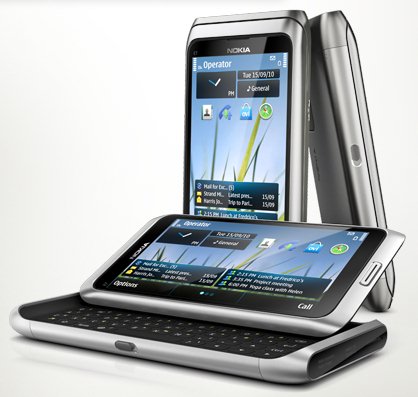
    The QWERTY flagship from Espoo has

    • A 4-inch Clear Black Display
    • Latest version of Symbian
    • 8 megapixel camera
    • 16GB of onboard memory,
    • Aluminum body
    • Slideout keyboard

    On a different note : we expect the device to be slated at the 26,000/- Price mark (you could expect higher)


    Full PR


    All-in-one business smartphone, the Nokia E7, arrives in stores

    Espoo, Finland – The highly anticipated Nokia E7 will begin arriving in stores in select markets this week, with broader availability building up quickly in several markets.

    With its tilting 4 inch ClearBlack display, full qwerty keyboard and a fast access to a wide variety of apps directly on the homescreen, the Nokia E7 is the key to having a successful day in or out of the office. Importantly, the device supports business applications from leading enterprise technology partners including Microsoft and IBM.

    Key features of the Nokia E7
    – Easy access to private and business email 
    – Create, edit and share office documents and view PDF files with Adobe Reader
    – Fast, secure intranet access with the built-in VPN
    – High-resolution photos and HD video with the 8 megapixel camera and dual LED flash
    – HDMI connectivity to project files, videos and images onto large screens
    – 16 gigabytes of on-board flash memory
    – USB-On-The-Go, enabling easy file sharing by connecting a USB stick to the smartphone

    For business users, Nokia E7 provides direct, secure and real-time access to email, calendar, contacts, tasks and the corporate directory through Microsoft Exchange servers, as well as Office Communicator Mobile, developed by Microsoft for Nokia smartphones, which brings presence and corporate instant messaging.

    Additionally, a wide range of entertainment and social services available on the Nokia E7 make it the perfect off-duty companion, and the Ovi Store offers a wealth of apps such as Bloomberg, Angry Birds and Sports Tracker.

    The new arrival offers drive or walk navigation in 80 countries. The latest commercial version of Ovi Maps, available immediately via Ovi Store or Ovi Suite, adds visibility to subways, trams and trains, real-time traffic, safety alerts, visibility to parking and petrol stations, speed limit warnings, and improved search and location sharing capabilities.

  • Nokia and Microsoft to Join hands next friday! – WP7 on NOKIA?

    Nokia and Microsoft to Join hands next friday! – WP7 on NOKIA?

    The New York Times is reporting, that, in a strategic shift of Platform from Symbian to either Android or Microsofts Windows Phone 7. The Finnish giant has chosen the latter. It was high time when the company drops its hopes on the only thing slowing down once a superpower in the mobile phone trade. Symbian was/is and may remain outdated, period. The company’s move may come as a welcome to its investors worldwide and to the millions of its users globally.

    There is a high chance and it’s entirely possible they could be ramping up to do that again, sharing apps and services between Windows Phone 7 and Symbian / MeeGo.

    But, the biggest question lies in the concept of Nokia becoming another hardware-only manufacturer, and surviving in a market that is already ahead in leaps and bounds, with self sustaining companies like Samsung, HTC and even LG. It is becoming more and more difficult to predict the future of this legend. Nevertheless, there is still hope, with the new changes coming to Symbian this year. What may be the most exciting year in the history of Technology has just begun!

    Source : New York Times

  • Dell Venue Pro Launched in India – INR 34,990

    Dell Venue Pro Launched in India – INR 34,990

    We just got word from Dell, Just as we got our Hands on the Dell Venue the Dell Venue pro is Headed for our Test Labs. The Device has a 4.1″ Amoled Display similar to its aforementioned cousin, it also has the very similar curved gorilla glass. The main things different about the Venue pro is the fact that it Runs Windows Phone 7 and that it has a full featured Qwerty Keyboard which has a slide mechanism. At the Launch of Windows Phone 7 OS, Microsoft was quite impressed with what Dell had done with the Venue Pro. Its time for us to see.

    The price is set at 34,990/ but expect the device in the Price range of 30K INR soon enough. Stay tuned for a Full Product Unboxing and Review – iG Style

  • WP7 Metro UI on iPhone 4 – We go Hands on!

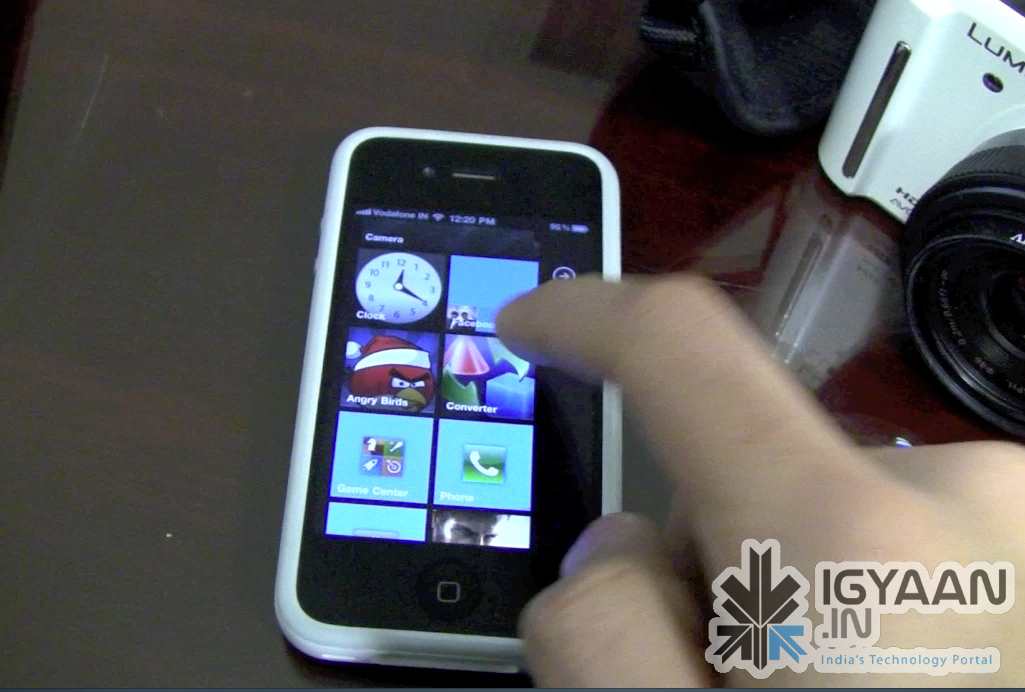
    WP7 Metro UI on iPhone 4 – We go Hands on!

    You have a Jailbroken iPhone/iPod/iPad? Do you love the new Metro UI from Microsoft Windows Phone 7?  Then this bit of information might just make you very very excited! Don’t get naughty!

    The video below previews a beta version of a Theme designed by Wynd, The theme is called OS7 and is fairly easy to Install. Check out the video Below and head on over to the source link to try it for yourself.


    Source modmyi

  • Microsoft finds the cause of Phantom Data Bug in WP7- blames third parties

    Microsoft finds the cause of Phantom Data Bug in WP7- blames third parties

    Is your Windows Phone device randomly sending and receiving data , Microsoft is aware of it. Apparently, there’s a “third party” that’s responsible for the misbehavior, and Redmond’s already reached out to help ’em make the necessary fixes.

    The Full Statement

    “We have determined that a third-party solution commonly accessed from Windows Phones is configured in a manner that potentially causes larger than expected data downloads. We are in contact with the third party to assist them in making the necessary fixes, and are also pursuing potential workarounds to address the configuration issue in case those are needed. At this point in our investigation, we believe this is responsible for most of the reported incidents.

    We are investigating additional potential root causes for the remainder of the reports.

    A small (low single-digit) percentage of Windows Phone customers have reported being affected.

    We are continuing to investigate this issue and will update with additional information and guidance as it becomes available.”


    Via : Engadget

  • Sony Launches the Vaio Bluetooth Laser Mouse in India

    Sony Launches the Vaio Bluetooth Laser Mouse in India

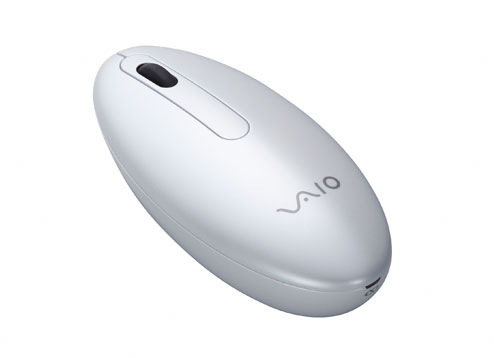
    After Apple and Microsoft, Sony now launches the new Vaio Mouse in India. The Mouse VGP-BMS20 is a Bluetooth Laser Mouse and comes in white and black color. We are trying to get a price for it.

    Via Sony Twitter

  • How to : fix the Windows Phone 7 Activation Required Screen

    How to : fix the Windows Phone 7 Activation Required Screen

    Okay so you got your new Windows Phone 7 Device, You must be real excited to get the device online access the market place and download cool apps for your Phone. But, as soon as you try to login with your LIVE account the device says , Activation failed :

    Activation Required
    An activation code is required before we can finish setting up your phone. Please contact customer service. You can skip this step and do it later.

    Here is how you fix it, Well it worked for us anyway.

    Step 1

    Since most customer support networks are horribly backed in INDIA, Microsoft India had no clue whatsoever about activation of Windows Phone 7.

    So we placed a call to Microsoft UK

    The Number is +44 08448002400


    Step 2

    Make sure you placed a call during business hours – 9AM – 7PM (GMT)

    Choose option 2 and then option 7


    Step 3

    Tell the support executive that you need to activate a windows phone 7 device to a live account and politely ask him to generate a code for you. Tell him/her that the device was bought in the UK.

    Give your details and wait for him to generate the code.

    Once he gives you the code make sure to write it down properly (all in CAPS)


    Step 4

    Enter the code and enjoy the Live experience.

    If the code does not work call back and request a new one.

    We tried calling MS USA prior to UK, but, their menus seemed much more complex and we couldn’t get through to the right department.

  • Hackers install a Windows Phone 7 rom on a HTC HD2 + Video

    Hackers install a Windows Phone 7 rom on a HTC HD2 + Video

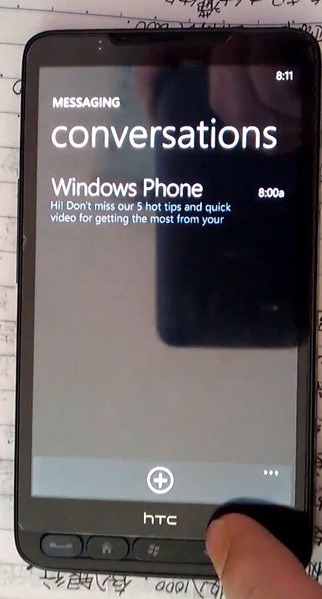
    Hackers have finally managed to get Windows Phone 7 working on the HD2. This new rom has just been released by DFT (Dark Forces Team).

    If you’re an HD2 owner just aching for a taste of Microsoft’s newest OS then now’s your chance. Video of the ROM in action after the break. Along with a video and instructions showing hacked access to Live services has now been posted. See the proof below.

    Looks like an android port may not be far. i.e. WP7 dual boot on Desire HD anyone?


    Source : mwangDFT (YouTube)

  • HTC HD7 Review + Video + Samples

    HTC HD7 Review + Video + Samples

    Windows Phone 7 Was released Q4 2010, Htc was the most involved during Launch of Windows phone 7. Htc was also, the firt company to bring their WP7 phones to India.. The First WP7 device to hit India was the HD7. iGyaan was the First to report its availability and also the first to give an unboxing video and pictures. Today we are here as the first with a review of this device on Indian shores. So, lets begin :-


    Overview

    Windows phone had predominantly dominated the smartphone (or supposed) market before the likes of Android and iOS. Windows Mobile OS was the easiest was to get around on your handheld touchscreen device using a stylus to navigate through the tiny start menus and buggy interfaces. Gone are those days, Microsoft, has upped the bar and competition has been tough on their noses. The Latest version of the Windows mobile platform the WINDOWS PHONE 7, does everything that the earlier variants couldn’t, a lot less of everything that they could, most importantly, it is as smooth and good looking as butter on a Hot Pan.

    HTC began as a company of Windows Devices, manufacturing devices under third party names, until they decided to launch their own brand and come out strong. The company has grown because of Microsoft and the Windows platform. So, they were the first to offer support for a refreshed version of their favorite OS. The HD7 is the flagship for the company in the Windows Phone 7 Series. With Beautiful looks and an inside that makes a even android phones shame the device packs it all, but, does it?

    Build Quality

    The Hd7 packs a stunning 4.3 inch 480×800 px front LCD. this screen along with a dark chrome metal bezel and invariably sexy looks make it one of the Hottest smart-phones in the market today. Overall a high strength construction along with premium use of glass and metals make it absolutely top notch. The flaws however are there and include, a very poorly designed back cover which leaves a lot to be desired and a lot of noise from the handset when, well its shaken.

    Also, noticeably bothersome is the fact that all the buttons are flush with the phones bezel so they are not tactile and really difficult to operate. The Screen is recessed into the bezel and the bezel hurts the finger while its under operation.


    TouchScreen & Display

    The Display is a 480×800 px LCD display, which is multitouch and boasts a high contrast and brilliant brightness. The display is absolutely amazing, we always hoped that the HTC samsung fallout wouldn’t happen. so that the HTC phones could continue getting SAMOLED screens. But, this screen makes you feel otherwise. The beautiful display along with brilliant colors from the Windows Phone 7 make the device look and perform great. The touch screen experience is fluid, to the extent that every tap gives you a response. The screen in our case did not fade when tilted, like it did for a lot of others people who complained about the quality of display. Agreed the viewing angle is not as good as we would expect from a device like the said, But, then again how many times do you actually look at your device at a 70-90 degree angle.

    The Kickstand plays a major role in how the display looks, Once placed on a surface the angle of view changes to a slightly tilted one, this does not affect the viewing experience  on the device – which can be totally hands-free

    Continue Reading by Clicking the Next Page Link Below

    Continue Reading by Clicking the Next Page Link Below

iGyaan Network
Privacy Overview

This website uses cookies so that we can provide you with the best user experience possible. Cookie information is stored in your browser and performs functions such as recognising you when you return to our website and helping our team to understand which sections of the website you find most interesting and useful.