Category: Social Media

  • Facebook Pays Bug Hunters $1 Million, India Second Biggest Recipient

    Facebook Pays Bug Hunters $1 Million, India Second Biggest Recipient

    The social media giant ‘Facebook’ has paid over 1 million USD to security researchers  who report bugs on their website, with India being the second biggest recipient among other countries. India has over 78 million Facebook users, and now is one of the fastest growing in the Bug Bounty program. The social networking major said 329 people have received rewards, including professional researchers, students and part-timers. The youngest recipient was 13 years old.

    A software bug is an error, flaw, failure, or fault in a computer program or system that produces an incorrect or unexpected result, or causes it to behave in unintended ways. Most bugs arise from mistakes and errors made by people in either a program’s source code or its design, and a few are caused by compilers producing incorrect code. 

     As per Facebook To qualify for a bounty, you must:

    • Adhere to the Responsible Disclosure Policy of Facebook.  
    • Be the first person to responsibly disclose the bug
    • Report a bug that could compromise the integrity of Facebook user data, circumvent the privacy protections of Facebook user data, or enable access to a system within the Facebook infrastructure, such as:

      • Cross-Site Scripting (XSS)
      • Cross-Site Request Forgery (CSRF/XSRF)
      • Broken Authentication (including Facebook OAuth bugs)
      • Circumvention of our Platform/Privacy permission models
      • Remote Code Execution
      • Privilege Escalation
      • Provisioning Errors
    • Use a test account instead of a real account when investigating bugs. When you are unable to reproduce a bug with a test account, it is acceptable to use a real account, except for automated testing. Do not interact with other accounts without the consent of their owners.
    • Reside in a country not under any current U.S. Sanctions (e.g., North Korea, Libya, Cuba, etc.

    Facebook offers great prize money which is a minimum of $500 and there is no maximum amount they have quoted, as each bug is awarded a bounty based on its severity and creativity.

    Our Bug Bounty program allows us to harness the talent and perspective of people from all kinds of backgrounds, from all around the world,Two of the bounty recipients have taken up full-time jobs with the Facebook security team” Facebook Security Engineer Collin Greene said 


  • Vine For Android Updated With Push Notifications

    Vine For Android Updated With Push Notifications

    An updated version of the Vine application is now available for download for the owners of Android-based devices, namely version 1.3.3, with some appealing improvements packed inside. 

    With the newest version, Viners now have the ability to share user profiles through more than just the SMS app (hopefully all Android apps with sharing capabilities will be available). Users can also look forward to push notifications, so they never miss a mention or re-Vine.

    Furthermore, the new application release provides the possibility to share any public post to Twitter or Facebook, while also delivering a variety of other bug fixes and improvements. 

    For those of you who don’t keep up with the social media, Vine is an app that allows you to create 6 seconds of video in a looping feed that you can tag and then post. Owned by Twitter, consider this the video version of the social messaging app, if the messages continued to repeat over and over again.

    Vine for Android is available through the Google Play store for free and it is compatible with devices running Ice Cream Sandwich and later platforms.

  • Facebook Planning 15-Second Ads For Your News Feed

    Facebook Planning 15-Second Ads For Your News Feed

    Facebook plans to introduce 15-second television-style ads to its Newsfeed, opening the door to a potentially crazy-lucrative new advertising option. Bloomberg reports that Facebook will sell the ad space for up to $2.5 million a commercial, and that commercial spots will initially run for a full day. The commercials will be targeted, so advertisers will run ads specific to age and gender.

    The social network currently allows advertisers to upload videos to their Facebook page and then broadcast them to a user’s news feed. The new service would let marketers buy their way directly into a person’s feed with a 15-second pitch, according to Bloomberg.

    As TheNextWeb reports, assuming the $2.5 million per day price is accurate, the new ads would create an immediate boost for Facebook’s bottom line. Considering that the company brought in $1.81 billion in revenue during the second quarter of 2013, a quarter worth of commercials at the highest price could hypothetically drive over 12 percent growth by adding as much as $225 million in revenue.

    With Facebook’s incredible dominance of global social networking and the sheer influence of the site on many users’ daily lives, it begs the question – where could unhappy users even migrate to, without losing so many digital connections, photos, and the ability to instantly keep in touch with just about everyone they know? 

    [Via]

  • Can’t Login to Twitter on an iPhone, iPad or iPod ? Twitter knows it, Here is How you Fix it!

    Can’t Login to Twitter on an iPhone, iPad or iPod ? Twitter knows it, Here is How you Fix it!

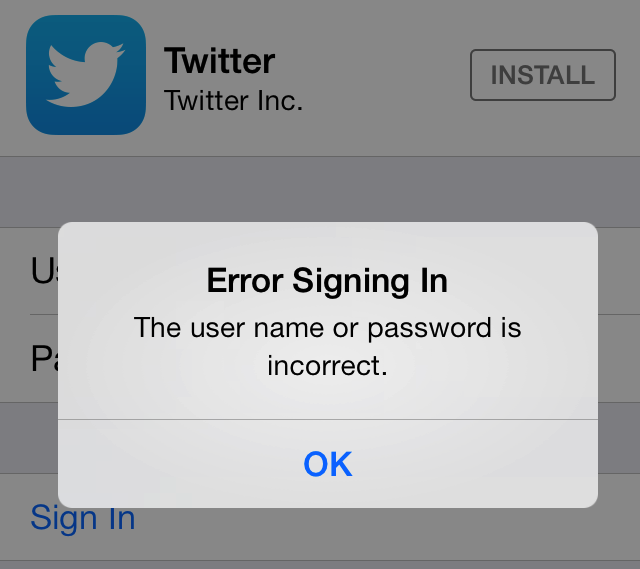
    Many iPhone / iOS device users are facing issues logging into Twitter from their iOS devices, so much so that some people cant even open the twitter website on their browser. Twitter is aware of this bug and claims that it is working on a fix. 

    If you can’t login to Twitter on your iPhone, iPad or iPod you may be one of the many who are affected by this bug.

    [box type=”notice” title=”Bug Alert:  ” message=” Some users are having trouble sending a Tweet with photo. Some users report seeing the following errors when logging into Twitter for iPhone: Unauthorized / @(null) / Error Loading Tweets (400 or 401) “]

    Twitter Recommends the following steps to attempt to reinstate your iPhone / iOS Twitter access to your Twitter account .

    Remove your account from the app and log back in

    If clearing your phone’s cache or turning your phone off and then on again didn’t work, you should try removing and then re-adding your account to the app. This is essentially the same thing as logging out and back in again, but since there is not “log out” option on the app, you’ll need to remove the account from the app entirely and then sign back in.

    Note: The instructions for removing an account from the app are different for iOS4 and iOS5 (and higher). If you don’t know which OS version your phone is running, you can check by going to your iPhone’s Settings > General > About > Version.

    To remove your account from the Twitter for iPhone app:

    1. Go to your phone’s System Settings.
    2. Tap on Twitter.
    3. Tap on the account that needs to be removed.
    4. Select Delete Account.

    To add your account back to the app:

    1. Open the Twitter for iPhone app.
    2. Tap Sign in.
    3. Enter your username and password.
    4. Tap Done.

    If you’ve forgotten your account’s password, follow the troubleshooting steps below to recover it.

    How to send a password reset from your mobile device:

    1. If you’re using a mobile device to access Twitter, you can send yourself a password reset via Twitter for Android, Twitter for iPhone, or mobile.twitter.com.
    2. On the welcome page, select Sign in and then Forgot password?
    3. Enter the email address or username that you are trying to request a password reset for. If you have a phone number associated with the account, you can choose to receive a reset via SMS. 

    Uninstall and reinstall the app

    If above troubleshooting steps didn’t resolve your issue, you can try deleting and reinstalling the app on your iPhone.

    To uninstall the app:

    1. From your home screen, press and hold your finger on the Twitter for iPhone app icon.
    2. The icon will begin to wobble and an x will appear in the top left corner of the icon. Tap the x.
    3. Your iPhone will ask you to confirm your decision to delete the app. Tap Delete.
    4. The app will disappear from the screen and has been deleted from your phone.

    To reinstall the app:

    1. Go to twitter.com/#!/download/iphone and click Download now.
    2. Open the App Store app on your phone and search for Twitter.
    3. Tap Install.

    Try clearing your phone’s cache

    1. Tap the Settings app icon on your iPhone.
    2. Tap Safari in the list of applications.
    3. Scroll down and select Clear History and/or Clear Cookies and Data
    4. If you’ve cleared your cache but are still experiencing the issue, try turning your phone off and then on.

    Check that your time zone settings are set to update automatically

    If you’re seeing “Unauthorized” or “Invalid username and Password” when you try to sign in, this is likely caused by incorrect time zone settings or an outdated version of the Twitter client application. Please make sure your Twitter client is up to date with the latest version and that the date, time and timezone settings are set to update automatically.

    To check your time zone settings:

    1. Tap the Settings app icon on your iPhone.
    2. Tap General.
    3. Select Date & Time.
    4. Make sure the option to Set Automatically is enabled.
  • Instagram Deleting Posts Uploaded Through Third Party Windows Phone App

    Instagram Deleting Posts Uploaded Through Third Party Windows Phone App

    Those of you using Instance, the unofficial Instagram client for Windows Phone, have probably noticed that things aren’t running as smoothly as they should since yesterday. Indeed Instance seems to be in some trouble.

    Numerous users report that photos that they share to the social photo service are being deleted shortly after being uploaded. This issue is in addition to an earlier problem that saw some users receiving a log-in error message when trying to use the app, although the two may be connected.

    The problems started when Instagram changed their keys that are used to authenticate, and Windows Phone users obviously got left out. However that problem was quickly fixed once Daniel Gary, the app’s developer, got wind of it.

    The Facebook-owned photo-based network hasn’t developed an official Instagram app for Windows Phone users. As a result, people have been forced to use third-party clients, such as the popular Instance application. 

    There’s no clear explanation why this is happening and the app’s creator Daniel Gary half-jokingly posted the tweet below.


    It’s unclear at this point whether the automatic deletions are a technical problem, or an intentional decision by Instagram to disincentivize third-party applications on the Windows Phone platform.


  • Instagram Posts Pictures Of Smoothies And Fruit To Their Accounts

    Instagram Posts Pictures Of Smoothies And Fruit To Their Accounts

    An Instagram hack that posts pictures of fruit to users’ timelines has returned after a sabbatical. 

    The security issue is called the ‘Smoothie Hack”, some clever smooth-ie criminal has decided to post pictures of this drink, but once you click on them this is where the breach happens. The pictures come with some text trying to explain that they are drinking a new diet and that others should try it by clicking on a URL link within their Instagram  bio, he wants you to try it with him.

    The hack seems to be harmless enough as far as these types of things go. Still, if you have been affected you should change that passcode (assuming you still have access to your account) and also change any other account passcodes that may have been the same as what you had been using on Instagram. 

    As The Next Web reports, the links being inserted into bios are made to look like BBC links, but the domain being used was actually registered just yesterday (although the registrant details may well be fake) – suggesting that it may have been registered specifically for use in this hack.

    In the meantime we offer this as advice — don’t click the links and move forward with a password reset as soon as possible.

    [Via]

  • Instagram For iOS Gets Landscape Mode

    Instagram For iOS Gets Landscape Mode

    Instagram can take photos and video and add filters that make them look dated, but nothing was more dated than the fact it didn’t support landscape mode.

    Instagram for iPhone has been updated with a couple minor improvements that could have a major impact on the way users enjoy the app.

    Until now, Instagrammers have been limited to taking photos in portrait mode; while it was possible to turn the phone on its size (the photos themselves are square either way) the interface did not adjust accordingly. In version 4.0.2, iPhone users can now turn the device onto its side and shoot as if using a regular camera app. Taking a photo in landscape lets you hold on to the other side of the phone for support, potentially forging better photos in the process.

    The other improvement made to the app, other than the requisite “bug fixes and performance improvements,” is the addition of Cinema Mode when using the front-facing camera. Cinema was a feature incorporated into Instagram videos on the iPhone, improving shakes and other aberrations in rendering.

    Instagram hasn’t stated that these improvements will come to Android — Cinema isn’t even available using the rear camera on Android — but we hope it is sooner than later.

  • Facebook Brings Stickers To The Web (PR)

    Facebook Brings Stickers To The Web (PR)

    Earlier this spring Facebook announced Home, a suite of apps for Android meant to make elements of the social site native to the phone. A month later, Facebook pushed out some features of Home to their iOS Messages app, including Chat Heads and stickers. Stickers are now rolling out to desktop users, and these users can choose from a catalog of available images in Facebook’s Sticker Store.

    facebook

    Sending stickers is simple: click on the smiley icon in your message, browse the top of the sticker window to decide on the pack you want, and make a selection. The basket icon takes you to Facebook’s sticker store, where you can find additional packs.

    Though they’re calling the collection a “store,” the stickers are currently free, although Facebook could one day decide to sell sponsored stickers. Though the social network is increasing their push to bring stickers to their messaging platform, (other social networking apps also offer stickers), TechCrunch says their head sticker designer has left the company.

    [toggle title=”Press Release”]Spice up your conversations now with Facebook Messenger
    Facebook Messenger gets updated with Chat Heads and Stickers

    Facebook, one of the largest social networking platforms has announced some upgrades in its instant messaging app Facebook Messenger and has rolled out a few interesting features such as Chat Heads and Stickers.

    Facebook now makes it easy to send private messages. Today, more than 10 billion messages are sent each day in total on Facebook. Private sharing and connecting is a big part of the Facebook experience. No matter what you’re doing or where you are, you want to reach your friends on Facebook – and you’re reaching your friend, not a phone number or a screen name so it’s personal, real and intimate.

    To spice up the conversation and keep your chats at the finger tips Facebook Messenger comes up with features such as Chat Heads and Stickers. Stickers are a way of letting the user free, of the same old smileys and emoticons. The user can use these to spice up the conversations and make them more interesting and fun. Chat heads allows the user to be just one tap away from chatting with his friends. The most frequently connected user on Facebook, appears on the home screen inside a circular shape, and does not go away until and unless, it is double tapped upon. Chat Heads make the texting experience quick and easy; it allows the user to switch between friends without having to go on the friend list again and again.

    Stickers have been available on the Facebook and Facebook Messenger apps for iOS and Android and now users can send them right from messages or chat on their desktop as well.

    Here are some quick tips to show you how to get the most out of Facebook mobile messaging.

    1. Start messages instantly
    From the Facebook app, tap the icon in the top right of your News Feed to get to the messaging sidebar. Just tap the name of a friend and your message will reach them wherever they log in to Facebook – on their smartphone, feature phone or the web. Want to know who will get notified about your message on their phone? Look for the mobile icon.

    2. Message groups of friends
    Making plans to see a movie with a small group of friends? Tap the message bubble icon at the top of the screen. Tap the Group button, then tap the names of the friends you want to message. Once you start a group conversation, you can give it a name like “Movie Crew” so it’s easy to find it again later.

    3. Send a sticker
    Stickers make Facebook messages more fun. Just tap the smiley to send a bunny, a cat or another cute critter. To download more stickers, just tap the basket icon. Stickers are a lightweight way to tell friends how you’re feeling, what you’re up to or to just say hi.

    4. Share a photo
    Sometimes you only want to share a photo with a handful of people. To add photos to a private conversation, tap + and choose from the photos on your phone or take a new one. People in the conversation just tap the photo to see it expand.

    5. Multi-task with chat heads
    With chat heads in Facebook for iPhone, you can keep chatting while you do other things on Facebook like check News Feed or post to a group. If you have Facebook Messenger for Android, you can keep chatting while you use other apps. Just tap the chat head when a new message arrives. Your friend’s message will open on top of your browser app for example so you can send a response without having to switch back and forth. When you’re done, tap the chat head to close the conversation and drag the chat head down to the ‘X’ to dismiss it.


    6. Download the Messenger app
    Want to get to your messages faster? The standalone Facebook Messenger app lets you get right to all your conversations from your Android or iPhone home screen. To download the app, go to: http://bit.ly/fbandroidmessenger or http://bit.ly/fbiosmessenger
    [/toggle]

  • Facebook Announces Beta Program, Lets You Test Android App

    Facebook Announces Beta Program, Lets You Test Android App

    Facebook is going head-on into the path of most resistance when it comes to Android. Its main app has been the butt of jokes since it was launched, and even since it went native in 2012 the company has endured scrutiny for poor performance.

    Today, Facebook has announced plans to combat such scorn with the launch of a beta program for its main app. By partnering with Google Groups and the Google Play Beta Program, Facebook will allow users to sign up for the beta program, giving them access to the new app through official means — Google Play itself — as opposed to download an APK and overwriting the original file.

    Google announced support for an extensive and granular alpha and beta program at its developer conference in May, allowing third-party developers to use Google Groups or Google+ to officially distribute tester versions of its apps through the Play Store. Customers like Falcon Pro, Plume, Sliding Messaging and Flesky, among others, have already taken part.

    In a blog post today, Facebook said of Android: “Facebook is the most-downloaded app in the Play Store, so we need to make sure it works for everyone, no matter their amount of RAM, network conditions, or version of Android they might be using. We want to make sure we’re always optimizing their experiences. With so many use cases to solve, testing becomes crucial to ensuring positive, consistent experiences across Android.”

    In other words, Facebook wants early adopters, across a variety of devices, form factors and network speeds, to be the guinea pigs for its Android team. Recently, the company released Facebook Home, a launcher replacement for a small subset of Android devices running Ice Cream Sandwich or above. The reception was tepid at best, but the social networking giant, which surpassed 750 million mobile users recently, has promised to work out the kinks in monthly updates.

    So too will it endeavour to fix the issues plaguing many Facebook for Android users. Notably, the app scrolls slowly and renders images at glacial speeds. Early indications point to dramatic improvements in the first beta version, along with some neat updates to the interface. For example, it’s possible to open the left- and right-side menu bars by swiping in from either side. This was previously only possible by tapping a button at the top left or right of the interface.

    To join the beta program, follow the following instructions. Once joined, downloading an update from the Play Store will replace the original Facebook app. Most users won’t notice much of a difference at first, but Facebook promises monthly updates.

    1) Join the Facebook for Android Beta Testers Google group
    2) Allow beta downloads by clicking Become a Tester in the Play Store (you need to join the Google Group before becoming a tester)
    3) Download Facebook from the Play Store to update your app
    4) Join the Facebook for Android Beta Testers group on Facebook to tell us what you think

  • Instagram CEO : Instagram For BlackBerry, Windows Phone Not Coming ‘Anytime Soon’

    Instagram CEO : Instagram For BlackBerry, Windows Phone Not Coming ‘Anytime Soon’

    Instagram is currently available via the web, or as a mobile app on the iPhone and Android devices. Knowledgable BlackBerry 10 users can unofficially get in on the fun and port the Android version over to their Z10, Q10 or Q5. There has also been several attempts to bring Instagram to Windows Phone, mainly begging by Nokia, but the Facebook-owned company has no imminent plans of a releasing a native app on either platform.

    It took the iOS-only service roughly 18 months–and 25 million users–to launch on Android, in early 2012, making it one of the operating system’s most anticipated app releases. Since then, the company has been acquired, introduced a slew of new features including video, and yet still has not migrated to other platforms.

    According to an article in Fast Company, CEO Kevin Systrom was asked if they’d be bringing the app Google Glass. “We’re not yet on BlackBerry or Windows Phone, so I think those will come before Google Glass… I’m not saying those will come anytime soon. I’m just saying that in order of priority, the way we evaluate where to expand to is really simply where our users are, and where the growth is. It took us a very long time to get to Android.”

    This is not the first time a popular app developer has shunned BlackBerry and Windows Phone. Netflix also stated the same reply of ‘we go where our users are.” Instagram has amassed over 130 million active users who’ve uploaded 16 billion photos and 5 million videos.

    Instagram has more than 100 million monthly active users on Android and iOS. The company recently added a video-sharing feature to help the service better compete with Twitter’s popular Vine app.

  • Report : Facebook Working On Flipboard Like App

    Report : Facebook Working On Flipboard Like App

    Facebook is experimenting with a lot of mobile-centric ideas, aiming to take the social network’s presence beyond just Facebook.  Although it has reportedly been in the works for well over a year, it appears as though Facebook is working on a news aggregating app.

    Now according to a report from The Wall Street Journal, Facebook is developing a new tool that focuses on news consumption in order to re-shape its identity as a social network, like Twitter, that can compete in the news consumption space. The project, which is reportedly called “Reader,” would be a feature that runs on Apple’s iOS Devices such as the iPhone, iPad, and iPod touch. 

    The social network has been quietly working on a service, internally called Reader, that displays content from Facebook users and publishers in a new visual format tailored for mobile devices, people with knowledge of the matter said.

    The project, which the company has been developing for more than a year, is designed to showcase news content in particular. Recent versions of Reader resemble Flipboard Inc., a smartphone and tablet app that aggregates stories from multiple sources and lets users swipe to flip through articles, said the people with knowledge of the project.

    While it’s unclear when Facebook will be ready to unveil the product, if it ever is, the Reader project is a sign the company is trying to get users to spend more time with it on mobile devices—and to see more ads.

    Facebook is clearly making an initiative to be more than just a social network to share photos and statuses

    [Via]

  • Facebook : Security Bug Revealed 6 Million Users’ Info

    Facebook : Security Bug Revealed 6 Million Users’ Info

    On Friday, Facebook admitted that a bug made the private contact information — either email addresses or phone numbers — of 6 million users accidentally accessible to Facebookers who downloaded their account histories onto their own computers.Compared to Facebook’s over 1 billion total members, 6 million isn’t much. But any security flaw has the potential to frighten people away from a website.

    The breach was caused by an unfortunate combination of Facebook’s “People You May Know” and “Download Your Information” features. “People You May Know” offers friend suggestions based in part on other users’ uploaded contact lists or address books; “Download Your Information” offers a downloadable version of your Facebook Timeline archive.

    When some users downloaded their Facebook archives with “Download Your Information,” the archive included contact information for second-tier connections with whom Facebook thought those users might want to connect but who hadn’t yet received or approved a friend request from that user.

    Facebook said the security bug did not reveal other personal or financial data and that only people on Facebook – not developers or advertisers – accessed the DYI tool. Therefore, the bug was not exploited maliciously. 

    “For almost all of the email addresses or telephone numbers impacted, each individual email address or telephone number was only included in a download once or twice,” Facebook clarified. “This means, in almost all cases, an email address or telephone number was only exposed to one person.”

    Facebook said it reviewed and confirmed the security bug, and therefore immediately disabled the DYI tool to fix the problem. The tool is now back online, however, because the problem has been resolved.

    The bug was found not by Facebook’s team, but by someone going through Facebook’s “white hat” hacker program, which offers a bounty for anyone who can find bugs on the site, paying a minimum reward of $500 per bug.

  • 5 Million Instagram Videos Uploaded On First Day

    5 Million Instagram Videos Uploaded On First Day

    Instagram’s new video feature isn’t going over well for everyone. GigaOm’s Matthew Ingram says he’ll never click on your videos, and others have followed suit, blaming the addition for disrupting the service’s simplicity and, proportionally, its charm.

    But that didn’t stop hundreds of thousands of users from uploading millions of videos in its first day — 5 million videos to be exact. According to an Instagram spokesperson, video uploads peaked during the Heat-Spurs game last night but remained steady throughout the day.

    While five million videos may not seem like a lot when you consider Instagram has 130 million active users, there are a few things to consider: there is a slight learning curve to this feature, and it takes a fair amount more effort to complete an Instagram video than a photo; and over half of Android users do not yet have access to video creation, as the feature is limited to phones running Jelly Bean and above. At last count, that was around 35% of total users — still hundreds of millions, mind you — but certainly enough to have an effect.

    Another thing to consider is that Vine, with its six-second-video focus, is likely better suited to be the “Instagram of video” than Instagram itself. There has always been a tense but friendly rivalry between Twitter and Facebook, each company borrowing features from one another, but adding video to Instagram seems to be largely reactionary and may be viewed in the long run as diluting its brand. Then again, 15 seconds, which is the maximum length of an Instagram video, is the perfect length for a pre-roll ad. So there’s that.

  • Instagram Gets Video With Filters

    Instagram Gets Video With Filters

    Those selfies and food photos in your Instagram feed might soon be a little less stationary. Starting today, the Facebook-owned service will be adding video features to its popular iPhone and Android apps.

    Video on Instagram gives the 130 million users of the app the ability to post short video clips that can be three to 15 seconds long. In contrast, Vine allows a maximum of six seconds of video.

    instagram

    The new feature opens a potential new revenue stream for Facebook, which paid a premium price to buy Instagram last year. But Instagram co-founder Kevin Systrom insisted the product was not specifically designed to generate new business.

    “This is driven by consumer demand, not by business need,” Systrom said during a news conference at Facebook headquarters. “I don’t think we designed it with any advertising in mind.”

    In its iOS version, the tool also includes a brand-new image stabilization mode called “Cinema” to eliminate shakiness in videos.

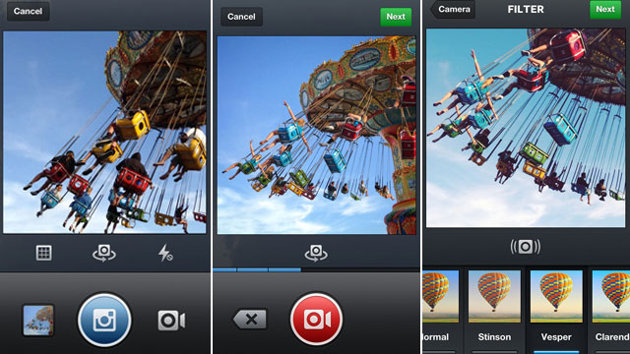
    Users will now hit the camera button and get a choice of a still camera or video camera option. Selecting the video option will bring up the usual viewfinder, and then, similar to Twitter’s Vine app, holding down the video icon will capture video. Releasing it will allow you to pause the video, readjust your shot and then start capturing again.

    Within hours of the new feature being added to Instagram, video clips began streaming in from locales around the world including a fish market in Japan, a space memorial in Russia and a surfing haunt on the California coast.

  • Report : Facebook To Add Video To Instagram on June 20

    Report : Facebook To Add Video To Instagram on June 20

    Facebook may be preparing to add video-sharing features to its Instagram app, in a direct response to the popularity of Twitter’s Vine app.

    According to TechCrunch, the company will unveil the new service at an event on June 20th. Earlier it was rumoured that Facebook will launch it’s own RSS service at the June event.

    Instagram is a popular photo-sharing application that is available for Android and iOS. Facebook had acquired Instagram in 2012 for a whopping $1 billion. About three months ago, Instagram had announced that it has 100 million monthly active users and these users are uploading over 40 million photos per day.

    instagram

    There are several clues suggesting that video may be the next step for Instagram, which now boasts of 100 million active users. For example, Facebook has prevented Vine from using its friend-finding feature. By doing this, Facebook looks embed users into its platform first, rather than a service like Twitter.

    Another instance of Facebook protecting its brand is how it is preventing Instagram uploads from being posted directly onto Twitter. Users can still share Instagram photos on Twitter, but users need to click the link to see them. By directing users back to the Instagram platform, users will spend more time in the photo sharing application.

    Adding the ability to shoot and share short videos directly from the wildly popular application could certainly give Facebook a boost in the social media war.

    Last week, Facebook announced that it was enabling hashtags on its site, also comparable to Twitter capabilities.

    [Via

iGyaan Network
Privacy Overview

This website uses cookies so that we can provide you with the best user experience possible. Cookie information is stored in your browser and performs functions such as recognising you when you return to our website and helping our team to understand which sections of the website you find most interesting and useful.