Category: Apps and Software

Games, Apps, Softwares, Operating Systems and Software Hacks

  • Skype for Mac updated to 5.3, Brings HD Video and Lion Support

    Skype for Mac updated to 5.3, Brings HD Video and Lion Support

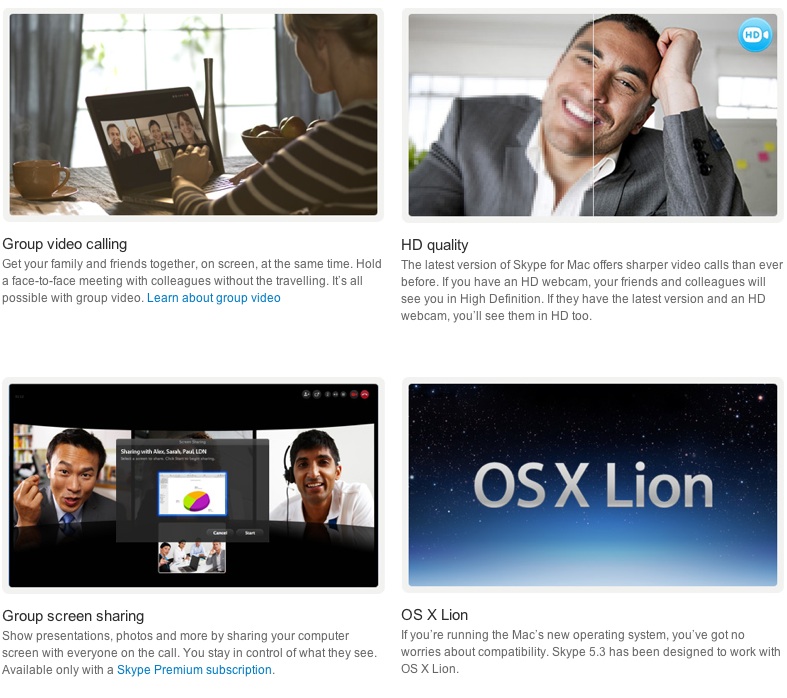
    The Skype for Mac app has been finally updated to support a full host of features, including HD video, group video calling, group screen sharing, and also brings OS Lion support. The Facebook chat module is now also integrated in the client.


    [toggle title_open=”COLLAPSE” title_closed=” READ SKYPE ANNOUNCEMENT” hide=”yes” border=”yes” style=”default” excerpt_length=”0″ read_more_text=”Read More” read_less_text=”Read Less” include_excerpt_html=”no”]
    Lion Support & HD Video Calls with Skype 5.3 for Mac OS X


    On the heels of our recent update to Skype 5.2 for Mac OS X, we are pleased to announce that we are making even more improvements to our Mac client with the release of Skype 5.3 for Mac OS X. Along with a number of fixes and improvements to the user interface, Skype 5.3 will feature support for the new Mac Lion and HD Video Calls.

    Skype 5.3 for Mac OS X is built to work with Apple’s newest desktop operating system, Lion, in addition to being compatible with past versions of OS X going all the way back to Leopard.

    Mac 5.3 imagae.jpg

    With Skype 5.3 for Mac OS X, you’ll also be able to send and receive HD quality video when talking to your friends and family. You’ll need to use the Mac’s built-in HD webcam or choose from a variety of webcams from our Skype Shop, such as the Logitech C910, to make video calls in crystal clear HD quality. To receive clear HD video calls on your Mac, we recommend an upload/download speed of 1.5Mbps.

    As with all updates, we ask that you download the most recent Skype update to take advantage of these recent features. If you have any questions or comments on the latest Skype software for Mac, please feel free to visit our new Skype Support Network. We hope you enjoy the new updates in Skype 5.3 for Mac OS X.

    [/toggle]

     [Skype]

  • Apple releases new Mac OS 10.7.2 seed and iCloud for Mac beta 6

    Apple releases new Mac OS 10.7.2 seed and iCloud for Mac beta 6

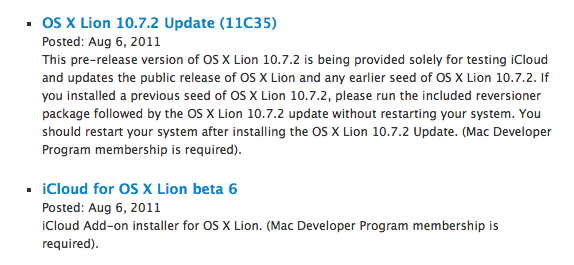
    Apple has released a new seed of Mac OS 10.7.2 and a new beta of iCloud for Mac. Mac OS 10.7.2 build 11C35 and iCloud for Mac beta 6 are both required to complete the MobileMe to iCloud transition process.

    This pre-release version of OS X Lion 10.7.2 is being provided solely for testing iCloud and updates the public release of OS X Lion and any earlier seed of OS X Lion 10.7.2. If you installed a previous seed of OS X Lion 10.7.2, please run the included reversioner package followed by the OS X Lion 10.7.2 update without restarting your system. You should restart your system after installing the OS X Lion 10.7.2 Update. (Mac Developer Program membership is required).

    iCloud

    iCloud Add-on installer for OS X Lion. (Mac Developer Program membership is required).


  • Kaspersky Lab releases Internet Security 2012 and Anti-Virus 2012 (PR)

    Kaspersky Lab releases Internet Security 2012 and Anti-Virus 2012 (PR)

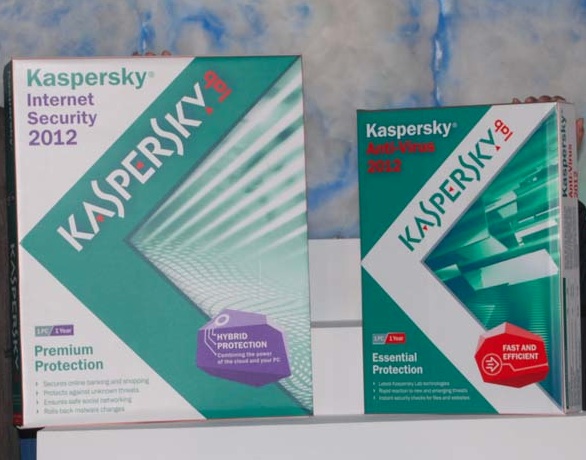
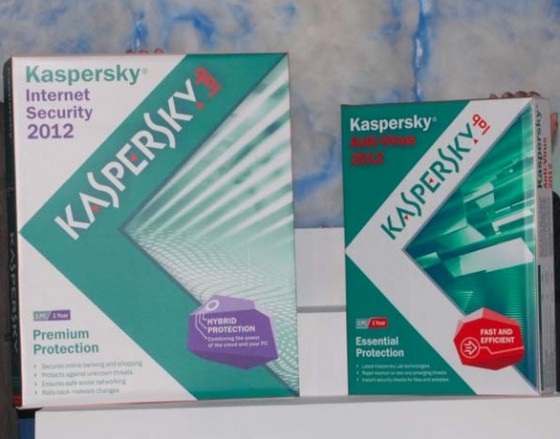
    Kaspersky has released the 2012 versions of its home user products today at The Park Hotel in Kolkata. Kaspersky says that it targets 35 thousand new malicious programs each day. With the new Internet Security 2012 and Anti Virus 2012 Kaspersky promises a faster and more efficient protection from digital threats. The new suite is also touchscreen device friendly which ensures seamless operation across all platforms. 


    The new 2012 versions continue the long tradition of excellence that our home user products have come to be known for. They feature integrated, world-class protection technologies designed to combat even the most complex of threats. At the same time, these products are now simpler and more user-friendly than ever before. We have taken yet another huge step in protecting Internet users against the most dangerous, unknown threats out there. Many of the modules featured in Kaspersky Internet Security 2012, such as web-antivirus, heuristics, the threat rating sub-system and anti-rootkit components, have been made easier to update and now interact more effectively with cloud technologies.”

    -Eugene Kaspersky, CEO and co-founder of Kaspersky Lab


    [toggle title_open=”Collapse” title_closed=”Read the Press Release” hide=”yes” border=”yes” style=”default” excerpt_length=”0″ read_more_text=”Read More” read_less_text=”Read Less” include_excerpt_html=”no”]

    Kaspersky Lab releases Kaspersky Internet Security 2012 and Kaspersky Anti-Virus 2012 at Kolkata.

    Kaspersky Lab, a leading developer of secure content and threat management solutions, unveiled the 2012 versions of its home user products today at The Park Hotel in Kolkata. The new versions of Kaspersky Anti-Virus and Kaspersky Internet Security are designed to provide Internet users with maximum protection and convenience.

    Kaspersky Lab’s home user products are distinguished by the comprehensive protection that they provide. Your computer and the data you store on it will be secure, regardless of the types of files you are working with, how often you use the Internet, or where you connect from – at home, or via a public access point.

    The all-new Kaspersky Internet Security 2012 and Kaspersky Anti-Virus 2012 incorporate the most advanced and effective protection technologies: a sandbox for launching suspicious applications, a program activity monitoring module, a script emulator, a cloud-based reputation database, a virtual keyboard plus many other features.

    Kaspersky Lab strives to continually improve the technologies we use in order to successfully counter the ever more complex computer threats that appear daily. That is why Kaspersky Internet Security 2012 and Kaspersky Anti-Virus 2012 feature a whole host of new and improved features.

    First-rate protection against unknown threats

    New malware appears at an extremely rapid rate these days – roughly 70 thousand new malicious programs each day. There are no signatures for these new threats, meaning innovative methods are required to detect them. Kaspersky Internet Security 2012 and Kaspersky Anti-Virus 2012 effectively neutralize new threats using non-signature-based behavioral analysis of suspicious programs. Kaspersky Lab’s latest products are capable of tracking program activity during present and previous work sessions.

    Monitoring program activity uses data from other components, such as the proactive protection module, email, web and IM antivirus components, the firewall, etc. The monitoring module tracks complete chains of events that could impact security, and literally pieces together an entire picture of program operations or even groups of operations affected by malware. If there have been a number of related incidents on your computer, all the monitoring module needs is to detect one of them in order to find all of the others.

    Importantly, it is now possible to cancel and roll back all of the actions executed by a program not only in the current working session, as was the case with Kaspersky Internet Security 2011 and Kaspersky Anti-Virus 2012, but in previous working sessions too. Furthermore, the list of actions that can be cancelled has been expanded to include the creation, renaming and modification of files, as well as changes to or new entries in the system registry, etc.

    Malicious activity detection has also taken a step forward with the use of behavioral templates. Kaspersky Lab data about malicious programs is incorporated into these behavioral templates, and a centralized template database helps to quickly locate unknown malicious code with complex behavioral patterns.

    Improved protection from the cloud

    In the 2012 versions of Kaspersky Lab’s home user products, cloud-based technologies, the cutting-edge of antivirus development, have been improved. By regularly exchanging information between products installed on users’ machines and the centralized databases in the cloud, the most up-to-date threat information is made available for the protection of users. Now, in addition to superior protection from the cloud, the new product versions also demonstrate how they do it. The main program window provides users with in-depth information about which cloud components are active and how they are protecting users’ computers and personal data.

    With just one click, users of Kaspersky Internet Security 2012 and Kaspersky Anti-Virus 2012 can find out about the reputation of any file on a local computer and make an informed decision as to whether or not to use it. All users need to do is right-click on the file’s icon and select the ‘View file reputation in KSN’ menu option. Users will then be shown the file’s threat rating as determined by the Kaspersky Security Network cloud service, which has been greatly improved since its inception and development three years ago. In addition to a file’s rating, users can also find out about the geographical distribution of the file, the level of trust attributed to it by other users and other similar information stored by Kaspersky Lab’s cloud tracking and rapid response systems.

    The 2012 versions of Kaspersky Internet Security and Kaspersky Anti-Virus warn Internet users of links that pose a threat and which will redirect users to fraudulent, malicious and spammer websites. Kaspersky Lab’s latest products receive the most up-to-date information available about undesirable Internet resources directly from the cloud, including websites with adult, violent and other similarly unsavory content. Users can rest assured that they will not find themselves entering websites designed to steal their personal information or infect their computers.

    Cloud technologies have even improved protection against spam. Databases located in the cloud provide templates for new spam emails in real time. This helps Kaspersky Internet Security 2012 and Kaspersky Anti-Virus 2012 to quickly adapt to ever-changing spammer tactics and be able to provide proper protective measures. Users do not have to fine-tune the new, user-friendly Anti-Spam module before getting down to work – the cloud already has all of the latest available data on spam mailings.

    Furthermore, Kaspersky Lab believes that the combination of cloud protection and security software running on users’ computers is an ideal way of ensuring multilayered protection. At present, this hybrid approach is the best option in terms of combating the wide range of threats out there in the wild. That is why both of the new product versions feature improved cloud technologies and enhanced program capabilities.

    Convenience and speed

    Kaspersky Internet Security 2012 and Kaspersky Anti-Virus 2012 are both high-performance products designed for minimal impact on your computer’s running speed and program operations. Kaspersky Lab’s products have been streamlined for optimal day-to-day use when surfing the Internet, searching for and viewing web pages, making VoIP calls, watching HD videos and playing online games, etc.

    The intelligent update system downloads updates for active product components only and launches them immediately after they have been plugged in. That means that antivirus database components are kept right up-to-date and download traffic is minimized. The update launch mode has been adapted to suit typical laptop and desktop work modes and will not slow down performance when operating system activity is resumed or a user launches programs.

    The Kaspersky Internet Security 2012 and Kaspersky Anti-Virus 2012 interfaces have been improved and now feature 3D and animated graphics, yet remain straightforward and user-friendly. The animated area of the main window contains intuitive icons for key actions, including disk scans, database updates, etc.

    The latest versions of Kaspersky Internet Security 2012 and Kaspersky Anti-Virus 2012 can now be used with touch-screen devices. Product installation has also been optimized, minimizing any conflicts with incompatible security software. Additionally, the steps for activating and purchasing licenses can now all be found in one convenient window.

    Eugene Kaspersky, CEO and co-founder of Kaspersky Lab, says, “The new 2012 versions continue the long tradition of excellence that our home user products have come to be known for. They feature integrated, world-class protection technologies designed to combat even the most complex of threats. At the same time, these products are now simpler and more user-friendly than ever before. We have taken yet another huge step in protecting Internet users against the most dangerous, unknown threats out there. Many of the modules featured in Kaspersky Internet Security 2012, such as web-antivirus, heuristics, the threat rating sub-system and anti-rootkit components, have been made easier to update and now interact more effectively with cloud technologies.”

    Kaspersky Lab India leadership team quotes:

    Unknown Threats and Surfing the Internet Are Under Control

    “Kaspersky Lab processes an average of 70,000 malicious and potentially unwanted programs per day. With the alarming rise in the number of malware threats, you need cutting-edge technology to keep you safe on the Internet. Our 2012 range of products deliver safe and efficient working environment on users’ computers. We believe it is the technology of our products backed by strong customer/channel confidence in our brand that helps maintain our leadership position in the Indian security marketplace.”

    Altaf Halde,

    Head – South Asia

    Kaspersky Lab

    Experience the best of both worlds

    “Our 2012 launch of consumer products give an altogether new dimension to Internet Security. For the first time, we bring to you Hybrid protection that combines the power of in-the-cloud technologies + on-the-PC protection. We believe the Hybrid model will give our customers the very best of both worlds. The new versions of Kaspersky Anti-Virus 2012 and Kaspersky Internet Security 2012 protect Internet users’ computers from unknown and dangerous malware by analyzing the behavior of suspicious software and referencing it against Kaspersky Lab’s cloud-based systems, which provide real-time information about threats in the wild. This results in any potential malware being detected and removed before it can do any harm to users’ computers or data. Not only will our customer be able to get the highest levels of security and protection but they will be able to have a better and faster Internet experience with minimum load on system resources. Now you can surf the Internet in safety, without the risk of having your credentials stolen by fraudsters. An intelligent update system downloads new databases to the products’ modules as and when they require them, based on the user’s activity on the computer. So you can be sure that you won’t be unnecessarily interrupted by the program when chatting with your friends on Facebook or watching a new video on YouTube. Go ahead, experience the best of both worlds…”

    Notes to Editor

    About Kaspersky Lab

    We believe that everyone should be free to get the most from technology – without intrusion or other security worries. Our crack team of specialists gives you the freedom to live your digital life without worrying about your personal information and assets. For 14 years, our team of experts has worked on exposing, analyzing and neutralizing IT threats. Along the way, we have amassed a tremendous amount of experience and knowledge about malware and how to deal with it.

    Kaspersky Lab is one of the fastest growing IT security companies worldwide. Today, it is firmly positioned as one of the world’s top four leading vendors of endpoint security software. Kaspersky Lab continues to further improve its market position, demonstrating significant growth in all regions. According to the company’s 2010 financial results, Kaspersky Lab’s global revenue grew by 38% compared to the previous year and exceeded US $500 million.

    The company today

    Kaspersky Lab is an international group that operates in more than 100 countries worldwide. The company’s headquarters are located in Moscow, Russia, from which it oversees global operations and business development.

    Kaspersky Lab currently employs over 2,300 highly qualified specialists. The company has its own territory offices in 29 countries and its products and technologies provide protection for over 300 million users worldwide.

    Unique experience and knowledge

    In 2011, Kaspersky Lab celebrates its fourteenth anniversary. Undoubtedly, the company’s most valuable asset is the relentless expertise it has gained in those years of combating viruses and other IT threats, enabling us to preempt trends in malware development. This helps us to remain one step ahead of the competition and provide our users with the most reliable protection from new types of attack.

    Consumer products

    Due to its high level of professionalism and dedication, Kaspersky Lab has become one of the market leaders in the development of antivirus protection. Kaspersky Lab was the first to develop many technological standards in the antivirus industry, including full-scale solutions for Linux, Unix and NetWare, a new-generation heuristic analyzer designed to detect newly emerging viruses, effective protection against polymorphic and macro viruses, continuously updated antivirus databases and a technique for detecting viruses in archived files. This is reflected in many respected security software developers choosing the Kaspersky Anti-Virus engine to drive their own products, including Alt-N (USA), AdaptiveMobile (Ireland), Blue Coat (USA), Check Point (Israel), Clearswift (UK), CommuniGate Systems (USA), Critical Path (Ireland), D-Link (Taiwan), GFI (USA), IBM (USA), Juniper (USA), Kaseya (Switzerland)), LANDesk (USA), Microsoft (USA), Mobixell (Israel), M86 (USA), Netasq (France), Netgear (USA), Parallels (USA), Safenet (USA), Sonicwall (USA), WatchGuard (USA), and ZyXEL (Taiwan).

    Kaspersky Internet Security 2012, the company’s flagship product for home users, incorporate the most advanced and effective protection technologies: a sandbox for launching suspicious applications, a program activity monitoring module, a script emulator, a cloud-based reputation database, a virtual keyboard plus many other features.

    Another popular solution from the company’s consumer product range is Kaspersky Anti-Virus 2012, which includes proven antivirus technologies that provide highly effective basic protection to millions of users across the globe.

    First-rate protection against unknown threats

    New malware appears at an extremely rapid rate these days – roughly 35 thousand new malicious programs each day. There are no signatures for these new threats, meaning innovative methods are required to detect them. Kaspersky Internet Security 2012 and Kaspersky Anti-Virus 2012 effectively neutralize new threats using non-signature-based behavioral analysis of suspicious programs. Kaspersky Lab’s latest products are capable of tracking program activity during present and previous work sessions.

    Improved protection from the cloud

    In the 2012 versions of Kaspersky Lab’s home user products, cloud-based technologies, the cutting-edge of antivirus development, have been improved. By regularly exchanging information between products installed on users’ machines and the centralized databases in the cloud, the most up-to-date threat information is made available for the protection of users. Now, in addition to superior protection from the cloud, the new product versions also demonstrate how they do it. The main program window provides users with in-depth information about which cloud components are active and how they are protecting users’ computers and personal data.

    Kaspersky PURE is an integrated solution for optimized home network protection. Kaspersky PURE represents a new class of product which provides a secure and productive digital environment, whatever your computer is used for.

    Kaspersky PURE combines complete protection against all types of web-borne threats with new, advanced features including extended parental control, data backup and encryption tools, a password management program and the ability to manage your entire home network or fine tune the security settings of your web browser and operating system from any computer on the network.

    Kaspersky PURE retains all the features that users of Kaspersky Anti-Virus and Kaspersky Internet Security have come to know and appreciate, including state-of-the-art ‘sandbox’ technologies that allow suspect applications to be run in a secure virtual environment, proactive detection of unknown threats, application control and restrictions on the level of access that suspicious programs have to passwords, logins, personal information and operating system settings.

    Kaspersky Mobile Security is a user-friendly and reliable solution that protects mobile devices from network attacks, malware targeting mobile platforms and SMS spam. In the event that a smartphone is lost, the data in its memory also remains protected.

    Corporate products

    In 1999, Kaspersky Lab was the first company to introduce integrated antivirus software for workstations, file servers and application servers running on Linux/FreeBSD operating systems.

    Today, the company offers a whole range of effective IT security solutions for the most popular operating systems. Kaspersky Open Space Security provides all types of corporate infrastructure with world-class anti-malware protection in a single, integrated suite of applications that work seamlessly across all platforms. Every workstation, laptop, file server, mail server, Internet gateway or smartphone is fully protected, giving the customer complete confidence that the network is secure, whether employees are working in the office, remotely or at home.

    The range of products for business includes applications for the protection of file servers and data storage systems running Windows, Linux and Novell NetWare operating systems, Microsoft Exchange and IBM Lotus Domino groupware servers. It also covers Sendmail, qmail, Postfix and Exim mail servers, Microsoft ISA Server/Forefront TMG, and various Linux proxy servers, workstations and laptops running Windows, Linux and Mac operating systems, as well as smartphones using the BlackBerry, Windows Mobile and Symbian platforms.

    The company’s product range covers all of the main information security requirements that businesses and large state organizations have to adhere to, including: excellent protection levels, adaptability to changing circumstances, scalability, compatibility with different platforms, high performance, high fault tolerance, ease of use and high value. One of the primary advantages of Kaspersky Lab’s corporate range is the easy, centralized management provided by Kaspersky Administration Kit 8.0 that extends to the entire network regardless of the number and type of platforms used.

    Kaspersky Administration Kit 8.0 includes more than 40 new and improved features which allow organizations with computer networks of any size, from several machines to distributed networks with a complex administration structure, to implement a flexible model of antivirus protection management. The ease of installation and minimal time required to manage a protection system using Kaspersky Administration Kit 8.0 helps to minimize Kaspersky Lab antivirus solutions’ total cost of ownership.

    The experts at Kaspersky Lab have designed a sophisticated spam filtration solution –Kaspersky® Anti-Spam – that boasts an excellent level of protection against unsolicited mail. The solution checks mail against a blacklist of providers and organizations, using SPF and SURBL technologies to filter traffic, analyzing the formal attributes of a message as well as using signature analysis, linguistic heuristics, and UDS technology for additional checks.

    Kaspersky Lab also offers a new range of IT security outsourcing services for corporations of any size. Kaspersky Hosted Email Security ensures reliable and effective spam filtering. This economically effective solution is easy to deploy and offers corporate networks world-class protection against all current and as yet unknown email threats. Kaspersky Hosted Web Securityprovides protection from IT threats that penetrate the corporate network via Internet gateways. The service combines the scanning of Internet traffic with web content filtering and ensures complete corporate network security for minimal financial outlay. With the help of the service, companies can implement a security policy that allows employees to interact effectively and safely with the Internet, yet restricts its use for personal activities such as communicating via social networks.

    The range of products offered by Kaspersky Lab ensures an unprecedented level of protection from malware and other external threats. Kaspersky Lab customers have access to a wide range of additional services to ensure the most effective operation of our products. The company also provides round-the-clock technical support in several languages by telephone and email.

    Customers

    Over 300 million people worldwide are protected by Kaspersky Lab products and technologies. Kaspersky Lab’s corporate client-base exceeds 200,000 companies located around the globe, ranging from small and medium-sized businesses, all the way up to large governmental and commercial organizations.

    www.kaspersky.co.in I www.kaspersky.com I

    [/toggle]
     

  • HTC Puccini 10 inch Android Tablet Screenshots leaked

    HTC Puccini 10 inch Android Tablet Screenshots leaked

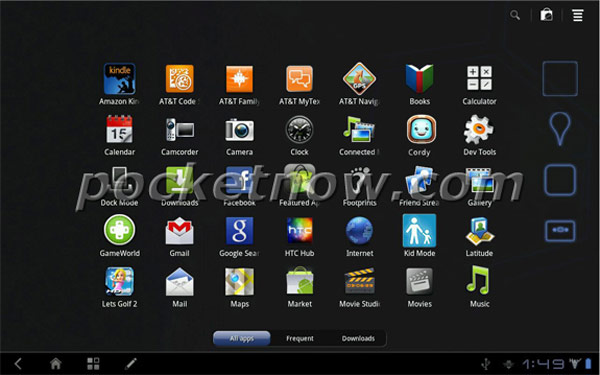
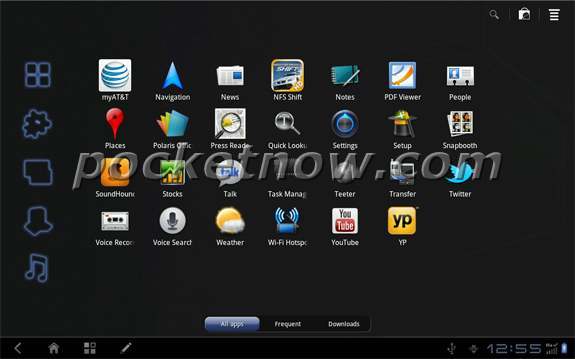
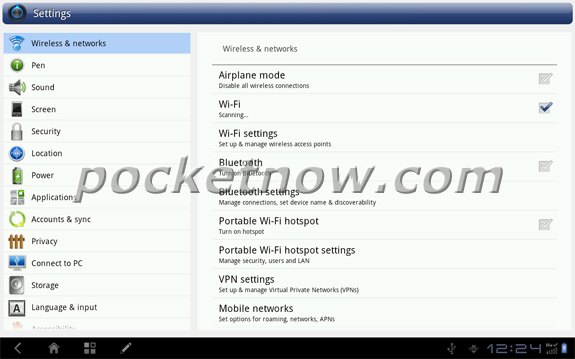
    HTC’s upcoming tablet the Puccini had earlier been leaked from the outside, now its time for screenshots to leak out. HTC is taking advantage of the 1280×800 resolution by tacking a number pad onto the keyboard; tabbed browsing also benefits from the increased real estate versus seven-inch models. 

    PocketNow estimates that the device will ship by the end of this year during the holiday season.

    [Pocketnow]

  • Have an Android Phone, this Trojan will record your Phone Calls!

    Have an Android Phone, this Trojan will record your Phone Calls!

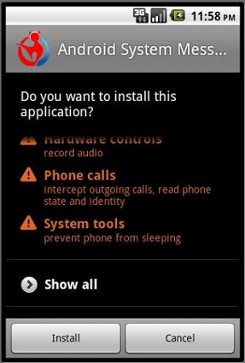
    Are you somebody important, do you work in a big corporation, or even for the government? Do you have an Android Phone? You might consider changing devices after reading this article. A new trojan app / bot that installs itself on any Android device via piggybacking over unknown source apps has found its way into the Android architecture.  Ca Technologies found that this easily built app lookalike trojan records your conversations and installs like any other app.

    There is no solid information weather this trojan has been released into the world, or if devices are already prey to such a menace. It goes to say some developer could easily capture your calls and upload them to a remote server. The brilliant part about it is that while installing you might get a warning stating that the app will record your calls, but who reads the terms page anyway?

    Next time you are installing an App on your Android device , especially via an unknown source, or patched apps, make sure you go through the permissions page with vigilance.

    [CA Technologies]

  • New Twitter.com with HTML5  for iPad access

    New Twitter.com with HTML5 for iPad access

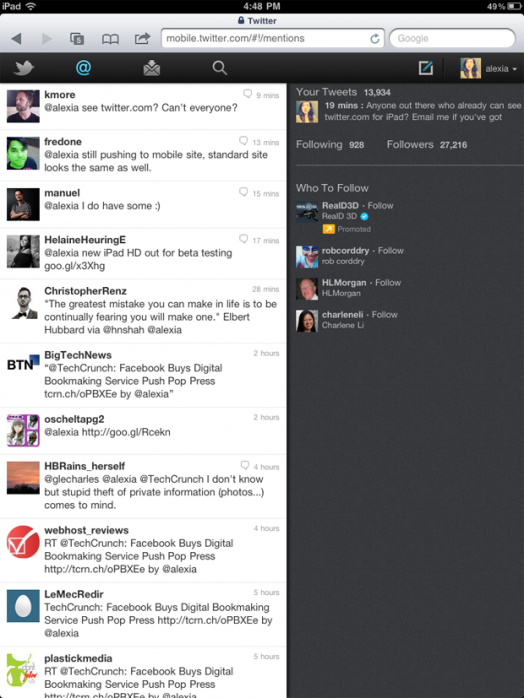
    Twitter has started the rollout of the new improved HTML 5 based website for iPad Access. The new website will be rolled out in phases and will be available to users across the world within a weeks time. 

    The website is in the form of an app or web app , which is fully based on HTML5.

    The HTML5 app provides a great option for people who prefer to use the browser over native apps. Its two-column view is consistent with the Twitter experience you’re used to (on Twitter.com), and it takes advantage of touch gestures and other device capabilities.” said  Carolyn Penner from Twitter

    [TechCrunch]


  • New Software Allows Unlimited Detail In Games

    New Software Allows Unlimited Detail In Games

    Computer games have come a long way since the days of Pacman and Mario. In today’s day, all the cool 3D graphics that you see are made up of polygons. Polygons are nothing but flat images that are joined together to create an object in 3D. The higher the number of polygons, the greater the viewing detail.

    Game developers have been trying very hard for a number of years to increase the polygon count in the games they make. However, computers face a problem when it comes to increased polygon counts. The higher the number of polygons, the greater processing power it takes to render all those polygons. Its because of this limitation that you will find games that have superb detail on one side of an object, while the other side is just a plain texturized image. Putting a cap on the number of polygons leads to a lot of compromises: You want a super detailed character? No problem, but then your world will look bland.

    An Australian company called Euclideon has developed a game engine that does away with polygons and instead replaces them with point clouds that are made up of individual ‘atoms’. So doesn’t increasing the number of objects on screen slow down everything? Well you’d think so but the company says that it has made it work and your computer will make it work too. The company has developed a 1 sq km island using their game engine and each speck of dirt on that island is made up of millions of these ‘atoms’ per cubic inch.

    The plus side to this is that the graphics are amazing. Simply put, polygons just cant cope with the kind of quality that the Euclideon ‘atoms’ can create. The curves that are generated with the ‘atoms’ are amazingly smooth and the level of detail is through the roof. You can quite literally see each individual grain of sand. In the next few years, computer games are going to make a huge leap forward in terms of graphics and we’re very exited about this technology and can’t wait for the company to deliver this game engine into the hands of game developers. Watch the video below for a demo of the engine in action:


  • Apple launches iCloud and iWork betas, Pricing for advanced users.

    Apple launches iCloud and iWork betas, Pricing for advanced users.

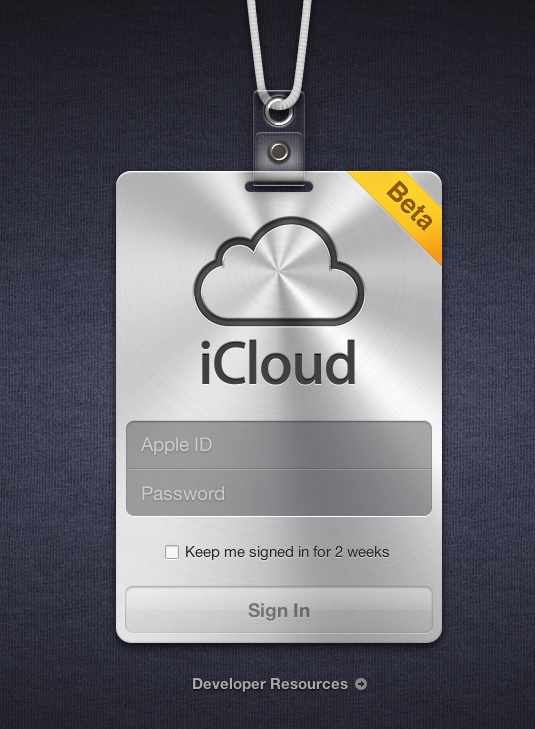
    Apple’s iCloud goes into a beta test mode , with the official site iCloud.com now a host to the beta signup page for a developer only preview of the cloud madness.  For those on iOS5 and Lion 10.7.2 in the test phases can login with their dev account ID and ease the cloud sweetness.

    If you exhaust the free 5Gb of data and need more, then the following pricing applies

    10Gb : US $ 20

    20GB: US $ 40

    50Gb: US $ 100

    A screenshot below shows the iWork icon already included in the beta.


    [MacRumors]

  • Skype for iPad Released (PR)

    Skype for iPad Released (PR)

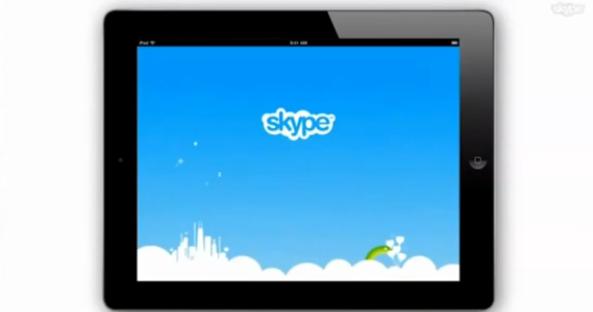
    The most anticipated update for Skype has been finally released. Skype for iPad is now official and brings voice and video chatting with others on Macs, PCs or other Skype clients. The app is not an add-on in the Skype for iPhone app but a separate iPad app available to download now from the App-Store. The app will let you enjoy the Skype goodness over Wifi or your data connection.


    [toggle title_open=”Collapse” title_closed=”Read the Press Release” hide=”yes” border=”yes” style=”default” excerpt_length=”0″ read_more_text=”Read More” read_less_text=”Read Less” include_excerpt_html=”no”]Skype for iPad

    Bring your Skype contacts closer with full screen video at your fingertips.
    Beautiful and simple, this is Skype built especially for the iPad. Call, video call, or instant message anyone on Skype. Plus, if you add a little Skype Credit, call landlines and mobiles at really low rates.

    Simple to use:
    • Join Skype on your iPad in a few moments or just sign straight in to your account.
    • If you already have a Skype account, your Skype contacts will automatically be there on your iPad.
    • We’ve made adding new Skype contacts really easy.
    • Once they’re in your Contact list, call, video or instant message them in one touch.
    • Flick through recent calls and instant messages in your Skype for iPad history.
    • Skype for iPad works over Wi-Fi or 3G (operator data charges may apply). Call Skype contacts on their iPhone, iPod touch, iPad, PC, Mac and even Skype enabled TVs.

    Access free Skype features:
    • Talk face-to-face or show what you’re seeing with front and back-facing cameras.
    • Use Skype for iPad to call anyone else on Skype – and enjoy near CD quality (SILK) sound.
    • Instant message and add emoticons to personalize your messages.

    Then unlock even more features when you pay a little:
    • Make cheap calls to landlines or mobiles from your iPad.
    • Get an Online Number from Skype so people can call you on your iPad.

    If you want to unlock these extra features, you can pay in a way that suits you.
    • Pay As You Go with Skype Credit – great for when you’re using Skype every now and again.
    • Pay monthly with a subscription – best if you use Skype a lot.

    System requirements:
    • Skype video calling requires iOS 4.0 or above.
    • Send and receive video using front or back camera on iPhone 4, iPad 2nd Generation, and iPod touch 4th Generation.
    • Send and receive video using rear camera on iPhone 3GS.
    • Receive video only on iPad 1st Generation and iPod touch 3rd Generation.
    • Works with any H264 compatible devices, including TVs.[/toggle]

  • Adobe’s Edge tool bring Flash ideologies to HTML5 (PR)

    Adobe’s Edge tool bring Flash ideologies to HTML5 (PR)

    Adobe has just announced the launch of their new tool called HTML5 Web Motion and Interaction Design Tool. The software currently in its beta form is available to download free of charge and will allow web designers to bring animation, similar to that created in Flash Professional, to websites.

    Features

    Feature Description
    Intuitive user Interface The user interface is based on a stage, timeline, and panels for elements and properties. It’s influenced by our customers’ favorite features and functionality in class-leading tools like After Effects and Flash Professional, but innovates in its ease of use. Animations and timing can be controlled on a WebKit-based stage, or via precise property adjustments directly on the timeline. You can also make quick edits on individual or multiple objects.
    Visually author animated content Create new compositions from scratch using basic HTML building blocks, text, and imported web graphics. Manipulate objects with an array of transformation and styling options which Edge natively applies to our jQuery-based animation framework.
    Add motion to existing HTML content Add motion elements to existing HTML web documents. Edge stores all of its animation in a separate JavaScript file that cleanly distinguishes the original HTML from Edge’s animation code. Edge makes minimal, non-intrusive changes to the HTML code to reference the JavaScript and CSS files it creates.
    Import web graphics files Import existing web graphics such as SVG, JPG, PNG, and GIF files.
    Standards-based output Edge reads and writes HTML, CSS and JavaScript files natively. Animated content produced in Edge  is expressed in a JavaScript Object Notation (JSON) data structure that preserves the CSS-based layout. JSON is a formatting style for JavaScript that is easily readable, and allows more flexibility to work with the document and animated content independently.
    Reliable content on desktops and devices Animated content created with Edge is designed and tested to work reliably on the iOS and Android platforms, WebKit-enabled devices, and popular desktop browsers such as Firefox, Chrome, Safari, and Internet Explorer 9.


    [toggle title_open=”Collapse” title_closed=”Read The Press Release” hide=”yes” border=”yes” style=”default” excerpt_length=”0″ read_more_text=”Read More” read_less_text=”Read Less” include_excerpt_html=”no”]Adobe Releases Early Preview of New HTML5 Web Motion and Interaction Design Tool

    SAN JOSE, Calif.–(EON: Enhanced Online News)–Adobe Systems Incorporated (Nasdaq:ADBE) today announced the first public preview release of Adobe® Edge, a new HTML5 web motion and interaction design tool that allows web designers to bring animation, similar to that created in Flash® Professional, to websites using standards likes HTML, JavaScript and CSS. Because of rapid changes around HTML5, the company is adopting an open development methodology for Adobe Edge and is releasing the software on the Adobe Labs site much earlier than normal in the development process – before it even reaches beta – in order to allow user feedback to help shape the final product.

    “Over the last year Adobe has delivered on several significant HTML5 milestones including contributions to jQuery, submitting code to WebKit, and enhanced HTML5 output in Creative Suite® 5.5”

    While in public preview, Adobe Edge will be a no-charge download that web designers are encouraged to explore and provide feedback on, to help shape future preview releases. To download the software, visit www.labs.adobe.com.

    Adobe Edge, first shown at Adobe MAX 2010, is ideal for designers who want an efficient way to leverage Web standards like HTML to create Web content with motion and transitions. Adobe Edge is being designed as a fast and lightweight professional-grade tool that complements Adobe’s existing Web tools, such as Adobe Dreamweaver® CS5.5, Adobe Flash Professional CS5.5 and Adobe Flash Builder® 4.5 software.

    “Over the last year Adobe has delivered on several significant HTML5 milestones including contributions to jQuery, submitting code to WebKit, and enhanced HTML5 output in Creative Suite® 5.5,” said Paul Gubbay, vice president of Design and Web Engineering, Adobe. “Now, with Adobe Edge, we’re taking our HTML5 tooling to a whole new level and look forward to getting some really useful feedback from the community over the next few months, as we refine the product.”

    The Adobe Edge preview works natively with HTML. It enables users to add motion to existing HTML documents without hampering design integrity of CSS-based layouts, and it also enables users to easily create visually rich content from scratch, using familiar drawing tools that produce HTML elements styled with CSS3. Users can import standard Web graphics assets such as SVG, PNG, JPG and GIF files and style them using CSS3. The design stage utilizes WebKit to enable design, preview and manipulation of content with incredible fidelity. The innovative timeline feature is both familiar for creative professionals and breaks new ground in animation productivity to enable users to define and customize motion applied to HTML elements with extreme precision. Content created with Edge is designed to work on modern browsers including those on Android, BlackBerry Playbook™, iOS , HP webOS and other smartphone mobile devices as well as Firefox™, Google Chrome™, Safari™ and Internet Explorer 9™.

    This Adobe Edge public preview is available today on Adobe Labs as a no-charge download for anyone wanting to explore adding motion and animation to their HTML workflow or HTML animation to their skill set. Creative professionals are encouraged to dive into the public preview and provide their feedback at www.labs.adobe.com. The Adobe Edge preview is expected to be updated regularly as new functionality is added.

    This summer Adobe is sponsoring the Expressive Web Tour HTML5 Camps in cities that include San Francisco, Tokyo, New York City and London to continue providing further support to people interested in HTML5.

    In addition, Adobe has launched a new online resource showcasing some of the newest and most expressive HTML5 and CSS3 features being added to the modern Web. The new site, which was released today in beta, was created using new HTML5 and CSS3 features.[/toggle]

    [Adobe]

  • New Gmail Android App v2.3.4 integrates Labels, custom tones and priority inbox among others

    New Gmail Android App v2.3.4 integrates Labels, custom tones and priority inbox among others

    The new Gmail app v 2.3.5 available now via the marketplace update adds a lot of new features to the on system app. the most important feature is the ability to sync only priority inbox with your device allowing you to save up on battery life. The other new feature that we like is label specific tones allowing you to customize the way you receive email.

    Officially What’s in this version:

    1. Save bandwidth and battery by only syncing priority mail
    2. Use label notifications to mash up filters, labels, and ringtones
    3. Remember ‘Show Pictures’ for senders
    4. Turn off sticky message actions in landscape or all orientations
    5. Better TalkBack support for accessibility
    6. Performance improvements

    [Android Market]

  • McAfee Family Protection Software Launched in India (PR)

    McAfee Family Protection Software Launched in India (PR)

    McAfee has launched its Family Protection Software in India. This software is not only an antivirus tool but it also provides content filters to protect children from the hazards of the Internet. It is designed to provide parents with an insight into the digital lives of their children. Read the Press Release for more information.


    [toggle title_open=”Collapse Press Release” title_closed=”Expand Press Release” hide=”yes” border=”yes” style=”default” excerpt_length=”0″ read_more_text=”Read More” read_less_text=”Read Less” include_excerpt_html=”no”]

    McAfee announced the launch of McAfee® Family Protection, a parental control program that protects children of all ages from online risks while allowing them the freedom to safely explore the Internet.

     “Online concerns for tweens and teens are not what they were two years ago” said Venkat Krishnapur, Senior Director, McAfee India. “The threat landscape has changed dramatically – especially in the context of how children of various ages in urban India use the internet and how they are exposed to various forms of threats online. McAfee Family Protection is a powerful tool that helps parents get better insight to the digital lifestyles of their children. Parents can choose to block categories of sites, filter out only a handful of sites, or block nothing at all and simply review online activity reports. Its innovative features such as online activity reports, age appropriate settings and YouTube, games and website blocking and so on gives Indian parents a powerful tool to ensure their kids stay safe when using the Internet.”

     Use of the Internet by Indian children and new parenting challenges:

     McAfee commissioned Synovate, to conduct a comprehensive research titled ‘How safe are Indian kids online?’  across 10 cities- New Delhi, Mumbai, Pune, Ludhiana, Kolkata, Ahmedabad, Bangalore, Chennai, Hyderabad, and Cochin, covering 500 children and 496 parents. Following are key highlights of the revelations from this survey:

    •  62% of all polled kids have shared personal information online.
    • 58% kids share their home addresses on the internet.
    • 39% of all polled kids do not tell their parents about these online activities
    • 12% of all polled kids had been victims of some kind of cyber threat

    “These findings are extremely relevant from the perspective of Indian parents. As the internet evolves into a new platform for self expression and social interaction, children are indiscriminately indulging in information exchange leading to an increasing rate of cyber exploits. The introduction of technologies like McAfee Family Protection is a step in the right direction as it enables us parents to understand, handhold and mould our children’s online persona and behavior”, said Anindita Mishra- McAfee Cybermum India.

    In the context of these newfound online threats, McAfee Family Protection offers a host of essential features to enable Indian families in monitoring their children’s online activities:

    • Age-Appropriate Settings – Settings are customized according to age-groups
    • Filtering for Music and Online Games –Parents can decide what rating of content children have access to. Types of filtering include:
      • Songs with explicit lyrics from iTunes
      • Access to online gaming sites
      • Viewing of objectionable videos on YouTube
    • Encrypted website blocking blocks teens from accessing proxy sites so they cannot try to bypass content filters
    • Program blocking enables parents to block any program, including file sharing networks which can lead to malware infections on PCs
    • Instant messaging monitoring enables parents to monitor and record complete instant message conversations to alert them of improper dialogue with strangers
    • Time limits help families manage the amount of time their children spend online: families are able to set the day and/or time for when their child can access the Internet
    • Email blocking pre-approves email accounts that a child is able to access and blocks emails from unknown sources
    • Instant email alerts can be sent to parents when access to objectionable material is attempted
    • Social network filtering records all social network postings that contain profanity and posts that include confidential information that has been predetermined by parents–such as a home address, phone, school name, etc


    [/toggle]

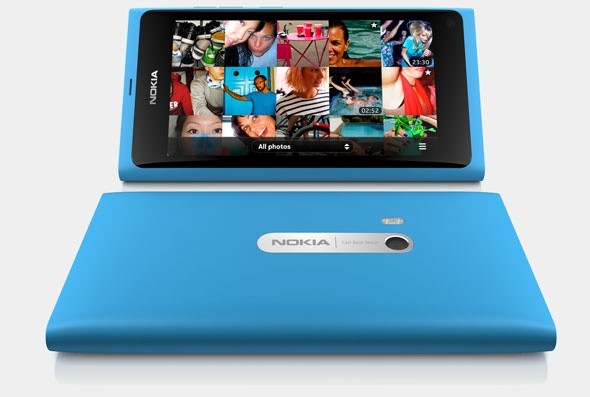
  • Nokia OVI store now sending 7 Million downloads a day

    Nokia OVI store now sending 7 Million downloads a day

    Nokia has announced that its Ovi Store has served a record 7.62 million downloads, this figure is more than twice of the 3 Million seen in October last year.

    In addition, Nokia said downloads more than tripled in India, which remains at the top in terms of downloaded volumes. Calculating on basis of totals, the Apple App Store serves about 16 million downloads a day.

  • Windows Phone ‘Mango’ released to vendors

    Windows Phone ‘Mango’ released to vendors

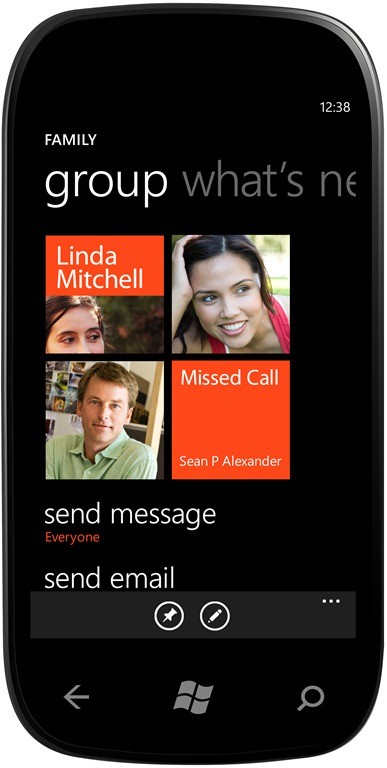
    Microsoft confirmed on its Windows Team Blog on Monday that it has released the RTM build of Windows Phone “Mango” to manufacturing partners.

    This marks the point in the development process where we hand code to our handset and mobile operator partners to optimize Mango for their specific phone and network configurations,” explained Microsoft’s Windows Phone corporate vice president Terry Myerson.

     Microsoft has said Mango will deliver more than 500 new features to the Windows Phone platform, including Internet Explorer 9 and deeper social network integration. Mango is also set to release sometime in August to all existing devices. 

    Microsoft also plans to release  Nokia, HTC, LG, Samsung, Dell, Acer, Fujitsu and ZTE branded Windows Phone ‘Mango’ devices.

    [Microsoft]

  • Facebook’s Dedicated iPad app leaked in its iPhone app

    Facebook’s Dedicated iPad app leaked in its iPhone app

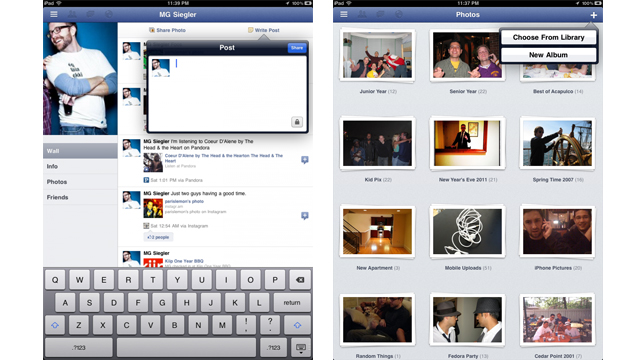
    The much awaited, dedicated iPad app for Facebook has be found in the latest update of the iPhone app.  @AeroEchelon, a Canadian engineering student who first noticed the hidden code says “change the UIDeviceFamily to 2 for iPhone on the Facebook app” . A basic edit of the file structure of the App will allow you to get a preview of the App. 

     The Facebook iPad app uses a left-side menu system that can be accessed by the touch of a button or the flick of the iPad screen. The interface is unlike the other iPad apps for accessing Facebook and TechCrunch calls it “Spectacular”.

    Hit the link for more screenshots and review by TechCrunch.

    [TechCrunch

iGyaan Network
Privacy Overview

This website uses cookies so that we can provide you with the best user experience possible. Cookie information is stored in your browser and performs functions such as recognising you when you return to our website and helping our team to understand which sections of the website you find most interesting and useful.