Tag: computer

  • Tips to Help Protect your Computer from Viruses

    Tips to Help Protect your Computer from Viruses

    In developing times like now, we live under the constant threat of computer viruses and malware that reach your system through emails or any external devices like a pen drive. We have multiple Anti-Virus programs available and it is critical to keep updating them. But the key to a virus-free environment is beyond using an anti-virus program. Safe computing practices and policies should be used to safeguard your PC from such threats.

    Let’s take a look at some user friendly, yet efficient methods of dealing with viruses, other than using Anti-Virus programs:

    Do not open suspicious email attachments

    spam
    Most of the infected emails are filtered in the SPAM Folder

    It is wise not to open any unknown email with an attachment unless you are expecting them. Most of the viruses and links to phishing websites come through emails. To know whether the mail contains a virus or not, you can follow the steps below:

    • Always check the sender’s address. If the address is known to you, it is safe to open the mail. But if the address is unknown, we would recommend caution before clicking on the mail.
    • Check the subject line. If the subject line shows some random sentences asking you to open the mail, Do Not click on it. Some viruses are capable of mimic, or spoof, legitimate email addresses.

    Keeping your computer updated

    Keeping your computer updated helps to lower down incoming viruses from external sources. It is because across different Operating Systems, various security updates are released, thus helping in protecting your computer.

    Using a Firewall
    firewall
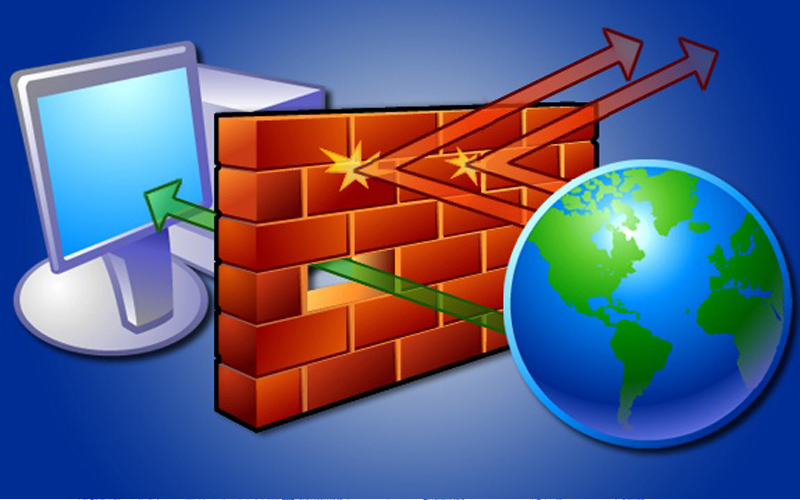
    Pictorial representation of how a Firewall works

    Use of Firewall does not entirely eliminate the threat of Viruses, but it helps in alerting you if a virus or worm attempts to connect to your computer. It can also block hackers from downloading potentially harmful files to your computer.

    Disabling the Auto-Play Option

    Many viruses attach themselves to a drive and start installing automatically when the media is connected to a computer. As a result, connecting any external hard disk or external data can lead to automatic propagation of such threats. Hence, disable Autoplay.

    Lastly, Surf Safe

    Many anti-malware programs include browser plug-ins that help avoid virus infections and internet phishing. These plug-ins should always be utilized with regular web browsing. Personal data and sensitive information should never be entered on any web page that has arrived independently. They should instead open a web browser, enter the address of the page they need to reach, and enter their information instead of clicking on a hyperlink and assuming the link has directed them to the proper URL. Hyperlinks contained within an e-mail message often redirect users to fraudulent, fake, or unauthorized websites. By entering web addresses manually, users can help ensure that they arrive at the actual page they intend.

    Although the above methods should be carried out on a daily basis, the only fool-proof savior is a good Anti-Virus program, like Avast! to name one. Many computers receive free anti-virus programs, but these are not enough to provide sufficient protection against the ever-growing list of threats. We need to stay updated with ever-growing technology. Browse safe!
  • Micromax Enters the Personal Computing Space with ‘Canvas LapTab’, a Laptop-Tablet Hybrid

    Micromax Enters the Personal Computing Space with ‘Canvas LapTab’, a Laptop-Tablet Hybrid

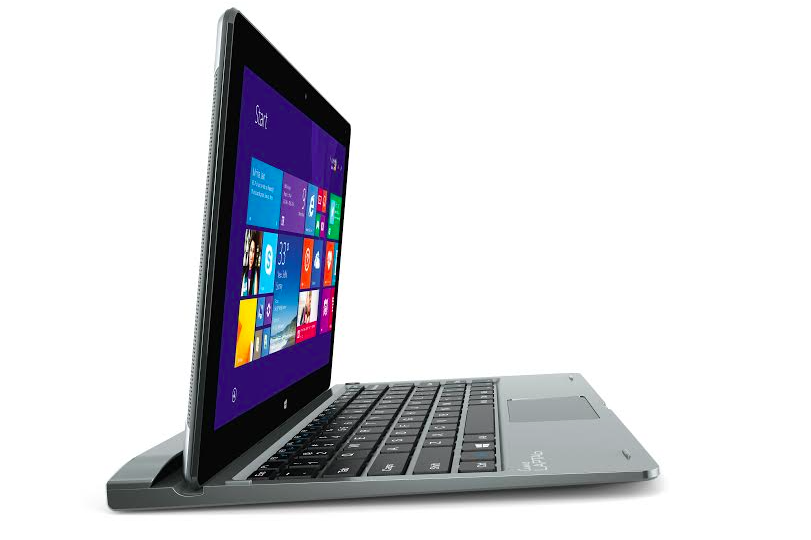
    Today, the homegrown handset maker Micromax debuted into personal computing arena with the launch of a tablet/laptop. It is the third segment where the company plans to gain a foothold, after smartphones and televisions. Dubbed as Canvas LapTab, the tablet transforms into a laptop when attached to a portable keyboard. The portable gadget is available at an easy price of Rs. 14,999.

    The Co-Founder of Micromax Vikas Jain stated at the launch event –

    We will launch five to six laptab models by March next year, which will more than 10-inches in screen size. We will move into pure laptops and pure personal computers overtime. We are thinking of manufacturing it in India.

    The device is different from the one unveiled at CES 2015 and runs on Windows 8.1 OS. The compact machine has been targeted at students, travellers, and enterprises.

    Coming to the specifications of the device, the Canvas LapTab features a 10.1-inch WXGA IPS touch screen. The processor powering the device is a 1.83GHz Intel Atom Z3735F, which comes bundled with 2GB of RAM. The memory storage details are still unknown. As mentioned above, the tablet runs on Windows 8.1 as of now, and can be upgraded to Windows 10 once its released.

    Optics includes a 2MP front and rear shooter. The LapTab has a mammoth battery of 7,700mAh, which can keep it going for 10 hours, the company claims. It comes with a 3G SIM slot for mobile data connectivity.

    The Canvas LapTab will be available on May 6 with the company’s online partner Amazon India. The product may be available through offline channels at a later stage.

  • New Apple iMac with Slimmer design and IVY Bridge Processors Launched

    New Apple iMac with Slimmer design and IVY Bridge Processors Launched

    imac 2012

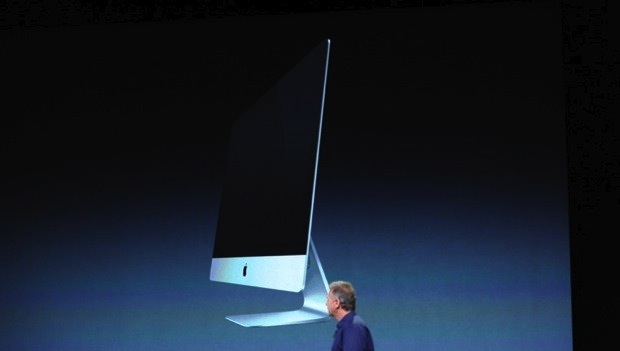
    Apple has also refreshed the new iMac with the latest processors and a new super slim design that will be the envy of all. Just 5mm thick at the edges, constructed with “friction stir welding” as well as a gapless, less reflective display that’s laminated together with the glass.

    The size of the iMac 2012 is the same with a 21.5-inch, 1080p model and a 27-inch, 2,560 x 1,400 model . Standard 720p-capable front cameras with dual mics as well as NVIDIA’s GeForce 600graphics, boasting up to 32GB of RAM and a lots of storage options upto 3TB of optical drives and a 768GB SSD or Apples new Fusion drive that mixes both 128GB of flash with 1TB or 3TB of conventional storage . 

    The 21.5-inch iMac ships in November, for a price of $1,299 for a 2.7GHz Core i5, 8GB of RAM and a 1TB hard drive.

    The 27-inch iMac is priced at $1,799 and you’ll get a 2.9GHz Core i5 as well as the same memory and storage. It will ship in December, however, which gives us a lot of time to save up our monies.

  • Virus found in Mideast can spy on finance transactions

    Virus found in Mideast can spy on finance transactions

    A new cyber surveillance virus has been found in the Middle East that can spy on financial transactions, email and social networking activity, according to a leading computer security firm, Kaspersky Lab.

    Dubbed Gauss, the virus may also be capable of attacking critical infrastructure and was built in the same laboratories as Stuxnet, the computer worm widely believed to have been used by the United States and Israel to attack Iran’s nuclear program, Kaspersky Lab said on Thursday.

    The Moscow-based firm said it found Gauss had infected personal computers in Lebanon, Israel and the Palestinian Territories. It declined to speculate on who was behind the virus but said it was related to Stuxnet and two other cyber espionage tools, Flame and Duqu.

    “After looking at Stuxnet, Duqu and Flame, we can say with a high degree of certainty that Gauss comes from the same ‘factory’ or ‘factories,’” Kaspersky Lab said in a posting on its website. “All these attack toolkits represent the high end of nation-state-sponsored cyber-espionage and cyber war operations.”

    Kaspersky Lab’s findings are likely to fuel a growing international debate over the development and use of cyber weapons. Those discussions were stirred up by the discovery of Flame in May by Kaspersky and others. Washington has declined comment on whether it was behind Stuxnet.

    According to Kaspersky Lab, Gauss can steal Internet browser passwords and other data, send information about system configurations, steal credentials for accessing banking systems in the Middle East, and hijack login information for social networking sites, email and instant messaging accounts.

    Modules in the Gauss virus have internal names that Kaspersky Lab researchers believe were chosen to pay homage to famous mathematicians and philosophers, including Johann Carl Friedrich Gauss, Kurt Godel and Joseph-Louis Lagrange.

    Kaspersky Lab said it called the virus Gauss because that is the name of the most important module, which implements its data-stealing capabilities.

    One of the firm’s top researchers said Gauss also contains a module known as “Godel” that may include a Stuxnet-like weapon for attacking industrial control systems.

    Stuxnet, discovered in 2010, attacked via USB drives and was designed to attack computers that controlled the centrifuges at a uranium enrichment facility in Natanz, Iran.

    Roel Schouwenberg, a senior researcher with Kaspersky, said the Godel code may include a similar “warhead.”

    Godel copies a compressed, encrypted program onto USB drives. That program will only decompress and activate when it comes in contact with a targeted system.

    While Kaspersky has yet to fully crack Godel’s code, Schouwenberg said he suspects it is a cyber weapon designed to cause physical damage and that its developers went to a lot of trouble to hide its purpose, using an encryption scheme that could take months or even years to unravel.

    CODE BREAKERS WANTED

    He said the prospect that a cyber weapon like Gauss or Stuxnet could attack critical infrastructure keeps him up at night.

    “They could do pretty much anything,” he said. “A few weeks ago when power went out in and around (Washington) D.C., my first thought was a cyber weapon.”

    Kaspersky said it is searching for “world-class” cryptographers to help it break the code.

    A United Nations agency that advises countries on protecting critical infrastructure plans to send an alert on the mysterious code.

    “We are going to, of course, inform member states that there is an unknown payload,” said Marco Obiso, a cyber security coordinator for the U.N.’s Geneva-based International Telecommunications Union, or ITU.

    “We don’t know what exactly it does. We can have some ideas. We are going to emphasize this,” he said.

    The ITU issued a warning about Flame shortly after the virus was unveiled by Kaspersky in late May. The agency told member nations that Flame could potentially be used to attack critical infrastructure, according to Obiso.

    At the time, experts knew only that Flame was a sophisticated espionage tool; they were not certain it could damage computer networks.

    Several weeks later, researchers at another security firm, Symantec Corp, confirmed suspicions that Flame was capable of deleting computer data and likely was used to attack Iran in April.

    Iran blamed Flame for causing data loss on computers in the country’s main oil export terminal and Oil Ministry. Reports of the data losses prompted the ITU to ask Kaspersky to search for a data-wiping virus, which resulted in its discovery of Flame and Gauss.


  • Lenovo unveils ultraslim IdeaCentre A720 PC for INR 89,990

    Lenovo unveils ultraslim IdeaCentre A720 PC for INR 89,990

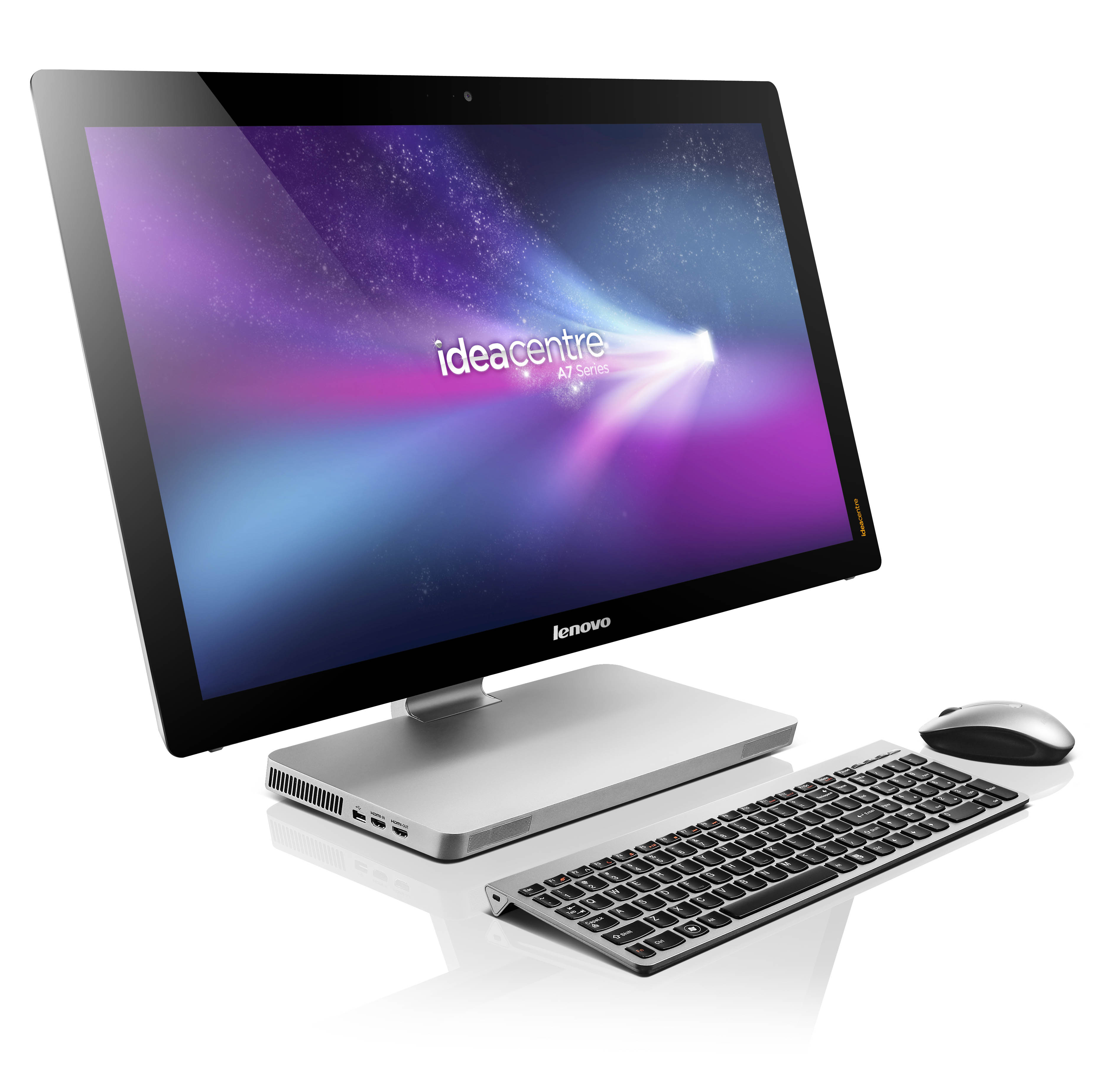
    PC vendor Lenovo has announced the launchof IdeaCentre A720, billed the world’s slimmest all-in-one at a price of Rs 89,000. The USP of this PC, which is powered by a 3rd generation Intel Core i7 processor, is its thin, frameless display.

    The Lenovo IdeaCentre A720 boats of a 10-finger multi-touch screen that folds down for interactive tabletop games. 
    It is packed with entertainment features—like Lenovo High-Sense (720p HD) webcam and Lenovo IdeaTouch, a suite of touch-optimised applications and games.

    The Lenovo IdeaCentre A720 is powered by NVIDIA® GeForce® graphic engine and apart from coming alongwith Windows 7 Home Premium, it is also Windows 8-ready.

    It sports a 27-inch full HD (1920×1080) frameless 10-point multi-touch display, has Bluetooth, Wi-Fi (802.11b/g/n), USB2.0, and USB3.0 connectivity. It has an in-built 6-in-1 card-reader, HDMI in/out and integrated stereo speakers that support Dolby Home Theatre.

    It also boasts of 40% faster boot time than standard Windows 7 computers. 

  • Lenovo to overtake HP as the world’s biggest PC maker

    Lenovo to overtake HP as the world’s biggest PC maker

    Whoops! Something went wrong!

    Chinese maker Lenovo appears poised to topple Hewlett-Packard as the world’s No. 1 personal computer brand by the beginning of 2013. Figures published late last week by market research firm Gartner showed Lenovo with 14.7 percent of the global market in Q2, just behind H-P on 14.9 percent.

     This followed a decline of 12 percent in H-P’s shipments during the quarter, according to Gartner. Not much over a year ago, Lenovo was the No 4 maker worldwide, but it overtook Acer in mid year, then passed Dell in the third quarter of 2011 to nail down second spot, which it has hung onto ever since.

    Dell meanwhile has slumped to fourth place. According to Gartner, H-P shipped 13.06 million PCs in Q2, followed by Lenovo (12.8 million), Acer(9.64 million) and Dell (9.35 million). The figures include netbooks but not tablets such as the iPad.

  • New Software Allows Unlimited Detail In Games

    New Software Allows Unlimited Detail In Games

    Computer games have come a long way since the days of Pacman and Mario. In today’s day, all the cool 3D graphics that you see are made up of polygons. Polygons are nothing but flat images that are joined together to create an object in 3D. The higher the number of polygons, the greater the viewing detail.

    Game developers have been trying very hard for a number of years to increase the polygon count in the games they make. However, computers face a problem when it comes to increased polygon counts. The higher the number of polygons, the greater processing power it takes to render all those polygons. Its because of this limitation that you will find games that have superb detail on one side of an object, while the other side is just a plain texturized image. Putting a cap on the number of polygons leads to a lot of compromises: You want a super detailed character? No problem, but then your world will look bland.

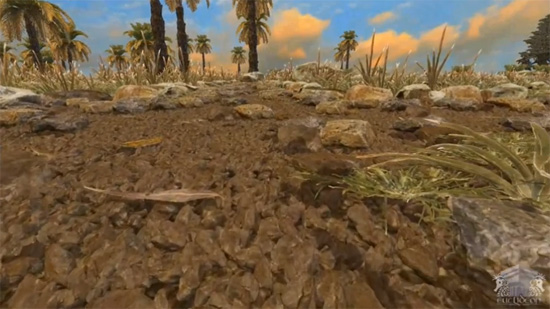
    An Australian company called Euclideon has developed a game engine that does away with polygons and instead replaces them with point clouds that are made up of individual ‘atoms’. So doesn’t increasing the number of objects on screen slow down everything? Well you’d think so but the company says that it has made it work and your computer will make it work too. The company has developed a 1 sq km island using their game engine and each speck of dirt on that island is made up of millions of these ‘atoms’ per cubic inch.

    The plus side to this is that the graphics are amazing. Simply put, polygons just cant cope with the kind of quality that the Euclideon ‘atoms’ can create. The curves that are generated with the ‘atoms’ are amazingly smooth and the level of detail is through the roof. You can quite literally see each individual grain of sand. In the next few years, computer games are going to make a huge leap forward in terms of graphics and we’re very exited about this technology and can’t wait for the company to deliver this game engine into the hands of game developers. Watch the video below for a demo of the engine in action:


  • Apple Refreshes The Mac Mini with Core i5 and i7, Thunderbolt and AMD Radeon HD (PR)

    Apple Refreshes The Mac Mini with Core i5 and i7, Thunderbolt and AMD Radeon HD (PR)

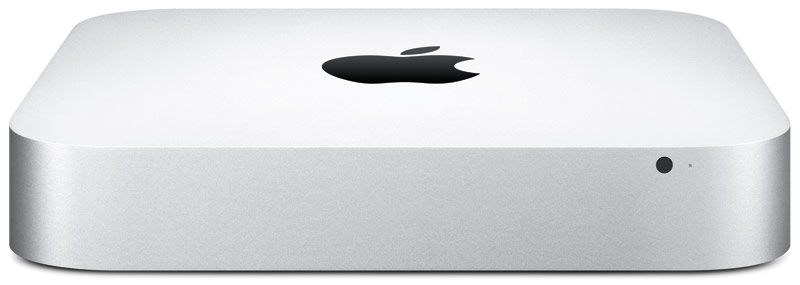
    Apple has dropped a new load of goodies on us today, as we suspected, Apple has updated the Mac Mini to include new hardware and Thunderbolt Ports.

    The new Mac mini packs an Intel Core i5 or i7 processor, Thunderbolt, AMD Radeon HD graphics, and Mac OS X Lion. 

    Starting at $599 with a 2.3GHz Intel Core i5 they offer a cheap alternative for owning a Mac.

    The 2.3 GHz dual-core Intel Core i5 Mac mini with 2GB of memory and a 500GB hard drive starts at a suggested retail price of $599 (US), with options to add memory up to 8GB and a 750GB hard drive.

    The 2.5 GHz dual-core Intel Core i5 Mac mini with 4GB of memory and a 500GB hard drive starts at a suggested retail price of $799 (US), with options to upgrade to a 2.7GHz dual-core Core i7 processor, up to 8GB of memory, and a 750GB hard drive with an option to add or replace with a 256GB solid state drive.

    The 2.0 GHz quad-core Intel Core i7 Mac mini with Lion Server, 4GB of memory and dual 500GB hard drives starts at a suggested retail price of $999 (US). Options include adding memory up to 8GB, two 750GB hard drives, or up to two 256GB solid state drives.

    [toggle title_open=”Collapse” title_closed=”Expand and Read Press Release” hide=”yes” border=”yes” style=”default” excerpt_length=”0″ read_more_text=”Read More” read_less_text=”Read Less” include_excerpt_html=”no”]Apple Updates Mac mini

    CUPERTINO, California-July 20, 2011-Apple® today updated the Mac® mini with next generation Intel core processors, new discrete graphics, high-speed Thunderbolt I/O technology and Lion, the world’s most advanced operating system. The new Mac mini delivers up to twice the processor and graphics performance of the previous generation in the same amazingly compact and efficient aluminum design.* Starting at just $599 (US), the new Mac mini is available for order today and in stores tomorrow.

    “Mac mini delivers the speed and expandability that makes it perfect for the desktop, living room or office,” said Philip Schiller, Apple’s senior vice president of Worldwide Product Marketing. “With faster processors, more powerful graphics and Thunderbolt in an incredibly compact, aluminum design, the new Mac mini is more versatile than ever.”

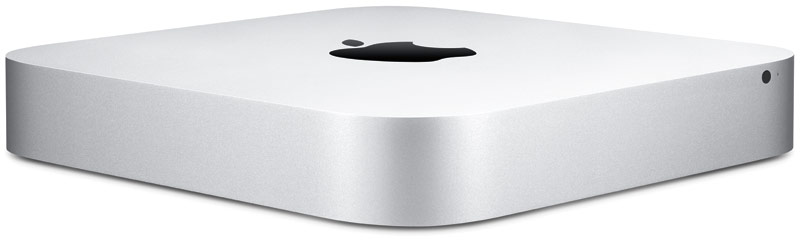
    At just 7.7-inches square and 1.4-inches thin, the new Mac mini maintains its compact aluminum design while delivering amazing performance and graphics capabilities. Available in three different configurations, customers can choose a Mac mini with the latest dual-core Intel Core i5 or Intel Core i7 processors, AMD Radeon HD 6630M discrete graphics, or a quad-core Intel Core i7 powered server configuration. Designed without an optical disc drive, Mac mini can access the optical drives on other PCs and Macs, and works with the MacBook Air® SuperDrive®. Configure-to-order options include up to 8 GBs of memory, a faster 7200 RPM hard drive and a 256GB solid state drive.

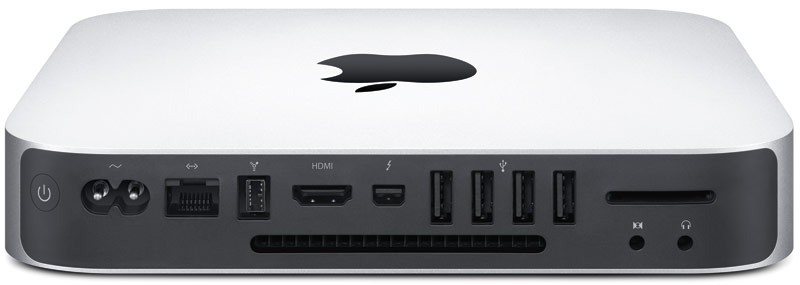
    Mac mini now comes with Thunderbolt I/O technology for expansion possibilities never before available to Mac mini users. With a Thunderbolt port, Mac mini can connect to peripherals such as high-performance storage devices, RAID arrays and the new Apple Thunderbolt Display, a stunning 27-inch IPS widescreen display that’s great for making FaceTime® HD video calls, surfing the Web and viewing movies and photos.

    With ultra-fast Wi-Fi, you can wirelessly download apps from the Mac App Store™, get music and movies from iTunes®, back up data to Time Capsule® and share files with AirDrop, which makes transferring files quick and easy. Mac mini includes Bluetooth for wireless peripherals and four USB ports for easy connectivity for the wired and wireless devices you use every day.

    The new Mac mini remains the world’s most energy efficient desktop, meets Energy Star 5.2 requirements and achieves EPEAT Gold status.** Mac mini has a highly recyclable aluminum enclosure, PVC-free components and cables, no brominated flame retardants and features material-efficient system and packaging designs.

    Every new Mac mini comes with Mac OS® X Lion, the latest major release of Mac OS X, the world’s most advanced operating system, and iLife® apps for creating and sharing great photos, movies and music. Lion introduces more than 250 new features to the Mac, including Multi-Touch® gestures and system-wide support for full screen apps; Mission Control, an innovative view of everything running on your Mac; the Mac App Store, the best place to find and explore great software; Launchpad, a new home for all your apps; and a completely redesigned Mail app.

    Pricing & Availability

    The new Mac mini is available through the Apple Store® (www.apple.com) today and in Apple’s retail stores and Apple Authorized Resellers starting July 21.

    The 2.3 GHz dual-core Intel Core i5 Mac mini with 2GB of memory and a 500GB hard drive starts at a suggested retail price of $599 (US), with options to add memory up to 8GB and a 750GB hard drive.

    The 2.5 GHz dual-core Intel Core i5 Mac mini with 4GB of memory and a 500GB hard drive starts at a suggested retail price of $799 (US), with options to upgrade to a 2.7GHz dual-core Core i7 processor, up to 8GB of memory, and a 750GB hard drive with an option to add or replace with a 256GB solid state drive.

    The 2.0 GHz quad-core Intel Core i7 Mac mini with Lion Server, 4GB of memory and dual 500GB hard drives starts at a suggested retail price of $999 (US). Options include adding memory up to 8GB, two 750GB hard drives, or up to two 256GB solid state drives.
    [/toggle]

  • Japanese Supercomputer in First Place after 2004

    Japanese Supercomputer in First Place after 2004

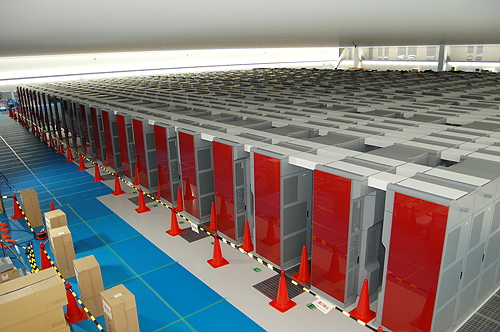
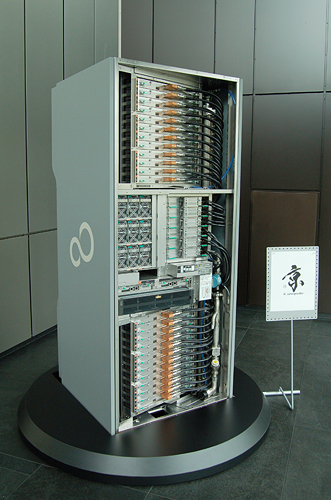
    The Kobe based Riken Advanced Institute For Computational Science has a supercomputer capable of 8.16 petaflops of computational power, which has reclaimed the #1 spot in the Top 500 list. The new machine has handsomely widened the gap from the now #2 Chinese Tianhe 1A which delivers almost a quarter of the computational capacity at 2.57 petaflops.

    The last time Japan held the #1 spot was in 2004 with their Earth Simulator. The new supercomputer, dubbed the K Computer, uses only CPUs to deliver the massive 8.16 petaflops. It does not use any GPUs or other accelerators. It is comprised of 68,544 eight-core SPARC64 VIIIfx processors which equals 548,352 individual cores.  When the machine is commissioned, it will be capable of even higher performance and will deliver more than 10 petaflops using 80,000 of the eight core SPARC CPUs (640,000 cores).

    This behemoth comes at a price though. It uses a whopping 10MW of power. This is almost two and a half times the power used by the existing top ten systems at 4.3 MW.

  • Nesting PC Virtual Tablet

    Nesting PC Virtual Tablet


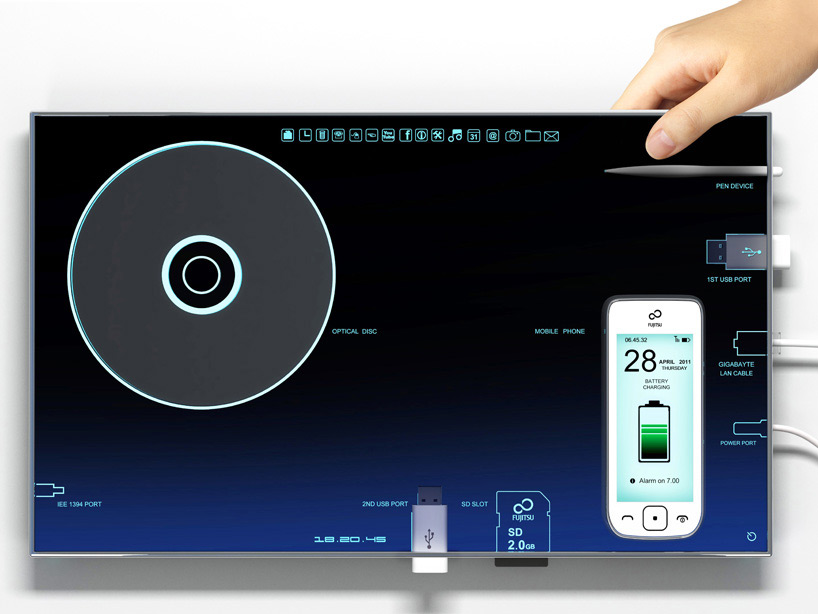
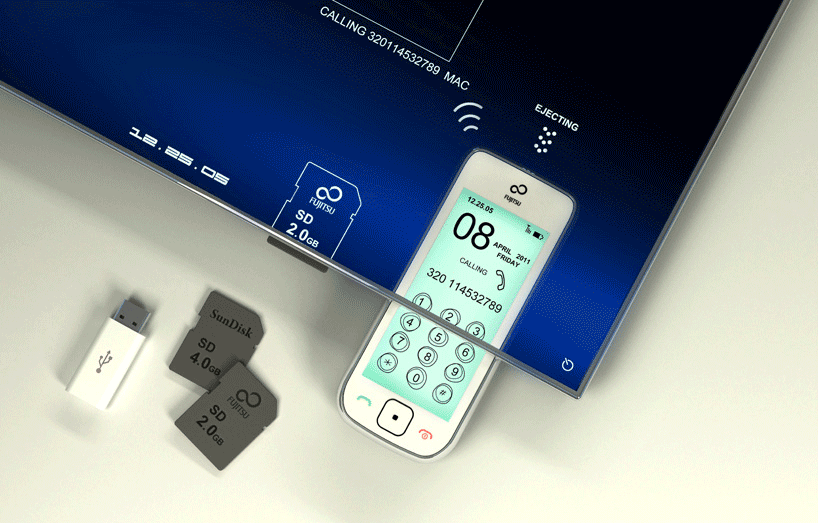
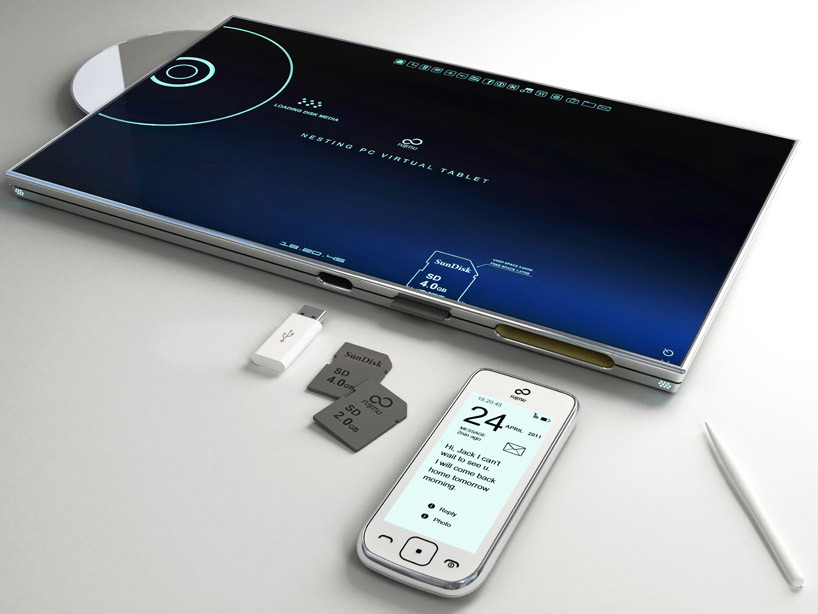
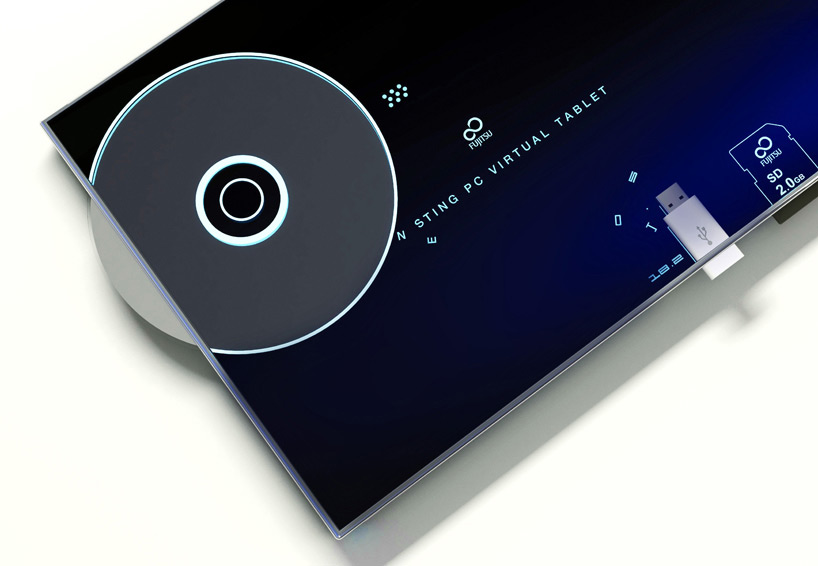
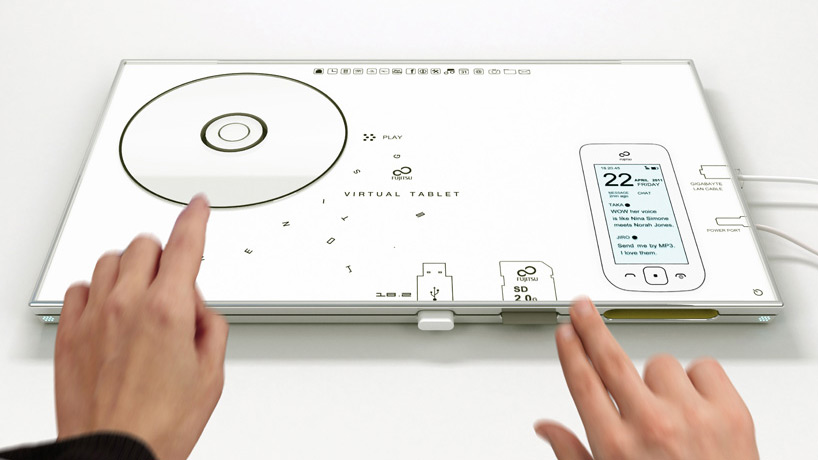
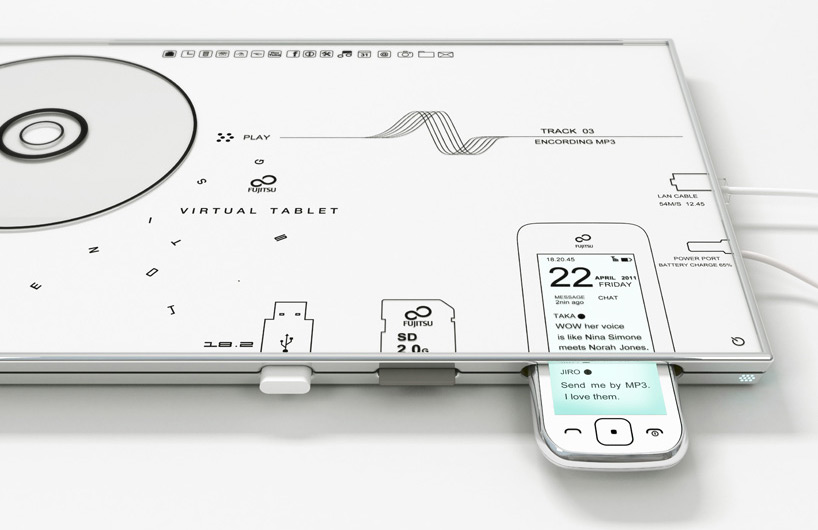
    The 13-inch concept tablet features a dedicated dock for mobile phones and other devices. When inserted, a visualization of the phone onscreen works in the same manner as would the device itself, permitting dialing, calling, texting, and other use. the loading of disk media or flash drives offers a similar intuitive functionality. Integrated charging eliminates the need for AC or outlet-specific adapters for these kinds of devices.


    This device has been created by Japanese Born, Italy Based designer Sono Mocci. He defines the device as a combination tablet and data visualization interface with automatic battery charging and data syncing. Phones, memory cards, CDs, USB ports, and I/O cables can be plugged directly into the device, where they will show up as images on the touchscreen for easy manipulation and access.


  • Next Macbook Air Model with Sandy Bridge and Thunderbolt may come next month

    Next Macbook Air Model with Sandy Bridge and Thunderbolt may come next month

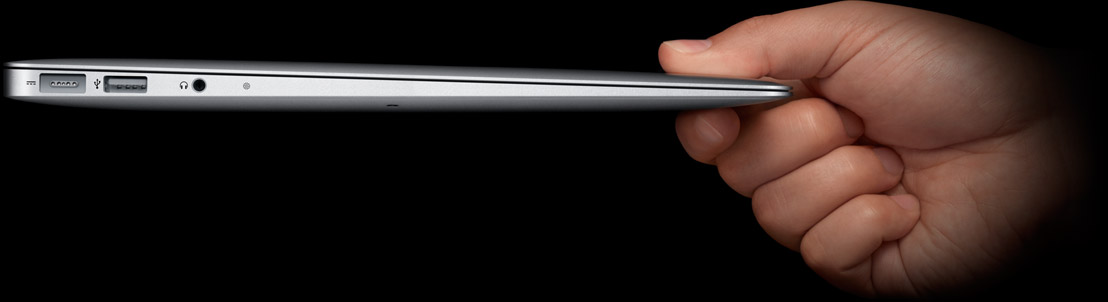
    You may want to hold on to you next ultralight powerhouse purchase. Apple may be revamping the Macbook air launched just 7 months ago with the new Sandy Bridge processors and an added thunderbolt port.

    “The Taiwan-based supply chain for Apple products will begin shipments of new 11.6-inch and 13.3-inch MacBook Air models featuring Sandy Bridge platform and Thunderbolt interface in late May for launch in June or July,” according to  by DigiTimes.

    [Source]

  • Your Desktop Supercomputer: Coming Soon

    Your Desktop Supercomputer: Coming Soon

    Scientists at the University of Massachusetts Lowell have managed to squeeze over a thousand processor cores onto a single chip. We’ve heard a lot about the potential for future desktop-sized supercomputers, but more than anything else this research proves that in the not-too-distant future it’s likely to be a reality. Interestingly enough, there’s also a green angle to this idea: FPGA chips can be more power efficient than their competitors, and if less computer time is needed to process complex tasks, then the overall power consumption of computers using the tech could be impressively low.


    The advance was made by Dr. Wim Vanderbauwhede’s team, who programmed an advanced chip called a Field Programmable Gate Array (FPGA). FPGA systems have been around for a while, and their strength is that they can be programmed “in the field” to best suit whatever task they’re needed for, unlike the hard-coded silicon ship designs you’re probably imagining. The UM team’s innovation was in working out how to program the FPGA to act as mini processor cores, since the tech is typically difficult to work with. This has traditionally been a barrier to their use in desktop PCs, although small FPGAs are often found inside devices like LCD TVs.


    Once the 1,000 individual CPU cores had been programmed onto the chip, the scientists took the necessary next step to prove how useful their innovation is: They ran an intensive algorithm through it to test how powerful it was, and they chose a tricky one too–at the core of motion MPEG video processing, used in many online video systems. The results speak for themselves. Using the kilo-core FPGA computer, the team was able to process 5 gigabytes per sec of movie files, which is about 20 times the rate that existing high-end computers can manage.

  • DIY : How To Revive An Old Computer Part 1

    DIY : How To Revive An Old Computer Part 1

    Lots of people today are looking for a new computer. Their reasons for doing so are varied but there are many common complaints that people have with old computers. The primary complaint i receive from users is that their computer is ‘too slow’. While the day to day tasks of the end-user remain pretty much the same (using Microsoft Office, surfing the web, watching movies,playing games etc.), the computing power required to perform those tasks has increased significantly.  So does this mean that your old desktop/laptop is now useless and obsolete? Should you throw it away or let it collect dust in a corner? NO. There are many uses for an old computer, a few of which i will be listing below:


    Make a Home Server

    The home server is one of the easiest and most common uses for an old computer. The basic home server can do simple tasks like sharing files over your home network, while more advanced setups can perform a plethora of tasks such as file sharing, website hosting, torrent downloader,  a dedicated firewall for your network, controlling electronic devices in your house etc. The requirements of each user will be different and you should decide the tasks that you would like your server to perform in advance to ensure an easier setup.


    The Basic Setup:


    I recommend using FreeNAS as an OS for your home server. It is an open-source OS based on FreeBSD which means it is free to download, use and distribute. The most basic task performed by FreeNAS, as the name suggests, is to provide Network Attached Storage in your home.  It can perform a wider variety of tasks but we’ll get to that later.


    Things you’ll need:

    • FreeNAS Live CD (Link Below)
    • Old Computer
    • Monitor & Keyboard for installation only (you can disconnect them after the install)
    • A few Hard Disks (minimum 1)
    • A 512mb or larger Pen Drive


    Download FreeNAS 32-bit Live CD

    Download FreeNAS 64-bit Live CD


    Insert the Live CD into your CD drive and wait for the computer to boot up. This can take some time, 5-10 minutes, and you will hear a *chirp* from your PC speaker when the system is ready. At this moment, the system is ready to use as-is from the Live CD or it can be installed onto our hdd or pen drive. I would personally recommend installing the system on your pen drive if your PC supports USB Boot. This leaves more SATA/IDE ports free to attach extra storage.

    When you reach the above screen, the system is booted. Since we dont want to run our system off a CD, choose option 9.

    We are going to be installing our system on a pen drive so we will choose option 1.


    You will receive a warning, Press OK.


    Choose your installation media and press OK. In most cases you will have only one option in this step.

    Choose your install destination and press OK. In most cases you will have a few options here. Please remember to choose your pen drive at this stage. If the device names (ad0, ad1, etc.) are confusing, you can identify your device with the capacity or manufacturer details.

    After this step, FreeNAS is installed on your system. Press Enter and choose the Exit option and you will be returned to the main menu. Choose option no. 7 to reboot your system. To ensure that the system boots from the pen drive, please remove the Live CD  and ensure that the pen drive is selected as the primary boot device in your BIOS.


    After the reboot, the first thing you have to do is to configure your network interface and LAN IP. These are the last things you need to configure on your FreeNAS box. When you get to the Console Menu, Choose option 1.

    Select your Primary interface. If you have multiple interfaces, you can select optional interfaces from the same menu.

    After assigning all interfaces select none and press OK.


    You will be given a list of assigned interfaces. Press OK and you will be taken back to the Console Menu.

    Select option 2 to assign your ip address. I recommend assigning a static ip to your server, so select No when given the option to use DHCP. Enter your ip address, subnet mask, internet gateway and DNS addresses. You do not need to configure an ipv6 address.

iGyaan Network
Privacy Overview

This website uses cookies so that we can provide you with the best user experience possible. Cookie information is stored in your browser and performs functions such as recognising you when you return to our website and helping our team to understand which sections of the website you find most interesting and useful.