Tag: facebook for android

  • Facebook Announces Beta Program, Lets You Test Android App

    Facebook Announces Beta Program, Lets You Test Android App

    Facebook is going head-on into the path of most resistance when it comes to Android. Its main app has been the butt of jokes since it was launched, and even since it went native in 2012 the company has endured scrutiny for poor performance.

    Today, Facebook has announced plans to combat such scorn with the launch of a beta program for its main app. By partnering with Google Groups and the Google Play Beta Program, Facebook will allow users to sign up for the beta program, giving them access to the new app through official means — Google Play itself — as opposed to download an APK and overwriting the original file.

    Google announced support for an extensive and granular alpha and beta program at its developer conference in May, allowing third-party developers to use Google Groups or Google+ to officially distribute tester versions of its apps through the Play Store. Customers like Falcon Pro, Plume, Sliding Messaging and Flesky, among others, have already taken part.

    In a blog post today, Facebook said of Android: “Facebook is the most-downloaded app in the Play Store, so we need to make sure it works for everyone, no matter their amount of RAM, network conditions, or version of Android they might be using. We want to make sure we’re always optimizing their experiences. With so many use cases to solve, testing becomes crucial to ensuring positive, consistent experiences across Android.”

    In other words, Facebook wants early adopters, across a variety of devices, form factors and network speeds, to be the guinea pigs for its Android team. Recently, the company released Facebook Home, a launcher replacement for a small subset of Android devices running Ice Cream Sandwich or above. The reception was tepid at best, but the social networking giant, which surpassed 750 million mobile users recently, has promised to work out the kinks in monthly updates.

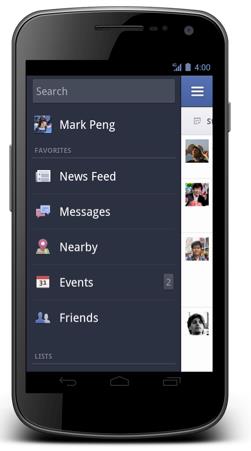
    So too will it endeavour to fix the issues plaguing many Facebook for Android users. Notably, the app scrolls slowly and renders images at glacial speeds. Early indications point to dramatic improvements in the first beta version, along with some neat updates to the interface. For example, it’s possible to open the left- and right-side menu bars by swiping in from either side. This was previously only possible by tapping a button at the top left or right of the interface.

    To join the beta program, follow the following instructions. Once joined, downloading an update from the Play Store will replace the original Facebook app. Most users won’t notice much of a difference at first, but Facebook promises monthly updates.

    1) Join the Facebook for Android Beta Testers Google group
    2) Allow beta downloads by clicking Become a Tester in the Play Store (you need to join the Google Group before becoming a tester)
    3) Download Facebook from the Play Store to update your app
    4) Join the Facebook for Android Beta Testers group on Facebook to tell us what you think
  • Facebook For Android Update Brings Better Cover Photos Management

    Facebook For Android Update Brings Better Cover Photos Management

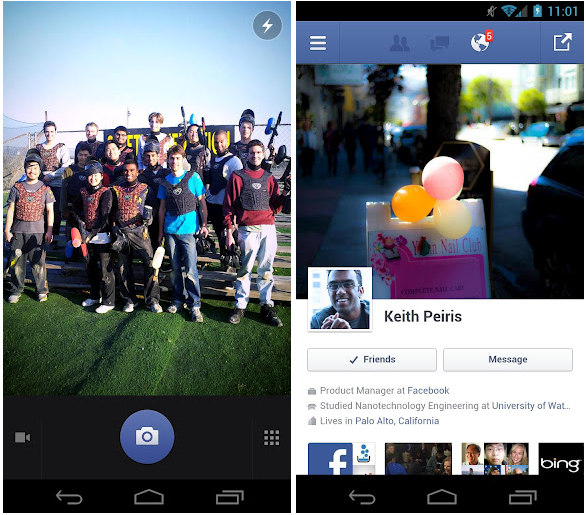
    The official Facebook for Android application has been upgraded in the Google Play Store to make life easier on those who tend to change their profile cover photo quite often. Users can now make the change right from their timeline instead of having to dig through settings and go through the grueling, nerve-wrecking task of pressing button upon button upon button.

    No one ever accused Facebook of being swift or thorough with its app updates, but they’re at least usually very welcome when they arrive. Back in 2011, the social network introduced ‘Timeline’, the now-mandatory profile layout that gives you one giant photo at the top, with a secondary profile picture in the bottom-left corner. Up until recently, you couldn’t change your cover photo on mobile. Now, in version 2.2, you can. 

    Again, not a huge feature but certainly appreciated. We’d love Facebook to redesign the app or, barring that, improve the performance of the one we have. But the company clearly has different priorities.  That said, today’s upgrade is waiting for you in the Google Play Store so get over there to check it out.

     Temple Run 2 for Android has also been updated, the developers have added the ability to restore the coin doubler if you happened to have re-installed the app on your device and purchased the power up.

    [Phandroid]

  • Facebook for Android Gets Updated

    Facebook for Android Gets Updated

    facebook

    Facebook for Android is now available for download in version 1.9.11, and, while the latest update is not very special compared with recent ones, it does come with three straightforward and important changes.

    Photo functionality should be improved with these three tweaks, which allow for faster photo tagging and a better organizing of your pics in albums. Finally, there’s also the customary bug fix, which this time helps solve a problem that was restricting “people using certain languages” from uploading images from time to time.

    For an app build almost entirely in HTML5, Facebook for Android is actually quite spritely, especially when run on more modern hardware. We’re excited for the day when Facebook for Android is built on native code, but for the time being enjoy your improved photo uploading experience.

    Facebook also made the “biggest overhaul of [its] Android SDK so far,” making it easier for developers to integrate the social network into third-party apps. These features include the Friend Picker and Places Picker, which apps can use to access the Open Grap in more comprehensive ways.

  • Facebook for Android Gets a Facelift and Tweaks

    Facebook for Android Gets a Facelift and Tweaks


    The new Facebook for Android app update, adds a whole lot of tweaks and and bunch of turbo speed boosts. According to Facebook :Photos and albums are up to two times faster than the previous Android app. It’s also easier to share photos, view comments and edit captions on the go. Your messages and notifications are now at the top of your screen. You can respond to friends and stay updated without leaving the page you’re on in Notification style. Just like the iOS App you can quickly access your News Feed, Groups, games and apps from the new left-hand menu. 

     [Facebook]

    Android Market]

iGyaan Network
Privacy Overview

This website uses cookies so that we can provide you with the best user experience possible. Cookie information is stored in your browser and performs functions such as recognising you when you return to our website and helping our team to understand which sections of the website you find most interesting and useful.