Tag: gmail

  • 8 Recent Google Updates You Might Have Missed

    8 Recent Google Updates You Might Have Missed

    Google is on an update spree. Lately, the company has been rolling out new updates across its Android apps and services frequently, however, it is hard to keep track of all the updates. So, we are rounding up recent Google updates that you might have missed.

    1. Google Lollipop 5.0.1

    Android-Lollipop-Banner

    After the roll out of Android Lollipop, Google has begun the process of getting Lollipop 5.0.1 out the door. The company quietly updated its Factory Images page to reveal a 5.0.1 built for the Nexus 9, Nexus 7, and Nexus 10. Installing images from this page does require the flashing of devices in order to update them, and does not carry user data across in the process, unless backed up and restored by the user.

    2. Gmail

    gmail

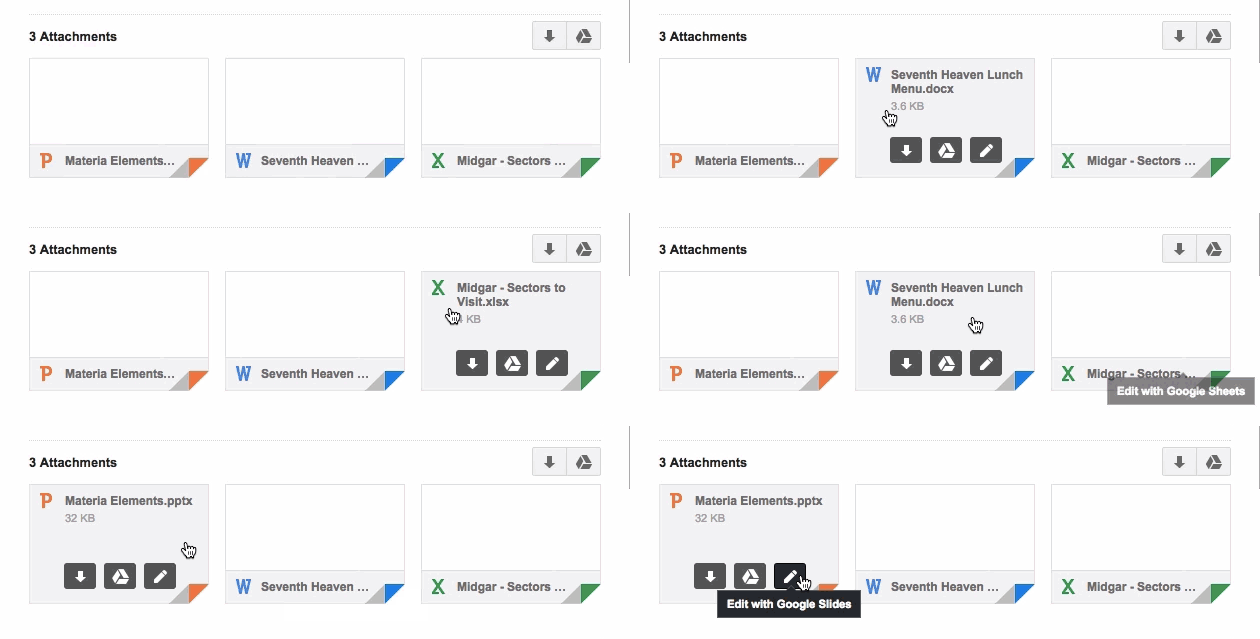
    With the new update, Gmail inbox allows users to edit Microsoft Office documents sent as email attachments. The new feature adds a Google Drive edit icon to Gmail attachments that says ‘Edit with Google Docs’. By clicking on this, the Office files get automatically converted into Google Docs, Sheets, or Slides.

    3. reCAPTCHA
    Recaptcha_anchor@2x

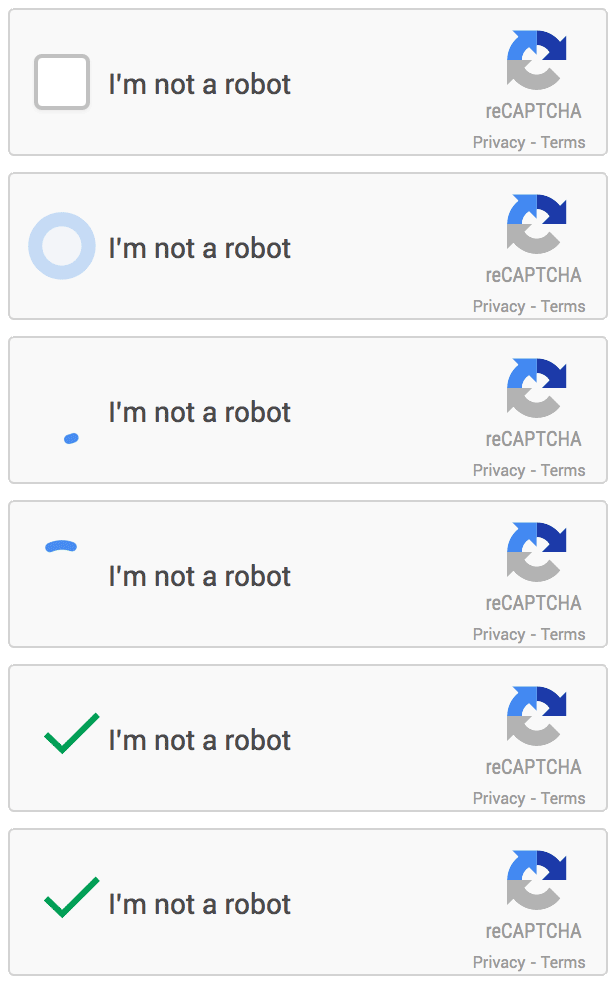
    Google has announced that it is dropping Captcha, its anti-bot system that asks users to identify a deconstructed word or two in order to avoid spamming. The company has admitted that 98 percent of bots can now correctly answer a Captcha and so they are switching to a simple ‘tick the box if you’re not a robot’ system, with all the clever stuff behind the scenes rooting out impostors instead.

    4. News & Weather app
    google-news-app-dark-theme-100533893-large

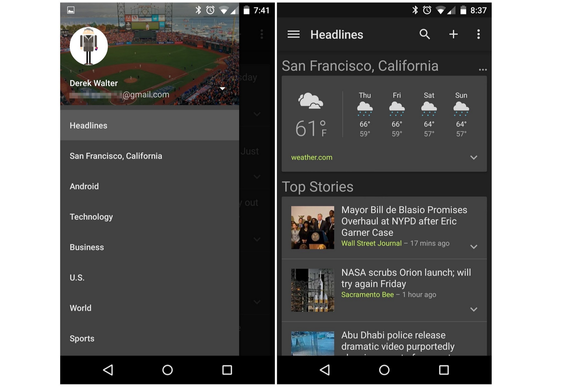
    Google has released an updated version of its News & Weather app on Google Play, which brings brand new dark themes and other changes. The company will roll out the update globally soon. In addition to the dark themes, which can be activated from overflow menu, the updated News & Weather app includes search option, new UI tweaks and bug fixes.

    5. Device Assist
    android-device-assist-primary-100533723-large

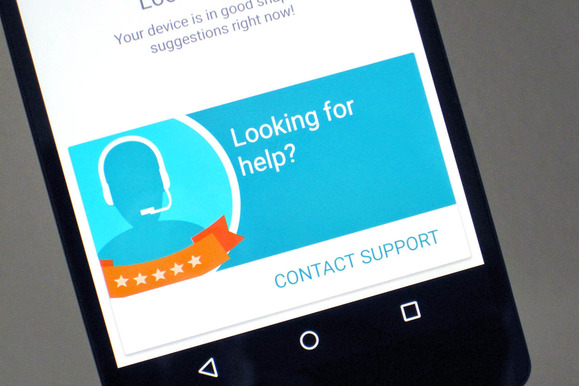
    Google has rolled a new troubleshooting app called Device Assist that offers specific tips and access to support Nexus, Google Play edition, and Android One running on Lollipop. Device Assist will alert you about any settings that could give you trouble, such as battery drain from cranking up the brightness too high. The app also includes a list of common tasks and how to perform them, such as taking screenshots and customising notifications. There is also an option of contacting to the Google Play support via call. Apart from requesting a call, you can also submit your smartphone statistics for more elaborate troubleshooting.

    6. Chrome Beta
    chrome beta

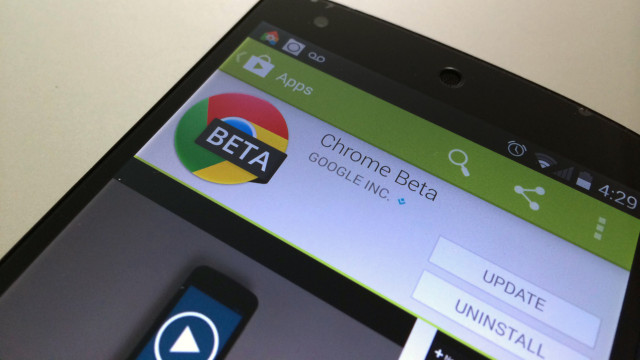
    Chrome Beta for Android has been updated by the company with minor design changes. The address bar has been redesigned for Lollipop users with Merge Tabs and Apps option enabled to go all the way across the display. Google has also added several new flags to the app, allowing users to enable a new bookmark manager and password generator.

    7. Google +
     google+

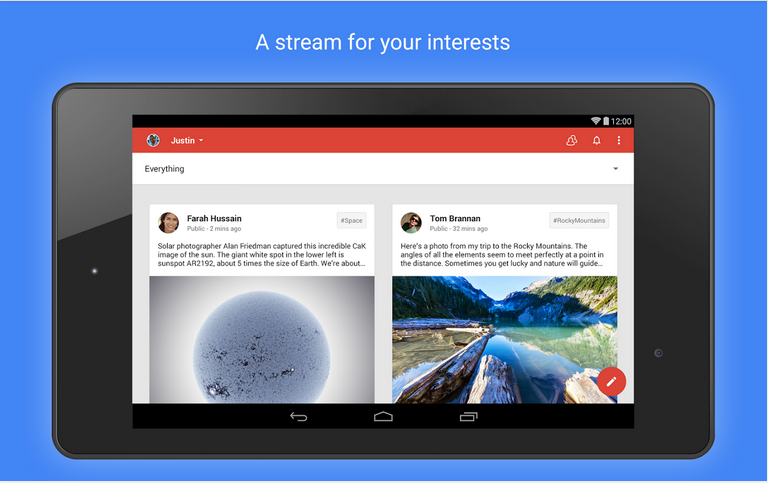
    Google+ has also received an update, debuting the app version 4.8. This update makes a few minor design enhancements too, like Chrome Beta. The ‘new post’ page has been slightly reworked with the publish button moving from bottom to the top and swapping places with the menu button.

    8. Google Play Games (version 2.2)
    Screen-Shot-2014-12-03-at-20.04.24-631x374

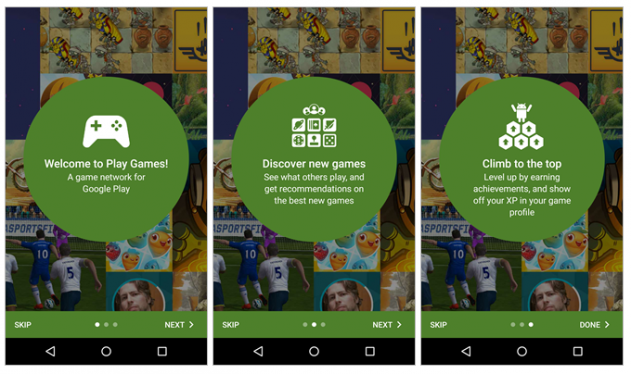
    This update adds a new interface for picking an account to use. The interface also now appears for all users, even those that have added only one account, with a new prompt to easily add another email. Finally, the game detail page has been enhanced with new ‘View in Play Store’ and ‘Share’ options.
  • You Can Now Edit Microsoft Office Documents Directly from Your Gmail Inbox

    Google has recently added another feature to the web-version of its popular email service, Gmail. Now, Gmail inbox allows users to edit Microsoft Office documents sent as email attachments. With Microsoft increasing its popularity in cloud space, Google has taken a right step forward.

    This doesn’t seem like a major update, however, the new feature is a part of Google’s strategy to make its cloud service more universal and make it a one-stop from enterprise workspace. The new feature adds a Google Drive edit icon to Gmail attachments that says ‘Edit with Google Docs’. By clicking on this, the Office files get automatically converted into Google Docs, Sheets, or Slides.

    edit_from_gmail.0

    Clicking this ‘edit’ option on an Office file attachment will convert the file to the preferred Google format, saving it in Google Drive to allow for continuous editing and sharing. Google has also increased the amount of Office file formats so as it can be imported to Docs to make the process easier. The list now includes 15 less-used Office formats including .pps and .ppsx.

    The formats will be converted into Google formats according to their extensions such as dot, dotx, dotm*, docm* will convert into Google Docs; xlt, xltx, xltm*, xlsm* into Google Sheets and pot, potx, potm*, pptm*, pps, ppsx, ppsm* into Google Slides.

    If you don’t want to change your file type, Google has a solution for that too. Google suggests you to use its Office Editing Chrome extension. It is also promising ‘improved charts, images, and tables support for these file formats, but didn’t go into detail.

  • Gmail’s Redesigned App to Support Yahoo and Outlook Accounts

    After the release of the long awaited Android L and its associated Material Design, it seems Google wants to take its feature a step further. Android Police has accessed Gmail 5.0 app for Android and discovered support for Yahoo and Outlook accounts. This will be a big blow to the independent apps of these mail clients; people might find it more convenient to access all their accounts from one place.

    The new Android OS was appreciated for its ease of use and simplified view with updated iconography and tweaked buttons. A companion video shows how the new update keeps the interface similar to what we have gotten used to, but adds more functionalities to the app.


    This will be a great new feature for folks who use multiple accounts for different purposes. It will work out for business and personal users and by using a single app to access all the mails will save a lot of precious time. Ok Google, we are waiting for our updates!

  • Researchers Hack Android and Expose Security Flaws

    Researchers Hack Android and Expose Security Flaws

    Android has become one giant monster of a success with over 50 per cent of market share. It has been integrated across multiple devices and is gaining new grounds each day. Its evolution has been appreciated and its next operating system, the Android L will come out soon. But it seems like researchers at the Riverside, University of California, are about to throw a wrench in the works of the Android.

    The research team hacked into the Android operating system by disguising malicious software in the form of an app. What was a surprising find was that Gmail was one of the easiest app to hack, and the researchers had a success rate of 92% in hacking the app. So its probably not a good idea to leave your compromising information in your Gmail account.

    The researchers say that there is a misconception in people’s minds that mobile apps cannot interact with each other; this hack will show that it’s a myth. They also made clear that they tried the hack on Android, but it might work on iOS and Windows OS too, as they too allow apps to access shared memory on the device.

    gmail
    Gmail was one of the easiest apps to hack.

    The researchers brought forward some serious security flaws in the system. They were able to track all that the user was doing on their phone.

    They were able to hack into apps like H&R Block, Amazon, Newegg, WebMD and Chase Bank. The Chase bank app’s hack revealed some stomach-churning revelation. The bank allows users to pay in checks by just taking the image of the checks. The researchers were able to hack the app and steal the image thereby gaining access to the user’s bank details and signature, which is really scary.

    Google, on the other hand, said that it appreciated the efforts of the researchers. They say that this kind of research teaches them some important lessons that will help to make their system stronger and more efficient.

    At a time when major enterprises are shifting to the mobile solutions for their businesses, this hack might create some hurdles for the device and operating system companies. Hopefully, now that the hackability of the system has been established, the companies will seriously consider the issue and resolve it as soon as possible. And the researchers should keep going on doing their good work.

  • Gmail for Android Gets Updated With Universal Attachment, Vacation Responder and More

    Gmail for Android Gets Updated With Universal Attachment, Vacation Responder and More

    Smartphones are full of applications, and almost every morning we get an update for one or other applications. Following the tradition, Google today updated its mailing application for Android, Gmail is now updated with some more features.

    Gmail application for Android has now got additional useful features. Today’s update add features like Vacation Responder, which can be set using the application from the mobile itself and will notify everyone who sends you an email that you are out on an vacation. Furthermore, Google has also added an universal attachment feature which will allow users to attach any kind of file through email(documents, PDFs, zip files).

    Other features include enhanced performance of the application on low memory devices. Google has also update the application adding an option to print your emails, but this option is however available only to users on Android KitKat. The update is spreading gradually, so be patient for your turn. 

    [Gmail]

  • Google Updates Navigation Bar and other Products as well

    Google Updates Navigation Bar and other Products as well

    Google introduced a new navigation bar, which will be rolling out across most Google properties over the next few weeks, Manager(Google), Eddie Kessler wrote in a blog post.

    “Getting around Google should be seamless, and once you’re inside an app, you don’t want any distractions,” Kessler wrote. “So we’re introducing an updated Google bar that streamlines your experience across products and devices.”

    navigation bar

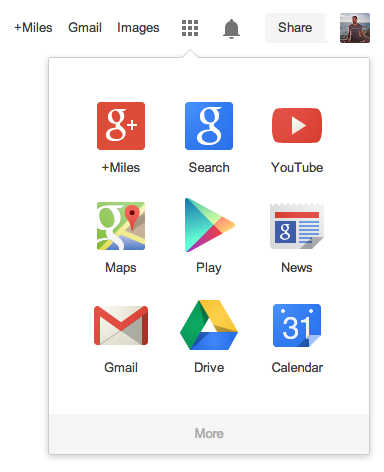
    There will also be a new app launcher from which you can easily access all your Google apps, like Gmail, Maps, Search, YouTube, News etc. The new app launcher is located at the top right of the screen and will also be present on Android devices and Chromebooks.

    Google also released a new version of its Chrome Web browser for Apple’s iOS 7. The updated mobile browser sports a new design and makes it easier to switch between Chrome and other Google apps on your iOS device.

  • Gmail Version 4.5 For Android Now Rolling Out

    Gmail Version 4.5 For Android Now Rolling Out

    Google has started rolling out its new version of Gmail for Android today.

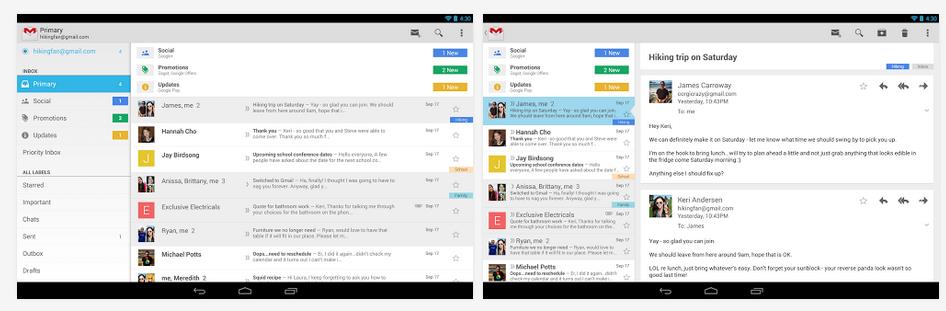
    Like the desktop version, Gmail for Android gets the organizational luxury of “categories”. Those tabs are meant to filter email messages into a type of sub-folder system, rather than clutter your inbox. 

    Also, now there is the option to refresh the feed by pulling down on the feed.

    The left-side navigation bar is also present, making it much easier to navigate between Labels.

    The update is rolling out slowly to the hundreds of millions of Android Gmail users, so head to Android Police for the APK download. No word on when the iOS version will be released. The tablet UI is the same, though the left menu remains on the screen.

    Have you tried the new Gmail layout on your desktop or laptop? What do you think of the new design for Android? Let us know your thoughts.

    If you’re the impatient kind, and cannot find the update on the Play Store, you might like to try one of the following download links to grab the updated APK today:

    All mirrors courtesy of Android Police

    [Android Police]

  • Google Unifies Cloud storage b/w GMail, Drive and Google + also For Enterprise

    Google Unifies Cloud storage b/w GMail, Drive and Google + also For Enterprise

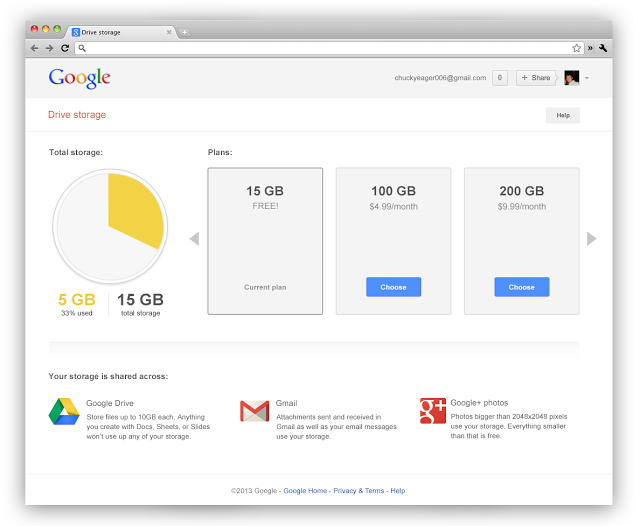
    Google has unified its cloud services starting yesterday offering a total of 15GB of storage to people using multiple Google services. With the same ID now you get 15GB of total storage across the three services, giving a boost to those who use drive more vs email or vice-versa. 

    Businesses using Google Apps will see their storage increase from 25 Gb to 30 GB across the services. 

    This move from Google comes as no surprise, as the company aligns with their storage model and frees up a lot of space from those people who were not using services on either side of Drive. 

    Shared storage

    This bigger number also makes the Google Service a lot more appealing than the lower free storage from say Dropbox.

    What’s more Google’ has added significantly cheaper upgrade plans to Drive, starting $4.99/month for 100GB which would get shared across the services, removing the previous 25 GB Gmail upgrade limit.

    These changes to Google Drive storage will roll out over the next couple of weeks.

    [VIA]

  • Ouch! Microsoft Hits Out At Gmail Over Privacy In Latest “Scroogled” Campaign

    Ouch! Microsoft Hits Out At Gmail Over Privacy In Latest “Scroogled” Campaign

    microsoft

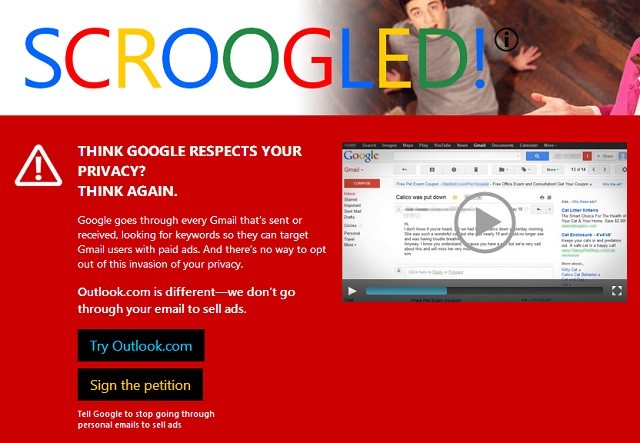
    Microsoft has taken aim at Google before with its ‘Scroogled’ advertising campaign, and now it’s revived the attack tactics, slating Gmail’s policy of reading your emails to target ads.

    “Think Google respects your privacy? Think again,” says Microsoft’s advert. It says that nasty Google goes through your every email, reading every word, so it can target ads to you based on what you’re writing about.

    microsoft

    [quote]”Emails are personal — and people feel that reading through their emails to sell ads is out of bounds,” said Stefan Weitz, senior director of Online Services at Microsoft in a statement. “We honor the privacy of our Outlook.com users, and we are concerned that Google violates that privacy every time an Outlook.com user exchanges messages with someone on Gmail. This campaign is as much about protecting Outlook.com users from Gmail as it is about making sure Gmail users know what Google’s doing.”[/quote]

    To illustrate this, Microsoft has a pair of shifty-looking eyes reading an email. Outlook.com, however, “prioritises privacy”, according to the ad.

    In a press release pushed out today, Microsoft said the Scroogled campaign is also an attempt to educate Americans on some of the bad practices used by email providers. A study commissioned by Microsoft reveals that 70% of consumers “don’t know that major email providers routinely engage in the practice of reading through their personal email to sell ads”, while a larger 88% disapprove of the practice.

    Previously Microsoft has used the “Scroogled” catch-phrase to warn users against Google Shopping’s practices, but today sees the campaign expanded into a much wider attack on Google and their advertising methods. Gmail has been targeted this time around, but it’s likely more services will be highlighted in future campaigns.

    [Tech Radar]

  • Gmail 2.0 For iOS Released, Gets New UI, Multiple Account Support

    Gmail 2.0 For iOS Released, Gets New UI, Multiple Account Support

    gmail

    Google’s Gmail app for iOS received its 2.0 facelift on Tuesday and is now available through Apple’s iTunes App Store.

    From the seamless multiple account integration to the use of Google profile photos, the Gmail app feels smooth and fresh, an equally potent combination of top-tier iOS app design and Google’s recent minimalist flair. Aesthetically, it hews closely to the recent flat, white upgrade Gmail’s desktop site recently received.

    The Gmail app also integrates Google calendar invites, so you can accept or reject times from within the app itself. Links also start up in Chrome by default (if it’s installed on the phone) so you can stay away from mobile Safari completely if desired. Google has improved search within the app which, if you’re anything like me, involves instantly retrieving results from 15,000+ emails.

    Gmail 2.0 also incorporates infinite scrolling, so it never appears like you have to dig into the servers for emails older than 30 days. It downloads headers and content on the fly and, as stated, makes searching huge databases even faster than before.

    Multiple account integration is going to be the biggest boost to productivity for many users; I was previously getting around this by forwarding my second and third accounts to a main one, but this is no longer necessary, thank goodness. Lastly, users can reply to Google+ posts from within an email thread, something we’ll likely continue to see Google iterate on in future updates. We wouldn’t be surprised if, one day, Gmail and Google+ are only one app on both Android and iOS.

  • Gmail 4.2.1 Update Out For Android 4.0 And Later

    Gmail 4.2.1 Update Out For Android 4.0 And Later


    gmail

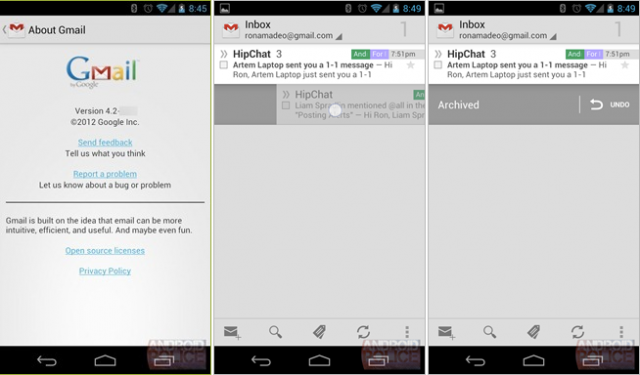
    Remember that huge upgrade to Gmail for Android we wrote about last month? Looks like Google was merely putting the finishing touches on the app before releasing it to everyone. While the big new features — pinch-to-zoom and swipe-to-archive — only work on devices running Ice Cream Sandwich and above, it looks like all Android devices received the requisite performance improvements and bug fixes.

    Smaller changes to the Gmail app include removing the message text size option (because pinch to zoom is now present), contextual unread counts for each label (as opposed to just the inbox), and a permanent anchor for the “inbox” label on the drop-down menu at the top of the app. Oh, and praise all that is holy: attachments are back where they belong – at the bottom of the message.

    Head to the Play Store to grab the latest version of Gmail now. And remember, this is only for Android 4.0 devices! You can also check out this post  by the Gmail team on Google+ to learn more about the new update.


  • Pinch-to-Zoom, Swipe To Delete Features Coming To Gmail for Android

    Pinch-to-Zoom, Swipe To Delete Features Coming To Gmail for Android

    We have some exciting news for long-suffering Android users patiently waiting for a feature that arguably should have been included since the beginning. Google is set to add pinch-to-zoom to its next version of Gmail, presumably to be added to the final build of Android 4.2 when the Nexus 4 launches next month.

    AndroidPolice obtained exclusive access to the .APK file, which seems to work without issue on Android 4.1 Jelly Bean. Besides the obvious improvements, Google has added some subtle things such as swipe right to archive/delete, as well as reporting phishing from inside the app.

    Even more features are said to be on their way, including the ability to swipe an email in the inbox view left or right to either archive or delete, always delete, or do nothing when in the All Mail or Sent views.

    We imagine the “archive or delete” option will hit you with a prompt asking you which one you want to do. You’ll also be able to do this for labels. Performing the gesture on “regular labels” will remove that label.

    Finally, a new “Report Phishing” feature has been added. Google probably wanted to give users a way to report the far more serious problem of phishing instead of the more generalized spam. This should hopefully allow them to bust these malicious emails more effectively and efficiently.

    You can check out a preview video after the break. Android Police says it’s working on obtaining permission to release the .APK to rooted Android users running Jelly Bean, but we’re sure other copies will crop up in the near future.

  • Google Brings Free SMS on Gmail in India

    Google Brings Free SMS on Gmail in India

    Google has extended its free SMS chat service to India, whereby users can send text messages to mobile phones via Gmail Chat.

    [quote]”You can send SMS messages to your contacts’ mobile phones using Gmail Chat … Google does not charge for using this service,” according to information available with Google’s website.[/quote]

    The SMS service is available in India and 51 other countries in Asia, Africa and North America.

    According to the feature, people using either chat programmes ( GTalk, or Gmail chat ) can send texts to mobile users for free and cell phone subscribers can reply at regular SMS rates.

    To ensure maximum coverage, the company has tied up with mobile service providers Aircel, Idea, Loop Mobile, MTS, Reliance, Tata DoCoMo, Tata Indicom and Vodafone in a few cities, including Delhi, Mumbai and Kolkata.

    The service starts with 50 SMS credits for each user, every sent SMS costing one credit. Every reply received adds on 5 credits subject to the maximum level being 50 SMS at any given time. There is no official statement from Google on the launch of this service, however the service has gone live this evening in the chat windows of many users. 

    But don’t stress if you run out. “In case the SMS credit goes down to zero, it will increase automatically to one text after 24 hours. Keep in mind that if you’d like a higher message credit, you can always send an SMS to your own phone, and then reply to that message multiple times. Every time you reply, your SMS credit is increased by five. Effectively, you’re buying more messages by paying your phone company for these outgoing messages,” says Google in an explanatory post on its website.

  • Google Tests Showing Gmail Messages in Search Results

    Google Tests Showing Gmail Messages in Search Results

    Google is creating an information bridge between its influential Internet search engine and its widely used Gmail service in its latest attempt to deliver more personal responses more quickly.

    The experimental feature unveiled Wednesday will enable Google’s search engine to mine the correspondence stored within a user’s Gmail account for any data tied to a search request. For example, a query containing the word “Amazon” would pull emails with shipping information sent by the online retailer.

    Such Gmail results will typically be shown to the right of the main results, though in some instances, the top of the search page will highlight an answer extracted directly from an email. For example, the request “my flight” will show specific airline information imported from Gmail. Something similar could eventually happen when searching for a restaurant reservation or tickets to a concert.

    Although Google has a commanding lead in Internet search, it remains worried about the threat posed by social networking services such as Facebook Inc. As social networks have made it easier to share information online, the Web is starting to revolve more around people than the keywords and links that Google’s search engine.

    Google has been trying to adapt by building more personal services and plugging them into its search engine.

    Blending email information into general search results could raise privacy worries. Google is trying to mitigate that by showing Gmail results in a collapsed format that users must open to see the details. For now, users must sign up to participate.

    Google Inc. ran into trouble over privacy in 2010 when it tapped the personal contact information within Gmail accounts to build a social networking service called Buzz. Google set up Buzz in a way that caused many users to inadvertently expose personal data from Gmail. An uproar culminated in a Federal Trade Commission settlement requiring the company to improve its privacy controls and undergo audits for 20 years.

    Google is treading carefully as it hooks Gmail up to its Internet search engine. The new feature initially will be available to 1 million Gmail users who sign up at HTTP://G.CO/SEARCHTRIAL . That’s a small fraction of the more than 425 million Gmail accounts that have been set up since Google launched its free email service eight years ago to compete against the offerings from Yahoo Inc. and Microsoft Corp.

    After getting feedback from the test participants, Google hopes to give all Gmail users the option of plugging their accounts into the main search engine, according to Amit Singhal, a senior vice president for the company.

    Singhal said Google is also willing to display information from other email service in its main search results. The gesture could avoid spurring additional complaints about Google abusing its position as the Internet’s search leader to favor its other services. That issue is the focal point of an antitrust investigation by antitrust regulators in the U.S. and Europe.

    Microsoft said it has no plans to make information in its competing Web mail service available to Google’s search engine. Yahoo, which operates another Gmail rival, had no comment.


  • Now Google Plus Hangout directly from GMail

    Now Google Plus Hangout directly from GMail

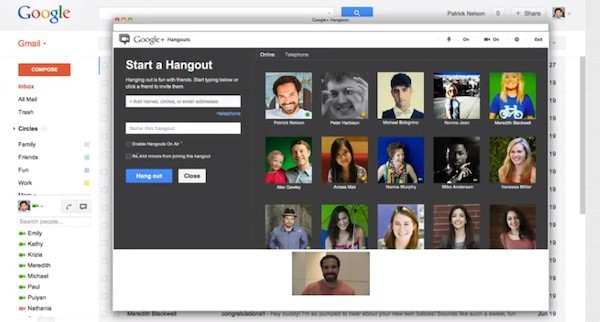
    Google has really begun to promote their new Hangouts. You can now start a Hangout with up to nine friends or colleagues straight from Gmail with a click of a button. It provides access to people with an Android or iOS device and those on Google+ in a web browser.


    [toggle_box title=”Google Hangouts” width=”Width of toggle box”]


    Since the introduction of Gmail video chat back in 2008, many of you have told us that you love the direct, personal communication it provides. That’s why we’re excited to announce that video chat is being upgraded to a more modern video calling technology — Google+ Hangouts. 

    Unlike the old video chat, which was based on peer-to-peer technology, Hangouts utilize the power of Google’s network to deliver higher reliability and enhanced quality. You’ll be able to chat with all the same people you did before and, in fact, with Hangouts you’ll now be able to reach them not only when they are using Gmail but also if they are on Google+ in the browser or on their Android or iOS devices.

    All Gmail users will benefit from this upgrade, but if you and the person you’re chatting with also use Google+, you’ll get even more from the Hangouts experience. You’ll be able to video chat with up to nine people at once, watch YouTube videos together, collaborate on Google documents and share your screen. Plus, Hangouts has a bunch of fun effects that you can try out…because any conversation is better when you’re wearing a virtual mustache or pirate hat.

    [/toggle_box]

    [Official Gmail Blog]


iGyaan Network
Privacy Overview

This website uses cookies so that we can provide you with the best user experience possible. Cookie information is stored in your browser and performs functions such as recognising you when you return to our website and helping our team to understand which sections of the website you find most interesting and useful.