Tag: hdd

  • Fixstars Launches 13000M : World’s Biggest SSD

    Fixstars Launches 13000M : World’s Biggest SSD

    While the personal computer industry is still trying to make the massive transition from mechanical Hard Drives to Solid State Drives, a new entrant has jumped into the fray to tilt the balance towards the newer technology’s favour.

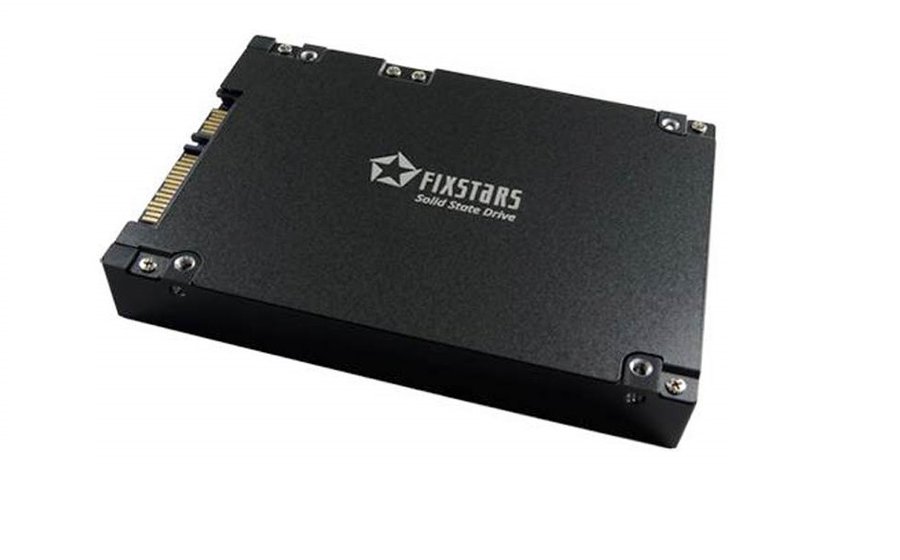
    For years now, SSDs have lurked in the shadows, and because of technological constraints have trailed HDD’s in terms of storage space, but all of this is about to change now. Meet Fixstars SSD-13000M.

    fixstars-1

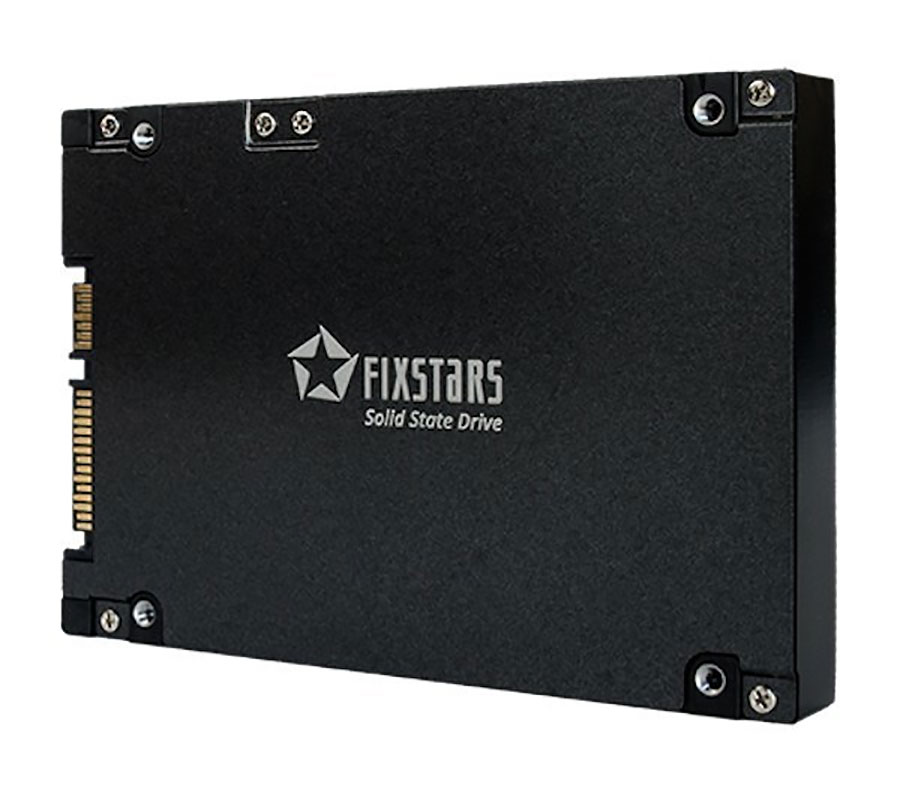
    This dull looking SSD from Fixstars comes with a massive 13TB of NAND-based flash memory, and is the biggest SSD so far. Put that in context with the fact that the biggest 2.5 Inch HDD available in the market is a 10 TB storage device by Seagate, you understand how impressive the tech behind this piece of computer hardware is.

    But as with most good things, this SSD also comes at a cost, and I’m not talking about the interesting price tag of $13000( approx Rs 8,50,000)  that it comes at. According to Fixstars own benchmarks, SSD-13000M because of its size loses out a bit on the speed. The company here has decided to go for steady performance instead of speed.

    This device is not focused at home users, and as such the steady performance at the exorbitant price does end up making sense. Considering that it’s no trivial task to combine, and validate so much NAND per drive, such pricing for the device can be considered acceptable.

    The Fixstars 13000M uses a specialized disk controller designed by the company and 15nm Toshiba MLC NAND memory. Sequential speed is listed as 580MB/s, sequential write is 540MB/s. Power consumption is listed to be 3W at idle and up to 6.5W under load.

    It can be years before NAND Technology becomes cheap enough for such applications to make its way into our homes, but for enterprise users with cash to burn, this offering from Fixstars does make a compelling argument in its favour.

  • Seagate Launches Momentous Hard Drive part 2, 750GB – 8GB SSD (PR)

    Seagate Launches Momentous Hard Drive part 2, 750GB – 8GB SSD (PR)

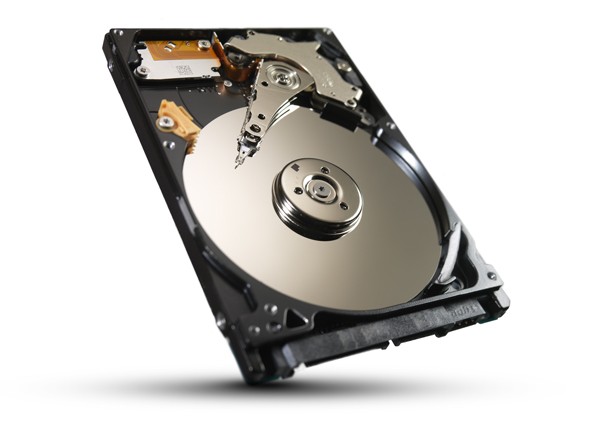
    Seagate was the first with its Momentous Hard drives last year, a hybrid drive which uses a mix of SSD along with traditional HDD to speed up operations. Now the company has bumped up its lineup with the next-gen Momentous hard drives. This time around the storage has been increased to a total of 750GB Minus a Nand flash partition which has been upped from 4GB to 8GB.

    Price is expected to be in Rs. 10,000/- mark at launch, and the drive promises incredible boot up and application startup times.


    [toggle title_open=”Press Release” title_closed=”Press Release” hide=”yes” border=”yes” style=”default” excerpt_length=”0″ read_more_text=”Read More” read_less_text=”Read Less” include_excerpt_html=”no”]SEAGATE SOUPS UP LAPTOP PC PERFORMANCE WITH FAST SOLID STATE HYBRID DRIVE

    Cupertino, Calif. – November 29, 2011 – Tip for revving up the speed of your laptop PC: Slip in a new Seagate (NASDAQ:STX) Momentus XT drive for faster computing, snappier gaming and lickety-split boot-up!

    Seagate is now shipping the second generation of Momentus XT, its groundbreaking solid state hybrid drive for consumer and commercial laptop personal computers. With a simple drive installation, users can boost boot-up speed and overall performance to transform the use of an ordinary laptop or desktop computer into a high-performance computing experience. Momentus XT is available at online retailers Amazon, Canada Computers, CDW, Memory Systems, NCIX, Newegg, and TigerDirect, and seven original equipment manufacturers are gearing up to ship laptops powered by Seagate’s fastest laptop drive ever.

    “Personal computer users are creating and using more documents, photos, video and other digital content than ever before, driving strong demand for systems that deliver the highest performance they can get their hands on,” said Scott Horn, vice president of worldwide marketing at Seagate.”Seagate’s second-generation Momentus XT is serving up solid state drive (SSD) speed, more storage capacity and simple, easy installation at an affordable price for even better, faster computing.”

    “High-speed storage devices make a difference when it comes to improving overall PC performance,” said John Rydning, research vice president at IDC. “Seagate’s newest Momentus XT gives notebook PC users an economical option for boosting PC performance while at the same time providing spacious storage capacity all in one device.”
    The Momentus XT drive is three times faster than a traditional hard disk drive, delivering speeds rivaling much pricier SSDs. The all-in-one design of Momentus XT makes installation for system upgrades simple, easy and affordable: the drive works in any laptop or desktop computer and with any operating system.

    Momentus XT – Satisfying the need for speed
    The Momentus XT hard drive delivers a massive 750GB of storage capacity and owes it speed to a Serial ATA 6Gb/second interface, 8 gigabytes of high-speed Single Level Cell NAND flash, 32 megabytes of drive-level caching and Seagate’s Adaptive Memory and FAST Factor technologies. Adaptive Memory works by identifying data usage patterns, and then moving the most frequently retrieved information to the embedded solid state memory for faster access – effectively tailoring hard drive performance to each user and their applications. FAST Factor blends the strengths of SSDs and hard disk drives into a powerful device for faster access to applications, quicker bootup and higher overall system speed.

    Now shipping in volume worldwide, the Momentus XT hard drive is backed by Seagate’s 5-year limited warranty. Manufacturer’s Suggesting Retail Pricing (MSRP) for Momentus XT 750GB is $189.[/toggle]

  • WD gets go ahead to buy Hitachi’s HDD business

    WD gets go ahead to buy Hitachi’s HDD business

    Western Digital had announced its plans to buy Hitachi’s (or Acquire) Hard Drive business for a total of 4.3 Billion US $. Regulators only approved the Western Digital deal after assurances that the company would sell off some its production assets, including a manufacturing plant, and transfer some intellectual property to the new unit being put on the auction block.

    So as soon ad WD can sell off their existing plant, they will be ready to take over Hitachi’s units.

  • 3TB Hardrives go Head to head – Seagate Barracuda XT Tops charts

    3TB Hardrives go Head to head – Seagate Barracuda XT Tops charts

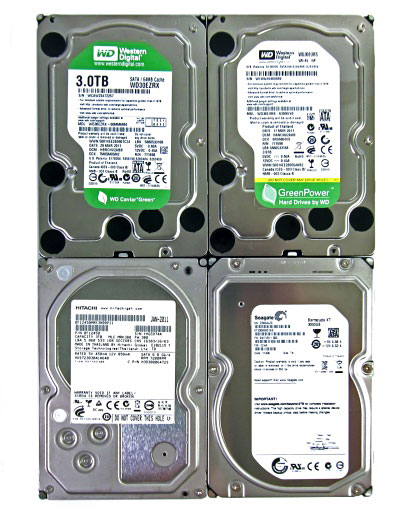
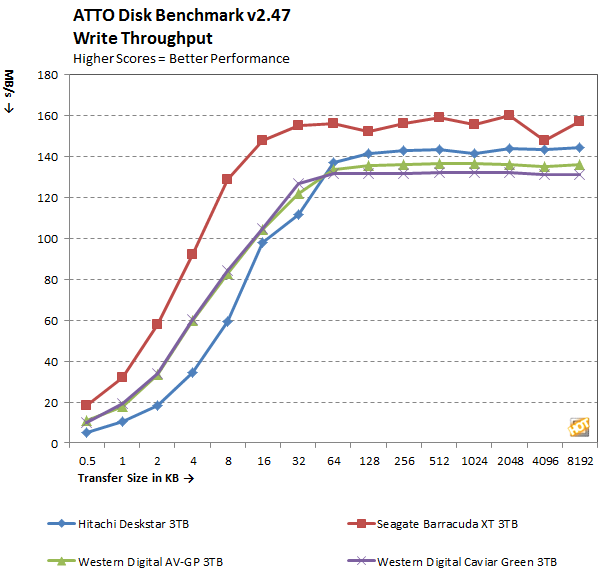
    Folks over at HotHardware decided to put all the new 3TB HDDs to test and up to their claims. The Seagate Barracuda XT came out like a winner from the whole fight, considering it has an 4GB ssd built onto the platter, it was quite obviously leading.

    Check out the full test at link below

    [HotsHardware]

  • Western Digital acquires Hitachi GST for $4.3 Billion

    Western Digital acquires Hitachi GST for $4.3 Billion

    WD is one of the worlds best hard drive manufacturing and selling companies and they have just announced a deal  to acquire one of its primary competitors, Hitachi Global Storage Technologies Steve Milligan, president and chief executive officer of Hitachi GST, will join WD at closing as president. In the deal the acquisition will include $3.5 billion in cash and $750 million in WD common stock.

    The takeover is said to be finalized by Q3 2011.


    Official Press


    Western Digital to Acquire Hitachi Global Storage Technologies

    Combination of Hard Drive Companies Will Create Industry’s Broadest Product Portfolio and a Significant Pool of Resources for Innovation

    IRVINE, Calif. and SAN JOSE, Calif., March 7, 2011 /PRNewswire-FirstCall/ — Western Digital (NYSE: WDC) and Hitachi, Ltd. (NYSE: HIT / TSE:6501) announced today that they have entered into a definitive agreement whereby WD will acquire Hitachi Global Storage Technologies (Hitachi GST), a wholly-owned subsidiary of Hitachi, Ltd., in a cash and stock transaction valued at approximately $4.3 billion. The proposed combination will result in a customer-focused storage company, with significant operating scale, strong global talent and the industry’s broadest product lineup backed by a rich technology portfolio.

    Under the terms of the agreement, WD will acquire Hitachi GST for $3.5 billion in cash and 25 million WD common shares valued at $750 million, based on a WD closing stock price of $30.01 as of March 4, 2011. Hitachi, Ltd. will own approximately ten percent of Western Digital shares outstanding after issuance of the shares and two representatives of Hitachi will be added to the WD board of directors at closing. The transaction has been approved by the board of directors of each company and is expected to close during the third calendar quarter of 2011, subject to customary closing conditions, including regulatory approvals. WD plans to fund the transaction with a combination of existing cash and total debt of approximately $2.5 billion.

    WD expects the transaction to be immediately accretive to its earnings per share on a non-GAAP basis, excluding acquisition-related expenses, restructuring charges and amortization of intangibles.

    The resulting company will retain the Western Digital name and remain headquartered in Irvine, California. John Coyne will remain chief executive officer of WD, Tim Leyden chief operating officer and Wolfgang Nickl chief financial officer. Steve Milligan, president and chief executive officer of Hitachi GST, will join WD at closing as president, reporting to John Coyne.

    “The acquisition of Hitachi GST is a unique opportunity for WD to create further value for our customers, stockholders, employees, suppliers and the communities in which we operate,” said John Coyne, president and chief executive officer of WD. “We believe this step will result in several key benefits-enhanced R&D capabilities, innovation and expansion of a rich product portfolio, comprehensive market coverage and scale that will enhance our cost structure and ability to compete in a dynamic marketplace. The skills and contributions of both workforces were key considerations in assessing this compelling opportunity. We will be relying on the proven integration capabilities of both companies to assure the ongoing satisfaction of our customers and to bring this combination to successful fruition.”

    “This brings together two industry leaders with consistent track records of strong execution and industry outperformance,” said Steve Milligan, president and chief executive officer, Hitachi Global Storage Technologies. “Together we can provide customers worldwide with the industry’s most compelling and diverse set of products and services, from innovative personal storage to solid state drives for the enterprise.”

    Hiroaki Nakanishi, president, Hitachi, Ltd. said, “As the former CEO of Hitachi GST, I always believed in the potential of Hitachi GST to become a larger and more agile company. This is a strategic combination of two industry leaders, both growing and profitable. It provides an opportunity for the new company to increase customer and shareholder value and expand into new markets. Additionally, it is important to us that WD shares common values with Hitachi GST to create a more global company that is well positioned to define a broader role in the evolving storage industry.”

    WD’s exclusive financial adviser on the transaction is Bank of America Merrill Lynch; its lead legal adviser is O’Melveny & Myers LLP. Goldman, Sachs & Co serves as financial adviser to Hitachi, Ltd. and Hitachi GST. Legal advisers to Hitachi, Ltd. and Hitachi GST are Morrison Foerster LLP and Skadden, Arps, Slate, Meagher & Flom LLP & Affiliates, respectively.

  • DIY : How To Revive An Old Computer Part 1

    DIY : How To Revive An Old Computer Part 1

    Lots of people today are looking for a new computer. Their reasons for doing so are varied but there are many common complaints that people have with old computers. The primary complaint i receive from users is that their computer is ‘too slow’. While the day to day tasks of the end-user remain pretty much the same (using Microsoft Office, surfing the web, watching movies,playing games etc.), the computing power required to perform those tasks has increased significantly.  So does this mean that your old desktop/laptop is now useless and obsolete? Should you throw it away or let it collect dust in a corner? NO. There are many uses for an old computer, a few of which i will be listing below:


    Make a Home Server

    The home server is one of the easiest and most common uses for an old computer. The basic home server can do simple tasks like sharing files over your home network, while more advanced setups can perform a plethora of tasks such as file sharing, website hosting, torrent downloader,  a dedicated firewall for your network, controlling electronic devices in your house etc. The requirements of each user will be different and you should decide the tasks that you would like your server to perform in advance to ensure an easier setup.


    The Basic Setup:


    I recommend using FreeNAS as an OS for your home server. It is an open-source OS based on FreeBSD which means it is free to download, use and distribute. The most basic task performed by FreeNAS, as the name suggests, is to provide Network Attached Storage in your home.  It can perform a wider variety of tasks but we’ll get to that later.


    Things you’ll need:

    • FreeNAS Live CD (Link Below)
    • Old Computer
    • Monitor & Keyboard for installation only (you can disconnect them after the install)
    • A few Hard Disks (minimum 1)
    • A 512mb or larger Pen Drive


    Download FreeNAS 32-bit Live CD

    Download FreeNAS 64-bit Live CD


    Insert the Live CD into your CD drive and wait for the computer to boot up. This can take some time, 5-10 minutes, and you will hear a *chirp* from your PC speaker when the system is ready. At this moment, the system is ready to use as-is from the Live CD or it can be installed onto our hdd or pen drive. I would personally recommend installing the system on your pen drive if your PC supports USB Boot. This leaves more SATA/IDE ports free to attach extra storage.

    When you reach the above screen, the system is booted. Since we dont want to run our system off a CD, choose option 9.

    We are going to be installing our system on a pen drive so we will choose option 1.


    You will receive a warning, Press OK.


    Choose your installation media and press OK. In most cases you will have only one option in this step.

    Choose your install destination and press OK. In most cases you will have a few options here. Please remember to choose your pen drive at this stage. If the device names (ad0, ad1, etc.) are confusing, you can identify your device with the capacity or manufacturer details.

    After this step, FreeNAS is installed on your system. Press Enter and choose the Exit option and you will be returned to the main menu. Choose option no. 7 to reboot your system. To ensure that the system boots from the pen drive, please remove the Live CD  and ensure that the pen drive is selected as the primary boot device in your BIOS.


    After the reboot, the first thing you have to do is to configure your network interface and LAN IP. These are the last things you need to configure on your FreeNAS box. When you get to the Console Menu, Choose option 1.

    Select your Primary interface. If you have multiple interfaces, you can select optional interfaces from the same menu.

    After assigning all interfaces select none and press OK.


    You will be given a list of assigned interfaces. Press OK and you will be taken back to the Console Menu.

    Select option 2 to assign your ip address. I recommend assigning a static ip to your server, so select No when given the option to use DHCP. Enter your ip address, subnet mask, internet gateway and DNS addresses. You do not need to configure an ipv6 address.
iGyaan Network
Privacy Overview

This website uses cookies so that we can provide you with the best user experience possible. Cookie information is stored in your browser and performs functions such as recognising you when you return to our website and helping our team to understand which sections of the website you find most interesting and useful.