Tag: iOS 7

  • WhatsApp’s VOIP functionality for iOS Leaked in a Screenshot

    WhatsApp’s VOIP functionality for iOS Leaked in a Screenshot

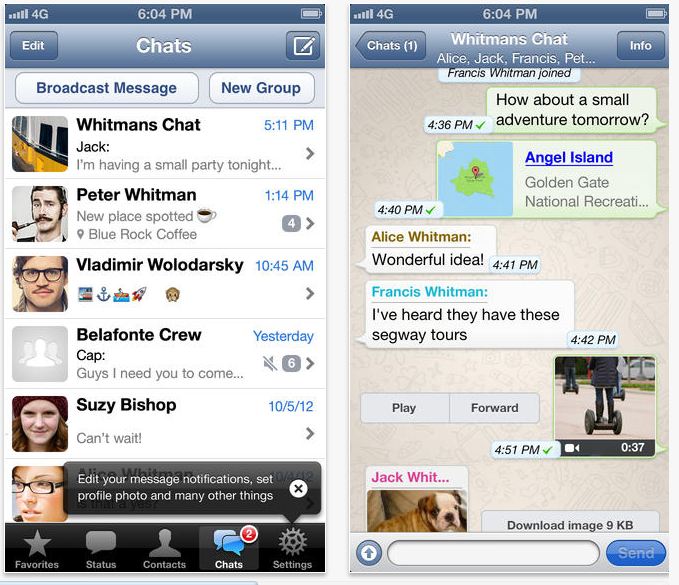
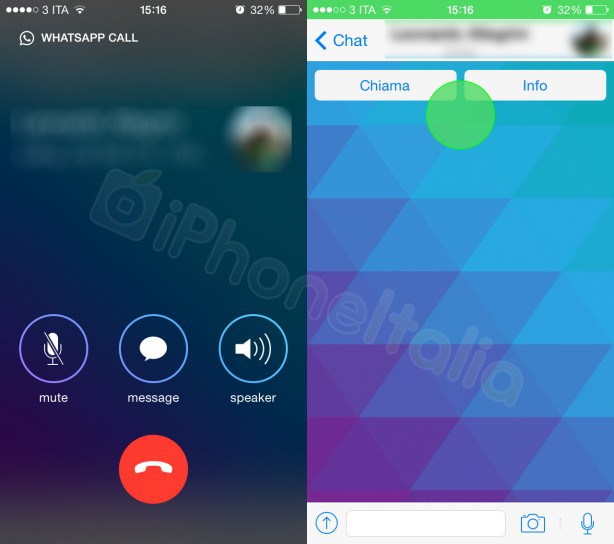
    During WhatsApp’s recent Facebook acquisition, CEO Jan Koum hinted that WhatsApp may get voice call functionality by the summer. This new leaked screenshot of the App’s upcoming update for iOS shows off those supposed calling capabilities, designed to work along with iOS 7’s design layout.

    The camera button on the top also hints at video call functionality. WhatApp will allow free voice calls and video calls with your friends on your WhatsApp list over Wifi and Cellular.

    It is also rumored that this functionality comes via Skype or using Skype’s voip technology as Facebook currently integrates Skype calling within its chat windows.

    With this feature WhatsApp may become the single point of social networking that everyone has been looking for. Now if only they could work out their battery drain.

  • Apple: 74% of App Store Users Are Using iOS 7

    Apple: 74% of App Store Users Are Using iOS 7

    Three months back, Apple launched its latest OS – iOS 7 in the market. Ever since then, users have treated the iOS 7 with mix reactions, as for some it is improved and for some it lags and freezes. 

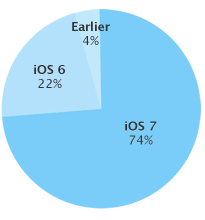
    chart

    Despite of the mixed reactions from users, the iOS 7 is now on 74% of Apple devices registered in the App Store. Apple has mentioned this on its developer page. This is a 10% increase in iOS 7 users from the month of October. Coincidentally, Google also announced that in just a month of release, 1.1% of Android users are on KitKat OS.

    However, alongside the iOS 7 other iOS versions are still in use. As per the report from Apple, 22% of users in the App Store are still on iOS 6 and 4% users are still on older versions of iOS. The rest 26% might want to know what is iOS 7 all about from the video below:

    [youtube url=”http://www.youtube.com/watch?v=S5-KmW1QhcE”]

    [Apple]

  • WhatsApp Messenger Gets The iOS 7 Friendly Update

    WhatsApp Messenger Gets The iOS 7 Friendly Update

    WhatsApp is the most used messaging app throughout all platforms. Whether it is iOS, Android, BlackBerry, Symbian or Windows Phone, this app runs on all platforms.

    whatsapp

    Following other applications to update according to the iOS 7, WhatsApp messenger also gets the much needed update. This new update is late, but it comes with some required changes.

    The new interface is simpler, and the new version introduces a broadcast lists. The latest update also improves location sharing with a 3D map, and the photo clickers can crop images and see larger pictures(thumbnails). The new update also allows you to manage your blocked contacts easily.  

    [App Store]

  • Apple iOS 7 : The Good And The Bad

    Apple iOS 7 : The Good And The Bad

    While developers around the world have been running iOS 7 on their iDevices for quite some time now, commoners began receiving the much hyped and much awaited update last night. 

    We take a look at the good and the bad things that Apple has introduced in the new OS.

    The Good

    1. Multi-Tasking

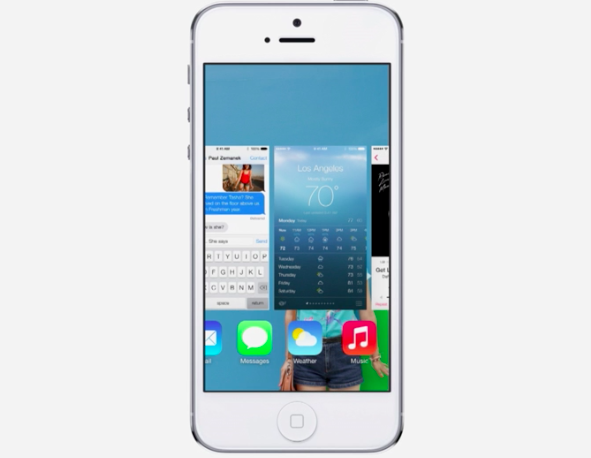
    In iOS 7, Apple has completely retooled the way multitasking (or switching between apps if we want to be a tad more precise) works. While beckoning the app switcher in iOS 7 remains the same — a quick double tap on the home button — the entire implementation has been completely retooled.
    ios 7

    Apps can now take advantage of full background multitasking but as always, you don’t have to close apps for battery saving reasons. Apple does a great job of freezing them in place so they don’t suck up your battery life.

    2. Control Center And Notification Center

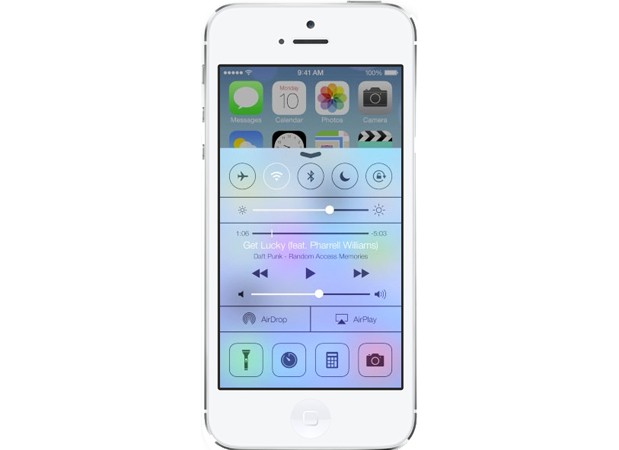
    The first thing each iDevice owner did after jailbreaking his/her device was to add shortcut toggles for simple utilities like turning WiFi on and off, Airplane mode, BlueTooth etc. Finally, Apple decided to incorporate this feature into the OS itself, with iOS featuring a brand new Control Center. 
    ios 7

    By flicking upwards from the bottom of the screen, you can enable or disable Airplane Mode, Wi-Fi, Bluetooth, and Do Not Disturb; adjust the volume and brightness; pause or play music; enable AirDrop and AirPlay; and quickly access your camera’s LED light (for use as a flashlight), timer, calculator, and camera.

    The Notifications panel also undergoes a makeover with it being divided into 3 categories. 

    3. AirDrop

    In iOS 7, not only can you quickly send photos, videos, and contacts using AirDrop, but just about anything from any app that has the share button (with the exception of music). The only problem is that it only works on iPhone 5 or later because of the chip architecture in the iPhone 4S. 

    4. Email Management

    Swiping right on an email in iOS 7 lets you delete the message, as always. But now it also reveals a “More” icon that you can tap to see more options, including the ability to move the email into a folder, mark it as unread or mark it as “junk.” With so many third-party apps vying to be your go-to iOS mail app, Apple seriously needed to beef up Mail—and it did, with this and other enhancements.


    The Bad

    1. Icons

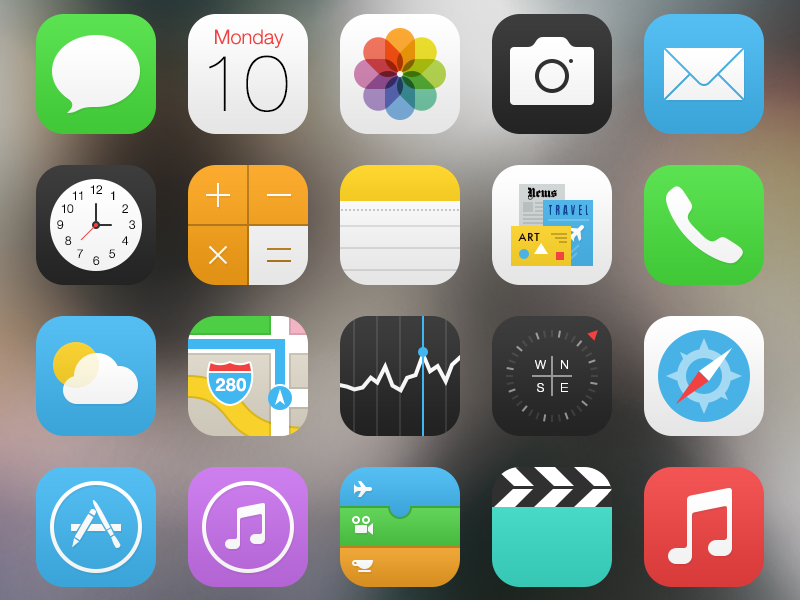
    When Apple gave the world its first glimpse of iOS 7 in June, professional designers and ordinary iPhone users alike were struck by the radical visual changes that the company had made to its signature mobile operating system. While Apple touted the brighter, flatter, and simpler design as the “biggest change to iOS since the introduction of the iPhone,” members of the design community denounced the new interface as “ugly,” “childish,” and “inconsistent.”
    ios 7

    At the center of the criticism were iOS 7’s new home screen application icons, whose lush, metaphorical designs were replaced by colorful, geometric abstractions. Safe to say they aren’t pleasing everyone.

    2. Rough Installation

    After downloading iOS 7, it took us six tries to actually install it. Granted, we attempted to install the OS the day of its release, late in the night—which was probably peak time for Apple’s servers. But we still think Apple should have been able to predict the demand and been better prepared. 

    3. Siri

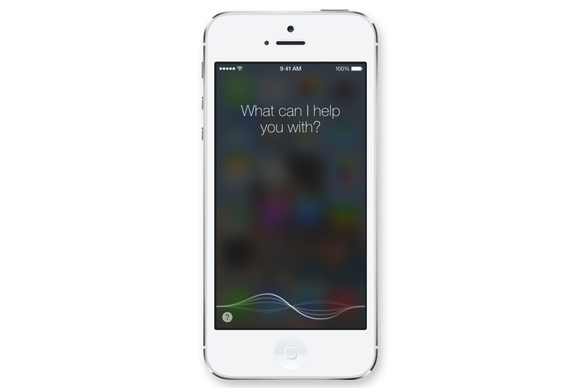
    Siri continues to get better, it’s still nowhere near being a feature that won’t frustrate you more than help you.
    ios 7


    Many times, it won’t be able to connect or won’t have an answer, and anytime it can’t help you quickly, it ends up taking up much more of your time as you dig through the phone to find an app you realize you should have opened in the first place. 

    4. Awkward Contrasts

    When Apple showed off iOS 7 in June, it was pretty proud of how the new icons seemed to float above the background wallpaper to create an almost 3-D effect. In real life, the interaction between iOS 7 and the screen background is challenging at best. Because groups of apps stored together no longer are set off with a black background and white border, they adapt to the wallpaper colors behind them.

    The results are mixed. Sometimes, you get offsetting contrast, sometimes you don’t. Worse still, the white text is often not so easy to read against the background, because the new font is thinner. You may find yourself experimenting with wallpapers to get it right.


    What do you think? Which features impressed you the most and which made you flinch? Let us know in the comments section below!
  • iOS 7 Download is Live, Get Links here !

    Apple iOS 7 download is now live for a vast variety of iDevices including iPad’s, iPhone’s and iPod’s . As always, the new iOS is available as an over-the-air update (go to the Settings menu on your iPhone (4, 4S, 5), iPad (iPad 2 and newer), and iPod touch (fifth-generation only) and navigate to General > Software Update) or a direct download from iTunes.

    Also since the whole world is probably busy updating their devices, the links below may help those who are unable to download directly from Apple. 


    [youtube id=”S5-KmW1QhcE” width=”100%” height=”300px”]


  • Apple Offering “Last Compatible Version” Of iOS Apps

    Apple Offering “Last Compatible Version” Of iOS Apps

    A new feature has been spotted that has been rolled out by Apple that provides a little love for the older germination hardware and iOS applications now that Apple iOS 7 will be launching tomorrow, together with the new Apple iPhone 5S and iPhone 5C smartphones launching on Friday September 20th.

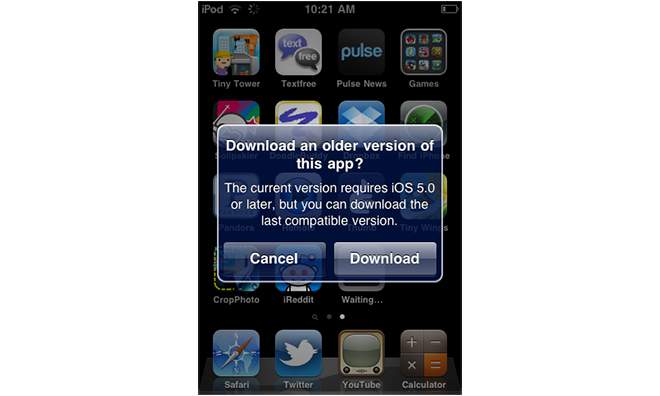
    The new Apple iOS feature offers the “Last Compatible Version” to older Apple hardware running older versions of Apples iOS mobile operating system.

    ios
    Image Via Reddit

    The feature appears when a person attempts to download an app with a new version that’s not compatible with the flavor of iOS that they’re running. A pop-up will appear to explain that the requested app requires a newer version of iOS, but that the user can download the last compatible version that was made available.

    This new feature should make it pretty simple for folks trucking along with old iOS hardware to continue to use their favorite apps, even if they require a newer version of Apple’s software than the device is capable of running. It’s certainly a nice little surprise for those users, especially on the eve of iOS 7’s arrival. 

    It’s a smart move, as older iPhones are resold around the world and often stay in use years after Apple stopped selling the device. This allows those owners to have access to apps that run efficiently on those devices, which helps with the overall user experience and Apple’s ecosystem.

    If you’re rocking an older piece of iOS hardware, such as aniPhone 3G or first-generation iPod touch, you can try it out yourself by hitting up the App Store.

  • iOs 7 To Be Released On September 18th

    iOs 7 To Be Released On September 18th

    Apple has unveiled the release date of iOS 7, the company’s largest functional and aesthetic change to “the world’s most popular mobile operating system” since its inception in 2007.

    While the flatter, cleaner lines are more fitting with the times, it’s the software’s improved developer tools, along with a number of new APIs for things like background updating, that make iOS 7 so interesting.

    Features like Search and Siri have been overhauled — the Spotlight is now accessed by swiping down from anywhere on the home screen — with the automated helper now available in a male voice as well.

    The company has also announced that the iWork suite, including iMovie, iPhoto, Keynote, Number and Pages will be a free download for iOS  7 users on both iPhone and iPad.

    Apple will release the iOS 7 update for most existing iOS devices, including the iPhone 4, 4s, 5, iPod touch 4G and 5G, along with the iPad 2, 3 and 4 and mini, on September 18th. Looks like the iPhone and iPad are getting the update on the same day, contrary to earlier reports.

  • iOS 7 To Be Launched On September 10

    iOS 7 To Be Launched On September 10

    September 10 is the date we’re currently marking in the diaries for the iPhone 5S and 5C reveal, and that may have just been reinforced by a claim that we’ll see the release of iOS 7 that very same day.

    According to an email sent to developers from Nuance, the company behind Siri, the general availability date for iOS 7 is set for September 10.

    The Next Web contributing writer Owen Williams posted the below email from Nuance to his personal blog, it reads:

    As you are probably aware, iOS 7 GA will be released on September 10th.

    The NDEV Program has pre-qualified that SpeechKit 1.4.5 works properly on iOS 7, but we encourage you to conduct own testing to ensure that when the upgrade happens, your Nuance speech services continue to work seamlessly.

    It asked developers using its API to conduct testing to ensure that their services work on iOS 7 even though its SpeechKit 1.4.5 is pre-qualified to work properly on iOS 7. Nuance is the voice recognition focused company which has also worked on Siri, Apple’s intelligent voice assistant.

    Historically, Apple has released iOS Golden Master versions to developers on the same day as the announcement of new iPhones, giving developers time to test their apps with the final version of the new iOS before its release it to the general public a couple of days before the launch of the new iPhone.

    [Via]

  • iOS 7 Beta 6 Release Seeding Early With Minor Fixes

    iOS 7 Beta 6 Release Seeding Early With Minor Fixes

    Rumours are that Apple will be holding a media event on September 10th – this is where they’ll possibly unveil the ‘iPhone 5S’ and the low-cost ‘iPhone 5C.’ Late last night, Apple inched closer to a final ‘golden master’ version of the upcoming iO7 7 and seeded iOS 7 beta 6 to developers.

    The update comes a week after the previous update and just hours after a report pegged the Beta 6 update for next week. The focus of the small update appears to be on an emergency issue with iTunes in the Cloud which requires a workaround.

    This update addresses an issue with iTunes in the Cloud, where some purchases may download or play unexpected items. If you have any devices running previous versions of iOS 7 beta, you must:
    1. Install iOS 7 beta 6
    2. Install the ResetMusicAndVideosLibraries configuration profile
    3. From Settings > Music, tap the Reset Media Library button
    4. Restart the device

    It’s only a 13.5MB OTA download (build 11A4449d) and according to the change log in the iOS Developer Center shows it brings a quick fix.

    iOS 7 is scheduled for release in the fall of this year, with updates to Apple’s iPhone and iPad lineups expected around the same time. If past history is any indication, iOS 7 should be made available to the public just a few days before the launch of the next-generation iPhone.

  • iOS 7 Beta 4 Fixes Charger Hack

    iOS 7 Beta 4 Fixes Charger Hack

    Apple is said to have fixed a powerful charger-based hack, which previously allowed iDevices to be compromised by hackers using a modified power charger in under a minute.

    As Reuters reports, Apple said the issue had been fixed in the latest beta of iOS 7, which has already been released to software developers.

    “We would like to thank the researchers for their valuable input,” Apple spokesman Tom Neumayr said.  The researchers were Billy Lau, a research scientist at the Georgia Institute of Technology, and graduate students Yeongjin Jang and Chengyu Song.

    Andy Greenberg, Forbes technology and information security reporter explains that the researchers took advantage of a security flaw in Apple’s developer model, which allows anyone with a developer license to install third-party apps on a registered device.

    ios 7

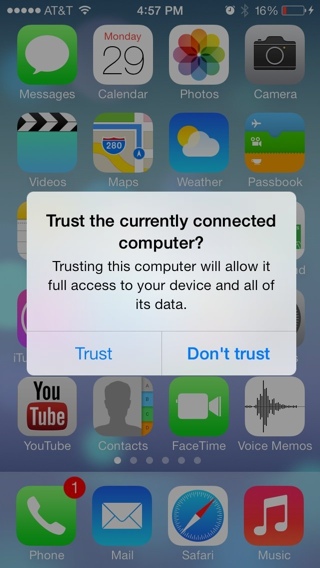
    iOS 7 prompts a new warning message to the user when they plug their iOS device to any device that attempts to establish a data connection informing them that “Trusting this computer will allow it full access to your device and all its data.”

    Of course, this leaves iPhones and iPads that won’t get the iOS 7 update vulnerable. According to the researchers, all other versions of iOS can be hacked in this manner.

    However, end users will have to wait for iOS 7 before the fix arrives.

  • iOS 7 Beta 2 Now Seeding To Developers

    iOS 7 Beta 2 Now Seeding To Developers

    Apple has released iOS 7 beta 2 to developers today, which officially contains “bug fixes and improvements” to the redesigned and initially-divisive mobile operating system.

    Apple first unleashed iOS 7 to the developer community at its Worldwide Developer Conference (WWDC) on June 10, but the release was only accessible on the iPhone and iPod touch.

    One major addition in the iOS 7 beta 2 is support for the iPad and iPad mini, though support only goes back to the iPad 2.

    Existing iOS 7 beta users can go to Settings / General / Software Update and begin the over-the-air download of iOS 7 beta 2. Registered developers can head to Apple’s Developer Portal for more information on how to sign up.

    iOS 7 includes an all-new user interface and features such as AirDrop peer-to-peer file transfer functionality, Control Center for quickly accessing settings, a new Photos app, integration with cars, and new Siri voices and options.

    Apple is scheduled to release iOS 7 this fall for iPhone 4 and up, iPad 2 and later, the iPad mini, and the fifth-generation iPod touch. If history is any indication, its release will also coincide with the launch of a new iPhone.

  • Apple Publishes iOS Fragmentation Chart, Most Devices On iOS 6

    Apple Publishes iOS Fragmentation Chart, Most Devices On iOS 6

    Apple says it’s charted the fragmentation of its iOS operating system and found its devices are generally more up to date than those of its U.S. rival Google. 

    fragmentation

    In contrast to Android, according to the pie chart and Apple, of all the users who visited the iTunes App Store, 93% of them were using Apple devices powered by Apple’s iOS 6 (the latest version of the company’s mobile operating system). iOS 5 is running on just 6% of all devices that used the App Store over the same period. Only 1% used anything older than iOS 5.

    Android’s “fragmentation” used to be a great deal worse that it is today, with the majority of users on older versions of the platform. However Android’s developer dashboard now shows that just under 59 percent of Android users are on OS 4.0 or higher (Ice Cream Sandwich or Jelly Bean).

    While Google has a larger share of the smartphone market, with so many devices running 3-year-old versions of Android, Apple’s numbers suggest its market share — at least for operating systems — is more up to date.

    For developers, the message is clear: Build your apps for iOS, and with one API you can hit the majority of the operating system’s addressable market. Develop for Android, and there are at least three different APIs you’ll need to deal with to reach the majority of its users.

    Apple’s next OS, iOS 7, is now out in a developer release. A general release consumer version of the new “flat” OS won’t be out until fall — to coincide with the introduction of the new iPhone “5S” hardware.

  • iOS 7 For iPad Screenshots Leak

    Apple showed off iOS 7 to the world last week and promised its release to consumers sometime ‘this fall.’ The developer community have been busy working through the many changes, but Apple only made it available on the iPhone and iPod Touch, missing is an optimized version for the iPad.

    iOS 7

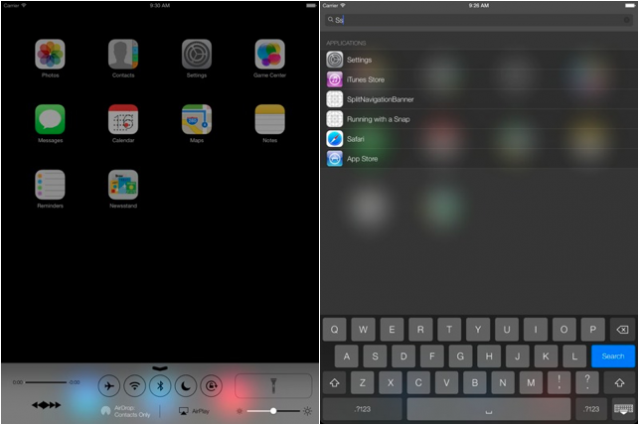
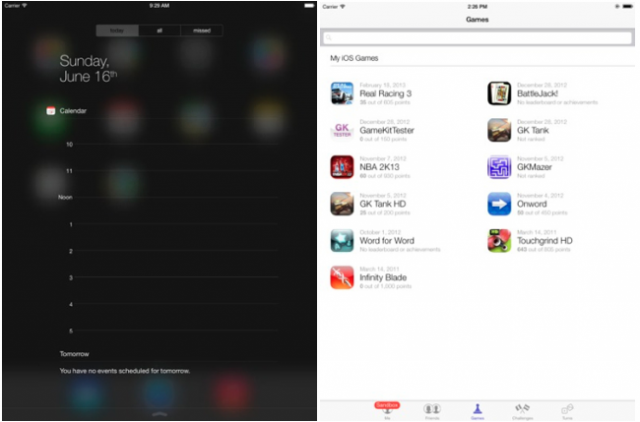
    However, if you’re on of the millions who are wondering exactly how iOS 7 will look on your iPad then these leaked screenshot will give you an indication. These images are from an iOS 7 emulator and carried over to iPad, but a notable change brings a full screen Notification Center to the forefront. Overall it seems that Apple is still working things out as important features like the Control Center and calendar aren’t in sync with how the iOS 7 beta looks on the iPhone.

    ios 7

    On the iPad, iOS 7 looks largely the same as it does on the iPhone, but more spread out. As is the case with iOS 6, Apple leverages the increased screen real estate the tablet affords it in order to improve certain areas of the OS’ functionality.

    Apple’s iOS 7 will come to the iPad 2, iPad 3, iPad 4 and iPad mini this fall, and an iPad iOS 7 beta is reportedly coming in the weeks ahead.

    [Via]

  • Leaked : Rumoured Logitech Gaming Controller For iOS 7

    Leaked : Rumoured Logitech Gaming Controller For iOS 7

    A leaked photo of the iOS 7 gamepad has surfaced, showing an iPhone 5 compatable gamepad device featuring the Logitech G logo design.

    In iOS 7, Apple has designed a bunch of specifications to enable accessory makers to deploy controllers with consistent sets of elements that both players and game designers work with.

    ios 7

    The controller fits around an iPhone 5 and features a thumb stick and five buttons. The Logitech manufactured peripheral will work with devices running iOS 7, according to Kotaku, who received the leak.

    Since the controller appears to be a G-series product in Logitech’s lineup, we have reason to believe it’s a prototype (i.e. not the finalized product).

    No word on when we might see this, although we would expect it to come to market when iOS 7 is released late in the third quarter or early in the fourth quarter. While Apple is not expected to offer its own gamepad, the Logitech model in the picture is just one of many expected options available for game playing Apple iPhone 5 owners by the end of the year.

    The idea of a decent gamepad controller for the iPhone is something that many gamers — casual or otherwise — are bound to be happy about.

    [Via]

  • Edit : iOS 7 Battery Life : One Word “Unfortunate”

    Edit : iOS 7 Battery Life : One Word “Unfortunate”

    Apple released iOS 7 for Beta testers and App developers a couple of days back. While we updated to the new OS in almost utter haste, 48 hours into the update few things are different. There are certain things that once you switch over you will simply adore and get used to. But then there are things that, while iOS 7 is in beta, beckon the user to simply flash back to iOS 6.


    Here is what we like about iOS 7

    A lot of things have become easier, and although small little changes don’t make sense to the observer, in the entirety of the situation they add up to an amazing overhaul of the usage experience.

      • Control Center : iOS 7 Control Center, according to my personal opinion, is the most awaited change in the OS. The only reason SBSettings ever existed and the only reason I ever Jailbroke my iPhone. Yes it has existed in Android forever, but Apple put it in a different location. Notifications from the top, control toggles from the bottom. Whether it is building on someone’s idea or simply changing a creation to make your own, it makes sense. Why has no one else ever thought of this? Our money is on multiple apps enabling this bottom toggle drawer on Android in 3 -2-1….. 
      • Page Swiping : To unlock iOS you can now swipe anywhere on the lock screen, you can also swipe back from your Text Messages and Emails to come back into your conversations. It’s not a big deal but I can’t imagine my iPhone without it anymore, and i have used it only for 48 hours with these gestures. Gizmodo shows it off in a beautiful way.
      • Minimal Design : As we progress into the future, a more minimal approach cleans up clutter and sort of de-stresses the effort. While many elements of the UI are truly unfinished and kiddish, the overall idea is marvelous. The interface is a lot more relaxed and “sober”, for the lack of a better word. It does a lot more with animations and highlight. Once Apple does fix the major design issues, and they must, the UI should be well appreciated by those in the iOS ecosystem.
      • Blocking: Over a hundred Apps on Android do this, iOS 7 has a wonderful new feature built in that simply lets you block all conversations from a particular number to you phone. Those annoying property sale messages are a thing of the past for me, any new spam number gets added almost instantly. The person calling on the other end gets a busy tone, and you don’t even get a notification. The blocking feature is also premature, I would like to select what all I want to block, only messages or only phone should be an option when they finally roll out. Another feature that would allow you to have a log of all the blocked calls or messages, which users could manually access, would make the feature perfect.


    Here is what we don’t like about iOS 7

    The OS is still in BETA stage and although it is a bit premature to give out opinion on Apple’s new iOS 7, these are things that may make us switch back to iOS 6.

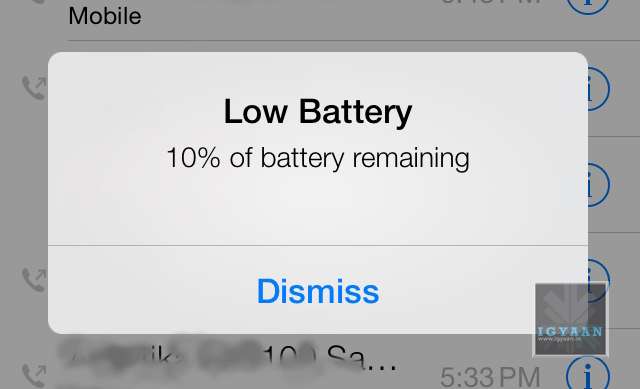
      • Battery Life : There is only one word : Unfortunate. The battery life on iOS 7 is lower than ever, we do understand that the OS needs to be tweaked and so do the Apps to work with the ecosystem. But an iPhone 5 on iOS 7, heats up like a firecracker and is ready to go off any moment. Even for developers, the reliability of the battery needs to be perfect, before Developers can start testing their Apps on the OS. At present, only a few may be able to get any work done. 


    Get used to this symbol!


      • Tap Precision : While many will debate the fact that the OS is new, the overly minimal design has made it a lot more difficult to use the iPhone or iPod on iOS 7. At some deeper level this may be Apple’s way of improving concentration with people (Apple a Day, makes you witty and gray). All Apple puns aside, the company needs to ensure that the final build is either more relaxed in terms of precision of tapping, or less minimal.

    A lot more design improvements as well as software fixes are required to make iOS 7 stable and ready for public consumption. However, even with the changes that Apple has shown off, the interface lacks a certain finished feel. While some elements are overly appreciated, some bugs have forced us to revert. A phone that requires a charge every 2 hours if of no use. So, While its time for us to switch back to iOS 6.1.4 on our iPhone 5, it is safe to say Apple is headed in the right direction. Are you switching yet ?

    [youtube id=”S5-KmW1QhcE” width=”100%” height=”300px”]

iGyaan Network
Privacy Overview

This website uses cookies so that we can provide you with the best user experience possible. Cookie information is stored in your browser and performs functions such as recognising you when you return to our website and helping our team to understand which sections of the website you find most interesting and useful.