Tag: shipping

  • Amazon Might Have a Secret Air Cargo Service Called “Aerosmith”

    Amazon Might Have a Secret Air Cargo Service Called “Aerosmith”

    New reports suggest that Amazon might be the owner of a secretive air cargo service that launched earlier this year.  Air Transport Services Group (ATSG) had begun shipping consumer goods out of a decommissioned air base in Ohio. The entire operation is being referred to as operation “Aerosmith”; however, the reported mystery company has not been revealed yet.

    Amazon Boxes

    This airfield is Wilmington Air Park and is a non-passenger airport that has been air-shipping cargo for various clients for some time now. It was previously used by DHL operations from 2003 to 2008, but has since remained empty.

    Recent reports have confirmed that Amazon has been looking for effective ways to serve its customers by creating drone superhighway and opening physical stores. Therefore, it only makes sense that owning their private air cargo operation would only allow the company to ship their products without any hassle of a middleman.

    Amazon Books

    More details about this tells us that the company behind “Aerosmith” has contracted four Boeing 767s, that fly from Wilmington to four other airports which are at close proximity to Amazon distribution centers. However, representatives at the airports have only mentioned that the cargo was coming in as “general consumer goods.”

    Companies such as FedEx, UPS and DHL have already confirmed that they are not the ‘mystery company’. Amazon has also reportedly been working on an overnight parcel delivery service.

    This isn’t really a crime so we wouldn’t know why anybody would be hiding it. Anyway, Amazon has not confirmed anything yet. Let’s just hope there is some sort of an announcement soon enough, because this seems like a silly secret to keep.

  • Lumia 950, 950XL May Launch in India on 5th November

    Lumia 950, 950XL May Launch in India on 5th November

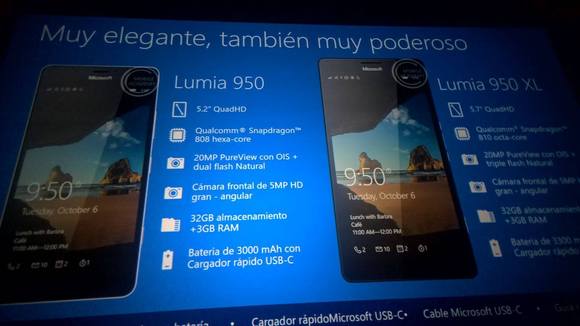
    Microsoft is all set to ship over a 1000 Lumia dummy devices in the country. The company will be holding a technology conference, ‘Future Unleashed’, for the same in Mumbai on the 5th of November, and it will be attended by CEO, Satya Nadella.Lumia Dummy ImportsThe company is shipping 500 Lumia 950 and 500 Lumia 950 XL dummies to India, according to Zauba, a website that records imports to the country. These devices will be available at retail stores for potential buyers to take a look at. The current price tags they come with are $587 (about Rs. 38,000) USD for the Lumia 950, and $665 (about Rs. 43,000) for the Lumia 950 XL. Lumia Dummy Imports 1We had expected the two devices to come out at IFA Berlin this year. Even though this was not to be so, around late September, leaked images with specs of the two Lumia phones appeared on the internet.

    Lumia 950 and Lumia 950 XL

    According to the slides, here are the specs for the Lumia 950 and the Lumia 950 XL. These specs also matched the earlier leaks that had been around for a while.

    Lumia 950:

    • Display: 5.2 inches, QuadHD
    • Processor: Qualcomm 6-core Snapdragon 808
    • Camera: 20MP PureView rear camera with optical image stabilization (OIS) and dual flash; 5MP HD front camera
    • Storage: 3GB RAM, 32GB internal storage
    • Battery: 3,000 mAh, with rapid charging via USB-C

    Lumia 950 XL:

    • Display: 5.7 inches, QuadHD
    • Processor: Qualcomm 8-core Snapdragon 810
    • Camera: 20MP PureViw rear camera with OIS and triple LED flash; 5 MP front camera
    • Storage: 3GB RAM, 32GB internal storage
    • Battery: 3,300 mAh, with rapid charging via USB-C

    These devices would perhaps be available just in time for Diwali for customers. For more information about the conference and other details, click here.

    Source: Zauba via [tw-button size=”medium” background=”#07ABE2″ color=”” target=”_blank” link=”http://wmpoweruser.com/microsoft-prepares-for-wide-distribution-of-the-lumia-950-range-in-india-imports-1000-display-dummies/”]WM Power User[/tw-button]

  • Shipping of iPhone 6s Plus Likely To Be Delayed

    Shipping of iPhone 6s Plus Likely To Be Delayed

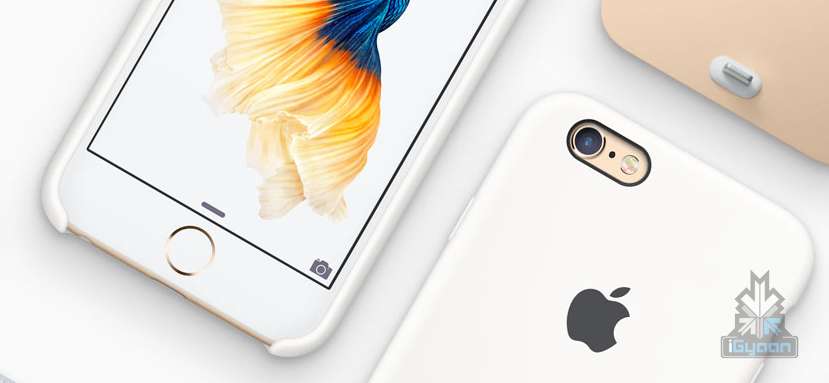
    Apple’s new iPhones – iPhone 6s and iPhone 6s Plus – were revealed last week. Pre-orders for the new models have already begun in the United States and other regions. However, due to some technical issues the shipping of the iPhone 6s Plus is likely to be delayed by 3-4 weeks.

    Reports suggest that the delay is due to issues with the backlight hardware of iPhone 6s Plus. Japanese supplier Minebea, which produces the backlight for the iPhone 6s Plus, is having issues related to supply. According to a note by KGI Securities analyst Ming-Chi Kuo to investors, Apple will hand over the order of the backlight to its other suppliers, Radiant, which will see orders upto 4-5 million units in September.

    “To accelerate availability, we believe Apple has been transferring substantial 6s Plus backlight module orders to Radiant. As such, we estimate the company’s iPhone 6s Plus backlight module orders to increase by 70-80 percent to 4-5mn units in September, boosting its order allocation from 35-45 percent to 70-80 percent,”

    Apple is looking to top the pre-orders of last year’s first-weekend record that sold over 10 million iPhone units. Apple is expected to have 1.5-2 million iPhone 6s Plus units ready to be shipped on 25 September, according to Kuo’s note.

  • Corsair Vengeance series gaming gear arrives with Mice and Keyboards (PR)

    Corsair Vengeance series gaming gear arrives with Mice and Keyboards (PR)


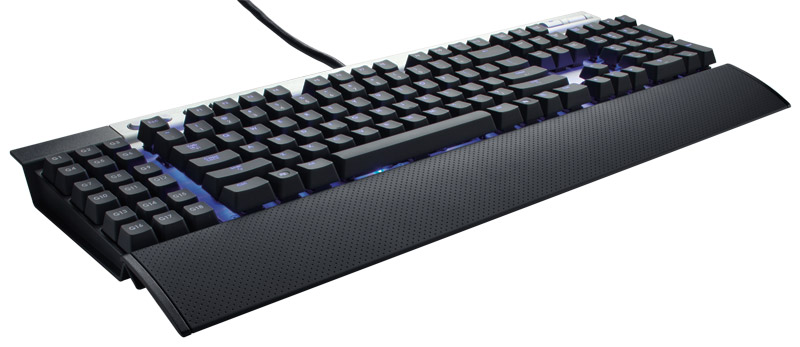
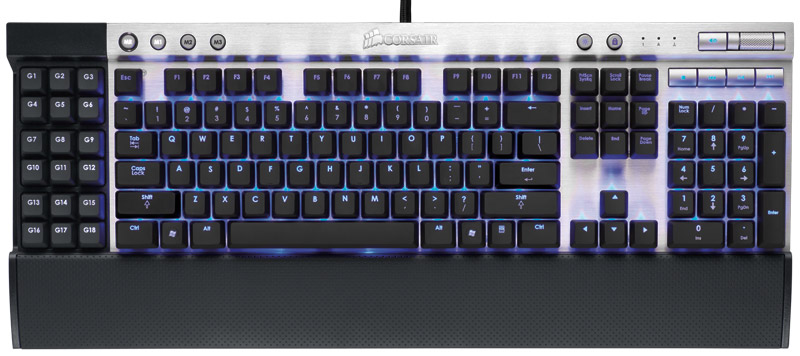
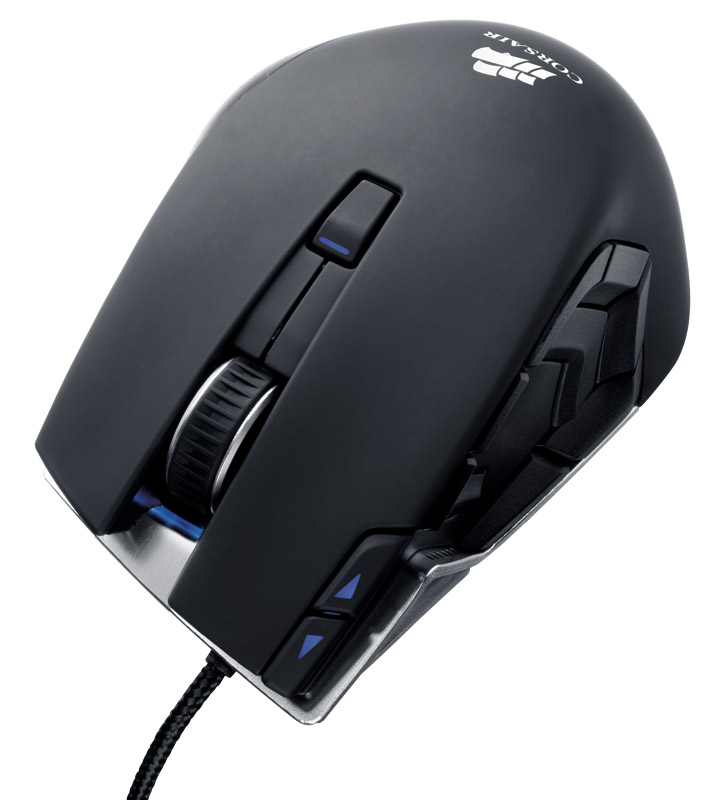
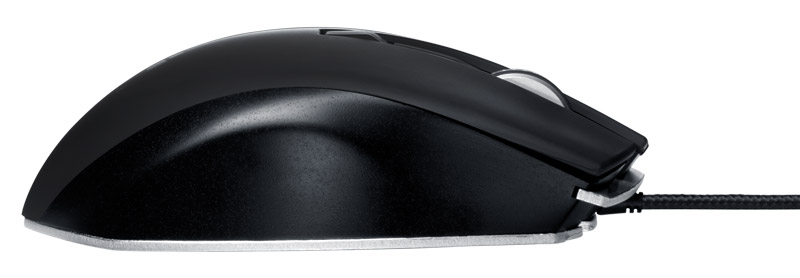
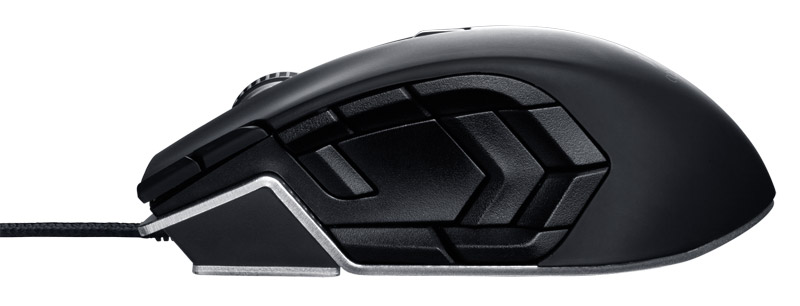
    Corsair has finally started shipment of their Vengeance series gaming mice and keyboards to their vendors worldwide. The Vengeance K60 and Vengeance K90 gaming keyboards and the Vengeance M60 and Vengeance M90 laser gaming mice are shipping out for the holiday season.

    The Vengeance K90 gaming keyboard has an MSRP in the United States of $129 and the K60 has an MSRP of $109. The Vengeance M90 gaming mouse has an MSRP of $79 and the M60 has an MSRP of $69. Add shipping and duties for Indian pricing.

    [toggle title_open=”Press Release” title_closed=”Press Release” hide=”yes” border=”yes” style=”default” excerpt_length=”0″ read_more_text=”Read More” read_less_text=”Read Less” include_excerpt_html=”no”]Corsair Announces Retail Availability of New Vengeance Gaming Keyboards and Laser Gaming Mice
    – The new Corsair Vengeance gaming peripherals line focuses on high performance and meeting the unique needs of PC gamers –

    FREMONT, California – December 15th, 2011 – Corsair®, a worldwide designer and supplier of high-performance components to the PC gaming hardware market, today announced immediate retail availability of their new line of Vengeance® PC gaming peripherals.

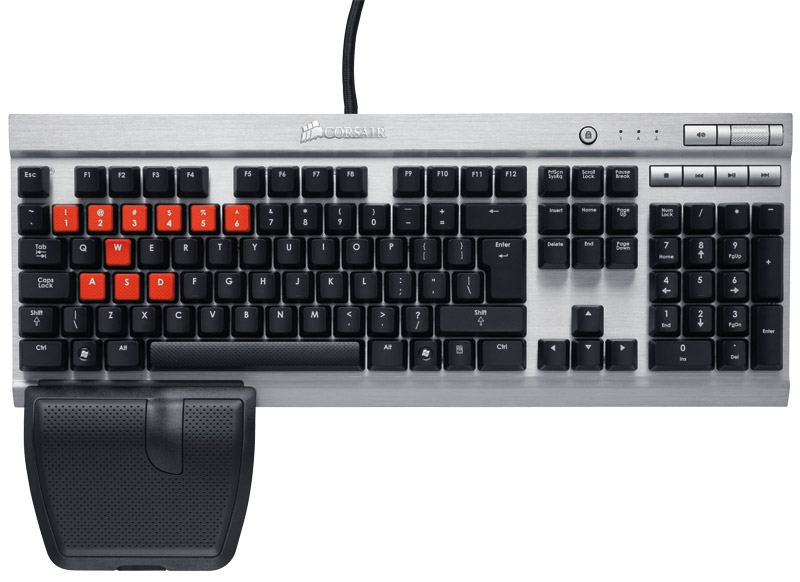
    Corsair’s new PC gaming peripherals line includes four new HID products: The Vengeance K60 and Vengeance K90 gaming keyboards and the Vengeance M60 and Vengeance M90 laser gaming mice. A key feature of all four of these new Vengeance Series products is the use of an aluminum structure to provide strength and durability, as well as a stunning industrial design.

    “We’re hardcore gamers ourselves, and with the new Corsair Vengeance line, we’ve developed precisely the products we always wanted.” said Ruben Mookerjee, VP and General Manager of the Components Business Unit at Corsair. “They’re carefully designed to give you the competitive edge you need to win.”

    Vengeance K60 and M60: Designed For First-Person Shooters

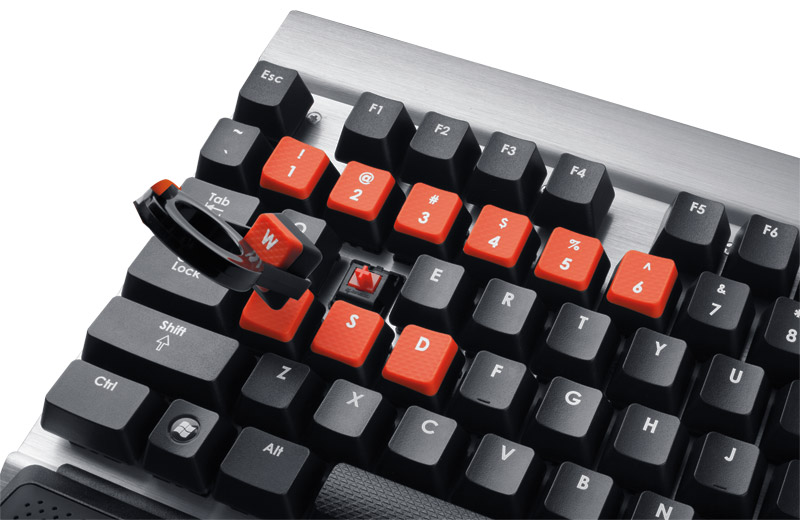
    The Vengeance K60 gaming keyboard and the Vengeance M60 laser gaming mouse are designed for PC Gamers who specialize in First-Person Shooters (FPS). The Vengeance K60 keyboard features the predictable linear response and light touch of Cherry® MX Red mechanical key switches for more agile movement and faster multi-taps. The contoured left-wrist rest plus shaped and textured WASD key caps increase comfort, even during extended gaming sessions. The K60 uses an advanced key matrix design that delivers complete anti-ghosting so no keystrokes are missed. Unlike other USB gaming keyboards that are limited to the USB-standard 6-key rollover, the K60 features a 20-key rollover and a blazing fast 1ms reporting rate (1000 reports per second).

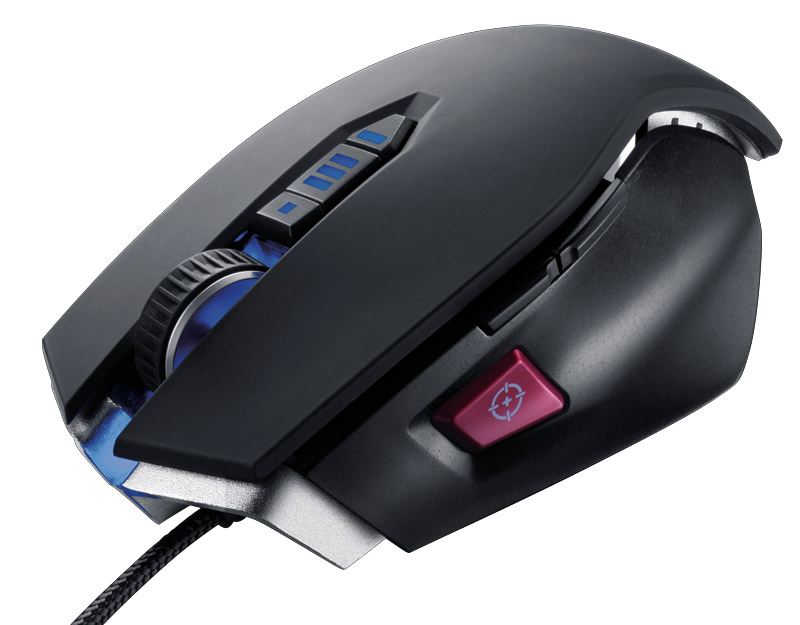
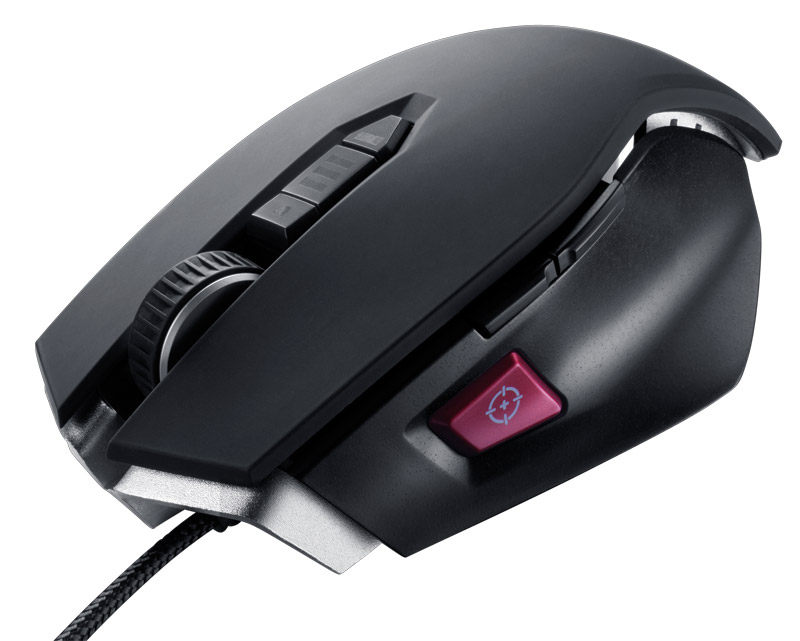
    The Vengeance M60 mouse features an enthusiast-grade 5700 DPI Avago Technologies LaserStream™ gaming sensor with on-the-fly resolution switching, an aluminum unibody design with adjustable center of gravity, programmable lift detection, a high-mass scroll wheel, and PTFE glide pads. A key innovation of the M60 mouse is the Sniper button, allowing an instant toggle from fast movement, high DPI-resolution mode down to a high-precision mode for more accurate aiming.

    Vengeance K90 and Vengeance M90: Designed For MMO and RTS Gaming

    The Vengeance K90 gaming keyboard and M90 laser gaming mouse are optimized to meet the unique needs of MMO and RTS gaming. The Vengeance K90 keyboard also features Cherry MX Red key switches, full anti-ghosting, 20-key rollover, 1ms reporting rate, and each key is individually backlit with a cool blue LED that can be adjusted to three different levels of intensity. The K90 also includes 18 dedicated macro keys that can be programmed either through software or on the fly, and with three user-selectable banks of macros you have a total of 54 independent macros available at any time. Your macros are stored in flash memory on the keyboard so you’ll be able to bring them with you wherever your gaming takes you.

    The Vengeance M90 gaming mouse features 15 fully programmable buttons, arranged and tuned for intuitive operation without compromising your grip, and on-board flash memory lets you save your macros in up to six profiles that can be switched on-the-fly. The Avago Technologies 5700 DPI LaserStream gaming sensor allows on-the-fly resolution adjustment and the programmable lift detection, high-mass scroll wheel, and PTFE glide pads ensure swift, precise movement. The intuitive Windows-based Vengeance software utility lets you manage your macro keys, on-board profiles, and sensor settings so you can customize your M90 to exactly match your gaming style.

    Pricing and Availability

    The Vengeance K90 gaming keyboard has an MSRP in the United States of $129 and the K60 has an MSRP of $109. The Vengeance M90 gaming mouse has an MSRP of $79 and the M60 has an MSRP of $69.

    The full range of Vengeance gaming peripherals is available from authorized Corsair retailers and etailers worldwide. To get the full story on our new Vengeance gaming keyboards and laser gaming mice, please visit:

    http://www.corsair.com/vengeance-gaming.html[/toggle]

  • Galaxy Nexus Priced at US$ 750, India Price?

    Galaxy Nexus Priced at US$ 750, India Price?

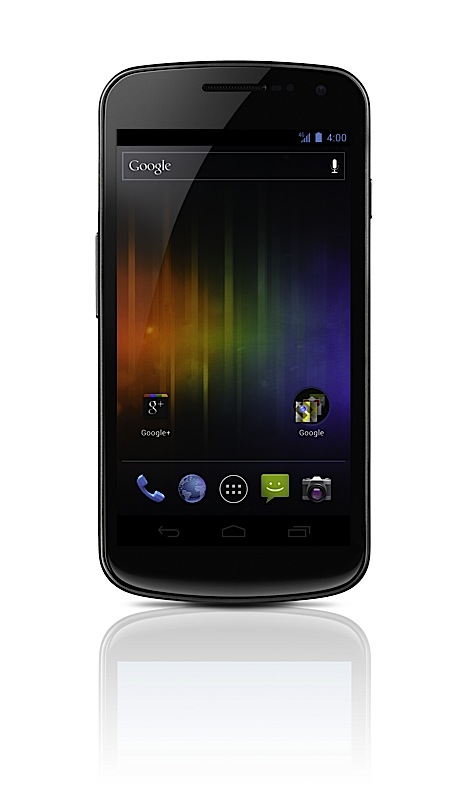
    The Galaxy Nexus got priced at a whopping US $ 750 which equals way over 35,poo Indian, to be a bit more precise, somewhere in the 37,500 mark. Does this mean a mass slaughter for hopes of all aiming to buy the galaxy Nexus? 

    The device has been on the Holiday wish-list of many a folk since the day it was announced. A price that high would really diminish expectant sales of the Galaxy Nexus. If Samsung India really wants to capture the market with this Google Phone then trust us Sammy, a price close to 30,000 would win a lot of Indian Hearts. We are no experts when it comes to market analysis (or are we) But Samsung has already flooded the field of opportunity with the S2 and the Note, now the higher price Nexus would just mean poor sales throughout.

  • Olympus PEN E-PM1 Mini Announced for US$ 500 and September launch

    Olympus PEN E-PM1 Mini Announced for US$ 500 and September launch

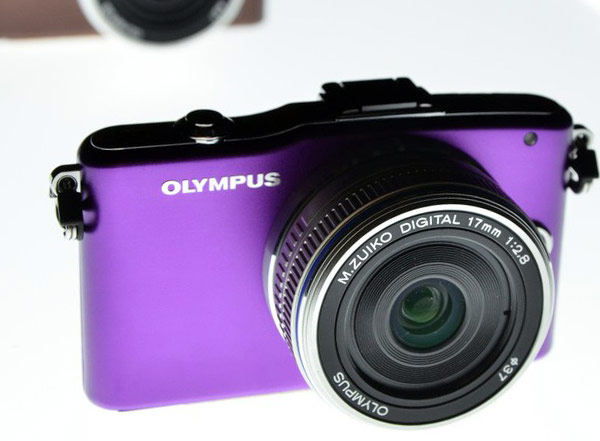
    Olympus has finally made the PEN E-PM1 Official and that too for a pretty ginormous 500 US $ or about 2500o Indian, including a 14-42mm f/3.5-5.6 kit lens. The company is calling it  “the easiest PEN to use,” yet the Olympus PEN is possibly the most impressive Micro four thirds series camera.

    Specs Include

    • New simpler user interface 
    • 23 Scene-Select modes
    • 3-inch 460k-dot LCD
    • 1080i HD video capture
    • RAW shooting 
    • ISO 12,800
    • Manual, Aperture Priority, and Shutter Priority shooting modes.
    • purple, pink, brown, white, silver, and black color options
     

    [toggle title_open=”Full Press Release” title_closed=”Full Press Release” hide=”no” border=”yes” style=”default” excerpt_length=”0″ read_more_text=”Read More” read_less_text=”Read Less” include_excerpt_html=”no”]

    The World’S Smallest Olympus PEN Is Also The Most Affordable: The PEN E-PM1 Packs Mega Power In A Micro Body For Under $500

    Small, Easy and Stylish Compact System Camera Ships in September and Fulfills the Promise of a Camera with Impressive DSLR Image Quality and HD Video in a Mini Camera Body

    CENTER VALLEY, Pa., August 25, 2011 – The wait is over! Starting next month, the smallest, lightest, and the most portable Olympus PEN camera – the PEN E-PM1 – will be available at the affordable price of $499.99. The Olympus “PEN Mini” comes in six stylish colors (purple, pink, brown, white, silver and black) to suit your personal style. The PEN E-PM1 packs a powerful punch with the same amazing image quality, lightning-fast speed, and 1080i high-definition (HD) video offered by the recently introduced PEN E-P3 and PEN E-PL3.

    The “PEN Mini” is also the easiest PEN to use, with simple controls that enable you to effortlessly access the power of digital photography. A step up from a point- and- shoot camera, the Olympus PEN E-PM1 features a new user interface that takes the guesswork out of capturing the perfect shot. A simple one-touch button enables you shoot HD video. iAuto and scene select modes enable you capture images with ease and speed, and six built-in Art Filters enable you explore your artistic side. The Olympus PEN E-PM1 puts the portability of a point-and-shoot with the performance of a DSLR in the palm of your hands.

    “The Olympus PEN E-PM1 is the ideal camera for those interested in DSLR quality in a compact camera design. It’s fun to use, super powerful, and its small size means it’s the ‘goes anywhere you go’ PEN camera,” said Katie Roseman, senior product manager, Olympus Imaging America Inc. “Whether you’re recording your child blowing out the candles on a birthday cake, capturing an elaborate candle-lit table setting at your favorite restaurant or chronicling a vacation, you will never worry about missing a fun or spontaneous moment with the PEN Mini by your side.”

    EASE OF USE

    Operating the “PEN Mini” is more intuitive with the newly-designed user interface. Popular menu options such as Art Filters, iAuto, Scene Modes, and Movie are immediately available for your selection. On-screen graphics are easy to read on the 3″ LCD and even include a handy pop-up guide to help you understand every setting. The Olympus PEN E-PM1’s Live Guide system allows you to preview effects as you adjust them before the image is even captured. iAuto mode automatically identifies the scene you’re shooting; portrait, landscape, night portrait, macro, or sport and adjusts the settings to optimize results. Choose from 23 Scene-Select modes, including the new 3D mode, Fireworks, Sunset, Children, Macro and Panorama, and more that cover almost any shooting situation. The camera’s three-inch widescreen 460-dot high-resolution LCD is so big and bright it enables you shoot and share photos and HD videos with ease.

    PROFESSIONAL IMAGE QUALITY

    The new 12.3 megapixel sensor is the same size as those used in pro quality DSLRs. Olympus’ in-body image stabilization technology makes it possible to use any compatible lens from wide-angle to telephoto, for perfectly clear, crisp photos no matter what the shooting situation, even in low light. New Face Detection Auto Focus adjusts focus automatically on the subject’s eyes for the best shot every time. You no longer need to worry about subjects appearing too dark against a light background with the PEN E-PM1’s Advanced Shadow Adjustment Technology.

    CREATIVE FREEDOM

    Shoot up to 29 minutes of full 1080i HD video with Dolby Digital stereo sound using the direct HD Movie Button. Add more flair to your photos and videos with six in-camera Art Filters (Pop Art, Soft Focus, Grainy Film, Pin Hole, Diorama and Dramatic Tone). Every Art Filter can be used in all shooting modes, including HD movie mode. Art Filters can achieve dramatic results on the go without the need for a computer or editing software, so you can spend more time shooting and less time computing. A variety of interchangeable lenses, accessories and flashes are compatible with the Olympus PEN E-PM1 to support all different photography needs. High-precision engineering and an improved internal focusing mechanism have enabled the Olympus MSC (Movie+Still Compatible) lenses to autofocus quickly, smoothly and silently; perfect for stills and HD movies in stereo with amazing clarity. In any mode, from close up to landscape, 3D technology brings your images to another dimension. The 3D data is processed in-camera for easy display on 3D televisions or laptops.

    LOW-LIGHT PERFORMANCE

    Capture the life of the party with the PEN E-PM1’s super luminosity AF Illuminator LED beam, which allows the camera to focus faster in low-light. Stunning night-time photos are a click away with a maximum sensitivity of 12,800 ISO. Additionally, the “PEN Mini” provides the flexibility of an optional slide-on flash included with camera.

    BLAZING SPEED

    The Olympus PEN E-PM1 offers fast sequential shooting, enabling you to take up to five photos per second. Capture that perfect shot, even when your subject is moving. The new FAST (Frequency Acceleration Sensor Technology) AF System is able to focus at an incredible speed and offers 35 separate focus areas that are spread over nearly the entire sensor, which makes it possible for pin-point accurate focusing on small subjects wherever they appear in the frame. The TruePic VI image processor has been designed specifically for the Olympus PEN series, with two (dual core) processing engines for superb color and clarity.

    AVAILABILITY

    The Olympus PEN E-PM1 kit will be available starting in September 2011. The kit includes the PEN E-PM1 body, MSC M.ZUIKO DIGITAL 14-42mm, FL-LM1 Flash, USB cable, video cable, BLS-1 Li-Ion battery pack, Li-Ion battery charger, shoulder strap, OLYMPUS [ib] software CD-ROM, manuals and registration card.

    U.S. PRICING / PRODUCT CONFIGURATIONS
    Olympus PEN E-PM1 Body with MSC M.ZUIKO DIGITAL ED m14-42mm II R f3.5/5.6 Zoom Street Price: $499.99

    Journalists interested in more information, review units and high-resolution images of the Olympus PEN cameras and PEN lenses and accessories should contact Keith Gordon, Mullen Public Relations, 212-885-3218, [email protected], or Jennifer Colucci, Olympus Imaging America Inc., 484-896-5719, [email protected], or visit the Olympus website: http://www.getolympus.com.

    [/toggle]

  • Acer Iconica 6120 Dual Screen TouchBook Gets a Price – PreOrder

    Acer Iconica 6120 Dual Screen TouchBook Gets a Price – PreOrder

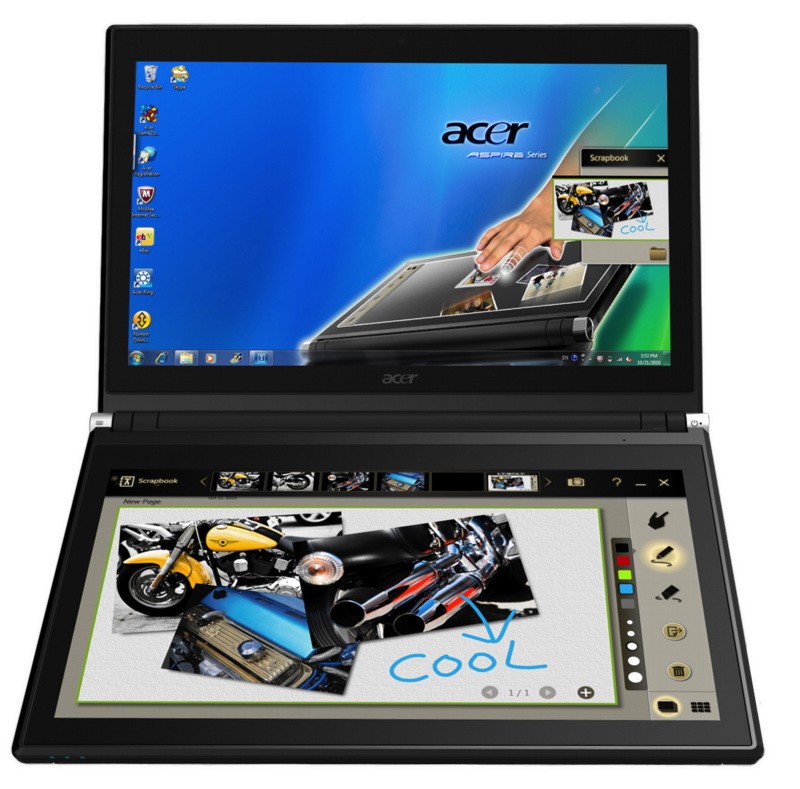
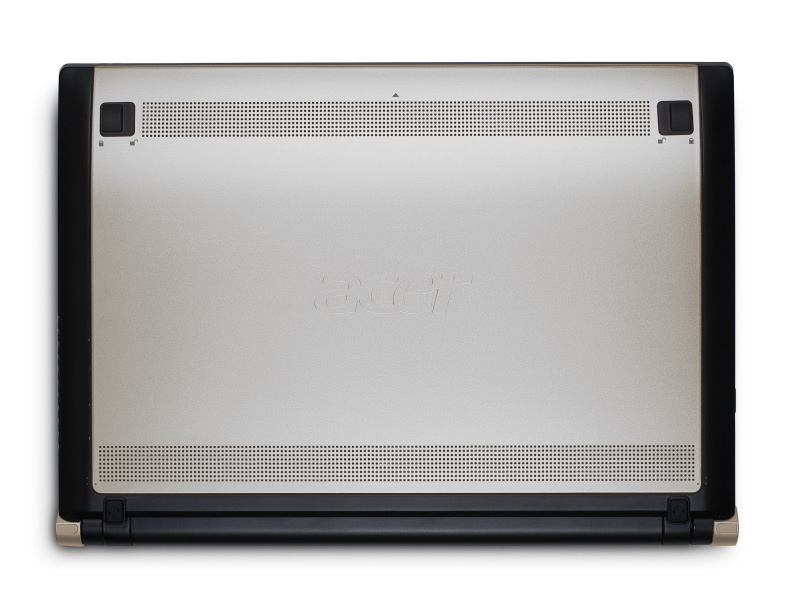
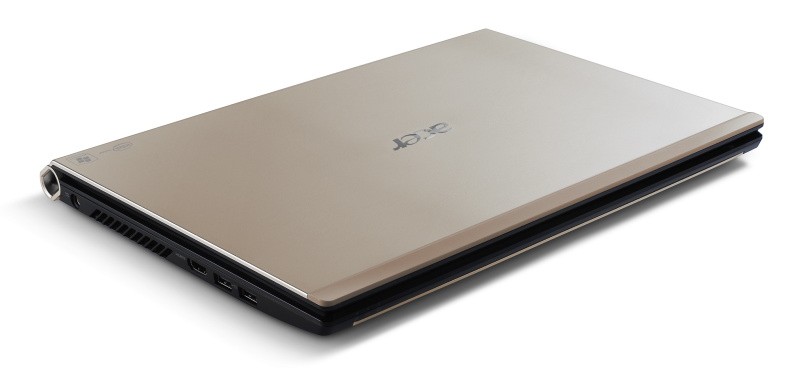
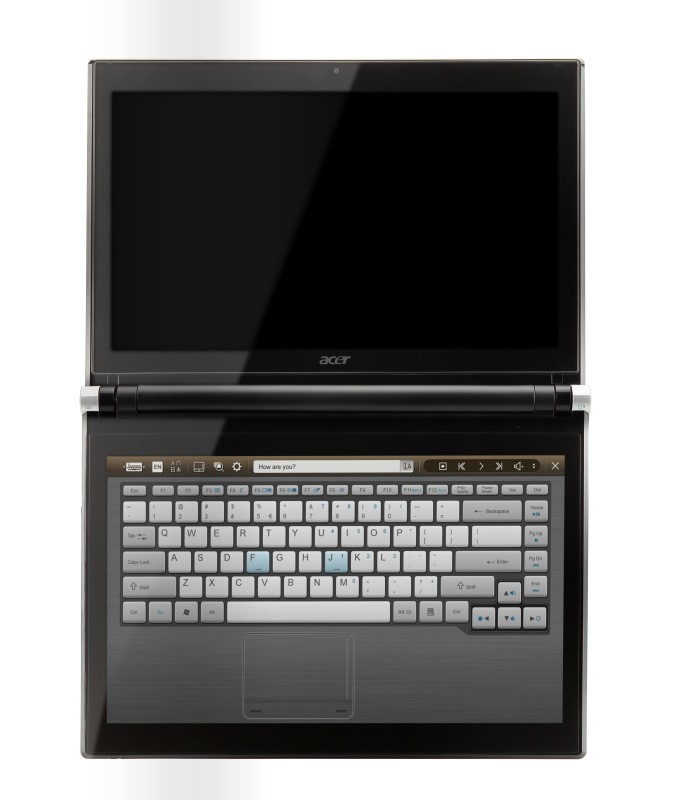
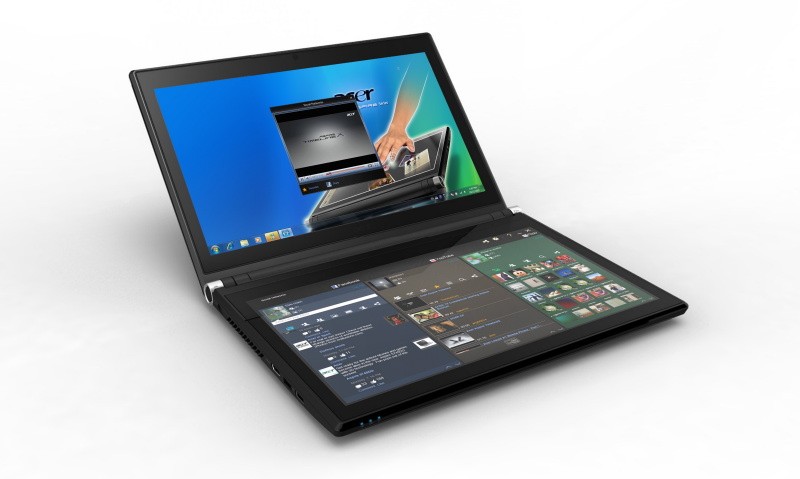
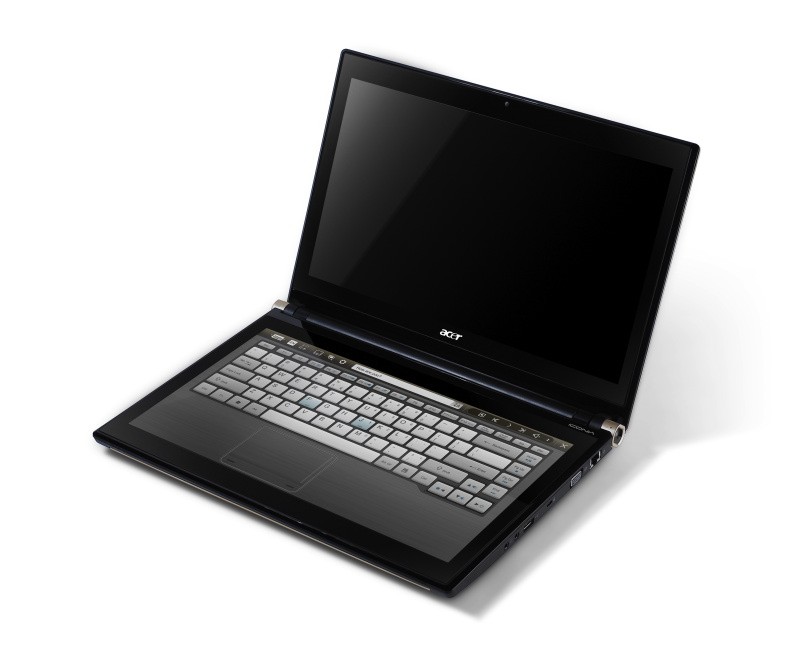
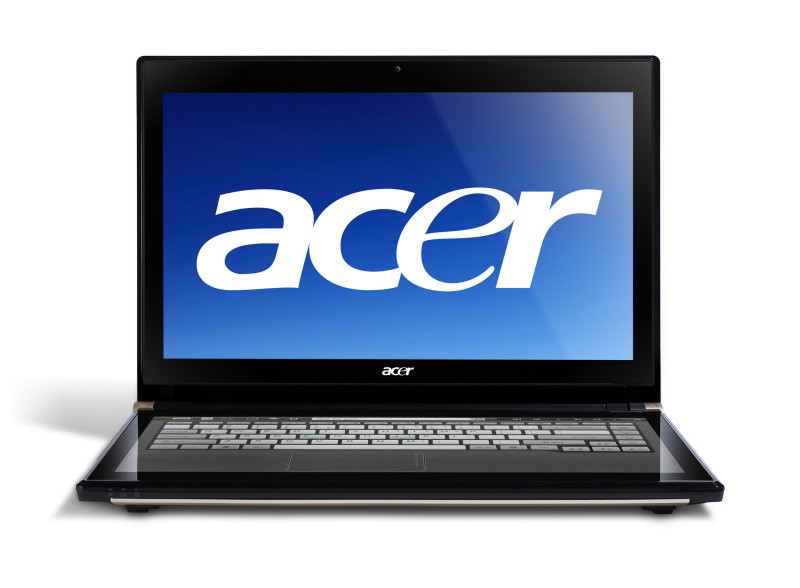
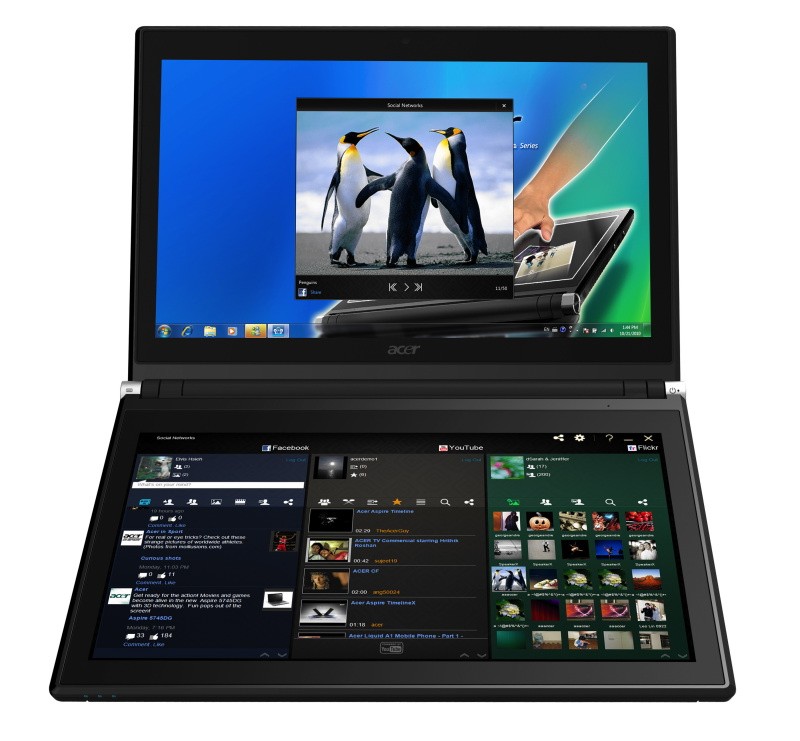
    Acer has announced the Pre-Order of its new Iconica Dual Screen Touch Notebook .

    • Price $1,199.99 ( US and CAD)
    • Dual 14-inch Gorilla Glas TouchPanels
    • Core i5 CPU
    • 4GB of memory
    • Intel HD graphics
    • 64-bit
    • Windows 7 Home Premium
    • USB 3.0 support
    • 640GB hard drive
    • 1.3 megapixel camera
    • 802.11b/g/n WiFi
    • HDMI output
    • Gigabit Ethernet
    • Weight 5.95 Pounds or 2.7KG (thats heavy!)


    Acer Iconia Touchbook Dual-Screen Tablet
    Provides Engaging, Natural Way to Interact with Digital Data

    World’s First and Only Tablet Featuring Two 14-inch Touch Screen Displays
    Now Available for Pre-Sale in the U.S. and Canada

    SAN JOSE, CA – March 29, 2011 – Acer today announced that its much anticipated dual screen tablet, the Iconia-6120 Dual-Screen Touchbook is now available for pre-sale in North America. Providing a powerful, immersive touch experience like no other, it is the world’s first and only tablet to offer two touch-enabled 14-inch high-definition widescreen LED backlit LCDs.

    Intuitive to use and customizable to individual needs, it combines the power of Intel Core i5 processing with the familiarity of Windows 7, and is destined to change how people use technology to engage with the world. A winner of this year’s prestigious “Last Gadget Standing” award at CES, the Iconia was noted for incorporating the best features of any notebook or tablet device.

    With the flexibility to use a finger, type on a virtual keyboard, or use a combination of both, the Iconia Touchbook provides many ways to make the computing experience a truly personal one. Consumers can customize what is shown on each screen, allowing them to watch a video on the top screen and browse their multimedia library on the bottom one, or view a single web page across the two displays. Using the bottom screen to manage and control the action on the top screen keeps presentations, movies or web pages free of icons and other navigational tools.

    Extremely durable and scratch resistant, the Iconia’s 14-inch LCDs are made of ultra-thin Gorilla® Glass from Corning, a renowned manufacturer of extremely durable glass. With a wipe and clean coating, it’s easy to keep the displays shiny and smudge-free.

    “The Acer Iconia Touchbook delivers a computing and visual experience like no other,” said Eric Ackerson, senior product marketing manager, Acer America. “Whether the Touchbook is used by a small business owner or a student, its unique dual screen design enhances the interaction they will have with their digital data. Our compelling design and applications will let them discover new and much more personal ways to communicate and enjoy the computing experience, regardless of whether it’s work related or for personal enjoyment.”

    The Heart of Iconia – the Acer Ring Control Interface
    The unique Acer Ring Control Interface makes navigating by touch simple and intuitive. By placing five fingers in a circular pattern on the bottom display, the Acer Ring appears, providing instant access to favorite applications and features. From this point, consumers can use their fingertip or launch the virtual keyboard to change the tablet’s settings, surf the web, capture screen images, post photos and status updates to a social network, watch a movie and more, all in the manner most comfortable and natural to them.

    AppCards Provide Quick and Easy Access to Productivity and Entertainment-Based Applications
    Appearing on the either side of the Acer Ring is a unique set of Iconia touch-based applications, called AppCards. Using a finger, users can scroll to the one they want, and simply tap it to have instant access to a range of compelling programs ideal for either business or home use.

    • TouchBrowser is specifically designed to offer a more comfortable web surfing experience when using touch input. Upon launching, web content will flow across both screens. A toolbar at the bottom of either screen provides easy control over the open pages. To enter a website address, consumers can use the virtual keyboard or enter it using handwriting gestures. A pinching action will zoom in on the content on the page. Pages can be added to Favorites by simply tapping the Add Favorites icon.

    • MyJournal is a handy place to keep clippings of websites and other information. Images can be captured from any web page and organized onto a single, easy-to-view page. It includes pre-set tabs for News, Sports, Entertainment, Politics and Business. The selected website content on the tabbed pages is automatically updated each time it’s opened. A toolbar at the top of the page makes it easy to edit, resize, rename and move clips to other pages. In a business environment, a professional will find this feature useful in tracking news on competitors or to keep an eye on the stock market. A consumer can follow a local news story, their favorite sports team or keep an eye on their favorite celebrity’s latest antics.

    • Social Jogger simultaneously connects to three of the most popular social networking sites — Flickr, Facebook, and YouTube, presenting them a simple interface on one screen. Users can check posts and updates on one screen at a glance, and use the other screen to view one of the sites in more detail, surf the web, view photos or work on a spreadsheet.

    • Scrapbook is a convenient place to store website and photo images and other content. It includes a pen tool for drawing or entering handwritten text, such as adding comments or reminders. From there, images can be exported to the clipboard for insertion into other applications, or saved as an image file.

    • TouchPhoto, TouchMusic and TouchVideo provide direct access to multimedia files stored on the tablet.

    “The Acer ICONIA Dual Screen is a great demonstration of how hardware and software together enables new ways to interact with your PC,” said Soren Lau, senior director of marketing in the Original Equipment Manufacturer Division at Microsoft. “With Windows 7, you get the familiarity of Windows with support for multi-touch, so you can flick through videos and files with a fingertip, or use the touch-based on-screen keyboard.”

    Easy-to-use Tools Make Navigating Intuitive and Fun
    Appearing directly on the Acer Ring are a number of useful functions and tools, including Virtual Keyboard, Gesture Editor, Capture, Webclip, Window Manager and Device Control. Tapping the desired tool’s icon brings it up for immediate use.

    • The Virtual Keyboard gives users the ability to enter data and navigate in a familiar fashion. Combined with its touch capabilities, the Iconia Touchbook is a flexible and powerful tablet designed for maximum efficiency and productivity. When both palms are placed on the bottom screen, the virtual full-sized keyboard instantly appears. Adaptive typing and predictive text allows for quick data entry and minimizes mistakes. A numeric touchpad with handwriting recognition converts handwriting to text. The palm rest area can also be customized with any image on the computer – a company logo or a scenic background — so users can personalize the tablet even more.

    • Gesture Editor is a simple and quick way to instantly launch specific applications, access favorite websites, or even to lock the computer with a simple finger motion. A set of pre-defined gestures is included, but customized gestures can be created in just five easy steps. For example, simply drawing a $ (dollar sign) on the screen can launch a financial or accounting application, or a (checkmark) can open a to-do list.

    • The Capture tool allows users to clip parts of an image (a photo, illustration or a webpage) and save it to the Scrapbook application for further editing. It’s a great way to collect images for use in a PowerPoint presentation. And it couldn’t be easier to do. With the picture on the top screen and the Scrapbook page opened on the bottom display, users just tap the Capture tool, run their finger around the desired image and then tap the area to open a menu that will allow them to drag and drop it onto the Scrapbook page. The captured image will automatically be added as a thumbnail image above the scrapbook page for quick and easy viewing. They can then drag and drop the desired thumbnail onto the page, where it can be rotated or resized with pinching actions.

    • The Web Clip tool is specifically for clipping parts of web pages to save to MyJournal. Tap the screen, select the area to crop, tap and drag on any of the corners of the selected area to size it, and then tap the area again to open a menu to paste the content into MyJournal, Scrapbook or copy it to the clipboard. It can also be saved as a bitmap file.

    • Window Manager provides a touch-friendly interface for controlling the various open windows on the displays. Users can customize which screen the application appears on as well as its size.

    • Device Control is an easy way to access and adjust power, display and volume settings, wireless connections and various devices connected to the HDMI, VGA and USB ports.

    Clear.fi makes data sharing convenient in small office environment or the home
    Making it easy to share multimedia content, the Acer Iconia Touchbook features clear.fi, Acer’s digital media sharing solution. Clear.fi automatically connects all Acer devices on a network (smartphones, notebooks, desktops, HD media players and storage devices) and then gathers and organizes media files by type (video, music, photo, pre-recorded TV). Users can browse the categories and then drag and drop the media to any of the connected PCs or devices for playback.

    No-Compromises Tablet Features Leading Technology for Maximum Productivity and Fun
    A super charged tablet filled with enough leading technology to rival many desktop and notebook PCs in performance, the Iconia-6120 Dual-Screen Touchbook is powerful enough to handle demanding applications and graphic intensive multimedia files. Featuring an Intel® Core™ i5 Processor with Intel® Turbo Boost Technology(2), 4GB of memory and Intel® HD graphics, the Touchbook is equipped for heavy lifting. In addition, Dolby® Advanced Audio™ v3 brings vibrant sound to business presentations, movies, music, and games.

    Windows 7 Home Premium 64-bit provides a familiar computing environment and is compatible with today’s most popular applications and media formats, and supports full web browsing with Adobe® Flash® Player 10.1. For professional environments, customers can upgrade using Windows Anytime Update to Windows 7 Professional to attain business-class PC: manageability, security and the ability to run the applications used within most organizations today, including Microsoft Office.

    To maximize productivity, the Touchbook includes the new USB 3.0 standard with a top speed that’s 10 times faster than standard USB 2.0; a 25GB high definition video file can be transferred from an external USB 3.0 storage device in just 70 seconds and stored on the roomy 640GB SATA hard drive(3). Two 2.0 USB ports and an HDMI port are also included.

    A 1.3 megapixel HD webcam is ideal for face-to-face videoconferencing or for staying in touch with business associates, friends and family. Connect reliably with 802.11b/g/n Wi-Fi CERTIFIED™ or Gigabit Ethernet LAN from work, home or while on-the-go. Weighing in at just 5.95 pounds(4), it’s as convenient to carry as any notebook computer, and fits comfortably in a briefcase or backpack.

    U.S. Configurations, Pricing and Availability
    With an MSRP of $1,199.99, the Acer Iconia-6120 Touchbook is available for pre-sale now and will be available in April at leading retailers nationwide.

    Canada Configurations, Pricing and Availability
    With an MSRP of $1,199(CAD), the Acer Iconia-6120 Touchbook will be available in April through authorized Canadian resellers.


  • iG-Exclusive : Nokia E7 Coming to India Next Month

    iG-Exclusive : Nokia E7 Coming to India Next Month

    While we will tell you that, Nokia Global – Announced that the E7 has been announced for Select Markets and should be shipping in countries in and around EU – UK, etc, anytime now. We just got word from Nokia Sales Rep Jatin Kaushik , That, the device is already slated for India and may come as early as next month.

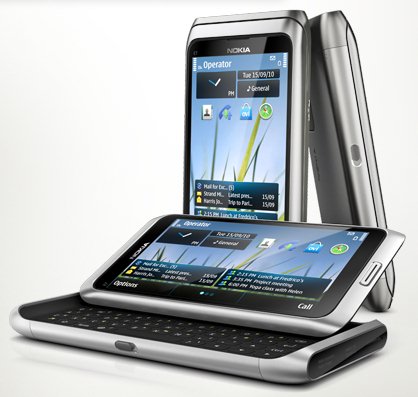
    The QWERTY flagship from Espoo has

    • A 4-inch Clear Black Display
    • Latest version of Symbian
    • 8 megapixel camera
    • 16GB of onboard memory,
    • Aluminum body
    • Slideout keyboard

    On a different note : we expect the device to be slated at the 26,000/- Price mark (you could expect higher)


    Full PR


    All-in-one business smartphone, the Nokia E7, arrives in stores

    Espoo, Finland – The highly anticipated Nokia E7 will begin arriving in stores in select markets this week, with broader availability building up quickly in several markets.

    With its tilting 4 inch ClearBlack display, full qwerty keyboard and a fast access to a wide variety of apps directly on the homescreen, the Nokia E7 is the key to having a successful day in or out of the office. Importantly, the device supports business applications from leading enterprise technology partners including Microsoft and IBM.

    Key features of the Nokia E7
    – Easy access to private and business email 
    – Create, edit and share office documents and view PDF files with Adobe Reader
    – Fast, secure intranet access with the built-in VPN
    – High-resolution photos and HD video with the 8 megapixel camera and dual LED flash
    – HDMI connectivity to project files, videos and images onto large screens
    – 16 gigabytes of on-board flash memory
    – USB-On-The-Go, enabling easy file sharing by connecting a USB stick to the smartphone

    For business users, Nokia E7 provides direct, secure and real-time access to email, calendar, contacts, tasks and the corporate directory through Microsoft Exchange servers, as well as Office Communicator Mobile, developed by Microsoft for Nokia smartphones, which brings presence and corporate instant messaging.

    Additionally, a wide range of entertainment and social services available on the Nokia E7 make it the perfect off-duty companion, and the Ovi Store offers a wealth of apps such as Bloomberg, Angry Birds and Sports Tracker.

    The new arrival offers drive or walk navigation in 80 countries. The latest commercial version of Ovi Maps, available immediately via Ovi Store or Ovi Suite, adds visibility to subways, trams and trains, real-time traffic, safety alerts, visibility to parking and petrol stations, speed limit warnings, and improved search and location sharing capabilities.

iGyaan Network
Privacy Overview

This website uses cookies so that we can provide you with the best user experience possible. Cookie information is stored in your browser and performs functions such as recognising you when you return to our website and helping our team to understand which sections of the website you find most interesting and useful.