Tag: softwareupdate

  • iOS 6 starts pushing out to iOS devices all over the world.  (Changelog)

    iOS 6 starts pushing out to iOS devices all over the world. (Changelog)

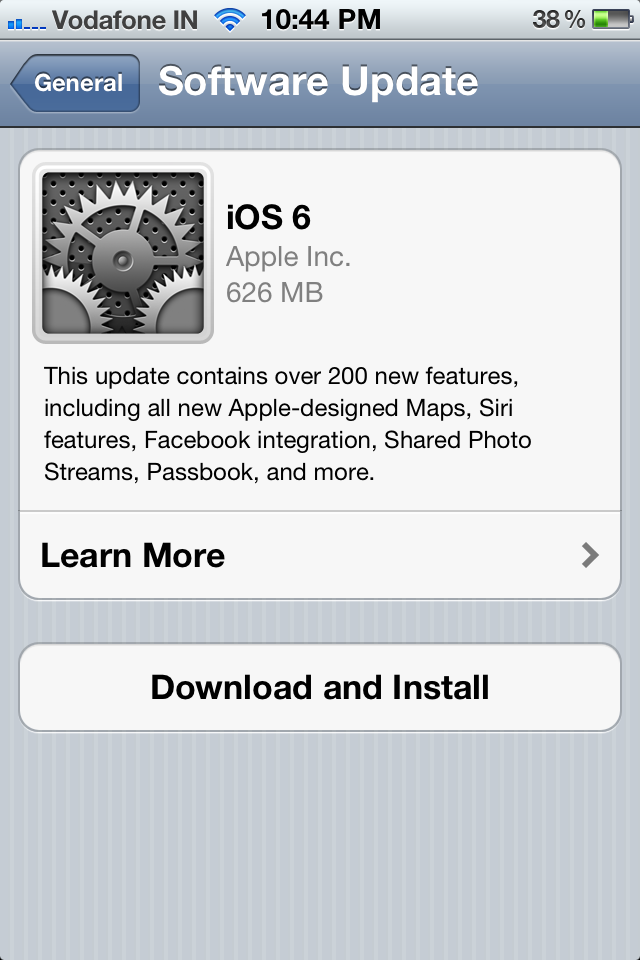
    Apple has started pushing out iOS 6 as we speak, while we download and update our iOS devices, you can check out the full log below.

    The iPhone 4S version is about 626 MB OTA.

    iOS 6 Software Update

    This update contains over 200 new features, including the following:

    • Maps

    • Apple designed vector based maps
    • Turn-by-turn navigation with spoken directions on iPhone 5, iPhone 4S, iPad Wi-Fi + Cellular (2nd and 3rd generation)
    • Real-time traffic information
    • Flyover for photo-realistic, interactive 3D views of major metro areas on iPhone 5, iPhone 4S, iPad (3rd generation), and iPod touch (5th generation)
    • Local search results with Yelp photos, ratings, reviews, and available deals
    • Siri integration for requesting directions and finding places along a route

    • Siri improvements

    • Sports: scores, player stats, game schedules, team rosters, and league standings for baseball, basketball, football, soccer and hockey
    • Movies: trailers, showtimes, reviews and facts
    • Restaurants: reservations, reviews, photos and information
    • Send a Tweet
    • Post on Facebook
    • App launch
    • Eyes Free in supported automobiles
    • Local search available in Siri supported countries (availability may be limited during initial rollout)
    • Additional country and language support for Canada (English and Canadian French), China (Mandarin), Hong Kong (Cantonese), Italy (Italian), Korea (Korean), Mexico (Spanish), Spain (Spanish), Switzerland (Italian, French, German), Taiwan (Mandarin), US (Spanish)
    • Supported on iPhone 5, iPhone 4S, iPad (3rd generation) and iPod touch (5th generation)

    • Facebook integration

    • Single sign-on from Settings
    • Post from Photos, Safari, Maps, App Store, iTunes, Game Center, Notification Center and Siri
    • Add location and choose audience for any post
    • View up-to-date Facebook profile photos and contact information in Contacts
    • View Facebook events and birthdays in Calenda
    •  Like content and see your friends’ Likes in App Store and iTunes Store

    • Shared Photo Streams

    • Share selected photos with the people you choose
    • Friends can view shared photos in Photos app, iPhoto and Apple TV
    • Friends can like and make comments on individual photos

    • Passbook

    • One place for boarding passes, store cards, movie tickets and other passes
    • Barcode display for boarding flights, buying coffee, getting into movies and other actions
    • Passes displayed on Lock Screen based on time or location
    • Passes can be automatically updated
    • Supported on iPhone and iPod touch

    • FaceTime improvements

    • FaceTime over cellular support for iPhone 5, iPhone 4S and iPad Wi-Fi + Cellular (3rd generation)
    • Receive FaceTime calls, sent to your iPhone number, on your iPad and iPod touch

    • Phone improvements

    • Do Not Disturb to suppress incoming calls and notifications
    • ‘Reply with message’ option when declining a call
    • ‘Remind me later’ option based on time or location when declining a call

    • Mail improvements

    • VIP mailbox to quickly access mail from important people
    • Flagged email mailbox
    • Insert photos and videos when composing email
    • Open password protected Office docs
    • Pull down to refresh mailboxes
    • Per account signatures

    • Safari improvements

    • iCloud tabs to see open pages on all your devices
    • Offline Reading List
    • Photo upload support
    • Full screen landscape view on iPhone and iPod touch
    • Smart app banners
    • JavaScript performance improvements

    • App Store and iTunes Store improvements

    • Updated store design
    • iTunes Preview history
    • Complete my season
    • Complete my album

    • Game Center improvements

    • Challenge friends to beat high scores and achievements
    • Post high-scores and achievements to Facebook and Twitter
    • Friend recommendations based on your Facebook friends

    • Accessibility improvements

    • Guided Access to limit device to one app or restrict touch input on certain areas of the screen
    • VoiceOver integration with Maps, AssistiveTouch and Zoom
    • Support for Made for iPhone Hearing Aids for iPhone 5 and iPhone 4S

    • Improved privacy controls for Contacts, Calendars, Reminders, Photos and data shared over Bluetooth
    • Reminders can be reordered in the Reminders app
    • Custom vibrations for alerts on iPhone
    • Clock app for iPad
    • Clock alarm with song
    • Search all fields in Contacts
    • Automatic movie mode for improved video sound quality
    • Definitions of a selected word for Chinese, French, German and Spanish
    • New keyboard layouts for French, German, Turkish, Catalan, Arabic and Icelandic
    • Keyboard shortcuts shared across devices via iCloud
    • Bluetooth MAP support
    • Global network proxy for HTTP
    • Features for China

    • Baidu web search
    • Sina Weibo integration
    • Share videos to Tudou
    • Share videos to Youku
    • Improved text input for handwriting and Pinyin

    • Bug fixes


    [Apple]

  • Evernote introduces Evernote Business, Updates its applications on iOS

    Evernote introduces Evernote Business, Updates its applications on iOS

    Evernote today announced their new revision, Evernote has now been designed to work with companies, small and medium, right out to the system. Evernote Business will be launching later this December, but the company is taking active early applicants 


    [Evernote Business]

  • Apple OS X Mountain Lion Quick Overview

    OS X Mountain Lion is here, and there are quite a few new features to learn all about, so we sum it up listing the best out of all of them .

    Notification Center

    Just like on iOS , Notification centre gives you all your  alerts and messages under one bar, instead of all over the place. You can access your notification history by clicking the list icon all the way in the top right corner of the OS X menubar. If you want to edit your notification center settings, you can do so in the Notifications section of System Preferences. You’ll be able to decide what kind of notifications individual apps provide, or turn them off entirely.

    Notes and Reminders

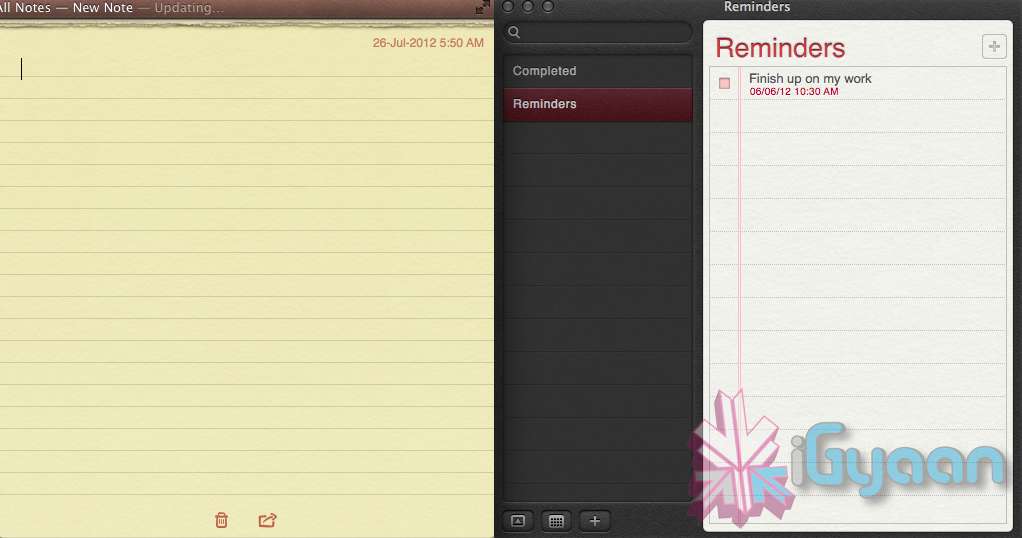
    The Notes app lets you save and organize text and images. Reminders allows you to create reminders so you don’t forget to do things. Again they are just like on iOS and sync well with your iDevices.


    Voice Dictation

    Just like on the iPad and iPhone you get voice dictation on Macs, in Mountain Lion (sadly no Siri).  To start dictating, just press the function (fn) key twice. When you’re done dictating, you can click the “done” button or press the function (fn) key twice again. OS X will take a moment and then provide you with the transcribed text. In addition to just offering words, you can say things like “period” or “comma” for punctuation and “new line” to make a new line.

    This feature works in any App or window that accepts text input via keyboard, also in online websites, like in GMAIL, as long as they are accessed in the new Safari.

    AirPlay Mirroring

    If you have an Apple TV, You can now mirror your display on an Apple TV (2nd or 3rd generation) with AirPlay if you enable it in Displays section of System Preferences. Down at the bottom there’s a checkbox beside “Show mirroring options in the menu bar when available.” Check it and you’ll be able to send your display to any detected Apple TV via the menu item in your menubar.

    Messages

    Messages is the iMessage of OS X. It’s been around in beta since Lion and hasn’t changed much in Mountain Lion. You can add your iCloud account to sync messages with an iPhone, iPad, or iPod touch. You can set up various instant messaging accounts, however, so Messages on the Mac is a little bit more functional than it is on iOS. That’s because it replaces iChat. Messages also now pulls out of Beta, so those of you who were experiencing slow takes may enjoy the new experience. 

    iCloud (Documents in the Cloud)

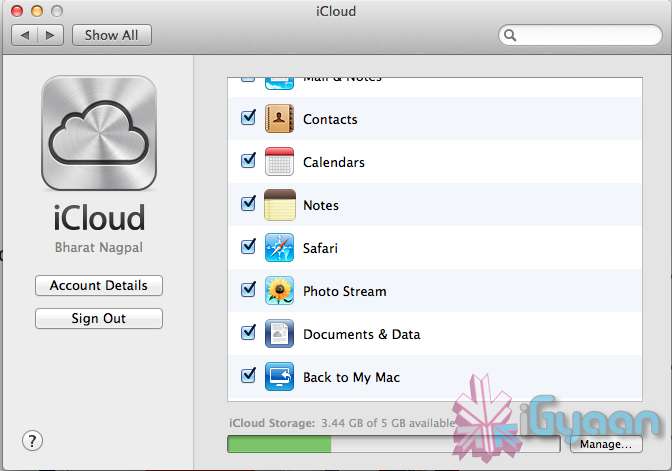
    iCloud has been upgraded significantly in Mountain Lion, you can access it in the same panel in System Preferences. If you turn on “Documents & Data” your documents (including versions of them) will be synced with iCloud, making them available on other iCloud-enabled devices.


    Share

     There is a new button in Mountain Lion, its the Share Button. Not every app has it yet, but many apps will be adding it to allow you to share content easily. In the meantime, Safari is one app that makes sharing sites easy to Messages, Twitter, and Email. If you click an image and then the sharing icon in a window’s toolbar, you’ll be able to share it on Twitter or Flickr. You’ll find other options for other file types as well. If you want to set up sharing accounts, visit the Mail, Contacts, & Calendars section of System Preferences.

    Security and Privacy

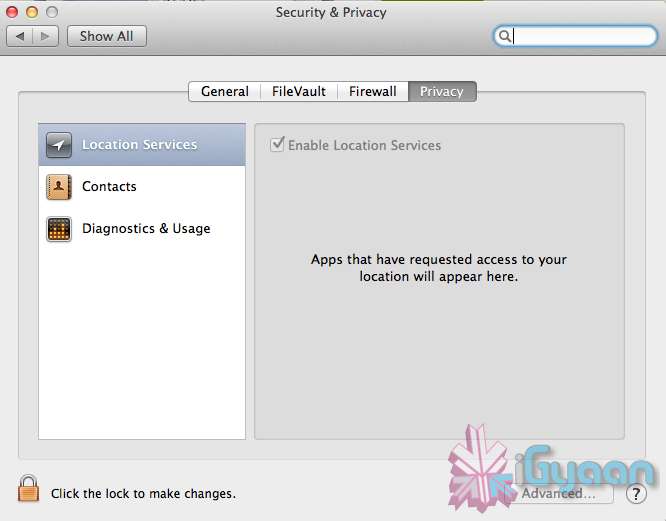
    In this new panel available in the System Preferences panel , a new checkbox “Allow applications downloaded from” , which once checked will give option “Mac App Store and identified developers” . This will prevent apps that aren’t signed through Apple’s developer center or downloaded through the Mac App Store from running

    Under Privacy, you get new privacy settings. This is where you can approve or deny an app’s permission to access certain things like your contacts, location, Twitter account, and more. 

  • Samsung Galaxy Note/ S2 Get Android 4.0.3 ICS with Touchwiz in India

    Samsung Galaxy Note/ S2 Get Android 4.0.3 ICS with Touchwiz in India

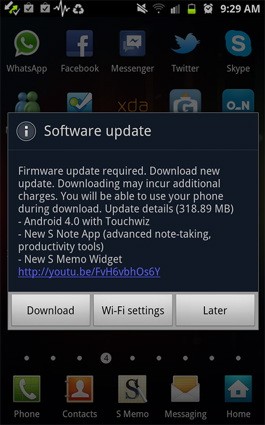
    Samsung has been smart to include India in the list of countries getting the ICS update for their Galaxy Note smartphone. Owners received a surprise notification alert yesterday and were able to download the 318.89MB software update over wifi to enjoy the new Touchwiz on Android 4.0.3.

    So if you have a Galaxy S2 or a Galaxy Note hit the updates section to enjoy the new official update.

  • Evernote for Android app brings Customizable Widgets and Voice to text.

    Evernote for Android app brings Customizable Widgets and Voice to text.

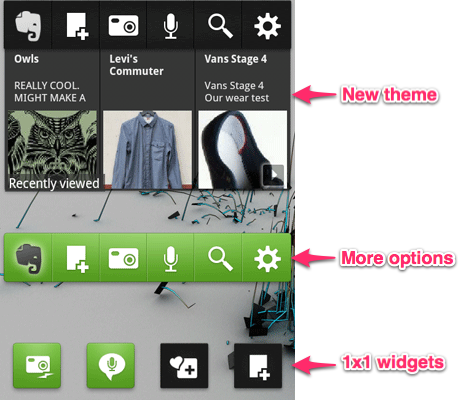
    All this Siri business has led to an evolution of the voice dictation on mobile phones. With more and more developers adding to the speech to text frenzy. Evernote is the next major app to bring the Speech to Text engine into their Android App, with a catch that only devices with Android 4.0 or above will be able to access said feature.

    The new Widgets are full of tweak-able features that allow you to customize color, buttons and exactly which notes appear in the large widget.A new feature called Quick Snapshot also allows you to save captures to your account.

    [Evernote]


  • Android 4.0.4 for Galaxy Nexus and Nexus S pushed out

    Android 4.0.4 for Galaxy Nexus and Nexus S pushed out

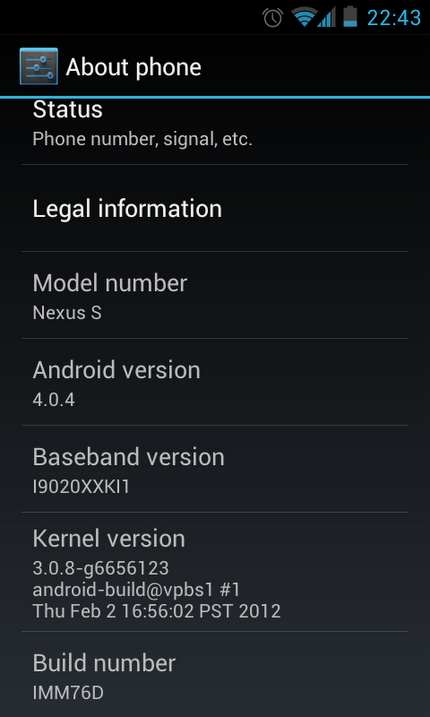
    Users of the Samsung Nexus S and those who bought the Galaxy Nexus will start to see a new light at the end of the tunnel as the update for Android 4.0.4 ICS is being pushed to these devices. Also owners of the Motorola Xoom (Wifi – only) will also start to see a similar update for their tablets. 

    The Nexus S users who missed the 4.0 update before Google pulled it due to major concerns, will also be directly able o update to Android 4.0.4.

  • HTC Starts rollout of HTC Sense 3.6 with ICS for Sensation and Sensation XE

    HTC Starts rollout of HTC Sense 3.6 with ICS for Sensation and Sensation XE

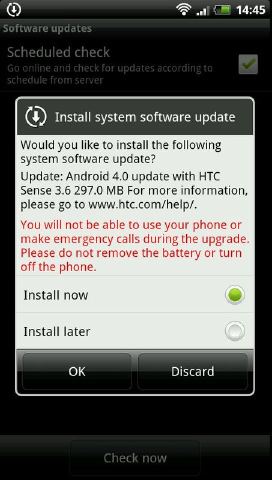
    HTC has already begun to roll out ICS updates for their Global and unlocked flagship devices the Sensation and Sensation XE. Now the update may not be available to all immediately, But HTC has assured the owners that the update will be broadly available within the coming days.

    [XDA-Developers]

  • Samsung Galaxy S II to get ICS on March 10th

    Samsung Galaxy S II to get ICS on March 10th

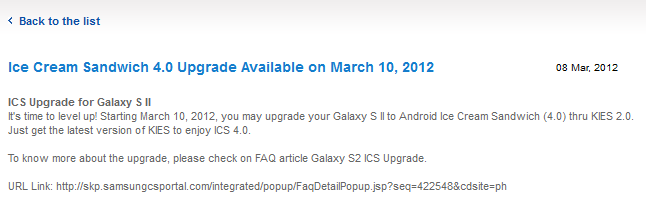
    There it is guys, Samsung has made it known that global and Carrier independent versions of the Samsung Galaxy S2 are getting the much awaited ICS update on 10th March. The update should be available through KIES and will be customized with Samsung’s own TouchWiz UI. However Samsung’s site specifies that because of “ICS OS feature,” Flash and Bluetooth 3.0 HS won’t be supported.

    [Samsung]

  • Asus postpones ICS for Transformer

    Asus postpones ICS for Transformer

    Asus has pushed the dates for the ICS release for their Transformer tablet to end of FEB -March 2012. The update is however, happening and will be seeded via an OTA download directly on the transformer. As always we will have a hands on preview of the OS on the tablet.


    [ASUS Singapore]

  • HTC announces ICS updates rolling in March for Sensation and Sensation XE

    HTC announces ICS updates rolling in March for Sensation and Sensation XE

    HTC has just updated their Facebook to announce its ICS rollout plan. ICS or Ice Cream Sandwich is the most anticipated Android update since android Froyo. it brings a whole host of changes to the table, and it will be interesting to see how HTC updates their Sense UI to add to ICS. According to HTC’s announcement the HTC Sensation and Sensation XE will be the first to get the updates followed by HTC EVO 3D, HTC Incredible S, HTC Desire S and HTC Desire HD


    HTC has been working hard to get its Ice Cream Sandwich upgrades ready, and we’re excited to announce that our first round of ICS upgrades will roll out by the end of March for the HTC Sensation and HTC Sensation XE, followed soon thereafter by the HTC Sensation XL. 

    In addition, we can confirm Ice Cream Sandwich upgrades will be coming later this year to the HTC EVO 3D, HTC Incredible S, HTC Desire S and HTC Desire HD. Stay tuned for more updates on Ice Cream Sandwich releases in the coming weeks

    FOr those in the US HTC has announced ICS updates for the Rezound, Vivid, Amaze 4G and EVO Design 4G. The US devices will get updates by the end of 2012.

    [HTC (UK)(US)]

  • Firefox gets updated to 9, faster Javascript and Lion compatibility added. links

    Firefox gets updated to 9, faster Javascript and Lion compatibility added. links

    Firefox browser has been updated to version 9. This version offers better compatibility on Mac computers running on Mac Lion 10.7, and a faster and juiced up Javascript handling. This is set to improve overall browsing speeds on the browser. Mozilla is claiming a overall 30% boost in performance post the JavaScript optimizations.  Firefox 9 also improves theme integration and swipe navigation for Mac OS X users. Want to take it for a test spin ? Download your version below

    [Mozilla Windows]

    [Mac

    [Linux]

  • Facebook for Android Gets a Facelift and Tweaks

    Facebook for Android Gets a Facelift and Tweaks


    The new Facebook for Android app update, adds a whole lot of tweaks and and bunch of turbo speed boosts. According to Facebook :Photos and albums are up to two times faster than the previous Android app. It’s also easier to share photos, view comments and edit captions on the go. Your messages and notifications are now at the top of your screen. You can respond to friends and stay updated without leaving the page you’re on in Notification style. Just like the iOS App you can quickly access your News Feed, Groups, games and apps from the new left-hand menu. 

     [Facebook]

    Android Market]

  • Apple iOS 5.0.1 is live, fixes battery woes and problems with sync

    Apple iOS 5.0.1 is live, fixes battery woes and problems with sync

    Ready for the first OTA iOS update ever? The iOS 5.0.1 as promised by Apple is already being pushed out. The new update fixes the battery life problems as seen in the existing version of iOS aka iOS 5. This update will also enable app swatting gestures on the iPad which were earlier available only to developers. The best part about it is that you can now get a OTA of just 44.7 MB instead of opting for a 700+MB download on iTunes.

  • HTC Announces Ice Cream Sandwich upgrades for their devices.

    HTC Announces Ice Cream Sandwich upgrades for their devices.

    HTC has announced the first wave of upgrades for their devices in a statement made on Facebook. Confirming that the HTC Sensation and Sensation XE will definitely get the upgrade, but leaving out majors from the announcement including Incredible S and Desire S. This announcement was made for the US division, but is applicable to worldwide devices.

    HTC knows how excited our fans are to get their hands on Google’s latest version of Android, Ice Cream Sandwich, so we’re thrilled today to announce the first wave of HTC phones that will receive upgrades: We can confirm the brand new HTC Vivid is upgradeable to Ice Cream Sandwich. In addition, Ice Cream Sandwich is coming in early 2012 to a variety of devices including the HTC Sensation, HTC Sensation XL and HTC Sensation XE, as well as the HTC Rezound, HTC EVO 3D, HTC EVO Design 4G and HTC Amaze 4G through close integration with our carrier partners. We’re continuing to assess our product portfolio, so stay tuned for more updates on device upgrades, timing and other details about HTC and Ice Cream Sandwich.

    [HTC (Facebook)]

  • Most Android Honeycomb Tablets will upgrade to Ice Cream Sandwich

    Most Android Honeycomb Tablets will upgrade to Ice Cream Sandwich

    The air has been cleared over the tablet to Android 4 controversy and it seems all but most Honeycomb tablets will be updated to the latest build of Android from their companies. The only thing that lies in the middle is the timeline, and since we all know that companies like to take their own sweet time ironing out the kinks, we would say it should be a while.


iGyaan Network
Privacy Overview

This website uses cookies so that we can provide you with the best user experience possible. Cookie information is stored in your browser and performs functions such as recognising you when you return to our website and helping our team to understand which sections of the website you find most interesting and useful.