Tag: Windows8

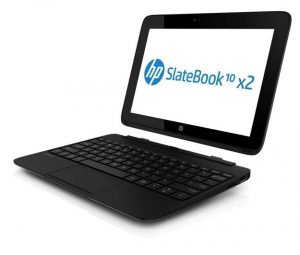
  • HP Shows off new Split x2 Windows Hybrid and Android based SlateBook x2

    HP Shows off new Split x2 Windows Hybrid and Android based SlateBook x2

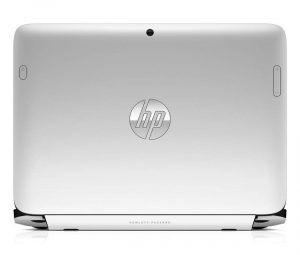
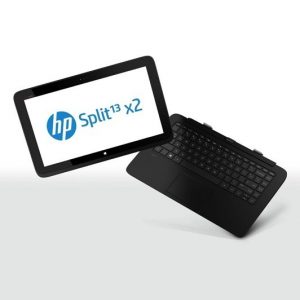
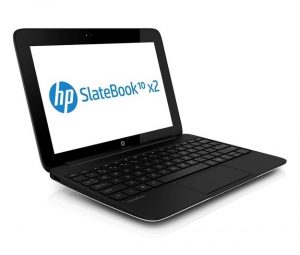
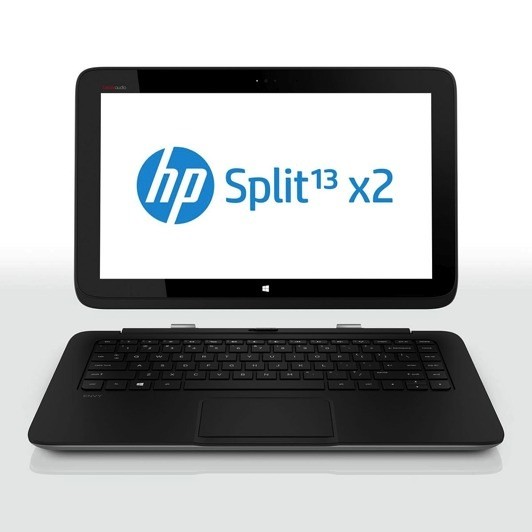
    HP is in the big for Android this time around, as they show off two new clamshell units, one of which is a Tegra 4 based Android Tablet.  HP has had a lot of success with its Envy X2 detachable hybrid and plans to expand the x2 series to make room for two follow-on products: the Split x2 (a Windows 8 hybrid) and the SlateBook x2 (an Android tablet).

    The specs on the Split x2 include: 

      • 13-inch 1,366 x 768 display
      • Core i3 or i5 processor Ivy Bridge
      • Keyboard dock includes a second battery or optional 500GB hard drive
      • SSD 128/256 GB
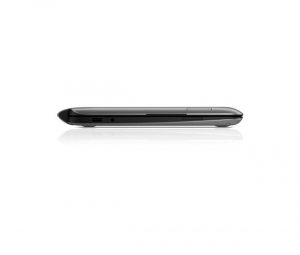
      •  2 x USB ports (one 2.0, one 3.0)
      • HDMI
      • Beats Audio
      • WiDi 
      • microSD and full SD card slots
      • Windows 8 loaded
      • Priced at US $ 800

    The SlateBook x2 Specs include

      • 10-inch 1,920 x 1,200, 400-nit IPS display
      • Tegra 4 SoC
      • Jelly Bean (4.2.2)
      • Keyboard has a battery built in
      • trackpad supporting multitouch gestures
      • Weighs 2.8 pounds in total
      • dual USB sockets
      • Stereo speakers
      • SD / microSD readers
      • Priced at US $ 480.

    [toggle title=”Press Release”]HP Expands x2 Detachable PC Portfolio to Enable Ultimate Flexibility
    New two-in-one detachable PCs with Android or Windows 8 offer mobility, productivity

    PALO ALTO, Calif., May 15, 2013 – HP today announced the HP SlateBook x2 and the HP Split x2, two detachable PCs that offer the full functionality of a notebook with a removable screen that also is a sleek tablet. Powered by the Android and Microsoft® Windows® 8 operating systems (OS), respectively, these versatile two-in-one devices combine power and portability, giving customers the flexibility to create, consume and share content in more places.

    HP’s unmatched portfolio of next-generation PCs is designed to enable users to connect
    with their information on devices that easily adapt to their needs. By releasing the
    magnetic hinge, users can move elegantly between the two form factors-tablet and
    notebook PC-all in one device.

    – The HP SlateBook x2 is the first Android detachable device with the NVIDIA Tegra 4 mobile processor, providing users more realistic gaming, fast web browsing and smooth high-definition (HD) video playback.
    – The HP Split x2, powered by the Windows 8 OS, features a 13.3-inch diagonal display and powerful processor and is ideal for work or play.

    “Customers want to access and share content anywhere, anytime, on any internet connected device-and they expect those connections to be seamless,” said Ron Coughlin, senior vice president and general manager, Consumer PCs, HP. “The HP SlateBook x2 and the HP Split x2 are next-generation devices and the latest examples of our continued commitment to evolving the computing experience by providing the flexibility necessary for customers to be productive at home, at the office or on the go.”

    The HP SlateBook x2 and Split x2 join the award-winning HP ENVY x2 as part of HP’s detachable PC portfolio. The HP SlateBook x2 also joins the HP Slate7 as part of HP’s push to offer access to the Google experience, and to provide access through multiple operating systems.

    HP SlateBook x2
    The HP SlateBook x2 enables users to shift effortlessly from entertainment to work by combining tablet portability with notebook productivity in a sleek, lightweight device that uses the popular Android operating system. With an advanced magnetic hinge design and dual battery system-one battery in the base and one in the tablet-users can easily switch from notebook to tablet and back, even while on the go.

    Ensuring users don’t trade functionality for portability, the HP SlateBook x2 features Android Jelly Bean 4.2.2 and delivers the Google experience with services like Google Now, Google Search, Gmail, YouTube, Google Drive and Google+ Hangouts for multiperson video chat as well as access to apps and digital content through Google Play.

    The SlateBook x2 features an NVIDIA Tegra 4 mobile processor, enabling users to access the TegraZone app and experience Tegra 4-optimized games. The 10.1-inch HD touchscreen display delivers crisp lines, sharp images and precision color while reducing glare. The SlateBook x2 also includes 64 MB of storage and DTS Sound+ Solution for accessing and enjoying photos, music and videos.

    HP’s exclusive native printing capability allows users to print directly from most applications.

    HP Split x2
    The HP Split x2 is a versatile, two-in-one detachable PC that combines power and portability with the Windows 8 operating system and powerful 3rd generation Intel® Core™ processor family. Consumers can now enjoy a high-performance ultraportable notebook suited for virtually any intensive task, and that doubles as a 13-inch tablet to give unparalleled entertainment capability for playing games, videos and more.

    Whether being used as a high-performance notebook or a tablet, the vibrant 13.3-inch
    diagonal HD touchscreen display makes it easier to view and share content, play games
    with friends and family, or enjoy high-quality music with HP Connected Music and Beats Audio, which provides the best-sounding, richest audio experience on a PC.

    An optional hard disk in the base expands storage capacity while dual batteries allow
    users to stay ultramobile.

    The HP Split x2 offers an eye-catching design with a soft-touch coating that provides a
    comfortable hold and shows fewer fingerprints. The HP Split x2 also offers exclusive HP
    innovations such as a 2-megapixel HP TrueVision Full HD webcam and the HP ClickPad
    for precise multifinger and gesture navigation.

    HP complements its new PCs with a suite of exclusive solutions and services that provide
    an array of simple and easy-to-access support tools and resources to help customers take full advantage of all the features that HP has to offer. Customers can add to the standard product limited warranty with HP Care Pack services to protect new HP products, and enhance the overall experience with accidental damage protection that helps consumers breathe easier when accidental drops, spills, and surges occur.

    For the HP SlateBook x2, customers can purchase the HP Care Pack with Accidental Damage Protection, which helps them avoid out-of-pocket repair or replacement costs and provides door-to-door service to the consumers’ homes so they are back up and running in no time. For the HP Split x2, customers can buy the HP Care Pack with Accidental Damage Protection bundled with Lojack, which allows customers to take immediate action to prevent data access if the PC is stolen.

    Pricing and availability
    The HP SlateBook x2 and HP Split x2 are expected to be available in the United States in August with starting prices of $479.99 and $799.99, respectively.

    Additional information about the HP SlateBook x2 and the HP Split x2 is available at www.hp.com/x2 and The Next Bench.[/toggle]
  • Skype gets up to Version 6.0 Integrates Microsoft Accounts and brings Retina Support

    Skype gets up to Version 6.0 Integrates Microsoft Accounts and brings Retina Support

    skype 6.0

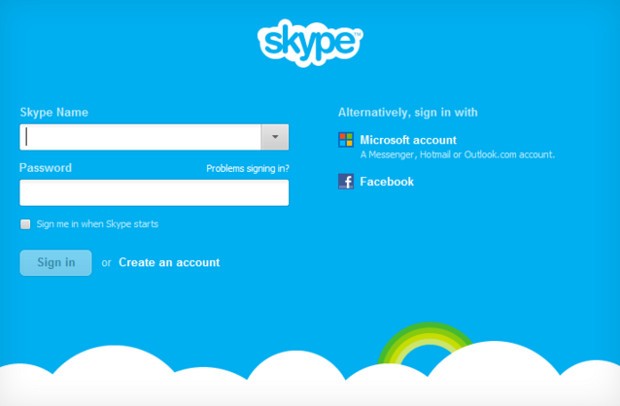
    Skype 6.0 gets a host of new features along with compatibility with Retina display Macs and future similar display PC’s. The new Skype adds the ability to sign in directly with your Facebook or Microsoft account including Hotmail, Live or Outlook. Skype 6.0 will also add Modern UI friendly look on Windows * machines/ tablets to up it game. Now you can instant message your Windows Live Messenger, Hotmail and Outlook.com contacts via Skype all in one place. Skype 6.0 also brings localization languages in Thai, Croatian, Slovenian, Serbian, Catalan and Slovak, bringing the total languages Skype supports to 38.


    [toggle_box title=”Skype Blog” width=”Width of toggle box”]

    Today we have released a new version of Skype for Desktop. Get it now for Windows orMac.

    What’s new:


      • Microsoft and Facebook Account Integration

    Sign up and sign-in is easier than ever. You can now sign into Skype 6.0 using your Microsoft or Facebook account – there’s no need to create a new Skype account. This makes it even easier to connect with friends on Skype without having to set up another account.

      • IM friends on Messenger

    Now you can instant message your Windows Live Messenger, Hotmail and Outlook.com contacts via Skype all in one place. If you use a Microsoft account today, merging your accounts is easy – just sign in to Skype with your Microsoft account.

      • Calling with Messenger friends is coming soon

    We’re working on polishing a feature which will enable audio and video calls to Windows Live Messenger customers using Skype 6.0 desktop clients. The feature will be available in coming weeks.


    We want to hear your feedback. Discuss what matters to you on Skype Support Network or report glitches on our public issue tracker.

    Here’s more of what’s new with Skype 6.0 for Windows Desktop:


      • Skype localized to six more languages

    We are excited to support our growing community around the world with new localized versions of Skype 6.0 in Thai, Croatian, Slovenian, Serbian, Catalan and Slovak, bringing the total languages Skype supports to 38.

      • Visual user interface refresh

    We have refreshed and flattened the Skype 6.0 UI with a simpler and less cluttered look. We have updated the look of the instant messaging and SMS areas as well.

      • Removal of online user count

    We have removed the online user counter at the bottom of your Skype Contacts list to unclutter the UI and make more space for your friends within the contacts list.

      • Display previously created profile pictures

    When you change your profile picture, we will now show you all of your previous Skype 6.0 profile pictures so you don’t have to look through old files if you want to use a previous image.

      • Improved telemetry

    We are constantly looking for ways to improve the quality of our product. To that end we are adding additional “opt-in” telemetry reports for users who choose this option: “Tools>> Options>>Advanced>>Tick “Help improve Skype…” The reports may contain your Skype ID and or Microsoft Account ID but we will not use it to identify or contact you.


    Here’s more of what’s new with Skype 6.0 for Mac Desktop:


      • Open Chats in Multiple Windows

    We hear your feedback! With this release we’ve added support to open chats in multiple windows.

      • Retina Display Support

    We also added another feature you’ve asked for – support Retina display. Now you can take full advantage of improved usability and of higher resolution screens.


    Known issues for Skype 6.0 for Mac:


    Category Description Workaround
    Account On Mountain Lion the profile image picker does not work as expected – recent images can’t be seen and effects can’t be added None available


    Release build for Skype for Windows is 6.0.0.120 and on Skype for Mac is 6.0.0.2946.

    Volunteer localization of Skype for Windows has been done by:


    • Bulgarian: Nikolina Filipova & Nikolay Filipov
    • Chinese (Simplified): Wang Miao (TOM.com)
    • Chinese (Traditional): Penny Yang, Carlos Lee (PChome)
    • Czech: Petr Silon
    • Dutch: Kees Koenders
    • French: Fabrice Imperial & Bruno Lépaulard
    • German: Claudius Henrichs & Dick Schiferli
    • Hungarian: Mark Bender
    • Italian: Daniele Conte
    • Lithuanian: Viktoras Kriukovas
    • Norwegian: Stig Auestad
    • Polish: Karol Szastok
    • Portuguese: Francisco Ferreira
    • Romanian: Péter & Mónika Henning
    • Turkish: Ömer Emin Dede
    • Ukrainian: Vitaliy Kupchynskyy


    Volunteer localization of Skype for Mac has been done by:


    • Bulgarian: Nikolay Filipov
    • Brazilian Portugese: Fabio Roselet
    • Dutch: Alexander Henket
    • Estonian: Triin Tähema
    • French: Jean-Pierre Kuypers
    • German: Claudius Henrichs
    • Norwegian: Kenneth Stevenson
    • Polish: Bohdan Zielinski
    • Portuguese Portuguese: Francisco Miguel Ferreira
    • Spanish: Carola Clavo

    [/toggle_box]

    [Skype]

  • Microsoft announces $39.99 Windows 8 Pro upgrade offer for existing Windows users

    Microsoft announces $39.99 Windows 8 Pro upgrade offer for existing Windows users

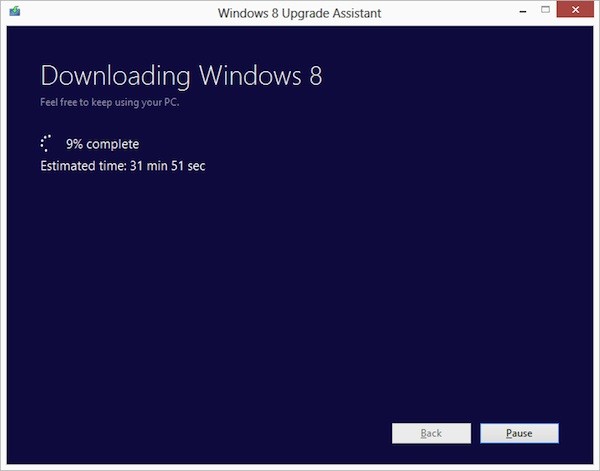
    Ready to jump to Windows 8 ? Microsoft is following in Apple’s footsteps by making the upgrade to Win 8 more pocket friendly. If you have an existing installation of Windows XP, Windows Vista, or Windows 7 will able to download a Windows 8 Pro upgrade for just $39.99 (IN Rs. 2200/-). 

    That’s a big drop from the company’s earlier upgrade prices, which were as high as US $ 99 (In Rs. 5500-7500) . If you want the DVD you can purchase it for a price of US $ 69.99. According to Microsoft the prices will increase when the promotion ends on January 31st 2013. 

    Each OS will have a different upgrade option, some bringing only personal files and some only files and settings to Windows 8. In most cases legacy apps will not be ported.

    [The Windows Blog]

  • Windows 8 Consumer preview hits one million Downloads in one Day

    Windows 8 Consumer preview hits one million Downloads in one Day

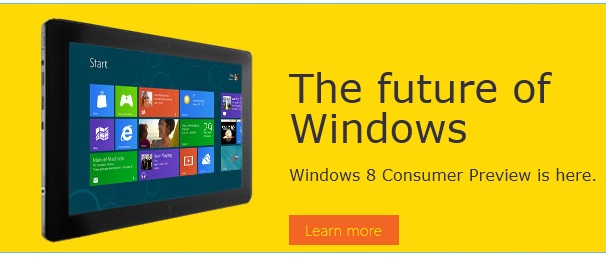
    The Microsoft Windows 8 Consumer Preview went up just a day ago and has already hit the million download mark. Microsoft’s next major software update is built around the Windows 7 platform merged with the Live Tile – Metro UI of Windows Phone 7. 

    Although the downloads are 1 Million, it may not mean that 1 million people downloaded the software. Get yours in the link below.

    Windows 8 Consumer Preview

  • Microsoft will replace NTFS with ReFS in Windows Server 8

    Microsoft will replace NTFS with ReFS in Windows Server 8

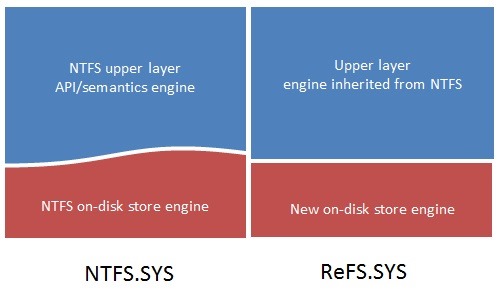
    Windows server 8 will introduce the Resilient File System, or ReFS, as a “next generation file system” built on the foundations of the NTFS. The new gen file system is designed by reusing NTFS’ API / semantics engine to retain a high level of compatibility with NTFS features. The new file system design is aimed to protect against latent disk errors, resist data corruption, uphold metadata integrity, grant large volume, file and directory size. The whole concept is to reduce the massive file corruption and fragmentation users face with NTFS and Windows in general.

    The key goals of ReFS are:

    • Maintain a high degree of compatibility with a subset of NTFS features that are widely adopted while deprecating others that provide limited value at the cost of system complexity and footprint.
    • Verify and auto-correct data. Data can get corrupted due to a number of reasons and therefore must be verified and, when possible, corrected automatically. Metadata must not be written in place to avoid the possibility of “torn writes,” which we will talk about in more detail below.
    • Optimize for extreme scale. Use scalable structures for everything. Don’t assume that disk-checking algorithms, in particular, can scale to the size of the entire file system.
    • Never take the file system offline. Assume that in the event of corruptions, it is advantageous to isolate the fault while allowing access to the rest of the volume. This is done while salvaging the maximum amount of data possible, all done live.
    • Provide a full end-to-end resiliency architecture when used in conjunction with the Storage Spaces feature, which was co-designed and built in conjunction with ReFS.

    The key features of ReFS are as follows (note that some of these features are provided in conjunction with Storage Spaces).

    • Metadata integrity with checksums
    • Integrity streams providing optional user data integrity
    • Allocate on write transactional model for robust disk updates (also known as copy on write)
    • Large volume, file and directory sizes
    • Storage pooling and virtualization makes file system creation and management easy
    • Data striping for performance (bandwidth can be managed) and redundancy for fault tolerance
    • Disk scrubbing for protection against latent disk errors
    • Resiliency to corruptions with “salvage” for maximum volume availability in all cases
    • Shared storage pools across machines for additional failure tolerance and load balancing

    What are the capacity limits of ReFS?

    The table below shows the capacity limits of the on-disk format. Other concerns may determine some practical limits, such as the system configuration (for example, the amount of memory), limits set by various system components, as well as time taken to populate data sets, backup times, etc.

    Attribute

    Limit based on the on-disk format

    Maximum size of a single file

    2^64-1 bytes

    Maximum size of a single volume

    Format supports 2^78 bytes with 16KB cluster size (2^64 * 16 * 2^10). Windows stack addressing allows 2^64 bytes

    Maximum number of files in a directory

    2^64

    Maximum number of directories in a volume

    2^64

    Maximum file name length

    32K unicode characters

    Maximum path length

    32K

    Maximum size of any storage pool

    4 PB

    Maximum number of storage pools in a system

    No limit

    Maximum number of spaces in a storage pool

    No limit

    [Building Windows 8]

  • Windows 8 Reset and Refresh options shown off!

    Windows 8 Reset and Refresh options shown off!

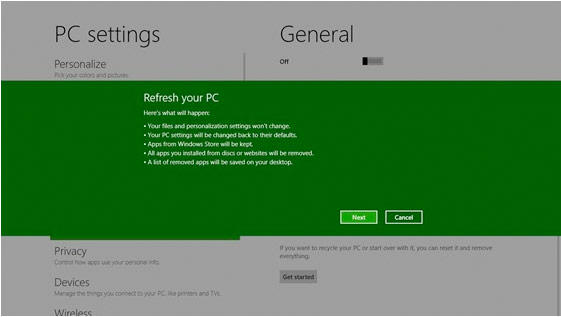
    Windows 8 is becoming more and more like the mobile counterpart.  Windows 8 will offer a pair of similar features; ‘Reset your PC’ will allow you to remove all personal data, apps, and settings from the PC, and reinstall Windows, while ‘Refresh your PC’ enables your to keep all personal data, Metro style apps, and important settings from the PC, and reinstall Windows. This seems very convenient, especially for those who have often been bugged by crowded and laggy machines.


    [MSDN]

  • Windows 8 Blue Screen of Death codes Replaced by Unhappy Blue Screen of Death

    Windows 8 Blue Screen of Death codes Replaced by Unhappy Blue Screen of Death

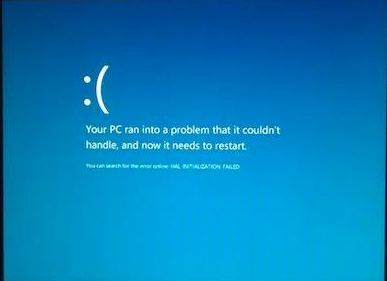
    Those blue screens that we have all loved to hate have been modified to appear a little more user friendly. Microsoft has replaced the Error Code Blue Screen of Death Kernel crash screen with a generic unhappy Smiley Face on a Blue Screen. Better or Not? What do you think?

  • Windows 8 Minimum requirements consist of Intel Atom and 1GB RAM

    Windows 8 Minimum requirements consist of Intel Atom and 1GB RAM

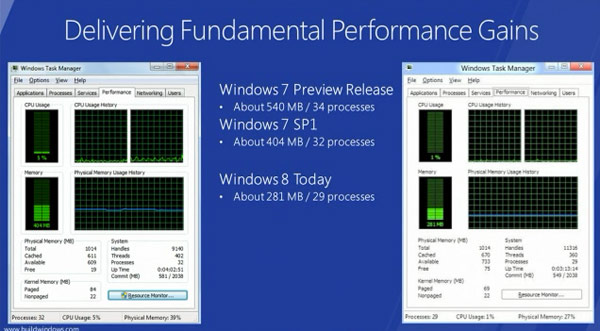
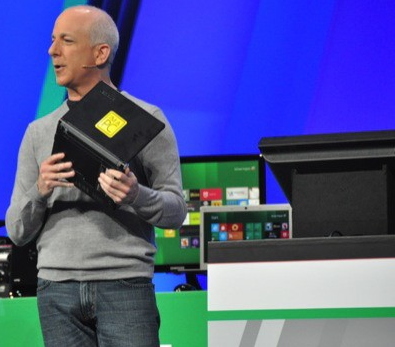
    Microsoft Windows President Steven Sinofsky after a quick announcement  and a simple demonstration explained that Win8 demanded fewer system resources than Win7 with the same hardware specs

    With a Lenovo S10 in his hand he showed that  an early-gen Atom CPU and 1GB of RAM is “enough” to run the new OS (AKA Windows 8 )


  • The new Windows 8 Store will sell both Metro based and Original 32bit Windows Applications

    The new Windows 8 Store will sell both Metro based and Original 32bit Windows Applications

    Microsoft has announced at the Build 2011 that the new Windows 8 store will be home to both apps that are based on the new Metro style UI along with traditional Windows Apps that you have grown to Love/Hate. 

    It kind of reminds us a lot of a certain “Mac App Store” but hey thats just us !

  • Windows 8 Developer Preview Launched, Downloads Commenced(PR)

    Windows 8 Developer Preview Launched, Downloads Commenced(PR)

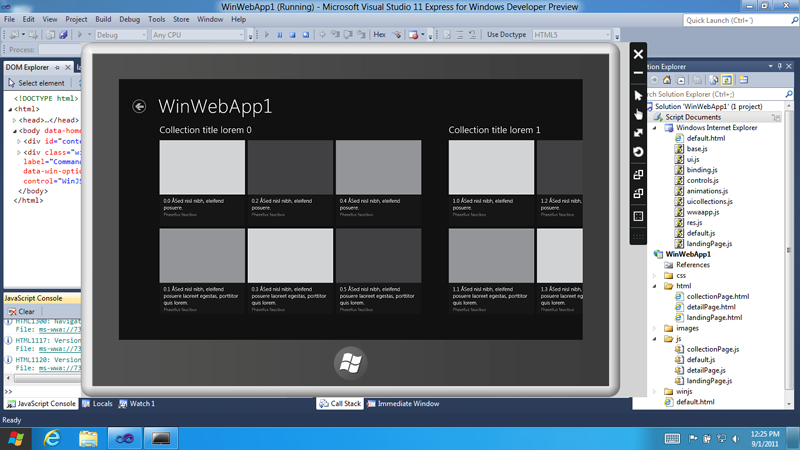
    With the commencement of the Microsoft Build conference, the company has also launched the Developer version of Windows 8.

    Widows 8 is a remained version of Windows, that offers a practically new way to interact with the personal computer. The new platform also bring a new range of capabilities that can let developers bring the easy and graphics of the Windows Phone 7 Metro UI .

    Steven Sinofsky- President Windows.


    Get Your version of the Dev Preview Here : Link – Microsoft Dev Downloads


    [toggle title_open=”Press Release” title_closed=”Press Release” hide=”no” border=”yes” style=”default” excerpt_length=”0″ read_more_text=”Read More” read_less_text=”Read Less” include_excerpt_html=”no”]Microsoft Reimagines Windows, Presents Windows 8 Developer Preview

    BUILD Conference attendees and developers get first access to new operating system.

    LOS ANGELES – Sept. 13, 2011 – Today at its developer-focused BUILD conference, Microsoft Corp. showcased a detailed preview of the next major release of Windows, code-named “Windows 8.” The company also detailed new tools for developers to help write applications for more than 1 billion people around the world who use Windows every day.
    “We reimagined Windows,” said Steven Sinofsky, president of the Windows and Windows Live Division at Microsoft, in his keynote address to the thousands of developers in attendance. “From the chipset to the user experience, Windows 8 brings a new range of capabilities without compromise.”

    The company also highlighted a variety of new features in Windows 8, including the following:

    Touch-First User Interface
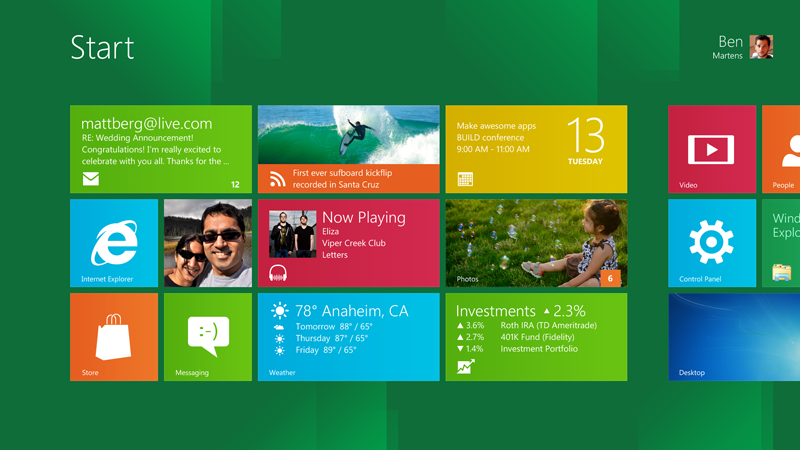
    • Metro style. Windows 8 introduces a new Metro style interface built for touch, which shows information important to you, embodies simplicity and gives you control.
    • Touch-first browsing, not just browsing on a touch device. Providing a fast and fluid touch-browsing experience, Internet Explorer 10 puts sites at the center on new Windows 8 devices.
    More Ways to Engage With Powerful, Connected Apps
    • Powered by apps. Metro style apps built for Windows 8 are the focal point of your experience, filling your entire screen so there are no distractions.
    • Apps can work together. Apps communicate with each other in Windows 8. For example, you can easily select and email photos from different places, such as Facebook, Flickr or on your hard drive.
    • The content you create syncs across your devices. Live roams all the content from the cloud services you use most – photos, email, calendar and contacts – keeping them up-to-date on your devices. With Windows SkyDrive, you can access content anywhere with your Microsoft account.
    Enhanced Fundamentals
    • The best of Windows 7, only better. Windows 8 is built on the rock-solid foundation of Windows 7, delivering improvements in performance, security, privacy and system reliability.
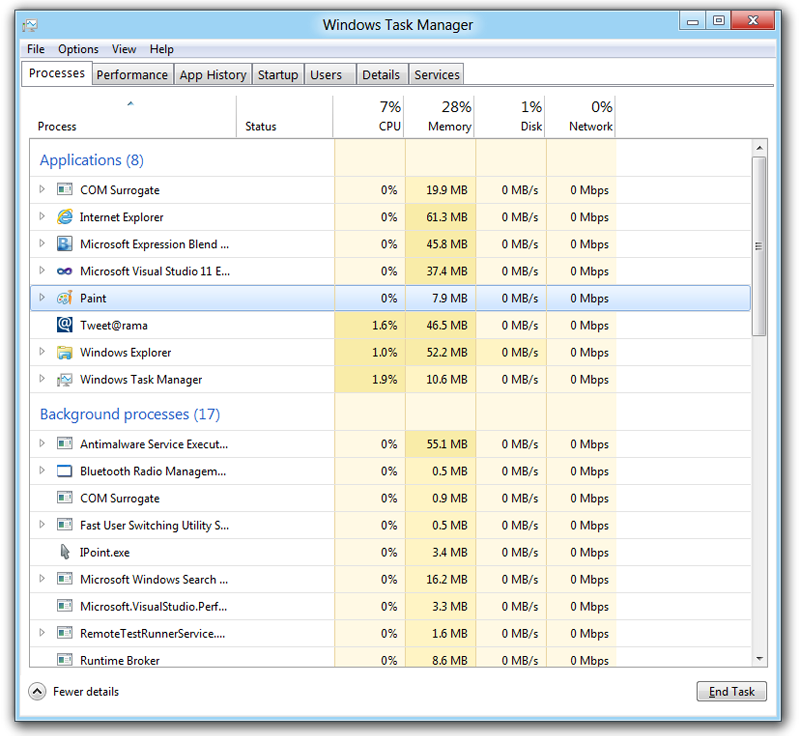
    • Preserving power-user favorites and making them better. For those who push the limits of their PC, Windows 8 features an enhanced Task Manager and Windows Explorer and new, flexible options for multimonitor setups.
    New Developer Opportunities
    • Windows Store. The Windows Store will allow developers to sell their apps anywhere Windows is sold worldwide, whether they’re creating new games or familiar productivity tools.
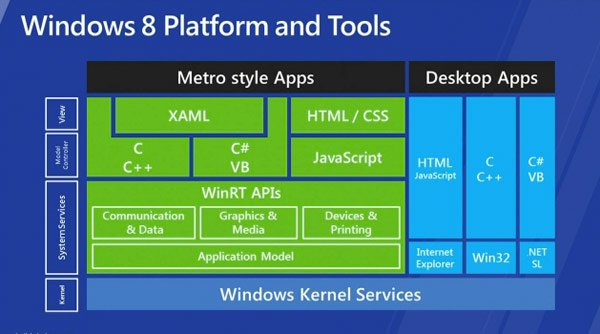
    • Build using more languages. Windows 8 lets you leverage your existing skills and code assets to create great experiences using the programming language you prefer.
    • Rich hardware integration leads to richer experiences – particularly for games. DirectX 11 gaming power underlies Windows 8, allowing the easy creation of full-screen games with smooth, flicker-free action.
    New Generation of Hardware
    • One Windows – many shapes and sizes. Support for ARM-based chipsets, x86 devices, touch and sensors means Windows 8 works beautifully across a spectrum of devices, from 10-inch tablets and laptops to all-in-ones with 27-inch high-definition screens.
    • Always connected. With Windows 8, new ultrathin PCs and tablets turn on instantly, run all day on a single charge and stay connected to the Internet so your PC is ready when you are.
    • Tap the full power of your PC. Windows 8 runs on PCs and is compatible with the devices and programs you use today on Windows 7, without compromise, to deliver the performance you expect of a PC.

    Developers will be able to download the Windows Developer Preview via the new Windows Dev Center later this week. Webcasts of sessions will be posted on the BUILD site as well.
    Founded in 1975, Microsoft (Nasdaq “MSFT”) is the worldwide leader in software, services and solutions that help people and businesses realize their full potential.
    Some information relates to a prerelease product, which may be substantially modified before it’s commercially released. Microsoft makes no warranties, express or implied, with respect to the information provided here.[/toggle]

  • Microsoft Patent Applications Reveal a possible Dual Screen Tablet Future

    Microsoft Patent Applications Reveal a possible Dual Screen Tablet Future

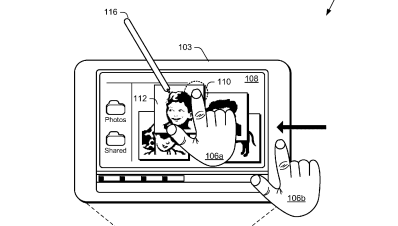
    Microsoft has been playing with the idea of a dual screen tablet for quite some time, remember the courier tablet? This time around MS is teasing the world of tech itself with the Tablet patent that promises a dual screen experience. Microsoft has been talking a lot about Windows 8 and a tablet specific OS.

    MS has filed for multiple patents including, Muti-screen dual tap, on-off gesture, Muti Screen Pinch and expand, Muti-screen – Hold – Expand- page flip and radial gestures. Microsoft has not yet been awarded with these patents. But looks like the whole Tablet frenzy has been fueled by the Apple Patent Lawsuits.

  • Microsoft Windows 8 taken out of the Wraps !! – Video

    Microsoft Windows 8 taken out of the Wraps !! – Video

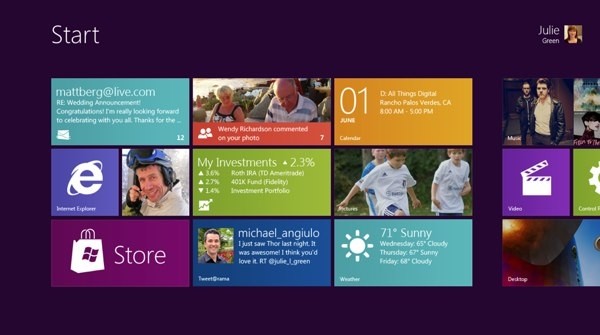
    Microsoft has just taken its Wraps off the next build of Windows, Microsoft Windows 8. Taking its inspiration hugely from the Windows Phone 7 Metro UI. Just like the Windows phone 7 Build this UI  is also designed perfectly to work with touch-screens. Therefore you can bet on a large number of Windows 8 tablets to hit once the OS is fully released for consumption.

    This next version of Windows will come with the new Internet Explorer 10 , as well as support for HTML5 and Java apps that will run better on tablet-sized devices. But, will also support all applications designed for Desktop use.


    [Build Windows]

  • “Next generation of Windows systems” To come in 2012 Says Steve Ballmer

    “Next generation of Windows systems” To come in 2012 Says Steve Ballmer


    The Company is yet to confirm its plans for Windows 8 Operating System, But Microsoft CEO Steve Ballmer said at the company’s developer forum in Japan, That “next generation of Windows systems” will be coming out next year, and that “there’s a whole lot more coming,” including “slates, tablets, PCs, a variety of different form factors.” – According to a Winrumors report Microsoft may demo the new  Windows 8 Tablet UI at the D9 conference later next week.

iGyaan Network
Privacy Overview

This website uses cookies so that we can provide you with the best user experience possible. Cookie information is stored in your browser and performs functions such as recognising you when you return to our website and helping our team to understand which sections of the website you find most interesting and useful.