Update : How to Install Android 2.3.4 Gingerbread on the Samsung Galaxy 5 (i5500 / i5503) + Cyanogen Mod 7.1

Update : Oct 9th 2011

The Guide has been updated to include the latest rom update. For those who have already used this guide and are on the Madteam rom v1.0 (those who used the guide from Aug 15th) use the steps at the bottom of the page to upgrade.

New iGyaan Guide 

Did you think it was possible?, we didn’t either!. But following various guides and tweaks we were able to get Cyanogen mod 7.1 running on the Samsung Galaxy 5, Yes the 1.5 year old device from Samsung.

The big differences we saw:

  • Tremendous improvement in battery life, almost fixes any battery leaks.
  • Fast and responsive OS Android 2.3, no lag and no jitters.
  • Clean looking UI + Cyanogen mod tweaks
  • Best Part : Nexus S style : CRT TV lock animation

This Guide was put together using our own experience, and its here to help you out.

Note: Like any other unofficial guide, there is a high chance that you might brick your phone.  iGyaan is in no way responsible for that and you are following this at your own risk.
 
Okay so lets begin!
Here is what you need 
  1. The iGyaan Galaxy 5 Pack : Download Here
  2. A Galaxy 5 : Duh!
  3. Widows PC
  4. USB – Micro USB data cable
  5. Patience and Humility.
  6. A MicroSD card with over 1GB free space.

Step 1 (Important)

  • Backup all your contacts and files.
  • Sync your device to your Gmail Accounts

Step 2 (Device Prep)

  • Time to put your Galaxy 5 in download mode
  • Power off your Galaxy 5
  • Hold Volume Down + Home + Power Button 
  • You should see the Download Screen
 

Step 3 (Install Recovery)

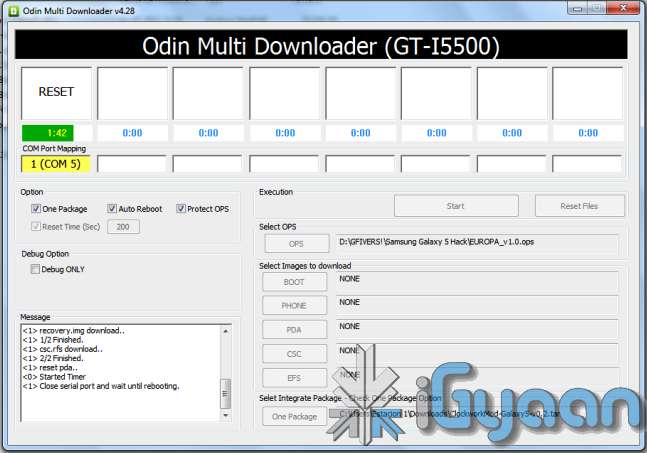
  • Fire up ODIN (found in the iGyaan Galaxy 5 pack)
  • Select the EUROPA_v1.0.ops  in the OPS field ( also in the iGyaan Pack)
  • Select One Package and ClockworkMod-Galaxy5-v0.4.tar in the one package Field
    (Also in the iGyaan Package downloaded earlier.)
  • Connect your phone to your pc via usb cable, wait for it to show up in ODIN
  • Once it shows up click START ( follow the images below)


IMPORTANT 


Your Device Should now boot up in Clockwork Recovery like the image below.

WARNING : DONT UNPLUG OR REBOOT your PHONE HERE.


Step 4 (Copy files)

  • Using the D pad or Volume +/- buttons browse to Mounts and storage
  • Once in mounts and storage select “Mount USB Storage”
  • Your memory card will show up on your PC
  • Copy the “update-cm-7.1.0-RC1-MADTEAM-v1.6-signed.zip” to the memory card ( found in the iGyaan package)
  • Once copied, Safely remove /eject the memory card mount from your PC
    (Do not remove it from the phone and do not reboot the phone
  • Press the  back button several times, till you reach the main screen as the image above.

Step 5 (Backups)

  • Browse to Backup and Restore
  • and select backup ( let the device backup your existing rom on the memory card)
  • Once done press the back button to come back to the main recovery screen.

Step 6  (Install Prep)

  • Browse to Wipe date /factory reset and initiate it by selecting “yes”
  • Browse to wipe cache / initiate it by selecting “yes.”
  • Browse to advanced : Wipe dalvik cache.

Step 7 (Install the Rom)

  • Browse to “Install zip from SD card”
  • Choose “Select zip from SD card”
  • Select the “update-cm-7.1.0-RC1-MADTEAM-v1.6-signed.zip” we copied to the memory card earlier.
  • Initiate it by selecting “yes”

Step 8 (One more thing!)

  • Once its done Reboot by selecting reboot system now from the main menu
  • At this moment your device will boot in Cyanogen Mod 7.1 for Galaxy 5. on Android 2.3.4
  • Its not over yet!
You will still need the Google Apps package to get the Market , Gmail, etc

Step 9 (Install Google Apps)

  • Once your phone is booted press the power button
  • Select “reboot”
  • Select “recovery” 
  • You will boot back into Clockwork Recovery
  • Go to Mounts and Storage and select “Mount USB storage”
  • Connect your device to a PC
  • Download and copy the following file to the memory card of your phone : Google Apps iGyaan.zip
  • Once copied  : come back to main recovery screen and select “Install zip from SD car”
  • Select the “select zip from sd card” and choose “google apps iGyaan.zip” : install by selecting “Yes”

Step 10 ( Final Steps)

  • Once all the above is done : reboot your phone
  • You will be boot into Cyanogen Mod 7.1 , but this time you will get the “Tap Android to Start” screen.
  • Follow the directions on the screen.

Enjoy your newly revamped Galaxy 5.!

This rom comes highly recommended, we installed it on our Galaxy 5 and its almost like a new phone, its much faster cleaner and much more stable than the Samsung Official Rom. this rom also improves the battery life by more than three times.

Leave your feedback below, and if you were able to do it properly.

If you have any problems post all your questions in the iGyaanforum.com thread over HERE 


Steps to Upgrade if you have used the Old Guide


Step One

  • Download the new iGyaan Package : Here 

Step Two

  • Use a usb cable / sd card reader to copy the file “update-cm-7.1.0-RC1-MADTEAM-v1.6-signed.zip” to the SD Card root folder (the file is in the iGyaan Package) 

Step Three

  • Reboot into recovery using the Rom Manager And choose “backup and restore”

    Next Create a new Backup.

Step Four

  • From the Recovery main screen select “install zip from SD Card”
    and choose the file you copied above

Step 5

  • Once the install is complete reboot the device and wait for it to load : first boot can take upto 15 minutes


Enjoy the update with tons of bug fixes !


As always the guide here is for informational purposes, iGyaan is not responsible for any softwares being used here and are courtesy their original developers. We therefore take no responsibility for any damages that may occur to your device.

Comments

258 responses to “Update : How to Install Android 2.3.4 Gingerbread on the Samsung Galaxy 5 (i5500 / i5503) + Cyanogen Mod 7.1”

  1. Parthasarathy Avatar
    Parthasarathy

    It worked perfectly!

  2. simpleMAN. Avatar
    simpleMAN.

    too many steps.

  3. wtfismattt Avatar
    wtfismattt

    parthu 4 shared

  4. wtfismattt Avatar
    wtfismattt

    it worked!! but i cant use viber atm idk why

  5. ReoNelBontigao Avatar
    ReoNelBontigao

    it has been 30 minutes and still my phone is not booting up to main screen. it just shows Samsung. I need help on this please!!!!!!

    1. ReoNelBontigao Avatar
      ReoNelBontigao

      guys i badly need help on this… i need my phone!

  6. KrashanthPareek Avatar
    KrashanthPareek

    hey I did all the steps as mentioned above bt at the tym of reboot its showing Samsung and android  again and again and the phone is not starting….PLzzzz help 
    Read more: https://igyaan.in/2011/10/14857/independence-special-upgrade-samsung-galaxy-5-android-2-3-4-gingerbread/#ixzz2RgqdamZZ https://igyaan.in/2011/10/14857/independence-special-upgrade-samsung-galaxy-5-android-2-3-4-gingerbread/#ixzz2RgqdamZZ

    1. ReoNelBontigao Avatar
      ReoNelBontigao

      KrashanthPareek  did it work? how many hours did it take before it boots up to main screen?

  7. dave5chintan Avatar
    dave5chintan

    boogy Hey
    Not able to perform STEP 3. When i downloaded from link iLivid got downloaded. Not sure how to Fire up ODIN and from where? Pls help. My mail id is [email protected]

  8. parthu Avatar
    parthu

    i am unable 2 download the igyaan pack.pls send me another link

  9. zhiquestra Avatar
    zhiquestra

    how about my galaxy 5 is in android 2.3.1 kernel??? can i upgrade it to 2.3.7 gingerbread +cyanogen mod 7.1?????? how?

  10. MarioRocha Avatar
    MarioRocha

    @niveditagopal90 Erase memory, Erase cache.

    1. niveditagopal90 Avatar
      niveditagopal90

      @MarioRocha  @niveditagopal90 kk i vl do it

      1. niveditagopal90 Avatar
        niveditagopal90

        @MarioRocha I erased memory and cache but still the same problm exist

  11. boogy Avatar

    try to get your battary out wait a minute and put back in

  12. niveditagopal90 Avatar
    niveditagopal90

    @evollution hey I did all the steps as mentioned above bt at the tym of reboot its showing Samsung and android  again and again and the phone is not starting….PLzzzz help

    1. boogy Avatar

      try to get your battary out wait a minute and put back in

      1. niveditagopal90 Avatar
        niveditagopal90

        @boogy hi ddid it bt still the same prob exist :(

  13. boogy Avatar

    hi 
    i’m in the middel of the botting and the  Google Apps iGyaan.zip doesn’t work
    can you send me a new link to [email protected]

  14. soumik Avatar
    soumik

    I performed all steps as mentioned above but my phone went into bootloop, now what to do ,can anybody help me?can somebody tell me how to flash stock rom through odin?

    1. frenchCan Avatar
      frenchCan

      Same thing for mine. Do you have any solution? How can I downgrade my phone to 2.1 then upgrade to 2.2 and then 2.3?

      1. soumik Avatar
        soumik

        @frenchCan I don’t know about 2.3 but when I flashed above file my phone went into bootloop so had to flash stockfirmware from samfirmware.com through odin. the firmware i downloaded had android 2.2 so got android 2.2 from there. And after that experience of bootloop I will prefer to use it with 2.2 .

  15. ElatedFriend Avatar
    ElatedFriend

    the google apps igyaan.zip is not working. please send us another link or files.

  16. ronaldnueva Avatar
    ronaldnueva

    where can I find this? Google Apps iGyaan.zip

  17. evollution Avatar
    evollution

    I upgraded last night. Just I have some issues now:
    3G is not working ..
    Reboot option doesn’t work. Phone remains “hanged up”. I have to remove battery and turn on again
    Many, many crashes !!
     
    Any idea??

  18. NeerajBeck Avatar
    NeerajBeck

    FINALLY after a very long struggle………. it finally done…. and thank you……!!! :D :D :D…. and wow the interface is so cool……!!

  19. NeerajBeck Avatar
    NeerajBeck

    FINALLY after a very long struggle………. it finally done…. and thank you……!!! :D :D :D…. and wow he interface is so cool……!!

  20. NeerajBeck Avatar
    NeerajBeck

    FINALLY after a very long struggle………. it finally done…. and thank you……!!! :D :D :D…. and wow he interface is so cool……!!!

  21. Prashant Avatar
    Prashant

    i m trying to upgrade 2.1 to 2.3 my phone galaxy 5 5503i did that step
    by step now its not starting my phone its restarting frequently
     

  22. Csj Avatar
    Csj

    Link is not working….

  23. Sddhrthshah6 Avatar
    Sddhrthshah6

    links r nt wrking??

  24. Pradeep Avatar
    Pradeep

    works great!!!! thank you guys :)

  25. Guest Avatar
    Guest

    Just installed this on my Galaxy 5. Battery life was significantly improved. I use the SetCPU app to set processor speed to minimum when the screen is off (not sure if this helps) and my battery lasts about a week or more.

  26. Ram Avatar
    Ram

    Hi… Instead of writing down the step by step instruction you can make a video of how to change from 2.1 to 2.2 and from 2.2 to 2.3.4 in galaxy I5503  …… If you do so it will be very easy for everyone to understand…. I hope you do a video about this asap…. 

  27. Biezpiena Kurpes Avatar
    Biezpiena Kurpes

    If you experience problems with samsung/android loop:
    go to samfirmware.com
    download any i5500  2.2 firmware
    use that *.tar file instead in odin
    leave everything else as in this tutorial
    update
    when i updated my phone it went into samsung logo loop
    now use this tutorial again with the custom 2.3 rom. it worked for me

  28. Vamsi Anil M Avatar
    Vamsi Anil M

    Can you guide me on how to install eclair 2.1 in my galaxy i5503, where I recently upgraded to froyo.. Im not satisfied with froyo. I just want to revert back.

  29. Patrick Palm Avatar
    Patrick Palm

    Not only did your entire software collection come from madteam but the entire guide is a madteam guide in itself too.

    And not a single acknowledgement of the hard work of madteam?

    You should be ashamed of yourself, this isn’t Red China.

    1. Superhuman Avatar
      Superhuman

      The guide is not copied from any where : the first line states clearly the rom is from madteam 
      “The Guide has been updated to include the latest rom update. For those who have already used this guide and are on the Madteam rom v1.0”

      As for as cred the last line states that
      “softwares being used here and are courtesy their original developers”

      Too bad your sole purpose was to troll on the site without reading the first or the last line of the page

  30. Malay Mukherjee Avatar
    Malay Mukherjee

    want to install android 2.3 on my viewpad 7.

    can you help?

  31. Amalnalinam Avatar
    Amalnalinam

    how much time it would take to compete step no; 2?

  32. Rt8s Avatar
    Rt8s

    my device is in loop mode ………. after step 8 ……….. it restarts with ANDROID text and again restarts and restarts ……….. any suggestions ………. even heard that first of all i ve to upgrade 2.2 to avoid this situation ……….. currently i m using 2.1 version and faced this problem while upgrading it to version 2.3.4

    1. Ankit Avatar
      Ankit

      even i am facing the same problem of the phone going into a loop showing samsung and android again and again…..but the phone doesnot reboot…. Please reply…..

      1. Johnajay96 Avatar
        Johnajay96

        u need to either change the baseband or install froyo n then update!

  33. Chiruanji5 Avatar
    Chiruanji5

    hai everyone im verynew to all this
    i tried to install cm7 on my gt-i5503(baseband-i5503jxjp5)
    but in odin itself its geeting flopped
    my odin showing
    Download Start…
    Create File…
    StartThread Detected : 1
    StartThread Detected : 0
    StartThread Detected : 0
    StartThread Detected : 0
    StartThread Detected : 0
    StartThread Detected : 0
    StartThread Detected : 0
    StartThread Detected : 0
    — cannot open the usb serial port. code: 5
    please some help
    thank u

    1. umar Avatar
      umar

      close kies and try again

  34. Medamine60 Avatar
    Medamine60

    Nice Tutorial.
    Thanks a lot

    But Kies won’t work after that! it’s doesn’t reconize the phone anymore!

    Do you have any idea please?

    Amine

    1. Veeradoss Avatar
      Veeradoss

      dear friend kies doesnt support any custom rom it suppots only stock roms

  35. Pecimuthovi Avatar
    Pecimuthovi

    problem s usb a wifi inak jede dobre

  36. kiran Avatar
    kiran

    When I am trying to Backup It is saying Can’t Mount / System!

    What should I do..? : (

  37. Ramaseshan Avatar
    Ramaseshan

    Android 2.2 official samsung update is good

  38. Ramaseshan Avatar
    Ramaseshan

    Hi Khairulhazmie,
    you havent bricked ur mobile completely ..

    Dont worry take it to your nearest service center they will restore ur previous version Android 2.1  

  39. Ramaseshan Avatar
    Ramaseshan

    Hi Abdul Follow these steps to go DOWNLOADING Mode

    Down Volume button + centre button (between call end and call start) then power off button(Call end button).

    Dont install this Version of Android as it is not Original Samsung or Orginal Android it is a third party software so u may brick ur pone.

  40. Spandan Mishra Avatar
    Spandan Mishra

    just an update…the latest source code being used is of android version 2.3.7
    also, madteam is working on proting ICS onto the Galaxy 5…

  41. Khairulhazmie Avatar
    Khairulhazmie

    NVM my last comment, I did all the guide.. but after i rebbot system now.. its keep showing SAMSUNG and Android (system font, not the original font) help pls, my phone running 2.1 before..

  42. Khairulhazmie Avatar
    Khairulhazmie

    Please I accidently press the reboot system now (at step4 without copying the rom )  :( and My phone wont boot :( it only shows Samsung etc and Android (system font) SOMEONE PLS HELP! im soo dead :(

  43. Abdul Pinnacle Avatar
    Abdul Pinnacle

    My computer is not recognising my phone in the download state any help on that??

  44. Ramaseshan Avatar
    Ramaseshan

    sam4u and dhiren no choice u need to go to service center.

    If u have warrantee no money else pay Rs.450

  45. Ramaseshan Avatar
    Ramaseshan

    Hi noob you havent bricked ur mobile completely ..

    Dont worry take it to your nearest service center they will restore ur previous version Android 2.1

  46. Ramaseshan Avatar
    Ramaseshan

    I am frm Chennai,India . Dont use this highly unreliable.

    I installed it workd fine for 2 days but on the 3rd day wen I tried connecting to wireless networks the phone got hanged automatically restarted.

    Then I took  to service center where they restored Android 2.1 again.

    Then I again updated to Android 2.2 it works fine.

    DONT USE  HIGHLY UNRELIABLE

    Android 2.2 official samsung update is good
     

  47. Devmalyaforever Avatar
    Devmalyaforever

    isnt hotfix required??? coz in the madteam forum, its given that it’s important to install the hotfix also….please reply soon!!!!

    1. Veeradoss Avatar
      Veeradoss

      dear friend hotfix always recomemded it only having fixes of any previous rom issues reported by folks

  48. Pjholl Avatar
    Pjholl

    Works well, took me about 25 minutes on my 2nd attempt (1st wouldn’t work at all due to a problem with Odin…2nd time worked fine).

    The display isn’t as colourful as 2.2, maybe there’s a theme setting I can change.

    9/10, thanks.

  49. Rajeshprajpati40 Avatar
    Rajeshprajpati40

    Hi this is Rajesh i m using galaxy 5 i5503.
    i have gone through the process of upgrade and i have also completed the process but my is still not starting pls help me what can i do….
    Pls reply me fast..

  50. Vd Pankajsharma Avatar
    Vd Pankajsharma

    easily upgraded
    tx to all the above steps

    1. Vd Pankajsharma Avatar
      Vd Pankajsharma

      i used android 2.1 for almost 15 months then upgraded to froyo yesterday night.
      then got greedy and upgraded to 2.3.7 in the morning
      m a non tech an done easily with the above simple steps

    2. Boopathy Avatar
      Boopathy

      what phone u have gt-I5503 or any else?

  51. sam4u Avatar
    sam4u

    hi how can i revert back to original operating system (2.1/2.2)?? I am also facing some problem any idea how to revert back to original?? Thanks

  52. Dhiren24pb Avatar
    Dhiren24pb

    hi how can i revert back to original operating system (2.1/2.2). i tried to revert but phone does not boot up/ will this be done by samsung service centre. main problm is with 2.3 installed my wifi detection range has reduced drastically and wifi keep disconnecting at very short interval.memo are not loaded , lastly for each application from android market it says check filtering and  downloading is damn difficult now.

  53. Solobaric50 Avatar
    Solobaric50

    Awesome ROM, my I5500 is running faster and the battery life is the best part, I do recommend this Gingerbread version, thanks bro’. I will post any bug here.

  54. n00b Avatar
    n00b

    so it seems that the solution to the “boot loop” is to install 2.2 first and then install 2.3.

    currently downloading 2.2, will repost here if successful.

  55. n00b Avatar
    n00b

    I downloaded everything, backed up everything, done the install and it reported back “Install from SDcard complete” then I went to “reboot now” but when it reboots it flashes the Samsung boot logo and then shows the word ‘android’ in small text in the midle of the screen to the right, and then reboots again, shows the Samsung logo, etc etc, keeps repeating?

    Anyone any ideas?

    Have I bricked it?

    1. Dg Ayan91 Avatar
      Dg Ayan91

      i am facing the same problems..what to do now?

      1. Khairulhazmie Avatar
        Khairulhazmie

        me too :(

        1. Guest Avatar
          Guest

          The problem is the firmeware from your mobile. You have to find the same firmeware that all the people use in this tutorial. To fix your problem put back the official firm and then, look for the Cy firm. I hope it is helpful

        2. ankit Avatar
          ankit

          same here… even i am getting the same problem, is there some solution to this? PLease help

    2. Shreedhar Manek Avatar
      Shreedhar Manek

      u didnt wipe the data ….do a data wipe ..it should work fine then

  56. Neo_Mad Avatar
    Neo_Mad

    I need the samsung 3×4 keypad please help me out

  57. shyam Avatar
    shyam

    my phone is I5503 with baseband as I5503DDJG5.
    will this upgrade work for me in india?
    please help me out

    1. shyam Avatar
      shyam

      I need firmware for 2.1 as well… please anyone help me in this…

  58. Tahar Avatar
    Tahar

    the arabic is working or not ?

    1. waleed Avatar
      waleed

      did you check?

  59. Ahmed Avatar
    Ahmed

    Nice work… You are amazing….

    1. Waleed Avatar
      Waleed

      Did you check whether reading/writing Arabic works?

  60. Mmeth84 Avatar
    Mmeth84

    nice its working

  61. Mmeth84 Avatar
    Mmeth84

    Does any one know where to get the ClockworkMod-Galaxy5-v0.4.tar, the one I got is not formated in tar pls.
    I have downloded different versions but all them have only two files which are
    # csc.rfs# and # recovery which is an iso file.

  62. Babiskir Avatar
    Babiskir

    works great thx!!!! :D

  63. Kc2play Avatar
    Kc2play

    can anybody plzz post a video how to install??

  64. Calgary Avatar
    Calgary

    Fantastic – thanks for this!

  65. sol Avatar
    sol

    hey, how can change the qwerty keyboard to  3×4? my i5503 is upgraded already..help

  66. sol Avatar
    sol

    from 2.1 to 2.2…now i got 2.3.7…..thank you again!!!!!!

    1. Prashant Avatar
      Prashant

       plz help me anyone

      1. Prashant Avatar
        Prashant

         i m trying to upgrade 2.1 to 2.3 my phone galaxy 5 5503i did that step by step now its not starting my phone its restarting frequently

  67. sol Avatar
    sol

    omg! thank you really. i have my samsung i5503 for a year now and then i upgraded to 2.2.. A new cellphone arrived which is  galaxy y and its  running 2.3.6. I got bored with my i5503 thats why i wanted to upgrade (again!). success! ! ! thank you…

  68. Tomi18r Avatar
    Tomi18r

    Great tut! :)

  69. farid akhavan Avatar
    farid akhavan

    no need to answer my last question
    just after step 8 (complete intall rom and reboot)
    my phone dont boot just appears “samsung”
    after that “android” appears 
    and after that samsung and after that android again again and again
    and i dont know what to do?
    helpp me

    1. Sarmelion Avatar
      Sarmelion

      I have exactly the same problem.

    2. sol Avatar
      sol

      the same situation, after more than 10 trials, nothing happened. i downgraded to 2.2 becoz im used to the 3×4 keyboard, now i cnat go back to 2.2, the same thing…”samsung” then “android” then “samsung” again..and again…help us

      1. Sam81176 Avatar
        Sam81176

        god,i too have the same problem.some one please help

        1. Khurram Avatar
          Khurram

          I too have the same problem…Help!!!

  70. Faridcomando Avatar
    Faridcomando

    guys 
    i cant put my phone in download mode!!!!!!!!
    i mean when i push and hold volume down button + home button nothing happens
    then when i push power button nothing happens and if i keep the power button holding the phone powers on
    could anyone help meeeeeeeeeeee how to solve this problem?
    pleeeeeeeeeeeeeeeease help meeeeeeeeeeeeeee
    pleaaaaaaaaaaaaaaaaaaaaaaaas!

  71. Vingreats Avatar
    Vingreats

    help me ! Galaxy Stuck in download mode. 

  72. Arjun_duvedi Avatar
    Arjun_duvedi

    thanks a ton man……….installed android 2.3.4 on my galaxy 5…..works fine…….thanks for the help….

  73. Paritosh Avatar
    Paritosh

    Tried it on my Galaxy but ODIN didn’t detect the phone :/
    Any solution?

    1. Royzumo Avatar
      Royzumo

      Same with me,got the same prob

  74. Zeijlvanv Avatar
    Zeijlvanv

    Very nice en smooth upgrade. Thank you very match. Now I need to find our how to install apps on SD. The foon is running fine and wifi is stable. Don’t hasitate, do it!

  75. Sumanthbaliga94 Avatar
    Sumanthbaliga94

    i did not find android market after upgrade any solution?????

  76. Sumanthbaliga94 Avatar
    Sumanthbaliga94

    Thank you……….. very very much….. Ginger Bread has installed successfully…….Now my mob is billion times faster, clear……….. and I’m vigorously  waiting for ICE-CREAM SAND WITCH…………………. :)

    1. Rakshangr Avatar
      Rakshangr

      how to get password  … it ask password

  77. Karthik M Avatar

    upgraded to it successfully.those who results  in boot loop try again by installing froyo first.froyo too might result in bootloop.don’t wory.then install this cyanogenmod package of igyan.u will succeed..

    1. Khurram Avatar
      Khurram

      Hi does downgrading to 2.2 and again upgrading to 2.3.4 really work???
      I’m having the loop problem.. while upgrading 2.1 to 2.3.4

  78. AMEYA DEVKAR Avatar
    AMEYA DEVKAR

    can i degrade. and if yes how to…???????? plz do answer anybody…

    1. Richardkesuma Avatar
      Richardkesuma

      You want degrade to Eclair?

  79. AMEYA DEVKAR Avatar
    AMEYA DEVKAR

    can i degrade ….?????

  80. Shrinivasrkashyap Avatar
    Shrinivasrkashyap

    swype keyboard is missing please help

  81. Neeraj ojha Avatar
    Neeraj ojha

    i installed android 2.3 cynogen mod 7.1 on my samsung galaxy 5 ……

    but the problem is FM is not working …….
    please give any suggestion ……….
    thank you in advance  

    1. Shrinivasrkashyap Avatar
      Shrinivasrkashyap

      attach a head set

  82. Santukv Avatar
    Santukv

    the ROM is great thanks guys… but it’s not getting connected to samsung Kies.. what’s the solution??

    1. Neeraj ojha Avatar
      Neeraj ojha

      if you want to connect internet via mobile ……then don’t look for samsung kies …..just go through usb tethering provided in wireless settings………kies is of no use …….

  83. brt Avatar
    brt

    I tried to update from 2.1 . I’d suggest to be careful. Couldn’t do the back up bit, got error “can’t mount /system.
    Decided to go without back up, looked like I did it but ended up with boot loop (like John who posted below. or above. whatever)
    To un brick, had to install 2.2 from samifirmware, what is strange, 2.2 single file version failed,
    had to use 2.2 multiple file version. Just so you know, things can go wrong with this mod.

    1. Ankitsingh16391 Avatar
      Ankitsingh16391

      same problem with we…..
      due to recovery can’t mount /system!

  84. Richardkesuma Avatar
    Richardkesuma

    It’s work!!

    Thanks!!

  85. Karan_Asthana Avatar
    Karan_Asthana

    Samsung keypad is missing…anyhow managed to extract from 2.1(Eclair) name(Axt9ime.apk & AxT9IME.odex) but dont know how to install them please help,I need them badly thanx in advance

  86. John Avatar
    John

    hi bharat…phone is stucked in infinitr reboot sequence! unable to get it boot even after many attempts!please help me out asap!!

    1. Karan_Asthana Avatar
      Karan_Asthana

      @John:Try installing 2.2 rom first…I had the same problem,it worked for me after installing it over 2.2..try this :)

  87. Tincho_ARG Avatar
    Tincho_ARG

    Hello, I’ve installed gingerbread with the old guide. I’m going to follow the last steps to install the new version. Do I have to backup phone data before doing it?
    and the, once I installed the 1.6 version, do I have to install hotfix 1.6? I saw it in madteam site.
    Thanks a lot, this guide is super clear, the one in august was very easy to follow. But had problems with the radio and when wi fi is on, and the screen turns off, I can´t turn it on again unless I take the battery out.
    Thanks in advance.

  88. Jorge Luis Avatar

    hello everything looks really great but i’ve tried several times to put my i5500 into download mode by pressing and holding  V- + Home botton + power and nothing happen my friends, so i think i would need a better help.

    1. supreet Avatar
      supreet

      first switch off ur phone and remove battery for 5 seconds and insert it then try

  89. Te_patricia Avatar
    Te_patricia

    after faileD first few attempts I tried reinstalling it again. Now it works as it is, smooth application launching, interface etc. The battery, well haven’t drained it yet but its around 50% comes day 2. Radio works. Wifi tethering works. Haven’t tested wifi yet since there are no free hot spots around (though it seems slower than froyo in detecting available hotspots). The problem I am experiencing now is bluetooth. It paired successfully with my laptop but can’t send/receive files (after 10% transfer it fails). Hope a fix for this comes soon, since I love the ability to transfer ANY apps to sdcard (even those unrecognized by app2sd) which means more memory for me to install more apps :)

  90. Dahkoh Avatar
    Dahkoh

    successfully accomplished update, just needed to go back to 2.1 then performed update again. everything seems to be as i imagined… loving it! apps also working properly. Only issue that remains for now is that i get “Problem loading widget on home screen… new to android so any solutions for this… thanks => c”,)8

  91. Raj Avatar
    Raj

    I have   installed this android-2.3.4  without any problem. Only problem is, when I try to install any application (such as Angry Birds). It say Can’t install, not enough memory. However I have enough memory still free in phone 60MB as well as in SD card 2 GB. Please help

  92. Dahkoh Avatar
    Dahkoh

    done exact steps as shown but ended up with loop after restrat now, SAMSUNG then ANDROID! HELP HELP HELP…

    1. Neeraj ojha Avatar
      Neeraj ojha

      first install andrid 2.2 and then install android 2.3 it will work…..try it out

  93. Dragon0005 Avatar
    Dragon0005

    would you recommend cyanogenmod for motorola defy? an do all the features work?

  94. wonderer Avatar
    wonderer

    thank you. works ok on my galaxy 5. but having problem restoring the contacts from kies.

  95. Shadi Avatar

    i installed the cyanogen 7 on my galaxy 5 & wow its amazing but i got a huge problemthe mobile crash shutdown without any errors or something done  and i cant turn it on again i must remove battery and insert it again and turn it on againSo… any solutions ???

  96. Pradeep Kumar Avatar
    Pradeep Kumar

    Thank you very much, it works great for me.

    1. Shadi Avatar

      works great without crashing from time to time ?

  97. Shaan Avatar
    Shaan

    I updated the galaxy5 using this ROM and wifi doesnt get enabled. its buggy.

  98. Seb Avatar
    Seb

    Hello, your mod is amazing. It works fantastic and looks great. The best mod I ever put on my galaxy europe. Thanks a lot

    1. Kc2play Avatar
      Kc2play

      can u pls put up a video 2 show to install it

  99. Varadbatra2011 Avatar
    Varadbatra2011

    hey when i  install the recovery the clorkwork mod screen doesnt appear and phone starts with android 2.3.3

  100. Sujithgn Avatar
    Sujithgn

    hi friends,Will this work with galaxy fit (S5670).Thanks

  101. Sujithgn Avatar
    Sujithgn

    hi friends,

    Will this work with galaxy fit (S5670).

    Thanks

  102. raman Avatar
    raman

    is works for samsung galaxy s 2 also??? plz help me to update now i have 2.3.3 ,waiting for ur reply thanks

    1. Gopikrishna Avatar
      Gopikrishna

      Yes the steps are same but the softwares are diffrent and i prefer and suggest you to go to a Samsung Service Center and give them the phone for updation , They will charge RS 120 Per Phone and it would be the best…

  103. Tapas1995 Avatar
    Tapas1995

    u surely seem to be playing around with this toy a lot!!! good dedication…. :D

  104. Ak3895 Avatar
    Ak3895

    will this work for galaxy pop ???

  105. william carey Avatar
    william carey

    Hi Folks,

    I tried and went success on the 1st try…. Its working AWESOME…….. In 2.3.3 version we had the problem of incoming calls getting disconnected until we make an outgoing call after reboot of our mobile – Now this has been fixed…..(Thanks a lot).. I had the problem in getting market in my mobile but downloaded the market.apk file and then installed and its working and it got updated to latest market version…

    Thanks a lot once again for publishing this excellent tutorial……. Good Lucks Folks :)

    1. william carey Avatar
      william carey

      Hi Folks,

      Recently I started to face an issue i.e continues root of my mobile when the battery capacity goes below 80%.

      Kindly give me a solution if you have any.

      Appreciate your help !!!.

  106. lepijohnny Avatar
    lepijohnny

    I do it without problem. Everything works fine :). Thanks.

    1. Yskomail Avatar
      Yskomail

      Does all previous Application will available after install CM. I mean FM Radio, Camera, Calculator Etc. 

    2. Kc2play Avatar
      Kc2play

      plz plz plz can u put up a video @show how to instal?

  107. godwin Avatar

    Tried reverting back to froyo, but t does not allow me to . Stuck at the Samsung loading screen. it just keeps on looping

    1. Bharat Nagpal Avatar

      use the new guide 

      1. supreet Avatar
        supreet

        hey i want 2 ask u that does it work on samsung galaxy 5 i5503 with android 2.1

      2. Mio Avatar
        Mio

        Hi, succeed upgrade to 2.3 but my phone can’t connect to data mobile now. How to connect to data mobile?

  108. Godwin George Avatar
    Godwin George

    Works well,untill i leave the phone to rest for a few minutes.
    Then it will not fire up again. No lights, no actian at all. It seems to turn itself off. I`ll have to take out the battery, to turn it on again. Someone who experienced the same problem?
    Used it on my Galaxy 5(samsung)

    1. Te_patricia Avatar
      Te_patricia

      same here, the mod works great at first, very fast… until i reinstalled my apps (still with 50mb memory free) and the system then lags painfully, the worse part is that finding the battery drained after I slept even with full battery… :(

  109. Dr Nihit Singh Avatar
    Dr Nihit Singh

    there r many people with problem…..why u r not replying

  110. Anand Manmathan Avatar
    Anand Manmathan

    hey at last it worked for me feel like a new device…. gr888888888888888888888…

    thanks igyaaaan…..

    1. Raj Avatar
      Raj

      I   installed this android-2.3.4  without any problem. Only problem is, when I try to install any application (such as Angry Birds). It say Can’t install, not enough memory. However I have enough memory still fre in phone 60MB as well as in SD card 2 GB. Please help

  111. Kirkenes69 Avatar
    Kirkenes69

    Works well,untill i leave the phone to rest for a few minutes.
    Then it will not fire up again. No lights, no actian at all. It seems to turn itself off. I`ll have to take out the battery, to turn it on again. Someone who experienced the same problem?
    Used it on my Galaxy 5(samsung)

    1. Kirkenes69 Avatar
      Kirkenes69

      Done it it all over, for the secound time. Still the same problem.

    2. Divide5 Avatar
      Divide5

      I was having the same problem, usually after wifi tethering. Re-install the rom, it’s on your SD card (unless you deleted it). Backup what you want first and wipe the memory then re install the rom. Seems to have fixed my problem. 

  112. Dr Nihit Singh Avatar
    Dr Nihit Singh

    its really awasome but my problem is …………
    1: FM radio is not working
    2: i have backup my contacts in samsung kies .how do i restore……….

    i really need yr help ….plzzzzzzzzzzzzzzzzzzzzzzz

    1. Vineeth K Bhat Avatar

      After installing the Cyanogenmod ROM I dont think you will ever be able to connect to “Samsung” KIES!!! use other means to upload your contacts through CSV, etc formats

  113. Sven T. Avatar
    Sven T.

    But is it multi-touch?

  114. Vineeth K Bhat Avatar

    I tried all the steps again but I am facing the same problem! It just keeps rebooting and it comes to the black screen (android) and reboots again. This just continues with out end :D

    What is wrong?

    1. Vineeth K Bhat Avatar

      I solved this issue was due to the baseband software. I solved the issue by changing the baseband.

      1. 159karan Avatar
        159karan

        Please elaborate,I am having same problem sir

  115. Cssraman7 Avatar
    Cssraman7

    it’s very useful for me. thank you

  116. Neeraj ojha Avatar
    Neeraj ojha

    well it is functioning but .It is not connecting to samsung kies.
    Also FM is not working..
    please give suggestion……..

  117. Fayau Avatar
    Fayau

    I get a black screen with ANDROID when it boots then it shuts down and turn on again then repeat

    1. Sree_monu27 Avatar
      Sree_monu27

      m gettin d same, wat did u do?

      1. Vineeth K Bhat Avatar

        hi…Even I have got the same problem….it does try to load Cynomod7 but keeps rebooting back.

        Have solved it by changing the baseband!!

  118. Vivek26oct Avatar
    Vivek26oct

    will it work on galaxy fit s5670?

  119. Ajeshmohanan Avatar
    Ajeshmohanan

    cant see my contacts in the SIM card, i keep all my contacts in my SIM.
    and how to hide a folder in this rom??
    Please help

    1. Papapau Avatar
      Papapau

      There are android apps available for that..

  120. Tsmehta Avatar
    Tsmehta

    Super like. Installed it on i5503. Exciting looks. Earlier I moved from 2.1 to 2.2 and today from 2.2 to 2.3. Thanks bro.

  121. Sm Mantas Avatar
    Sm Mantas

    Can someone help me? I’m bad english so I scard to do it, can someone film it and send to me?

    1. Papapau Avatar
      Papapau

      Its OK to do it.  If your smartphone is in ENGLISH, you will not have any problem..

      Instructions are very detailed..

      Browse to “Install zip from SD card”Choose “Select zip from SD card”

  122. Gauravpatil Avatar
    Gauravpatil

    Thanks Dude ……..Took me 4 tries to get it right………………..the interface is really exiting

  123. S_Preet Avatar
    S_Preet

    does this also work on samsung galaxy5 15503

    1. Papapau Avatar
      Papapau

      YES!! Took me a single try!! no problems.. Ah there are big problems after installation.. Can’t get my finger off the “ClockworkMOD Settings”!! too many great things to do!

  124. Amin Qim Avatar
    Amin Qim

    how to install market and google map???

    1. Papapau Avatar
      Papapau

      Dude, Do Step 9..

      Download and copy the following file to the memory card of your phone : Google Apps iGyaan.zip

      Cyanogen separated that to avoid conflict with Google..

  125. Sashi Avatar
    Sashi

    It worked great (actually faster than from 2.1 to 2.2) . Thanks. But looks like I 5503 is not working with 3G since i left 2.1 (and same in 2.3 as well).  (Not sure if its really a problem with my operator, but i don’t think so). Anyways, thanks again for the neat walk through tutorial :)
    [email protected]

  126. Dvla Avatar
    Dvla

    Issue with my WiFi : can’t find  any of it ?! Any suggestion?

  127. Dvla Avatar
    Dvla

    Its working perfect on my GT-I5500  :))
    Thanks  mate!

  128. Akashpadole1990 Avatar
    Akashpadole1990

    Its. Working good but my phone is not conecting to my pc with samsung kies and my radio is not working pls resolve this problem thanku.

  129. Billy Avatar
    Billy

    After I did this my WiFi cannot connect, it always turn on and off

  130. Joe M Blake Avatar
    Joe M Blake

    once in the download mode my pc doesn’t detect the phone. 

    1. Papapau Avatar
      Papapau

      USB cable problem?

  131. Xpete23 Avatar
    Xpete23

    Worked Perfect for me, Thanks Sire

  132. Manu Avatar
    Manu

    i did it its wndrfull and 100% working

  133. Debarghya7opera Avatar
    Debarghya7opera

    Why don’t the admin is not replying i don’t know i know u can see this by doing this u made many users mobile a paperweight either do something abt switching off or close your site as a technology site bloody fake…….

    1. Papapau Avatar
      Papapau

      This is not fake.. Follow the instructions carefully..

      Why dont you just re-flash your old ROM..

      Included in the instruction above is backing up your current ROM.. unless you failed to do that also..

  134. Jay Diya Avatar
    Jay Diya

    URGENT!!! My phone is stuck at Backing up .android_secure…
    I have successfully completed the first 4 steps

    1. Papapau Avatar
      Papapau

      Retry… and carefully follow each steps.

  135. Manu Avatar
    Manu

    Will void my warranty ??????

    1. Papapau Avatar
      Papapau

      No. Samsung will just re-flash your device to their default firmware version, Froyo, if you try and ask for their help. Which is dumb.

  136. Mantas Avatar
    Mantas

    is it hard?

  137. Paranthaba Avatar
    Paranthaba

    Superb.. It works fine. But i couldn’t connect with Samsung Kies software. Any suggestions..
    Also i want to install swype, facebook, and some useful application and i want to download ..through my computer and then transfer to my mobile. Pls give suggestion for that also

  138. Avinash Kumar Sahu Avatar

    Its working fine … ignore my previous comments.. only problem with radio .
    Please suggest any alternate app from market for radio..

    thanks.

  139. Lol Avatar
    Lol

    Great :) works perfect :)

  140. Comgeek Avatar
    Comgeek

    Will it work on the samsung galaxy pop

  141. GRAND CANYON Avatar
    GRAND CANYON

    thank u very much, if we give video for this process very much helpful for to do them,,, so many members will try,,,

  142. Rjvag123 Avatar
    Rjvag123

    please review xperia mini pro and mini

  143. Mansoorali11218 Avatar
    Mansoorali11218

    hi can we Upgrade galaxy ace 2.2 froyo to 2.3 gingerbread . please let me as soon as possible.

  144. Fazil Avatar
    Fazil

    sir, will u please make a same kind of tutorial for motorola DEFY… I want to install GB on it. but, i donno how to do it. I got lot of ideas frm different sites. but I believe u guys. ur tutorials are real simple to understand. hope i will get the tutorial very soon. thank you

    1. Elanthirayan Avatar
      Elanthirayan

      HI Fazil .Its easy to install u r defy 2.3gb .its simple instruction .r u android 2.2 stock rom

  145. supreet Avatar
    supreet

    my phone is stuck on starting screen

  146. kushalraj patnaik Avatar
    kushalraj patnaik

    working awesomly but having troubles with battery….it drains out like water!!! suggest ways to overcome!!!!!!! i drains in every 5 hrs…on 1st 2 uses, it lasted for a day…but it doesnt now…plz suggest ways
    thanx…

  147. Avinash Kumar Sahu Avatar
    Avinash Kumar Sahu

    Adding to it I would like to tell that as long as it is connected to PC it doesn’t switches off/ sleeps. 

  148. Avinash Kumar Sahu Avatar
    Avinash Kumar Sahu

    Facing the same kind of problem but I dont think the mobile actually switches of . I called from other mobile once screen went off  and the call was getting connected but the cell wasnt ringing .  
    I have to remove my battery every time it goes to sleep mode and reboot.  Plz suggest some solution ASAP. I liked the look and feel , customization etc. If this problem can be sorted out I would be really happy..

    Help needed  ASAP.

  149. Cris R Avatar

    -Anything about GPS works…
    -No Google maps
    -No Radio.
    -No YouTube from Android

    Other Apps:
    -NetFront Life Documents doesn’t works

    1. Papapau Avatar
      Papapau

      Step 9..

  150. Jbh759 Avatar
    Jbh759

    odin mode ….check platform verification for more than 15 minutes. Nothing comes out.

  151. Jbh759 Avatar
    Jbh759

    already followed your steps, but it don’t goes to ClockworkMod recovery. Why?

  152. sat123yam Avatar
    sat123yam

    Hey , Can you provide the procedure for Galaxy 3 running froyo 2.2

  153. kushalraj patnaik Avatar
    kushalraj patnaik

    there’s a software called BLUETOOTH FILE TRANSFER…..all prblems solved!!!!

  154. kushalraj patnaik Avatar
    kushalraj patnaik

    hey there’s a software for bluetooth file transfer….no more prb with my bluetooth!!! :D

  155. kushalraj patnaik Avatar
    kushalraj patnaik

    it is good….awesome indeed…guys having prb might not have performed the ops correctly…
    i have a bug with bluetooth…doing further research on it

  156. aditya agrawal Avatar
    aditya agrawal

    same problem like others…it switches off again and again..:( :(

  157. Deepaknair Avatar
    Deepaknair

    Thanx buddy Cyanogen works perfectly….but only fm radio is not working plz tell me how 2 fix this…..

  158. Debarghya7opera Avatar
    Debarghya7opera

    I was a big fan of igyan but today they broke my heart 1st i updated then it’s ok but it’s got switched off auto several times then i wanted to flash it back to 2.2 & it says big partition size unable to do……i think i have to to care center & re-flash it from their.

    1. Debarghya7opera Avatar
      Debarghya7opera

      plz fix it.

      1. Papapau Avatar
        Papapau

        “…then i wanted to flash it back to 2.2…” “…unable to do…”
        – This scenario doesnt involve cyanogen.. maybe its already a problem with your phone. yes, bring it to the service center.

  159. Ak3895 Avatar
    Ak3895

    hay will it work 4 ma SAMSUNG GALAXY POP ????

  160. Bijibaba Avatar
    Bijibaba

    Is it possible in galaxy 3???

  161. Ak3895 Avatar
    Ak3895

    hay will it work on my SAMSUNG GALAXY POP ????? 

    plz answer :D

  162. Harry Avatar
    Harry

    Switches on and then off again and again….what’s wrong and how do i fix it…galaxy i5503.

    1. Bharat Nagpal Avatar

      Factory reset data, boot into recovery and Repeat Step 6 -10 ( remember to remove your simcard)

      1. Shashikirankr Avatar
        Shashikirankr

        hi,
        i’m facing the same problem, and i repeated the steps 6-10 but still the same problem. i did it after removed my sim card but still the same problem.
        pls help me on this…

        1. Anand Manmathan Avatar

          download 2.2 firmware from samfirmware and install it…. this gingerbread thing wont work…  i tried a lot… but no use… after a long day of trying and several times of bricking i went back to 2.2

        2. Papapau Avatar
          Papapau

          Download the downloadable provided above.. maybe some are corrupted.
          Works for me, 1 try and everything is history!

  163. Debarghya7opera Avatar
    Debarghya7opera

    I did all but it’s getting switched off (after update) what to  do? GALAXY 5

    1. gaurav grover Avatar
      gaurav grover

      U just beed to perform the factory reset/wipe data in recovery mode… its that simple ….
      From-galaxy fit(using cyanogenmod 7.1)

      1. Shashikirankr Avatar
        Shashikirankr

        hi,
        i’m also facing the same problem
        pls can you explain me in detail how to resolve this???

  164. Pratyay Keny Avatar
    Pratyay Keny

    Gingerbread for galaxy fit :(

  165. Aditya Deva Avatar
    Aditya Deva

    Thank you Bharat for the great insight. I was one of first people to install the cm7.1 a couple of weeks ago. but the following points should help extract the maximum out of the phone.

    1. you should also give a guide how to partition the sdcard  with ext4 partition and swap.

    2. How to run mad2sd script so that the ext partition in SD card is used to increase the usable rom size upto 2 gb. (i’ve done it.)

    3. How to enable swap using mad2sd script. 

    4. you should have shipped clockworkmod recovery ver4.0.1.4  instead of 3.0.0.5 as shown in screenshot.

    PS: mad2sd script is already included in the rom.

    Careful!!!!    : BUG : Also there is one bug in this rom. you should not toggle between 2g and 3g network. it brings up a force close loop showing “sorry cannot access com.android.phone”. I had to wipe data and reinstall the rom again.

    Apart from the above bug the phone runs very very fast and is very good. support for the rom is in the http://www.madteam.co  forums

  166. Nathan Mukesh Avatar
    Nathan Mukesh

    Bluetooth does not work otherwise its awesome

  167. Vivekbumb Avatar
    Vivekbumb

    don’t follow this guide. i messed up and wasted whole day. better guides at xda are available. i finally fixed it by changing the baseband to a tested one.

    1. Shashikirankr Avatar
      Shashikirankr

      hi,
      how did you fix the problem???
      i’m facing the same problem here, i followed the steps given above and now my mobile is keep restarting.
      pls help me on this.
      waiting for your reply:-)…

  168. supreet Avatar
    supreet

    does it work on samsung galaxy 5 15503 perfectly without lags

  169. Abdulraheemm Avatar
    Abdulraheemm

    How about Samsung Galaxy sl ?????
    Is there a different guide available ????? Has anyone tried before ????? I read about issues with camera functions….

  170. DINESHSINGH Avatar
    DINESHSINGH

    AWESUM…………………………………………….. 
    THANKS DEAR……………………………….PLS TELL ME HOW TO INSTALL OTHER APPLICATIONS IN PHONE THROUGH MY SDCARD AND IN SDCARD……PROBLEM: PHONE IS NOT CONNECTING TO KIES………BACKUP FILES  ARE OF CONTACTS ARE CHANGED FROM”.spb” TO “.vcf” ……HELP ME OUT TO GET MY CONTACTS BACK…….

    1. Anand Manmathan Avatar

      how did u did it???

      1. Dineshsingh Avatar
        Dineshsingh

        simple follow the steps ..be patient yaar…….in steps follow karte time waat lag jati hai…..ki kahin phone ki band na bhej jaye…..but still facing problem in bluetooth and FM

  171. Bharath kumar Avatar
    Bharath kumar

    @Bharat –  You forgot to warn the user about the touchwiz customization that they’ll loose once they install this ROM.
    Sammy’s FM Radio, Calculator, Contacts, Dialer, Camera, Alarm won’t be available in this ROM.
    All the above apps are much better than the cyanogenmod rom’s apps. But still, I’m on cyanogenmod(SGS).

  172. Bharath kumar Avatar

    @google-e6421fd136bca18d688db0d2aff50020:disqus – You forgot to warn the user about the touchwiz customization that they’ll loose once they install this ROM.
    Sammy’s FM Radio, Calculator, Contacts, Dialer, Camera, Alarm won’t be available in this ROM.
    All the above apps are much better than the cyanogenmod rom’s apps. But still, I’m on cyanogenmod(SGS).

    1. Dineshsingh Avatar
      Dineshsingh

      dear problem in FM and BLUETOOTH…….pls solve it

  173. Dsouza Clementia Avatar
    Dsouza Clementia

    can i install gingerbread on my motorola defy..?

    1. Bharath kumar Avatar

      s. you can install different GB roms on your defy. Cyanogenmod is one of them

  174. Anudyuti Kar Avatar

    What about samsung galaxy 3?????!!!!!

    1. Aditya Deva Avatar
      Aditya Deva

      samsung galaxy 3 is having a custom rom called inroid v 5.2. you can search for it in xda-developers.

      http://forum.xda-developers.com/showthread.php?t=986831

      http://www.indroid.in/

      the developers are indians and battery life is extended as per users after using this rom.

Leave a Reply to Mmeth84 Cancel reply

Your email address will not be published. Required fields are marked *

iGyaan Network
Privacy Overview

This website uses cookies so that we can provide you with the best user experience possible. Cookie information is stored in your browser and performs functions such as recognising you when you return to our website and helping our team to understand which sections of the website you find most interesting and useful.

Share via