Category: Latest

All the Latest, News, Reviews, Updates, How To, Mobile Phone news, Global and International News, From Cameras to Automobiles, from TV To PC and a lot more! Constantly updating!

  • Dell Streak Pro 10 Launched in China for the World

    Dell Streak Pro 10 Launched in China for the World

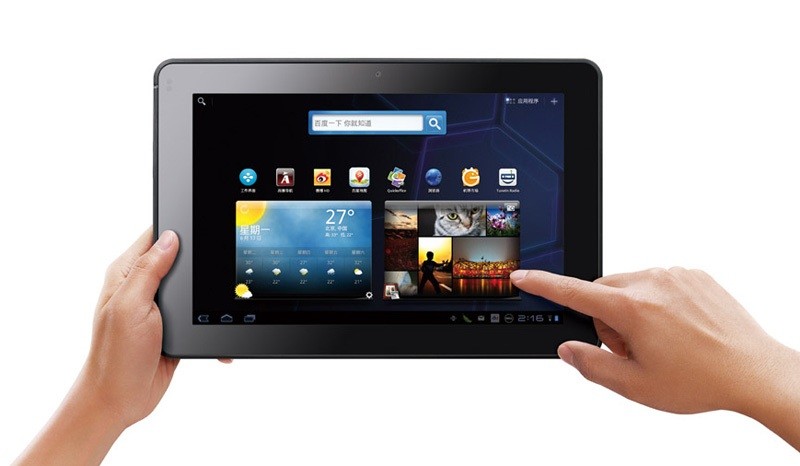
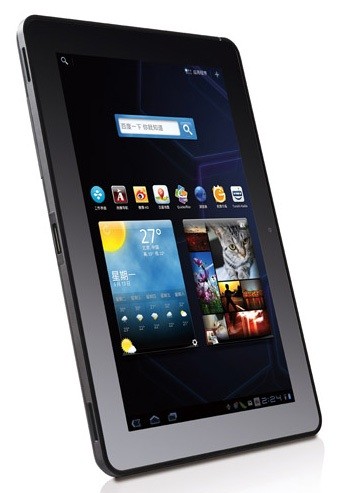
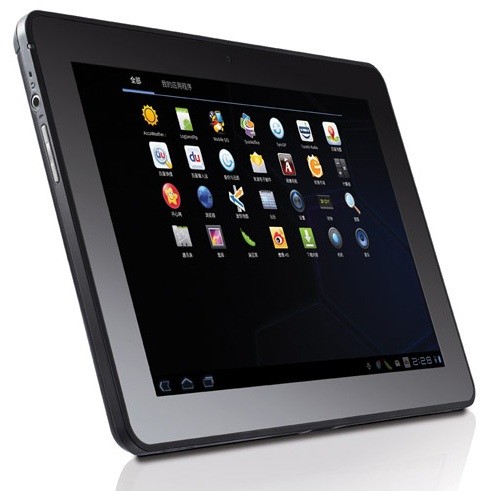
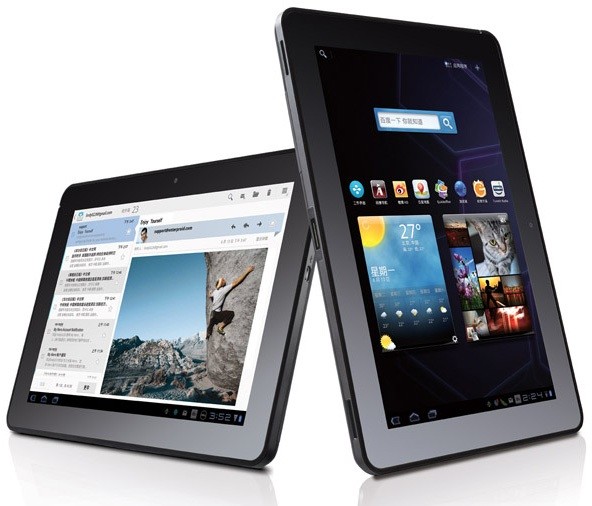
    The Dell Streak never really gained popularity in India, but its successors might catch on if the timing is right. The new Dell Streak Pro 10 / 10 Pro has been launched globally with a unveiling in China yesterday. The device has interesting specs and a really good price, it is also backed by Dell’s reliable service in India.

    • 1GHz NVIDIA Tegra 2 T20 chip
    • 1GB DDR2 RAM
    • 1,280 x 800 LCD 
    • Corning’s Gorilla Glass
    • 5 megapixel camera
    • 2 megapixel camera ( front)
    • SDHC expansion slot
    • 24.1WH battery
    • Honeycomb 3.1

    Price of the 16GB WiFi tablet plus 2GB of cloud storage for just ¥2,999 ($465) (Rs.22,000). Stay tuned while we try and contact Dell for official word on release in India.


  • New Gmail Android App v2.3.4 integrates Labels, custom tones and priority inbox among others

    New Gmail Android App v2.3.4 integrates Labels, custom tones and priority inbox among others

    The new Gmail app v 2.3.5 available now via the marketplace update adds a lot of new features to the on system app. the most important feature is the ability to sync only priority inbox with your device allowing you to save up on battery life. The other new feature that we like is label specific tones allowing you to customize the way you receive email.

    Officially What’s in this version:

    1. Save bandwidth and battery by only syncing priority mail
    2. Use label notifications to mash up filters, labels, and ringtones
    3. Remember ‘Show Pictures’ for senders
    4. Turn off sticky message actions in landscape or all orientations
    5. Better TalkBack support for accessibility
    6. Performance improvements

    [Android Market]

  • How To Tie A Water Balloon In Under 10 Seconds

    How To Tie A Water Balloon In Under 10 Seconds

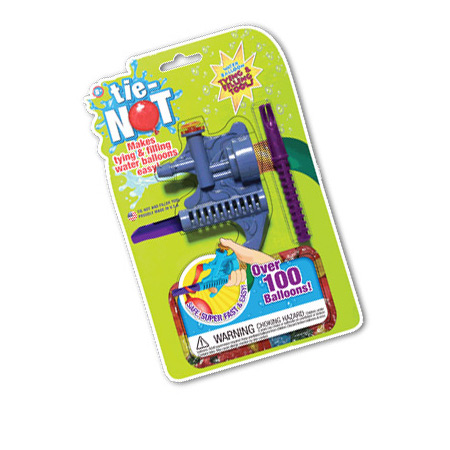
    We’ve all played Holi at some point or another, and we’ve all tied our fare share of water balloons. Unfortunately, some people find it hard to tie water balloons. This might be for many reasons but most of the time its because the balloons are very small and the person tying them has fat fingers. Case in point – me.

    Well we’ve found the perfect solution for all our balloon tying needs and its called the Tie Not. This fascinating gadget fits a standard garden hose and can fill a balloon and tie it for you too. The best part? Its amazingly simple to use. Watch the video below and then make a mental bookmark to get this for next Holi. Your friends will thank you…


  • MSI Releases latest GE620DX gaming laptop (PR)

    MSI Releases latest GE620DX gaming laptop (PR)

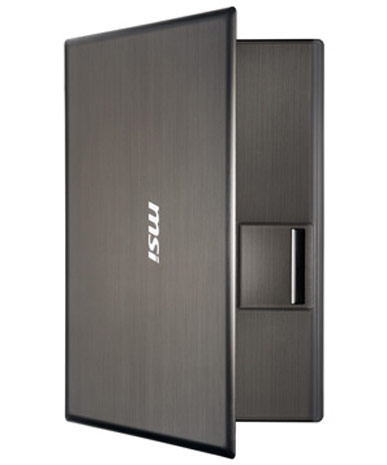
    MSI has just dropped the gaming bomb and is sticking to it, the company already has the worlds fastest gaming laptop and now releases the new GE620DX

    Specs Include

    • 2GHz quad-core Intel Core i7 processor
    • NVIDIA GeForce GT 555M
    • MSI Premium Sound and THX’s True Studio Pro
    •  15.6-inch 1366 x 768 HD display
    • 720p camera
    • HDMI out port and USB 3.0
    •  GPU Boost feature
    Along with the above specs the laptop is clad in a brushed metal aluminum finish and will go on sale sometime next month. No info on pricing.
    [toggle title_open=”Collapse” title_closed=”Read The Press Release” hide=”yes” border=”yes” style=”default” excerpt_length=”0″ read_more_text=”Read More” read_less_text=”Read Less” include_excerpt_html=”no”]MSI GE620DX Laptop
    Power plus performance, perfect for playing

    Wed, 27 Jul 2011

    MSI just rolled out its new generation GE620DX gaming notebook computer with Intel Core i7-2630QM quad core processor, top-of-the-line nVidia GeForce GT 555M discrete graphics card, MSI Premium Sound, and THX TruStudio Pro wrap around sound. You’ll have so much fun gaming, a hundred orcs won’t be able to drag you away from your laptop.

    Taipei-MSI has introduced its new GE620DX gaming laptop, featuring the Intel second generation Core i7-2630QM quad core processor (core speeds of 2.00GHz) and nVidia’s top-end GeForce GT 555M discrete graphics card. Not only does the GE620DX offer more powerful graphics performance and enhanced resolution, it supports nVidia’s PhysX and Microsoft’s DirectX 11 for great graphics with more detailed and convincing details, like cooler explosions and more realistic flowing water, to maximize your gaming pleasure.

    Eric Kuo, associate vice president for global sales, MSI Notebook, points out that MSI’s superior Premium Sound and THX TruStudio Pro wrap around sound team up to offer you the perfect combination of sound and visuals for the ultimate multimedia experience. This gaming dream machine also boasts an exterior with awesome high tech lines. The letters “MSI” are emblazoned in the center of the GE620DX’ cover in luminescent white script which is set off by the metal brush finish. Not only is this machine a dream to play, it’s a dream to look at, too.

    Power is the name of the game
    Intel 2nd generation Core i7 quad core CPU: The GE620DX features the latest Core i7-2630QM quad core processor with core speeds of 2.00GHz. The new generation Intel Core i7 processor supports Intel Turbo Boost 2.0 and Quick Sync Video. Intel’s Turbo Boost 2.0 greatly enhances performance in each core, automatically allocating processor resources to boost core clock speeds and overall computer performance, while Quick Sync Video revs up efficiency when ripping, synchronizing, and editing multimedia files.

    nVidia’s high end GeForce GT 555M discrete graphics card: The GE620DX packs nVidia’s new generation GeForce GT 555M discrete graphics card with 2GB of display memory. The nVidia PhysX technology offers the serious gamer some seriously realistic visuals. In addition, the GE620DX supports DirectX 11 for higher resolution, allowing you to see, for example, details of distant buildings for more realistic gaming.

    GPU Boost: The GE620DX laptop supports MSI GPU Boost technology which automatically switches back and forth between the discrete graphics card and the graphics chip. When your computer is processing graphics-heavy applications, it automatically kicks into the discrete graphics card mode to give you superior graphics processing capabilities and when performing general word processing tasks or browsing the Internet, it cuts to the power-sipping integrated graphics chip mode, striking the ideal balance between performance and battery life.

    Realistic multimedia experience
    Top cinema-grade sound: The GE620DX comes with MSI’s Premium Sound to meet the need of even the most demanding audiophiles for crisp, clean sound. Now, you can experience sounds like you’ve never heard them before in an NB computer. The GE620DX also comes with THX TruStudio Pro smart surround sound technology previously found only in cinemas, which when coupled with its top-end internal speakers, reproduces any music type or frequency faithfully.

    Cinema Pro technology: The GE620DX features powerful multimedia processing and MSI’s own Cinema Pro technology for superior graphics. One touch of the Cinema Pro hotkey instantly switches you to film mode for higher resolution and richer colors.

    Full array of HD hardware: The MSI GE620DX sports a 720p webcam to give you high definition, smooth, bright pictures when video conferencing with friends and family. If you want something bigger than a high definition computer screen to view films, it comes with an HDMI port, so any type of high-fidelity, high-definition video can be played on your NB, but viewed via a cable on a large-screen LCD TV.

    Designed with you in mind
    USB3.0: The GE620DX comes with new USB3.0 ports which boast transfer speeds of 4.8Gbps-10 times faster than USB2.0, and 80% higher power transmission, providing vastly higher data transfer rates and charging speeds for external hard drives, flash drives, and other handheld electronic devices.

    Shortcuts to shut off power to idle hardware: Located above the GE620DX’ keyboard are six shortcuts. With one click of the mouse, you can eject a DVD, turn off the screen, or turn on the S-Bar, Turbo Battery+, Cinema Pro, or power, so don’t waste battery power when you’re away from your computer for a few minutes.

    MSI S-Bar: Just one click of the GE620DX’ S-Bar hotkey calls up all functions onto the screen, so you can control everything from the webcam, projector, network, and Bluetooth to volume control, screen brightness, and standby mode.[/toggle]

  • Samsung Galaxy SII coming in White August 15 : A Savior to the Race

    Samsung Galaxy SII coming in White August 15 : A Savior to the Race

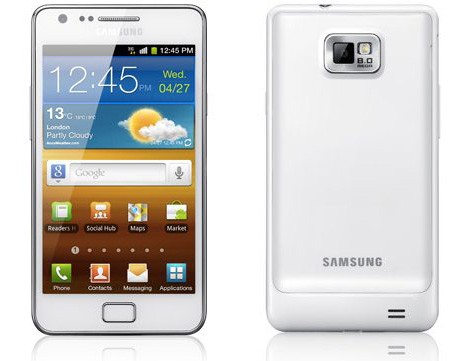
    One of the most successful smartphones of the year, the Samsung Galaxy S2, will now be available in White starting August 15 in the UK. The device is expected to hit India around the same time. The Samsung Galaxy S2 has been the most sought after cellphone in India, right after the iPhone 4 and above the LG Optimus 2X and HTC Sensation. 

    Samsung hopes to continue to sell the device through december, when a newer Galaxy with a 2Ghz dual core processor is supposed to be announced for 2012.

  • The Future Of Shopping Has Arrived

    The Future Of Shopping Has Arrived

    In China, SK Telecom has begun pilot testing of a new shopping cart system dubbed the Smart Cart. These carts basically have an integrated tablet which is running a proprietary software that communicates with a shoppers smart phone through an application developed for this purpose.

    Once users have downloaded the Smart Cart application to their phones, they can search for product information, discounts, coupons and they can even make a shopping list. When in the supermarket, the users phone is synced to the aforementioned tablet, which has a positioning sensor which can determine a shoppers location to 1m within the store. This allows users to get information about that section of the store and also allows store owners to provide targeted advertisements.

    Upon checkout, the tablet shows a list of purchased items as well as any membership points and coupons earned. SK Telecom elaborates:

    We expect that ‘Smart Cart’ will become a more personalized smart shopping service when combined with customer information– like shopping history and usage pattern– managed by existing retailers. Customers will shop conveniently through product recommendations based on analysis of user’s shopping history and location information; manufacturers will be able to carry out targeted marketing for customers located in the store; and retailers will secure a new marketing channel that enables integrated and seamless communication with customers.


  • Skypump – The Green Charging Station

    Skypump – The Green Charging Station

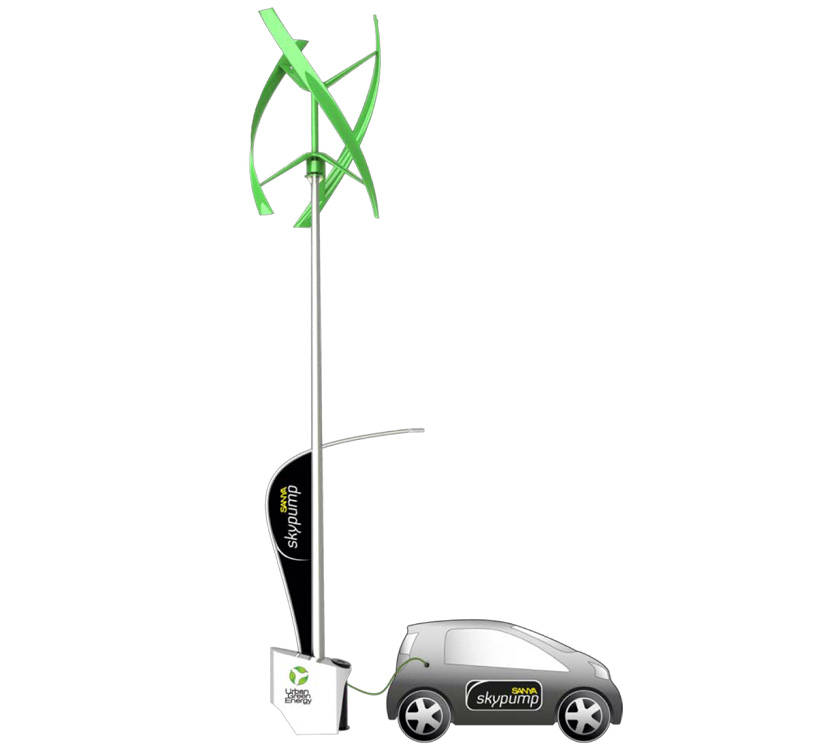
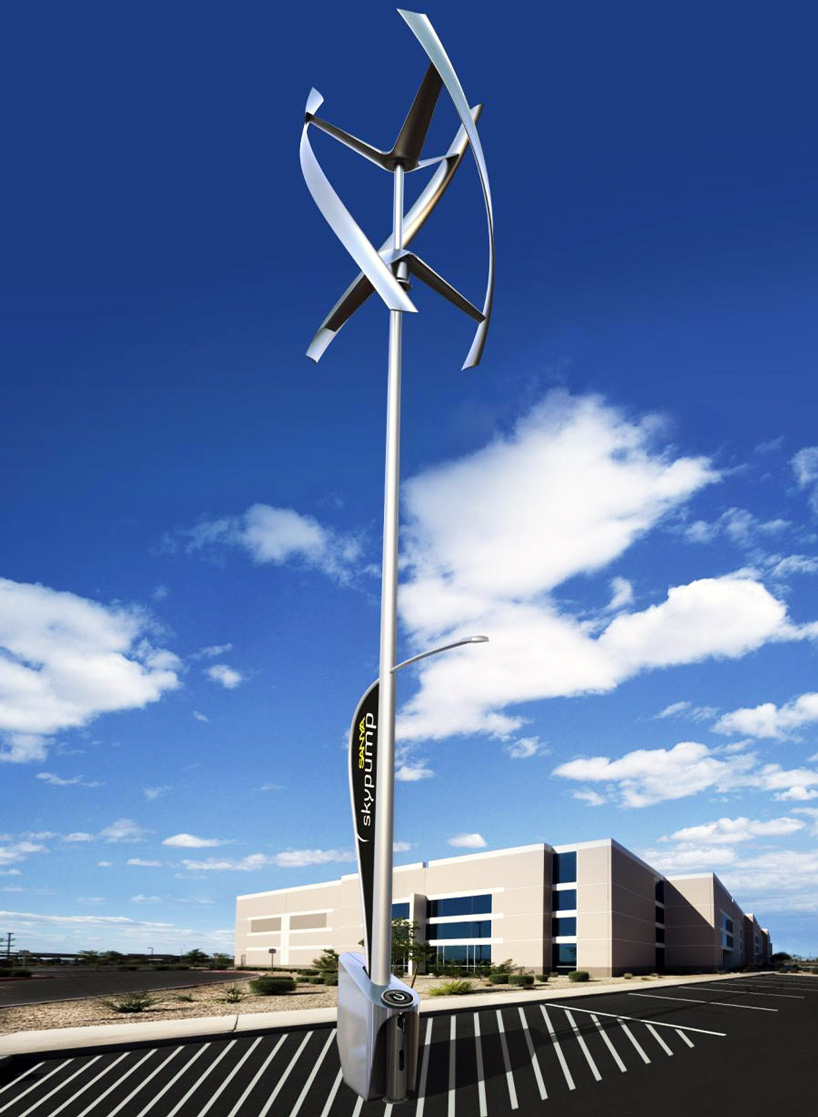
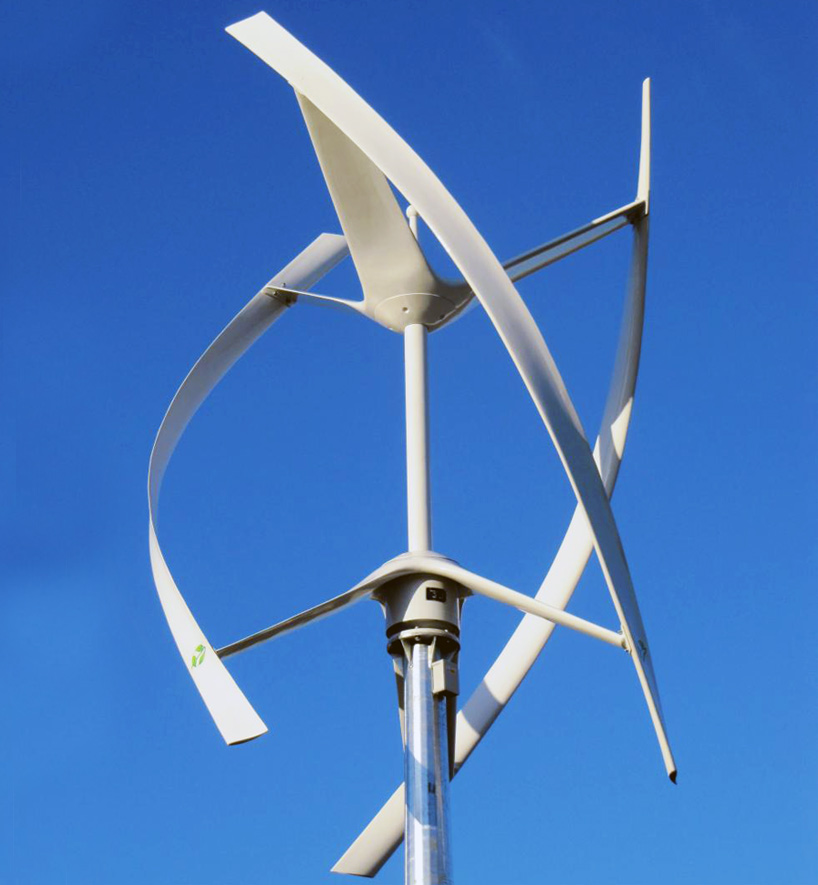
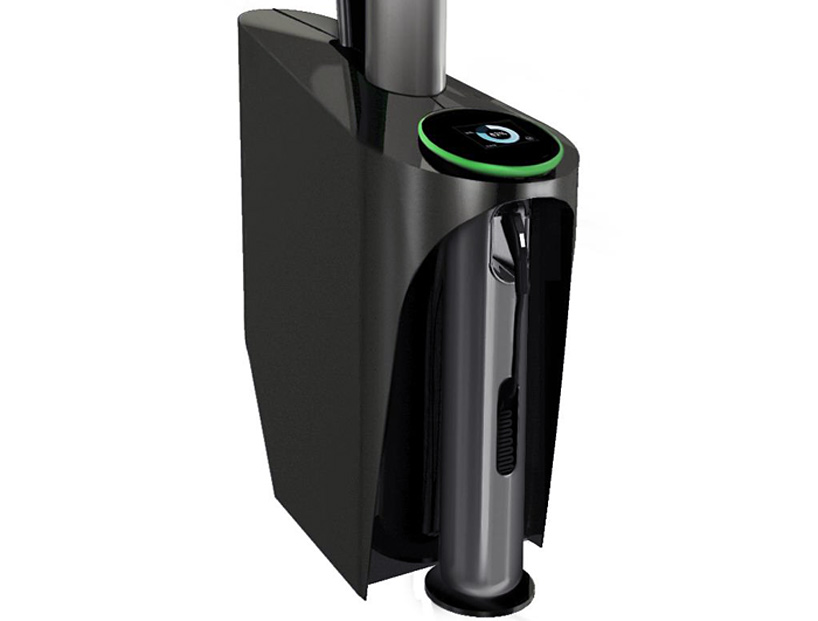
    The Sanya Skypump is a wind powered charging station for electric vehicles and it has been developed by Urban Green Energy in collaboration with General Electric. While still in the conceptual stages, the Skypump combines a GE Wattstation with a urban green wind turbine which can capture up to 4KW of wind energy.

    The turbine is 13m high and can easily be installed in parking lots, rest stops and other areas. As it is attached to the grid, once the station is fully charged and a vehicle is not plugged in, the Skypump will keep pumping electricity back into the grid. The company is also producing a version of the charging station for domestic use. The domestic version will be using a wall mounted GE Wattstation which can charge an electric car in four to eight hours. There is no news on whether the Skypump will offer similar efficiency.


  • Smart Pebbles – A Cool Spot For Your Phone

    Smart Pebbles – A Cool Spot For Your Phone

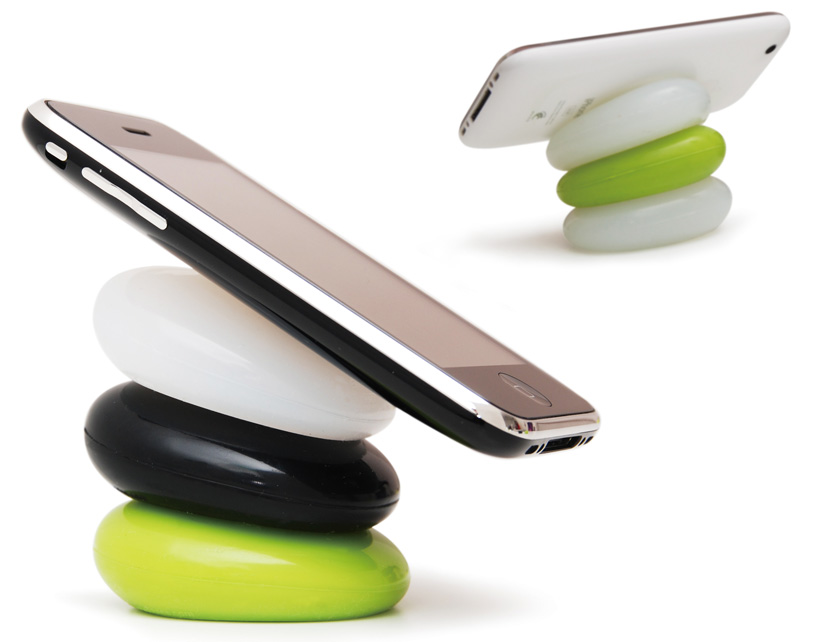
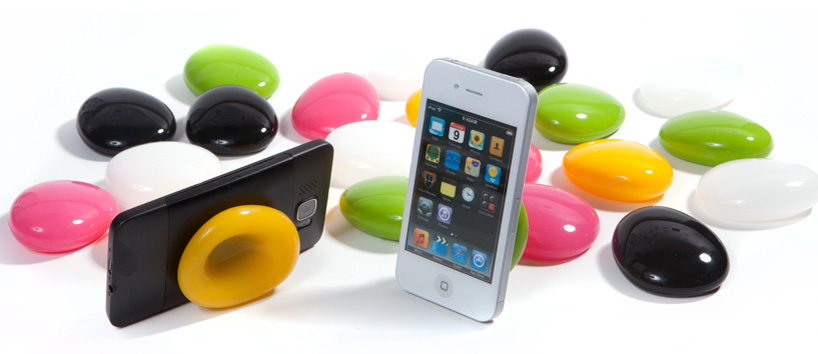
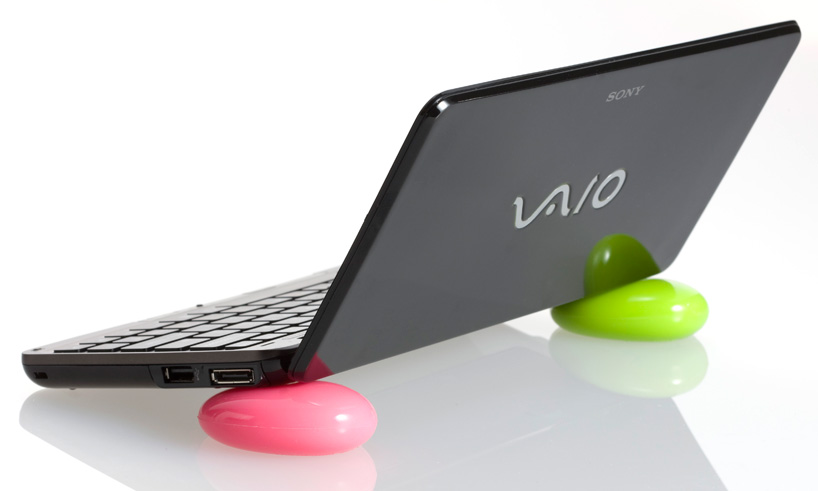
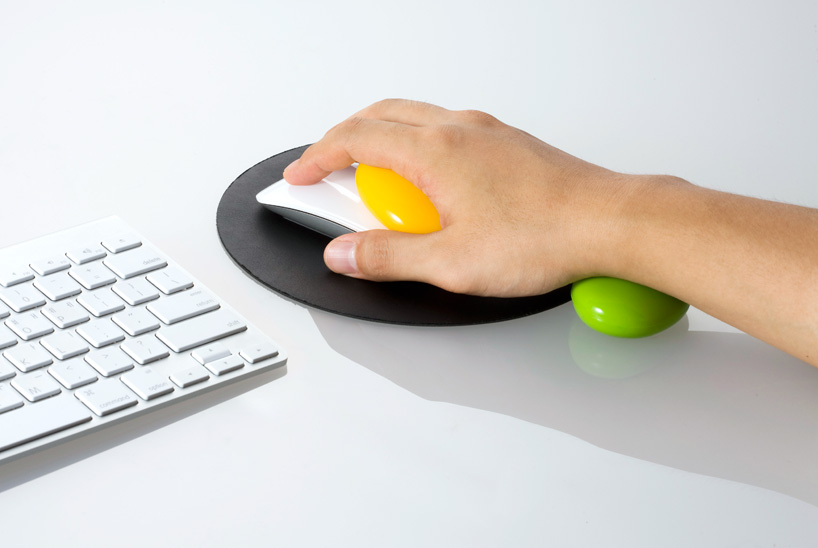
    Every now and again we find a product which we look at and go, “That’s cool, I want one”. Well the smart pebbles are one of those products. These colourful pebbles created by Korean designer Kijin Shin of Designmaxx provide a comfortable resting spot for your phone, tablet, laptop or any other device that you want. They can also be used as a wrist support while you’re using the mouse. To use the pebbles, simply press them in the center and you can then proceed to place your phone, laptop or tablet on them. The pebbles are available for 15 USD for a pair.


  • The Festo Smart Bird – A Miracle In Aviation

    The Festo Smart Bird – A Miracle In Aviation

    We’ve all seen Wile E Coyote trying to flap some ACME wings to take off from a cliff to catch the Road Runner and failing every single time. Well sadly, like the coyote, man has had the greatest trouble trying to design a machine that can fly like a bird. Until today, we have not had the materials or the scientific data to unravel the mystery of flight. And it’s not for a lack of trying. Many engineers and scientists have, over the years, tried to achieve this goal but have failed time and time again.

    After many centuries of observing bird flight and analysing its motion and studying the anatomy of birds, man has enough data to replicate the way a bird flies. Researchers at Festo, a global leader in the fields of pneumatic and electrical automation technology, have developed a prototype that they’ve dubbed the Smart Bird. Watch the video below and see it take its first flight.


  • Exclusive : Bold 9900 Coming to India August 2nd week , August 22nd in UK

    Exclusive : Bold 9900 Coming to India August 2nd week , August 22nd in UK

    The carbon fibre loving, touchscreen boasting, fastest smartphone from Blackberry is coming to India in August. The steel frame device is already set to launch in the UK on 22nd August. The device will initially be available only in the black color , but RIM promises to release a chic white version in October sometime. The device is the biggest upgrade to the Bold lineup from RIM in the longest time since the 9700.

    We also have exclusive news that the device will be priced at 32,500/- with a 1.5 year warranty.

    The company is also planning to release the Torch 2 sometime later this year.

  • Tech 101 – How Touch Screens Work

    Tech 101 – How Touch Screens Work

    Previously, we’ve explained How Liquid Crystal Displays Work as well as How OLED Displays Work. Today, we’re going to explain how Touch Screens Work.

    Touch Screens are all the rage today. You’ll find them in many devices like tablets, smart-phones, computer monitors, PDAs, ATMs, table tops, kiosks etc. A touch screen can use multiple inputs from your fingers to styluses and even sausages! But how does this marvel of technology really work? There are many different types of touch screen displays. You will hear many marketing gimmicks regarding capacitive or resistive technology, but most people just don’t know the difference. Read on to learn more about this fascinating technology.

     The first touch screen was made all the way back in 1965 by E.A. Johnson at the Royal Radar Establishment, Malvern, UK. Since that first prototype, many methods of detecting touch on a display have been developed. The most widely used touch screen technologies are explained below:

    Resistive Touch Screens

    A resistive touch screen is composed of many layers. The two most important layers are made of a flexible polymer which are coated with a resistive material and are separated with an air gap or microdots. The resistive material is applied in lines on each sheet and they are placed perpendicular to each other. When a person touches their finger to a resistive touch screen, the two layers are pressed together, and the points of intersection on the two layers allow the processor to accurately measure the position of the touch.

    When pressure is applied to the screen, a uniform voltage is applied to the first sheet, and the second sheet measures the voltage as distance along the first sheet, which gives the X coordinate. Similarly, when the X coordinate has been ascertained, a voltage is applied to the second sheet, and the first sheet is used to measure the distance, which gives the Y coordinate. These measurements take place in only a few milliseconds, which means that a touch is registered as soon as contact is made.

    Since these types of touch screens rely on a point of contact between the two resistive layers, any pointing device like a finger or stylus can be used on them. These screens are also quite inexpensive to manufacture as they don’t require any specialized components. Due to the design of these screens, registering multiple points of contact was not possible due to vectoring issues. However, new technology is now available that overcomes these vectoring issues and allows multiple points of contact to be measured.


    Capacitive Touch Screens

    Capacitive touch screens can be based on two different technologies:

    Surface Capacitance

    This is the most basic form of capacitive touch screen technology. One side of the insulator is coated with a conductive layer. A voltage is applied to this conductive layer, which results in a uniform electrostatic field. When you bring your finger in contact with the screen, a capacitor is formed dynamically. This changes the electrostatic field across the screen and this change is measured by sensors placed in the four corners of the screen. The point of contact can be accurately measured based on the change in capacitance in the four corners of the screen. The greater the change in any corner, the closer the point of touch is to that corner. As there are no moving parts, these types of capacitive touch screens are very durable and are used in industrial applications as well as kiosks.


    Projected Capacitance

    Projected capacitive touch screens work on a principle similar to the matrix found in Liquid Crystal Displays. There can be either a single layer on which an X-Y grid is etched to form a grid pattern of electrodes or two separate perpendicular layers on which parallel lines are etched to form the grid. There are two basic types of projected capacitance technologies – Mutual capacitance and self capacitance.

    • Mutual Capacitance: These types of capacitive displays have a capacitor at every intersection along the grid. A voltage is applied across the rows or columns which creates a local electric field across the display. When it is touched with a finger or capacitive stylus, the capacitance at each point on the grid changes, which can be measured and gives an accurate location of the point o contact. This technology can measure multiple points of touch.
    • Self Capacitance: This type of capacitive touch screen can have the same grid pattern as a Mutual Capacitance screen but the rows and columns operate independently. With this type of screen, the capacitive load of a finger is measured on each row and column by a current meter which gives the point of touch. These types of screens can only measure one point of touch at a time.

    Projected Capacitance touch screens can operate without direct contact and can have a layer of insulation between the user and the screen itself. However, they require the use of a capacitive input device in the form of a human finger or a specialized stylus with a capacitive foam tip. These types of touchscreens are more expensive to manufacture than resistive touch screens. They also face issues when in contact with any capacitive material like water.


    Infrared Touch Screens

    These types of touch screens work on a very simple principle. Infrared LEDs or lasers are used to form an X-Y grid on the surface of the screen. These transmitters are coupled with receivers that monitor the grid pattern. When a touch event occurs, the infrared light from the transmitters is blocked in that region. The receivers that are no longer detecting an infrared signal are used to measure the exact point of contact.

    Infrared touch screens face many problems from objects that obstruct the infrared grid such as smudges on the screen and dust particles. Any kind of input can be taken on these screen from fingers to gloves to styluses.


    So now that you know how a touch screen works, we hope that you can have a new-found appreciation for all the devices that use this technology. A tremendous amount of research and hard work has been put in to make an input interface for a sense that most of us take for granted – Touch.
  • McAfee Family Protection Software Launched in India (PR)

    McAfee Family Protection Software Launched in India (PR)

    McAfee has launched its Family Protection Software in India. This software is not only an antivirus tool but it also provides content filters to protect children from the hazards of the Internet. It is designed to provide parents with an insight into the digital lives of their children. Read the Press Release for more information.


    [toggle title_open=”Collapse Press Release” title_closed=”Expand Press Release” hide=”yes” border=”yes” style=”default” excerpt_length=”0″ read_more_text=”Read More” read_less_text=”Read Less” include_excerpt_html=”no”]

    McAfee announced the launch of McAfee® Family Protection, a parental control program that protects children of all ages from online risks while allowing them the freedom to safely explore the Internet.

     “Online concerns for tweens and teens are not what they were two years ago” said Venkat Krishnapur, Senior Director, McAfee India. “The threat landscape has changed dramatically – especially in the context of how children of various ages in urban India use the internet and how they are exposed to various forms of threats online. McAfee Family Protection is a powerful tool that helps parents get better insight to the digital lifestyles of their children. Parents can choose to block categories of sites, filter out only a handful of sites, or block nothing at all and simply review online activity reports. Its innovative features such as online activity reports, age appropriate settings and YouTube, games and website blocking and so on gives Indian parents a powerful tool to ensure their kids stay safe when using the Internet.”

     Use of the Internet by Indian children and new parenting challenges:

     McAfee commissioned Synovate, to conduct a comprehensive research titled ‘How safe are Indian kids online?’  across 10 cities- New Delhi, Mumbai, Pune, Ludhiana, Kolkata, Ahmedabad, Bangalore, Chennai, Hyderabad, and Cochin, covering 500 children and 496 parents. Following are key highlights of the revelations from this survey:

    •  62% of all polled kids have shared personal information online.
    • 58% kids share their home addresses on the internet.
    • 39% of all polled kids do not tell their parents about these online activities
    • 12% of all polled kids had been victims of some kind of cyber threat

    “These findings are extremely relevant from the perspective of Indian parents. As the internet evolves into a new platform for self expression and social interaction, children are indiscriminately indulging in information exchange leading to an increasing rate of cyber exploits. The introduction of technologies like McAfee Family Protection is a step in the right direction as it enables us parents to understand, handhold and mould our children’s online persona and behavior”, said Anindita Mishra- McAfee Cybermum India.

    In the context of these newfound online threats, McAfee Family Protection offers a host of essential features to enable Indian families in monitoring their children’s online activities:

    • Age-Appropriate Settings – Settings are customized according to age-groups
    • Filtering for Music and Online Games –Parents can decide what rating of content children have access to. Types of filtering include:
      • Songs with explicit lyrics from iTunes
      • Access to online gaming sites
      • Viewing of objectionable videos on YouTube
    • Encrypted website blocking blocks teens from accessing proxy sites so they cannot try to bypass content filters
    • Program blocking enables parents to block any program, including file sharing networks which can lead to malware infections on PCs
    • Instant messaging monitoring enables parents to monitor and record complete instant message conversations to alert them of improper dialogue with strangers
    • Time limits help families manage the amount of time their children spend online: families are able to set the day and/or time for when their child can access the Internet
    • Email blocking pre-approves email accounts that a child is able to access and blocks emails from unknown sources
    • Instant email alerts can be sent to parents when access to objectionable material is attempted
    • Social network filtering records all social network postings that contain profanity and posts that include confidential information that has been predetermined by parents–such as a home address, phone, school name, etc


    [/toggle]

  • Traveling Wave Reactors – The New Nuclear Power Source

    Traveling Wave Reactors – The New Nuclear Power Source

    Conventional nuclear reactors use Uranium 235 as their power source. However, out of all the Uranium that we dig up, only about 1% is U-235 while the rest is composed of, its not so reactive cousin, U-238. So what can we do with this U-238? Well according to some new research, we can now use U-238 as a fuel to power a new generation of nuclear reactors.

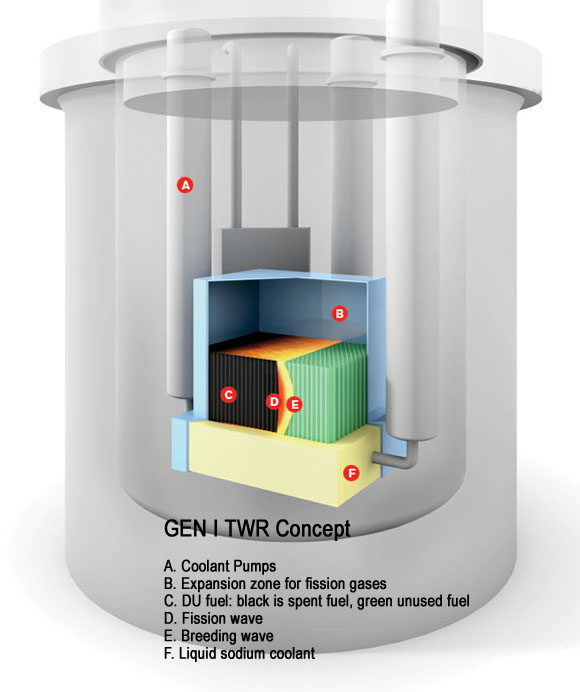
    Bill Gates has funded a new startup called Terrapower which is attempting to build the first prototype of a new type of nuclear reactor called a traveling wave reactor. this reactor will be using uranium 238 as a fuel source. How this will work is that a bunch of uranium 238 rods will be placed around a rod of uranium 235. This rod of U235 will kickstart the entire process. The uranium 238 gets converted into plutonium 239. This will generate heat and keep the entire reaction going, and as it propagates outwards from the center in a kind of wave, more rods of U-238 can be added to keep it going. Once the fuel gets used up, it can be used to kickstart a new reaction.

    What this basically means is that you can burn the expensive fuel, you can burn the cheap fuel, you can burn the waste from other nuclear reactors and generate electricity from the whole thing. If we start extracting Uranium from sea water, which is apparently easy to do, we can provide enough electricity to power the entire human race without any problems for thousands of years.

  • Nokia OVI store now sending 7 Million downloads a day

    Nokia OVI store now sending 7 Million downloads a day

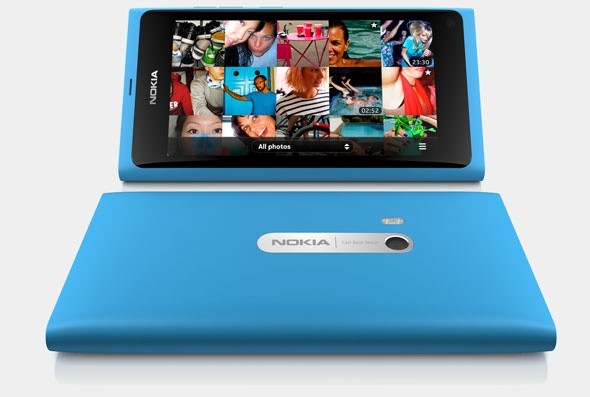
    Nokia has announced that its Ovi Store has served a record 7.62 million downloads, this figure is more than twice of the 3 Million seen in October last year.

    In addition, Nokia said downloads more than tripled in India, which remains at the top in terms of downloaded volumes. Calculating on basis of totals, the Apple App Store serves about 16 million downloads a day.

  • Thinner iPhone 5 Confirmed by Leaked silicone cases

    Thinner iPhone 5 Confirmed by Leaked silicone cases

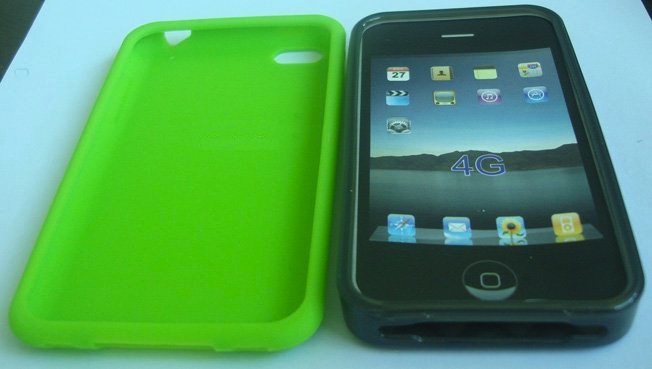
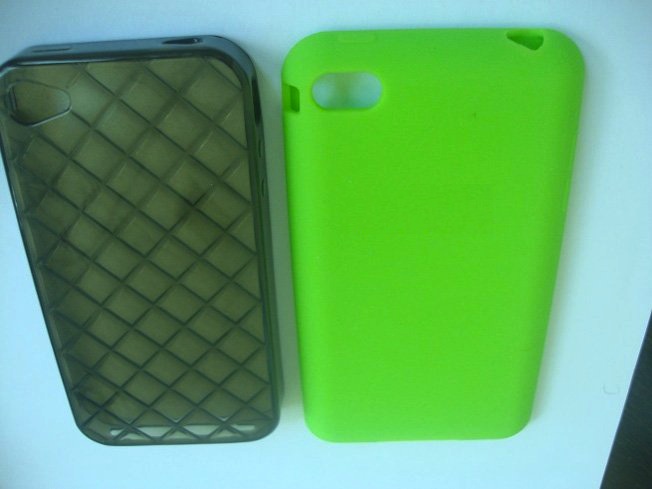
    Several cases for the next gen of iPhone have been leaked online, looking at the images the case looks definitely thinner than the existing iPhone 4s case. Although they are also identical to the shape an design of the iPod touch, suggesting an iPod touch with camera flash. Several manufacturers have also claimed to be shipping their cases for retail for the iPhone 5.


    The device is expected to be announced in August and shipped in September, Either way its going to be an exciting quarter.

iGyaan Network
Privacy Overview

This website uses cookies so that we can provide you with the best user experience possible. Cookie information is stored in your browser and performs functions such as recognising you when you return to our website and helping our team to understand which sections of the website you find most interesting and useful.