Category: Social Media

  • Rumour : Facebook RSS Reader Set For June 20 Launch

    Rumour : Facebook RSS Reader Set For June 20 Launch

    Facebook sent out press invitations via snail mail for a launch event, possibly for a Facebook RSS Feed or news reader, at its headquarters in Menlo Park, California on June 20.

    The Facebook launch event invitation postcards request that reporters come and see the “big idea” that their “small team” has been working on, Mashable’s Emily Price reported.

    The dead-tree invitation features a printed coffee cup stain ring and the words “A small team has been working on a big idea. Join us for coffee and learn about a new product.” 

    With Facebook having launched hashtags, which is still technically in its early trial-and-error phase, this new product might have something to do with that new feature. But what we’re guessing is that the product announcement just might have to do with the discovery of an Facebook RSS reader hidden inside of Facebook’s Graph API code. Facebook hasn’t commented on the bit of code alluding to an RSS reader that was found, and come July 1, Google Reader will officially be killed off. The timing lines up pretty well. 

    If Facebook does have a new Facebook RSS reader, the move would fit in with the company’s strategy of trying to become the go-to place for internet users looking to know what is going on in the world, a strategy Mark Zuckerberg pointed to at the March launch of Facebook’s revamped news feed.

  • Vine Now Available For Android

    Vine Now Available For Android

    Vine for Android is now available for devices running Android 4.0 and above.

    While the wait has been arduous for thousands of Android users accustomed to simulteanous app releases, but Twitter has finally released Vine for Android to the world. The six-second video social network has been the talk of the media and journalism circuit since its iPhone release in January, and an Android version was promised shortly thereafter.

    The initial Android app is bare-bones: you can view the masterpieces from your stream of followers, upload your own six-second Vines, explore popular posts and Editors’ Choice clips, and share content to Twitter and Facebook. Unlike the iPhone version, however, you can’t tag users in posts, nor can you use hashtags. You also can’t engage the front-facing camera, something that was added to a previous iPhone release. There are also no push notifications in the first version, which will be disappointing to some users.

    Vine for Android includes a Zoom feature, something that does not exist on the iOS version.

    Mainly, though, Vine for Android is slow. Whereas the iPhone version renders video while you’re filming, the Android equivalent takes a long time to render after the filming. It takes over 30 seconds to render a six-second video.

    In a blogpost on 3 June, Twitter said Android users can expect, “frequent updates with new features […] as well as bug fixes and performance improvements” in the coming weeks.  This will include front-facing camera support, push notifications, the ability to mention people and use hashtags, and the ability to search.

    [Mobile Syrup] 

  • Pinterest Now lets you send pins directly to friends.

    Pinterest Now lets you send pins directly to friends.

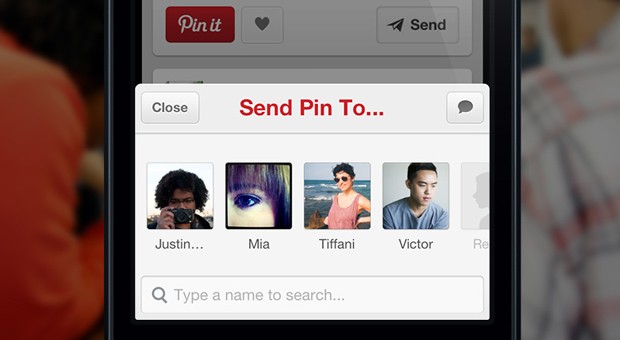
    The Pinterest app got updated, along with a tiny overhaul of the mainframe, now allowing users to send pins directly to their friends. On the web however you can only email the pins as of now, the send pin option  is currently only available to mobile app users. 

    2013051602


    Have you ever seen a pin you knew a certain friend or family member would love? Now you can send pins directly to your friends and fellow pinners from the web or your phone. You can even include a message to give it a more personal touch!

    Just tap Send from either web or mobile to send a pin. You can send pins to fellow pinners (if you both follow each other), Facebook friends, or email contacts. We’ll show you the most recent people you’ve sent pins to for easy access.


    [Pinterest]

  • Google Launches standalone Apps for Hangouts on iOS, Gmail, Chrome and Android

    Google Launches standalone Apps for Hangouts on iOS, Gmail, Chrome and Android

    Google has unified the messaging service and termed it Hangouts. With standalone apps for iOS, Gmail, Chrome and Android. The conversation is kept in focus and not the platform you use, focusing the interface on conversations that carry from device to device, notifications and shared photo pools that weren’t in Google Talk.

    The new service of Hangouts replaces Google Talk, Google+ Messenger, and the original Google+ Hangout video chat service and as per Google Hangouts will eventually replace all of Google’s communication properties. The new Hangouts is basically a messaging app, like Whatsapp or Facebook Chat.

     Hangouts will store all conversations in the cloud, and allow users to message friends at any time, even if they’re not connected. Users can visit past conversations and access shared photos and video call history; thanks to Google’s cloud, Hangouts will sync everywhere, giving people access to conversations on any device.

    Just like the old Hangouts the new Hangout will allow video call with up to 10 friends, and new features include “just hanging out”  with an amazing “watermark” allowing users to show when someone else is typing just like in WhatsApp messenger or iMessage, but whats new is the ability so see how far the recipients have read into the conversation. 

    Every photo that you or a friend posts in Hangouts will be automatically saved in a private shared album on Google+, and users can view the photos they’ve shared over time. Hence the new integration of Google+ with this new Hangout service is essential. 

    Google also plans to integrate other communication features like Google Voice and their international VOIP services within Hangouts, but no real timeline has been clarified for the same. 

    The apps for iOS, Android and other services are live and can be downloaded.

    [iOS APP]


  • Google+ gets new Multi-Column card design and Auto-Hashtags

    Google+ gets new Multi-Column card design and Auto-Hashtags

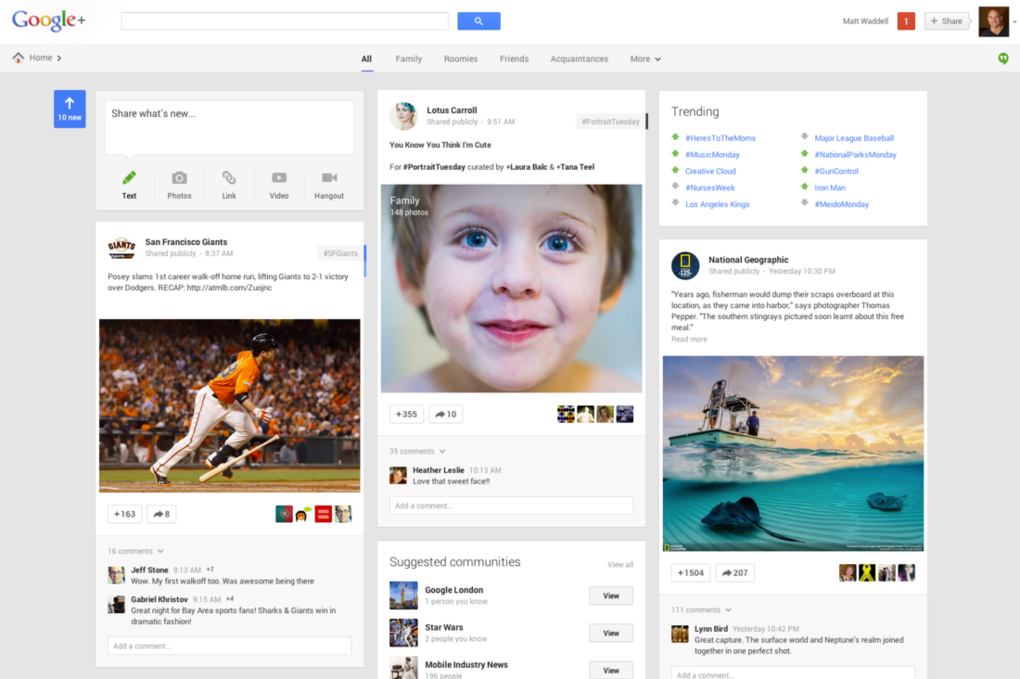
    Google at the I/O conference has launched a new design of their social networking site, Google+. Users on Google+will be seeing their social content in a new way thanks to a multi-column format fit for any size screen.

     The design consists of a maximum of 3 columns populated with individual cards for posts and pictures, almost to replicate Pinterest type UI. Columns appear or disappear depending upon the size of your screen, and cards can be flipped to reveal editing options, the cards can also be moved around. 

    Identical to Facebook’s left side menu, Google+ has also added a similar menu to help in the navigational traits. The Videos and Pictures will span to the width of the screen across multiple columns for a nicer looking experience.  Google clarified that the new design is responsive and will adjust to screen sizes. In addition, this 3-column layout will make its way across devices.

    Incase you like the original format, you can continue on the old design and say boo to the new Google + format. 

    Among the new features of Google+ is the ability to flip an image and look at related pictures under similar Hashtags. A feature called Auto Enhance will analyze and apply tweaks to your uploaded photos. The auto enhance feature will include fairly simple adjustments like brightness, contrast, color correction, noise reduction, tonal distribution, and saturation, but it will also make some more intensive changes. 

    “Auto Awesome” detects the kinds of photos you take, Google is going to try to make other improvements. Uploading a series of similar photos taken in a short period of time,  will automatically make an animated GIF out of it on Google+.

    Auto_Awesome_GIF

    The new Social Network design will also automatically pick out best pictures and ignore the blurry ones. This feature will choose the “best” photos to show off. To cite an example, Multiple images from an event will be scanned and only the good ones will be automatically shared, the remaining will remain pending for approval.

    Google also focuses on unified messaging service with the new Hangouts which is now integrated into the Google+ redesign. Google is releasing Hangout apps for Android, iOS, and Chrome (as well as integration with Gmail). In this move Google will get rid of Google Talk, Google Messenger, and Video Hangouts and everything will be replaced with the new Hangouts.

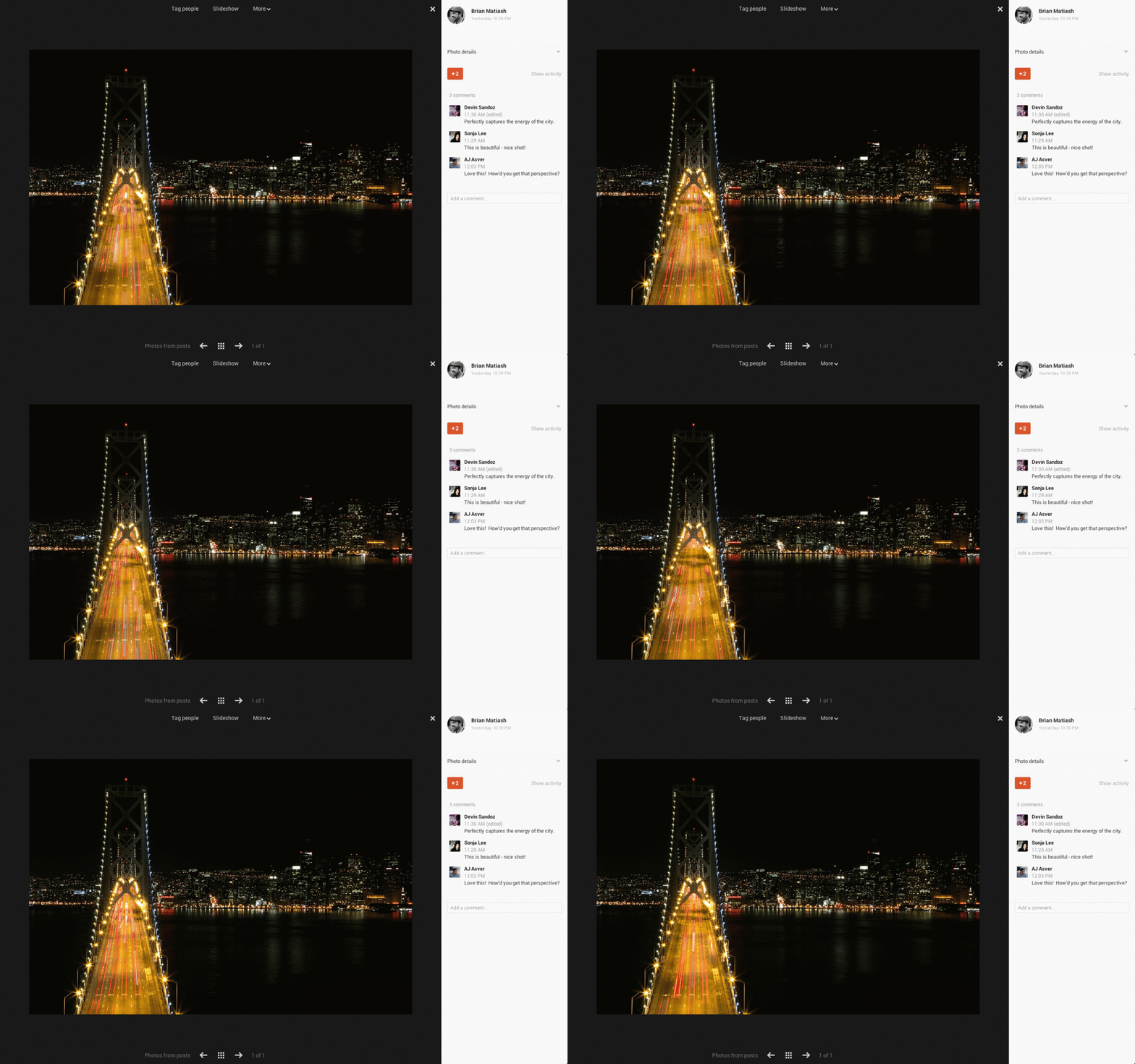
    Google still promises the features launched earlier for Google+ like unlimited uploads for photos under 2048-pixels wide, a fullscreen picture viewer, and 15GB of free space for for photos that cross the size limit.


  • Facebook for iOS gets updated with Photo Viewer Button; Save, share or make profile!

    Facebook for iOS gets updated with Photo Viewer Button; Save, share or make profile!

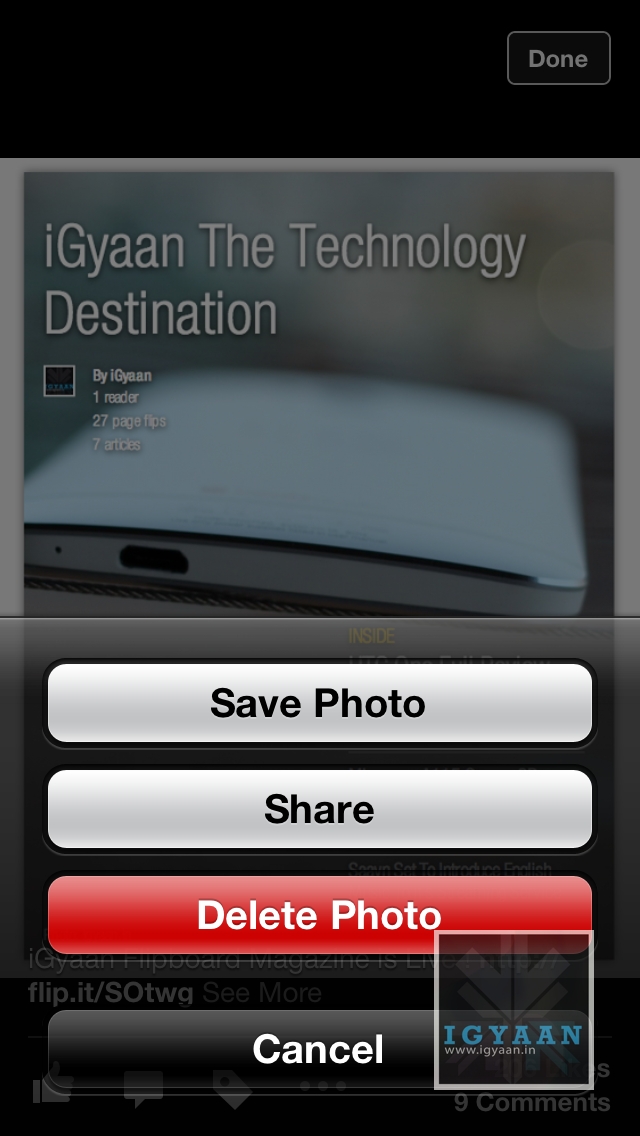
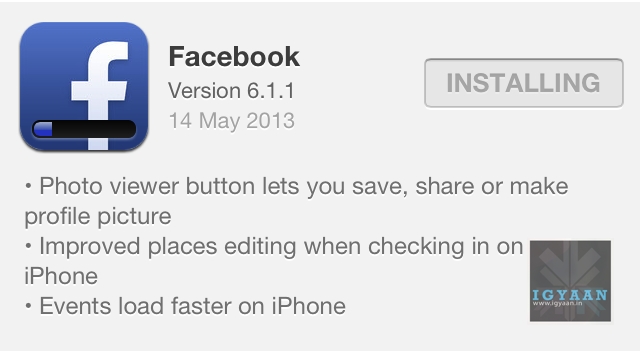
    The Facebook App on iOS just got an Update on their version 6.1.1 . The new update brings about a Photo Viewer button that lets you save or share an image you are viewing from your handheld, and also set is as you profile image, making handling of images a lot better on iOS devices. 

    facebook share update 1


    A few other improvements include , enhanced “places editing” while checking in on the iPhone on Facebook and faster load times for Events which are compressed on server side and delivered to the handsets.

    Facebook has seen a growth in Mobile Platform usage for its apps by almost 200% in the last year and the company expects these numbers to grow tremendously in the coming two quarters. 

  • Twitter Updates Android And iOS App, Expands Trends Locations

    Twitter Updates Android And iOS App, Expands Trends Locations

    Twitter for iPhone has been updated today with some minor feature improvements and better support for in-line Vine videos. The Android version has also been updated.

    The company has been rolling out updates to its mobile apps in quick succession since the beginning of the year, after clamping down on what third-party developers can do with their own software. This latest version for iOS adds Trends data to over 160 different cities around the world, including many in India, and improves in-line Vine video playback.

    Vine was acquired by Twitter and has since been systematically integrated into the Twitter experience, while continuing to be available in a standalone Vine app. After the acquisition, rival social network Facebook moved to limit the ability to cross-post Vine videos from Twitter to Facebook in apparent retaliation for Twitter’s attempt to do the same to Facebook acquisition Instagram.

    Perhaps the most important addition to the app is one that will come in under the radar. When replying to a retweeted Tweet — for example, if you see a Tweet I retweeted of someone you don’t follow — it will include both the original person and retweeter within the response. Users can also invite others from within the app itself. That, and bug fixes and performance improvements, round out changes made in this new version.

    As for the Android version, the company now uses an overflow menu (the three dotted lines) on compatible devices such as the HTC One to quickly switch between accounts and access the settings.

    The folks at Twitter have also said that users will now be able to “enjoy a smoother experience” courtesy of some bug fixes and other improvements.

    The new versions of the apps also added the ability to invite friends to join Twitter from within the app.

    You can download the updated version of Twitter for Android and iOS now from their respective app stores.

  • Facebook To Delete Beheading Videos After Complaints

    Facebook To Delete Beheading Videos After Complaints

    Facebook has said it will delete videos of people being decapitated which had been spread on its site.

    “We will remove instances of these videos that are reported to us while we evaluate our policy and approach to this type of content,” BBC News quotes Facebook.

    The company had previously refused to remove several graphic clips, claiming people have a right to show the “world in which we live”.

    The turn-about reportedly came after the California-based social network’s safety advisory board criticised the decision to leave the gruesome clips up at the website. 

    The warnings came after a one-minute long video was uploaded to the site last week showing a woman being beheaded by a masked man.

    A voice heard on the footage suggests that it was filmed in Mexico. A second video clip showing the execution of two men has also been shared on the network after being posted last Wednesday. The victims say they are drug smugglers for a Mexican cartel before being attacked with a chainsaw and knife.

    Celia Mellow, who started a petition calling for the clips to go, said she was ‘shocked’ by the images.

    Meanwhile, Facebook last night announced first quarter revenues were up 38 per cent on 2012 to £938million. But shares were down 28p to £17.35.

    Chief executive Mark Zuckerberg said: ‘We’ve made a lot of progress in the first few months of the year.

    ‘We have seen strong growth and engagement across our community and launched several exciting products.’

  • Facebook Reports First Quarter Results, Reveals 751 Million Monthly Active Mobile Users

    Facebook Reports First Quarter Results, Reveals 751 Million Monthly Active Mobile Users

    Facebook issued its first quarter results for the new year and made some pronouncements on the state of the mobile web and mobile advertising in general.

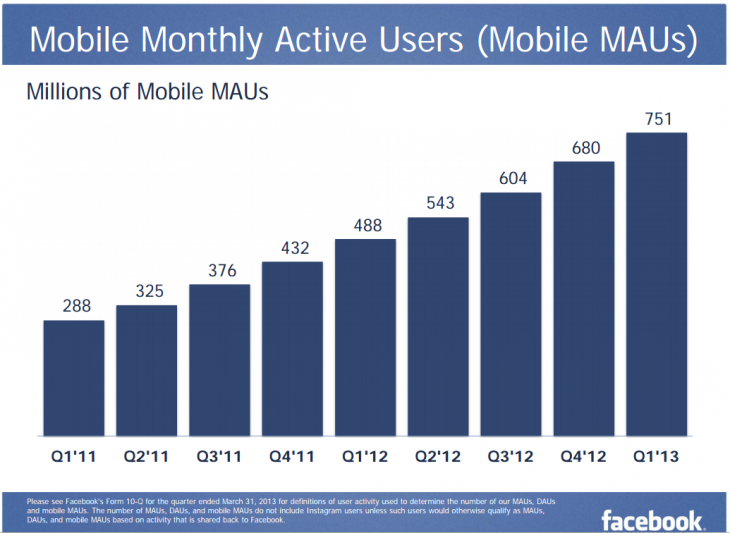
    The company, which went public in 2012, now has 751 million monthly mobile users, up 54% from the same period last year. Considering that number comprises 68% of the company’s 1.11 billion total monthly active users, that is an astounding number.

    facebook

    In a recent study conducted by Facebook, it found that 70 percent of all respondents use Facebook on their phone — 61 percent of which use the service every day. The company also found out that out of all the things that could be done on a smartphone, being on Facebook was the third most popular activity. 70 percent said that the Facebook app has become one of the most commonly used applications — right below checking email (78 percent) and Web browsing (73 percent).

    More impressive is the rate of growth: that 54% uptick in mobile users is much higher than the 23% increase in total active monthly users.

    So while it’s not safe to say that Facebook’s growth has completely stopped, it only grew some 4.75% since last quarter, while mobile users were up nearly 11% in the same period. Advertising revenues have also seen a slight bump from mobile users; 30% of Facebook’s advertising revenue now comes from mobile devices, up from 14% in Q3 and 23% in Q4.

    Facebook’s mobile apps are among the most popular on its respective platforms, and with an increasing number of “sponsored posts” littering users’ news feeds, it’s only a matter of time before that 30% number increases to over 50%.

    [The Next Web]

  • Microsoft Releases Facebook Beta For Windows Phone, Features High-Resolution Photos, Timeline And More

    Microsoft Releases Facebook Beta For Windows Phone, Features High-Resolution Photos, Timeline And More

    Facebook for Windows Phone, while maintaining a nice design, has always lagged behind its iOS and Android counterparts for features.

    Microsoft is launching a new version of its Facebook app today in beta, bringing many of the most highly-requested features to Windows Phone users. Not only is the design a better compromise between the company’s existing mobile apps and the Windows Phone design guidelines, but it offers Timeline support, high-resolution images and post sharing.

    facebook

    Instead of showing a tiny preview, the beta Facebook app now allows pics embedded inside a post to take up all the horizontal screen estate. Basically the shots can take advantage of large high-resolution displays.

    The new app supports left- and right-side sliding bars, much like Android and iOS, and they open smoothly with a swipe from either side. Any page, including specific timelines, the messaging folder or even specific brand pages, can be pinned to the home screen for easy access, and the app still supports using images from albums as lock screen art. Toast notifications are said to be more reliable as well.

    “Once you’ve put the beta app through its paces, we hope you’ll pass along bug reports, feature requests, and other feedback by going to Settings>About in the app”, Microsoft says. “You can also post a Store review. Your comments and suggestions will inform future releases”.

    While the beta is not quite stable, and cannot be found by searching in the Windows Store, it will go a long way to alleviating some of that cross-platform envy Windows Phone users have been feeling lately. No word on whether Chat Heads are coming to Windows Phone any time soon, but having native Facebook Messenger support from the Messages app should suffice for now. The beta will be installed alongside your current Facebook app until it comes out of beta.

    [Windows Phone Blog]

  • Twitter’s Vine App For Android “Coming Soon”

    Twitter’s Vine App For Android “Coming Soon”

    Vine, Twitter’s popular video sharing app, has been a success on iOS and consistently remained as being one of the top ten social apps.

    vine

    The free app allows you to record 6-second looping videos and share them via Vine, Twitter or Facebook. Dom Hofmann, the original creator of Vine, spoke with The Verge and he noted that a future enhancement that will be coming to iOS will be the option to tag people, which as a result will make it even more social.

    In addition, Vine is poised to expand past Apple and integrate into the lives of Android users. 

    The company told The Verge recently that an Android version is coming soon, but didn’t say exactly when we can expect it to hit the Google Play store.

    Clues pointing to a Vine Android app have been out ever since February, when the company has started looking for a lead Android engineer. Why would anyone do that, unless they were developing an Android app?

    More interesting though is the thought process that went into creating Vine. Vine co-founder Dom Hofmann told The Verge that the key to the app was not in “reducing complexity” as Steve Jobs and Jony Ive were noted for saying, but rather “concealing complexity”.

    In other words, allowing users to do something relatively complex in a simple way. Quite an interesting interview if any of you are interested. 

    In any case we’ll keep you guys updated, but in the meantime Android users, are you guys excited?

    [The Verge]

  • Twitter for Mac gets update, Support for Retina Display, New Composer and Languages

    The Twitter for Mac app has received a much needed update, that not only brings support for retina display, but also few other fixes.


    Twitter for mac update


    • Photos: It’s easier than ever to share photos. Simply click the camera icon in the lower-left corner of the Tweet compose box, and choose a photo to share. If you prefer, you can still drag and drop photos from the desktop.
    • Retina display support: Now Twitter is even more vibrant and detailed on the highest resolution Mac notebooks. With this update, Tweets will be clearer and sharper, creating a more vivid experience.
    • 14 more languages: In addition to English, Twitter for Mac now supports Dutch, French, German, Indonesian, Italian, Japanese, Korean, Malay, Portuguese, Russian, Simplified Chinese, Spanish, Traditional Chinese, and Turkish.


    Along with these updates, Twitter for Mac offers keyboard shortcuts, support for multiple accounts and timelines, and other features. Download now from the link below. 

    [App Store]

  • Twitter #music App Rolled Out For iPhone And Web, Coming To Android Soon

    Twitter #music App Rolled Out For iPhone And Web, Coming To Android Soon

    Twitter officially announced that Twitter #music will be going live today. So far Twitter users will be able to access the new music discovery app via the web (music.twitter.com) or through an iPhone app.  It was built by the team behind We Are Hunted, which Twitter acquired last year.

    Unfortunately it appears that Android users are going to be left out – at first.

    twitter #music

    What is Twitter #music? Twitter notes that it’ll “change the way people find music” and is all based on activity through the people and bands you follow. The app is categorized into 4 areas: Popular, Emerging, Suggested, and Now Playing. You have the option to listen to a song within the app, purchase, learn more about specific artists, or retweet songs or albums to your followers.

    Twitter will access the millions of users, plus iTunes, Spotify and Rdio to find out what people are talking about and what’s popular. “By default, you will hear previews from iTunes when exploring music in the app. Subscribers to Rdio and Spotify can log in to their accounts to enjoy full tracks that are available in those respective catalogs.”

    Twitter #music also includes a suggested music screen and the ability to search for music from your favorite artist. Find something you like and you can play it right from the interface. As you would expect, Twitter #music encourages instant sharing: you can tweet what you’re listening to directly from the Player screen.

    This release should take the success Twitter has seen in their release of Vine earlier this year.

  • Leaked : Twitter Music To Involve Spotify, Rdio, iTunes and More

    Leaked : Twitter Music To Involve Spotify, Rdio, iTunes and More

    By now, you may have heard that Twitter is launching it’s own music service tomorrow dubbed Twitter Music. Although some is known about the service, there is still a lot that is unknown. Fortunately for audiophiles, there has been some more information leaked about the new service.

    As TheNextWeb reports, the latest information comes from the site’s code: designer Youssef Sarhan has discovered the service will have both a Web interface and a separate app, will offer streaming, as well as integrate with Spotify, Rdio, iTunes, Soundcloud, Vevo and YouTube.

    Youssef followed the trail of source code that eventually led to this:

    .iconmusic-spotify-connect-btn{background-position:-4431px -0px;height:32px;width:179px}

    .iconmusic-player-source-rdio{background-position:-2801px -0px;height:19px;width:30px}

    .iconmusic-player-source-itunes{background-position:-2751px -0px;height:19px;width:30px}

    .iconmusic-player-source-soundcloud{background-position:- 2851px -0px;height:14px;width:92px}

    .iconmusic-player-source-vevo{background-position:-2963px -0px;height:9px;width:53px}

    .youtube-vid player{position:absolute;padding:10px;height:200px}

    Other notable features include artist biographies, being able to compose tweets from the music app, follow other users, charts and shows, being able to buy songs, verified users, and search (TNW discovered these last two):

    • .artist-bio
    • .iconmusic-compose-tweet-btn-bg
    • .iconmusic-profile-large-following-btn
    • .iconmusic-menu-charts
    • .iconmusic-menu-shows
    • .iconmusic-player-btn-buy
    • .iconmusic-verified-small
    • .search-tooltip .iconmusic-btn-search-close

    The following image gives us an idea regarding the UI of Twitter Music

    twitter 

    This is what the player will look like, again referenced in the CSS for the page :

    twitter

    Are you anticipating Twitter Music? Is there one particular feature that you would like to see? Leave a comment below and let us know what you think!

    To read Youssef’s full findings, visit Sefsar.

    [The Next Web, Gizmodo]

  • Facebook Home Now Available For Almost All Android Devices

    Facebook Home Now Available For Almost All Android Devices

    Android Developer Paul O’Brien, has done it again. First, he unleashed Facebook Home apks before the initial release. Now, he has made Facebook Home available to all devices, even unrooted ones. That is correct. You do not have to be rooted to give Facebook Home a try.

    The folks at Modaco extracted the Facebook Home APK file and made it available for all those in other countries than the US.

    Paul O’Brian of Modaco found a way to patch the files necessary to run Facebook Home on unsupported devices and made it available for download. He patched a version of the Home app to keep it from figuring out what device you’ve just loaded it onto.

    As TechCrunch explains, 

    All you really need to do is pop into your Android device’s settings and make sure it’s set to install applications from unknown sources (it’s in the “Security” section). From there, you just have to download and install his patched versions of the Facebook Home app, as well as his patched Facebook and Facebook Messenger apps too. Already have those latter two apps installed? You’ll have to uninstall both of them and load up O’Brien’s cooked versions in order for Home to work properly.

    That could pose an issue for some of the more curious among you — certain devices that have the Facebook app baked into it by the manufacturer (like the HTC One, for example) won’t play nice with this version of the Home app unless you root the device and remove the Facebook app yourself. Thankfully, rooting most popular devices is way easier than it used to be, but be sure to do your homework if you think you may take the plunge.

    Facebook’s ‘exclusive’ product reserved for the HTC One, One X, One X+, Samsung Galaxy S3, S4 and Note 2 debuted in the Play store on 13th of April, 2013 and has garnered a lackluster two-and-a-half stars rating with near 2 thousand votes.

    This news should come as a blow to HTC, which released the HTC First, a phone which supposedly was a part of the select group of devices destined to get Facebook Home. 

    For more details on how to download and install this APK file, head over to Modaco.

    [Modaco, TechCrunch]

iGyaan Network
Privacy Overview

This website uses cookies so that we can provide you with the best user experience possible. Cookie information is stored in your browser and performs functions such as recognising you when you return to our website and helping our team to understand which sections of the website you find most interesting and useful.