Tag: Android

  • Android Safer Than iOS According to Reports

    Android Safer Than iOS According to Reports

    The mythbusters are back, and this time one of the all time popular myths regarding iOS has been busted. According to a new study, it turns out that iOS isn’t as malware-proof as people have come to believe. In fact, reports suggest that Android is safer and more secure than iOS.

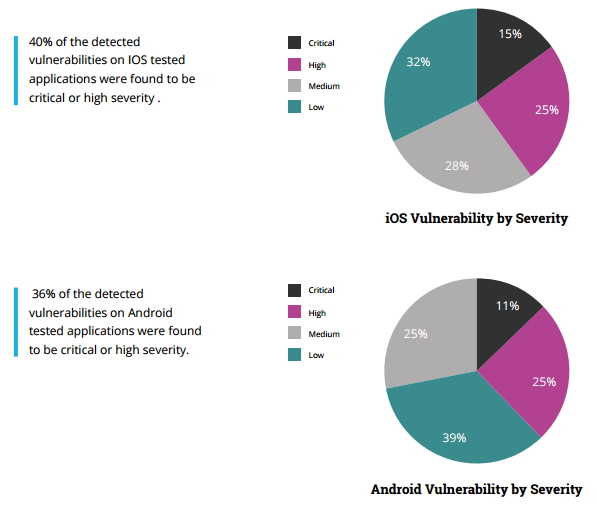
    The study carried out by Checkmarx and AppSec Labs claim that Apple’s ‘wall garden’, that is the App Store, is filled with apps that have greater percentage of critical or high severity security vulnerabilities when compared to Android apps.

    According to the report, a critical vulnerability is defined as one “that exposes a major security risk with a direct exploit (not needing user involvement). If exploited, the security threat might cause major damage to the application and/or have major impact on the company.”

    Here’s what the claim means for everyone. Firtsly, it breaks the image of iOS being regarded as the most fool-proof operating system. Secondly, it also means that there is now no safe operating system out there as all the major players are now on the same boat. Of course, it was only a matter of time for a report such as this to come out. Hackers do tend to target big names, especially ones that claim to be unbreakable.

    “With more than 1.5 million apps available in the two main app stores, Apple and Android, and hundreds of billions of downloads to date, the mobile landscape has quickly become the main playground for hackers and attackers.”
    ios-vs-android-security

    As the reports suggest, 36 percent of Android apps were found to be potentially critical or highly severe while a surprising 40 percent of iOS apps were deemed critical, crushing the common misconception that iOS is a safer platform.

    There seems to be some credibility to this report, especially after the recent news that a popular app on the App Store, called InstaAgent, has been leaking Instagram username and passwords and sending them off to a remote server as well as publishing unauthorized images to users account without their consent.

    Checkmarx’s Amit Ashbel explained to GeekTime that most of the security flaws are the result of vulnerabilities in developers’ code. “The mobile application industry as a whole is lagging behind on secure coding best practices,” he added.

    Well, that’s one less thing for iPhone users to brag about now.

    Source: [tw-button size=”medium” background=”#07ABE2″ color=”” target=”_blank” link=”https://www.checkmarx.com/2015/11/05/the-state-of-mobile-app-security/”]Checkmarx[/tw-button]


     

  • Facebook Wants Some Employees to Switch from iPhone to Android

    Facebook Wants Some Employees to Switch from iPhone to Android

    According to reports, Facebook employees simply have too much love for the iPhone. So much so that the company’s chief product officer Chris Cox is forcing some employees to shift to Android. The reason behind this is that Facebook needs to know how its social networking site is doing across all platforms and not just on high-end iOS devices.

    According to Cox, Facebook workers need to be “reporting bugs and living in the same experience that most Facebook users experience today,”

    Facebook’s primary goal is to enter as many markets as it can. This means that the company has to tailor its software for every platform emerging across devices both advanced and old. Facebook is also keen on entering markets in developing nations where internet speeds are slow and older devices are still commonplace.

    “I am mandating a switch of a whole bunch of my team over to Android, just because people, when left up to their own devices, will often prefer an iPhone.”

    iPhone might be popular in some countries like the U.S., U.K .,and China but Android still dominates globally with around 82% of smartphones on Android’s operating system. Furthermore, the Android devices range from low-end to high-end. Thus, in order to study how Facebook functions in Android, employees will need to have a hand-on experience with it.

    Facebook iOS

    The seriousness of Facebook’s aspirations is also understood when this news is clubbed with last week’s decision to have ‘2G Tuesdays’. The new initiative will see employees work for one hour ever Tuesday on 2G connections. This will give employees an “opportunity to experience for themselves the slow mobile Internet speeds found in developing countries.”


  • Here Are 5 Mobile Apps You Can Use To Scare Friends This Halloween

    Here Are 5 Mobile Apps You Can Use To Scare Friends This Halloween

    Halloween is around the corner, and yes, we are aware as Indians we do not need another festival to celebrate in the month of October, but there’s no harm in spooking a couple of your friends out. Here’s a list of five smartphone apps that you can download specifically for the purpose.

    1. Ghost Lens App

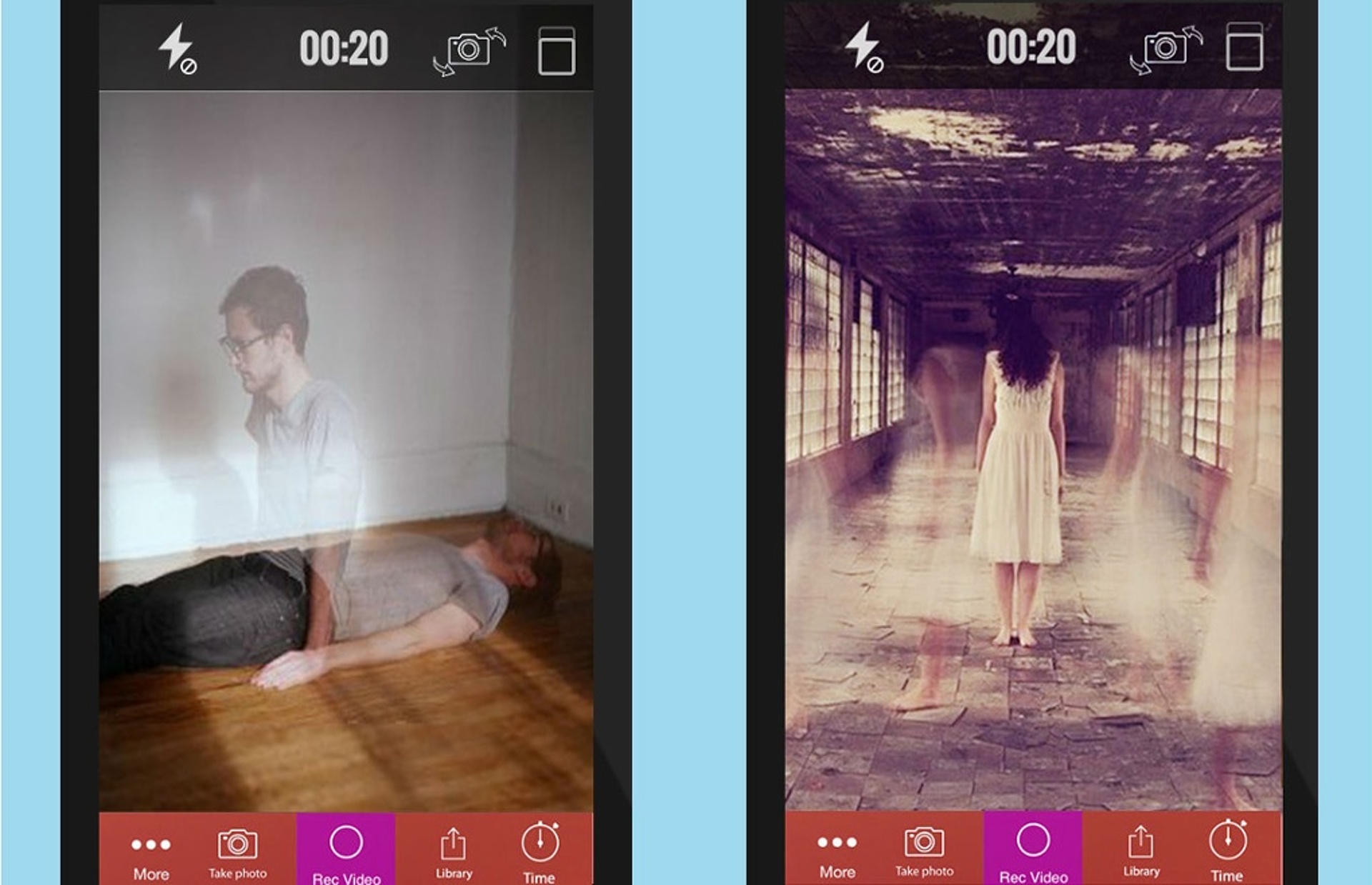
    The first one you can try out is called the Ghost Lens app, which happens to be free on all iOS devices. It’s a very efficient app, where you just have to choose from a selection of backgrounds and filters, then you shoot your own video or pictures and save it. This is what your end result could potentially look like:

    Ghost Lens App

    2. The Camera Hoax

    The Camera Hoax, yet another free iOS app, allows you to choose an image from the given options within the app, such as ghosts, ghouls, UFOs etc. after which you can add a picture of yourself from your phone gallery and upload it. This app comes with a bunch of expert photoshop features too.

    Camera Hoax App

    Minecraft:

    In the spirit of Halloween, even Minecraft has vamped up its settings. Therefore, along with skeletons, and zombies, it now added a Halloween Costumes skin pack as a 79p in-app purchase to give your Minecraft character a Halloween makeover.

    Camera Hoax App

    Halloween Sounds Pro:

    Visual effects aside, sound also plays a very important role in scaring people, therefore to amp up your experience there is a free Halloween Sounds Pro app which lets you choose from a series of gory sounds such as a hiss or a scream to scare people around you. This app comes free on the iOS and has a $1 fee on the Android version.

    Minecraft App

    The Hunting Part 1:

    Last but definitely not the least, we have The Hunting Part 1, which basically puts you in a Blair Witch Project kind of simulation that you need to get out of. The film is shot from a first-person view, and it’s perhaps one of the most interactive zombie movie apps till now. This one should be a whole lot of fun to play on the 13th of Friday, after having said “Bloody Mary” to the bathroom mirror thrice. Go save yourselves!

    Hunting Part 1 app

  • List of Smartphones to Receive Android 6.0 Marshmallow Update

    List of Smartphones to Receive Android 6.0 Marshmallow Update

    By now you’re probably aware that the latest Android 6.0 Marshmallow update has begun rolling out. You might also have an idea of what the new update offers such as the Now on Tap and Doze features, among other things. But what’s really making everyone wonder is whether or not their Android devices are eligible for the update.

    Well, you don’t have to wonder anymore. We have a list of devices of major smartphone companies that will receive the Marshmallow update in due time. The Nexus phones are the first devices eligible for the updates, as it has usually been the case. Google’s recently launched Nexus 5X and 6P come pre-installed with the Android 6.0 OS, also called Android M. Other OEMs will soon be releasing it for their smartphones as well.

    Major flagships will first receive the update followed by the second batch of phones. Here is the list of smartphones from Samsung, LG, Motorola, HTC, Xiaomi, Asus and other brands that are scheduled to get the update. Check it out to see if your phone made the cut.

    Samsung

    • Galaxy Note 5
    • Galaxy S6
    • Galaxy S6 Edge and Edge+
    • Galaxy S5
    • Galaxy Note 4
    • Galaxy Alpha
    • Galaxy A7, A8 (A3, A5 and Galaxy E series to receive it later on)

    LG

    • LG V10
    • LG Class
    • G3, G4
    • Flex 2
    • G2
    • G2 Pro
    • G Flex

    Motorola

    • Moto X Pure Edition
    • Moto X Style
    • Moto X Play
    • Moto (Gen 2)
    • Moto G
    • Moto Turbo
    • Droid Turbo
    • Moto Maxx

    Sony

    • Sony Xperia Z5 series
    • Xperia M5
    • Xperia C5 Ultra
    • Xperia Z3+
    • Xperia Z3 series
    • Xperia Z2
    • Xperia Z Ultra GPE
    • Xperia Z1

    HTC

    • HTC Desire Eye, 816, 820 and 826
    • HTC One M9, M9+, E9, E9+, M8 and M8s.

    Xiaomi

    • Mi 4
    • Mi 4i
    • Mi Note
    • Mi Note Pro
    • Redmi Note 2
    • Redmi 2 Prime
    • Redmi 2
    • Redmi Note (2014)
    • Redmi 1S

    Asus

    • ZenFone 2 series
    • ZenFone Laser
    • ZenFone Deluxe
    • ZenFone Selfie
    • ZenFone 6
    • ZenFone 5
    • ZenFone 4.
  • Hands On with Android 6.0 Marshmallow

    Hands On with Android 6.0 Marshmallow

    The latest Android Marshmallow is out and we all want to know if the new features, that have been hogging the spotlight for a while, are what they boast of or not. An early hands on with the latest operating system will give you an idea of what to expect.

    We look at a few key features that are touted to be big game changers for Android.

    Now on Tap

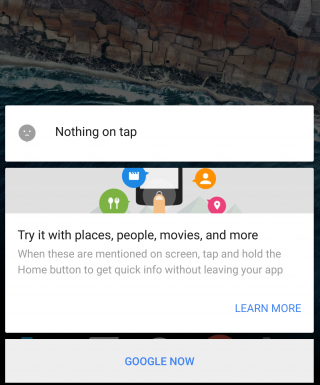
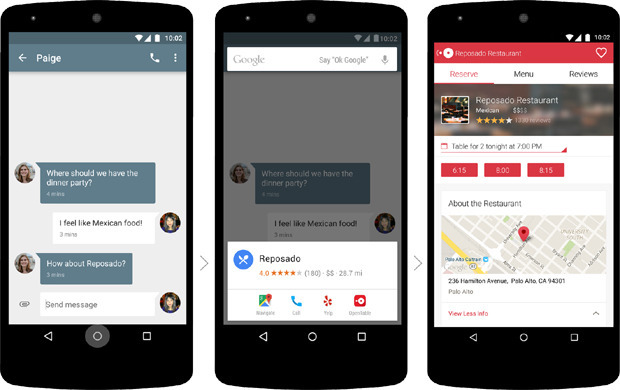
    This is the biggest feature of Android Marshmallow and one that the company is banking on the most for the success of the latest operating system. Now on Tap is a feature that can be launched in any page by pressing and holding the Home button. Once you do that, the feature will suggest some helpful information based on certain important keywords on that page. So, for example, if you’re reading some news article, Now on Tap will provide you some suggestions based on that particular news story, which could be certain names that figure in the story, or a google search of the background of the story.

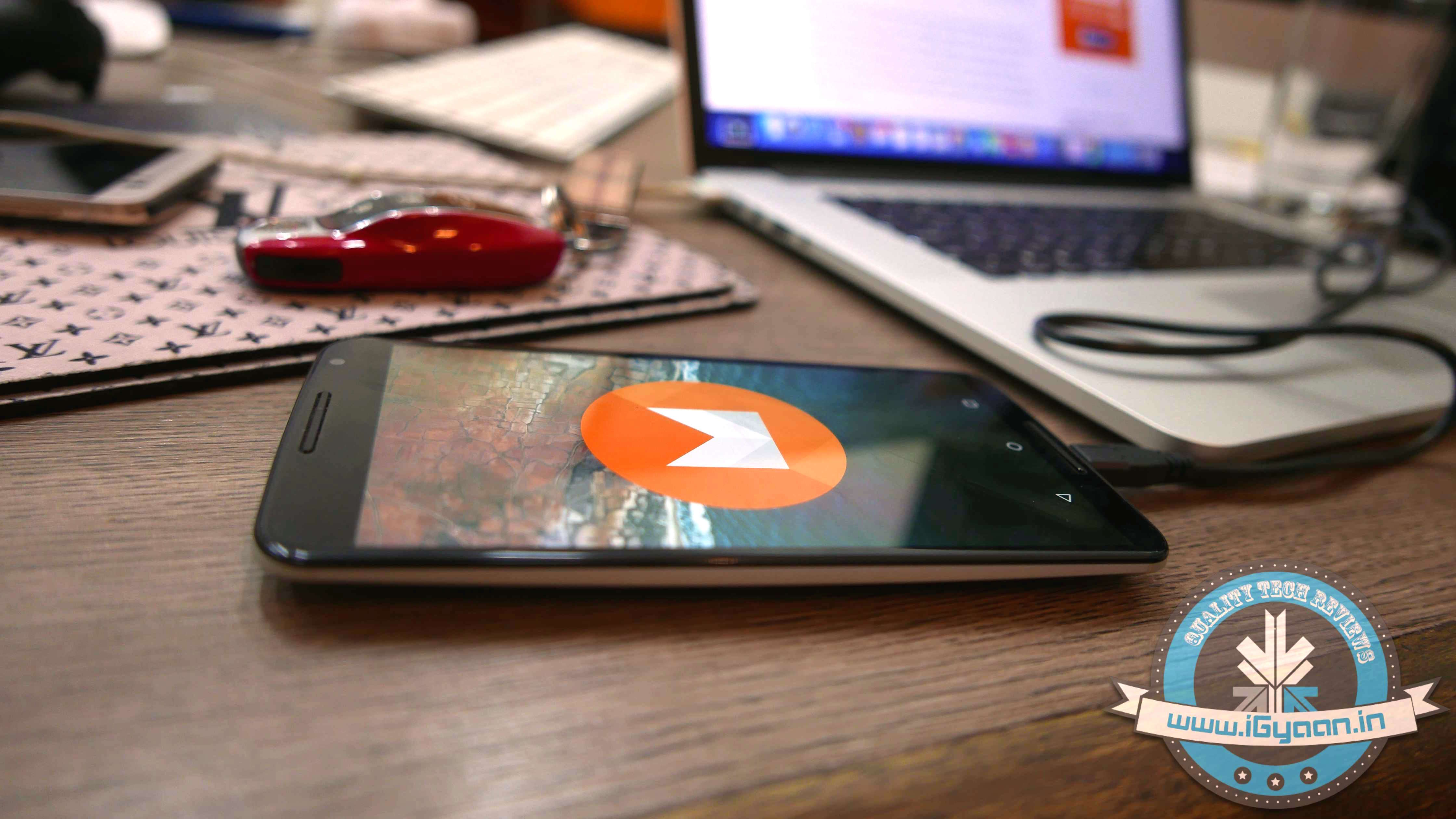
    Marshmallow

    While this feature suggest usefulness, there are times when Now on Tap just doesn’t offer much information at all. It basically depends on the page you’re in. Another thing is that Now on Tap comes up with what it thinks are useful information and not necessarily what you may find useful. You could be looking for A but shows you M instead.

    However, Now on Tap does provide information when it finds something good, there’s no doubt about that. It makes it easier to find out things if you’re lucky to get the right keyword info. You no longer have to leave one app to begin search in another. It’s a good start but a perfect one.

    Cut, Copy, Paste made easy

    Marshmallow (2)

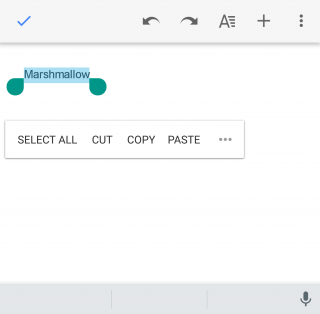
    This may not look like a big change but even small ones are welcomed if it makes life just one second faster. The new cut, copy, paste option now features just below the text, rather than at the top of the screen, which makes reachability that much better. You’ll find you can get work done faster that way if you’re working on some document.

    Doze

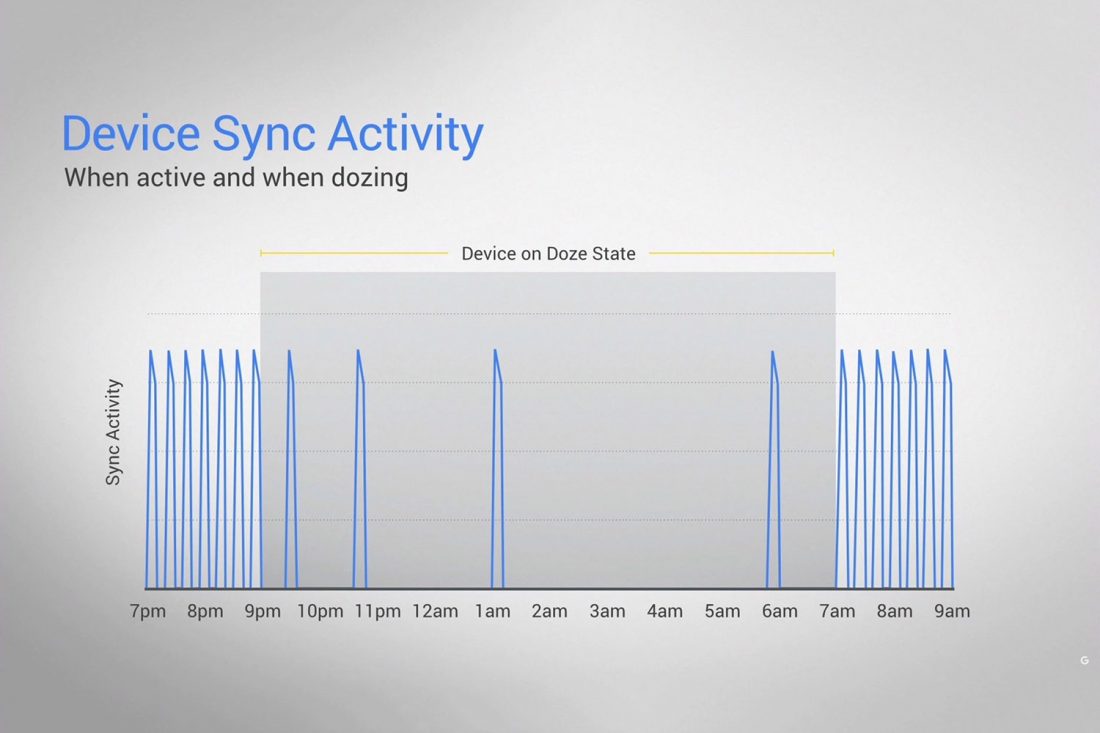
    This is a feature that will find acceptance from all. Who doesn’t appreciate a feature that helps save battery life? Here’s the thing about Doze – you won’t see it work with your eyes. Everything happens in the background. The phone detects when it’s not being moved or touched and then reduces the background activity to conserve battery.

    Marshmallow Doze

    Does it really work? We kept the phone untouched for half an hour and made notes of the change in battery percentage, and based on what we’ve found it does seem to work. It’s safe to say that you can expect at least 30 minutes of extra battery life with the latest update, which is what Google has promised.

    Doze uses your phone’s accelerometer to know when your phone is at rest. The ‘Doze’ feature, however, will only work if your phone is kept on a table or hard surface and will not work if you’ve kept it in your pocket, or if it senses motion.

    “By offloading sensor processing from the main CPU to the Android Sensor Hub, we’re able to run at a fraction of the power budget.” Google’s Dave Burke explained last week.

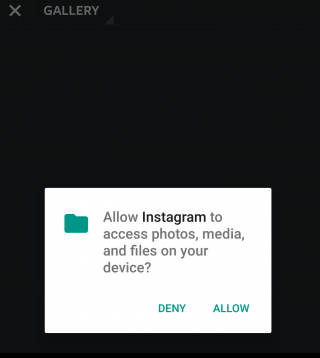
    Control over Permission and Privacy

    Marshmallow (3)

    It’s always good to know just how much your phone is accessing your apps. Before the Marshmallow upgrade, you were basically allowing your newly downloaded apps to access everything from your location to your photos. Now, however, you can say yes or no to specific permissions within an app, which gives you more control over the information that is given to the app.

    This feature has already been seen in the iOS and it is perhaps one of the more obvious influences here.

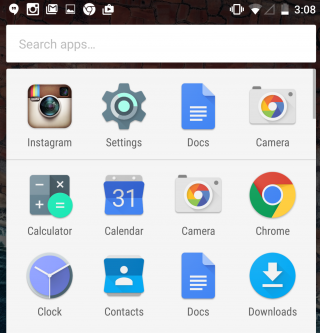
    App waterfall

    Marshmallow (4)

    Your ‘app drawer’ is the place all your apps are kept, both used and unused ones. It exists so that you don’t have to clutter your Home screen with all the native and foreign apps that are there in your phone. Android has not neglected that. You will now see that the drawer moves horizontally making it a simple scroll screen rather than swiping your thumb from right to left. What’s more, you also have a search bar on top of the drawer that allows you to type the app you’re looking for instead of wasting time searching for it normally. A similar feature appeared with the iOS 9 upgrade that had a search bar in the Settings menu.

    These are just a few features that we thought to mention on our initial use. The Marshmallow upgrade promises a lot more and we’re sure to find new things as we continue to explore. Here’s a list of devices that are eligible for the Android upgrade. If your device is in it we suggest you go ahead and download it and have a little fun yourself.

  • Google Officially Begins Rolling Out Android Marshmallow

    Google Officially Begins Rolling Out Android Marshmallow

    Android 6.0 Marshmallow is finally out and ready for Nexus users. The latest OS upgrade began rolling out yesterday and is destined for universal acceptance. The Marshmallow update is perhaps the most juiciest Android update to come out in a while with features such as Now on Tap, Doze, and many others that is sure to deliver some happiness for users. We have already mentioned some of the best new features of the Marshmallow.

    Just a quick recap. There are features that will make your life a little more easier such as the new ‘cut, copy, paste‘ option that can now be found right above the text, he ‘Doze‘ feature that reduces background activity to give you a longer battery life, and ‘Now on Tap‘ that offers a variety of suggestions on practically any page you visit, among other things.

    Android M install 0

    Furthermore, security permissions for apps is now more like iOS where you will be asked for permission while performing a particular task rather than having to worry about what all you end up accepting when downloading a new app.

    Brian Rakowski, VP of Product Management, released a blog yesterday welcoming the launch of the new Marshmallow update and listed out some of the highlights of the new operating system. He also mentioned the Nexus devices that are scheduled to receive the update “over air”, which are Nexus 5, Nexus 6, Nexus 7 (2013), Nexus 9 and Nexus Player. The recently launched Nexus 5X and Nexus 6P will be released with the Marshmallow update pre-installed.


  • YU Relaunches Yuphoria With Android Lollipop and a Cheaper Price Tag

    YU Relaunches Yuphoria With Android Lollipop and a Cheaper Price Tag

    Yu Yuphoria is now available at a price of Rs. 6,499 on Amazon, following a Rs. 500 price-cut. The phone was launched in the country in May with a price tag of Rs. 6,999. Another update the smartphone comes with is that of the operating system. The older Android Lollipop-based Cyanogen OS 12 custom ROM has now been replaced with stock Android 5.0 Lollipop.

    Yu Yuphoria 20
    Yu Yuphoria

    Additionally, the company made Yureka Plus available at a price of Rs. 8,999 on Amazon. Cyanogen OS 12 of the phone has been replaced with Android 4.4.4 KitKat. Yunique is another smartphone by Yu which has been updated in a similar fashion. It’s priced at Rs. 5,499 and runs on Android 5.1 Lollipop.

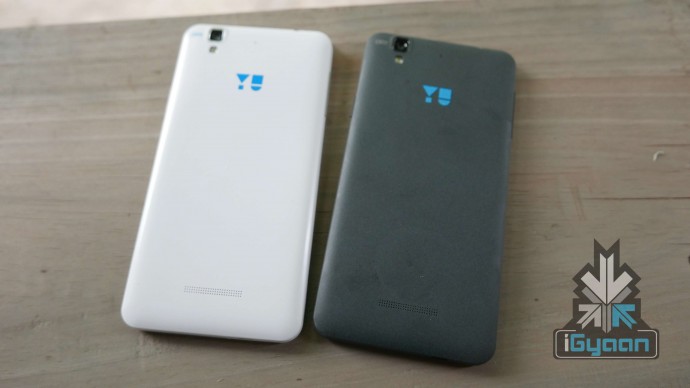
    Yu Yureka: Alabaster White and Moonstone Grey
    Yu Yureka: Alabaster White and Moonstone Grey

    The Yu smartphones have taken the circuit by storm with their competitive prices and have provided the consumers a wider range to choose from. The lowest priced 4G LTE smartphone in the market is Lenovo A2010 at a price of Rs. 4,990. However, the Yu phones are highly likely to tip the buyers’ interest in their favour now, away from brands like Lenovo.

    According to the rumour mill, YU has something interesting in store for its fans. A always, we’ll update you with the details.

  • Motorola Ditches Some of its Bloatware with the Latest Android Upgrade

    Motorola is removing bloatware in a big way, keeping its current lineup of smartphones something special for Android enthusiasts. The company plans to keep the phones light and clean without stuffing them with their own software and application. In an attempt to make the phones more Android pure, Motorola has announced which of its devices will be getting the Marshmallow upgrade and also announced that it would be deleting a few of its own software.

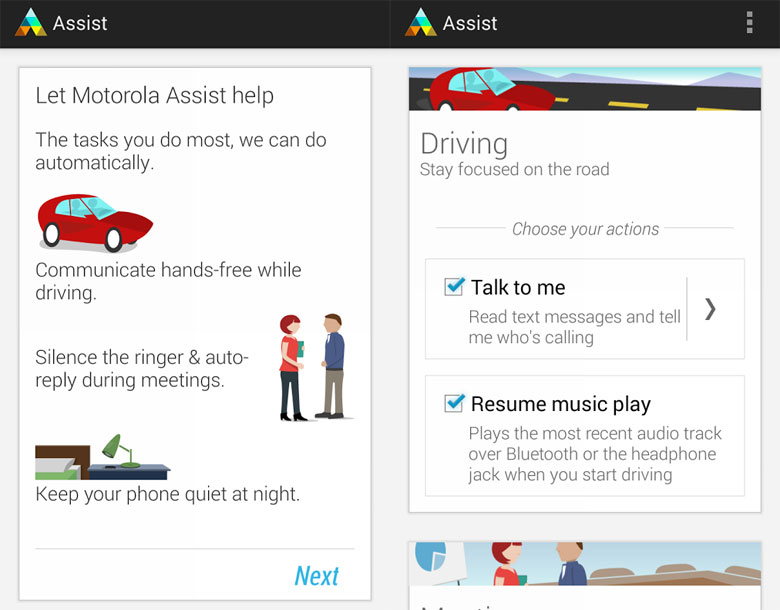
    Specifically, Motorola will be removing in-house apps and services like Moto Assist, Motorola Migrate and the Motorola Connect (Chrome extension) and won’t preload them onto devices anymore.

    moto-assist

    Here’s why this is a good thing – Bloatware takes up a lot of storage space and resources. The extra weight causes slower upgrade process. Many OEMs have taken advantage of Android’s wide scope of applications and have generally stuffed their phones with applications that not only take up space but also don’t particularly enhance user experience since most of the apps are hardly ever used.

    Motorola senior VP of software engineering Seang Chau understands why the company doesn’t need to add bloatware to its phone – because if users want an extra application, they can download it from the Google Play, that likely does better than what OEMs offer.

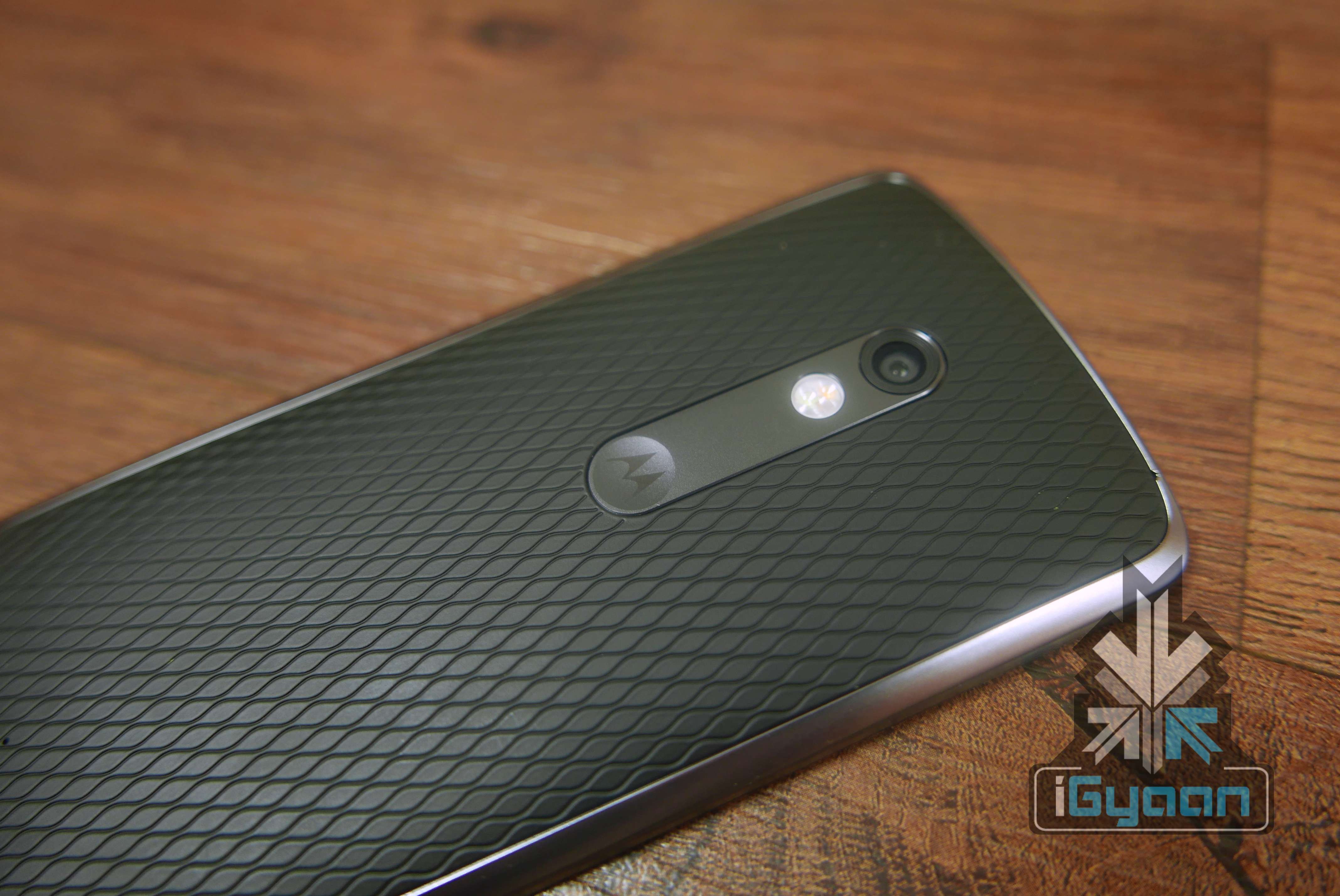
    Moto X Play 3

    “The release of a new Android version is a great time to take a fresh look at our signature Moto Enhancements to ensure we’re complementing Android (not competing with it),” Motorola explains. “Both of these products were valuable in their time but the world has moved on and they no longer add enough value to justify taking up space in your device.”

    This is how Motorola is finding acceptance among Android fans. Not many companies out there would accept that their own services don’t actually improve the overall user experience. Motorola has come to stand out as one of the very best Android OEMs when it comes to not taking up storage space and resources with its own applications.

    For existing Motorola users, here’s a full list of devices that will be getting the upgrade to Android 6.0 Marshmallow with the deleted bloatware:

    • 2015 Moto X Pure Edition (3rd gen)
    • 2015 Moto X Style (3rd gen)
    • 2015 Moto X Play
    • 2015 Moto G (3rd gen)
    • 2014 Moto X Pure Edition in the US (2nd gen)
    • 2014 Moto X in Latin America, Europe and Asia2 (2nd gen)
    • 2014 Moto G and Moto G with 4G LTE2 (2nd gen)
    • DROID Turbo
    • 2014 Moto MAXX
    • 2014 Moto Turbo
    • Nexus 6

    The company will be releasing more information on the timing of these phone upgrades in the coming weeks.

  • How and Why You Should Disable Autoplay on Facebook

    How and Why You Should Disable Autoplay on Facebook

    Facebook’s newest change has been the addition of the autoplay feature in its videos. One day you’re happily scrolling down your homepage, and suddenly you hear a cat meowing in the background. Yes, the video has begun to play simply because you happened to stumble across it on your homepage. No, you did not give the command for it to start meowing.

    Other than causing the annoyance of unnecessary cat-noises, this new feature is also a big toll on your internet data, not to mention taking away your right to completely ignore other people’s videos on your homepage.

    So here’s a quick look at how you can disable autoplay:

    iPhone:

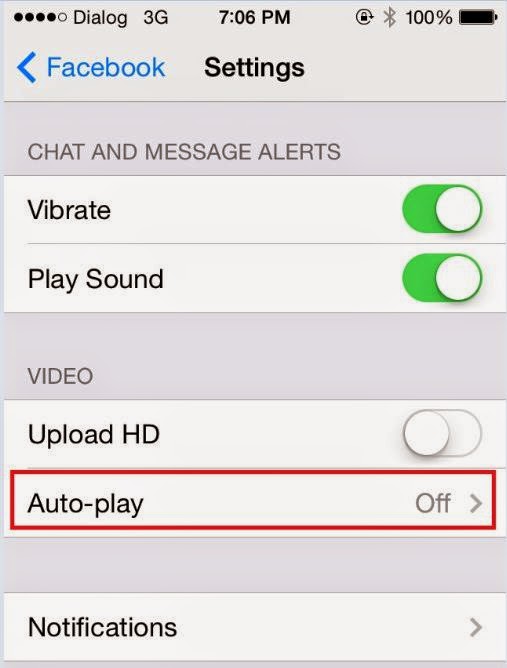
    facebook video autoplay


    Go to your settings, scroll down until you find Facebook and then select Settings again. Once there you could choose either ‘Wi-Fi Only’ or switch it off entirely.

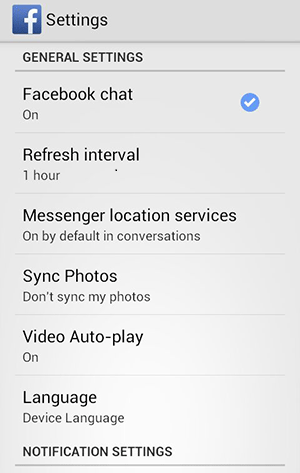
    Android:Autoplay on Android

    You will find the autoplay settings in your Android app. Choose the Menu button followed by Settings and therein lies your answer.

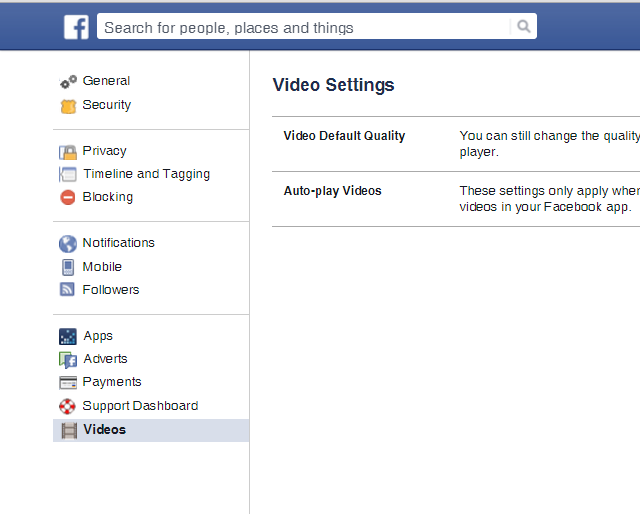
    Desktop:Autoplay on Desktop

    Click the arrow in the upper-right corner of your Facebook profile and choose Settings. There will be Videos on the bottom left of your screen now. Click on it, which will take you to the autoplay settings and from there you can switch it off.

  • Google Brings Out the Android-Powered Pixel C Tablet

    Google Brings Out the Android-Powered Pixel C Tablet

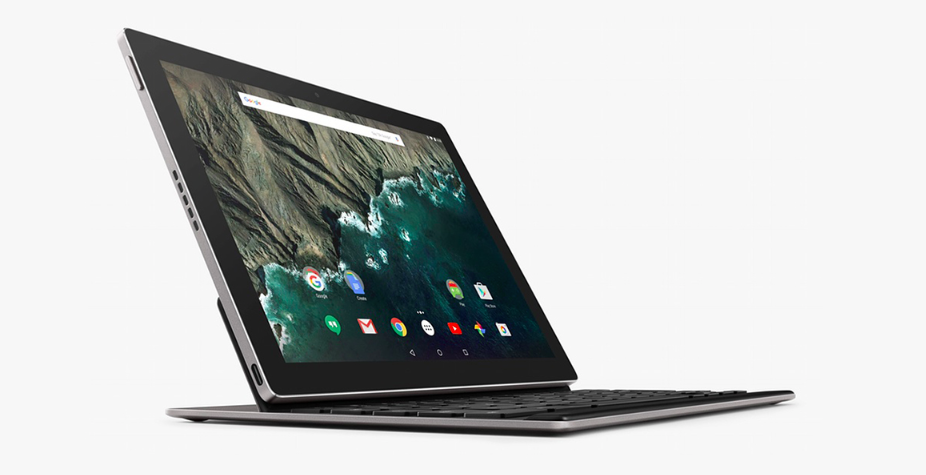
    Pixel C is the newest Android tablet on the block released at the official Google event today. The device is the result of an attempt to put together something where the whole is greater than the sum of the parts, claims the company.

    The device is a 10.2-inch tablet that has a display and resolution of 2560×1800 (308) ppi. The screen is capable of sensing when to employ the physical keyboard and when to opt for touch. The GPU is Maxwell with an NVIDIA X1 quad-core processor. It operates on Android 6.0 Marshmallow and boasts of far-field voice recognition with the help of four microphones in the device.

    android_tablet_1

    Battery life can be checked with the double tap light bar in the gadget. Google promises regular updates on the device’s software and apps post its release.

    Yes, it all sounds lovely, too lovely to be palatable, and therefore it’s time to mention the price. The tab is priced at $499 for the 32 GB version and $599 for the 64 GB version. The keyboard is an additional accessory costing $149. Looks like Google too has gone the Apple way and has refused any relief of a lower price to the buyers.

  • ‘Stick with Android’ App Mocks ‘Move to iOS’

    ‘Stick with Android’ App Mocks ‘Move to iOS’

    Android fans have spoken. The Move to iOS  Android app that was launched by Apple recently was received like a cold slap by Android users. Now an Android developer has come out with a hilarious reply by creating a ‘Stick with Android’ app.

    A developer named Jonatthias released the app on Google Play Store and this is the app’s description:

    “Everything about Android is designed to be easy. That includes sticking with it. With just one step, you can keep your content automatically and securely on your Android device with the Stay on Android app. No need to save your stuff elsewhere before staying on Android. The Stay on Android app securely keeps you away from switching to another (worse) platform.”

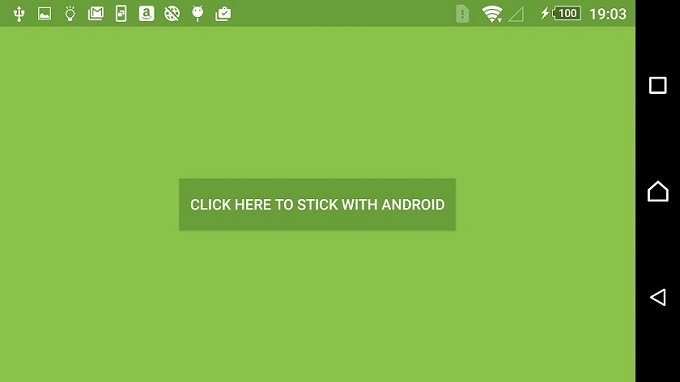
    Clearly, the description wages an all out war to take down the apparently insulting Move to iOS app. The Stick with Android app doesn’t do much except show a single button on screen that says “Click here to stick with Android” which, when pressed, lets the user stick with Android. And it’s as simple as that.

    Stick-with-Android

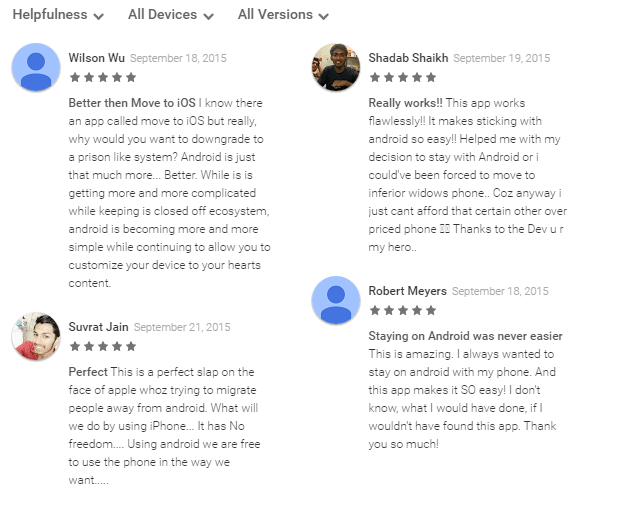
    However, the hilarity does not end there. The app has an almost perfect 5 star rating in the Google Play Store whereas the Move to iOS app currently has a 1.8 rating, which is perhaps more to do with the existence of the app rather than the functionality of it. This practically useless app is one of the best rated Android apps at the Store.

    As usual, the best part about an app like this is the user reviews. Click here if you want to download the app for a quick giggle.

    Stick with Android


  • Blackberry CEO Officially Showcases the Company’s First Android Smartphone

    Blackberry CEO Officially Showcases the Company’s First Android Smartphone

    Blackberry revealed that the hardware revenue for 800,000 smartphones consisted of an average selling price of just $240. Apple will make more money than that in just one day. Needless to say, things seem beyond bleak for Blackberry.

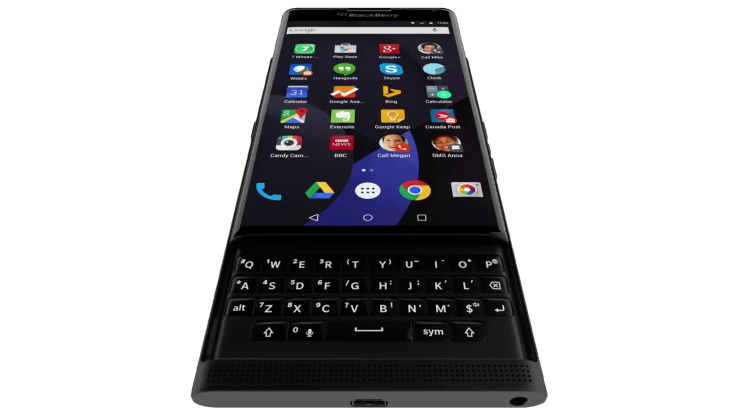
    In a fresh attempt to pull itself together, Blackberry earlier announced its plans to launch an Android phone, the first of its kind for the company. Previously codenamed as Venice, Blackberry Priv (short for ‘privacy’) was confirmed yesterday as the official name of the smartphone. Priv is expected to bring the best of both worlds by coupling the latest Android technology with exclusive Blackberry features.

    Blackberry Venice

    The phone is expected to feature a 5.4-inch quad HD display. The camera is will possibly be a 18 MP, with a Snapdragon 808 processor, a 1.8GHz core and 3GB of RAM.

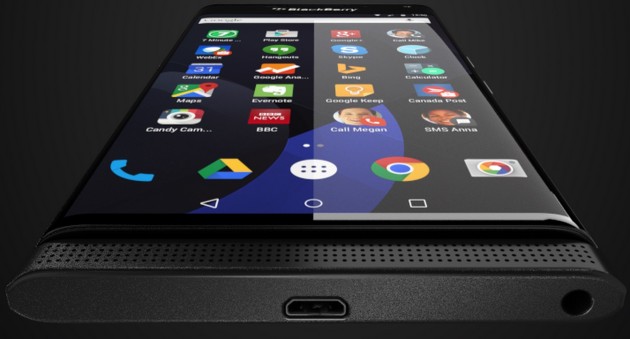
    So far, we only had leaked images to go on with. But just yesterday, Blackberry CEO John Chen made an appearance along with Priv in a BNN Canada video. Now we know for a fact that the newest Blackberry smartphone will have a big display which is curved at the edges, reminiscent of Samsung Galaxy S6 edge and S6 edge+.

    A little over five years ago, Blackberry had blown the world of instant messaging off its feet with its Blackberry Messenger. It’s time the company made a similar breakthrough again. It will be the launch of Blackberry Priv which would determine whether or not Blackberry is able to reaffirm its position in the tech world.

    Source: [tw-button size=”medium” background=”#07ABE2″ color=”” target=”_blank” link=”http://www.bnn.ca/Video/player.aspx?vid=713580″]BNN[/tw-button]
  • Android 6.0 Marshmallow Will Release on October 5

    Android 6.0 Marshmallow Will Release on October 5

    According to latest leaks, Google’s most recent Nexus smartphones – Nexus 5 and Nexus 6 – will get an Android 6.0 Marshmallow upgrade on the 5th of October. Which means those of you who own either of the devices will be updated to the new software on that date. The information was spotted by MobileSyrup in a release schedule posted by Canadian wireless carrier, Telus.

    This may also suggest that Android 6.0 Marshmallow will soon be available for other Android devices as well, however, the latest Nexus smartphones will be the first to get the upgrade since they run pure Android and don’t have any carrier bloatware that needs updating along with the basic software.

    Android Marshmallow

    Android 6.0 promises improved performances and new features such as ‘Now on Tap’ that provides more information by pressing and holding the Home button on whichever screen you’re on, native fingerprint support, and individual app permissions, to name a few.

    We know that Google is planning to launch two new Nexus devices on September 29 – the LG Nexus 5X and Huawei Nexus 6P – and will also run on the latest Android 6.0 Marshmallow in addition to the last two Nexus phones. Nothing is known yet as to when the latest Android software will start rolling out for other Android devices.

    Source : [tw-button size=”small” background=”#07ABE2″ color=”” target=”_blank” link=”http://mobilesyrup.com/2015/09/24/android-6-0-marshmallow-rollout-october-5/”]Mobile Syrup[/tw-button]
     

  • Best Look We’ve Got So Far at BlackBerry’s First Android Phone

    Best Look We’ve Got So Far at BlackBerry’s First Android Phone

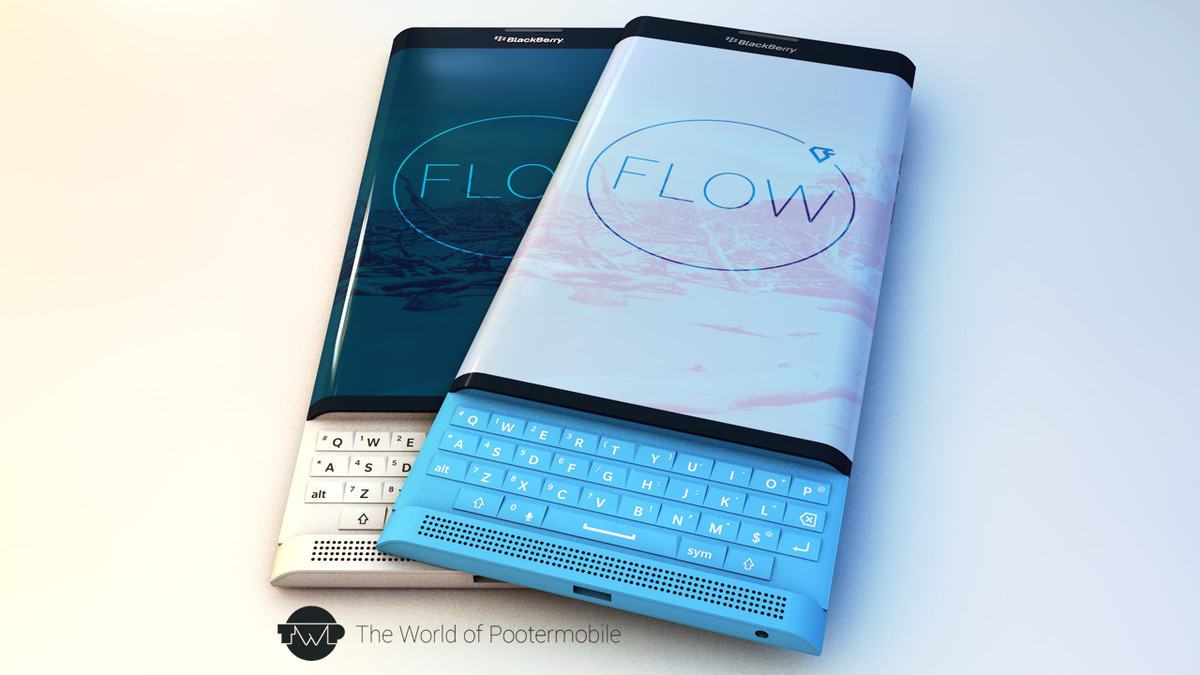
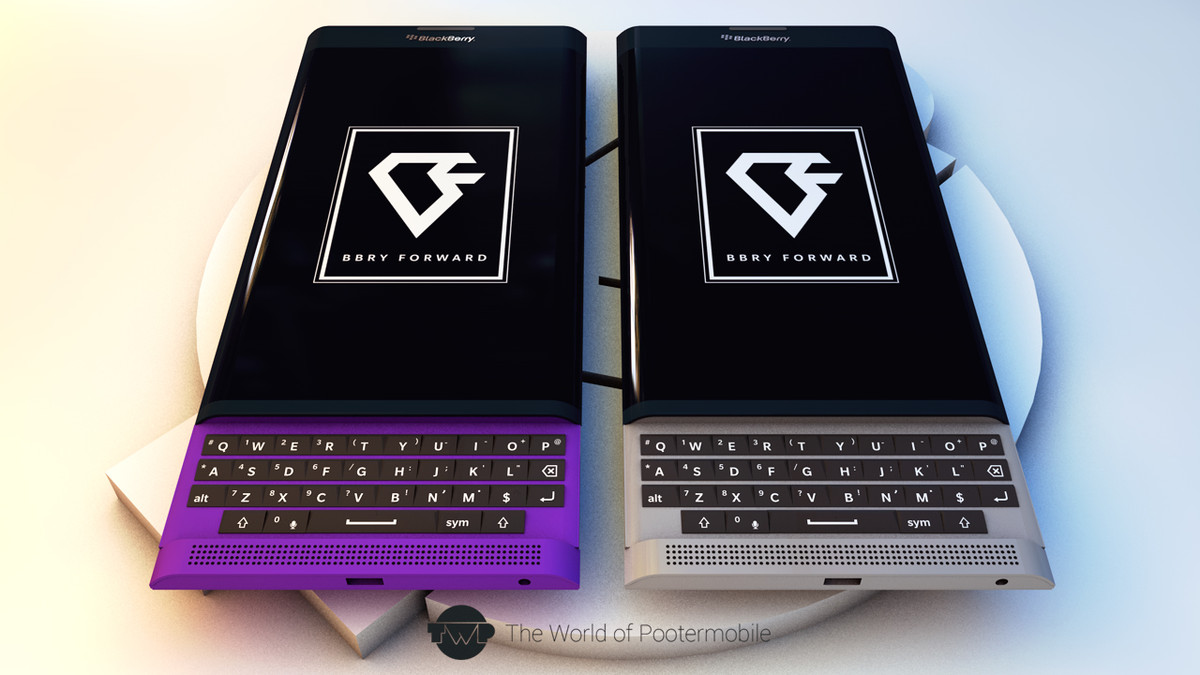
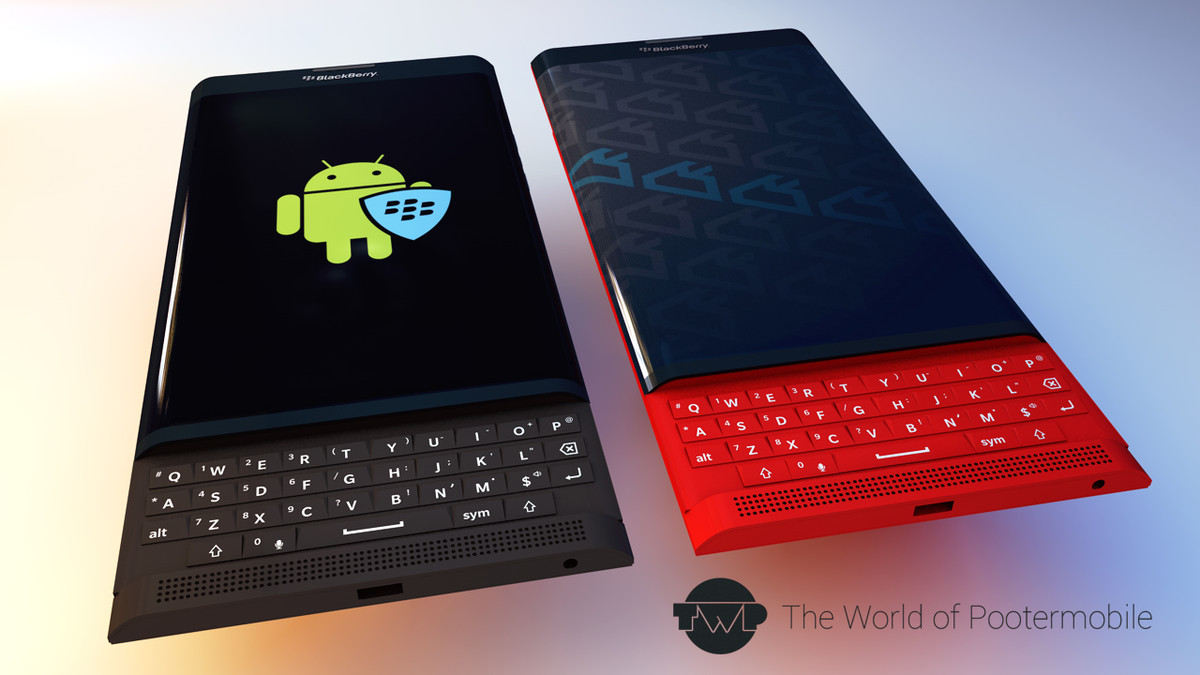
    As leaked images of Blackberry Venice flood the internet, a fan adds to it by showing us colourful versions of the phone. The renders include white, aqua blue, purple, silver, red, and black. Hopefully Blackberry will break out of its black and white monotony and surprise buyers this time.

    Blackberry Venice
    Venice in White and Aqua Blue

    Venice will mark Blackberry’s entry in the Android world and should be available for sale somewhere around November this year. With the price yet to be announced, this phone is expected to come bearing the hexa-core Snapdragon 808 SoC, a 3 GB RAM, and an OIS-assisted 18 MP main camera.

    Colourful Blackberry Venice
    Venice in Purple and Silver

    Blackberry once again brings best of both worlds in its keyboards, which like the Passport, boasts of a biometric sense touch. Scrolling through documents and long web pages just became so much easier. Unlike older Blackberry handsets, the Venice has an equally distributed weight across the screen and the keyboard. Presence of  a physical camera button, volume rockers and a smart action key, along with a front facing speaker grille and a microSD slot has also been confirmed.

    Venice in Black and Red
    Venice in Black and Red

    Tap-to-wake, Blackberry Hub, Blackberry Device search, and Google Search are some of the cool new additions the gadget possesses. To find more about Venice, click here.

    Source: [tw-button size=”medium” background=”#07ABE2″ color=”” target=”_blank” link=”http://crackberry.com/poll-blackberry-venice-slider-colors”]Crackberry[/tw-button]

  • Apple Haters Pounce on ‘Move to iOS’ App

    Apple Haters Pounce on ‘Move to iOS’ App

    We love controversies. And there is no one more likely to stir up mixed reactions that take over the internet quite as much as Apple. In a move that was sure to create a buzz just from its title, Apple released an Android app (yes, we said Android) called ‘Move to iOS’ which allows Android users who are looking to switch to Apple to do so in an easy fashion.

    The app allows a smooth, easy way to transfer all your data such as contacts, photos, messages and bookmarks from your old Android device to your new iPhone. Apple promises a simple process to transfer your Android data. However, the app will only work if you’re setting up your iPhone or iPad as a new device.

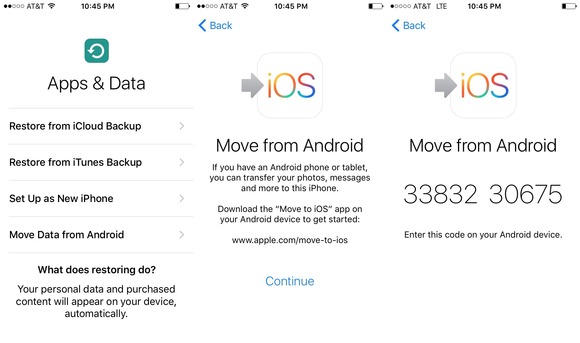
    Move to iOS

    Now for a quick tour on how the app works. When you begin setting up your iPhone or iPad, you will select a language, cellular or wireless network, then choose the apps and data you want to transfer. You will then select the Move Data from Android option in the transfer content screen. Then open the ‘Move to iOS’ app on your Android device. You’ll be prompted to enter a nine-digit code on both devices after which the transfer will begin.

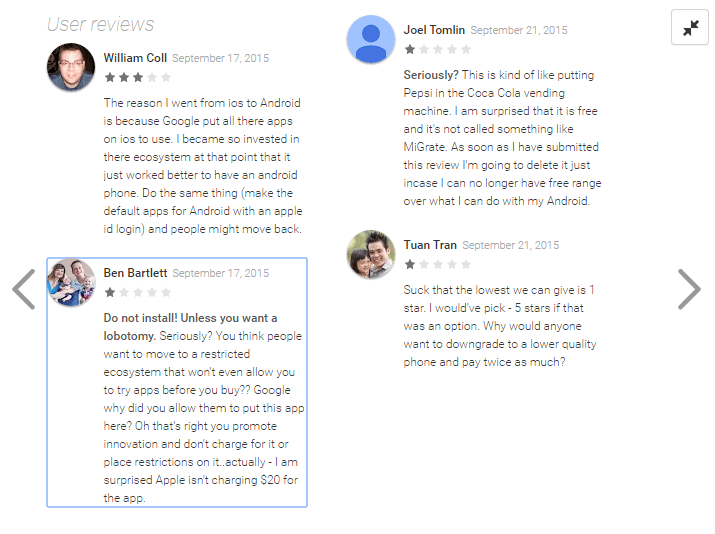
    While this app is truly helpful for those who want to switch over to the iPhone and would deserve anywhere between 4-5 stars, it, however, has received a hilarious 1.7 out of 5 rating on the Google Play Store. The low rating is credited to Android users who have shown their scorn at the app by giving it the lowest rating possible and by posting hateful reviews. Just for fun, here are some of them.

    Move to iOS Reviews

    While Android users have voiced their opinions (which have less to do with the app itself), you can download this app here if you are planning to switch from Android to iOS. It is a solid app that allows smooth transfer of data, no matter what haters say.

    Image Source: [tw-button size=”medium” background=”#07ABE2″ color=”” target=”_blank” link=”http://www.macworld.com/article/2984758/ios-apps/hands-on-with-apples-move-to-ios-android-app.html”]Mac World[/tw-button]
iGyaan Network
Privacy Overview

This website uses cookies so that we can provide you with the best user experience possible. Cookie information is stored in your browser and performs functions such as recognising you when you return to our website and helping our team to understand which sections of the website you find most interesting and useful.