Tag: App

  • Skype Beta comes to Windows Phone (video)

    Skype has announced and released the Beta version of their App for Windows Phone devices running 7.5 and above.  This early version will allow free audio and video calls over WiFi or 3G, alongside those any-number paid-for calls. 

    You can download the beta version of the Skype for Windows Phone app for free by clicking here directly from your Windows Phone, or simply scanning the QR code below. You will need to have a smartphone running Windows Phone 7.5. You can check what version of Windows Phone your phone is running at Settings > About.

    Tested and working Windows Phones:

    • Nokia Lumia 710
    • Nokia Lumia 800
    • HTC Titan
    • HTC Radar
    • Samsung Focus S 
    • Samsung Focus Flash


    [toggle title_open=”Press Release” title_closed=”Press Release” hide=”yes” border=”yes” style=”default” excerpt_length=”0″ read_more_text=”Read More” read_less_text=”Read Less” include_excerpt_html=”no”]


    Skype brings voice and video calling to Windows Phone users around the globe


    Many of you have been waiting for this. And today we are excited to announce our new Skype for Windows Phone Beta app. This now makes Skype available on almost all of the leading mobile smartphone operating systems. The gold version of the app will be available in April.


    Starting today, download the beta version directly from your Windows Phone or at theMarketplace from your computer to test drive Skype for Windows Phone and share your feedback with us.


    Skype for Windows Phone Beta* supports the most important Skype features you’ve come to know and love. And you will be especially thrilled by the clean and simple Skype experience that the Metro user interface delivers on your Windows Phone. It has never before been so easy to connect with the people you care about most.


    Check out this video to see how the app works.


    With Skype for Windows Phone Beta you can make free audio and video calls** to your Skype contacts over 3G and 4G or WiFi***, make affordable calls to landlines and mobiles using Skype Credit, create and hold one-to-one and group chats, and update your profile and account information, among others features.


    This is only the beginning for Skype for Windows Phone…it’s just going to get better and better. We see incredible potential to include Skype capabilities in Windows Phone in order to enable a great experience for you.


    You can download the beta version of the Skype for Windows Phone app for free**** by clicking here directly from your Windows Phone, or simply scanning the QR code below. You will need to have a smartphone running Windows Phone 7.5. You can check what version of Windows Phone your phone is running at Settings > About.


    We have already tested and certified the following devices for the best performance of Skype for Windows Phone:


    • Nokia Lumia 710
    • Nokia Lumia 800
    • HTC Titan
    • HTC Radar
    • Samsung Focus S 
    • Samsung Focus Flash


    We love hearing your thoughts and questions, so please feel free to visit our Skype Support Network or tweet your Skype for Windows Phone questions to @Skype. Also, you can join us on Twitter by following the #SkypeMWC hashtag where we will be sharing Windows Phone tips throughout the week.


    *The beta version of the Skype for Windows Phone app will have English language support only.
    **The device must be equipped with at least one camera to utilize video calling.
    *** Users can place calls with their Windows Phone over a cellular data connection or WiFi network. Additional data charges may apply. To get the best quality video calling, Skype recommends a strong WiFi connection. Skype-to-Skype calling on Windows Phone is compatible with Skype for Windows 4.2 and above, Skype for Mac OS X 2.8 and above, Skype for Linux, Skype for iOS 3.0 and above, Skype for Android 2.0 and above, and Skype running on TVs.
    **** The Skype for Windows Phone Beta app is free. If you use your mobile data connection to download the Skype app, operator charges may apply, so we recommend an unlimited data plan.

    [/toggle]
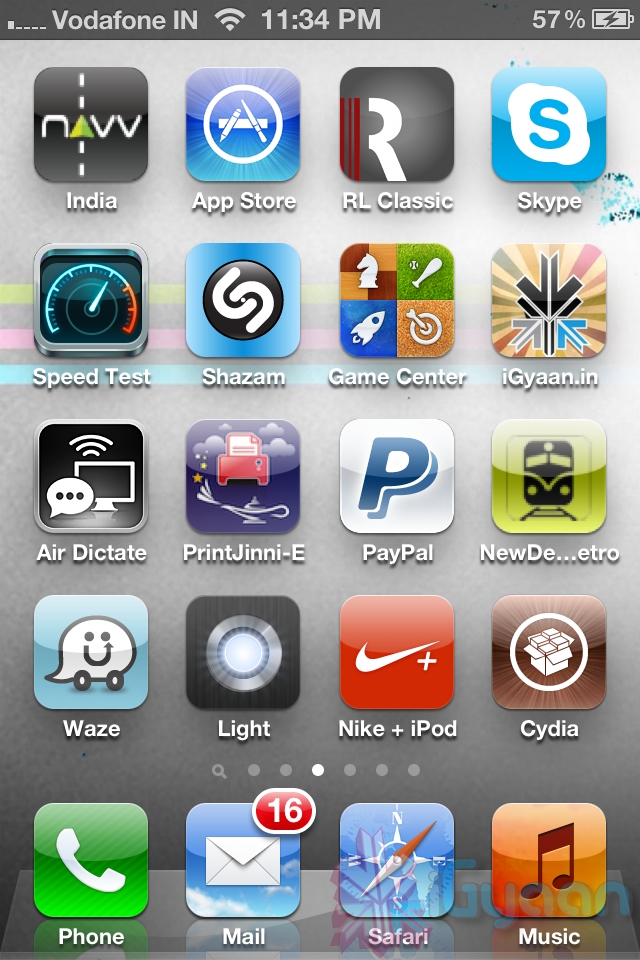
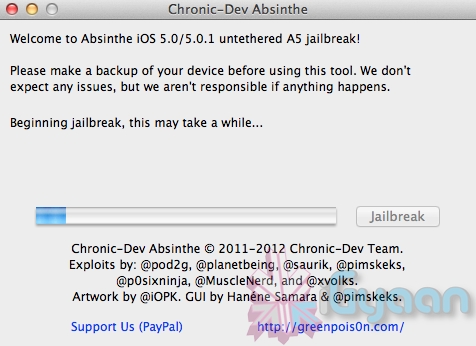
  • DIY : How to Jailbreak your iPhone 4s / iPad 2 Using Absinthe

    DIY : How to Jailbreak your iPhone 4s / iPad 2 Using Absinthe

    So ready to break your device free from the evil clutches of Apple? The highly awaited untethered jailbreak for iPhone 4s and iPad 2 is finally out. 

    Lets begin

    Here is what you need

    1. iPhone 4s / iPad 2 on iOS 5.o or iOS 5.0.1
    2. Download Absinthe from the links below
      [greenpois0n 1][ greenpoison 2]
    3. Apple computer/Hackintosh running MAC OS X / Snow Leopard
    4. Windows users will need to wait for the windows app

    Lets begin with Jailbreak

    Step 1

    • Make sure you backup your device with iTunes or have all you data synced with iCloud
    • For this jailbreak to work you have to disable backup passwords from iTunes.


    Step 2

    • Download and Open Absinthe on your Mac

    Step 3 

    • Plugin your iPhone 4s / iPad 2 on your mac using the USB cable
    • Click the Jailbreak button on Absinthe and wait for the process to finish.


    Step 4

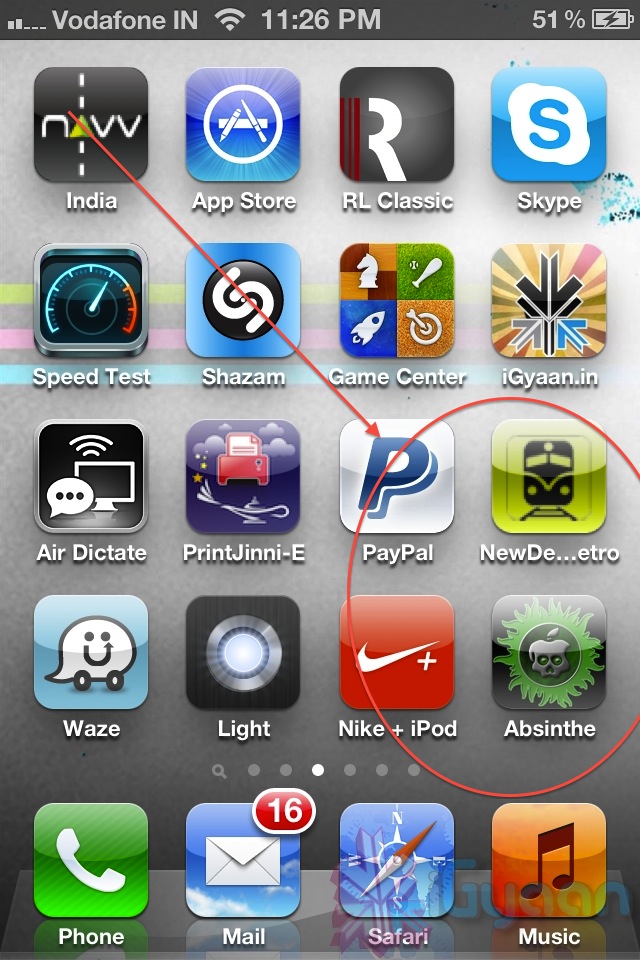
    • Once the process is complete you will see a new app on your iPhone/iPads screen – Absinthe


    • Tap the app to start it ( make your you have internet connectivity)
      Note: you might get error connecting to database – due to high usage currently) 
    • Once you do get a connection it will download the Jailbreak data and reboot your device.
    • Once the device reboots you will see the Absinthe icon replace with CYDIA!
     

    Enjoy your Jailbroken iPhone 4s / iPad 2 ! 

    Video Coming Shortly!


  • App A Day: Tiny Tower

    App A Day: Tiny Tower

    Do you remember when you were younger, there used to be a game called SimTower? Today we bring you another free game for your iDevice called Tiny Tower which is kind of a remake of the older game. Tiny Tower lets you build a tiny tower and manage the businesses and bitizens that inhabit it. The objective is to build the highest most revenue generating tower that you can.

    The game starts out very simply. You have a lobby on which you have to construct a new floor. You start with a simple residential floor. It can hold 5 “Bitizens” who pay you rent every day and work for you in your tower. Once your residential floor is completed, you can build your first business!

    All businesses require employees. While playing, you’ll come across many different bitizens with a variety of strengths and weaknesses, It is up to you to assign the right bitizen to the right job. Along the way, you may just give a few people their dream jobs.

    When you tap a business floor, a new interface pops up that allows you to hire and fire people as well as to produce items for sale. Different businesses produce different items, and each item is prepared in a different quantity and in a different amount of time. Each business can produce three levels of products. The first level sells the cheapest and is produced in the least amount of quantity, time and money, while the third level sells for the highest price and is produced in a higher quantity but is more expensive and takes the maximum amount of time to produce. To produce a level 1 item, you need to have one employee, two employees for level 2 and three employees for level 3. Once items are ready, the business has to be “stocked” by tapping the business again. Once a business is stocked, it will continue to sell products even if you aren’t playing the game while it still has stock remaining. Once it is sold out, the business will close down and you start the whole process again.

    A really easy, though low paying, way to make money is to do the job of the elevator attendant. From time to time, different people will walk into the lobby and request to be dropped to a specific floor. While this sounds easy, when your tower reaches 20+ floors, you’ll realize that it starts to take a while for you to get from the lobby to the floor and back.

    Sometimes special bitizens with a large VIP label show up. VIPs provide various advantages to your tower. They range from a real estate agent who can instantly fill up a residential floor to a rich tycoon who buys out all of one item from the business that you take him to. When a VIP appears, you can drop them to the floor that you feel will provide you the most advantage. Choose carefully though.

    As your tower starts to grow, you can reorganize floors by moving them and you can also customize the look and feel of each floor by repainting it. Has your tower grown too tall? Relax. You can upgrade your elevator too.

    As with most free to play games, there are various in-app purchases that allow you to buy various “TowerBux” packages. TowerBux can be spent on speeding everything up in your tower, from construction to item production.

    All in all this game isn’t one that you’ll be playing for hours at a stretch, but it is the game that you’re gonna come back to for five minutes every hour.


    Tiny Tower - NimbleBit LLC

  • Apple Releases iBooks 2, now with Textbooks (PR)

    Apple Releases iBooks 2, now with Textbooks (PR)

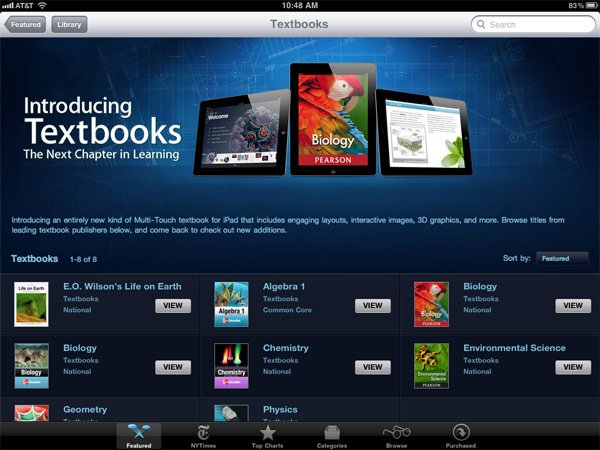
    Apple has released a new version of the iBooks publishing platform yesterday at the Guggenheim museum in New York City. The new iBooks 2 app is available today as a free download from the App Store. It features a lot of new improvements including the ability to share textbooks. The reason for giving iPad’s to students in universities becomes even more useful starting today.

    The App allows fullscreen books, interactive 3D objects, diagrams, videos and photos, the iBooks 2 app will let students learn with just a tap or swipe of the finger.

    Education is deep in Apple’s DNA and iPad may be our most exciting education product yet. With 1.5 million iPads already in use in education institutions, including over 1,000 one-to-one deployments, iPad is rapidly being adopted by schools across the US and around the world, Now with iBooks 2 for iPad, students have a more dynamic, engaging and truly interactive way to read and learn, using the device they already love.”

    -said Philip Schiller, Apple’s senior vice president of Worldwide Marketing. 

    [toggle title_open=”Press Release” title_closed=”Press Release” hide=”no” border=”yes” style=”default” excerpt_length=”0″ read_more_text=”Read More” read_less_text=”Read Less” include_excerpt_html=”no”]


    Apple Reinvents Textbooks with iBooks 2 for iPad
    New iBooks Author Lets Anyone Create Stunning iBooks Textbooks

    NEW YORK-January 19, 2012-Apple® today announced iBooks® 2 for iPad®, featuring iBooks textbooks, an entirely new kind of textbook that’s dynamic, engaging and truly interactive. iBooks textbooks offer iPad users gorgeous, fullscreen textbooks with interactive animations, diagrams, photos, videos, unrivaled navigation and much more. iBooks textbooks can be kept up to date, don’t weigh down a backpack and never have to be returned. Leading education services companies including Houghton Mifflin Harcourt, McGraw-Hill and Pearson will deliver educational titles on the iBookstore? with most priced at $14.99 or less, and with the new iBooks Author, a free authoring tool available today, anyone with a Mac® can create stunning iBooks textbooks.

    “Education is deep in Apple’s DNA and iPad may be our most exciting education product yet. With 1.5 million iPads already in use in education institutions, including over 1,000 one-to-one deployments, iPad is rapidly being adopted by schools across the US and around the world,” said Philip Schiller, Apple’s senior vice president of Worldwide Marketing. “Now with iBooks 2 for iPad, students have a more dynamic, engaging and truly interactive way to read and learn, using the device they already love.”

    The new iBooks 2 app is available today as a free download from the App Store™. With support for great new features including gorgeous, fullscreen books, interactive 3D objects, diagrams, videos and photos, the iBooks 2 app will let students learn about the solar system or the physics of a skyscraper with amazing new interactive textbooks that come to life with just a tap or swipe of the finger. With its fast, fluid navigation, easy highlighting and note-taking, searching and definitions, plus lesson reviews and study cards, the new iBooks 2 app lets students study and learn in more efficient and effective ways than ever before.

    iBooks Author is also available today as a free download from the Mac App Store and lets anyone with a Mac create stunning iBooks textbooks, cookbooks, history books, picture books and more, and publish them to Apple’s iBookstore. Authors and publishers of any size can start creating with Apple-designed templates that feature a wide variety of page layouts. iBooks Author lets you add your own text and images by simply dragging and dropping, and with the Multi-Touch™ widgets you can easily add interactive photo galleries, movies, Keynote® presentations and 3D objects.

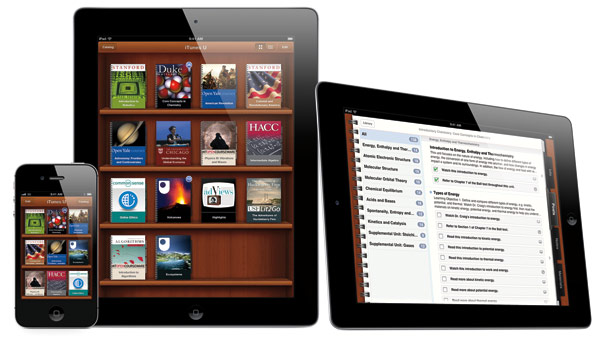
    Apple today also announced an all-new iTunes® U app giving educators and students everything they need on their iPad, iPhone® and iPod touch® to teach and take entire courses. With the new iTunes U app, students using iPads have access to the world’s largest catalog of free educational content, along with over 20,000 education apps at their fingertips and hundreds of thousands of books in the iBookstore that can be used in their school curriculum, such as novels for English or Social Studies.* The iTunes U app is available today as a free download from the App Store.

    *Some content is available only for iPad.

    Apple designs Macs, the best personal computers in the world, along with OS X, iLife, iWork and professional software. Apple leads the digital music revolution with its iPods and iTunes online store. Apple has reinvented the mobile phone with its revolutionary iPhone and App Store, and is defining the future of mobile media and computing devices with iPad.

    [/toggle]

  • App A Day: MetalStorm Wingman

    App A Day: MetalStorm Wingman

    Do you love airplanes? Are you an air fanatic? Do you want to shoot down enemy fighters while you’re partnered up with your best friend? If you answered yes to those questions, then you HAVE to try this game.

    Metalstorm: Wingman is the successor to the highly successful game Metalstorm: Online. It is a highly addictive flight combat simulator which offers a wide range of gamers the ability to pilot their very own fighter jet. The game is fairly simple to play. At the very basic level, you have to shoot down enemy planes with missles and cannons. You control your aircraft by tilting your iDevice in the desired direction of flight. The on screen controls allow you to fire your weapons, control the speed of your jet, change the camera view and pause the game. You can also swipe the screen in any direction and have your plane perform an advanced evasive maneuver in that direction.

    The game offers players a variety of aircraft to purchase, as well as a detailed tech tree for each. Players also have the option of equipping their aircraft from a wide arsenal of missles and cannons.

    While these features alone would have made the game quite nice, what makes it truly amazing are its multiple game modes. You have the standard campaign and single player modes but there is also a multiplayer ‘verses ‘ mode as well as a ‘Co-Op survival mode’. What this means is that you can play a game verses your friend and blow his plane to bits, or you could team up with them and see how many waves you can survive as wingmen together. Did we happen to mention that there’s a little icon that pops up in the corner of your screen in multiplayer games? It lets you talk to your wingman/opponent while you’re in-game. Multiplayer in Metalstorm is achieved through the Game Center. It works flawlessly (during numerous tests) over both WiFi and 3G, with players in the same room or across the world.

    But wait! There’s More! Do you have a nice, big, shiny and sleek TV in your room? Yes! Ever wanted to play a game from your phone on that big TV? Yes! Do you happen to also have an Apple TV? Yes! All you have to do is connect the Apple TV and your iPad 2/iPhone 4s/iPod Touch and start AirPlay Mirroring. Congratulations. You’re now ready to play Metalstorm: Wingman in 720p on your TV. While the screen is being mirrored, the game shows the inside of a cockpit on your device’s screen, which adds to the coolness of the entire experience.

    The only feature of this game that we did not like was the fact that you have to be online to play it, either over WiFi or 3G. You cannot play this game without a connection. Not even single player mode. We can hope that they will disable this feature in a future update.

    So how much does this game cost? Nothing. Its free to download and free to play. There are various in-app purchases available for various coin packages to easily help you to upgrade your plane, restock your weapons and even buy an all new plane.

    Here’s hoping to see you in the skies someday. God speed. And Good Luck.

    MetalStorm: Wingman - Z2Live, Inc

  • Nokia gives free Car Mode for early Belle adopters

    Nokia gives free Car Mode for early Belle adopters

    Nokia’s new Car Mode is the most seamless car connectivity system between a Smartphone and a Head-unit of your vehicle you will ever find. This lets you connect your phone to your car’s infotainment system (if you’ve got one) and control your phone through the car, rather than touching the phone itself. Two apps out of which  One is called Nokia Car Mode that offers Nokia’s leading turn-by-turn navigation, as well as the overall smartphone experience into the car environment, while also bringing Nokia Drive, traffic updates, Nokia Music and voice calls while driving.

    The other is called Nokia Car Mode with MirrorLink that gives additional MirrorLink support and the seamless connectivity of the smartphone within the car at a cost of £17.99 (Rs. 1699).

  • CyanogenMod Compiler project lets you make your own ROM

    CyanogenMod Compiler project lets you make your own ROM

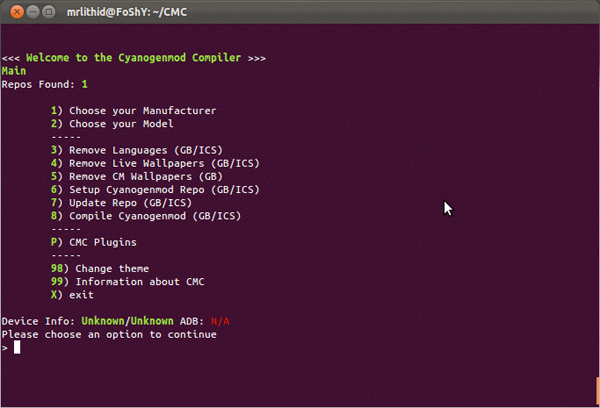
    A command line based project released by lithid-cm has the ability to go any user the power to create their own CM Roms. Called the CyanogenMod Compiler (CMC) it currently is in the test phase and allows only basic tweaks to a CM ROM including the ability to eliminate languages, wallpapers and tweak themes. The general idea is to be able to develop your own custom ROM without the need for dependence on anyone.

    [xda-developers]

  • WindowBreak Project wants a single universal unlock tool for Windows Phone Devices

    WindowBreak Project wants a single universal unlock tool for Windows Phone Devices

    Windows Phone developer Jaxbot is back, after a long time, to modding and developing for Windows Phone 7.5 Devices. His new Project WindowBreak seeks a universal unlock tool for all / any Windows Phone 7-7.5 devices. This just means a possibility of jailbreak, which can be unlocked using this tool. Jaxbot has already demonstrated this process on Samsung devices in his video below. He wants to get the app running for othe manufacturers including Nokia and HTC.


    [xda-developers]

    [WindowBreak]

  • Apple fixes AppStore bug on iOS 3.1.3, upgrades till avoidable

    Apple fixes AppStore bug on iOS 3.1.3, upgrades till avoidable


    If you are still feeling lazy after yesterday’s news on the download block by Apple on devices on iOS 3.1.3 or prior. Apple has acted swiftly and is prompt to say that it was merely a bug that was preventing download of apps directly to devices. There is no fix or update that needs to be installed and everything should be back to normal.

    [Apple Support Communities]

  • Microsoft Launches Skydrive app for WindowsPhone and iOS, what no Android app?

    Microsoft Launches Skydrive app for WindowsPhone and iOS, what no Android app?

    Microsoft is going the Nokia way, where iOS is not a threat and Android is too much clutter. The company today released the Skydrive app for Windows Phone and iOS leaving out Android out of the picture, for the time being at least. The apps will bring the ability to browse all of your files, share them with others, delete them and create new folders. When sharing links you can even choose whether or not a person can edit a document or simply view it. Check out the videos below.

  • Google introduces Currents, its Flipboard for Android

    Google introduces Currents, its Flipboard for Android

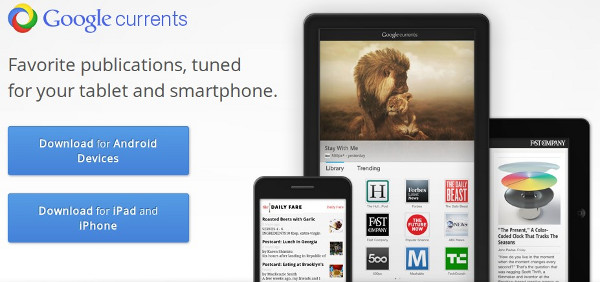
    Flipboard yesterday launched its new iOS app for iPhone and iPod, after its great success on the iPad. Google has today finally announced its Android rival, called currents, funnily enough the app is available on both Android and iOS with cross platform support from the get go. The app gives a magazine like reading experience for online feeds. The app is free and offers you a swipeable, graphics-heavy way to read material from partners like AllThingsD, PBS, Huffington Post and Fast Company, as well public Google+ feeds and RSS. You can also import our own content and add feeds like the iGyaan Rss.

     For publishers, Google is providing self-service tools for customizing how their content is displayed in the app. Currents is US only for the time being. You can always head over to XDA-Dev for the hacked link for using it in India for Android only.

    [Android Market]

    [App Store]

  • Twitter also gets updated with new look , its faster and simpler

    Twitter also gets updated with new look , its faster and simpler

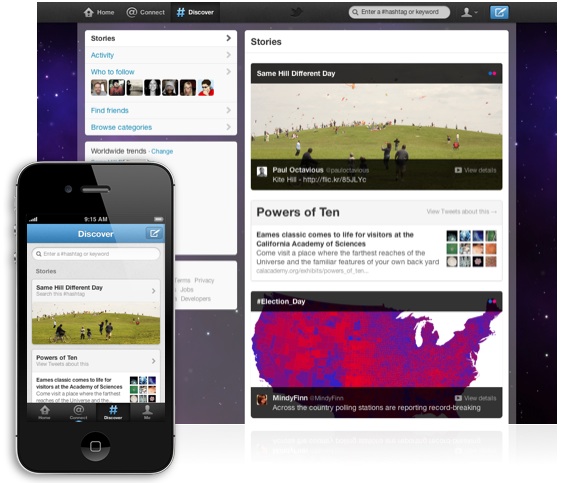
    Twitter just got updated along with apps for Android and iOS. The new look is designed around four new tabs — “Home”, “Connect”, “Discover” and “Me” — that make for a less complicated and more streamlined experience. You can visit http://fly.twitter.com/ to look at all the new changes, or wait up-untill next week to see the full updates. Apps should have already received updates by now.

    [Twitter Blog]

    [Twitter]

  • Google+ and Goggles apps for Android get new update with new features

    Google+ and Goggles apps for Android get new update with new features

    With the new update on the app you will  now be able to search posts and people from within the Google+ app. The new update will also allow you to add +1 to photos and comments, see the ‘online’ and ‘typing’ status of your Messenger buddies, and upload videos and full-res photos. 

    With the new Goggles you have a brilliant continuous mode that will allow you to log multiple items without the need to press the shutter button again and again. The update will also allow better crowd sourcing which means that you will now be able to add things unknown to Goggles like our unboxing knife!

    So make sure you are updated.

    [Android Market]

  • Facebook for Android Gets a Facelift and Tweaks

    Facebook for Android Gets a Facelift and Tweaks


    The new Facebook for Android app update, adds a whole lot of tweaks and and bunch of turbo speed boosts. According to Facebook :Photos and albums are up to two times faster than the previous Android app. It’s also easier to share photos, view comments and edit captions on the go. Your messages and notifications are now at the top of your screen. You can respond to friends and stay updated without leaving the page you’re on in Notification style. Just like the iOS App you can quickly access your News Feed, Groups, games and apps from the new left-hand menu. 

     [Facebook]

    Android Market]

  • Eric Schmidt says ‘Android will be bigger than iOS’


    Speaking at Le Web in Paris Google CEO, spoke about why Apps were first written for iOS and then ported over to Android. The response was one that would not surprise any Android user, Schmidt claims ” In about 6 months its going to be the other way round.”  He predicts that the new OS Ice Cream Sandwich will remove the device fragmentation and lead people closer to the OS, making it a preferred choice of developers.


    [Engadget]

    [Le Web (YouTube)]

iGyaan Network
Privacy Overview

This website uses cookies so that we can provide you with the best user experience possible. Cookie information is stored in your browser and performs functions such as recognising you when you return to our website and helping our team to understand which sections of the website you find most interesting and useful.