Tag: App

  • Facebook also comes to Skype

    Facebook also comes to Skype

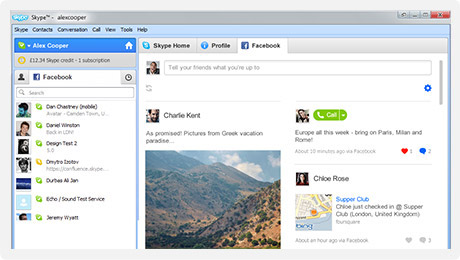
    Skype has also added Facebook live chat to their windows client. Skype 5.3 for windows enables people logged into Skype to talk to their Facbook friends via an easy interface.

    Import your Facebook News Feed to keep up with the latest from your friends. Comment, Like and call them direct from Skype. Update your Facebook status from Skype, too.

    Get all the latest Skype features plus send instant messages direct to Facebook chat. See when your friends on Facebook are online and get in touch in one click.


    Its only available for Windows Right now, But expect a Mac client soon. Hit the link below if you rock a PC.

    [Skype for Windows]

  • Facebook Brings Group Chat and Video Calling – Targets Google +

    Facebook Brings Group Chat and Video Calling – Targets Google +

    Facebook has just announced Facebook Video calls, in partnership with Skype. The Video feature embeds directly into Facebook chat and is a free to use service.

    There were three major announcements today.


    • Group chat(“an easier way to find someone who is online”)
    • Skype-enabled video chat
    • 750 million Facebook members


    In a direct approach the Member downloads a tiny Skype applet .jar file and Facebook Video chat becomes available. Users can now click the video button in the chat module to initiate a video call. The user on the receiving side, get a popup, much like a Skype call. The video camera on either side is turned on only when the recipient accepts the call. 

    As Mark pointed out, the interface is buggy. we tested it out and after several repeat failures we were able to get a stable connection.

    The popup is pretty simple and is always on top. The video chat can be made full screen and minimized or muted. Mark also noted that more developments will come as and when improvements are done to the system. 

    Tony Bates from Skype noted that over 150 million video calls are made each month through Skype, and now this feature will be available on Facebook. 

    visit the link below to get started

    [Facebook Videocalling]

  • App A Day : MoneyTron For iOS iPhone, iPad and iPod

    App A Day : MoneyTron For iOS iPhone, iPad and iPod

    [dropcap]W[/dropcap]ho does not need an expense monitor, an easy to use and definitive way to organize and maintain your expenses. The new MoneyTron App for the iPhone, iPad and iPod does exactly that, and that too with an interesting user interface.

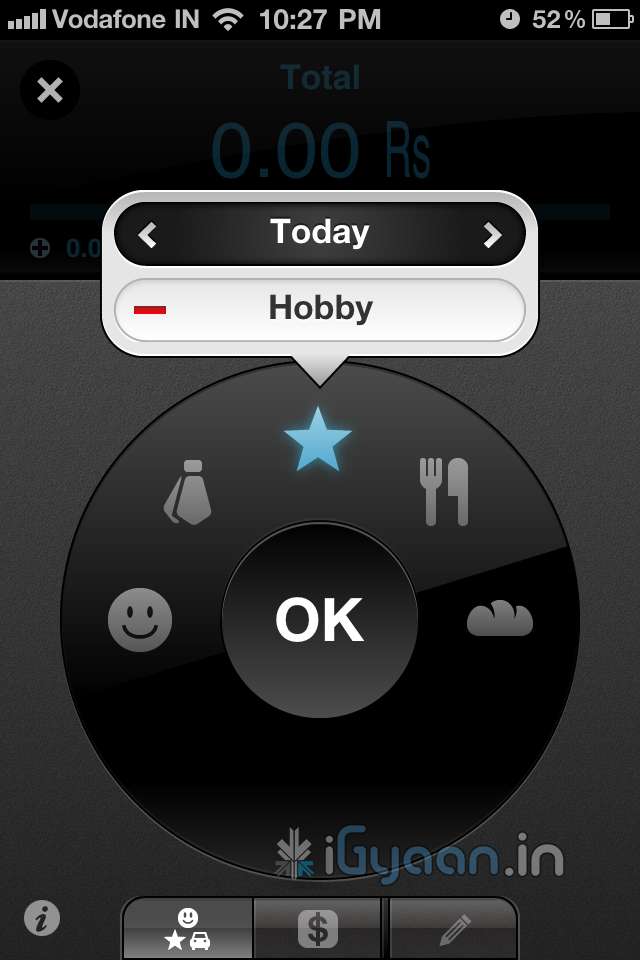
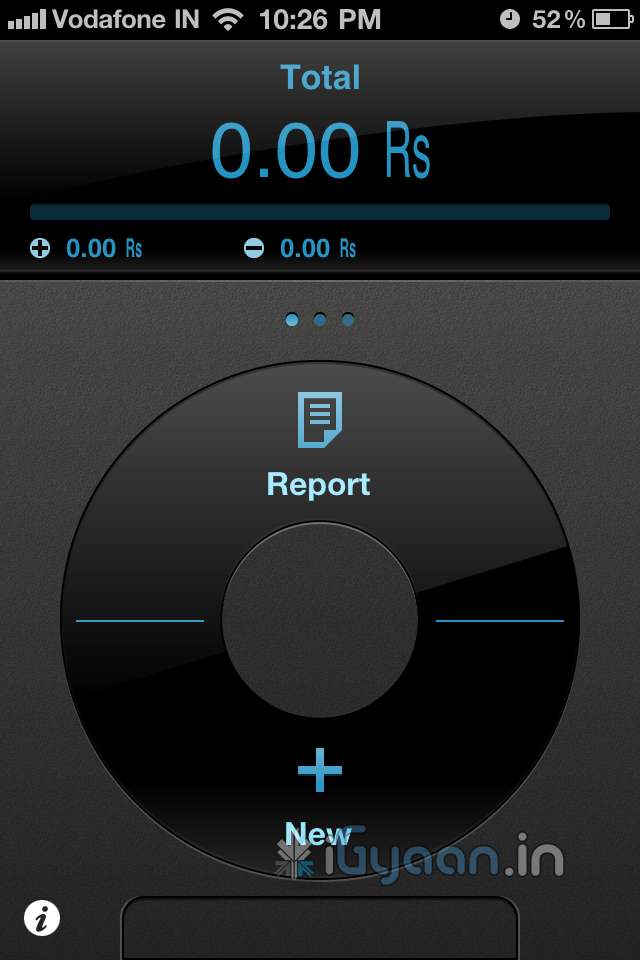
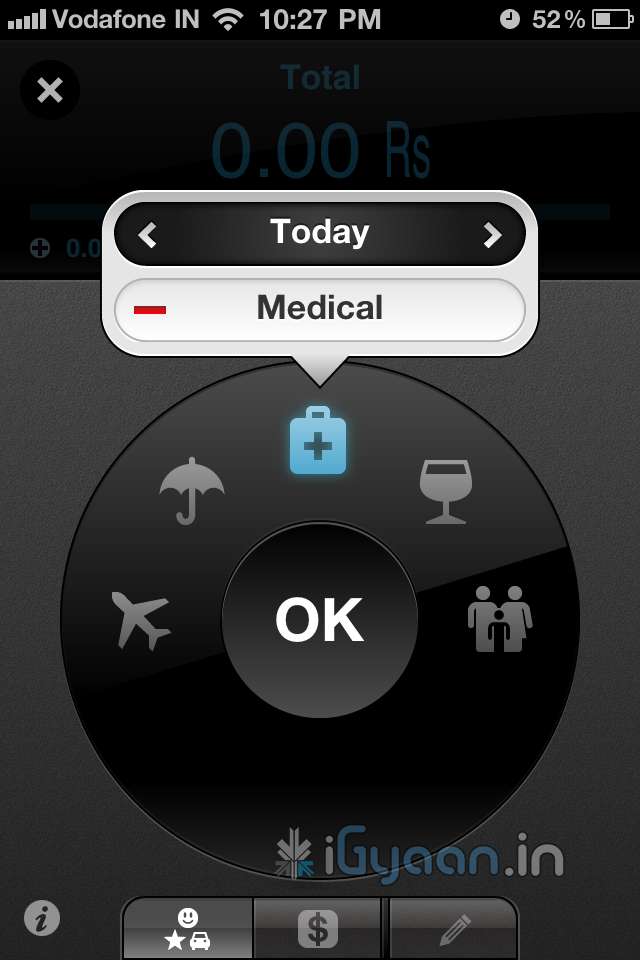
    When you start Moneytron you are greeted with a nice startup screen  with two options new or report. Taping on new shows a carousel which lets you select the type of record, ranging from incoming income, to expenses like clothing, drinking, eating , social and even household expenses and groceries. there are tons of options, and if you don’t like or use a particular option you can turn it off.

    Next all you need to do is enter the value of your record and save, thats it you are done, a reassuring cash register sound confirms the record(the sounds can be turned off too). The app is an easy and effective way to record transactions. The report feature is excellent too, it lets you check your monthly, daily or total transactions. The new update adds a passcode lock which will help you avoid unwanted eyes.  The add a note feature allows you to type in a quick note about the transaction.

    One thing that majorly lacks in this app is the ability to export reports. There is no option to email or share reports, say you want to send your details to an accountant or a friend, you cant.

    This app would have been perfect with an export feature so right now it gets one rank less.

    [xrr rating=4/5 label=”We Rate it : ” imageset=shiny_yellow_star display_as=fraction_stars]

    Requirements: Compatible with iPhone, iPod touch, and iPad. Requires iOS 3.1 or later

    • Size: 4.6 MB
    • Languages: English, Japanese

    DOWNLOAD

       INDIAN APP STORE LINK  US APP STORE LINK
    MONEYTRON for iOS MoneyTron - webtron Inc.  MoneyTron - webtron Inc. 
  • Skype Video Calling Hacked to Work on Sensation and Galaxy S2 Update : Mi 410

    Skype Video Calling Hacked to Work on Sensation and Galaxy S2 Update : Mi 410

    The latest Skype update enables video calling on Android device, but is limited to a strict number of devices. The folks over at DroidLife have found a way to make it work on your new Android 2.3 devices including the HTC Sensation and the Samsung Galaxy S2.

    Simply Download the Cracked Skype from the link on droidlife and copy it to your device and install it. (Make sure third party apps are enabled in your settings)

    Oh yeah we tested it on the HTC Sensation, and it works flawlessly.


    UPDATE: Big update we got the new Skype app up and running and making calls on the Mi 410 from SPICE. A video coming up soon.


  • SENTINEL – The First Women’s Security App

    SENTINEL – The First Women’s Security App

    MindHelix Technologies LLP, a Kochi based IT company, has launched an app called SENTINEL which is the first app designed with women’s security in mind. The app can send instant alerts in case of any problems. A forced power-off of the phone or an improper exit of the application will trigger an alert to be sent. Prolonged signal loss will also cause a ‘fail safe’ alert SMS and email to be sent from the company’s server.

    Co-Founder & CEO Christin Emmanuel George said

    [quote]We want to add a direct emailing or texting to nearest police station as soon as possible. We hope to get their consent in receiving and acting on such information.[/quote]

    According to a survey by Assocham Social Development Foundation, more than 53% of women feel unsafe in their workplace, especially at night. With crimes against the fairer sex on the rise, applications like these could provide a sense of security for women. Records show that crime rates against women have increased dramatically in the metros.

    Sentinel can send multiple SMS and e-mail alerts to preconfigured numbers and e-mail ids. The alerts would include last known location, direction of travel, mode of transportation and vehicle number (which the user can enter). The app has been designed for smart phones including all devices with Android, Blackberry, Symbian, iOS and Java operating systems. The application was designed with the urban woman in mind and requires a continuous cellphone signal.

    The free app can be downloaded from http://sentinel.mindhelix.com/

  • App of the Day : Postale for iPhone, iPad and iPod touch

    App of the Day : Postale for iPhone, iPad and iPod touch

    Once in a while an app comes along that reminds of the good old times, Postale is that app. Possibly the easiest to use Postcard making and sharing app available in the App Store.

    The app is simple to use and has a minimalist menu with just the right amount of selections. You select the layout and theme of your Postale card, place your photo just right, then type in your message. When you’re ready to share it, select one of the twelve retro-styled postage stamps to place on your postcard.

    FEATURES

    • 3 card layouts and 3 card themes
    • Choose a photo from your Photo Library or snap a picture with your device’s camera from right inside the app
    • Position, rotate, and scale your photo right onto the card
    • Optionally change the color of your photo to Black & White or Sepia-Tone
    • Type in your own custom title and message
    • 5 fonts to choose from
    • 12 retro-styled stamps
    • Send right from the app via email, Facebook, or Twitter


    It literally takes a few seconds to create a beautiful postcard and share it with your friends or favorite social networking sites.

    iG Rating  : 4/5

    Download

    Postale - 7twenty7 LLC

    Postale – 7twenty7 LLC

  • Apple Releases Final Cut Pro X (64 Bit), Motion 5 and Compressor 4 (PR) : DOWNLOAD LINK

    Apple Releases Final Cut Pro X (64 Bit), Motion 5 and Compressor 4 (PR) : DOWNLOAD LINK

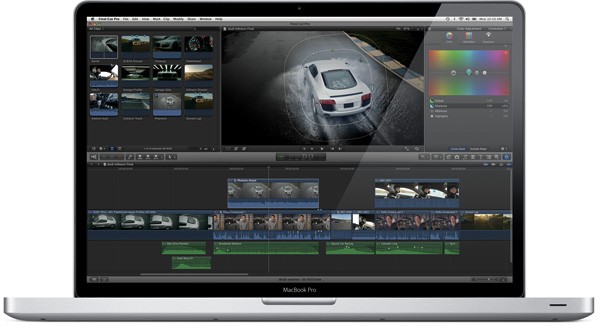
    Apple finally and on time launched the much awaited Final Cut Pro X today. Possibly the most awaited Video Editing software in a long time. Final Cut Pro X brings simplicity of the iMovie interface with advanced features of Final Cut along with multi-core performance.

    The software is available in the Mac AppStore for $299. Add-ons Motion 5 and Compressor 4 are also available today for $49.99 each from the Mac App Store.

    DOWNLOAD

    Final Cut Pro – Apple®

    Final Cut Pro - Apple®

    ——————————-

    Compressor – Apple®

    Final Cut Pro - Apple®

    ——————————-

    Motion – Apple®

    Motion - Apple®

    ——————————-

    We will have a full review on the Final Cut Pro X Shortly!

    [toggle title_open=”COLLAPSE PRESS RELEASE” title_closed=”READ THE PRESS RELEASE” hide=”yes” border=”yes” style=”default” excerpt_length=”0″ read_more_text=”Read More” read_less_text=”Read Less” include_excerpt_html=”no”]Apple Revolutionizes Video Editing With Final Cut Pro X

    CUPERTINO, California-June 21, 2011-Apple® today announced Final Cut Pro® X, a revolutionary new version of the world’s most popular Pro video editing software which completely reinvents video editing with a Magnetic Timeline that lets you edit on a flexible, trackless canvas; Content Auto-Analysis that categorizes your content upon import by shot type, media and people; and background rendering that allows you to work without interruption. Built on a modern 64-bit architecture, Final Cut Pro X is available from the Mac® App Store™ for $299.99.

    “Final Cut Pro X is the biggest advance in Pro video editing since the original Final Cut Pro,” said Philip Schiller, Apple’s senior vice president of Worldwide Product Marketing. “We have shown it to many of the world’s best Pro editors, and their jaws have dropped.”

    “I’m blown away by what Apple has done with Final Cut Pro,” said Angus Wall, Academy Award-winning film editor. “Final Cut Pro X is incredibly modern and fast, but most importantly it lets you focus on telling your story in the most creative way, while it actively manages all of the technical details.”

    At the heart of Final Cut Pro X is the Magnetic Timeline, a trackless approach to editing your footage that lets you add and arrange clips wherever you want them, while other clips instantly slide out of the way. You can use Clip Connections to link primary story clips to other elements like titles and sound effects, so they stay in perfect sync when you move them. You can even combine related story elements into a Compound Clip that can be edited as a single clip. The groundbreaking new Auditions feature lets you swap between a collection of clips to instantly compare alternate takes.

    Content Auto-Analysis scans your media on import and tags your content with useful information. Final Cut Pro X then uses that information to dynamically organize your clips into Smart Collections, so you can easily find the clips you want by close up, medium and wide shots as well as media type and the number of people in the shot. You can also tag parts of clips with Range-based keywords to add custom search criteria to your media.

    Completely rebuilt from the ground up, Final Cut Pro X is a 64-bit app that takes full advantage of the latest Mac hardware and software so you never have to wait for the next edit, even if you’re working with 4K video. Final Cut Pro X uses multi-threaded processing and the GPU on your graphics card for blazing fast background rendering and superb real-time playback performance. Additionally, a ColorSync-managed color pipeline ensures color consistency from import to output.

    Final Cut Pro X also includes powerful tools for audio editing and color correction, and is complemented by two companion apps, Motion 5 for professional motion graphics and Compressor 4 for advanced media encoding, available from the Mac App Store for $49.99 each.

    Pricing & Availability
    Final Cut Pro X is available today for $299.99 from the Mac App Store. Motion 5 and Compressor 4 are available today for $49.99 each from the Mac App Store. Full system requirements and more information on Final Cut Pro X can be found at www.apple.com/finalcutpro.

    Apple designs Macs, the best personal computers in the world, along with OS X, iLife, iWork and professional software. Apple leads the digital music revolution with its iPods and iTunes online store. Apple has reinvented the mobile phone with its revolutionary iPhone and App Store, and has recently introduced iPad 2 which is defining the future of mobile media and computing devices.[/toggle]

  • App A Day : Age Of The Zombies: Review : iPhone | iPad | iPod | Android

    App A Day : Age Of The Zombies: Review : iPhone | iPad | iPod | Android

    Halfbrick Studios’ Age of Zombies is a fun dual stick shooter with varied scenery, lots of weapons and thousands of zombies, ranging from cavemen to mobsters and even dinosaurs. It’s easy to play, oftentimes funny and quite intense.  The Main Character of this game is Barry Steakfries, who grabs a pistol and is ready to kill zombies, with his i don’t give a monkey’s behind attitude.

    The game is set in various locations and Barry travels through time to visit Prehistoric times, the 1930s and ancient Egypt, among other locations. Killing zombies along the way obviously. SMG, shotgun, grenades, a mini gun, buzz saw and flamethrowers pop up as bonuses during the game, but only one item at a time can be selected. The default pistol has unlimited ammo, but does not always get he work done.

    If you play anything like us the game will last only a couple of hours and will entertain you throughout. The app can be had for US$ 2.99 and will not disappoint, if you are looking for a fun, fast action game with zombies and blood and lots of guns. If you are not looking for this, better look elsewhere.

    We Rate it : 4.5/5

    DOWNLOAD

    Age of Zombies™ - Halfbrick Studios

    Age of Zombies™ – Halfbrick Studios

    Price: 2.99 US$

    Requirements: Compatible with iPhone, iPod touch and iPad. Requires iOS 3.0 or later

  • Make calls from you iPad 3G : PhoneIt-iPad

    Make calls from you iPad 3G : PhoneIt-iPad

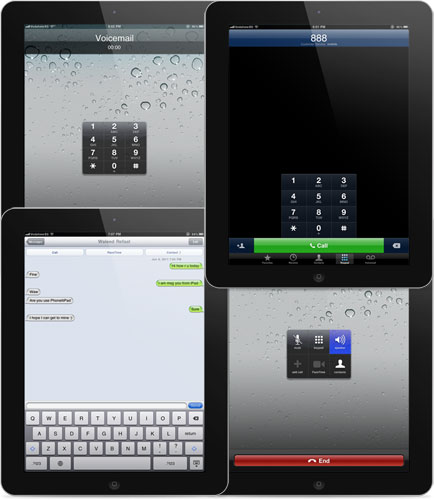
    The team from iPhoneIslam that hacked Facetime into iPhone 3Gs is back with what people though was impossible making calls from the iPad. Since the day the iPad was launched people wanted to use it as a phone. This new app allows just that but with a pretty knacker. The app costs 20$ or about Rs. 900, well worth it for converting your iPad 3G into a large iPhone.

    [iPhoneIslam]

  • App a Day – 3D Board for iOS

    App a Day – 3D Board for iOS

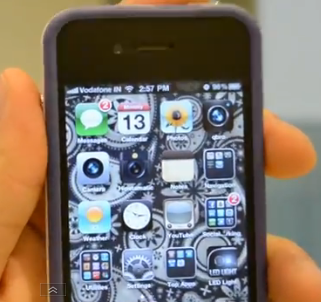
    Have you ever wanted to turn your iPhone screen into a 3D screen? Well now you can. With the 3D board application, your home screen turns into a glasses free 3D screen. The wallpaper moves and shifts based on how you’re holding the phone. It is available from the BigBoss repository in Cydia for $2.99. All in all its a fun application to fool your friends into thinking you’ve replaced your iPhone’s Retina Display with a 3D Retina Display. Check out the video for more info.

  • Apple releases iWork to iPhone and iPod touch (PR)

    Apple releases iWork to iPhone and iPod touch (PR)

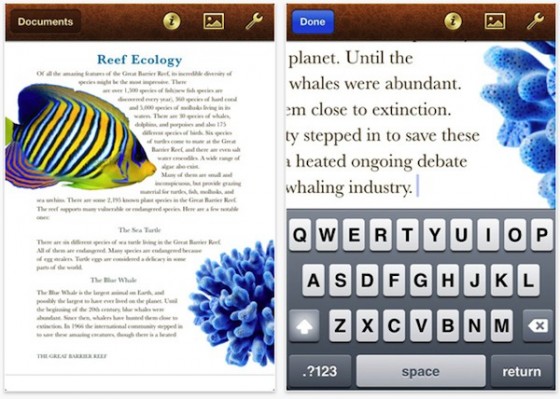
    Being a few of the most successful apps on the iPad online App store since day one of Launch, Apple has finally brought some love to iPhones and iPod Touches. The same apps will now run on all other iOS devices making them universal Apps at US% 9.99


    PRESS RELEASE

    Apple iWork Now Available For iPhone & iPod touch Users

    CUPERTINO, California-May 31, 2011-Apple® today announced that its groundbreaking iWork® productivity apps, Keynote®, Pages® and Numbers®, are now available for iPhone® and iPod touch®, as well as iPad®. Created for the Mac® and then completely redesigned for iOS and Apple’s revolutionary Multi-Touch™ interface, Keynote, Pages and Numbers allow you to create and share stunning presentations, beautifully formatted documents and powerful spreadsheets on the go. iWork apps are available on the App Store™ for $9.99 each to new users and as a free update for existing iWork for iPad customers.

    “Now you can use Keynote, Pages and Numbers on iPhone and iPod touch to create amazing presentations, documents and spreadsheets right in the palm of your hand,” said Philip Schiller, Apple’s senior vice president of Worldwide Product Marketing. “The incredible Retina display, revolutionary Multi-Touch interface and our powerful software make it easy to create, edit, organize and share all of your documents from iPhone 4 or iPod touch.”

    Keynote, Pages and Numbers import and export documents from iWork for Mac and Microsoft Office; print wirelessly using AirPrint™; and include beautiful Apple-designed themes and templates. All iWork apps now include improved document management with thumbnail images that let you find your files quickly, organize them and group them into folders using intuitive gestures. From the Tools button in the toolbar, you can easily share any presentation, document or spreadsheet without leaving the app.

    Keynote makes it easy to create impressive presentations, complete with animated charts and transitions. You can play your presentation in Full Screen view on the stunning, high-resolution Retina™ display or connect to a projector or HDTV for a large audience. Available separately, the Keynote Remote app allows your iPhone or iPod touch to control a Keynote presentation on any iOS device or Mac.

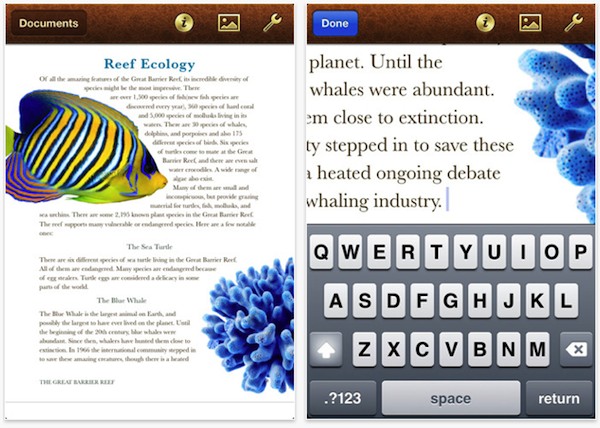
    Pages is the most beautiful word processor ever designed for a mobile device and has everything you need to create amazing documents. Pages takes full advantage of the high-resolution Retina display on iPhone 4 and iPod touch so you can see all the detail and richness of your documents. To make working with text easy on iPhone and iPod touch, Smart Zoom automatically zooms in to follow the cursor while you’re editing and zooms back out when you’re done.

    Numbers uses Multi-Touch gestures and an intelligent keyboard to help you create compelling, great-looking spreadsheets with over 250 easy-to-use functions, flexible tables and eye-catching charts. Just like Pages, Numbers takes advantage of the high-resolution Retina display and Smart Zoom to make working with text and cells on iPhone 4 or iPod touch easy.

    Pricing & Availability
    Keynote, Pages and Numbers are universal apps that run on iPad and iPad 2, iPhone 3GS and iPhone 4, and iPod touch (3rd & 4th generation). Keynote, Pages and Numbers are available from the App Store for $9.99 (US) each for new users, or as a free update for existing iWork for iPad customers. Keynote Remote is sold separately via the App Store for 99 cents (US).

    Apple designs Macs, the best personal computers in the world, along with OS X, iLife, iWork and professional software. Apple leads the digital music revolution with its iPods and iTunes online store. Apple has reinvented the mobile phone with its revolutionary iPhone and App Store, and has recently introduced iPad 2 which is defining the future of mobile media and computing devices.

  • Angry Birds for Windows Phone 7 delayed to 29th June

    Angry Birds for Windows Phone 7 delayed to 29th June


    Despite early reports that Rovio would release Angry Birds for Windows Phone 7 on 25th May . Microsoft said on Wednesday that the game won’t launch until June 29th. The reason for the delay has not been mentioned by Microsoft. But it seems that Microsoft is launching major titles through May and june and don’t want the title launches to clash.

    [Read]

  • iDVM is the Digital Voltage meter companion for your iDevice

    iDVM is the Digital Voltage meter companion for your iDevice

    iDVM Digital Multimeter — the world’s very first iDevice-enabled voltmeter, from Redfish Instruments. Designed specifically for auto/ electrical engineers in mind the Device uses Ad-hoc wireless network to connect with whatever iDevice you have. Once you’ve purchased the multimeter and downloaded the accompanying iDVM app, you’ll be able to gather electrical measurements from up to 30 yards away from your target, log data over extended periods of time and export your findings in spreadsheet or graph displays.

    Priced at just $220 (Inr 10,000)


    Press Release

    Redfish Instruments Introduces World’s First iPhone-Enabled Wireless Multimeter

    SANTA CRUZ, Calif.–(BUSINESS WIRE)–Redfish Instruments, Inc., a provider of iPhone- and iPad-enabled electronic test and measurement equipment, announced today the introduction of the iDVM™ Digital Multimeter. The iDVM multimeter wirelessly connects to an iPhone, iPad, or iPod Touch via an ad hoc wireless network allowing users to acquire, visualize, and share electrical measurement data on their Apple devices. The iDVM app can be downloaded free from the Apple App Store.

    According to Patrick O’Hara, Redfish Instruments’ president and CEO, “The unique pairing of the iPhone or iPad with a digital multimeter provides a user experience that is truly revolutionary. Not since the advent of the LCD has the multimeter been so substantially enhanced.” Regarding the market opportunity, Mr. O’Hara commented, “The iPhone and iPad provide a known user interface that permits customers to interact with electronic test and measurement tools that was not possible prior to this post-pc era. We believe that our new iDVM voltmeter is the first of many new uses for this tremendous interface; we’re excited to be an early pioneer.”

    Traditionally, multimeters have not provided an easy method of exporting or saving data. The iDVM permits a user to log data over an extended period of time using the iPhone or the iPad as the storage device. For example, service engineers can use the iDVM to collect data and store it in a report for submission to their clients, or keep the data on the voltmeter for their own records. Using the GeoTag feature of the iPhone or iPad, service engineers can even identify their location as part of the data. The iDVM is built in the USA using all USA-made parts, and uses rechargeable batteries.

    The iDVM was designed for a wide range of users-from automotive technicians, to advanced embedded systems engineers, to electrical or building contractors, to field service workers.

  • App a Day: Waze |Social Maps for iOS, Android, Symbian, Windows Mobile and Blackberry

    App a Day: Waze |Social Maps for iOS, Android, Symbian, Windows Mobile and Blackberry


    Waze. The new social navigation app which provides you with real-time traffic updates as well as turn-by-turn navigation. The app is really fun to use and comes with a host of features. Since the maps are crowd-sourced, they’re always up to date and accurate in areas where google maps fail. The social aspect of the app comes from its ability to create local traffic groups, which help all drivers in the group by providing traffic updates, accident reports, speed trap data etc.


    The app is more of a game than a navigation app as it has a PAC-MANesque interface that has little dots that your car can gobble up while you drive, you also have toffees that appear from time to time  for extra points. If you’re in an area where there are no maps or the maps are wrong, you can re-map them by switching to dozer mode, which turns your car into a bull-dozer so you can pave your own road! This is a great feature and the first time we’ve seen a navigation app providing this level of detail. A full feature list of the app is below.


    NAVIGATION FEATURES:

    • Voice-guided, turn-by-turn navigation
    • Live crowdsourced traffic information
    • Real-time monitoring of road conditions and automatic re-routing as conditions on the road change
    • Alternative route options
    • Notification when approaching police traps and speed cams
    • Learns and personalizes your preferred routes
    • Free, community-updated map

    SOCIAL DRIVING FEATURES:

    • Road reports from nearby drivers – speed cams, police traps, accidents hazards and more, with the ability to add a photo to your report
    • Ability to create or join local driving groups
    • See your Facebook friends on the map
    • Check in via Foursquare to earn the ‘Road Warrior’ badge
    • Fun avatars to choose from
    • Ability to ‘ping’ other wazers
    • Twitter integration to share your road reports
    • ‘Road goodies’ for extra points, scoreboard, plus other cool geo-gaming elements

    SAFETY AND OTHER FEATURES:

    • Typing disabled while car is in motion
    • Voice-alerts when approaching a hazard
    • Automatic shut-down after 10 minutes of no movement to preserve battery life


    You can download the app from the following links. Remember to join the iGyaan Waze group called iGTraffic.


    Waze – Social GPS navigation, traffic & road reports – Waze Inc.

    Waze – Social GPS navigation, traffic & road reports - Waze Inc.


    For all other devices, visit http://m.waze.com from your mobile browser. The Blackberry version is still in Beta and does not have the full feature set.

  • App a Day:Contr2Brothers – Contra for iOS

    App a Day:Contr2Brothers – Contra for iOS

    Well we found an app that brings back a few childhood memories of sitting in front of the TV and furiously mashing the controls of the NES to kill a few bad guys and achieve 14-bit glory. Here we have a misappropriatly named game called Contr2Brothers – a copy of the good-old game Contra. It features the same game-play as the original with on-screen controls that are slightly tough to use. The game claims to offer 30 lives but we still haven’t figured out how to get there. The audio is a little irritating after a while so you might want to mute it. One good feature is that the game supports upto 2 players via a bluetooth connection. Download it from the link below to relive your childhood…

    [xrr rating=3/5 label=”Price : $0.99 ” imageset=shiny_yellow_star display_as=fraction_stars]

    [xrr rating=4/5 label=”Ease of Use :” imageset=shiny_yellow_star display_as=fraction_stars]

    [xrr rating=3.75/5 label=”Features :” imageset=shiny_yellow_star display_as=fraction_stars]

    Contr2Brothers - IceFish


    [qrcode]
iGyaan Network
Privacy Overview

This website uses cookies so that we can provide you with the best user experience possible. Cookie information is stored in your browser and performs functions such as recognising you when you return to our website and helping our team to understand which sections of the website you find most interesting and useful.