Tag: google maps

  • Google Maps Hides An Image Of An Android Robot Urinating On The Apple Logo

    Google Maps Hides An Image Of An Android Robot Urinating On The Apple Logo

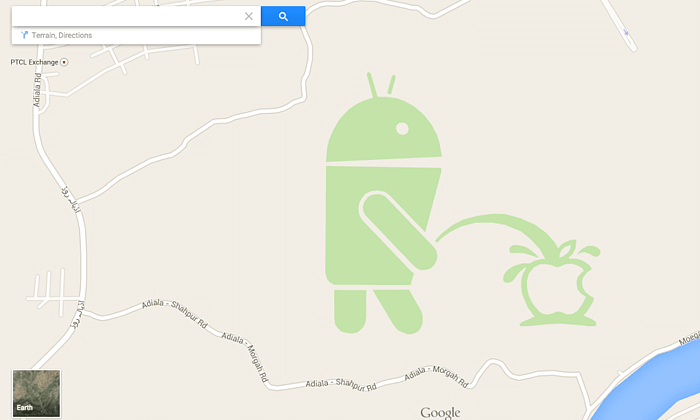
    In a bizarre yet funny incident a Google map render image contains a cartoon of an Android robot taking a piss on the Apple logo. The image is in a small patch just south of the Pakistani city of Rawalpindi, which was possibly put by an End- user.

    Someone at Google definitely is getting the boot as the image, which apparently was by an end-user helpfully “suggesting” an edit, has now been removed, Google says. “We’ve terminated the Android figure involved in this incident, and he’ll be disappearing from Google Maps shortly.”
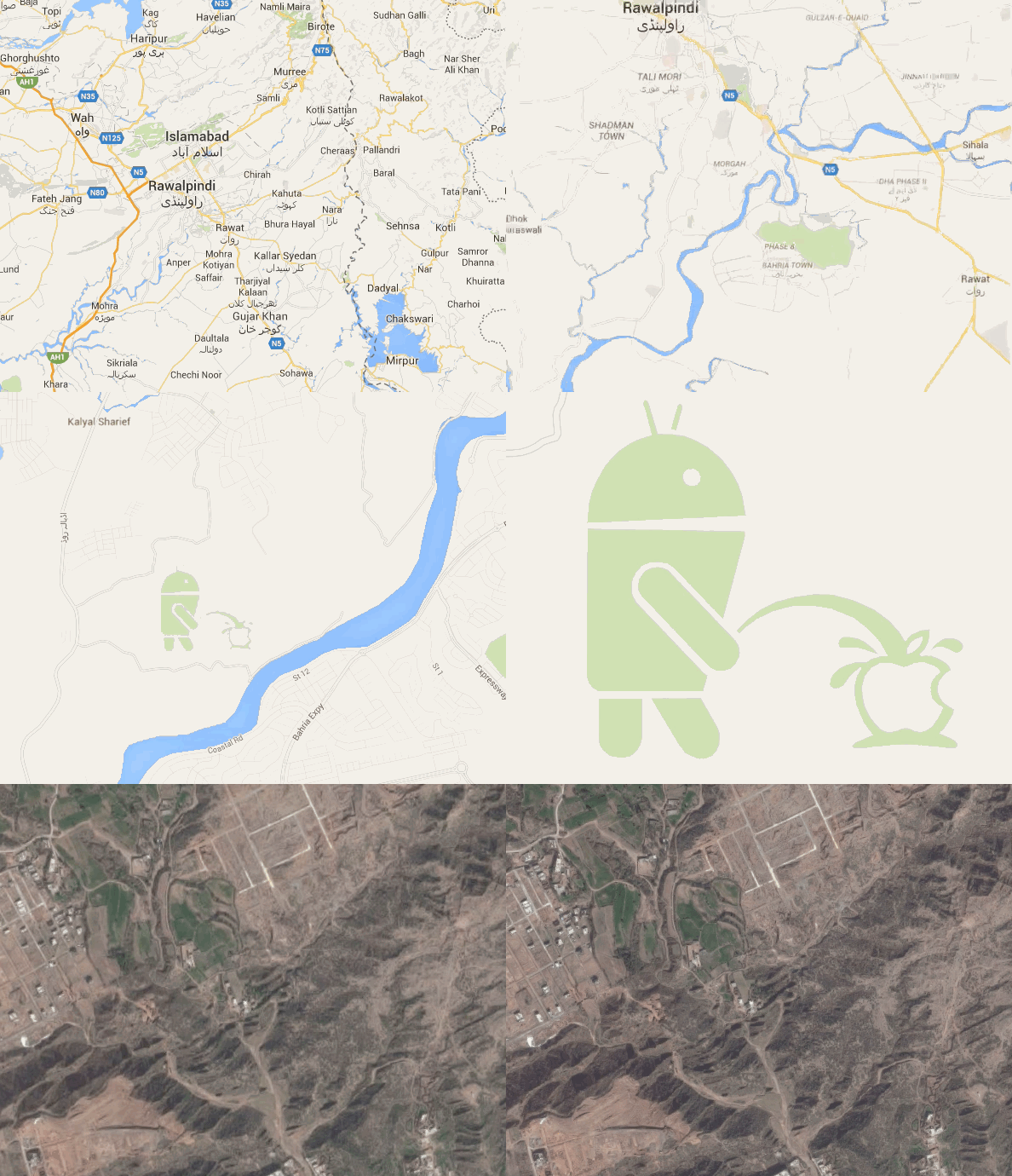
    Ulix0DL

    Another picture accompanies the Urinating Android Figurine, a few miles to the east, reads : “Google review policy is crap.”

    The Google Map Maker allows for users to suggest changes on the Google Maps, which are then duly moderated. These two however were not identified and managed to get on the public domain. This is not the fist incident of lack of moderation on Google Maps, and considering the massive scale of the project it may not be the last.

    f5b5894a-fdd2-4e00-82c9-e85e1b3d0fd5-620x434

    However people always tend to leave stuff for a few chuckles here and there.

  • Now Google Lets You Send Directions From Desktop to Your Android Phone

    Now Google Lets You Send Directions From Desktop to Your Android Phone

    The Maps app by Google is a must-have tool while commuting from one place to another. Users need to type in the address or speak it to Google to get directions to the location, but what if you can avoid all that hassle. The search engine biggie has launched a new feature that allows sending directions from Chrome browser to your handheld device. Now users can search commute routes before leaving for the destination.

    The announcement was made public by the company itself through its Google+ page. The process is as simple as searching on Google. Just type in send directions in the Chrome omnibox and add the final point. Tap on the ‘Send directions to my phone’ option and it will send the directions to your device. The Google Maps will load automatically with the specified location and will navigate to your destination.

    It looks like the feature is not accessible in India as of now, but is expected to arrive soon. The hardware and software company launched ‘Find my Phone’ feature a week back that helps locate your missing Android device. It also revised its search algorithm to boost mobile-friendly websites and slipped a list of relevant apps within search results for you to download. All the moves are in favour of its users.

  • Google Helps You Visit The Mount Everest Region Without Moving a Muscle

    Google Helps You Visit The Mount Everest Region Without Moving a Muscle

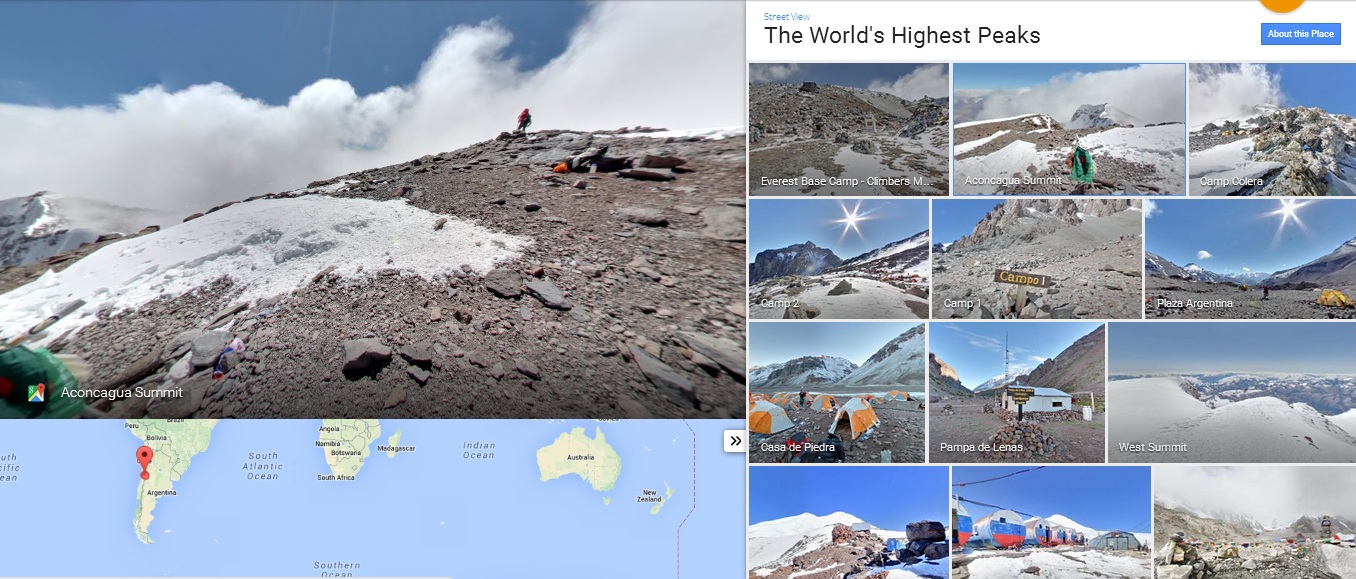
    Users can now glide along the trees, mountains and even visit remote villages, thanks to Google’s Street View. Teaming up with Apa Sherpa, who holds the record for reaching the peak of Mount Everest 21 times, and Nepalese non-profit organization, Story Cycle, Google has managed to scale and photograph the Khumbu region of Nepal for ten days. This created the new Street View images and has helped in improving the maps of the area the Sherpa people have called home for centuries.

    Street View

    Gorak Shep is the closest one can get in this virtual trek. Also, indoor imagery of the Everest Summiteer Lodge, which was built by Apa Sherpa in 1996, can be accessed to. Apart from these, other interesting sights includes lodges, schools, monasteries, clinics, etc.

    ht_google_pic

    “My hope is that when people see this imagery online, they’ll have a deeper understanding of the region and the Sherpa people that live there,” Apa Sherpa said in a blog post. “The region has much more to offer than just the mountains.”

    The Mount Everest is not the only wonder to come to Google Street View. Users can take a virtual trip to the South American Amazon rainforests, visit the pyramids in Egypt, France’s Bordeaux region, etc.

  • Google to Shut Down the Google Maps Engine

    Google to Shut Down the Google Maps Engine

    Google Maps Engine is a tool that lets developers create their own maps on top of Google provided maps. The service now faces a shutdown as the engine is supposedly slowing down. Google Maps will remain functional, but the service to create customized maps will be pulled off.

    ZDNet reports that the search giant will end the service in the coming year after which users won’t be able to sign into the service. A rival map maker CartoDB is said to be replacing the service.

    Google has confirmed the shutdown and said that they will support the clients who use the Maps for Work product by Google through their contract period. Maps for Work gave enterprises and businesses the power to visualize their business on the map and attract more customers using the various features. There aren’t any reasons cited for the shutdown.

    CartoDB hopes to be the replacement of this Google Maps engine and is expected to run on the Google Cloud Platform. It can also be engaged with Google sign-in accounts.

    These are some of the moments when big corporations have to do the unfavorable thing. The company had given immense tools in the hands of the people in the form of the Maps Engine. The sting of shutdown will be felt by businesses as well as by Google.

  • Google Maps Lane Guidance Feature Makes For a Handy Travel Companion

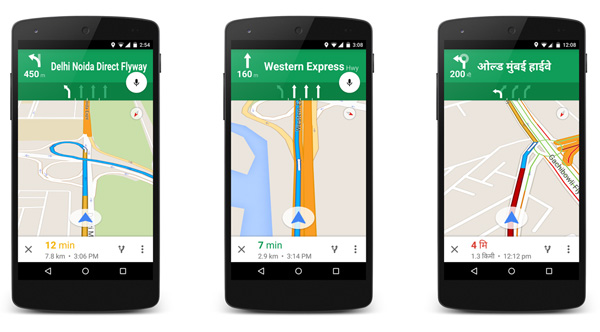
    Indian roads always remain packed with vehicles. These busy roads notice honking and screaming on working days as well as on weekends. People have to leave home half an hour or an hour in advance to counter traffic. Not any more! Now Indians don’t have to freak out in the traffic jam as Google Maps has launched a lane advisory system in India.

    Lane-Guidance

    With this new feature, Google Maps gives voice guidance to the users, enabling them to see and hear voice-guided instructions about the alternate lane they should take to avoid traffic. The app is compatible with both Android and iOS and gives lane guidance in around 20 major cities. Google aims to make the app handy and more useful for regular travellers. Director, Producer and Program Management of Google Suren Ruhela clarified the main motive behind updating the app saying –

    With the Google Maps app for iPhone/iPad and Android, users will now be able to see and hear voice-guided instructions, signalling which lane they should stay in or move to while in navigation mode.

    She further said that the company will continue to upgrade Google Maps for mobile to make it a handy travel companion.

    The 20 cities included in the lane guidance feature are Ahmedabad, Bengaluru, Bhopal, Chandigarh, Chennai, Coimbatore, Delhi, Hyderabad, Indore, Jaipur, Kolkata, Lucknow, Mumbai, Mysore, Nagpur, Pune, Surat, Thiruvananthapuram, Vadodara and Visakhapatnam. Drivers in this cities will be able to choose on lane option for easy commute in their mother tongue. The app added Hindi as a default accent last year in July.

    The app added a couple of other features as well like turn-by-turn voice guidance, which user’s can get in preferred language. Drivers can change the language from the ‘Language and input’ option. The added feature is a really supportive addition to improving search experience for Indian users.

    With traffic the way it is, even in the smallest towns in India, this is quite an initiative by Google Maps to help the hapless stuck in everyday traffic!

  • Get Exploring with the New Google Maps Feature

    Remember the time when there was a profession dedicated to guides? oh yes they still exist and Google has plans to make that job obsolete. With the new ‘Explore’ feature, exploring new places will get a lot easier. The feature will be available on Google Maps app on both Android and iOS platform.

    The Explore feature will be available on Android as well as iOS
    The Explore feature will be available on Android as well as iOS

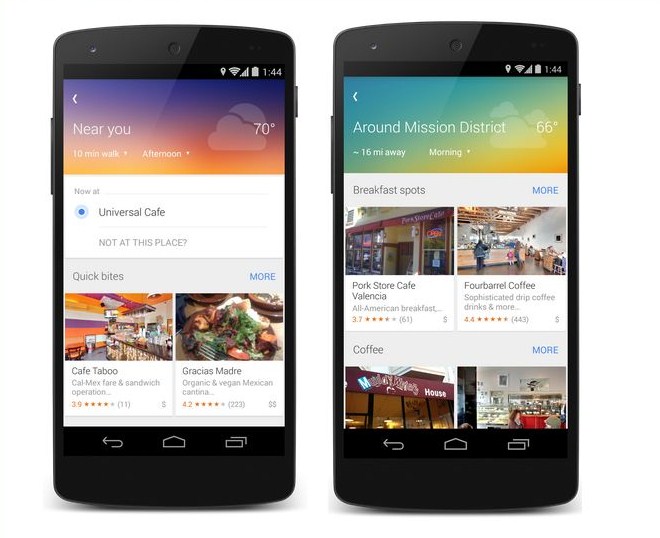
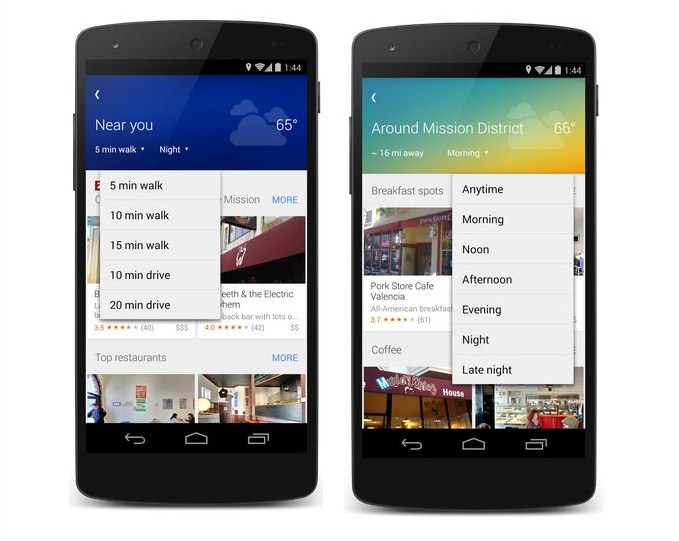
    All the user needs to do with this update is to tap the new Explore button at the bottom right corner of the map to get a quick look at what’s nearby (where available). The feature will provide you information on different places and activities that adapt to each area and moment throughout the day. This also allows you to browse other neighborhoods and cities on the map so you can plan your day’s outing or daydream about your next vacation.

    The feature also gives you an option of finding what is nearby the place where you’ll be in the next five minute walk or a 20 minute drive. The convenience of finding a spot that suits your taste has never been this easy. As the results change according to the time of the day and weather, you can be assured that you will find exactly what you are looking for. The feature performs optimally when the location reporting and web history have been turned on.

    Google explore
    The Awesome functionality of this app will make it stand out.

    The feature also lets you assess the reviews and relevant information about the spot you have chosen to hang at. This can be done by tapping on the ‘My location’ on an Android devices. You can also save these places for future references. Like other data analysis based system, the app will personalize itself with regular use.

    On the look from, the upgrade features Google’s latest material design. The interface is simple, clean and easy to understand.

    So if you have an itch to always be outdoor and exploring, Google Maps and the Explore feature was what the doctor would prescribe for you. So go ahead, get Exploring !

  • Take a Virtual 3D Trip of London Through Google Maps

    Take a Virtual 3D Trip of London Through Google Maps

    You’ve always known that there is a traveller inside you. But the biggest hindrance you had was the lack of enough paper currency in your wallet. You have read all about the elegance of London in the works of Charles Dickens, Shakespeare, Jane Austen and the stinging satires by D. H. Lawrence. You can’t wait to leave for this beautiful historic city and reminisce about the times when the city inspired those literary giants. Or you are a football maniac and want to pay homage to the temples of football may whatever your choice of club be.

    Well, Google is here with its Maps update to give you a feel of what’s it like to roam those streets, so that when your wallet is finally ready you can wander around town like you belong there.

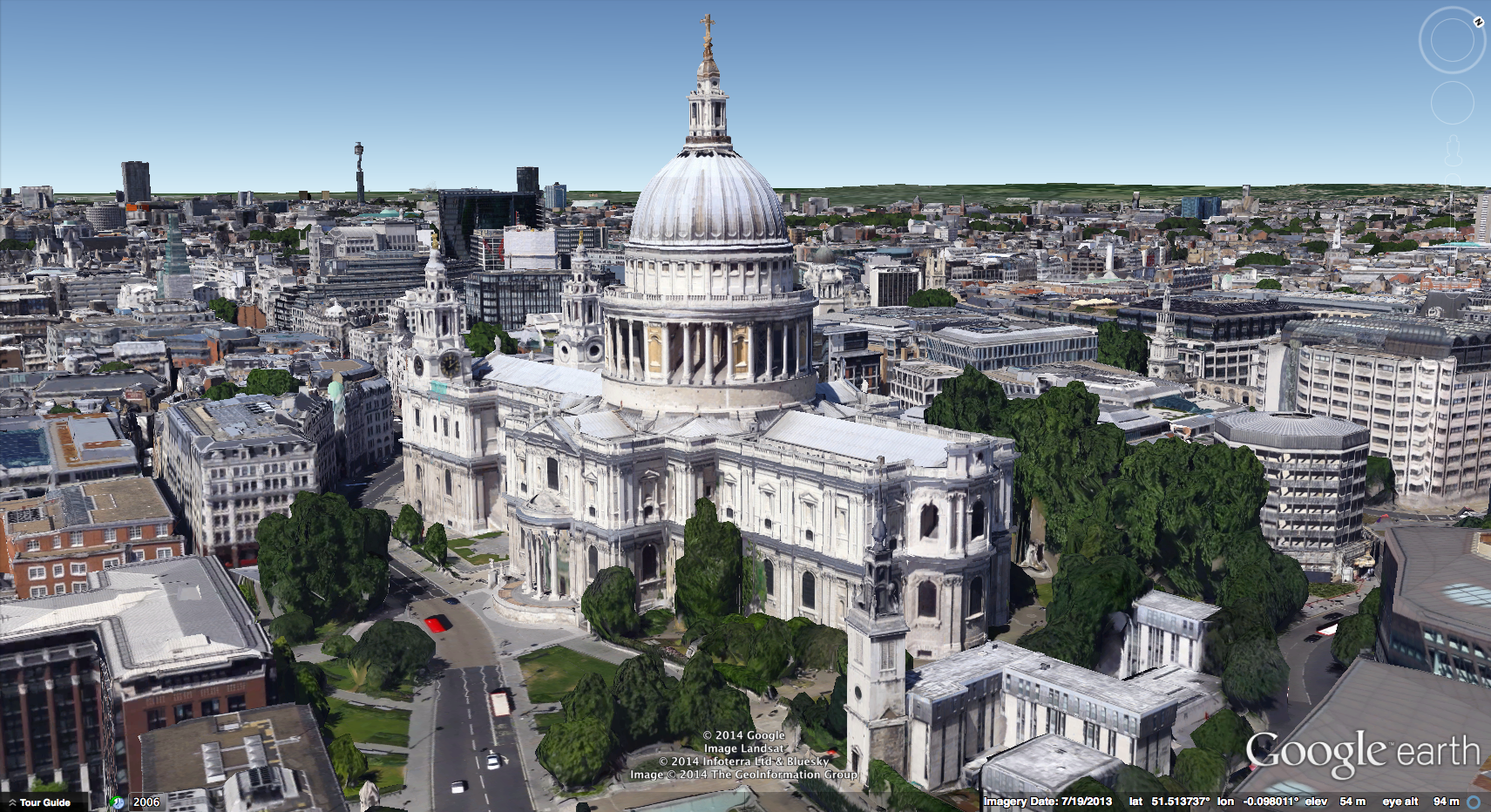
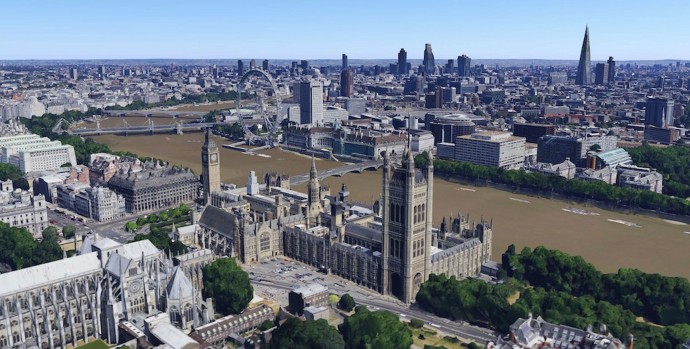
    After bringing the 3D virtual tours of Reading, Leeds, Birmingham and Stoke on Trent, London is the next stop on the tour. The tour which is similar to the one that is available on Apple’s maps gives you a Superman eye view of the British capital. You can pan, zoom, rotate your way through all the sights you’ve always wished to see and feel good doing it.

    London 1

    This update is also helpful for Londoners who want to create a mental map of London like Benedict Cumberbatch’s version of Sherlock. The 3D tour is not just restricted to the tourist spots but gives you access to the entire city. So go ahead and take the Google Maps tour you’ve been waiting for so long. London is now just a few clicks away.

  • Google Maps Now Available in 25 More Countries

    Anyone who has used Google Map Navigation will probably know how important it can be at some point or other. Be it searching a good place for a meal or searching the way to home from an unknown place, Google Maps has helped in most cases.

    While, some people enjoy using Google Maps Navigation others do not have access to it yet. This will soon change as Google has added 25 new countries to take an advantage of this features. Here are the countries which recently got access to Google Navigation:

    • Andorra
    • Bangladesh
    • Bhutan
    • Burundi
    • Central African Republic
    • Croatia
    • Djibouti
    • Gabon
    • Guadeloupe
    • Haiti
    • Lesotho
    • Libya
    • Maldives
    • Mongolia
    • Puerto Rico
    • Republic of Congo
    • Samoa
    • Serbia
    • Sierra Leone
    • Somalia
    • Togo
    • Tonga
    • Tunisia
    • Vanuatu
    • Zambia

    The Google Maps Navigation is now available on approximately 100 different countries. However, few countries like Algeria, Bahrain and Russia do not support the navigation in all regions. The company says’s they are trying to bring the Navigation Beta to more countries gradually. Google Maps Navigation (Beta) requires at least Android OS 1.6 and comes included as part of Google Maps for Android v3.2 and higher. For more information you can check out the source:

    [Google]


  • Google Maps With Indoor Mapping For iOS and Android Now Available in India

    Google Maps With Indoor Mapping For iOS and Android Now Available in India

    Google’s indoor maps was launched some time back, but was not available in India. However, what we noticed now is that Google indoor maps is now available in both the platforms Android and iOS.

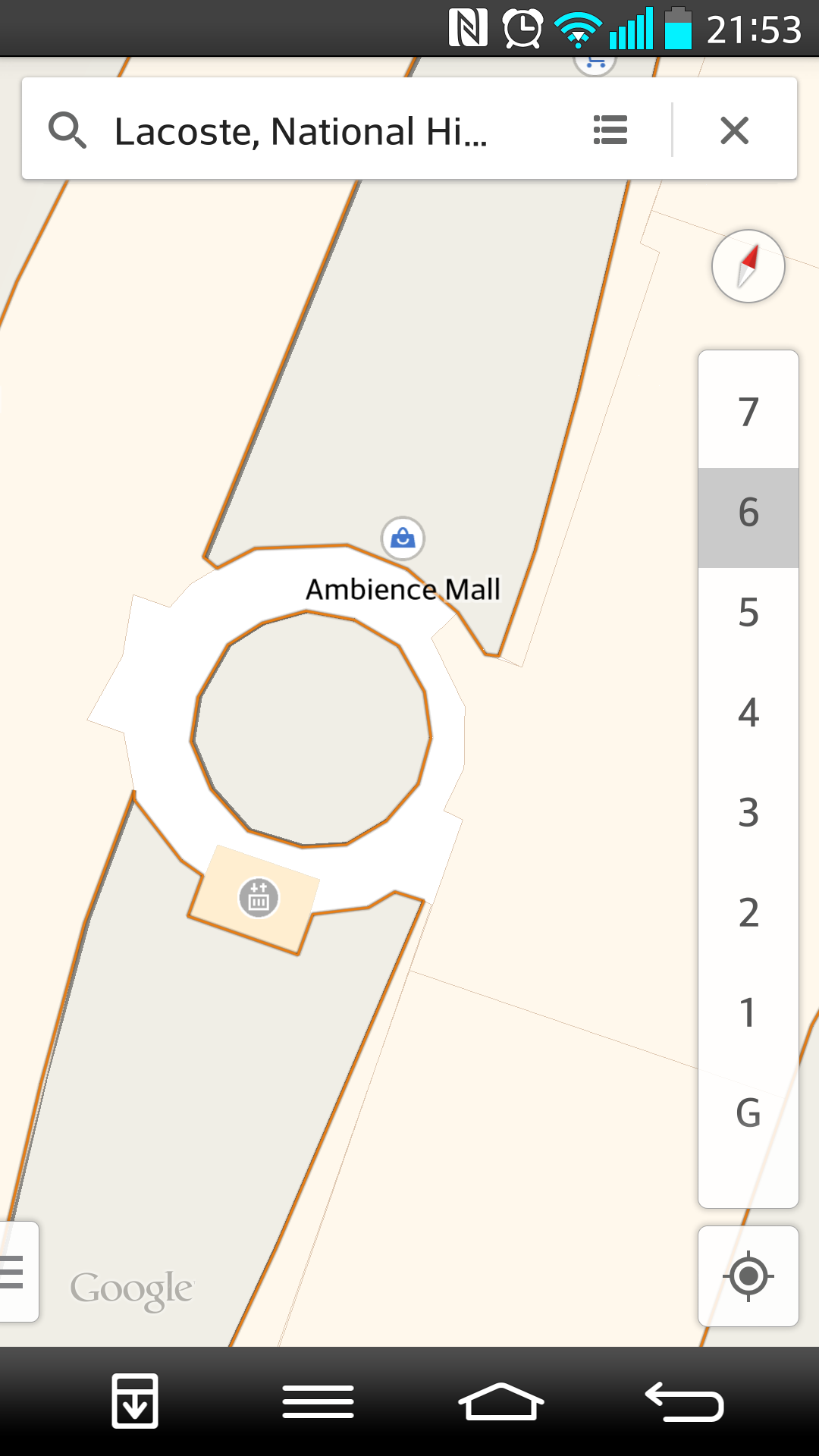
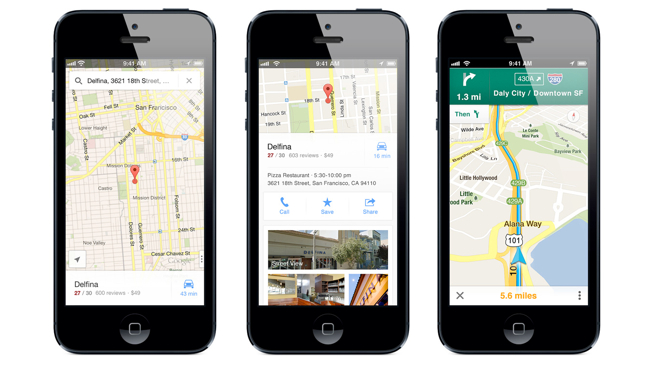
    Google added this feature to Maps in the month of July 2013, but as said before it never made its way to India. iGyaan discovered that the Google Indoor maps is now available in India, for instance users can search for any store in the mall you are in and the application will guide you the floor and the way towards it. Check out the images above which demonstrates the availability of indoor maps on iOS and the image below shows the Google indoor maps on Android.

    Screenshot_2013-11-02-21-53-32

  • Google Maps Update For iOS Brings In-Line Route Previews, Tips and Tricks

    Google Maps Update For iOS Brings In-Line Route Previews, Tips and Tricks

    Google Maps For iOS might not have satisfied every user, but Google is constantly trying to improve its map on the iOS devices through updates often.

    The new release shows brief route previews with traffic overlays, which makes it easier and less complicated ways to get from one place to another. If you are not aware of how to use the Google Maps on the iOS devices you can also browse a new Tips and Tricks section for help.

    google maps

    The company also claims in the version 2.3.4 update release notes that the new version brings enhanced support for the Arabic and Hebrew languages (including voice commands and prompts) and bug fixes. The update is now available at the app store.

    [via]

  • Google Maps Updated For Android, Better Navigation

    Google Maps has got a new update (7.2) on Android. Now when you search for directions to a place and there are multiple routes, you will get Google Now card-like options with a new “Start Navigation” button, which saves a tap and a time overall.

    The Android app’s latest update tweaks hotel search results by adding sponsored rate and booking links, which places a tiny “ad” icon next to services that paid for exposure.

    google-maps-logo

    The information for places such as restaurants, retail stores, etc. also has a minor update. The hours a business is open is now displayed right below the category of store it is in bold.


  • Google Maps Returns To The iPad, Updated With Indoor Navigation And Live Traffic

    Google Maps Returns To The iPad, Updated With Indoor Navigation And Live Traffic

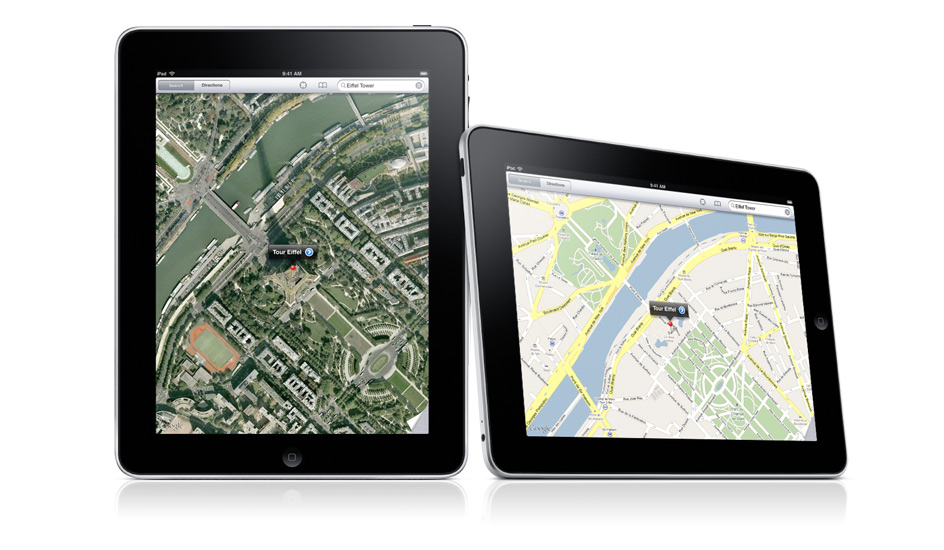
    The big Google Maps update that hit the Android Play Store last week is now rolling out to Apple’s mobile platform. The update, which brings the app to version 2.0, contains a number of new features including iPad support and indoor maps.

    Google Maps version 2.0 brings the iOS title more in line with the native Android offering, including indoor mapping and the newly released “Explore” pane. 

    Google Maps 2.0 for iOS includes both live traffic updates and incident reports that offer details on current traffic conditions. Unlike the Android version of the app, it does not include on-the-fly rerouting, but Google has said that it plans to add the feature in the future. The new version of Maps also offers indoor directions and maps for malls, airports, transit stations, and more.  

    Google Maps is currently unavailable to download in the App Store for many countries until this update is released.

    As 9to5Mac reports, some users have had success downloading the new version of Google Maps by deleting their current version and downloading it from iCloud. 

    Google launched an overhaul of its Maps service at its IO event in May, and following that it announced an acquisition of the mobile mapping service Waze for just over $1 billion last month.

  • Take A Virtual Tour Of ‘Diagon Alley’ Thanks To Google Street View

    Take A Virtual Tour Of ‘Diagon Alley’ Thanks To Google Street View

    Google has given its map users access to many wonderful, bizarre and otherwise impossible to access places, but now it is opening up fictional worlds to exploration by adding Diagon Alley from the Harry Potter series to Street View.

    The Street View application has just added 360 degree views of Diagon Alley, the fictional cobblestone wizarding marketplace from the Harry Potter books and films, where all manner of magical paraphernalia can be acquired.

    For the films, Diagon Alley was built bricks-and-mortar in precise detail on a soundstage at Warner Brothers’ London studios. On Street View, users can swoop in from above the studios’ expansive grounds and into the dark confines of the pre-Victorian marketplace, where they can pass by Potter fan icons like Gringotts Wizarding Bank, Ollivanders Wand Shop and Mr. Mulpepper’s Apothecary.

    In reality, Diagon Alley Ollivanders Wand Shop, Weasleys’ Wizard Wheezes joke shop and the entrance to Gringotts Wizarding Bank are all part of the entrance to the Warner Bros Studio Tour in London.

    The Diagon Alley set took more than three months to build and the 20,000 products on the shops’ shelves were created over six months.


    View Larger Map

    After Deathly Hallows wrapped filming in 2010, part of Leavesden Studios (where all eight Potter movies were shot) was converted into a tour attraction along with permanent sound stages for future films to use.

    The Warner Bros. Studio Tour London: The Making of Harry Potter opened in 2011 and has served as the country’s sole Potter attraction.

    Google recently announced that it had added 1,001 new destinations to Street View, including historical landmarks and sports stadiums.

  • Google Updates Maps And Google Earth, Removes Clouds, Adds 800,000 MP Worth Imaging

    Google Updates Maps And Google Earth, Removes Clouds, Adds 800,000 MP Worth Imaging

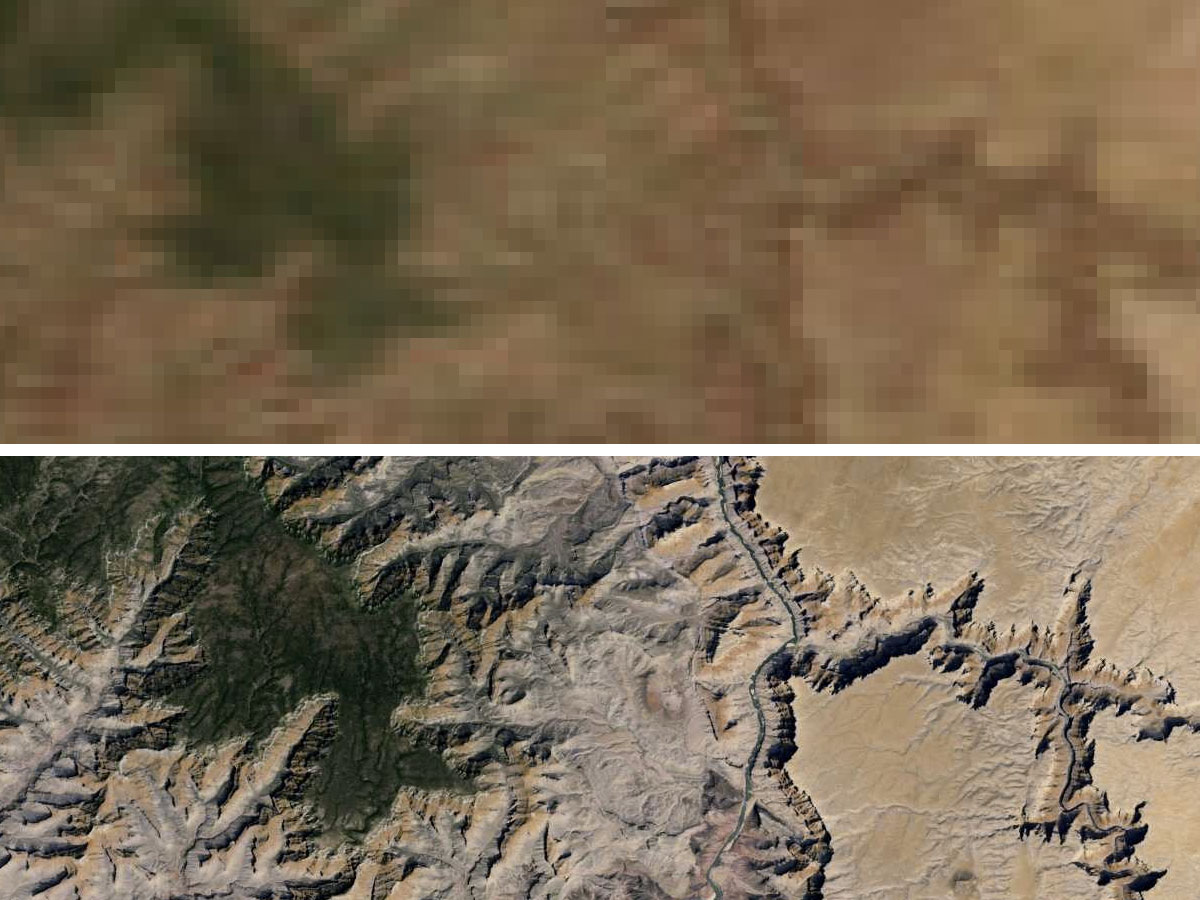
    Google’s attempt to compress the entire world’s streets, websites, businesses, and countries into one comprehensive database got another boost today with the announcement of an updated version of Google Maps’ Earth view. 

    Google have updated their popular Google Maps and Google Earth with 800,000 megapixels of new imagery.

    Google Earth

    Google Earth for Android or iOS now features a new user-interface and Street View imagery, enabling explorers to virtually browse the Earth from street-level straight from their handsets.

    “We’re unveiling new satellite imagery for all Google mapping products today. This stunning new imagery of the earth from space virtually eliminates clouds, includes refreshed imagery for regions of the world where high-resolution imagery is not yet available, and offers a more comprehensive and accurate view of the texture of our planet’s landscape,” wrote Matt Hancher, Tech Lead for Google Earth Engine in a blog post.

    The updated app brings a new streamlined interface, where a tap on the Earth logo in the top-left corner serves up informative layers like Panoramio Photos and Wikipedia. Google Earth also features improved directions, allowing users to “visualise step-by-step transit, walking and biking directions in full 3D”, according to a post on the Google Lat Long blog.

    Google Earth

    The new imagery offers a nearly cloud-free snapshot of the entire planet, providing unobstructed views of Earth’s topography, as well as more detailed looks at previously low-resolution areas of the map.

    Thanks to hundreds of terabytes of data swiped from the USGS’s and NASA’s Landsat 7 satellite, zooming out to a global view now fills your screen with 800,000 megapixels of pristine, cloudless Earth. Plus, multiple regions have been bestowed with refreshened imagery including Russia, Indonesia and central Africa.

    Google said the new Landsat 8 satellite, which launched earlier this year, would capture even more up-to-date imagery in the months and years ahead. Users can access the new satellite imagery by going to Google Maps and turning on satellite view or by launching Google Earth. 

  • Revamped Google Maps Show up on Signup Page, Ahead of Google I/O

    Revamped Google Maps Show up on Signup Page, Ahead of Google I/O

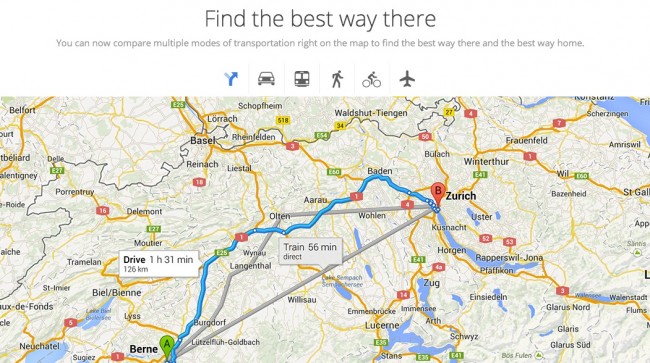
    Just before the Google I/O event the sign-up page for “the new Google Maps” briefly went live showing off atleast one of the things Google has planned for the mega yearly event. Droid-Life managed to grab some screenshots, indicating that the company is working on a smarter Google Maps, which will show the cartography based on the information you are looking for. Users will use a “smarter search box” to highlight just the “things that matter most”.

    Ground Transportation, Flights and even Google Earth has been integrated directly into the main Google Maps, making for a more seamless approach towards the mapping use. 

iGyaan Network
Privacy Overview

This website uses cookies so that we can provide you with the best user experience possible. Cookie information is stored in your browser and performs functions such as recognising you when you return to our website and helping our team to understand which sections of the website you find most interesting and useful.