Tag: imessage

  • This App Lets You Use iMessage On Android

    This App Lets You Use iMessage On Android

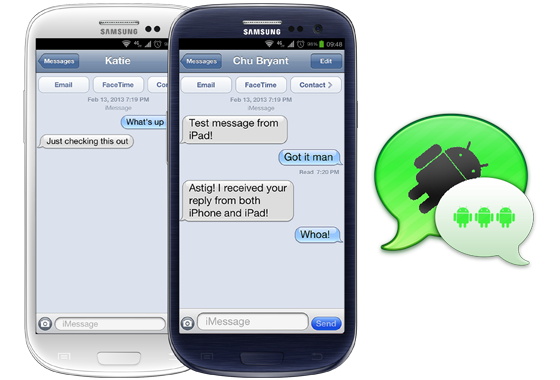
    There are plenty of instant messaging apps for both Android and iOS platforms like WhatsApp. However, iMessage is an instant messaging app which is for iOS devices only. A new app called weMessage however, lets Android users get the experience of iMessage as well.

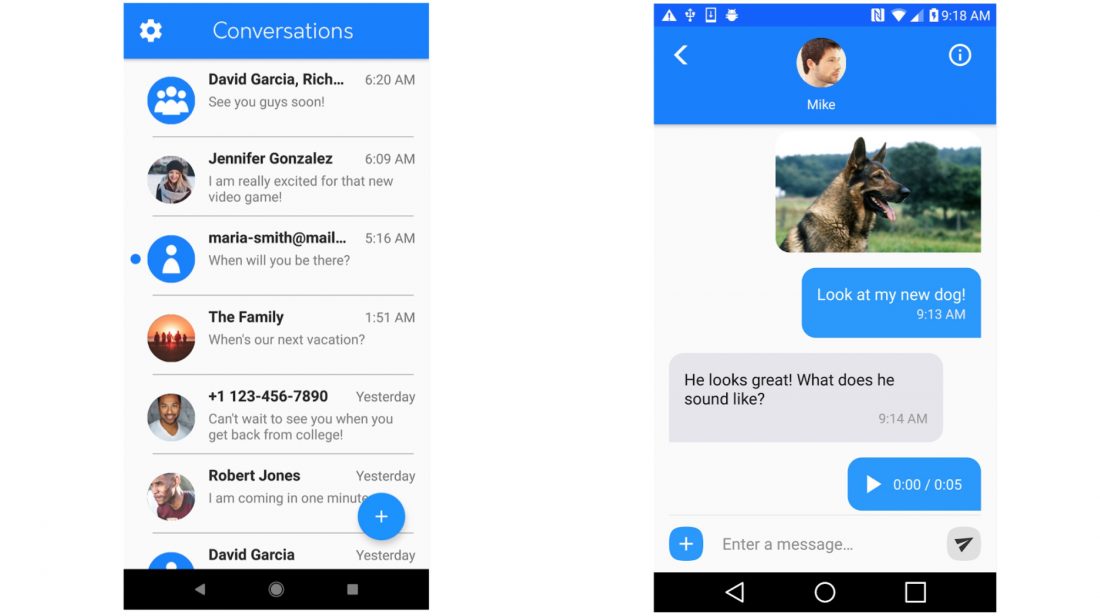
    In-app screenshots

    weMessage is an app and server combination that was created by 16-year-old developer Roman Scott. He posted about the new messaging solution on Reddit, and it received a lot of attention:

    My name is Roman, and I am a 16 year-old app developer. I have recently published my first app to the Play Store, called weMessage. weMessage is an app that allows you to use iMessage on your Android phones or tablets.

    I created weMessage due to the inability of people on Android to use iMessage’s ecosystem. Although it is allows you to use iMessage on your Android device, I cannot close the gap between Android and Apple completely because weMessage is reliant on an Apple computer, which I will explain below.

    weMessage is composed of two pieces of software: the Android app itself and a messaging server that I called the weServer. In order to use weMessage, you need to install the weServer on a Mac computer. The weServer acts as a “bridge” between the Mac computer and your Android device.

    It is worth noting that cross-platform iMessaging solutions have been published on the internet before. The reality is that developers who have done this in the past have seen their solutions blocked by software updates from Apple. Until Apple takes the app down, you can download weMessage here. You can also log on to the weMessage website to learn more about the app and how to download and install the solution.

  • Apple Ordered to Pay $626 Million in Patent Infringement Case

    Apple Ordered to Pay $626 Million in Patent Infringement Case

    Apple, in a case that has been jumping around from one court to another since 2012, has been dealt a major blow. Apple has been ordered to pay VirnetX Holding corp a cool $626 million for violating patents related to FaceTime and iMessage amongst other technologies that the jury determined had been patented by VirnetX, and hence are its property.

    Apple Face Recognition AI

    VirnetX, is commonly known as a patent troll across the industry because of its habit of targeting tech companies and making almost all of its revenue from patent licensing and lawsuits. It has sued a number of tech companies over the past decade and has famously settled disputes with Microsoft over patents used in Skype, and made $200 million from the Redmond-based company in another patent infringement related case in 2010.

    This recent verdict is in continuation from a case where a jury had found Apple guilty of violating the same patents back in 2012.The company then was asked to pay an amount of $368 million to VirnetX.

    Apple appealed and won on a technicality, but as it is with the judicial system, the appeals court vacated the damages and sent the case back down to a bench at a District Court for retrial, where the jury found Apple guilty and ordered it to pay even more money to VirnetX because it found it guilty of “willfully” violating the company’s patents.

    Reacting to the decision a member of the legal team from Apple said that the company would appeal the decision. The company argued that the patents in question are not valid.

    “We are surprised and disappointed by the verdict and we’re going to appeal. Our employees independently designed this technology over many years, and we received patents to protect this intellectual property. All four of VirnetX’s patents have been found invalid by the patent office. Cases like this simply reinforce the desperate need for patent reform,” he said.

  • Apple Wants to Create New Mobile Products for the Android Ecosystem

    Apple Wants to Create New Mobile Products for the Android Ecosystem

    After announcing the release of Apple Music for Android, Apple has gone even further by posting a job listing, looking for a software engineers to create products for Android users.

    apple music

    This new position is reportedly not for the Apple Music but for new mobile products that Apple plans to launch for Android users. Some of the speculated apps that might be in for this project are – the iWork, iCloud, iMessage, Safari, iTunes etc. It is said that releasing iCloud on Android would give users another option to access their files.

    android-logo

    However, it seems like Apple’s iOS is finally facing the Android challenge head-on by expanding its accessibility, especially after reports have shown them losing numbers in  markets in USA and China. No further information is available on what these new mobile products are going to be.

    Source: [tw-button size=”medium” background=”#07ABE2″ color=”” target=”_blank” link=”http://9to5mac.com/2015/08/05/apple-job-listing-android-apps/”]9to5[/tw-button]

  • New Web Tool by Apple Allows Users to Deregister Phone Numbers from iMessage

    New Web Tool by Apple Allows Users to Deregister Phone Numbers from iMessage

    Apple has released a new tool that let’s former iPhone users deregister their phone numbers instantly from Apple’s iMessage system. This allows switching between iOS and other smartphones hassle free. Many former iPhone users have reported for years that they were unable to receive text messages from friends.

    The problem occurs as Apple continues to route texts through iMessage even after users have moved on to non Apple devices. Since iMessage is exclusive to the Apple platform, users who moved away from iOS but did not disable iMessage first, were unable to see messages sent from friends who used Apple devices. The only solution to this for users who were still facing this problem was to deregister entirely the old device from their Apple accounts.

    With the recently released tool, all users need to do is enter the phone number they wish to deregister from Apple’s iMessage system. Apple will then send a code via SMS, which they need to type into the browser to deregister.

    Apple received a lot of heat earlier this year over disappearing messages which irritated some users to the extent that they had to file a law suit over the matter.

  • Fake iMessage App For Android Surfaces, Raises Security Concerns

    Fake iMessage App For Android Surfaces, Raises Security Concerns

    There’s something fishy about this iMessage app for Android, and it’s not the fact that it’s using an outdate iOS 6 skin. While that should be a first warning sign, the reality is that the app, which recently appeared in the Google Play Store, is the work of a third-party developer. It by no means provides official cross-platform access to Apple’s popular messaging service.

    9to5Mac reports that scrutiny of the .apk file – the form the program takes outside the Play Store ecosystem – suggests that there is a serious potential risk to personal data. The app works by using the developer’s own server as a proxy to spoof messages into appearing to come from an iPad Mini, thus bypassing the strict “Apple Only” nature of the iMessage protocol. However, in doing so, it means that the developer has access to all of your message data.

    People that have tried the app reported varying results – some report that they can only message other Android users, while others have only some Apple contacts.

    In addition to these security flaws, the iMessage app requires you to sign in with a working Apple ID. As you probably already know if you have one, your Apple ID stores payment information and personal data, and serves as your gateway into a number of Apple services.

    The iMessage for Android app is available as a free download in the Google Play Store and is by a developer called Daniel Zweigart.

  • Some iOS Developers Targeted With iMessage “Denial Of Service” Attack

    Some iOS Developers Targeted With iMessage “Denial Of Service” Attack

    The Next Web is reporting that a group of iOS developers has been targeted with a series of rapid-fire messages on iMessage, creating a sort of denial-of-service (DoS) attack that crashes the iMessage app.

    App developers iH8sn0w, well known for his jailbreak tool, and Grant Paul were among those targeted by the DoS attack that overwhelmed their respective Messages inboxes with a load of automatically-generated transmissions. 

    imessage

    The two devs believe the messages to have been sent one after another from the Messages app on OS X, with a simple AppleScript effecting the barrage that prompts a victim to constantly clear notifications and text.

    Grant Paul, one of the targeted iOS developers explains how the attack worked:

    “What’s happening is a simple flood: Apple doesn’t seem to limit how fast messages can be sent, so the attacker is able to send thousands of messages very quickly,” Paul says.

    The second part of that, he explains, is that if a user sends a ‘complex’ text message using unicode characters that force a browser to render ‘Zalgo’ text, or simply uses a message that is enormous in size, them the Messages app will eventually crash as it fails to display it properly. This will effectively ‘break’ the Messages app on iOS by forcing it to close and stop it from re-opening because it can’t render that text.”

    iH8sn0w mocked up a proof-of-concept AppleScript to demonstrate how such an attack may work. If Apple doesn’t limit the influx of messages, a user’s app will quickly become filled with what amounts to piles of spam.

    The attacks hit at least a half-dozen iOS developer and hacker community members, and appear to have originated with a Twitter account involved in selling UDIDs, provisioning profiles and more that facilitate in the installation of pirated App Store apps which are re-signed and distributed.

    Currently, there is no way to block particular senders in iMessage, though iH8sn0w said it should be possible for Apple to notice the bursts of messages and block them as repetitive spamming. Victims can also disable iMessage entirely.

    [The Next Web, Mac Rumors]

  • Fix your Macbook Pro Battery life as Apple releases Mountain Lion Software Update 10.8.2

    Fix your Macbook Pro Battery life as Apple releases Mountain Lion Software Update 10.8.2

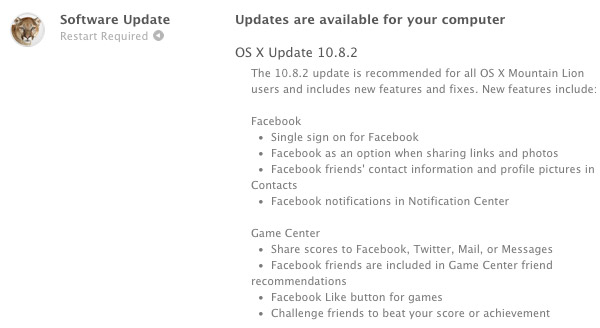
    Just some time back Apple started pushing iOS 6 to all iOS devices (compatible ones at least), in support Apple has also started seeding the newest Software Update to the Mountain Lion users. The 10.8.2 brings several things including Facebook Integration and most importantly for Macbook Pro users the update is said to bring a secret Battery life Fix.

    Check out the full Changelog below:

    Facebook

    • Single sign on for Facebook
    • Adds Facebook as an option when sharing links and photos
    • See Facebook friends’ contact information and profile pictures in Contacts
    • Facebook notifications now appear in Notification Center

    Game Center

    • Share scores to Facebook, Twitter, Mail, or Messages
    • Facebook friends are included in Game Center friend recommendations
    • Added Facebook “Like” button for games
    • Challenge friends to beat your score or achievement

    Other new features

    • Adds Power Nap support for MacBook Air (Late 2010)
    • iMessages sent to your phone number now appear in Messages on your Mac*
    • You can now add passes to Passbook (on your iPhone or iPod touch) from Safari and Mail on your Mac*
    • FaceTime can now receive calls sent to your phone number*
    • New shared Reminders lists
    • New sort options allow you to sort notes by title, the date you edited them, and when you created them
    • Dictation now supports additional languages: Mandarin, Cantonese, Spanish, Korean, Canadian English, Canadian French, and Italian
    • Dictionary app now includes a French definition dictionary
    • Sina Weibo profile photos can now be added to Contacts

    * Requires iOS 6

    General fixes

    The OS X Mountain Lion v10.8.2 update also includes general operating system fixes that improve the stability, compatibility and security of your Mac, including the following fixes:

    • Adds an option to discard the changes in the original document when choosing Save As
    • Unsent drafts are now opened automatically when launching Mail
    • Receive Twitter notifications for mentions and replies from anyone
    • URLs are shortened when sending tweets from Notification Center
    • Notifications are disabled when AirPlay Mirroring is being used
    • Adds SSL support for Google searches from the Smart Search Field in Safari
    • Adds a new preference to have Safari launch with previously open webpages
    • Resolves an issue that may cause the “Enable Autodiscover” checkbox to always remain checked
    • Enables access to the Mac App Store when Parental Controls are enabled
    • Support for @icloud.com email addresses
    • Resolves a video issue with some VGA projectors when connected to certain Mac notebooks
    • Addresses an issue that may prevent Active Directory accounts from being locked out
    • Resolves an issue that may cause the policy banner to re-appear prior to logging in
    • Improvements to SMB
    • Addresses an issue with NIS users when auto-login is enabled
    • Addresses an issue in which the Keychain may not be accessible
    • Ability to pre-authenticate a FileVault protected system
    • Addresses an issue that may cause Xsan to not automatically start after migrating from Mac OS X Snow Leopard
  • The complete guide for upgrading to iOS 5 on a Mac and PC

    The complete guide for upgrading to iOS 5 on a Mac and PC

    If you own an iOS device and are skeptical about the new iOS 5 update. Here is our quick guide for upgrading your precious iOS device to the latest from Cupertino.

    The first step is updating your Computer.

    Computer

    You will need to update you computer to the last builds of the following softwares, if you are on a PC only download the iCloud control panel and update iTunes.

    Lion 10.7.2
    iPhoto 9.2
    iTunes 10.5
    iCloud control panel for Windows


    iTunes

    Before you begin updating your device, the first step is always to take a backup

    Follow the guide Step by Step

    1. Backup your iOS device to your pc/mac using iTunes
      (Right-click on your device in the left-hand column in iTunes. Select Backup.)
    2.  Download the iOS 5 update. You can manually download the update here
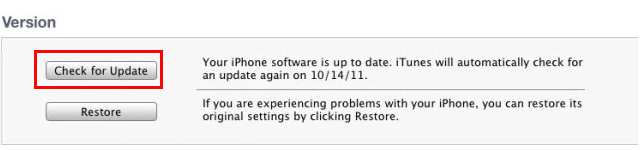
    3.  Plug your iOS device into iTunes and Check for Update.
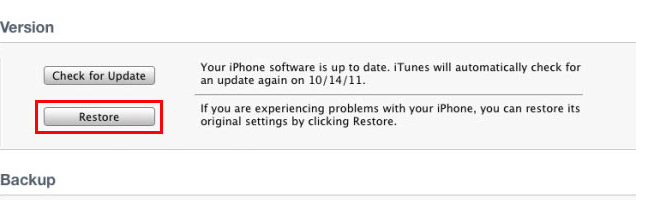
    4. iTunes will give you two options (Update or Restore), choose the one required and start updating.
    iCloud
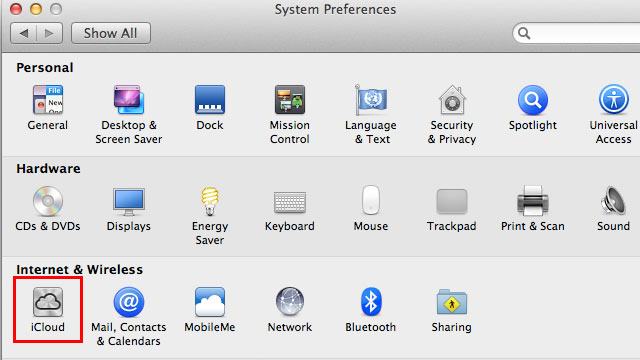
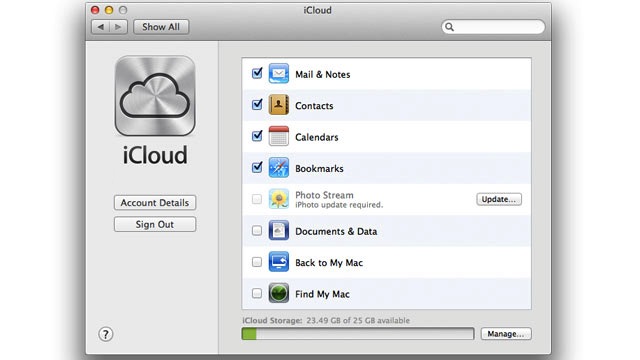
    While your device is updating head over to iCloud in System>Preferences on a Mac (control panel in PC)
    • Use your existing iTunes ID to sign in 
    • If you don’t have an ID create one
    • Once you sign in you settings panel will show
    • Now set all the preferences according to your requirement.
    • Okay iCloud is set

    Set up Device

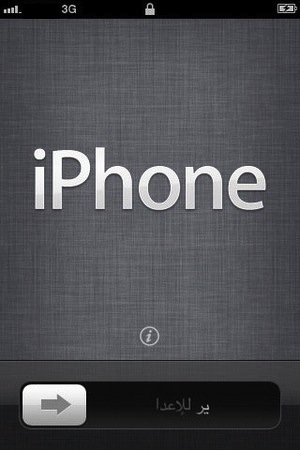
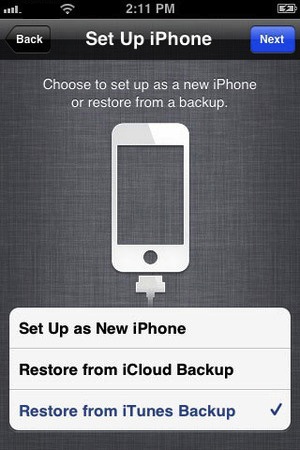
    • Once your iPhone finishes the update, you’ll be presented with the setup-assistant.
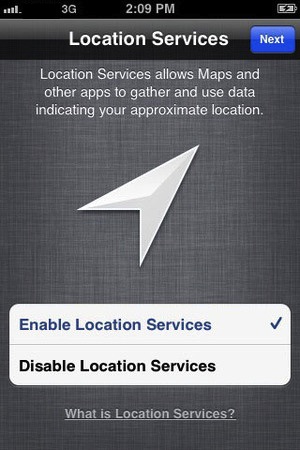
    • During the setup you’ll first be asked if you want to set up Location Services.
    • Next you will be asked whether to set as new device or restore (new feature in iOS)
    • Choose the relevant option and proceed.
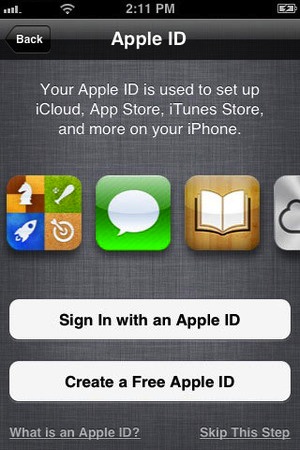
    • Next you’ll be asked to add your Apple ID information. This information is used to set up iTunes, the App Store, and iCloud.
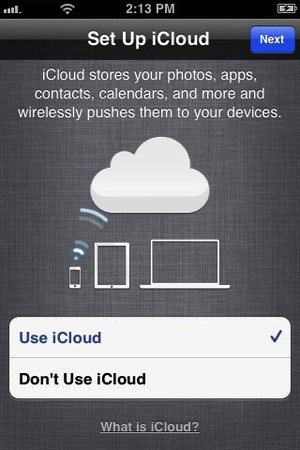
    • Next is iCloud, if you followed our Guide : just enter the same account details as you entered for iCloud on mac/pc.
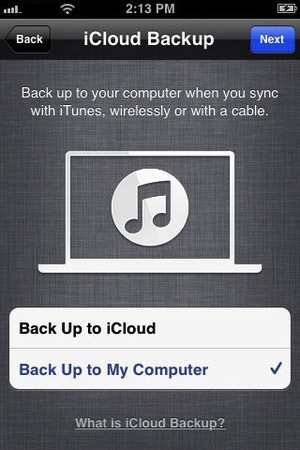
    • The setup will now ask whether you want to backup to cloud of Mac, We suggest mac/pc (since the cloud will be busy for the time being)
    • Next the assistant will ask you a certain number of questions, which you can answer according to your choice, whether you want “Find my iPhone”
      or want to send information to Apple.

    You are all Done Enjoy your new iOS 5 Device 

    So did you upgrade to iOS 5 ?
    How was it?
    [polldaddy poll=5579753]
  • iOS 5 now live along with Mac Lion 10.7.2 – iCloud , iMessage Notifications and lots more are a Go

    And just like the iOS 5 is being seeded to Users across the world. If you’ve got an iPhone 3GS, 4, third- or fourth-gen iPod touch, or either of the iPads you can download Apple’s latest and greatest mobile OS right now. Its not currently supported in Jailbreak so you would want to stay hands off for the time being. Stay tuned for our full review of the OS coming up shortly.

    [Apple]

  • Breaking : iOS 5 will be available to download on Oct 12th

    Breaking : iOS 5 will be available to download on Oct 12th

    Apple has just announced the official date of the iOS 5 release. The latest version of the Apple iOS firmware will hit downloads on the 12th of October 2011.


    The iOS 5 will add over 200 new features most of which were covered in out edit here

  • EDIT : Why The iOS 5 going to be the Best Mobile OS to Date!

    EDIT : Why The iOS 5 going to be the Best Mobile OS to Date!

    Apple has recently announced the new iOS 5, The biggest update to their mobile phone OS since the iPhone was launched back in 2007. So Big, infact, that Apple decided to bypass the iPhone 5 launch this year round.

    What the iOS 5 bring that the iOS didn’t already have.

    People loved the iOS for its fluidity and ease of use, its beautiful and clean interface and the simplicity of performing actions to utilize and exploit the abilities the device it was on. The huge list of useful and eye pleasing applications which were designed  to work within the means of the OS and worked on the same basic principle, doing simple things easily and simplifying difficult things.

    But not everyone feels like this. Especially those who take pride in their endeavors to defame the fruit companies products, with their basic set of questions in place. Why does the structure have to be so closed? Why are we not allowed to do things that prior devices allowed us to do? Bluetooth file transfer- File management, Adobe Flash based browsing, even setting a custom ringtone.

    The fact of the matter is, Apple saw that these things were slowing down the Operating Systems usage which in turn deteriorated the whole device. For example, Bluetooth file transfer was the main reason due to which, in 2005,  over 3 million Nokia phones got infected with a virus which would delete important files from the Symbian structure ending basic phone use.

    Adobe flash is the heaviest video plugin ever made ( Adobe’s CEO confirms this) it is heavy on the processor , ram and extremely heavy on battery. Apple saw that by disabling Flash for video within Internet browsing, the overall battery life of device increased considerably. That being said, the user always should to have the choice to make the decision for himself. Adobe flash is allowed in the Application structure and a large number of apps are made with flash. Apple could have enabled Flash for a user to decide. But , in their defense it is easier to ignore a couple of 1000 people complaining about Flash – than a few million complaining about bad battery.

    Apple knows and is sure of one thing and one thing only, if they say their device does something, it does it. They don’t care about anything else and especially those things that they don’t promise or talk about.

    With the new iOS 5 , Apple brings about a large number of change in the Operating Systems use and the way you use your iDevice in a day to day basis. Apple has made these improvements not only due to a large number of demands, But also to take on the competition head first.

    The iOS 5 adds a huge chunk of things that were missing from the iOS over 200 to be precise. It also adds a whole list of new and innovative aspects to the already popular OS. Here are some of the most notable things

    Notifications

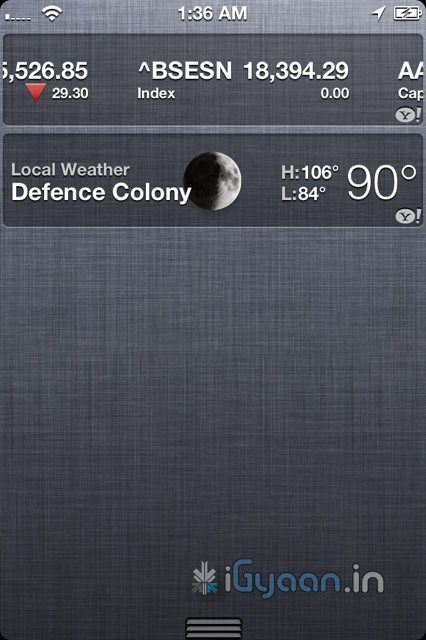
    Possibly the most asked-for improvement, the new notification system takes cue from the Android notification panel and takes it one notch higher. Just swipe down from the top of any screen to enter Notification Center.

    Choose which notifications you want to see. Even see a stock ticker and the current weather. Notifications appear briefly at the top of your screen, without interrupting what you’re doing.

    The Lock screen displays notifications so you can act on them with just a swipe. Possibly the first OS to have this feature built right into it. Yes you can get it on Android too, but only with a third party plugin.


    iMessage

    What has Apple done here? This is a feature that i personally have been waiting for. Apple has single handedly taken down forces of the mobile world, ping chat, whatsapp etc have stability problems, they break functionality and messages most often don’t reach the intended recipient. Enter – iMessage , Apple has built instant messaging over networks for free into iPods, iPads and iPhones on iOS 5 . You can send text, audio, images and even video over your devices to other people using iOS5 devices. Not only will this take a single most lethal blow at Blackberry, but also eliminate the need for most third party chat plugins

    Almost 60% blackberry users complain that if the iPhone had something close to bbm they would switch, and they will once iMessage comes out. If that does really hold true, then Apple will truly and effectively have stabbed competition right in the chest. Taking out Blackberry would mean great news for Apple and iPhone users, with a large number of people on iPhones, popularity of iMessage is bound to go up. Ergo the iOS 5 Device owner is bound to reap the benefits.


    Reminders

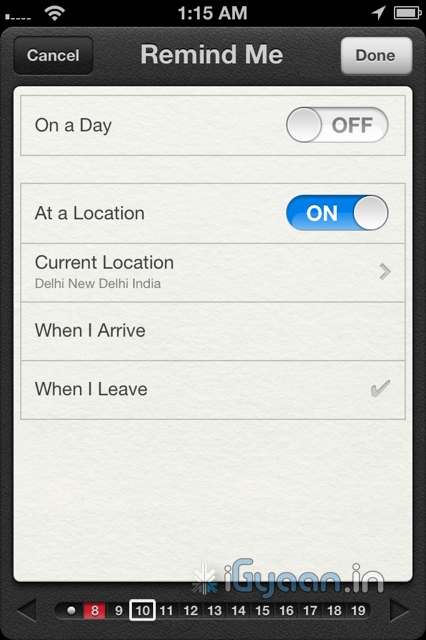
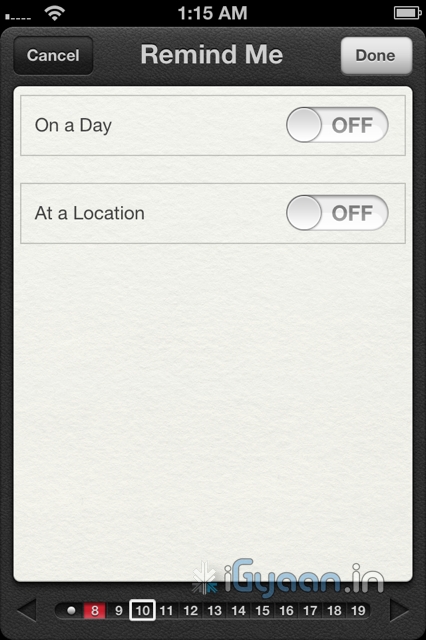
    We fail to understand, why this functionality never existed in the first place. A good reminder system is something every phone should have. whether smart or dumb.  Apple has done something really great with reminders. Not only are they simple to-do lists — complete with due dates and locations, they are also location based. 

    What does location based mean, you ask! Well lets put it in an example: A reminder app will play a sound or flash a note and remind you, that once you leave office you need to buy eggs on the way home, at a fixed time say 10 minutes before you leave office daily( lets say at 5:30pm daily). But in a scenario, where your daily departure time changes from 5:30 pm to say 4:30 pm  you will be reminded to buy eggs when you are already possibly at home. In a alternate scenario you will be reminded to buy eggs at 5:20 pm, but by the time you leave office at 7:00pm ( say you got late)  you will forget.

    Reminders from Apple solves this problem easily. You set a location based reminder – on departure from Office a reminder from the phone will remind you of your duties. The Phone using the GPS detects that you have left office, irrespective of the time, and reminds you that you have to buy eggs on your way home. Far more efficient and far more convenient than any other reminder we have ever used.

    Twitter Integration

    What is so great about twitter anyway? Nothing but the fact that the whole world uses it to share their thoughts. Its not a social network and its not about ads or games, no invitations to unknown parties and no fan pages. Its simple mood sharing, and the new iOS5 has it and will bring it to iPhones , iPods and iPads . The twitter integration is built right into Safari, Photos, Camera, YouTube, or Maps, you can tweet messages or reply to @usernames, you can even share your location. Its nothing great but the fact its built into the OS is really awesome and we like it a lot.

    Camera and Photos

    The iPhone 4 brought the best possible camera that any mobile device had ever had. Sure we have had cameras up-to 12 megapixel on cellphones, but its time that all of us accept the fact that more megapixels is not equal to better camera. The iPhone 4 features a backlit sensor that captures images like a dream, better than any other device to date. The new improvements in the Camera and photo apps take this functionality and extends it into the iOS 5.

    The most noticeable improvement is the use of the volume button as the camera shutter release. People have always struggled tapping the onscreen button, often resulting in shaky and wobbly images. The use of a physical button on the strategic location such as the volume key, makes it almost identical to holding a point and shoot camera- Boom! instant awesome images.

    You can also now open the Camera app right from the Lock screen, use grid lines, pinch-to-zoom gestures, and single-tap focus and exposure locks to compose a picture on the fly. Using iCloud all your pictures are instantly shared with all your devices, iPhone to iPad to your Mac.

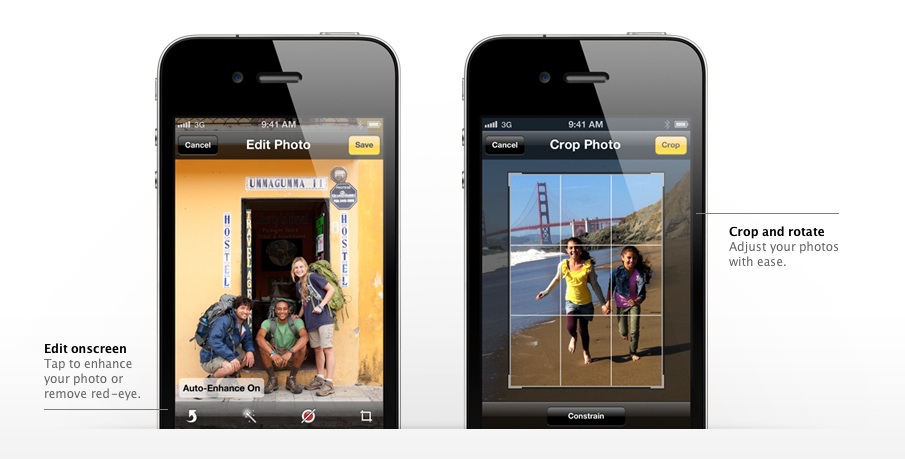
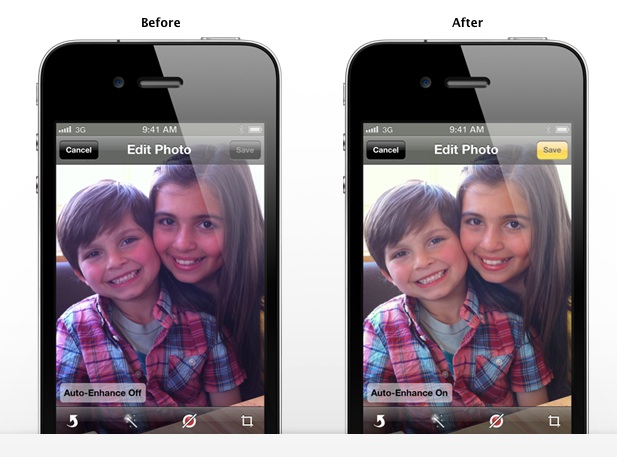
    The photos app allows better editing, crop, rotate, enhance, and remove red-eye without leaving the Photos app, a possible total replacement for Point and Shoot Cameras.

    Wifi Syncing

    Say What ? Did you read wireless sync? yes you did! Since the day the iPhone has been launched people have wanted a way to wirelessly sync their devices, and guess what, Apple allows you to do that in iOS 5. You do require to plug in your device into a charger for the obvious battery drain prevention that a WiFi sync may cause, But its better than getting to a Pc/Mac every time you want to sync. Now daily when you plug in your iPhone, iPad or iPod for charging it will also sync it to your computer. That is simply brilliant!


    200 More Features

    Apart from the above mentioned features the iOS 5 brings about over 200 changes, from improvements in the Mail and Calendar App to new Game center, multitasking gestures on the iPad, device to TV mirroring on the iPad, that fact that now when you buy an iDevice you wont be greeted with the annoying connect to iTunes logo as the devices will be ready to be used without connecting to a PC. iCloud is bringing a whole new list of possibilities to iDevices, and we will talk about it soon. 

    We see Apple progressing to new levels every time they announce something. No matter what anyone says , Apple was the first company to have perfected a touchscreen mobile phone, the first to popularize the concept of an App Store. They might be an expensive product company, a snobby company, with closed circuits and irritating policies. Their devices have a locked OS with limited potential. But it looks like the company is starting to open up to what the customer wants, and they prove it with the iOS 5.

    According to us the iOS 5 is going to be the best Mobile OS to Date. Future enhancement will come and most will follow in Apple’s footsteps, even go further. Windows Phone 7 “Mango” is unlocking 500 features in WP7 and Android is constantly evolving. But till that happens looks like Apple has hit the ball out of the park. The iOS 5 is coming this fall to the iPhone 3Gs – the iPhone 4 the iPad  and the iPad 2. It is also coming to iPod Touch 3rd and 4th gen.

    Thats our opinion, whats yours ? Leave your feedback in the comments below.

    [polldaddy poll=5241624]
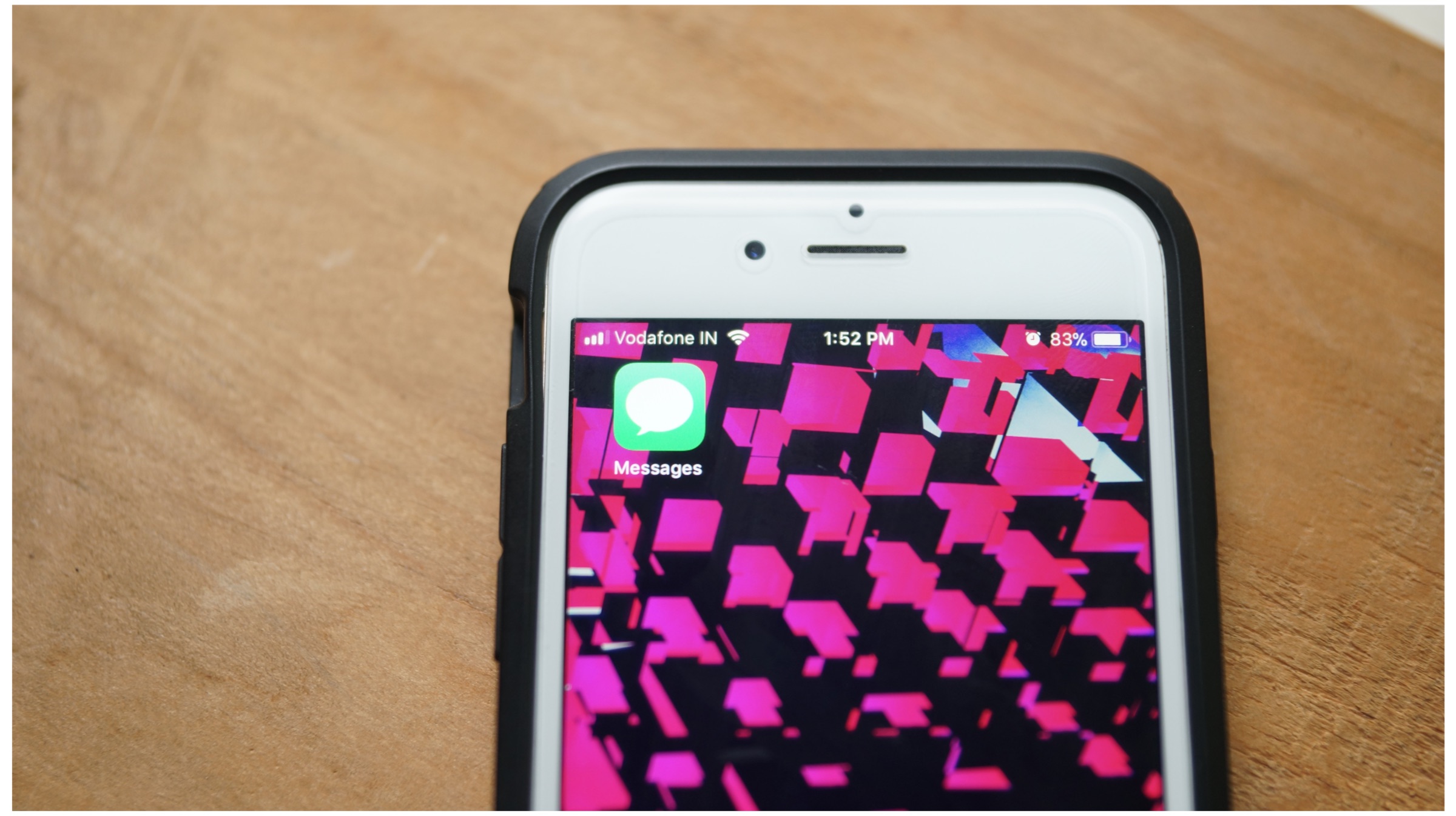
  • Apple launches iMessage to target BBM, inter iPhone connectivity over wifi + 3g , pictures , voice and video + text instant messaging

    Apple launches iMessage to target BBM, inter iPhone connectivity over wifi + 3g , pictures , voice and video + text instant messaging

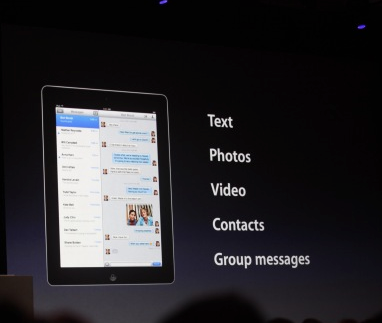
    Apple has just announced then new iMessage service at the WWDC as a part of the new iOS 5

    Includes delivery receipts, with the option to read them. A typer indicator, so you know if the other person is snoozing, and you can push to all your devices. It handles text messages, photos, video, contacts, group messaging.

    • Works on 3G + Wi-Fi
    • Supports iPhone, iPad and iPod touch
iGyaan Network
Privacy Overview

This website uses cookies so that we can provide you with the best user experience possible. Cookie information is stored in your browser and performs functions such as recognising you when you return to our website and helping our team to understand which sections of the website you find most interesting and useful.