Tag: iPhone

  • Rumors Point to an 8MP Camera in iPhone 5

    Rumors Point to an 8MP Camera in iPhone 5


    Now that the WWDC is over and iOS 5 is out in the open, Rumors of the next iPhone from the fruit company at Cupertino are starting to heat up. With the existing new Apple A5 chip and a possibly bigger edge to edge display, a revamped design, NFC and here is something new an 8 Megapixel backlit sensor similar to that on the iPhone 4.  DigiTimes states that OmniVision has been awarded the contract to supply the bulk of the image sensors for Apple’s iPhone 5. These sensors, according to the report, will feature an 8-megapixel resolution. OmniVision is said to be supplying roughly 90% of the image sensors for Apple’s next iPhone, while Sony will supply the remaining 10%.

    [DIGITIMES]

  • Apple Introduces iOS 5 with 200 New Features

    Apple Introduces iOS 5 with 200 New Features

    Apple is announcing the new iOS5 for iDevices , with a whole list of changes that ensue.

    Top 10 features

    1. Notification Center
    2. Newssatnd
    3. Twitter Integration
    4. Reminders
    5. New way to take pictures (camera)
    6. Safari integration
    7. Game Center
    8. Wireless syncing and OTA software updates
    9. New Keyboard
    10. iMessage

    There are more than 200 new features . we will detail them soon

    More developing …….soon!


  • Apple launches iMessage to target BBM, inter iPhone connectivity over wifi + 3g , pictures , voice and video + text instant messaging

    Apple launches iMessage to target BBM, inter iPhone connectivity over wifi + 3g , pictures , voice and video + text instant messaging

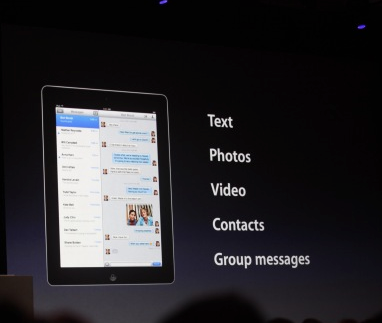
    Apple has just announced then new iMessage service at the WWDC as a part of the new iOS 5

    Includes delivery receipts, with the option to read them. A typer indicator, so you know if the other person is snoozing, and you can push to all your devices. It handles text messages, photos, video, contacts, group messaging.

    • Works on 3G + Wi-Fi
    • Supports iPhone, iPad and iPod touch
  • Reminder : Tonight Apple Keynote, Possible iPhone 5 Launch : We will cover it Live !


    There is a lot of information pointing to the fact that a new iPhone may just be released today evening at the WWDC (morning in USA) . We will cover the even live from all aspects on our Live Blog.


    CLICK HERE FOR LIVE BLOG

    So be sure to bookmark the page as you may never know what secrets Apple might have up its sleeve.

  • Rumor: iOS5 to bring Automatic App Updates

    Rumor: iOS5 to bring Automatic App Updates


    Rumors abound that Apple’s new iTunes will have an option to automatically download app updates to your iOS devices without needing to perform a wired sync. The leaked version of iTunes has a My App Updates screen which describes a previously unseen feature “If your device has Automatic Download enabled for apps, your updates will download to your device without having to sync.”

    As the Automatic Download setting doesn’t yet exist in iOS, the leak appears to suggest that this feature will become available in iOS 5. All features of iOS 5 will be revealed on Monday during the Apple World Wide Developers Conference. We will be covering the event live here.

  • Apple WWDC Keynote on iOS 5, Mac OS X Lion and iCloud is on June 6th, We will Cover it Live!

    Apple WWDC Keynote on iOS 5, Mac OS X Lion and iCloud is on June 6th, We will Cover it Live!

    Who knows whats going to happen at this keynote, iOS 5 , Mac OS X lion and iCloud are already known facts. A lot of speculation on the iPhone 5 and possibly the iPhone Nano. We will just have to wait till Mr. Jobs shows up in his Black turtle neck and blue jeans.

    In the mean time bookmark this page to get unrestricted access to our live coverage of the event.

    10:30PM – INDIA / New Delhi/Mumbai/Kolkatta/Chennai/Bengaluru

    06:00PM – London
    07:00PM – Paris
    09:00PM – Moscow
    02:00AM – Tokyo (June 7th)

  • Apple camera patent will stop Smartphone pirates dead in their tracks

    Apple camera patent will stop Smartphone pirates dead in their tracks

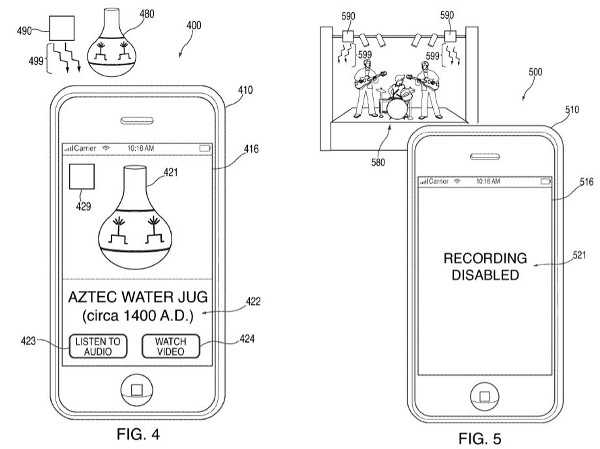
    Apple inc. filed a patent yesterday, that they could actually potentially use. Pairing an infrared sensor with the camera already on board, portable devices could receive data from transmitters placed on strategic locations at copyright events.

    These transmitters would prevent the camera from recording and would instead show, watermarks, blank screen and even warning messages to the smartphone user.

    [Patently Apple]

    [US Patent Office]


  • Apple releases iWork to iPhone and iPod touch (PR)

    Apple releases iWork to iPhone and iPod touch (PR)

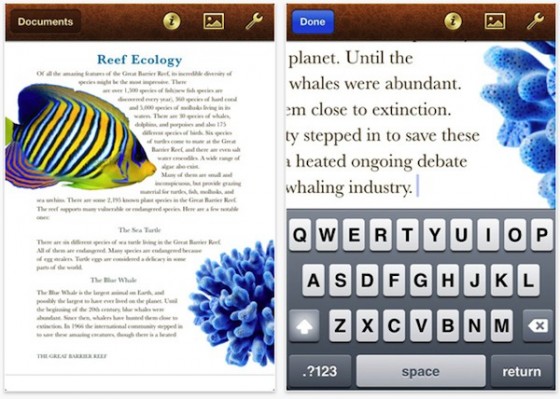
    Being a few of the most successful apps on the iPad online App store since day one of Launch, Apple has finally brought some love to iPhones and iPod Touches. The same apps will now run on all other iOS devices making them universal Apps at US% 9.99


    PRESS RELEASE

    Apple iWork Now Available For iPhone & iPod touch Users

    CUPERTINO, California-May 31, 2011-Apple® today announced that its groundbreaking iWork® productivity apps, Keynote®, Pages® and Numbers®, are now available for iPhone® and iPod touch®, as well as iPad®. Created for the Mac® and then completely redesigned for iOS and Apple’s revolutionary Multi-Touch™ interface, Keynote, Pages and Numbers allow you to create and share stunning presentations, beautifully formatted documents and powerful spreadsheets on the go. iWork apps are available on the App Store™ for $9.99 each to new users and as a free update for existing iWork for iPad customers.

    “Now you can use Keynote, Pages and Numbers on iPhone and iPod touch to create amazing presentations, documents and spreadsheets right in the palm of your hand,” said Philip Schiller, Apple’s senior vice president of Worldwide Product Marketing. “The incredible Retina display, revolutionary Multi-Touch interface and our powerful software make it easy to create, edit, organize and share all of your documents from iPhone 4 or iPod touch.”

    Keynote, Pages and Numbers import and export documents from iWork for Mac and Microsoft Office; print wirelessly using AirPrint™; and include beautiful Apple-designed themes and templates. All iWork apps now include improved document management with thumbnail images that let you find your files quickly, organize them and group them into folders using intuitive gestures. From the Tools button in the toolbar, you can easily share any presentation, document or spreadsheet without leaving the app.

    Keynote makes it easy to create impressive presentations, complete with animated charts and transitions. You can play your presentation in Full Screen view on the stunning, high-resolution Retina™ display or connect to a projector or HDTV for a large audience. Available separately, the Keynote Remote app allows your iPhone or iPod touch to control a Keynote presentation on any iOS device or Mac.

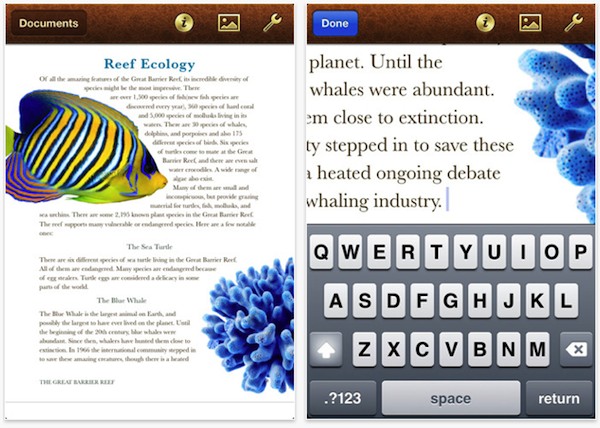
    Pages is the most beautiful word processor ever designed for a mobile device and has everything you need to create amazing documents. Pages takes full advantage of the high-resolution Retina display on iPhone 4 and iPod touch so you can see all the detail and richness of your documents. To make working with text easy on iPhone and iPod touch, Smart Zoom automatically zooms in to follow the cursor while you’re editing and zooms back out when you’re done.

    Numbers uses Multi-Touch gestures and an intelligent keyboard to help you create compelling, great-looking spreadsheets with over 250 easy-to-use functions, flexible tables and eye-catching charts. Just like Pages, Numbers takes advantage of the high-resolution Retina display and Smart Zoom to make working with text and cells on iPhone 4 or iPod touch easy.

    Pricing & Availability
    Keynote, Pages and Numbers are universal apps that run on iPad and iPad 2, iPhone 3GS and iPhone 4, and iPod touch (3rd & 4th generation). Keynote, Pages and Numbers are available from the App Store for $9.99 (US) each for new users, or as a free update for existing iWork for iPad customers. Keynote Remote is sold separately via the App Store for 99 cents (US).

    Apple designs Macs, the best personal computers in the world, along with OS X, iLife, iWork and professional software. Apple leads the digital music revolution with its iPods and iTunes online store. Apple has reinvented the mobile phone with its revolutionary iPhone and App Store, and has recently introduced iPad 2 which is defining the future of mobile media and computing devices.

  • Wow Keys: The iPhone Keyboard Dock

    Wow Keys: The iPhone Keyboard Dock


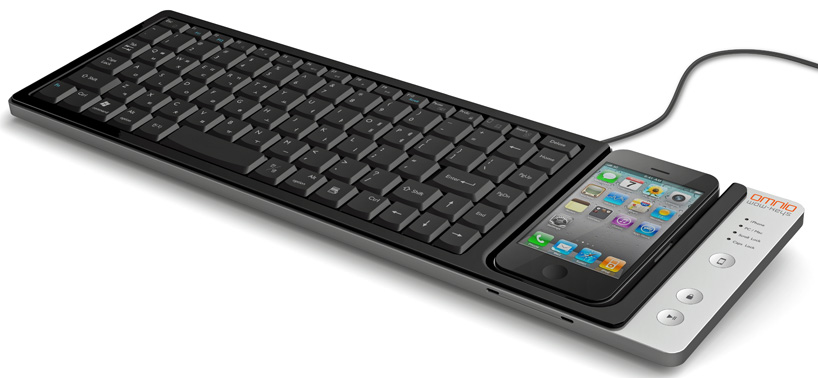
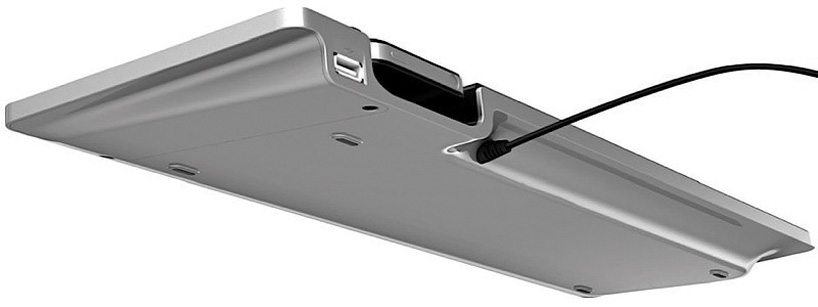
    Korean manufacturer Omnio has come out with a few prototypes of its ‘WOW Keys’ USB keyboard last year and is all set to enter the keyboard industry with its finished product this year. Measuring 16 x 4.7 x 1 -inches and weighing 1.4 pounds, the full-size QWERTY keyboard is compatible with both windows and mac operating systems, permitting the docking of iPhones and iPods.

    In addition to charging and syncing when connected to the keyboard, the handheld devices can be used for touchscreen control of the PC, including as a numberpad when loaded with a special app. Two-way functionality means that with the press of a button, ‘wow-keys’ can switch from ‘PC mode’, which uses the phone or iPod as touchscreen input to the PC, to ‘iPhone mode’ instead, which permits easy file transfer and utilizes the keyboard for text entry directly into the handheld device. In ‘iPhone mode’, twelve keyboard hotkeys provide shortcut functionality to the docked device, such as ‘search’, ‘home’, ‘play/pause’, and ‘display on/off’.


  • The iPhone 5 may have a curved Glass Front

    The iPhone 5 may have a curved Glass Front

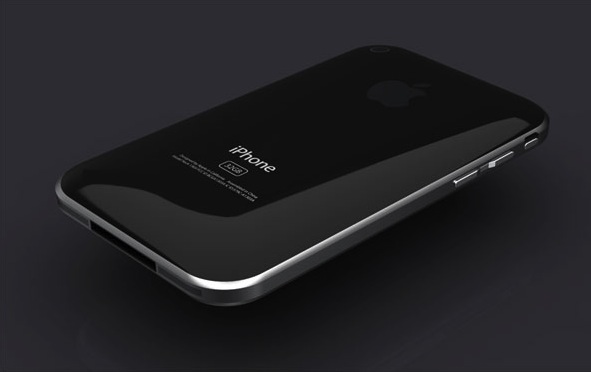
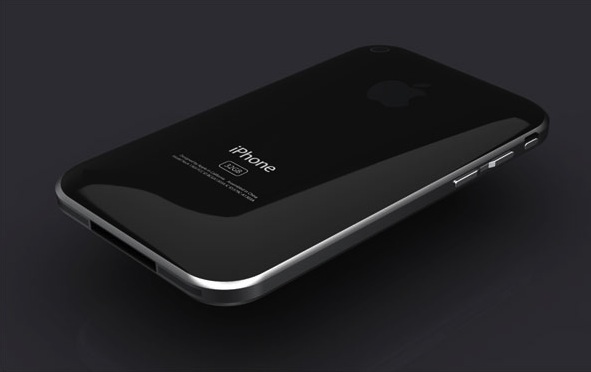
    According to a report by DigiTimes, a rumor around the supply chain in Taiwan is that Apple is going to adopt a curved cover glass for the iPhone 5.

    Cover glass makers are reluctant to commit investment to the purchase of glass cutting equipment due to the high capital involved, said the sources. However, in order to push forward the production of curved glass, Apple reportedly has purchased 200-300 glass cutting machines to be used by glass makers, said the sources. The glass slicing machines are currently being stored at associated assembly plants and will be brought online once yield rates for the production of curved glass reaches a satisfactory level, the sources revealed.

  • App of The Day : Kung Fu Panda 2 : Be The Master

    App of The Day : Kung Fu Panda 2 : Be The Master


    Who doesn’t love KungFu Panda? The fact that the second movie is coming out is getting everyone excited. But, wait there is a game to go with that. Enter Kung Fu Panda 2 : Be The Master Game for iOS.


    • Seller: THQ Inc.
    • Genres: Games | Kids | Entertainment | Adventure
    • Released: 19-05-2011
    • Version: 1.0.02
    • Size: 20.44 MB

    DOWNLOAD : Kung Fu Panda 2: Be The Master - THQ Inc.

    Kung Fu Panda 2: Be The Master – THQ Inc.


    The game comes in various different scrolls or Levels

    I LOVE KUNG FU!!!
    Po is finally a real Kung Fu warrior, but to become a true Master, he must dedicate himself to training. Shifu has revealed to him the Secret of the Thousand Scrolls, and Po’s awesome journey begins with the first two:

    PAWS OF POWER – Train with Shifu in the Dojo, swiping and clawing your way through flying training dummies based on all of Po’s greatest foes. But watch out for the bee hives! They’re a major buzz kill.

    FEET OF FURY – Scale the towering Waterfall of Agony, jumping higher and higher with the help of firework-powered chairs, bouncy bamboo stilts, and other special items. Leap to new heights… or else it’ll be one big belly flop below!

    NEW SCROLLS ON THE WAY!!! – Dedicated warriors will be rewarded as two new Scrolls are revealed with coming updates! SKADOOSH!

    KUNG FU TRAINING IS ITS OWN BEST REWARD…
    But there are plenty of other perks, too!
    Unlock collectible action figures of the Furious Five! TOTALLY SWEET!

    Earn special Achievement Badges to guide you through your training.

    Track your progress against other warriors on the Top Trainers leader boards.

  • WiFiPhoto : Share iOS Photos Wirelessly : App A Day

    WiFiPhoto : Share iOS Photos Wirelessly : App A Day

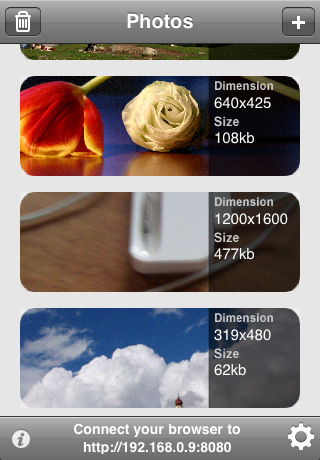
    Ever needed to share photos wirelessly from your iPhone, iPod touch or iPad, well WiFiPhoto does just that with ease.

    This app comes with an easy setup process simply select your WiFi network and point your Browser to the IP address provided by the App and – bam – all your photos are available for download without the need of any wires or iTunes Syncing.  Emailing reduces the size of the image , But with this app you can simply transfer the photos you want quickly and efficiently.


    FEATURES

    • – Simple and elegant interface
    • – Select multiple photos
    • – Change image quality to fit your needs
    • – Download a single picture or a compressed archive of all photos
    • – Autorotate. No need for further adjustments after download
    • – Pick from Camera roll or Photo library


    WiFiPhoto - Matteo Rossi

    WiFiPhoto – Matteo Rossi


    [xrr rating=3.5/5 label=”We Rate WiFiPhoto” imageset=shiny_yellow_star display_as=fraction_stars]

  • iDVM is the Digital Voltage meter companion for your iDevice

    iDVM is the Digital Voltage meter companion for your iDevice

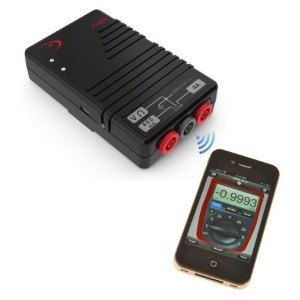
    iDVM Digital Multimeter — the world’s very first iDevice-enabled voltmeter, from Redfish Instruments. Designed specifically for auto/ electrical engineers in mind the Device uses Ad-hoc wireless network to connect with whatever iDevice you have. Once you’ve purchased the multimeter and downloaded the accompanying iDVM app, you’ll be able to gather electrical measurements from up to 30 yards away from your target, log data over extended periods of time and export your findings in spreadsheet or graph displays.

    Priced at just $220 (Inr 10,000)


    Press Release

    Redfish Instruments Introduces World’s First iPhone-Enabled Wireless Multimeter

    SANTA CRUZ, Calif.–(BUSINESS WIRE)–Redfish Instruments, Inc., a provider of iPhone- and iPad-enabled electronic test and measurement equipment, announced today the introduction of the iDVM™ Digital Multimeter. The iDVM multimeter wirelessly connects to an iPhone, iPad, or iPod Touch via an ad hoc wireless network allowing users to acquire, visualize, and share electrical measurement data on their Apple devices. The iDVM app can be downloaded free from the Apple App Store.

    According to Patrick O’Hara, Redfish Instruments’ president and CEO, “The unique pairing of the iPhone or iPad with a digital multimeter provides a user experience that is truly revolutionary. Not since the advent of the LCD has the multimeter been so substantially enhanced.” Regarding the market opportunity, Mr. O’Hara commented, “The iPhone and iPad provide a known user interface that permits customers to interact with electronic test and measurement tools that was not possible prior to this post-pc era. We believe that our new iDVM voltmeter is the first of many new uses for this tremendous interface; we’re excited to be an early pioneer.”

    Traditionally, multimeters have not provided an easy method of exporting or saving data. The iDVM permits a user to log data over an extended period of time using the iPhone or the iPad as the storage device. For example, service engineers can use the iDVM to collect data and store it in a report for submission to their clients, or keep the data on the voltmeter for their own records. Using the GeoTag feature of the iPhone or iPad, service engineers can even identify their location as part of the data. The iDVM is built in the USA using all USA-made parts, and uses rechargeable batteries.

    The iDVM was designed for a wide range of users-from automotive technicians, to advanced embedded systems engineers, to electrical or building contractors, to field service workers.

  • The Gecko Nano Pad

    The Gecko Nano Pad


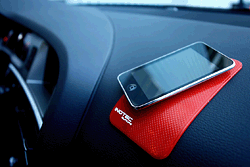
    The Nano Pad is a hand-sized pad that makes use of nanotechnology to create a vacuum system onto which cellphones and other devices stick. One can put it on the car dashboard to hold iPods, mobiles, PDAs, MP3 players, pens, coins or even reading glasses. The pad forms a vacuum seal “like a gecko’s foot”, making your cellphone, camera or other small gadgets “hands-free” while you are driving or busy with something else. The Nano-pad only comes in one size but will stick by being placed on any part of a hard, flat surface. It comes in a variety of colours and can be used indoors as well as in your car. It is said to be heat and cold resistant so we shouldn’t face any issues leaving it in our cars in the Indian summer.


  • App a Day:Contr2Brothers – Contra for iOS

    App a Day:Contr2Brothers – Contra for iOS

    Well we found an app that brings back a few childhood memories of sitting in front of the TV and furiously mashing the controls of the NES to kill a few bad guys and achieve 14-bit glory. Here we have a misappropriatly named game called Contr2Brothers – a copy of the good-old game Contra. It features the same game-play as the original with on-screen controls that are slightly tough to use. The game claims to offer 30 lives but we still haven’t figured out how to get there. The audio is a little irritating after a while so you might want to mute it. One good feature is that the game supports upto 2 players via a bluetooth connection. Download it from the link below to relive your childhood…

    [xrr rating=3/5 label=”Price : $0.99 ” imageset=shiny_yellow_star display_as=fraction_stars]

    [xrr rating=4/5 label=”Ease of Use :” imageset=shiny_yellow_star display_as=fraction_stars]

    [xrr rating=3.75/5 label=”Features :” imageset=shiny_yellow_star display_as=fraction_stars]

    Contr2Brothers - IceFish


    [qrcode]

iGyaan Network
Privacy Overview

This website uses cookies so that we can provide you with the best user experience possible. Cookie information is stored in your browser and performs functions such as recognising you when you return to our website and helping our team to understand which sections of the website you find most interesting and useful.