There is no denying the omnipresent existence of the Internet in our lives. The virtual trail left behind by a user online has ensured that pretty much all their personal information has been documented in some form or the other in a deep, dark pocket of the Internet.
Checking-ins on social media platforms, booking cabs and taxis, looking for train or plane tickets or simply the nearest cafe to grab a cuppa -all these activities have ensured that that details about our location and day to day activities are on public display all the time, leaving us vulnerable and unprotected.
However, not all is lost. A university in the US has developed an app which ensures that third-parties have no access to your location. Developed by a team of researchers at Binghamton University, the app makes sure third-parties are blocked from tracking down your location depending on what you search online.
“When we release personal information to the internet, it is out of our control, and can be easily searched and used for malicious purposes. We are trying to provide a more efficient and feasible solution to make sure that kind of information is secure,” says Linke Guo, team leader of the research.
Once developed successfully and put to use, the app would make the virtual space safer for the average user. Let’s see if this attempt manages to cure privacy issues online.
Update:Within 12 hours of issuing it, the ban has been revoked. WhatsApp is working again in Brazil, for now.
Looks like it’s time to shove that smartphone aside for two days and look up from the phone screen if you’re in Brazil. The country has closed WhatsApp for 48 hours. Reasons for this have not been disclosed.
In the past, there has been much ado by Brazil’s telecommunication companies to curb interaction on WhatsApp. They claim that the free calling feature of the app is illegal and requires stricter regulations.In an attempt to distinguish itself from countries like the US, especially post the entire NSA spying scandal, Brazil had passed net neutrality laws in 2014, the internet ‘Bill of Rights’ being an example. Two years down the line, things seem to be taking a turn for the worse in Brazil. Soon, individuals would have to enter their address and phone numbers, among other details, to be able to use websites and apps.
With the government having given no explicit reason for this 48-hour long ban, the current picture is just as hazy as the future of WhatsApp in Brazil. The ban has already let to a huge uproar with grievances being expressed on social media. At the same time, WhatsApp competitors like Telegram are doing exceptionally well. Let’s see where it goes from here for the Brazilian cyber space and internet laws.
In an attempt to up its security, Apple got rid of over 250 apps from its App Store. These apps were using a software developed by a Chinese firm called Youmi which allowed them access to the user’s personal details like email address and the serial number of their smartphone. According to sources, the apps received a total of 1 million downloads.
The apps which relied on Youmi’s SDK, mostly made by companies and firms based in China, may not have willingly or knowingly violated Apple’s secutrity. As is backed by SourceDNA’s blog post:
“We believe the developers of these apps aren’t aware of this since the SDK is delivered in binary form, obfuscated, and user info is uploaded to Youmi’s server, not the app’s. We recommend developers stop using this SDK until this code is removed.”
This security issue was brought to light by SourceDNA when they were updating their own product called Searchlight. Searchlight inspects the security and checks apps for security violations. SourceDNA later on went ahead to comment in their blog post, “We’re concerned other published apps may be using different but related approaches to hide their malicious behavior.”
Apple on the other hand, issued the following statement:
“We’ve identified a group of apps that are using a third-party advertising SDK, developed by Youmi, a mobile advertising provider, that uses private APIs to gather private information, such as user email addresses and device identifiers, and route data to its company server. This is a violation of our security and privacy guidelines. The apps using Youmi’s SDK will be removed from the App Store and any new apps submitted to the App Store using this SDK will be rejected. We are working closely with developers to help them get updated versions of their apps that are safe for customers and in compliance with our guidelines back in the App Store quickly.”
Exchanging pictures and videos through emails or messaging apps comes with two problems – one is the procedure of attaching them, and two, sometimes, we are not sure if it is safe or not.
If you are one of those people who face the above dilemma, then ‘Shoot’ is the perfect app for you.
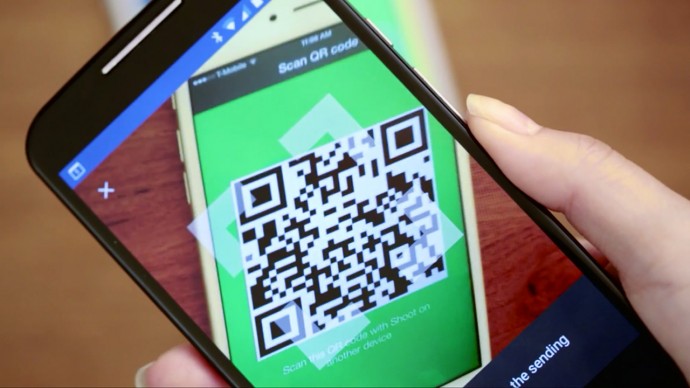
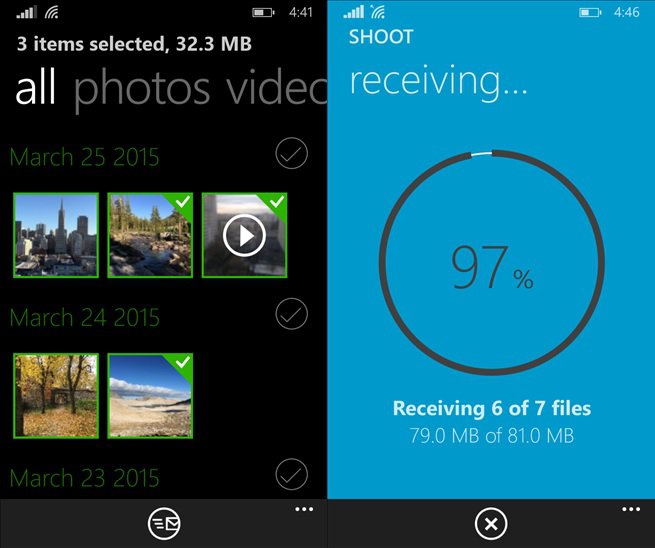
The app is developed by one of the famous companies that are best known for its torrent clientele, BitTorrent. Via Shoot, you can easily share your photos with your friends, regardless whether it is an iOS, Android device or a Windows Phone using QR codes for authentication. If you want to send some files to your friend, you can choose the file you wish to send and your phone will display a QR code. The person to whom you are sending the file to, the receiver, will have to scan the QR code, and the data will be transferred using the BitTorrent Sync Technology. Since Shoot is powered by the BitTorrent protocol, files move instantly between devices without going through the cloud, and hence they are less likely to be hijacked. Also, they are transferred faster, regardless of the network of the connected device.
You may say that we have Bluetooth and other messaging apps that do not require the hassle. Well, Shoot’s two main winning points are:
It is easy to send large batches of media files to several devices at one time. There is no limit on the quantity of files that can be moved using the Shoot app.
Privacy, since nothing goes up on the Cloud service. That is, the files are only being accessed by you and the recipient – the company’s servers aren’t acting like a middleman in the process. Data is shared directly instead of requiring files to be uploaded to a central server and then downloaded by the recipient.
BitTorrent Shoot doesn’t require the two devices to be on the same Wi-Fi network, which is a plus.
Erik Pounds, BitTorrent Sync’s VP of product management, explained:
If you’ve ever experienced a situation where you’re on iOS and a friend next to you has an Android phone, sending something like a big batch of photos or a long video is a challenge. We based the use case around spontaneity: You could be at a concert with friends, recording a video; on vacation with your family, taking tens/hundreds of pictures; maybe at a birthday dinner, capturing a group serenade.
You can download the app now directly from Google Play, Apple’s App Store, and the Windows Phone Store. Just for trial, you can send three files for free using Shoot. After this, you will be asked to pay a one-time fee of $1.99. Receiving is free. Though, this is how the app generates revenue (yes, Shoot does not show any ads.)
It will be interesting to see how QR codes work out in the future for exchanging data through different devices.
It is shocking when one of the largest cab services in the world suffer a blow like Uber did in 2014, in India. The rape unnerved thousands and the company’s fortunes sank in a country where they had the largest following, after the US.
A year later, Uber has recovered and has come a long way from having a marred reputation. They recently revised their privacy policies and have resolved to tighten their riders security. There’s no room for worry because here’s why Uber just got safer and hence, cooler.
We care deeply about the privacy of our riders and drivers. It’s why we’re always looking at ways to improve our practices.
[pullquote_right] the driver can access your personal data and past rides only if you wish. [/pullquote_right] Recently, Uber’s Katherine Tassi, who manages the Counsel of Data Privacy at Uber Technologies, announced that Uber has doubled the size of their privacy team and tightened the leash on their policies. That means three important benefits:
Uber will now make sharing background information of the rider, optional. This means that the driver can access your personal data and past rides only if you wish.
The texts that have been shared between the driver and rider will be accessible to the company so there is a limited scope of malicious activities.
It will also have an option to share your contacts with the app. This means that your friends and family can receive exciting new offers, if you wish to give Uber that information.
With their privacy and security in place, the app is likely to be updated on July 15th.
[tw-divider][/tw-divider]
Unfortunately, India isn’t going to experience the other updates that have taken place. Uber has partnered with Spotify to bring your type of music to your cab ride, when you’re party hopping or just heading home on a regular day. It would’ve been great to have this feature as one can just connect their Spotify account to the music tab of their Uber app and listen to their favourite tracks, instead of balmy item numbers or loud Radio Jockeys. Hopefully, Uber will develop an alternative for their growing number of riders in India.
Lastly, many might not know that one can only book an Uber minutes or half an hour before they want a ride. This is very tricky for nervous travellers who want to be organised and book a cab at least a day in advance. You don’t want to bank on it if you have an early morning flight to catch. Nevertheless, if you do trust Uber showing up on time and if you’re a disorganised traveller, this feature wouldn’t bother you too much.
In the physical world, it may be difficult for you to cut some annoying people from your life. And admit it, we’ve all been in that situation where we wish we could ‘block’ that obnoxious boss, a lecherous acquaintance or maybe a spiteful ex, without confrontation. Facebook understands this and makes it super easy to shut someone out, without being harassed. Here is a three-step process to severe ties, instantly. Just virtually, of course.
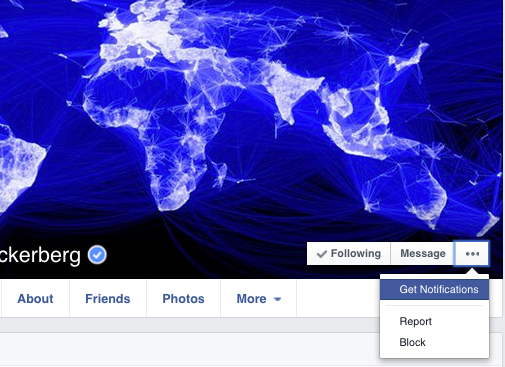
1. Go to the profile of the person you wish to block.
2. Click the three dots “…” alongside Message and a list will appear
3. Select ‘Block’ to restrict the person from sharing things with you.
How Does Facebook Blocking Help?
As soon as you confirm, the user will be blocked from receiving any notifications from you. Blocking is not permanent and you may choose to unblock anyone, anytime. It’s extremely efficient and the person will not be notified about the blocking. He/She can’t even find you on the social networking site, even if they try. If that sounds a bit harsh, then there are options to unfriend them or hide the particular post which you don’t want to see on your wall.
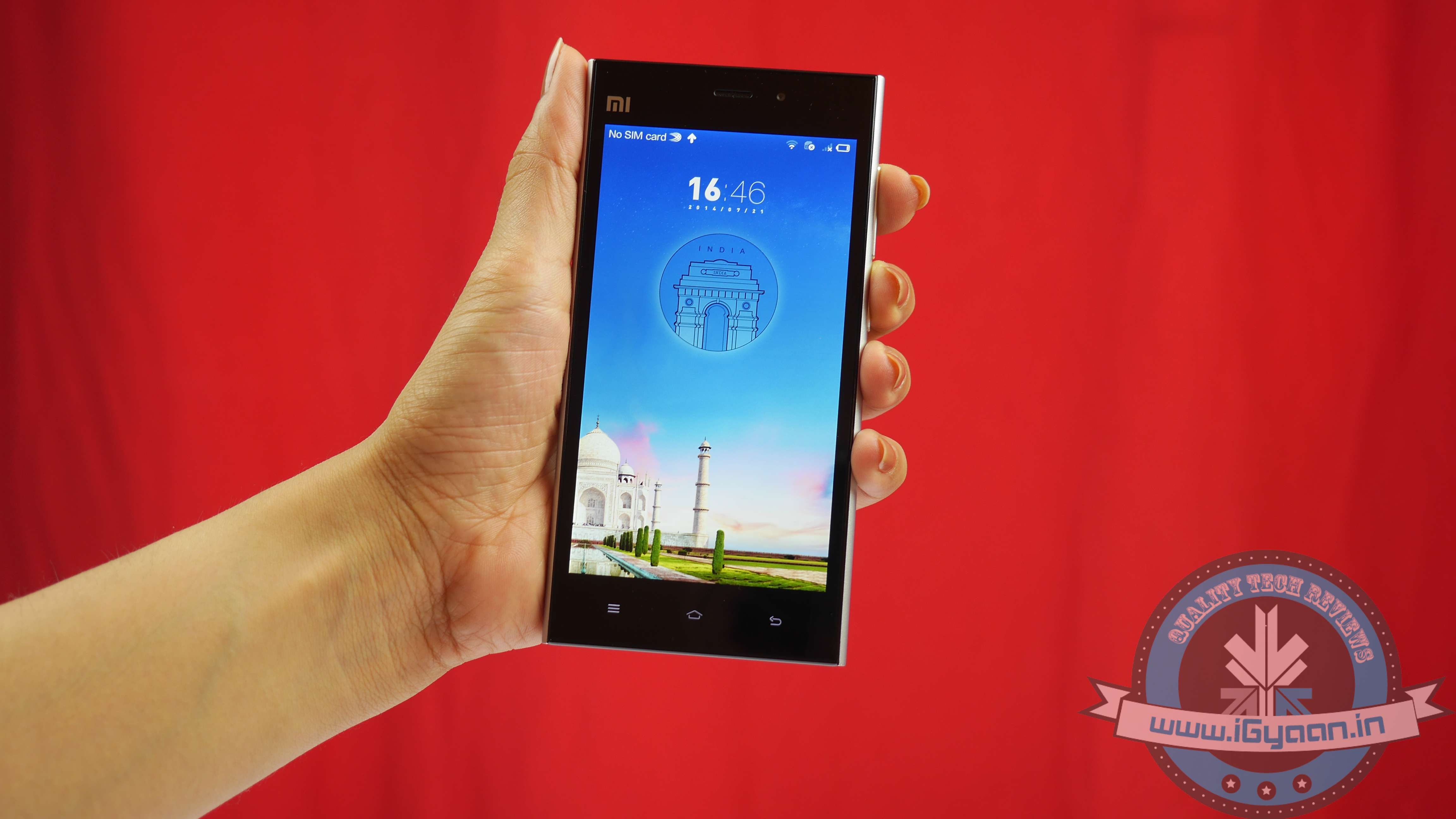
The Indian Air Force (IAF), earlier this week had issued a circular to its employees asking then to refrain from using Chinese phones. The focus was mainly on the hot selling Xiaomi phones. It had cited a report by F-Secure which said that they found that the Redmi 1S was forwarding carrier name, phone number, IMEI (the device identifier) plus numbers from address book and text messages back to Beijing. Even after Xiaomi took proactive steps towards addressing its concern, IAF, is pressing on its officials and families to refrain from using the phones.
Xiaomi had earlier in an interaction with PTI said that IAF must be taking into consideration an earlier privacy concern raised by F-secure. The security solutions company had done a test on the phones and found that they were automatically syncing the files on the cloud. Xiaomi said this was because cloud syncing was on by default on their devices. The company had released an OTA update on 10th August which would give the users the option to manually turn cloud syncing on.
Xiaomi added that F-Secure had acknowledged the efficacy of the new update. The company had also started the process of migration of the international user data out of its Beijing-based servers and started shifting it to Amazon’s AWS data centers.
It is important to know that this issue is not a cause for concern for the general public. The data, that is said to be collected by all service providers and handset manufacturers. The cause of concern was it going into the hands of a Chinese company. The Chinese government is notorious for collecting information without much regard for the legality of its actions. The country’s authorities had raged a man-in-the-middle attack to harvest passwords of iCloud users. Folks working in the military deal with sensitive information and that’s why the Air Force is exercising proactive caution. For the average person, you can go ahead and register for that next flash sale. It’s only going to get better after these incidents.
Xiaomi has taken into consideration the massive privacy scares regarding their devices and are taking proactive steps towards addressing them. The company is planning to shift non-Chinese user data out of its Beijing data center. This comes after the directive issued by the Indian Air Force for its personnel, asking them or their families to refrain from using Chinese phones.
The Air Force had cautioned its employees, warning that Xiaomi was secretly sending user information to a secret location in China. Xiaomi has been a favorite amongst the young population because of high spec devices which are available for attractive prices. The buzz around it has led to a figurative stampede to get the device on Flipkart.
One of the most popular phones in India, the Xiaomi Redmi 1S sells out within seconds on Flipkart.
Seeing this accusation by the Air Force could cause trouble for its business in India, Xiaomi quickly went into damage control mode. Xiaomi’s Vice President of International, Hugo Barra wrote a detailed blog post on how the company plans to take on the issue.
Mr.Barra said that the company has been setting up servers in multiple locations and will be moving user data outside China. All international user data will be shifted to Amazon AWS data centers in California (USA) and Singapore. This migration process will be completed by the end of October and will benefit its users in Hong Kong, India, Indonesia, Malaysia, Philippines, Singapore, and Taiwan.
It was also said in the post that by next year the company will try to set up a local data centre in India and Brazil itself. This will give users faster access and privacy can be maintained in-country.
The Chinese authorities have been facing heavy criticism for engaging in a man-in-the-middle attack on Apple iCloud account. Considering the interfering nature of that government, it is rather safer to keep your data away from their prying eyes. We have to wait and see if these measures taken by the company offer some good solutions to the concern. People love these irresistible devices, but the importance of privacy cannot be overlooked.
Privacy is a major concern today. Following the slew of celebrity hacks and password leaks, people have started doubting the safety of social sharing. Especially with photographs that can be stolen by unscrupulous hackers and posted on the internet, it is necessary to keep them safe from unrecognized eyes. Yovo, a Photo sharing App, tries to address that.
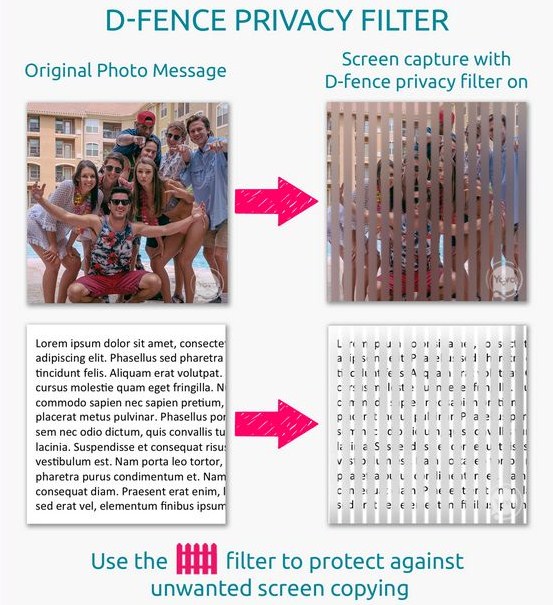
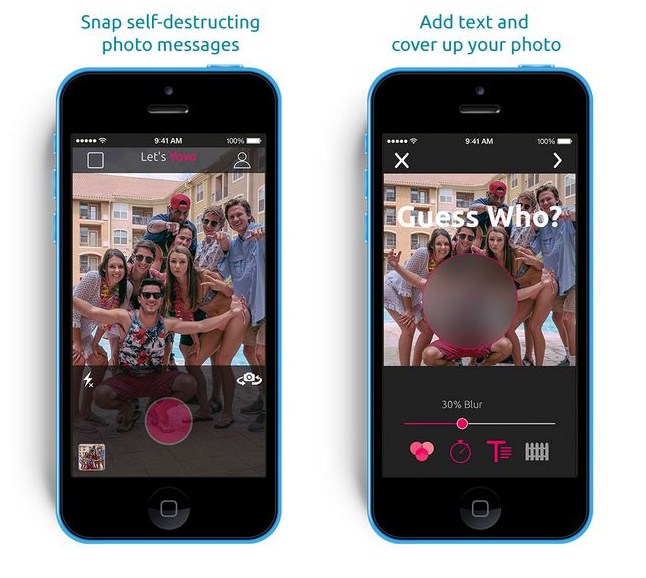
Yovo is developed by privacy software company called ContentGuard. The app utilizes Barrier Grid optical illusion to keep your photos secure. The app restricts the ability for people to gain the image using screenshots. When somebody opens the photo message the grille moves and allows them to see the picture. If the receiver attempts to take a screenshot, it will result in an image with blurred sections.
The app can come handy for people who are sending personal or even restricted content through photos and had previously used other apps, such as Snapchat. Now that even Snapchat has been compromised, this is probably a good time for Yovo to come as a good alternative to the service.
Yovo also allows you to selectively blur images from your phone before sending them. There is also a self-destruct timer which can be set for 1 second to 24 hours. It truly protects your content, including your messages.
If it succeeds in providing what its promising, Yovo can actually gain a huge following. Snapchat is claiming that the third party apps were responsible for the leak. Hopefully, Yovo has a better hang of things than the hugely popular service. The app is available on the App store. So give it a try and if you like it, ask the developers to come with an Android version soon.
The recent hack perpetrated by an unethical digital thief has raised serious concern about security of personal data especially on cloud accounts. Cloud computing has been touted by companies as the next step in the evolution of computing where your data is accessible to you through all your devices. It is immensely convenient, but this leak brought forward some serious flaws in the security.
Cloud computing has seriously gained steam, with government and corporates bringing in their data on the cloud. The Indian government recently spoke of a plan for bringing each citizen’s government data on the cloud that can be accessible by government offices. This surely has a lot of merits but the privacy concerns still looms. Hopefully, the lessons learnt by incidents like the recent hack will help make the security of cloud systems stronger.
So how do you keep your data safe from the low-lifes’ on the internet who go snooping into others business? Well, here we list how you can enjoy the convenience of cloud storage and the internet while not letting go of your rightful privacy.
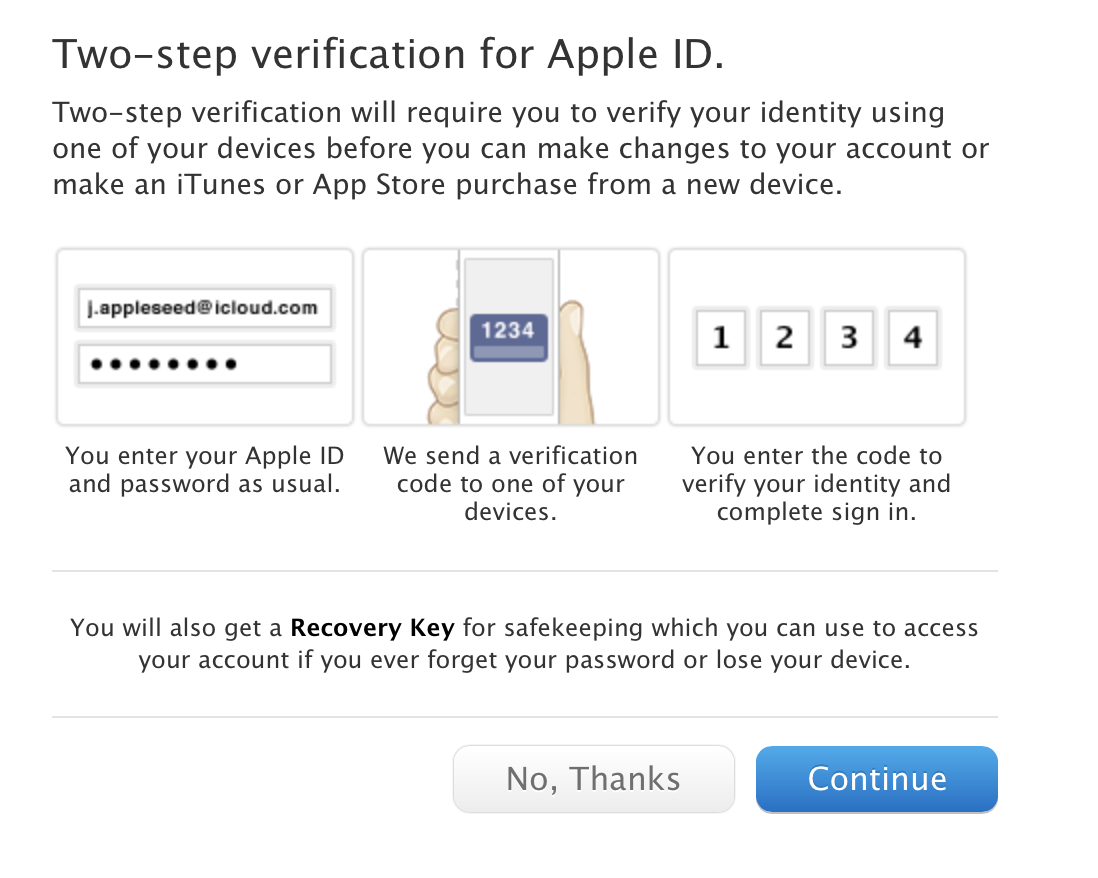
1. Set Up Two-Step Verification
A good way of doing this is through the two-step verification feature. This process adds an extra layer of security. All major service providers like Apple, Google, Facebook and others provide a two-step verification which sends a code in a text message that you punch in to access your account.
Two step verification is a secure way of making sure only you have access to your account.
2. Use Google Authenticator App
If you are a heavy Google account user then the Google Authenticator app for iOS, Android and Blackberry can come handy for you. Its main function is that it develops a two-step verification code, making it practically impossible to hack. Download it from here.
3. Stay Vigilant
Learn how your account works, because there is no value in ignorance. In times when we live in a network of digital devices, knowing how they operate is essential. Don’t take pride in your ignorance, something that Jennifer inadvertently did at an award function, and it tipped off the hacker.
4. Change Your Passwords Frequently
This point has been said multiple times but it still needs repeating: Change your password regularly. Even when you think your account holds nothing of importance, there is still a lot of personal information in there, so it’s better to have a strong password protecting your information. You can create a code that you can keep on updating without forgetting.
5. Better Safe Than Sorry
Last but not the least, the most important precaution that you can take is, not take the compromising images in the first place. If you take an image with a device that connects to the internet, know that the people on the internet have the ability to access it. Yes, sadly that’s the world that we live in now. But if you really need to send some data that you want to be fully secure; you can show the data to the person intended physically, send files through Bluetooth or use encrypted messaging apps like Signal.
With all the security measures that can be taken, you have to realize that the systems will have some deficiencies. The hackers exploit those deficiencies. But each time they do infiltrate the security, they teach the companies the faults in their systems and make systems stronger. So even though someone as amazing as Jennifer Lawrence had to deal with this inconvenience, the system has become a bit more secure for the regular folks. So be alert what you do on the internet. Take precautions and you’ll be safe.
The internet world went abuzz yesterday when one hacker picked up images from the iCloud accounts of celebrities such Jennifer Lawrence, Ariana Grande, Kate Upton and posted them online. This massive breach of privacy was taken very seriously as it hit some of the most prominent public faces and consequently raised concerns about the security of user data.
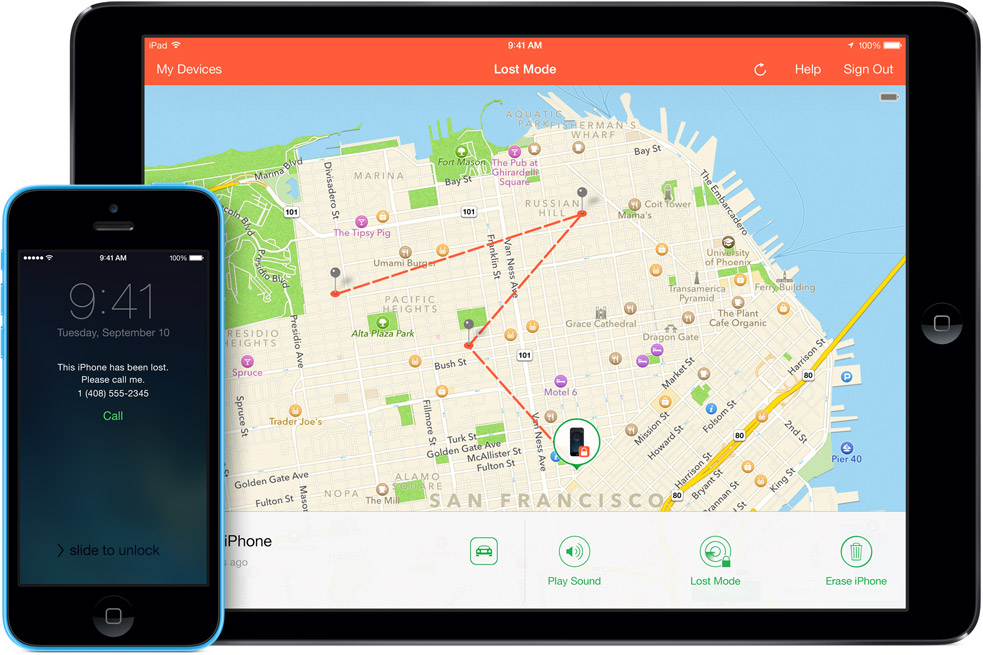
The fault of this massive leak lies on Apple. The failure of iCloud’s security features caused this breach. One of the main culprits of the heist is said to be the ‘Find My iPhone’ API, which let hackers try different passwords repeatedly without getting locked out. This fault was addressed by Apple after it came to light.
Hackers accessed personal accounts through a loophole in Apple’s “Find My iPhone” service
The hacker said that he held hundreds of other nude and semi-nude pictures. He demanded $40,000 in Bitcoins for releasing more photos. Thankfully the world felt a lot better and saner when all that the guy got was 0.2 Bitcoins which amount to just $95. It is said that hacker got a whiff of Jennifer Lawrence using iCloud when she said at an award function that she doesn’t understand how to back-up on iCloud.
The important part to remember is that if you go looking for these pictures, you are becoming a party to the side that is harassing the actresses. The lesson was well-learnt by professional pain-in-the-butt of celebrities, Perez Hilton, who said that they were removing the images from their website. You can see how severe the privacy breach was; the guy who makes a living out of the misfortunes of others had the decency to bring down the violating images. So be good and stay away from 4chan for good.
Xiaomi has faced all the spectrums of media coverage. From the good ones such as the phenomenal praise for being an innovative handset and equipment maker to the bad ones such as being an Apple copycat. Recently the company faced allegations of privacy lapse from its cloud messaging service. Some even alleged that Xiaomi was spying for the Chinese government. Xiaomi was fast on their feet to release an update that will try to put the hysteria to rest.
Here’s for some perspective on the news. A Finnish online security and Privacy Company called F-secure took it upon itself to inquire into claims of Xiaomi sending cloud based messages back to its servers in Beijing. What was more infuriating was the fact that the data that was being sent back was unencrypted, so anyone could intercept and sell it for profit. The data sent to the servers included phone’s carrier name, phone number, IMEI and even numbers and text messages back to HQ in Beijing.
The allegations were huge enough to harm the company’s potential consumer market, and hence, Xiaomi brings out this new upgrade. The MIUI cloud messaging service is a free SMS service. By routing messages via IP instead of using the carrier’s SMS gateway, the SMSes are sent free of charge. Xiaomi says it needs the data packets to determine if the message can be routed over the internet for free.
The issue was that the phone’s cloud messaging was enabled to be always on sync. Now with the new ROM update, folks who buy fresh Xiaomi or factory refresh their phones will have the option to enable cloud messages manually. So if you don’t want to use Xiaomi’s cloud service you can turn it off. The update also encrypts the data that is sent to servers so that it can’t be sniffed out for unscrupulous purposes.
Xiaomi’s VP Hugo Barra took to Google Plus (in an act of corporate transparency rarely seen) to explain the entire issue. He posted an in-depth FAQ’s in which he mentions that no user data or social graph is stored, and the messages leave the servers immediately to ensure quick delivery of the message. Hopefully with the new encryption and security update, Xiaomi can return to being a giant pain to competing smartphone manufacturers and an angel in consumer’s eyes.
France’s National Commission on Computing and Freedom (CNIL) threatened Google with a €300,000 fine due to the company’s lack of compliance with a June decision aimed at protecting users’ private data. The French agency that regulates information technology says Google had not satisfactorily responded to its June decision giving the company three months to be more upfront about the data it collects from users.
In a statement Friday, France’s National Commission on Computing and Freedom, known as CNIL, said:
Google hasn’t made requested changes, including specifying to users what it uses personal data for, and how long it’s held. CNIL said it will now launch formal sanction proceedings, a process that could take months.
On the other hand, Google spokesman Al Verney said:
Our privacy policy respects European law and allows us to create simpler, more effective services. We have engaged fully with CNIL throughout this process and will continue to do so going forward.”
The National Commission on Computing and Freedom said five other European countries are also taking similar steps in a staggered offensive against Google’s privacy policy between now and the end of July. It said Google has largely ignored earlier recommendations from European regulators. Similar actions are underway in Spain, Germany, Britain, Italy and Netherlands.
On Friday, Facebook admitted that a bug made the private contact information — either email addresses or phone numbers — of 6 million users accidentally accessible to Facebookers who downloaded their account histories onto their own computers.Compared to Facebook’s over 1 billion total members, 6 million isn’t much. But any security flaw has the potential to frighten people away from a website.
The breach was caused by an unfortunate combination of Facebook’s “People You May Know” and “Download Your Information” features. “People You May Know” offers friend suggestions based in part on other users’ uploaded contact lists or address books; “Download Your Information” offers a downloadable version of your Facebook Timeline archive.
When some users downloaded their Facebook archives with “Download Your Information,” the archive included contact information for second-tier connections with whom Facebook thought those users might want to connect but who hadn’t yet received or approved a friend request from that user.
Facebook said the security bug did not reveal other personal or financial data and that only people on Facebook – not developers or advertisers – accessed the DYI tool. Therefore, the bug was not exploited maliciously.
“For almost all of the email addresses or telephone numbers impacted, each individual email address or telephone number was only included in a download once or twice,” Facebook clarified. “This means, in almost all cases, an email address or telephone number was only exposed to one person.”
Facebook said it reviewed and confirmed the security bug, and therefore immediately disabled the DYI tool to fix the problem. The tool is now back online, however, because the problem has been resolved.
The bug was found not by Facebook’s team, but by someone going through Facebook’s “white hat” hacker program, which offers a bounty for anyone who can find bugs on the site, paying a minimum reward of $500 per bug.
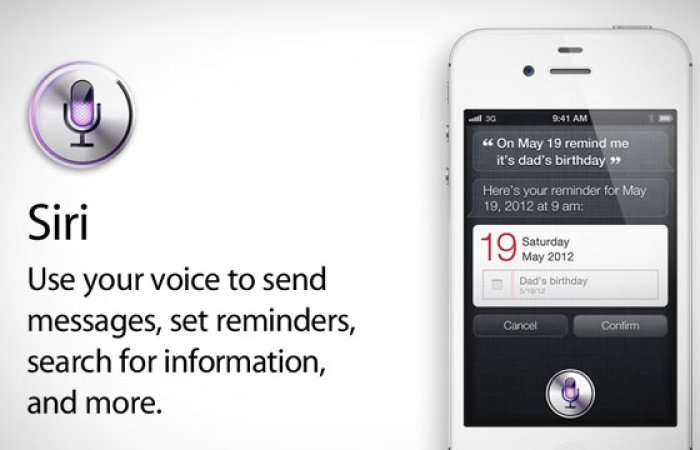
Apple has revealed that it holds on to voice data that users submit to Siri for up to two years.
Siri keeps your personalized data collected and stored on its servers whenever you pick up your iPhone and ask her a question. The Cupertino firm also assured customers that the files it retains become disassociated from the user after six months, or if they deactivate the personal assistant.
Responding to questions raised by the American Civil Liberties Union yesterday, Apple on Friday dispatched its spokeswoman Trudy Muller who explained to Wired the firm’s data retention policy governing Siri.
Apple may keep anonymized Siri data for up to two years. If a user turns Siri off, both identifiers are deleted immediately along with any associated data.
Based on the information Muller provided, Wired’s Robert McMillan explains exactly what happens when you use Siri:
Whenever you speak into Apple’s voice activated personal digital assistant, it ships it off to Apple’s data farm for analysis. Apple generates a random numbers to represent the user and it associates the voice files with that number. This number — not your Apple user ID or email address — represents you as far as Siri’s back-end voice analysis system is concerned.
Citing the Apple spokeswoman, the site reveals that the company makes sure the data is anonymized. Apple “only collects the Siri voice clips in order to improve Siri itself,” it says.
However, an American Civil Liberties Union lawyer who had previously raised privacy questions about Siri says Apple should take additional steps to protect its users’ privacy.
According to Nicole Ozer, “There is no good reason for Apple to not include information about privacy practices on their Siri FAQ page.”



 In an attempt to distinguish itself from countries like the US, especially post the entire NSA spying scandal, Brazil had passed net neutrality laws in 2014, the internet ‘Bill of Rights’ being an example. Two years down the line, things seem to be taking a turn for the worse in Brazil. Soon, individuals would have to enter their address and phone numbers, among other details, to be able to use websites and apps.