Facebook is gung ho about videos and animated pictures taking over the social networking site. Today, GIFs are the new way to greet and add some humour to your News Feed (because words were so 5 years ago). And it’s time people caught up with the trend. GIFs are short animated videos that say what you want to say in a funny, ‘pop culture’ referenced way, only minus the need to use words. To put it simply, GIFs are the new emojis.
Memes have been around for a while now. But Facebook felt that memes and smileys weren’t enough to convey ones feelings anymore. Initially, Facebook was against using GIFs, fearing that along with its autoplaying video feature the News Feed would become too cluttered. But the company had to cater to the users love for meme’s and GIFs. So, without further ado, here’s how you can post GIFs on Facebook.
Posting a GIF on Facebook
Posting a GIF is simple, however, you won’t be allowed to upload your own GIF files to your post as you would a photo. You’ll either need to create one and upload it on another hosting site or simply find a GIF that aptly describes your Monday morning blues, for example, from sites like Giphy, Imgur and Tumblr. Open the GIF and right-click on the image.
If you’re using Google Chrome, select the option ‘Copy Image URL’. For Firefox, the option is ‘Select Image Location’. And for Opera it’s ‘Copy Image Address’. Basically, every browser will have a similar option that allows you to copy the URL.
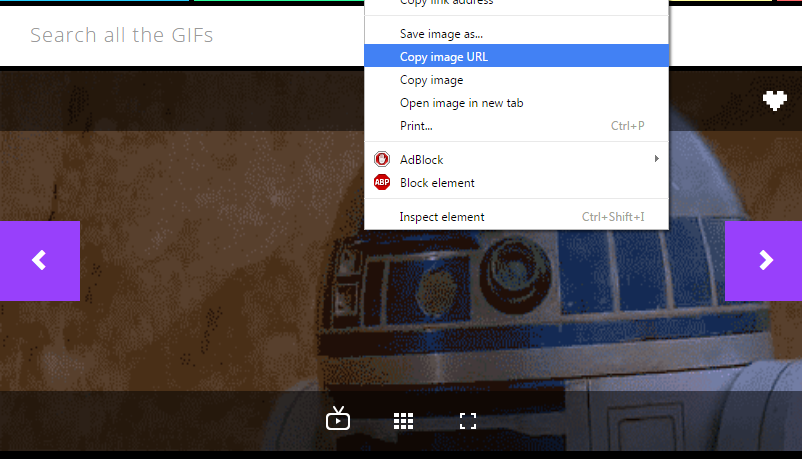
Next, log into your Facebook account and simply paste the URL in the ‘What’s on your mind?’ status field. Once the image appears, you can edit the status and write something so that people understand what the GIF is trying to convey. Hit Post and you’re done.
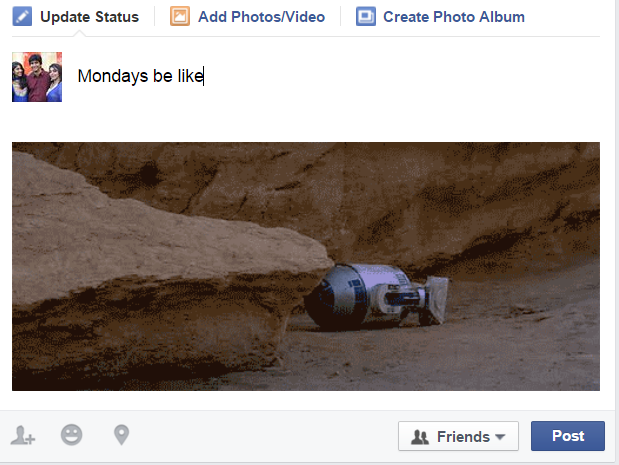
Now that you know how simple it is, go ahead and find your perfect GIF for the day and share it with your gang on Facebook. It’s all about spreading the joy and knowing that there are people out there who feel the same way about Mondays. Sigh.
You may have also noticed a GIF option in your Messenger and chat as well. Facebook has been testing the GIF and attachment buttons for the Messenger, though not all users have the feature yet. Open a chat window on the Facebook site or through the Messenger app and you’ll find a new GIF button next to the smileys icon.
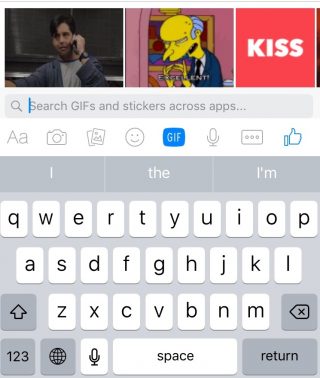
The GIF option will show you some trending GIFs and it also lets you search for the GIF you want. Now you can have more animated discussions with your friends when you feel words just don’t cut it.

Leave a Reply to Abhishek C Raveendra Cancel reply