Category: Latest

All the Latest, News, Reviews, Updates, How To, Mobile Phone news, Global and International News, From Cameras to Automobiles, from TV To PC and a lot more! Constantly updating!

  • Apple testing Retina Displays from LG and Samsung for iPad 3

    Apple testing Retina Displays from LG and Samsung for iPad 3

    According to Korean Times, Apple is testing 2048 x 1536 displays for the iPad next. 


    Apple’s upcoming iPad 3 will feature an improved display to support quad extended graphics (QXGA), a display resolution of 2048×1536 pixels with a 4:3 aspect ratio to provide full high definition (HD) viewing experience,

    According to their source the iPad 3 is the actual name of the device and not iPad HD. Apple did change its supplier of its primary chipset from Samsung to TSMC earlier this year. This happened due to the series of legal actions b/w Apple and Samsung. Apple however may not find a better manufacturer than Samsung or LG for the display.

  • iOS Is Still Bigger Than Android

    iOS Is Still Bigger Than Android

    Over 15,000,000,000 apps have been downloaded by some 200,000,000 users from the Apple App Store. In total, the App Store has around 425,000 applications available for sale. Last Thursday, Google announced that over 6,000,000,000 app downloads had been made by some 135,000,000 users form the Google Marketplace, which has around 250,000 applications available for sale.

    The growth of Android is spurred on by the release of new Android smart phones and tablets in the market. While the tablets might not be able to dislodge the iPad from the top spot, the smart phones are giving the iPhone a run for its money. Google CEO Larry Page said that new Android devices are activated at a rate of around 50,000 per day. Despite the number of activations, the iPad, iPhone and iPod Touch still lead the pack.

    At present, Apple’s iOS remains the number one mobile operating system but speculation is ripe that its just a matter of time before Android overtakes iOS to become the leading mobile operating system.

  • Is Apple Killing The iPod?

    Is Apple Killing The iPod?

    Apple’s iPod has been around for the last ten years. When it was launched it was a revolutionary product that defined an industry. We’re sure that the iPod will be around for some time but is the end in sight? According to an analysis by Fortune magazine, iPod sales hit their peak during the holiday season of 2008. Since then, sales have been pushing south at a steady pace.

    Apple’s jumped from around 22.7 million iPods sold at the end of 2008 to an expected 8.39 million iPods sold within the third quarter of 2011. These numbers do include the bump in sales received during the holidays, but, when comparing sales with the previous year, there is a 7.2% drop from Q3 of 2010.

    Apple has decided to concentrate its efforts in its smart phone and tablet sales. When you think about the features that are built into Apple’s product line, the decline in sales starts to make sense. The more of Apple’s user base that shifts to the iPad or the iPhone, the more its antiquated iPod line looks like a meager purchase. The only huge difference between an iPod and an iPhone for example is price and capacity. While music lovers can store many many more songs in their iPods, and pay less for it, they are giving up a huge number of features.

    It costs less money to shift from a low capacity iPhone to a high capacity one, than it does to purchase an iPhone and an iPod. And this is not considering those people who have already bought an iPhone and an iPad both. Why would people want all three? We highly doubt that users who use an iPad and/or an iPhone will be wanting to add an iPod touch to their collection.

    Apple’s expected to hit around 7.9 million in third quarter sales for the iPad 2, and around 18.3 million in iPhone sales.

  • Is Google Changing The Way We Remember Things?

    Is Google Changing The Way We Remember Things?

    We’ve all been in a situation where we needed to remember a certain factoid about our town/city, our cars, a new concert or movie in town but for the life of us, we just can’t remember. So what do all of us do? We take out our smart phones or goto a computer and open up Google. We search for what we want, supply that information to our peers and promptly forget it again. So what exactly is happening here?

    Researchers from Columbia University, in a study titled “Google Effects on Memory”, conducted a crucial experiment in which participants were asked to type in some trivia into the computer. Half the group was told that the data would be safe and stored in multiple folders, while the other half was told that the data would be erased. Surprisingly, the group that thought the data would be deleted had a better retention of the trivia they entered. Even more surprisingly, the other group did not remember the trivia as well as it remembered exactly where the trivia was stored. Does this resemble a Google keywordish effect to you?

    The study has come to the conclusion that the Internet is acting like a collective Super Long Term Memory for the entire human race. In ancient times, people used to memorize entire histories and texts aided by mnemonic codes like rhymes and metre. Once printing was invented, mankind was liberated from having to perform such tasks. Now that we have the Internet, the effect is much larger. All we have to do is search for what we want and we find it. It seems that our brains are being reprogrammed to remember keywords or tags that would provide the information that we should have remembered in the first place, resembling search engines in their own right. Touché Google, touché.

  • EDIT : Why The iOS 5 going to be the Best Mobile OS to Date!

    EDIT : Why The iOS 5 going to be the Best Mobile OS to Date!

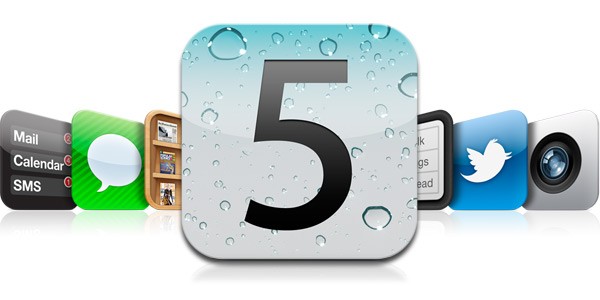
    Apple has recently announced the new iOS 5, The biggest update to their mobile phone OS since the iPhone was launched back in 2007. So Big, infact, that Apple decided to bypass the iPhone 5 launch this year round.

    What the iOS 5 bring that the iOS didn’t already have.

    People loved the iOS for its fluidity and ease of use, its beautiful and clean interface and the simplicity of performing actions to utilize and exploit the abilities the device it was on. The huge list of useful and eye pleasing applications which were designed  to work within the means of the OS and worked on the same basic principle, doing simple things easily and simplifying difficult things.

    But not everyone feels like this. Especially those who take pride in their endeavors to defame the fruit companies products, with their basic set of questions in place. Why does the structure have to be so closed? Why are we not allowed to do things that prior devices allowed us to do? Bluetooth file transfer- File management, Adobe Flash based browsing, even setting a custom ringtone.

    The fact of the matter is, Apple saw that these things were slowing down the Operating Systems usage which in turn deteriorated the whole device. For example, Bluetooth file transfer was the main reason due to which, in 2005,  over 3 million Nokia phones got infected with a virus which would delete important files from the Symbian structure ending basic phone use.

    Adobe flash is the heaviest video plugin ever made ( Adobe’s CEO confirms this) it is heavy on the processor , ram and extremely heavy on battery. Apple saw that by disabling Flash for video within Internet browsing, the overall battery life of device increased considerably. That being said, the user always should to have the choice to make the decision for himself. Adobe flash is allowed in the Application structure and a large number of apps are made with flash. Apple could have enabled Flash for a user to decide. But , in their defense it is easier to ignore a couple of 1000 people complaining about Flash – than a few million complaining about bad battery.

    Apple knows and is sure of one thing and one thing only, if they say their device does something, it does it. They don’t care about anything else and especially those things that they don’t promise or talk about.

    With the new iOS 5 , Apple brings about a large number of change in the Operating Systems use and the way you use your iDevice in a day to day basis. Apple has made these improvements not only due to a large number of demands, But also to take on the competition head first.

    The iOS 5 adds a huge chunk of things that were missing from the iOS over 200 to be precise. It also adds a whole list of new and innovative aspects to the already popular OS. Here are some of the most notable things

    Notifications

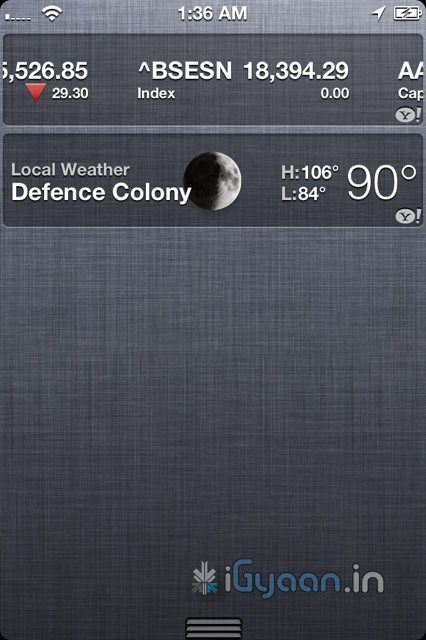
    Possibly the most asked-for improvement, the new notification system takes cue from the Android notification panel and takes it one notch higher. Just swipe down from the top of any screen to enter Notification Center.

    Choose which notifications you want to see. Even see a stock ticker and the current weather. Notifications appear briefly at the top of your screen, without interrupting what you’re doing.

    The Lock screen displays notifications so you can act on them with just a swipe. Possibly the first OS to have this feature built right into it. Yes you can get it on Android too, but only with a third party plugin.


    iMessage

    What has Apple done here? This is a feature that i personally have been waiting for. Apple has single handedly taken down forces of the mobile world, ping chat, whatsapp etc have stability problems, they break functionality and messages most often don’t reach the intended recipient. Enter – iMessage , Apple has built instant messaging over networks for free into iPods, iPads and iPhones on iOS 5 . You can send text, audio, images and even video over your devices to other people using iOS5 devices. Not only will this take a single most lethal blow at Blackberry, but also eliminate the need for most third party chat plugins

    Almost 60% blackberry users complain that if the iPhone had something close to bbm they would switch, and they will once iMessage comes out. If that does really hold true, then Apple will truly and effectively have stabbed competition right in the chest. Taking out Blackberry would mean great news for Apple and iPhone users, with a large number of people on iPhones, popularity of iMessage is bound to go up. Ergo the iOS 5 Device owner is bound to reap the benefits.


    Reminders

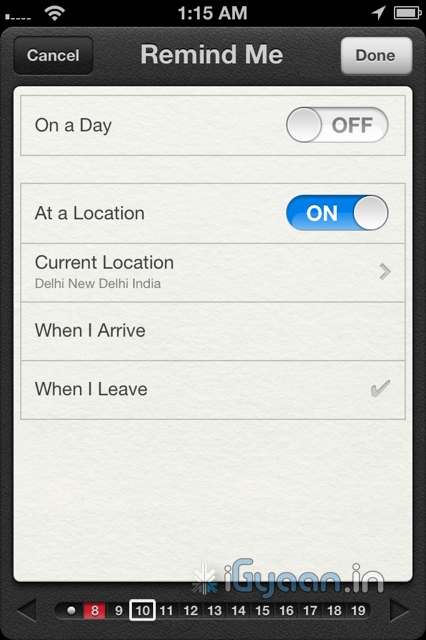
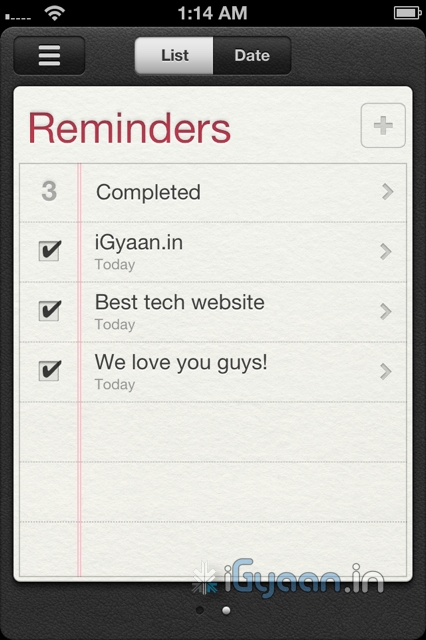
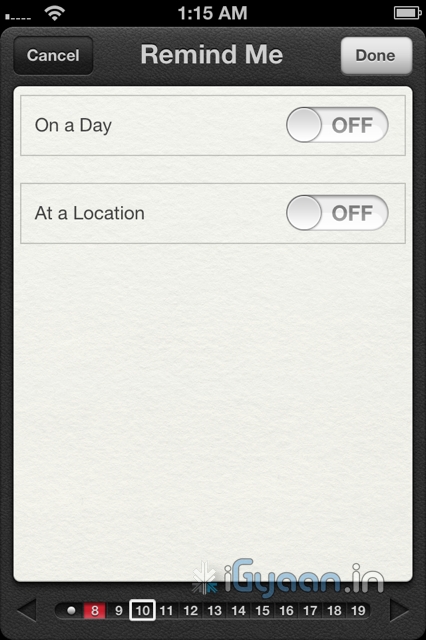
    We fail to understand, why this functionality never existed in the first place. A good reminder system is something every phone should have. whether smart or dumb.  Apple has done something really great with reminders. Not only are they simple to-do lists — complete with due dates and locations, they are also location based. 

    What does location based mean, you ask! Well lets put it in an example: A reminder app will play a sound or flash a note and remind you, that once you leave office you need to buy eggs on the way home, at a fixed time say 10 minutes before you leave office daily( lets say at 5:30pm daily). But in a scenario, where your daily departure time changes from 5:30 pm to say 4:30 pm  you will be reminded to buy eggs when you are already possibly at home. In a alternate scenario you will be reminded to buy eggs at 5:20 pm, but by the time you leave office at 7:00pm ( say you got late)  you will forget.

    Reminders from Apple solves this problem easily. You set a location based reminder – on departure from Office a reminder from the phone will remind you of your duties. The Phone using the GPS detects that you have left office, irrespective of the time, and reminds you that you have to buy eggs on your way home. Far more efficient and far more convenient than any other reminder we have ever used.

    Twitter Integration

    What is so great about twitter anyway? Nothing but the fact that the whole world uses it to share their thoughts. Its not a social network and its not about ads or games, no invitations to unknown parties and no fan pages. Its simple mood sharing, and the new iOS5 has it and will bring it to iPhones , iPods and iPads . The twitter integration is built right into Safari, Photos, Camera, YouTube, or Maps, you can tweet messages or reply to @usernames, you can even share your location. Its nothing great but the fact its built into the OS is really awesome and we like it a lot.

    Camera and Photos

    The iPhone 4 brought the best possible camera that any mobile device had ever had. Sure we have had cameras up-to 12 megapixel on cellphones, but its time that all of us accept the fact that more megapixels is not equal to better camera. The iPhone 4 features a backlit sensor that captures images like a dream, better than any other device to date. The new improvements in the Camera and photo apps take this functionality and extends it into the iOS 5.

    The most noticeable improvement is the use of the volume button as the camera shutter release. People have always struggled tapping the onscreen button, often resulting in shaky and wobbly images. The use of a physical button on the strategic location such as the volume key, makes it almost identical to holding a point and shoot camera- Boom! instant awesome images.

    You can also now open the Camera app right from the Lock screen, use grid lines, pinch-to-zoom gestures, and single-tap focus and exposure locks to compose a picture on the fly. Using iCloud all your pictures are instantly shared with all your devices, iPhone to iPad to your Mac.

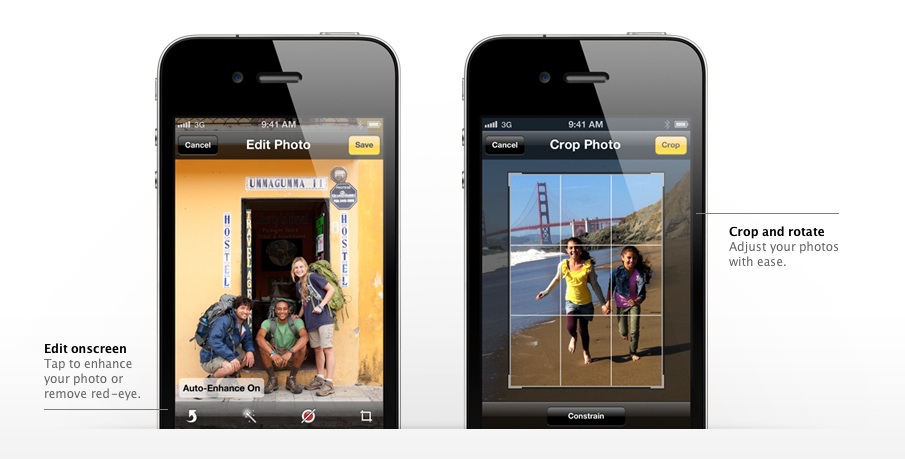
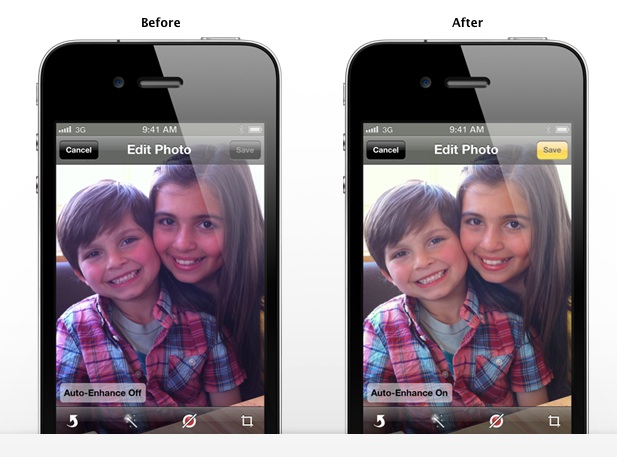
    The photos app allows better editing, crop, rotate, enhance, and remove red-eye without leaving the Photos app, a possible total replacement for Point and Shoot Cameras.

    Wifi Syncing

    Say What ? Did you read wireless sync? yes you did! Since the day the iPhone has been launched people have wanted a way to wirelessly sync their devices, and guess what, Apple allows you to do that in iOS 5. You do require to plug in your device into a charger for the obvious battery drain prevention that a WiFi sync may cause, But its better than getting to a Pc/Mac every time you want to sync. Now daily when you plug in your iPhone, iPad or iPod for charging it will also sync it to your computer. That is simply brilliant!


    200 More Features

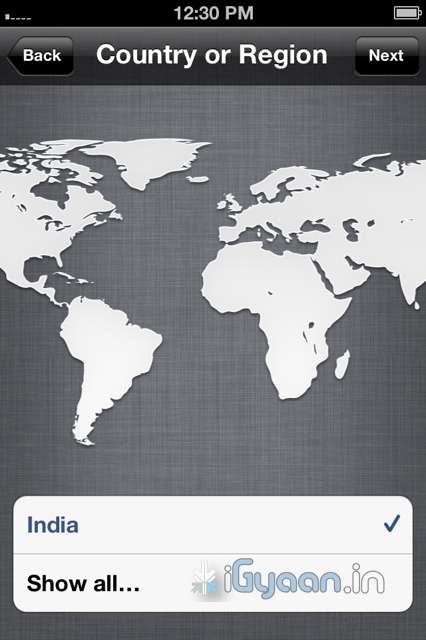
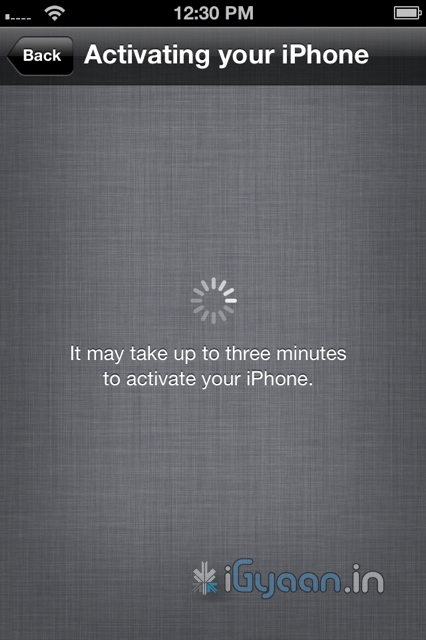
    Apart from the above mentioned features the iOS 5 brings about over 200 changes, from improvements in the Mail and Calendar App to new Game center, multitasking gestures on the iPad, device to TV mirroring on the iPad, that fact that now when you buy an iDevice you wont be greeted with the annoying connect to iTunes logo as the devices will be ready to be used without connecting to a PC. iCloud is bringing a whole new list of possibilities to iDevices, and we will talk about it soon. 

    We see Apple progressing to new levels every time they announce something. No matter what anyone says , Apple was the first company to have perfected a touchscreen mobile phone, the first to popularize the concept of an App Store. They might be an expensive product company, a snobby company, with closed circuits and irritating policies. Their devices have a locked OS with limited potential. But it looks like the company is starting to open up to what the customer wants, and they prove it with the iOS 5.

    According to us the iOS 5 is going to be the best Mobile OS to Date. Future enhancement will come and most will follow in Apple’s footsteps, even go further. Windows Phone 7 “Mango” is unlocking 500 features in WP7 and Android is constantly evolving. But till that happens looks like Apple has hit the ball out of the park. The iOS 5 is coming this fall to the iPhone 3Gs – the iPhone 4 the iPad  and the iPad 2. It is also coming to iPod Touch 3rd and 4th gen.

    Thats our opinion, whats yours ? Leave your feedback in the comments below.

    [polldaddy poll=5241624]
  • How To : Import Your Facebook Contacts to Google Plus (+) : Step by Step

    How To : Import Your Facebook Contacts to Google Plus (+) : Step by Step

    After getting you an Invite,

    And Telling you

    How to Setup your Account on Google Plus.


    We are now helping you shift your Facebook contacts to Google + .

    It is a tedious, process but it works


    Step 1. Yahoo Mail

    • Create a Yahoo mail account if you don’t already have one.
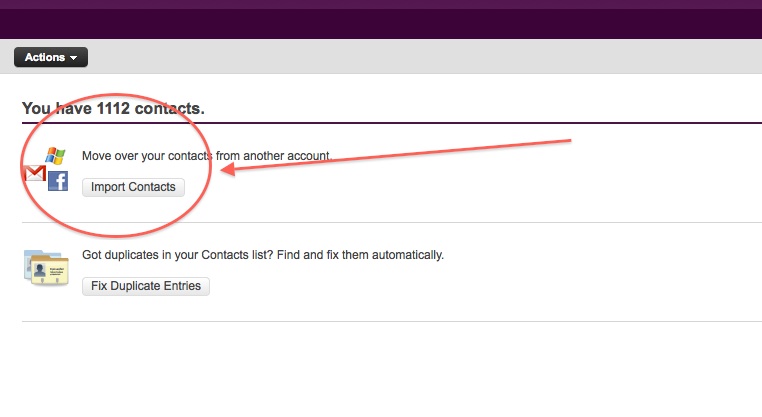
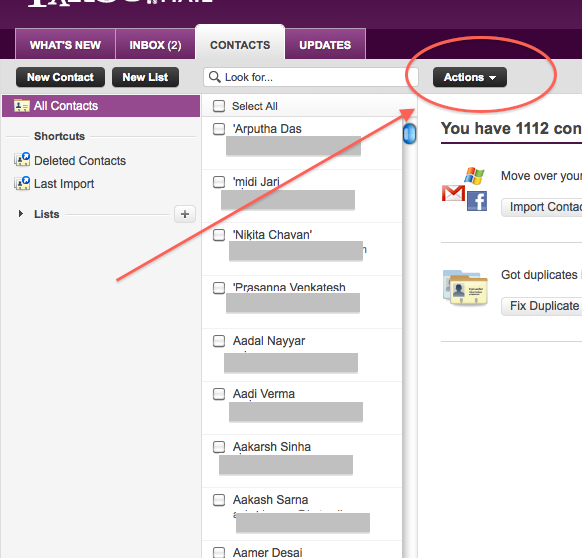
    • Login and click the contacts tab.
    • Once in the contacts tab you will be able to import contacts from Facebook.
    • Go ahead and do that.
    • After you enter your Facebook details all your contacts will appear in the contacts tab.
    • Next its time to export the contacts.
    • Click  the Actions button in the contacts screen.
     
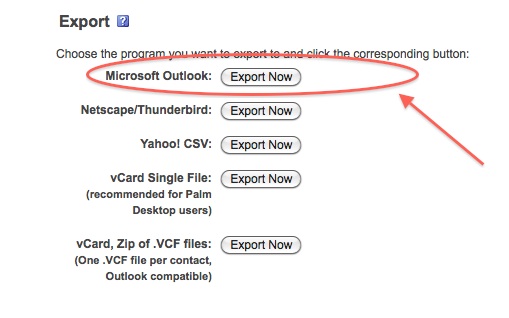
    • Now click Export all and choose the Microsoft Outlook option.
    • Save the file
    • Move on to Step 2
     

    Step 2 : Windows Live Mail

    At this point you would want to say to yourself, Why would i need a windows mail account?

    Answer : Currently Google + supports contact import from Yahoo and Hotmail. But once you import your contacts from Facebook to yahoo mail, Google plus can’t import them. Same is the case with Hotmail/Windows Live Mail. But with our work around Google Plus will import your contacts, So go on ahead:

    • Make sure you have a Windows Live Mail or Hotmail account (if not get one) 
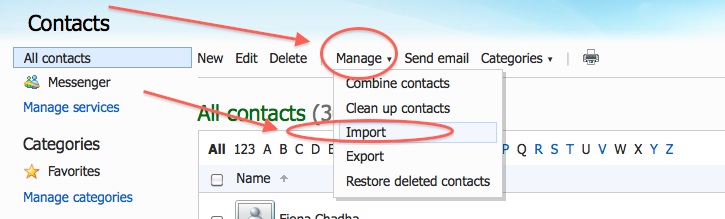
    • Next go into the Contacts Menu
    • Click Manage and then Click Import


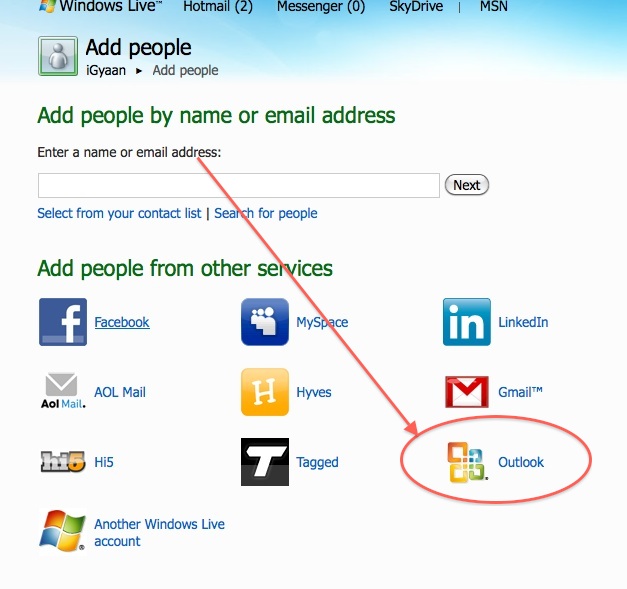
    • Next, Choose  Outlook and import the file you previously exported from Yahoo mail.
    • Now that your contacts are imported in yahoo mail the next step is to add them to Google Plus

    Step 3 : Google Plus

    • Log onto your Google Plus account
    • Visit the Circles tab
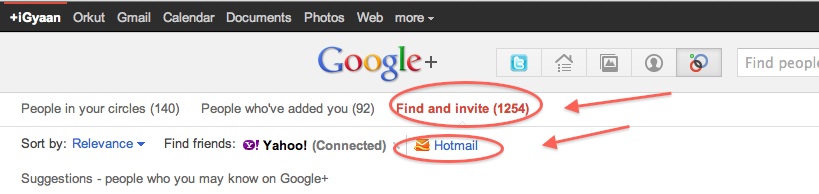
    • Click find and Invite
    • Click on hotmail
    • Enter your details


    You are Done!

    You have successfully imported your Facebook Contacts into Google Plus. 
    Now go ahead and add people to the circles of your choice and invite them.


  • Need a Google Plus ( + ) invite , Tell Us!

    Need a Google Plus ( + ) invite , Tell Us!

    Its been almost 2 weeks since the inception of Google + and a lot of people are still struggling for invitations to the G+ ecosystem.

    iGyaan can Help!


    Update: Due to the overwhelming response we have changed the terms a little bit.


    First Like us on Facebook


     Second Subscribe on Youtube


    Now, just use the contact link on top of our website and send us your name and email address. 


    We will Invite you into the new world of Social Networking.

    Successful Invites : 2344 and counting


    Once you have your invitation : Go here to know how to get started on Google Plus 


    Click here for a tutorial on how to import your Facebook contacts into Google Plus


  • Foxconn to Make Amazon Tablet

    Foxconn to Make Amazon Tablet

    Apple’s largest manufacturer of their devices like The iPhone and The iPad – Foxconn (they also the worlds largest contract manufacturer of electronics) will now produce the Android gutted tablet from the stables of Amazon. A report released yesterday claims that a 10.1 inch display is in the manufactory, and Quanta Computer, another contract manufacturer from Asia, is already shipping a 7 inch device to Amazon.

    Foxconn Electronics (Hon Hai Precision Industry) has reportedly landed orders for 10.1-inch tablet PCs from Amazon with shipments to begin in 2012, while Quanta Computer has begun shipping a 7-inch model to Amazon. Foxconn declined to comment on market speculation.

    The smaller version dubbed “coyote”  packs a dual-core NVIDIA Tegra processor and will be available in Aug-Sept timeframe. While the larger 10 inch version will ship later this year and is dubbed ” Hollywood”, has a quad-core Kal-El chip.

    Foxconn already manufacturers the Kindle for Amazon, about 12 million a year, compare that to the 40 Million iPad for Apple this year and it seems like even Foxconn has a lot to loose if they loose Apple as a client.

    Looks like Apple lost on securing their manufacturer by signing an exclusive deal of tablet manufacture with them. It is highly unlikely of Apple to allow such a thing to happen, hopefully no high level exec gets fired from cupertino – because he didn’t read his memo!


  • Tech 101: How OLED Displays Work

    Tech 101: How OLED Displays Work

    In our previous article, we explained How Modern LCDs Work. In this article, we’ll be exploring how the new generation of displays based on OLED technology work.


    What Exactly are OLEDs?

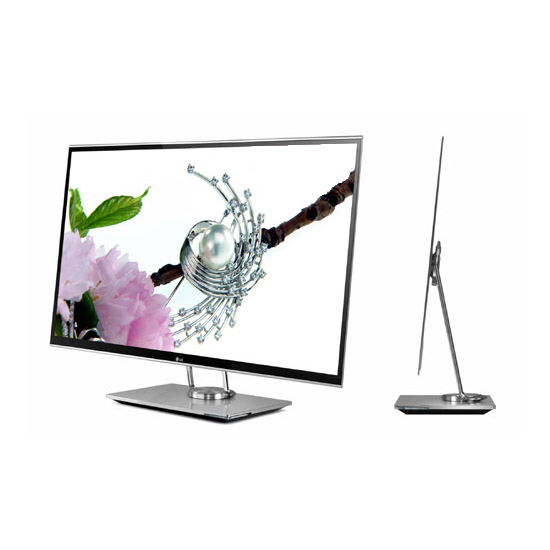
    There are a lot of products in the market today ranging from TV’s to Laptops and even Smart Phones that contain an OLED display. But what are these displays and how do they work? OLED stands for Organic Light Emitting Diode. This technology is named after the organic polymers that are used in its construction. For a long time, organic compounds have been assumed to be electrical insulators but new research and manufacturing techniques have allowed the industry to use these polymers for many applications on a vast scale.

    OLEDs are solid-state devices which are composed of thin films of organic molecules which emit light when a current is applied. OLEDs can provide brighter crisper displays that use less power than conventional Light Emitting Diode (LED) and Liquid Crystal Display (LCD) technologies. Another application for OLEDs is in the form of lights to be used in homes and offices. These lights have a long life and are very efficient.


    The Manufacturing Process

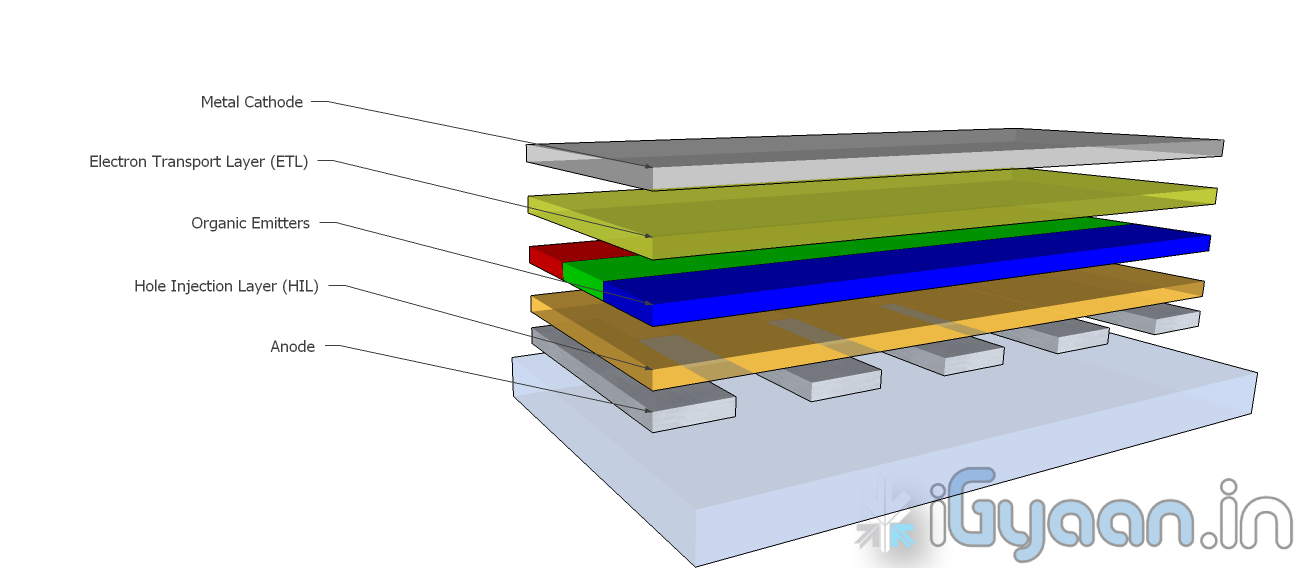
    OLEDs are basically layers of organic material sandwiched between an anode and a cathode and mounted on a substrate. This entire device is usually between 100 to 500 nanometers thick or is about 200 times thinner than a human hair.

    The substrate is usually a sheet of glass which is coated with a transparent conductive oxide which works as the anode. The next layer consists of hole injection material, the organic emitters and the electron transport layer which are together referred to as the organic stack. On top of the organic stack is the inorganic cathode. The device operates as follows:

    • Cathode – The cathode injects electrons into the system when a current flows through the device. It may or may not be transparent.
    • Organic Stack – This layer is made up of different organic polymers that are built up in layers. This is where light is made. The organic stack consists of the following layers:
      • Electron Transport Layer (ETL) – This layer consists of organic polymers or plastics that transport electrons from the cathode to the Organic Emitters.
      • Organic Emitters (OE) – This is a layer that is made up of organic polymers that may or may not be mixed with phosphorescent chemicals.  One polymer used in this layer is polyfluorene.When an electron finds a hole, it falls into the hole and gives up energy in the form of light.
      • Hole Injection Layer (HIL) – This layer is made up of polymers that transport electrons to the anode. This leaves ‘holes’ for electrons transported from the ETL to fill.
    • Anode – The anode removes electrons from the system when a current flows through the device. It is always transparent.

    This is the process by which a single OLED works. To turn them into colour displays, manufacturers place several layers of OEs on a display. There are various methods with which these individual pixels can be turned into a full colour display.


    Types of OLED Displays

    There are several types of OLED Display

    • Passive-matrix OLED
    • Active-matrix OLED
    • Transparent OLED
    • Top-emitting OLED
    • Foldable OLED
    • White OLED
    Passive Matrix OLEDs or PMOLEDs

    PMOLEDs are designed in a hash pattern. The anode and cathode are made in strips that are arranged perpendicular to each other. The points of intersection of the strips of anode and cathode make up the individual pixels where light is emitted. External circuitry is used to control which pixels are on and what colour they emit. The brightness of each pixel is dependent on the amount of current in the system.


    Active Matrix  OLEDs or AMOLEDs

    AMOLEDs have a full layer of anode and cathode materials but they borrow a technology from LCDs to produce a visible display. Sandwiched between the anode and the organic layer is a layer of thin film transistors or TFTs that makes the array. The TFT array is the circuitry that decides which pixel is on and what colour it displays. AMOLEDs are more efficient than PMOLEDs because the external circuitry used to run the PMOLEDs consumes more power. AMOLEDs also have a faster refresh rate which makes them more suitable to larger displays used in televisions and computer monitors.


    Transparent OLEDs or TOLEDs

    TOLEDs are constructed with only transparent  components, and are upto 85% as transparent as the substrate used when they are turned off. When it is turned on, the display still allows light to pass both ways and remains transparent. It can have either an active matrix or a passive matrix. This technology would be perfect for Heads Up Displays and Medical Equipment.


    Top Emitting OLEDs or TEOLEDs

    TEOLEDs are constructed with a substrate that is either opaque or reflective. They are perfectly suited for an active matrix design. They are used in smart-cards.


    Foldable OLEDs or FOLEDs

    FOLEDs are constructed with a highly flexible substrate which could either be a plastic or metallic foil. These types of OLEDs are very lightweight and durable. They are used in cell phones and can reduce breakage. They could also potentially be integrated into fabrics to create smart clothing.


    White OLEDs or WOLEDs

    WOLEDs  emit pure white light that is brighter and more uniform than the light which is emitted by fluorescent lights. . WOLEDs can be made in large sheets and can reduce energy costs massively if used to light homes and buildings due to their low power consumption.


    Advantages and Disadvantages of OLEDs

    OLEDs offer many advantages over the current favorite, LCDs and LEDs.

    • The organic construction of an OLED is much thinner than the many layers required for an LCD or LED display.
    • OLEDs can be built onto a thin plastic substrate which allows them to be flexible instead of the glass used in LCDs and LEDs.
    • Due to its design, an OLED display is much brighter than an LED display. This is because the conductive and emissive layers of an OLED can be stacked several times to produce more light than an LED while still remaining extremely thin.
    • Since OLEDs emit light themselves, they do not require a back-light. LCDs work by selectively  blocking areas of the back-light to produce individual pixels. OLEDs are also much more energy efficient than LCDs because they lack a back-light.
    • As OLEDs are made from plastics, they can be built into large thin sheets which makes them much easier to produce. It is much more difficult to create an LCD display of the same size.
    • OLEDs have a much viewing angle than LCDs because they do not block light in any fashion. Since they produce their own light, they can provide a field of view of upto 170o.

    For all their advantages over LCDs and LEDs, OLEDs have a few problems as well.

    • Red and green OLED films have a very long life of between 46,000 to 230,000 hours while blue OLED films currently have a much shorter lifespan of around 14,000 hours.
    • The manufacturing process for OLEDs is not cheap as of now.
    • OLEDs are not at all water resistant and can easily be damaged on contact with even a few drops of water.


    While LCD and LED technology remains in the mainstream, OLEDs are making headway into the television, computer and mobile segments. Manufacturers and engineers are realizing the potential benefits of using OLED technology for their devices. In the next few years we should see an increase in OLED sales as well as some novel applications of the technology.

    Stay tuned to the Tech 101 segment to learn more about what makes our everyday devices tick.

  • How to : Set up your Google Plus Account Step by Step

    How to : Set up your Google Plus Account Step by Step

    Today we are going to help you set up a Google Plus Account – Step By Step


    Step 1 : Invitations

    If you don’t already have an invitation to Google plus, then you should consider making friends with better people, like us.

    Hit this link to get an Invite 

    Note:

    • You will need a gmail email address or a fully qualified google profile to get this to work.
    • Google apps and associated email addresses  are currently not supported

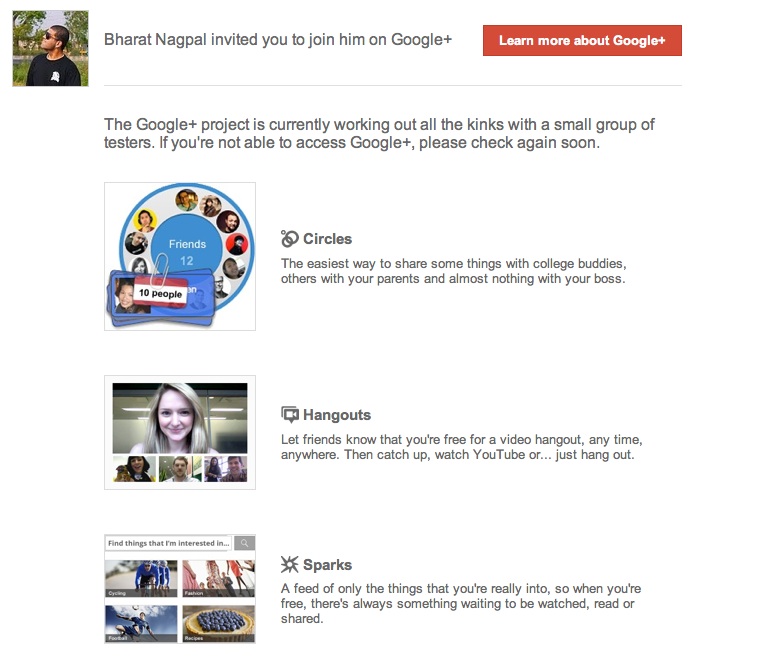
    When you get an invite it should look something like the image below


    After you get an invite  you will need to click the button :  


    Step 2 : Register 

    Once you click on the button you will be redirected to the registration page:


    Add your details, upload and crop your profile Photo.

    And you are all set to CLICK JOIN


    Step 3 : Profile

    Now that you are in, you would want to set up your profile.

    You will be greeted with a similar welcome page : 

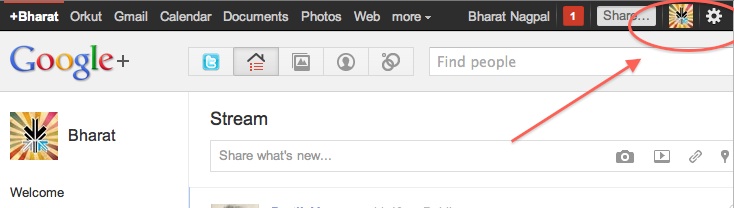
    welcome page
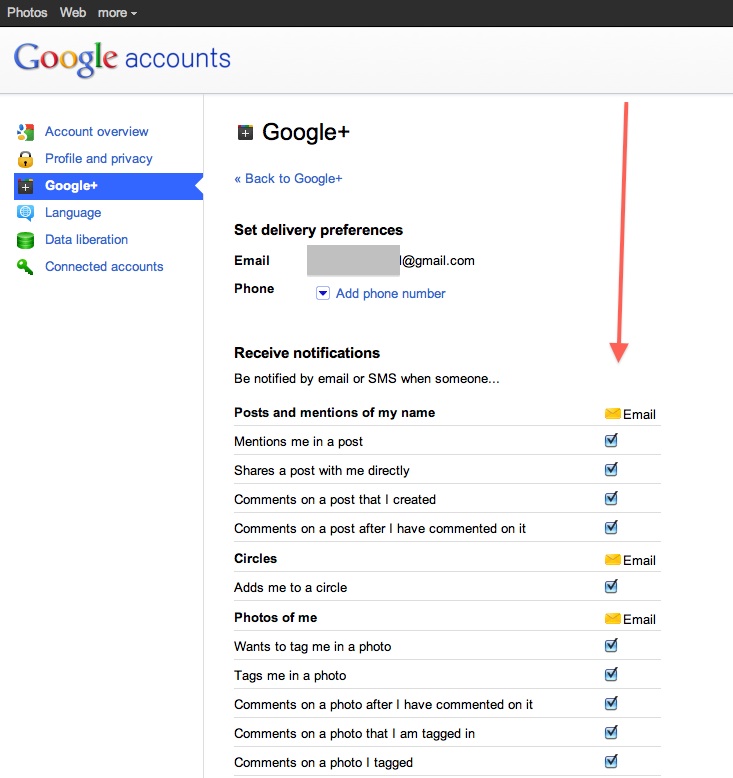
    • Click the sprocket settings button on the top right of you browser to get into Google Plus settings.


    • Next, Set up your privacy and sharing settings in the page.

    HIT – SAVE, and you are done!


    Step 4 : Setting up Circles

    Hit the circles button on your profile page to set up Circles.


    Once on the circles page you will be able to , find people by email addresses or by searching for them over other networks and email services like yahoo mail or hotmail.

    Simple create circles of your choice, Like Friends, Family, Colleagues, Game Buddies, College, etc.

    You can also add the same person to multiple circles.

    Once you are done finding and adding your friends, its time to start posting!.


    Step 5 : First Post!

    • Simple click on the share bar in your Google Plus homepage and start writing.
    • You can add media like videos or photos or even links and location from where you are posting.
    • Also select what all circles you would like to share this post with.
    • You can also leave it blank to share with everyone
    Once you are done typing click the green Share button.

    Congratulations you have successfully started using Google Plus (+)


    You can now start inviting your friends too!
    Stay tuned for an update to this post where we share details about Sparks, Hangouts and Streams


    We also have a tutorial on how to transfer your Facebook friends to Google + here.
  • No iPhone This year : Due to Overheating A5 Chip

    No iPhone This year : Due to Overheating A5 Chip

    Say it isn’t so! Several rumors are pointing to a further delay in the launch of Apple most anticipated phone since the original iPhone n 2007. According to a story on a chinese website, the overheating A5 chip was the first cause of delay in the iPhone 5 and the shift from June to a supposed September release. 

    The story goes on to say that Apple will be transitioning to a 28-nanometer manufacturing process with the A6 chip, apparently due next year. The A5 chip that goes into iPad 2 is manufactured on Samsung’s 45-nanometer process and is almost twice the size of the iPhone 4?s A4 processor. That is not acceptable for the constantly shrinking size of the iPhone.

    If there is any truth to the story, then we think Apple might release an iPhone 4s sort of modest yet sufficient upgrade which will satisfy the hungry customer for another year, say gorilla glass, 8mp camera dual core A4 chipsets. Either way get ready to take on news with a pinch of salt as we start to get closer to the real deadlines.

  • A New Sleek iPhone 5 Concept

    A New Sleek iPhone 5 Concept

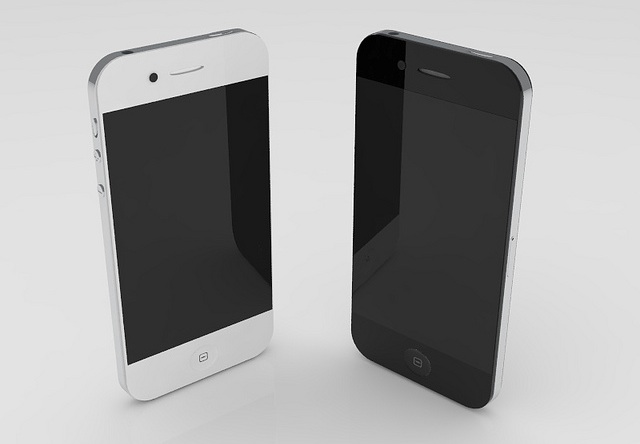
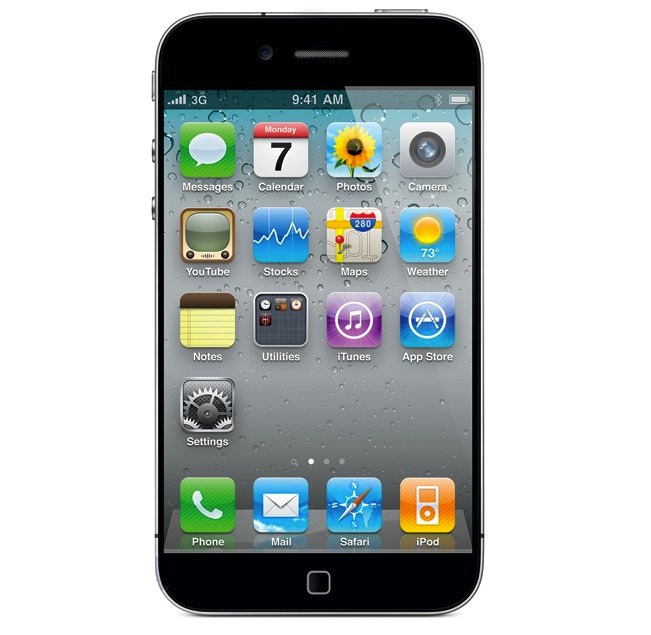
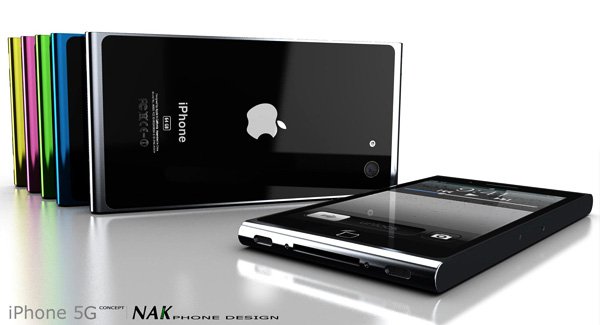
    People all the world are waiting anxiously for the next iteration of Apple’s Jesus Phone. There are many rumors going around and speculation is ripe about to the design and specifications of the iPhone 5. Some people believe that the phone will have a larger screen, some believe that it will have a better camera and processor. Whatever the case may be, the iPhone is coming and its coming soon.

    Antoine Brieux of NAK Studio recently came up with his own idea of what the iPhone 5 should look like. And he’s come up with a super sleek design. The concept is reminiscent of the iPod Nano due to the coloured aluminium and shape of the bezel. If the new iPhone looks this good, it’s going to have no trouble selling (not that it’s going to have any trouble selling either way). What do you think of this new concept?

  • Adobe launches Flash Player 11 beta with 7.1 surround sound

    Adobe launches Flash Player 11 beta with 7.1 surround sound

    Adobe is now allowing people to download the latest version of their desktop flash player, Flash Player 11 beta.


    Key benefits of the Flash Player 11 desktop beta include:

    • Stage3D APIs — Create highly interactive visuals to improve collaboration on 3-dimensional models.
    • 64-bit support — Support for 64-bit operating systems and browsers on Linux, Mac OS, and Windows.
    • G.711 audio compression for telephony — Integrate voice/telephony into business apps using G.711 codec.
    • H.264/AVC SW Encoding — Encode higher quality video locally using H.264 video.
    • Socket Progress Events — Build advanced file sharing apps like FTP clients that send large amounts of data.
    • HD surround sound — Deliver full HD videos with 7.1 channel surround sound directly to AIR powered TVs.
    Hit the Link below to download your copy.
  • Qualcomm launches Vellamo browser benchmark for Android devices

    Qualcomm launches Vellamo browser benchmark for Android devices

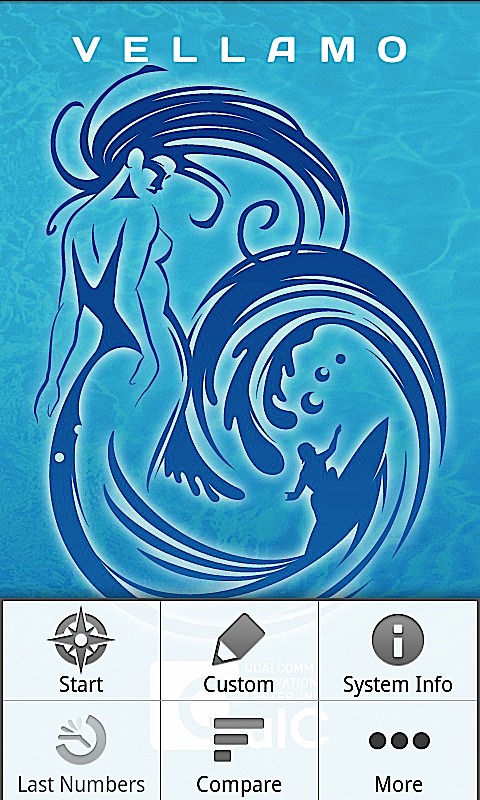
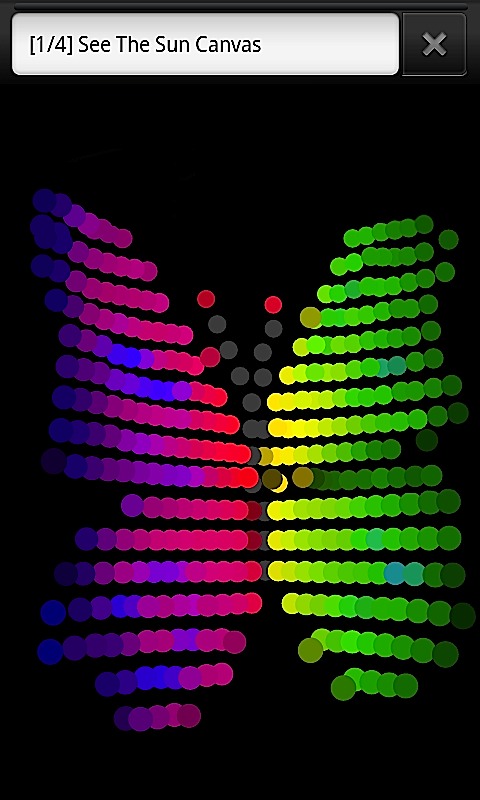
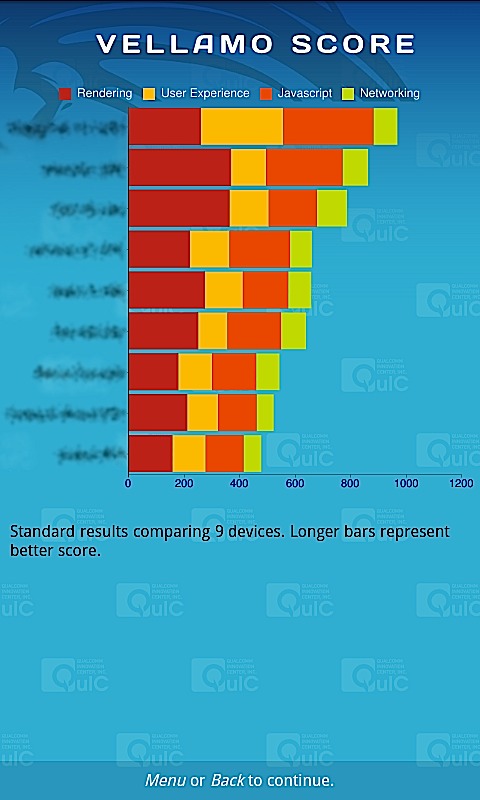
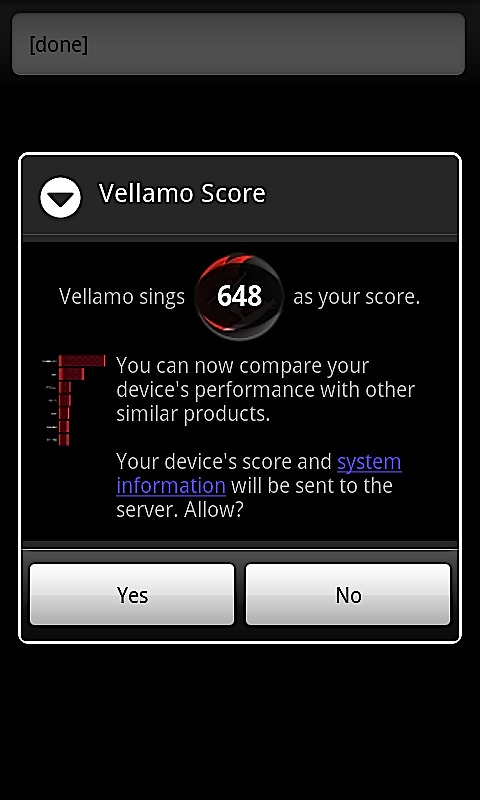
    The mastermind behind a flurry of chipsets for Mobile phones, also responsible for graphic benchmarks like Neocore. Qualcomm has just launched the Vellamo Benchmark for Android devices. This benchmark if for mobile browser lagging tests. Vellamo is essentially a suite of 11 tests designed to gauge browser performance on Android phones and tablets.

    To operate it requires any Android Device over OS 2.0


  • MSI To Launch World’s First PCI Express Gen 3 Motherboard (PR)

    MSI To Launch World’s First PCI Express Gen 3 Motherboard (PR)

    MSI has announced that it will be releasing the world’s first PCI Express Gen 3 motherboard and exclusive Click BIOS II with unified interface. This motherboard will bring together may new technologies to boost performance. Read the Press Release for more information.


    [toggle title_open=”Collapse Press Release” title_closed=”Expand Press Release” hide=”yes” border=”yes” style=”default” excerpt_length=”0″ read_more_text=”Read More” read_less_text=”Read Less” include_excerpt_html=”no”]

    New Delhi, India: MSI, the world-renowned mainboard and graphics card manufacturer, officially launches the Z68A-GD80 (G3), featuring world’s first large bandwidth PCI Express Gen 3 mainboard, and the latest UEFI technology: Click BIOS II which features a homogenous interface both under Windows and the UEFI interface. Conforming to Intel’s latest design standard, the MSI Z68A-GD80 (G3) with PCI Express Gen 3 provides a data transfer rate that is 200% faster than PCI Express Gen 2, enhancing the performance of graphics cards without bandwidth limitations. Click BIOS II, allows simple and intuitive system adjustments in both Windows and the UEFI interface! In addition, Z68A-GD80 (G3) utilizes MIL-810STD Certified Military Class II components and are equipped with OC Genie II technology which increases the performance of hard drive up to 457%. The MSI Z68A-GD80 (G3) enables next generation superior performance with PCI Express Gen 3 and OC Genie II, ultimate stability with certified Military Class II components and an extreme user-friendly Click BIOS II interface both in Windows and in the UEFI BIOS. 

    If you want to own the highest specification, components and the most superior performance and technology, the best choice is MSI Z68A-GD80 (G3).  The product is expected to hit the market in the very early Q3 2011 as the first PCIe Gen 3 mainboard available in the global market. 

    The world’s 1st PCI Express Gen 3 Mainboard – unparalleled performance

    With the Z68A-GD80 (G3), MSI introduced the world’s first PCI Express Gen 3 mainboard in Computex 2011. With ultra-high 32GB/s transfer bandwidth, PCI Express Gen 3 is 200% faster than PCI Express Gen 2. This allows the MSI Z68A-GD80 (G3) to process huge amounts of data and information, maximizing the performance of AMD CrossFireX and NVIDIA SLI multi-GPU solutions. 
    MSI Z68A-GD80 (G3) is backwards compatible with all the devices with PCI Express 2.0 or older devices already available on the market and enhances their performance considerably. For example, PCI Express 2.0 SSD devices on MSI Z68-GD80 (G3) mainboards perform 14% faster than on competitor’s mainboards. 

    Click BIOS II with unified interface – provides the best experience 

    As an industry leader of UEFI technology, MSI revolutionizes the industry again with the world’s first UEFI BIOS which utilizes a unified graphical interface in both Windows and in the UEFI BIOS, Click BIOS II. Click BIOS II brings the ease of a clear, unified interface with all the benefits of MSI’s UEFI interface. This allows both die-hard overclockers and first-time system users to get the maximum out of their system through an easy-to-use Graphical User Interface. This interface supports all traditional input devices like a Keyboard, Mouse or new touch-screen interfaces for the most flexibility. 

    OC Genie II unleashes total system power 

    MSI’s exclusive OC Genie II provides stunning system performance within a single push of a button and unleash the true performance of CPU, memory and integrated graphics all at once. By maximizing system performance and guaranteeing the most stable condition, it gives users the best benefits in the shortest time. When measuring with industry standard benchmarking software such as 3DMark Vantage and PCMark Vantage, the results show that OC Genie II boosts 3D game performance up to 145% and hard drive reading speed up to 457% along with Intel Smart Response Technology. 

    Military Class II brings top quality and stability 

    MSI has equipped all its Z68 mainboards with the leading-edge Military Class II components. In addition to Hi-c CAPs made out of the rare element Tantalum and the Solid CAPs with a lifespan longer than 10 years, Military Class II includes Super Ferrite Choke (SFC) that provides 30% more power and is 10% more efficient. Military Class II components ensure ultimate stability and performance under any circumstance.

    [/toggle]

iGyaan Network
Privacy Overview

This website uses cookies so that we can provide you with the best user experience possible. Cookie information is stored in your browser and performs functions such as recognising you when you return to our website and helping our team to understand which sections of the website you find most interesting and useful.