Tag: iOS

  • EmojiWorks Creates the World’s First Emoji Keyboard

    EmojiWorks Creates the World’s First Emoji Keyboard

    We are all aware how important emoticons are nowadays. Nobody wants to type ‘okay’ anymore, just a thumbs up emoticon will do. The process is supposed to save time, but we still have to press an extra key to open our emoji options. These troubles will however soon be in the past, because EmojiWorks has debuted its first hardware based emoji keyboard. So now, with the help of a built-in shortcut, you can immediately just type in your preferred emoji.

    Emoji keyboard

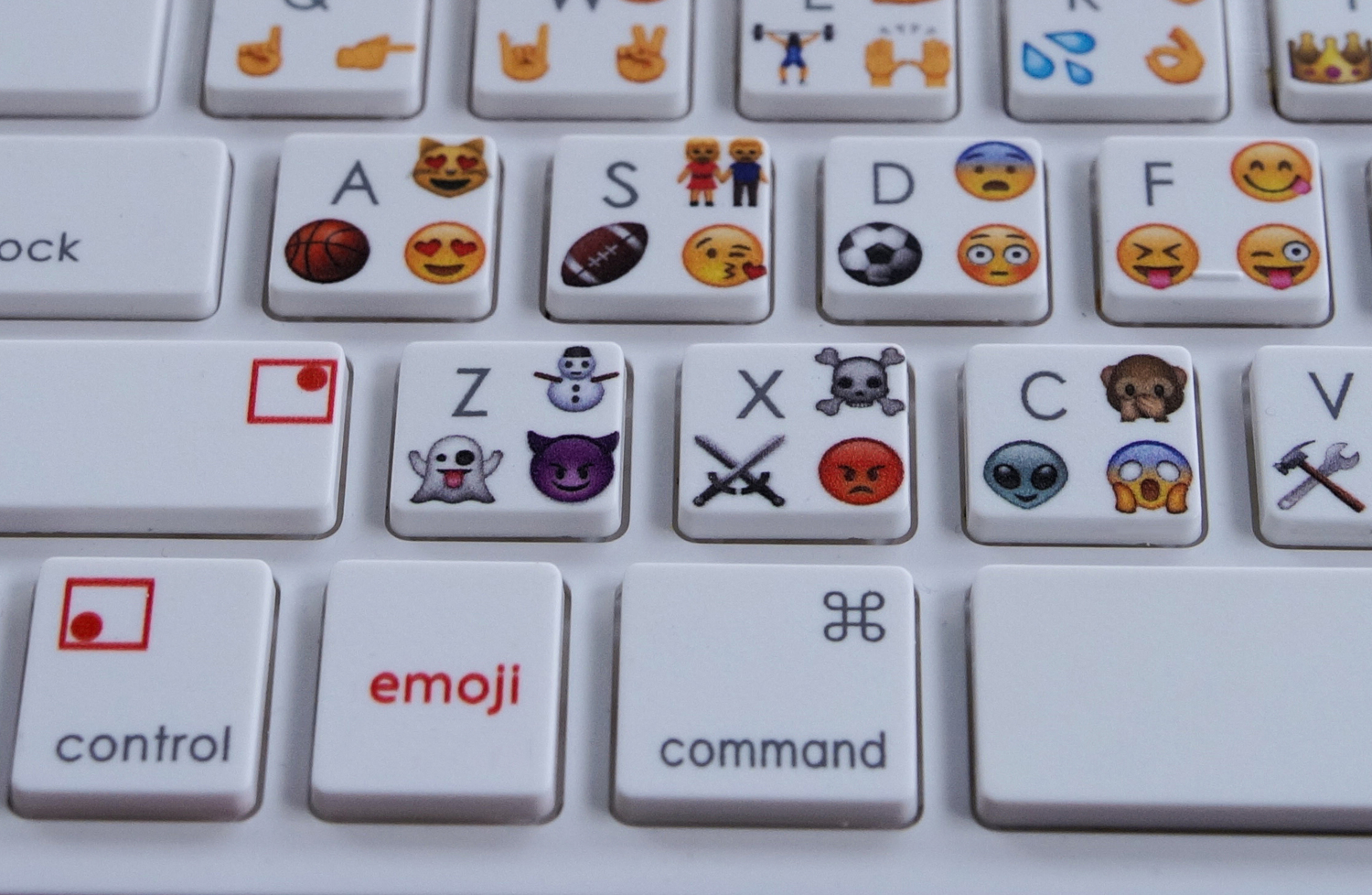
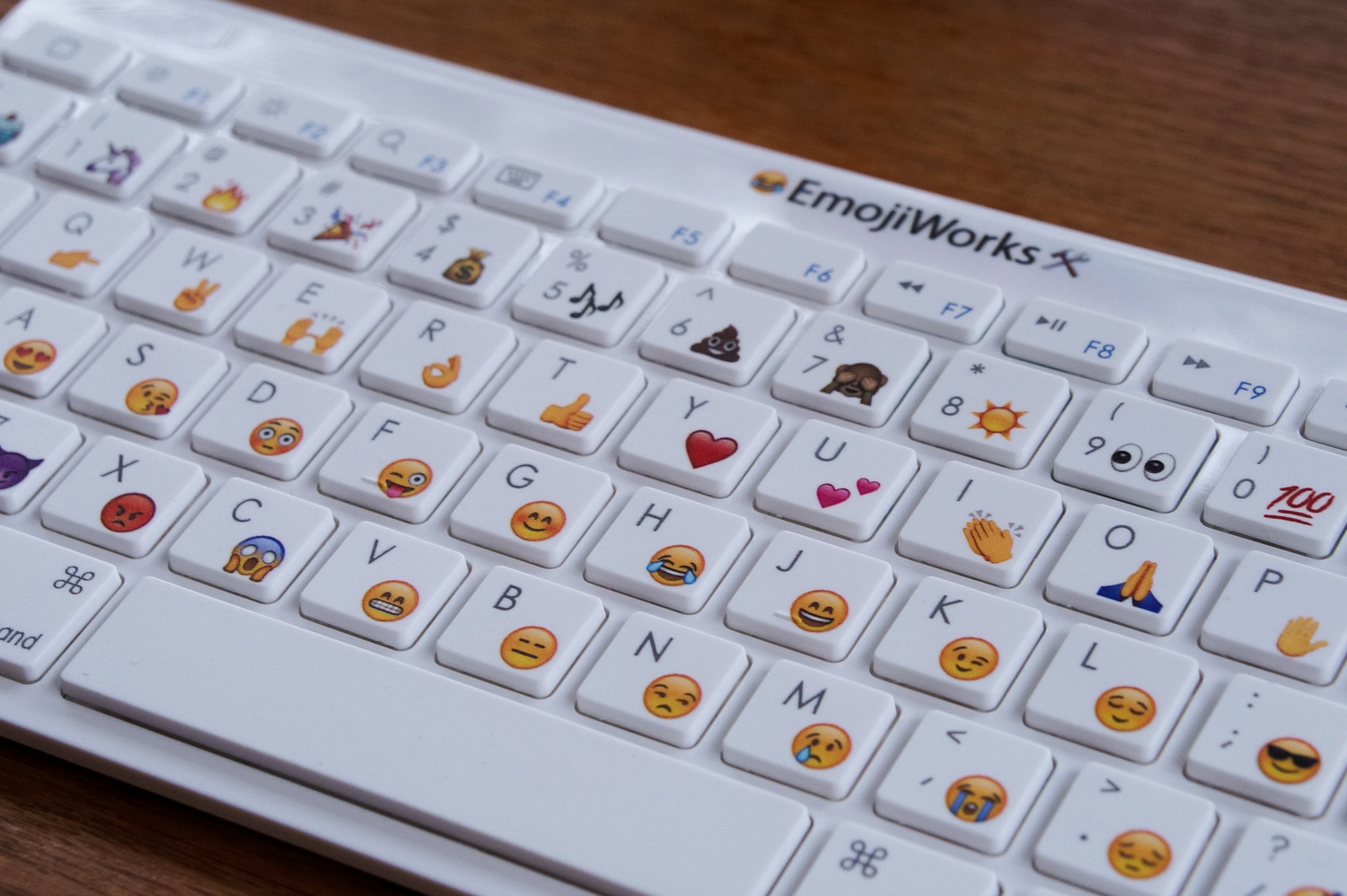
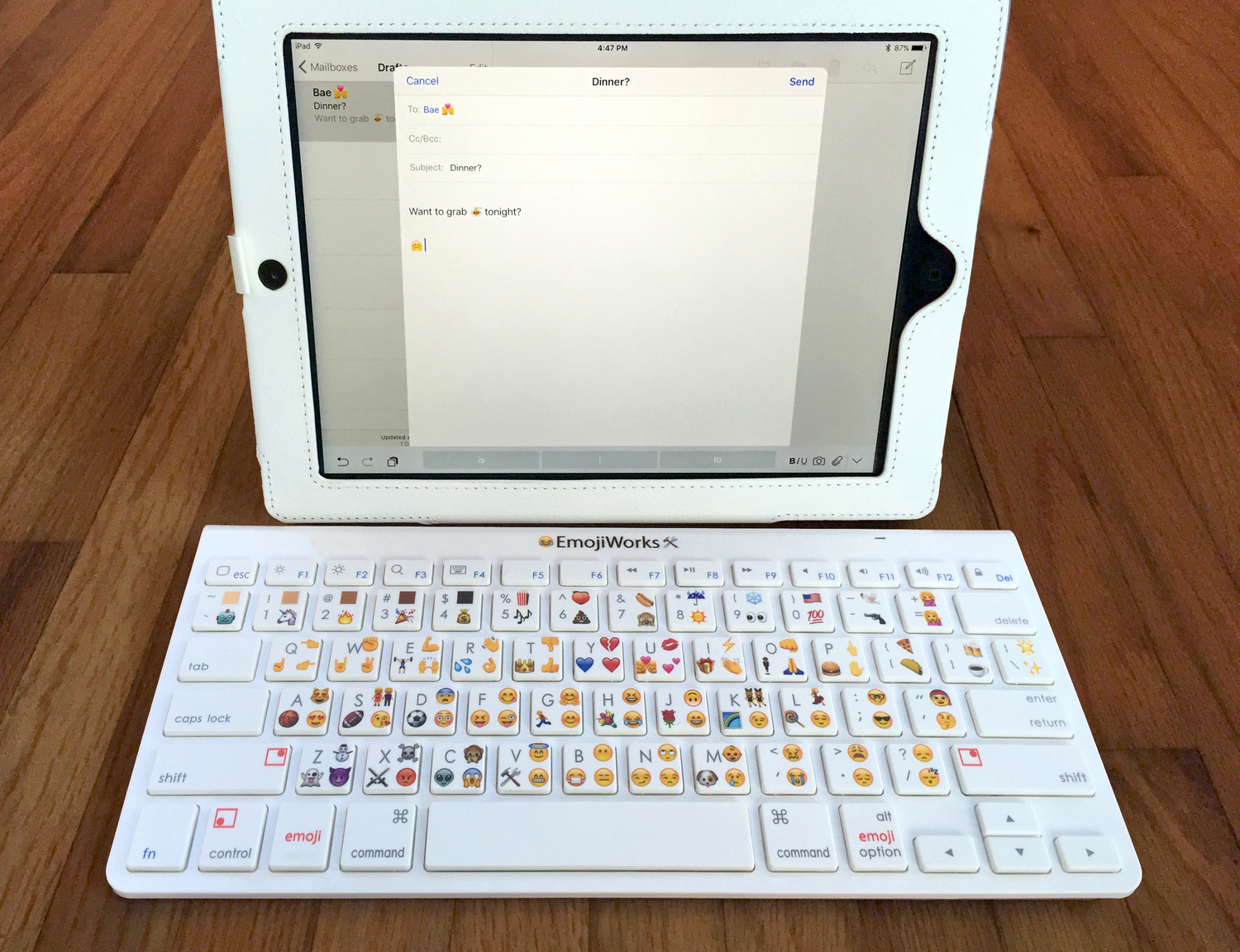
    Design wise it looks like an Apple keyboard with emoji symbols and each key has an emoji along with a character. Just like the shift key we use in order to type in a letter in capitals, there is an additional ’emoji’ button which you need to press in order to insert the specific emoji.

    Emoji Button

    EmojiWorks has been very careful so as to include all your favourite emoji, including the poop emoji. They also claim that the emoji keyboard is up to 10 times faster than a standard keyboard and is Bluetooth enabled; this feature in turn makes it compatible with Mac and iOS devices. The only con that comes with this keyboard is that it cannot be customized as it comes pre-printed with emoji on the keys along with pre-programmed emoji shortcuts. Here is a short video:

    https://youtu.be/Hvm3B6kXPK0

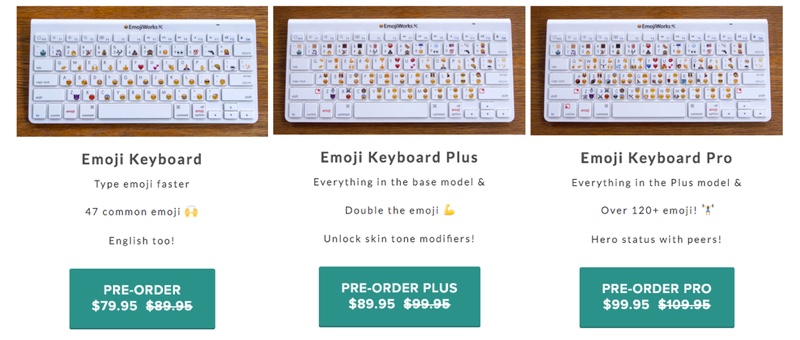
    Speaking of its availability, the emoji keyboards come in three different models: the Emoji Keyboard at $79.95 (approx Rs.5,175), the Emoji Keyboard Plus at $89.95 (Rs.5,830), and the Emoji Keyboard Pro at $99.95 (Rs.6,485). The difference between these keyboards is that the number of emoji shortcuts differ, so basically, the cheapest one will have one emoji per key, the emoji plus will have a total of 94 emoji and the emoji plus will have more than 120 emoji, with three shortcuts per key.

    Emoji Keyboards

    Click here for your pre-order and more information.

  • Facebook Wants Some Employees to Switch from iPhone to Android

    Facebook Wants Some Employees to Switch from iPhone to Android

    According to reports, Facebook employees simply have too much love for the iPhone. So much so that the company’s chief product officer Chris Cox is forcing some employees to shift to Android. The reason behind this is that Facebook needs to know how its social networking site is doing across all platforms and not just on high-end iOS devices.

    According to Cox, Facebook workers need to be “reporting bugs and living in the same experience that most Facebook users experience today,”

    Facebook’s primary goal is to enter as many markets as it can. This means that the company has to tailor its software for every platform emerging across devices both advanced and old. Facebook is also keen on entering markets in developing nations where internet speeds are slow and older devices are still commonplace.

    “I am mandating a switch of a whole bunch of my team over to Android, just because people, when left up to their own devices, will often prefer an iPhone.”

    iPhone might be popular in some countries like the U.S., U.K .,and China but Android still dominates globally with around 82% of smartphones on Android’s operating system. Furthermore, the Android devices range from low-end to high-end. Thus, in order to study how Facebook functions in Android, employees will need to have a hand-on experience with it.

    Facebook iOS

    The seriousness of Facebook’s aspirations is also understood when this news is clubbed with last week’s decision to have ‘2G Tuesdays’. The new initiative will see employees work for one hour ever Tuesday on 2G connections. This will give employees an “opportunity to experience for themselves the slow mobile Internet speeds found in developing countries.”


  • Here Are 5 Mobile Apps You Can Use To Scare Friends This Halloween

    Here Are 5 Mobile Apps You Can Use To Scare Friends This Halloween

    Halloween is around the corner, and yes, we are aware as Indians we do not need another festival to celebrate in the month of October, but there’s no harm in spooking a couple of your friends out. Here’s a list of five smartphone apps that you can download specifically for the purpose.

    1. Ghost Lens App

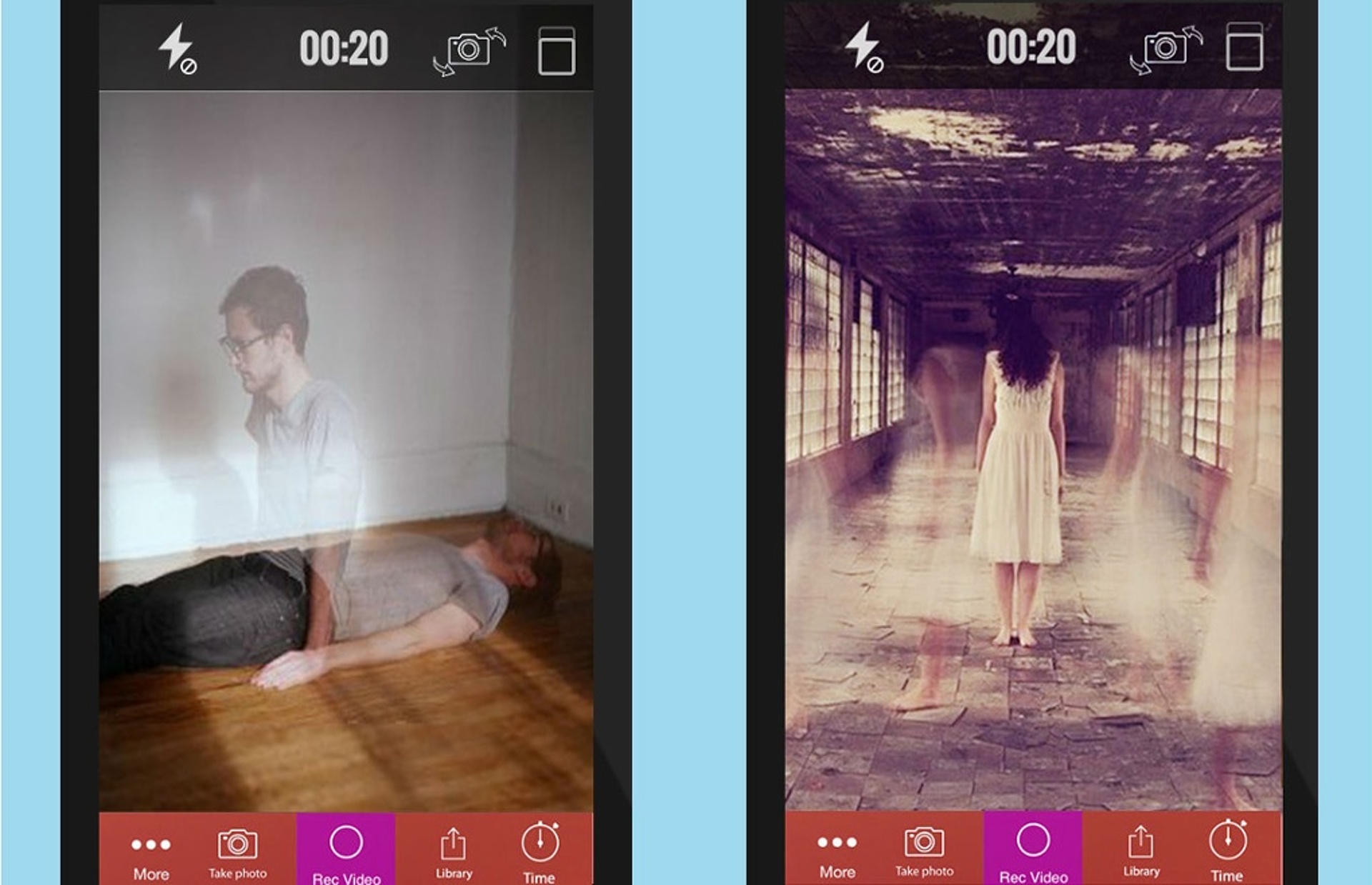
    The first one you can try out is called the Ghost Lens app, which happens to be free on all iOS devices. It’s a very efficient app, where you just have to choose from a selection of backgrounds and filters, then you shoot your own video or pictures and save it. This is what your end result could potentially look like:

    Ghost Lens App

    2. The Camera Hoax

    The Camera Hoax, yet another free iOS app, allows you to choose an image from the given options within the app, such as ghosts, ghouls, UFOs etc. after which you can add a picture of yourself from your phone gallery and upload it. This app comes with a bunch of expert photoshop features too.

    Camera Hoax App

    Minecraft:

    In the spirit of Halloween, even Minecraft has vamped up its settings. Therefore, along with skeletons, and zombies, it now added a Halloween Costumes skin pack as a 79p in-app purchase to give your Minecraft character a Halloween makeover.

    Camera Hoax App

    Halloween Sounds Pro:

    Visual effects aside, sound also plays a very important role in scaring people, therefore to amp up your experience there is a free Halloween Sounds Pro app which lets you choose from a series of gory sounds such as a hiss or a scream to scare people around you. This app comes free on the iOS and has a $1 fee on the Android version.

    Minecraft App

    The Hunting Part 1:

    Last but definitely not the least, we have The Hunting Part 1, which basically puts you in a Blair Witch Project kind of simulation that you need to get out of. The film is shot from a first-person view, and it’s perhaps one of the most interactive zombie movie apps till now. This one should be a whole lot of fun to play on the 13th of Friday, after having said “Bloody Mary” to the bathroom mirror thrice. Go save yourselves!

    Hunting Part 1 app

  • VSCO Cam Joins the Bandwagon With Its Own GIF Making App

    VSCO Cam Joins the Bandwagon With Its Own GIF Making App

    Whether or not a consensus has been reached on the pronunciation of the word, GIFs are all set be a bigger part of our virtual lives. VSCO Cam have decided to follow suit with lots of other developers and come up with its own GIF-making app. However, the glitch is this app is only for iOS users.

    https://youtu.be/cthr_L7wt5A

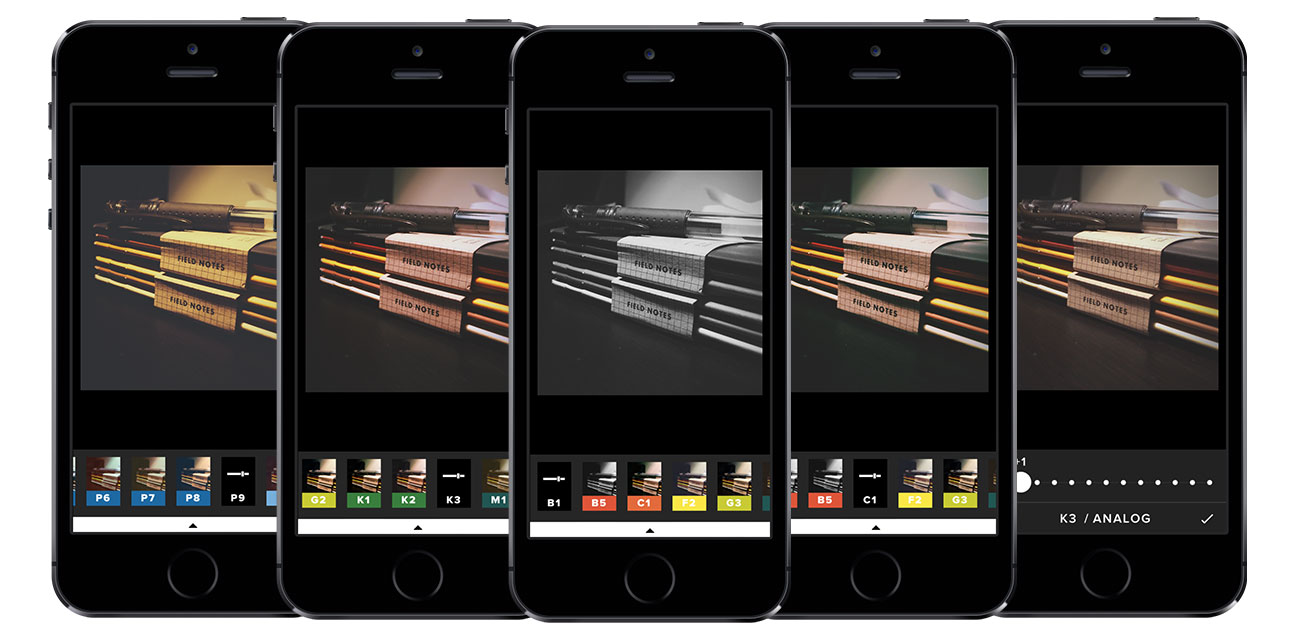
    DSCO, an Instagram-like app, is unveiled by the company for achieving the moving image effect for a footage of few seconds. This mobile photography app allows you to choose filters and presets, developed along with MTV and others, for your GIF before posting it on one of the social media platforms or on the company’s own portal. The app is available as a free download for all iOS users.

  • Apple Owes 30% of Last Quarter iPhone Buyers to Android Switchers

    Apple Owes 30% of Last Quarter iPhone Buyers to Android Switchers

    Following the official announcement of its revenue and profits for the fourth quarter, Apple reported that one third of iPhone buyers during the quarter had been using Android devices before the switch. The company also claims this shift to be the largest ever since they started tracking people’s movements from one OS to another, three years ago.Apple and Google

    Needless to say, Tim Cook is more than just glad about the news, especially in the light of the lukewarm response the new iPhones have received since their launch in September. Cook comments on the switch of so many users to iOS and says,

    “That number is the largest that we’ve ever recorded since we began measuring it three or so years ago. It’s a huge number and we’re very, very proud of that number.”

    No doubt this movement has been one of Apple’s goals for a while now and the company has left no stone unturned in achieving it. The recent ‘Move to iOS‘ app of the company which allowed users to switch their Android devices to iOS is one such attempt.

    The fourth quarter ended on the 26th of September, which means it could include only two days of the iPhone 6s and 6s Plus sales. With the new iPhones not faring as well as Apple expected or would have preferred, it would be interesting to see Apple’s report for the next quarter. There will be more colourful bits of news for both Apple loyalists as well as haters once that report is made public. Hold your breath until then.

  • Battery Management Lessons for iPhone users

    Battery Management Lessons for iPhone users

    It is a well known fact that we consider the iPhone as an amazing development made in technology, but it often becomes a slab of glass and metal once it’s drained out of battery.

    And as irritating as it gets when we run out of battery, there are some easy ways of extending its battery for a while longer.

    Here are some simple tricks and tips for iPhone users fed up with their phone’s battery:

    Low Power Mode

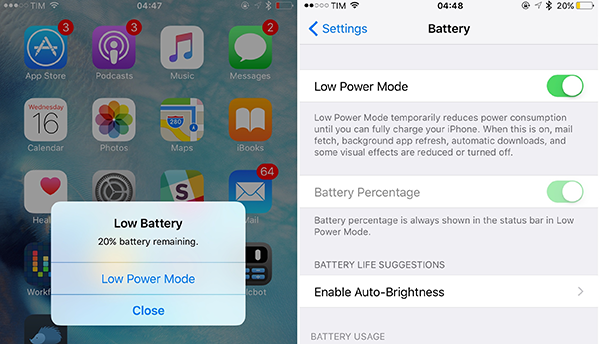
    The recent introduction of iOS 9 came with a special feature of a power saving mode. This update warns you with a message when your battery drops down to 20% and offers Low Power Mode.  Activating Low Power Mode reduces animations throughout the system. It also decreases the time before the screen darkens and makes every effort to save your battery for a little longer. When power saving mode is activated, the battery indicator turns from either green or red, to yellow.

    Also, Low Power Mode can be activated at other times: look for the option in the new Battery section of Settings once you’ve upgraded to iOS 9.battery extension
    Toning down on visual effects in iOS 7 and iOS 8

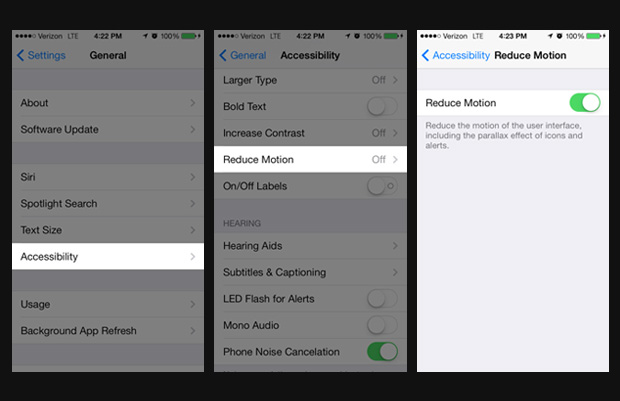
     The parallax effect introduced in iOS 7, which makes your icons and notifications appear to be floating, might be pretty and cool. But at the same time, it drains the battery of your phone like a vampire, by constantly using your phone’s graphics processor. So, when you’re` in a place where charging your phone would not be possible, you could save your battery by disabling this feature.

    You can switch to static rather than dynamic wallpaper – the iOS 7-style wallpaper that moves around as you tilt your phone. This will cut down the power drain a little. When you set a new Wallpaper, tap where it says ‘Perspective Zoom: On’ to turn it off.

    You can also go to Settings > General > Accessibility > and switch on Reduce Motion to temporarily turn off all the parallax effects.battery extension
    Cool not Hot Phone

    There is no other way to say this – heat is really bad for batteries. It would be wise not to leave your phone lying in direct sunlight. The ideal comfort zone claimed for its best performance is between 16° to 22° C (62° to 72° F). Exposing it to a temperature higher than 35° C (95° F) can permanently damage battery capacity, so battery won’t power your device for long on a given charge. Also, it is advised that the cases should be removed while charging, as certain cases tend to generate excess heat that can affect battery capacity.

    Reduce Screen Brightness, Turn Off Vibration and AirDrop

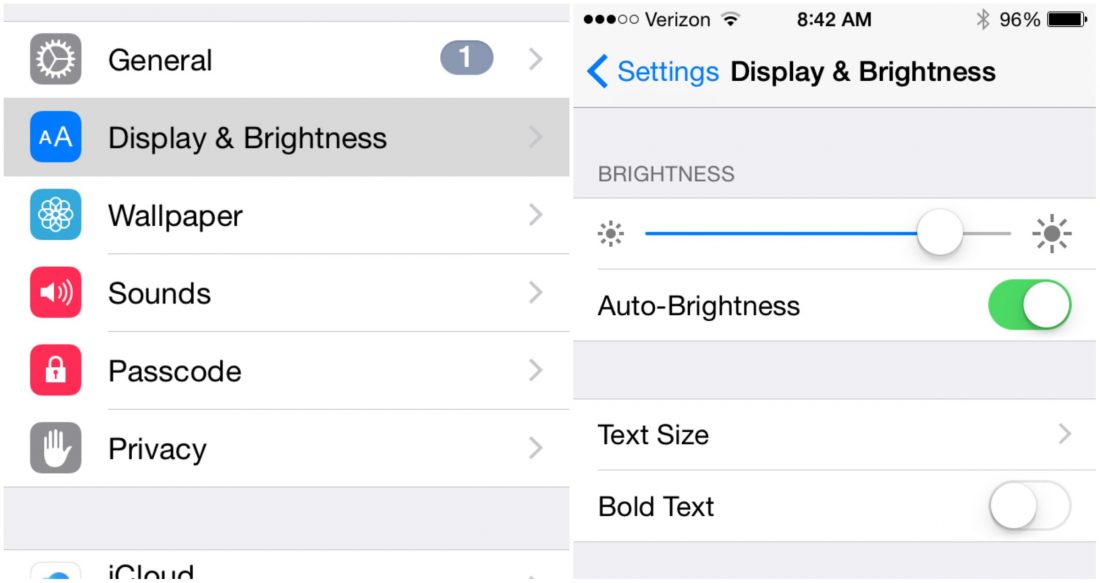
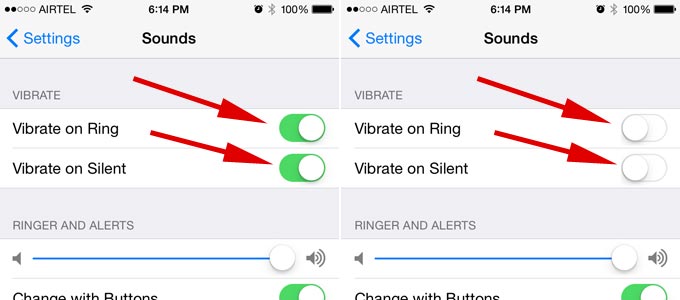
    A simple way of saving battery is by reducing the brightness level of your iPhone screen. The brighter the default setting for the screen, the more power it consumes.battery extensionThere are a number of ‘Beep’ and songs to choose from for message and call notifications. Leaving out the rattling of your phone when a call or a message comes can save a little of your battery.battery extension
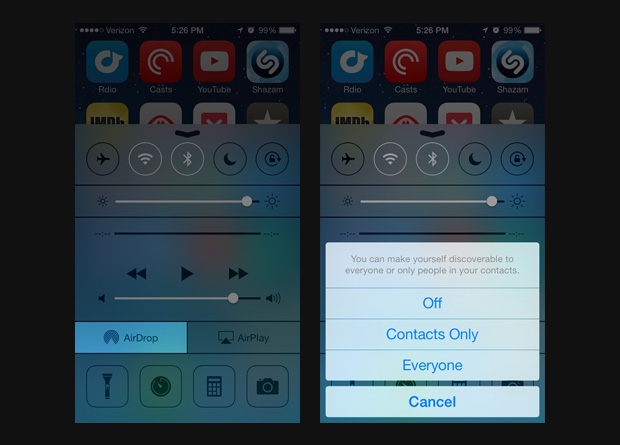
    Also, turning off bluetooth and AirDrop whenever it is not in use can help in retaining battery life. Next time you are done transferring photos and files to and from other phones, make sure your bluetooth and AirDrop is turned off immediately after. battery extension
    Disable Siri Shortcut

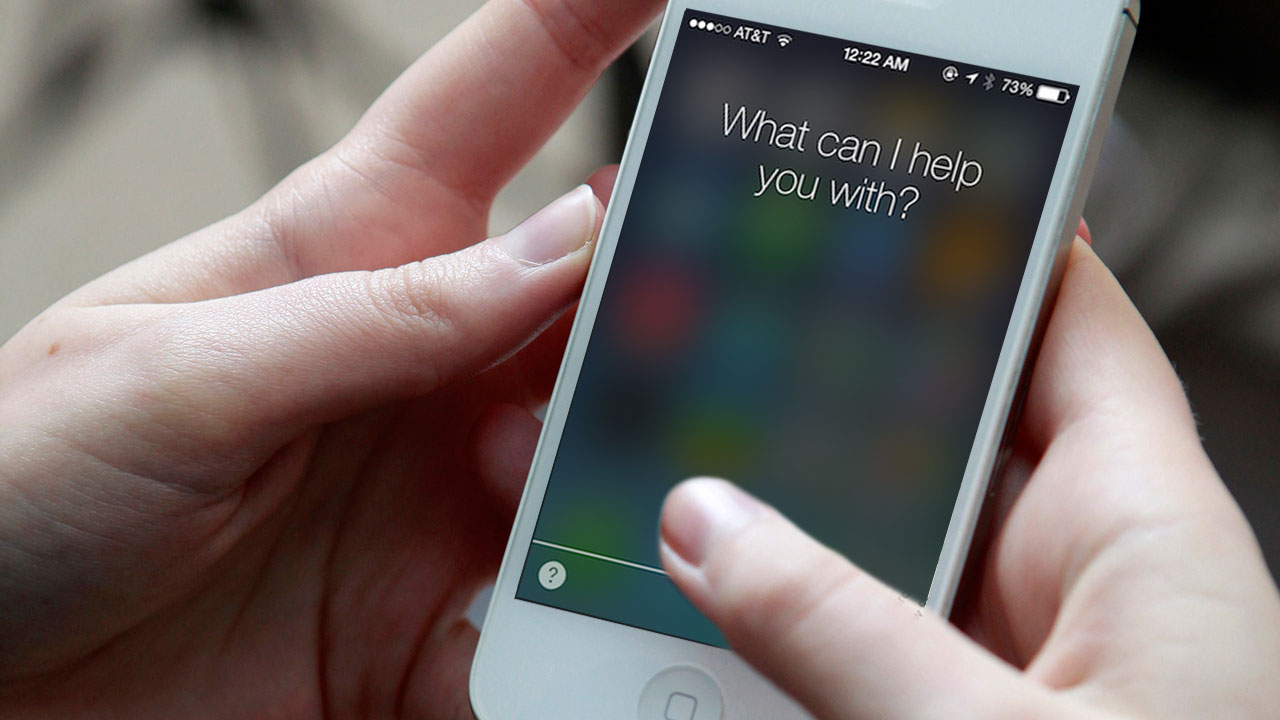
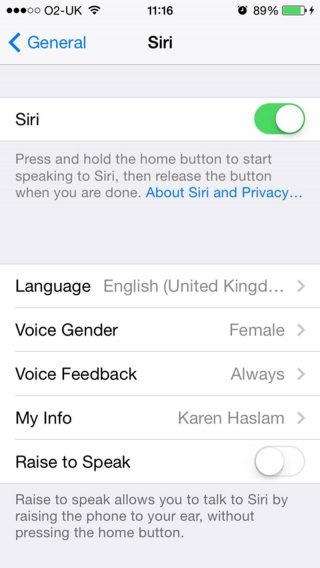
    Yes, even Siri can be a bit of a drain on battery life. You’ll find the ‘Raise to Speak’ option in Settings > General > Siri -if you aren’t using it, make sure to turn it off. That sensor is active whenever your phone is unlocked. If it detects you holding your phone next to your face, it will make Siri listen automatically.battery extension
    Update manually, Avoid Background Refresh App

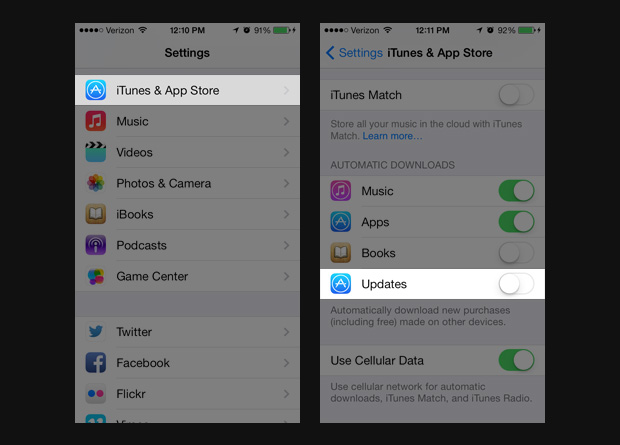
    Although updating your phone automatically seems to be the easiest way of updating, it is best to update manually. As it is handled automatically within the device it eats up tremendous amount of battery.

    Go to Settings> iTunes & App Store> In the Automatic Downloads section, find Updates> Move slider to off/white.battery extension
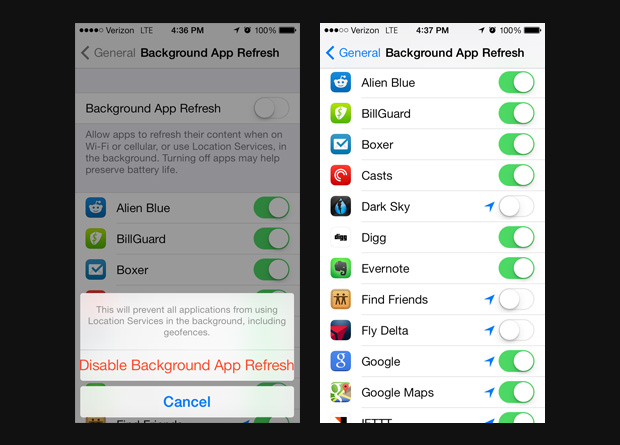
    It is also advisable to not use background app Refresh. We know how convenient it is when your device automatically updates the most used apps for you -but for the love of battery- it is better if this is disabled.

    Go to Settings> General> Handoff & Suggested Apps> Move the My Apps and App Store sliders to Off.battery extension
    High-Impact Games 

     This comes as no surprise that games and apps with high-end graphics and quality tends to consume more battery. So when you are playing games with 3D image quality or apps like the GPS chip for maps, and location-based apps it consumes more battery than when you are reading a book on Kindle.battery extension

    Follow these simple steps to prevent your iPhone from draining out of juice. Next time you land yourself in a dystopic world which lacks all forms of charging options, you’d know what to do.
  • YouTube’s iOS App Now Let’s You Edit Videos On the Fly

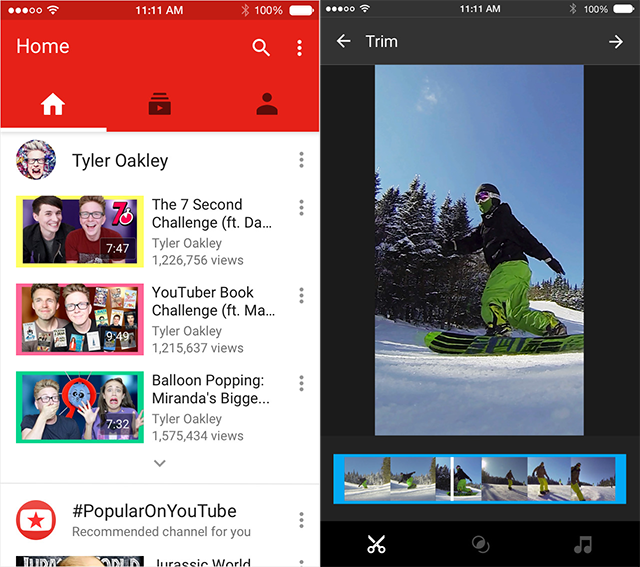
    Recent reports suggest that Google has updated its YouTube iOS app with some basic in-app editing features. The new YouTube version 10.38 was released on Monday in the App Store for the iPhone, iPad and iPod Touch.

    YouTube 10.38

    The in-app editing features include trimming a video, applying filters, and changing background music. So, if you want to upload a video on YouTube you can now just film it using your iPhone and upload it accordingly, instead of going through the long process of uploading it on to your PC and then using a third-party editing app. However, the editing features on YouTube are still quite basic, so if you’re going in for some serious editing, then it’s probably best to use the third-party apps for now.

    YouTube iOS

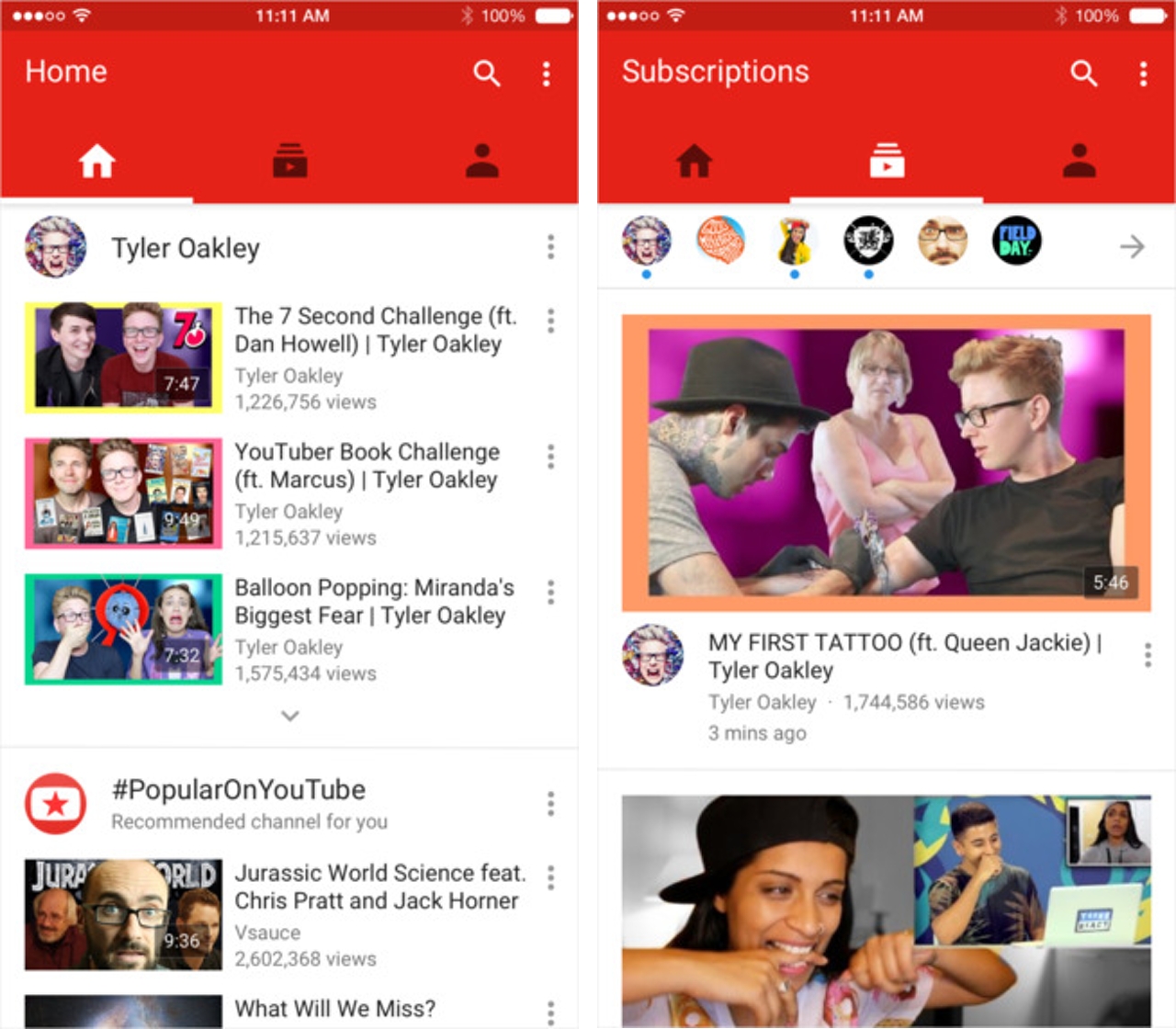
    The update is not just for users who create videos and upload them. YouTube has also gone through a minor display makeover for the lay YouTube user. So, if you watch videos on YouTube to waste your life away then the new updates help you. You can now swipe left to see your subscribed channels and swiping once more to the left will reveal your account page.

    You can also just tap one of the three icons at the top of the page to navigate between your home page, subscriptions page and the account page. There’s one last thing, there are three dots at the upper right of your screen which can lead you to your YouTube settings, help screen and other features.

    You can download the YouTube app for free on the iTunes App Store.

  • LowRes Coder App for iOS Lets You Create Your Own 8-bit Games

    LowRes Coder App for iOS Lets You Create Your Own 8-bit Games

    Have you ever had a great game in mind but never could get it past the idea stage because you just didn’t know how? Well, there is an iOS app called LowRes Coder that allows you to create that 8-bit game you’ve always wanted to ever since you played Snakes and Space Invaders all those years ago.

    The LowRes app for iPhone, iPad, and iPod Touch provides you the tools to program retro looking games and demos, and you don’t need to be a programming genius to do so. With this app you can be the designer and the developer. It is a user-friendly way to create your very own game and run it on a virtual game console once you’re finished.

    LowRes App (4)

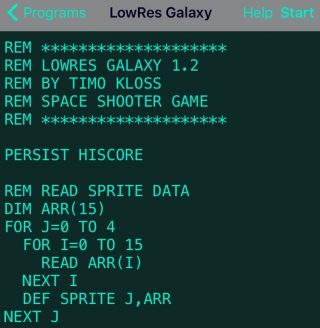
    The app uses basic programming language that is easy to understand. It is the “classic” language that programmers used a long time ago, and it is perfect for anyone who is keen on knowing how programming works. Consider it as a beginners guide to programming, if you may. The app uses three sound generators, 8×8 pixel sprites, 16 colours, and 64×64 pixels. It is inspired by 8-bit systems with an integrated BASIC interpreter and editor.

    Have an idea? Run with it

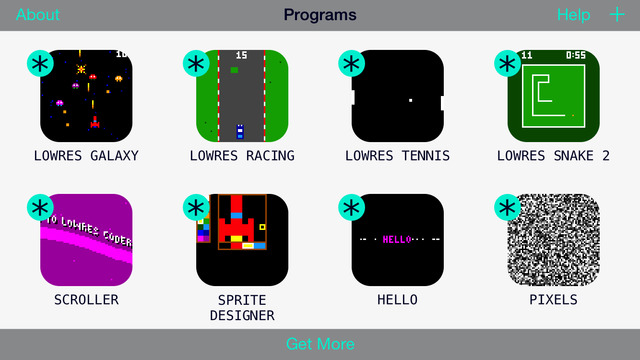
    Before you jump to a new page to start creating your codes, you need to know what to write. The app comes pre-loaded with games like Snake, Tennis, Racing, and Galaxy (some nostalgia for all). You can open any one of them and program more features into them, to make them more unique and fun. The sample lines give you an idea of how codes are written so that you can create your own game from scratch. If you’re new to programming this is a great way to learn the basics.

    LowRes App

    See what others are creating

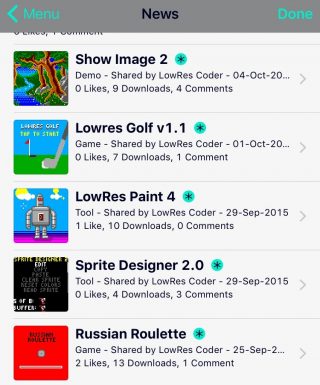
    There is a big community of amateur programmers out there who just love to make their own hopping, jumping, slithering games. The app lets you publish your games on your own profile page, which is then visible by the community.  You can check out others games and have others try out yours. Its a great way to get ideas, inspiration, and share your passion for programming.

    LowRes App (2)

    What are you waiting for?

    You’ve probably got an idea of what this app does for you. And if you are the curious type, you’ll appreciate an app that gives you the potential to one day, go beyond 8-bit gaming. This app won’t turn you into coding savants, but it’ll set up the basics. The app allows you to create new games and make changes to pre-loaded ones, which is pretty neat for a free version. Even if you’re not into coding right now, the app lets you play tons of games on the community, till you get an idea of how easy it is to make them.

    The free download limits the amount of lines you can use to 24 (you can do a lot in 24), however, if your dream game is a little more complex than that, you can go for the full version via in-app purchase for $2.99. You can download the app here for iOS users. Code on, people.

    LowRes App (3)


  • Your Facebook Profile Picture Can Soon Be a GIF

    Your Facebook Profile Picture Can Soon Be a GIF

    Facebook has just updated a new profile picture feature for iOS users. Now, your Facebook display picture could be a GIF of yourself.

    iOS users will have to check their profiles on the mobile app in order to find the notification. Once on the app, you’ll have to click on the ‘more’ tab and select your name to go to your profile. Then you will be asked to add a new summary bio. After editing that you’ll have to loop a profile video.

    For this, you will find an icon between the camera and video symbol on your profile picture. Click on that, and pick whether you want to take a video or upload one. The video is supposed to be only seven seconds long.

    The last step is to add featured photos, for this you will find a space for inserting five pictures below the ‘About Me’ section. You’re done. Your profile will look somewhat like this now :

    desktop gif facebook
    Image Source : wired.com

    However, there are a couple of things you need to know about this feature. Firstly, that it’s not yet available to all users and as of now, just a select few have got it. Secondly, the profile GIF can be viewed all across Facebook, but can only be edited via the mobile app. So go check your Facebook as soon as possible and tell us what you think about this cool new feature.

  • How and Why You Should Disable Autoplay on Facebook

    How and Why You Should Disable Autoplay on Facebook

    Facebook’s newest change has been the addition of the autoplay feature in its videos. One day you’re happily scrolling down your homepage, and suddenly you hear a cat meowing in the background. Yes, the video has begun to play simply because you happened to stumble across it on your homepage. No, you did not give the command for it to start meowing.

    Other than causing the annoyance of unnecessary cat-noises, this new feature is also a big toll on your internet data, not to mention taking away your right to completely ignore other people’s videos on your homepage.

    So here’s a quick look at how you can disable autoplay:

    iPhone:

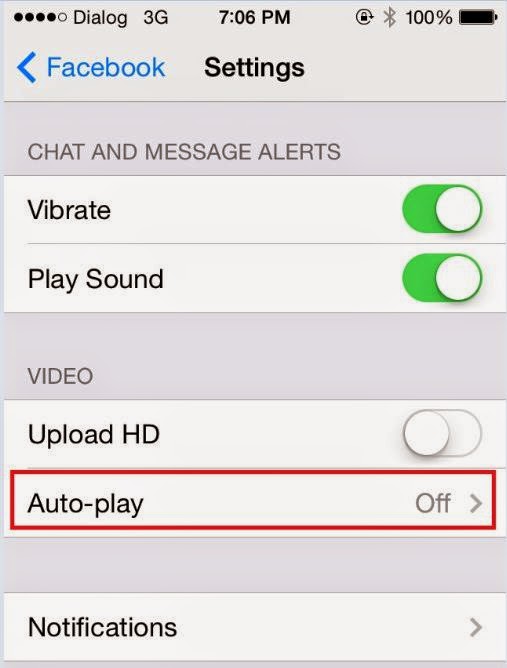
    facebook video autoplay


    Go to your settings, scroll down until you find Facebook and then select Settings again. Once there you could choose either ‘Wi-Fi Only’ or switch it off entirely.

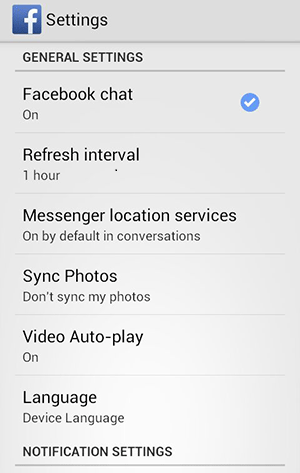
    Android:Autoplay on Android

    You will find the autoplay settings in your Android app. Choose the Menu button followed by Settings and therein lies your answer.

    Desktop:Autoplay on Desktop

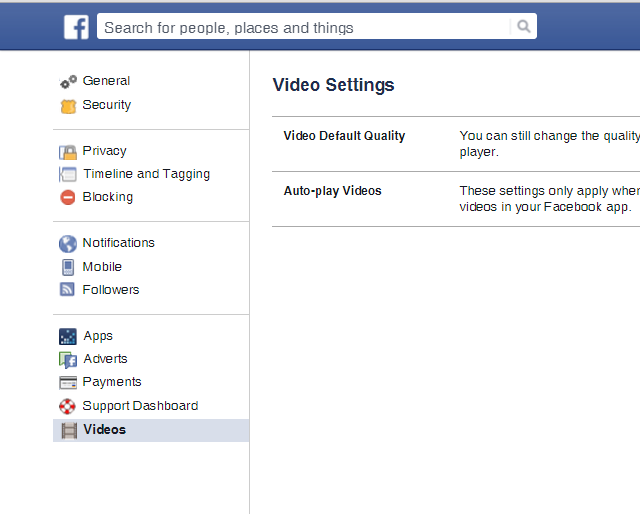
    Click the arrow in the upper-right corner of your Facebook profile and choose Settings. There will be Videos on the bottom left of your screen now. Click on it, which will take you to the autoplay settings and from there you can switch it off.

  • ‘Stick with Android’ App Mocks ‘Move to iOS’

    ‘Stick with Android’ App Mocks ‘Move to iOS’

    Android fans have spoken. The Move to iOS  Android app that was launched by Apple recently was received like a cold slap by Android users. Now an Android developer has come out with a hilarious reply by creating a ‘Stick with Android’ app.

    A developer named Jonatthias released the app on Google Play Store and this is the app’s description:

    “Everything about Android is designed to be easy. That includes sticking with it. With just one step, you can keep your content automatically and securely on your Android device with the Stay on Android app. No need to save your stuff elsewhere before staying on Android. The Stay on Android app securely keeps you away from switching to another (worse) platform.”

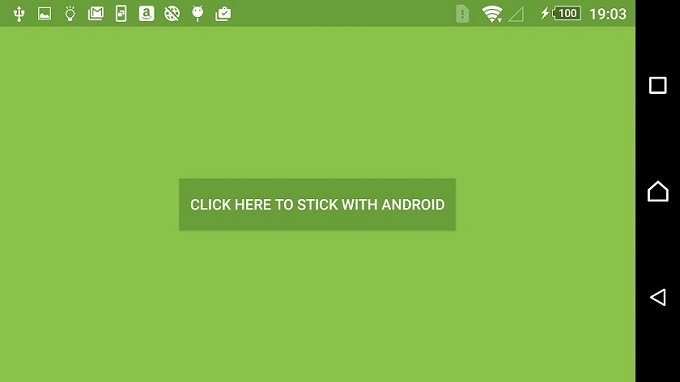
    Clearly, the description wages an all out war to take down the apparently insulting Move to iOS app. The Stick with Android app doesn’t do much except show a single button on screen that says “Click here to stick with Android” which, when pressed, lets the user stick with Android. And it’s as simple as that.

    Stick-with-Android

    However, the hilarity does not end there. The app has an almost perfect 5 star rating in the Google Play Store whereas the Move to iOS app currently has a 1.8 rating, which is perhaps more to do with the existence of the app rather than the functionality of it. This practically useless app is one of the best rated Android apps at the Store.

    As usual, the best part about an app like this is the user reviews. Click here if you want to download the app for a quick giggle.

    Stick with Android


  • Apple Releases Bug Fixes For iOS 9

    Apple Releases Bug Fixes For iOS 9

    Last week, Apple released its latest operating system which came with its fair share of bugs and glitches to the annoyance of many. This is not a new phenomenon as last year’s iOS 8 saw perhaps the most number of bugs. However, Apple is now working quickly to remove the issues with its new update. The new iOS 9.0.1 update is ready to be installed today and it removes some, not all, of the bugs that Apple users have been facing.

    Issues such as broken alarms and timers, distorted paused videos in Safari and Photos, and one the left users stuck on the ‘Slide to Upgrade’ screen, preventing them from using their device unless they rolled back to iOS 8, have been fixed with the latest update. Despite the bugs, the iOS 9 has seen the highest adoption rate so far with more than 50 percent of devices already on the latest OS. Clearly, Apple fans have not been deterred by news of users having issues downloading the OS on the first day.

    iPhone 6

    The release of iOS 9.0.1 mirrors that of iOS 8.0.1 which also came out just a week after the release of OS 8, though to much ire as the second update to iOS 8 did not seem to fix bugs but rather created more. Users reported that iOS 8.0.1 was breaking cellular reception and other features like Touch ID. Apple is not looking to make the same mistakes again with this latest update.

    For those who haven’t updated your iPhone or iPads yet can do so today (and after midnight in India). Do not expect all your troubles to disappear right away. Let us know if the latest iOS 9.0.1 has made your life more easier.

  • Apple Haters Pounce on ‘Move to iOS’ App

    Apple Haters Pounce on ‘Move to iOS’ App

    We love controversies. And there is no one more likely to stir up mixed reactions that take over the internet quite as much as Apple. In a move that was sure to create a buzz just from its title, Apple released an Android app (yes, we said Android) called ‘Move to iOS’ which allows Android users who are looking to switch to Apple to do so in an easy fashion.

    The app allows a smooth, easy way to transfer all your data such as contacts, photos, messages and bookmarks from your old Android device to your new iPhone. Apple promises a simple process to transfer your Android data. However, the app will only work if you’re setting up your iPhone or iPad as a new device.

    Move to iOS

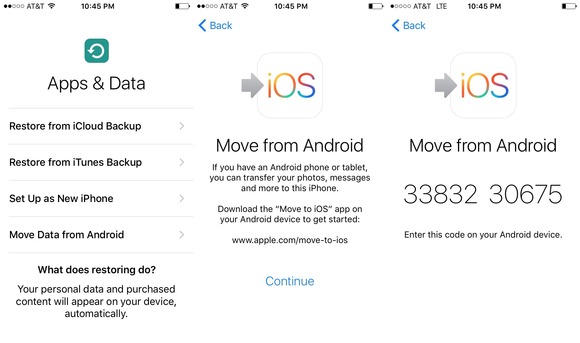
    Now for a quick tour on how the app works. When you begin setting up your iPhone or iPad, you will select a language, cellular or wireless network, then choose the apps and data you want to transfer. You will then select the Move Data from Android option in the transfer content screen. Then open the ‘Move to iOS’ app on your Android device. You’ll be prompted to enter a nine-digit code on both devices after which the transfer will begin.

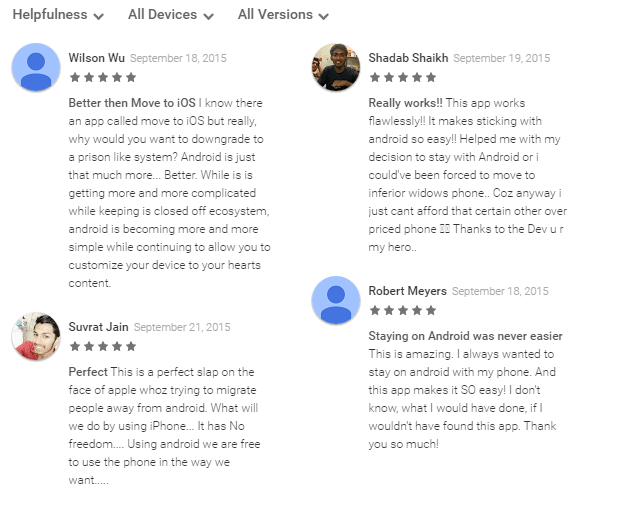
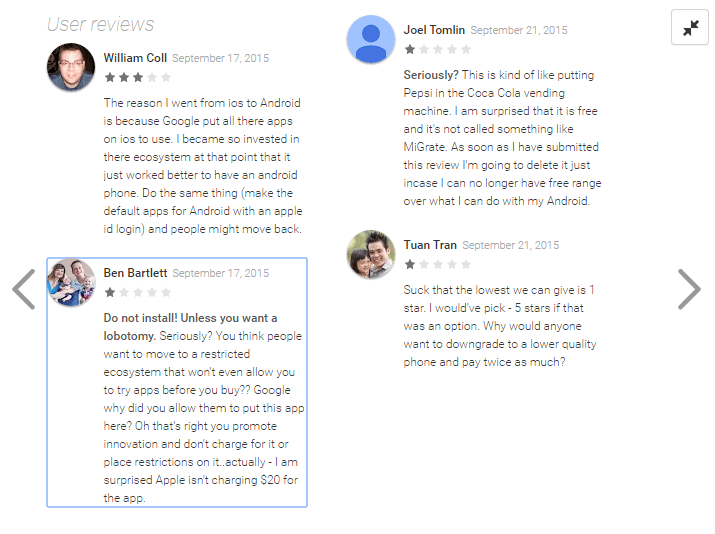
    While this app is truly helpful for those who want to switch over to the iPhone and would deserve anywhere between 4-5 stars, it, however, has received a hilarious 1.7 out of 5 rating on the Google Play Store. The low rating is credited to Android users who have shown their scorn at the app by giving it the lowest rating possible and by posting hateful reviews. Just for fun, here are some of them.

    Move to iOS Reviews

    While Android users have voiced their opinions (which have less to do with the app itself), you can download this app here if you are planning to switch from Android to iOS. It is a solid app that allows smooth transfer of data, no matter what haters say.

    Image Source: [tw-button size=”medium” background=”#07ABE2″ color=”” target=”_blank” link=”http://www.macworld.com/article/2984758/ios-apps/hands-on-with-apples-move-to-ios-android-app.html”]Mac World[/tw-button]

  • Cyber-Attack: Apple iOS App Store in the Throes of Malware

    Cyber-Attack: Apple iOS App Store in the Throes of Malware

    In what was seen as a first of its kind of attack, Apple Inc has suffered major internet intrusion in its iOS App Store by a malicious programme called XcodeGhost. Though the company has now taken necessary steps to remove infected iPad and iPhone programmes and files, it has still not announced a way for users to determine whether or not their devices have been infected.

    AppleStore

    The affected apps include Tencent Holdings Ltd’s popular mobile chat app WeChat, car-hailing app Didi Kuaidi and a music app from Internet portal NetEase Inc. According to the cyber-security firm, Palo Alto Networks Inc, a total of five infected apps have been found in the app store since this cyber-attack.

    Christine Monaghan, the Apple spokeswoman, affirmed in an email,

    “We’ve removed the apps from the App Store that we know have been created with this counterfeit software. We are working with the developers to make sure they’re using the proper version of Xcode to rebuild their apps.”

    Though the malicious software was found embedded in hundreds of apps, Apple has not disclosed the exact number. Needless to say, this unprecedented incident has left Apple users more than just surprised all over the world.

  • Apple Hires Artificial Intelligence Experts to Up Siri’s Game

    Apple Hires Artificial Intelligence Experts to Up Siri’s Game

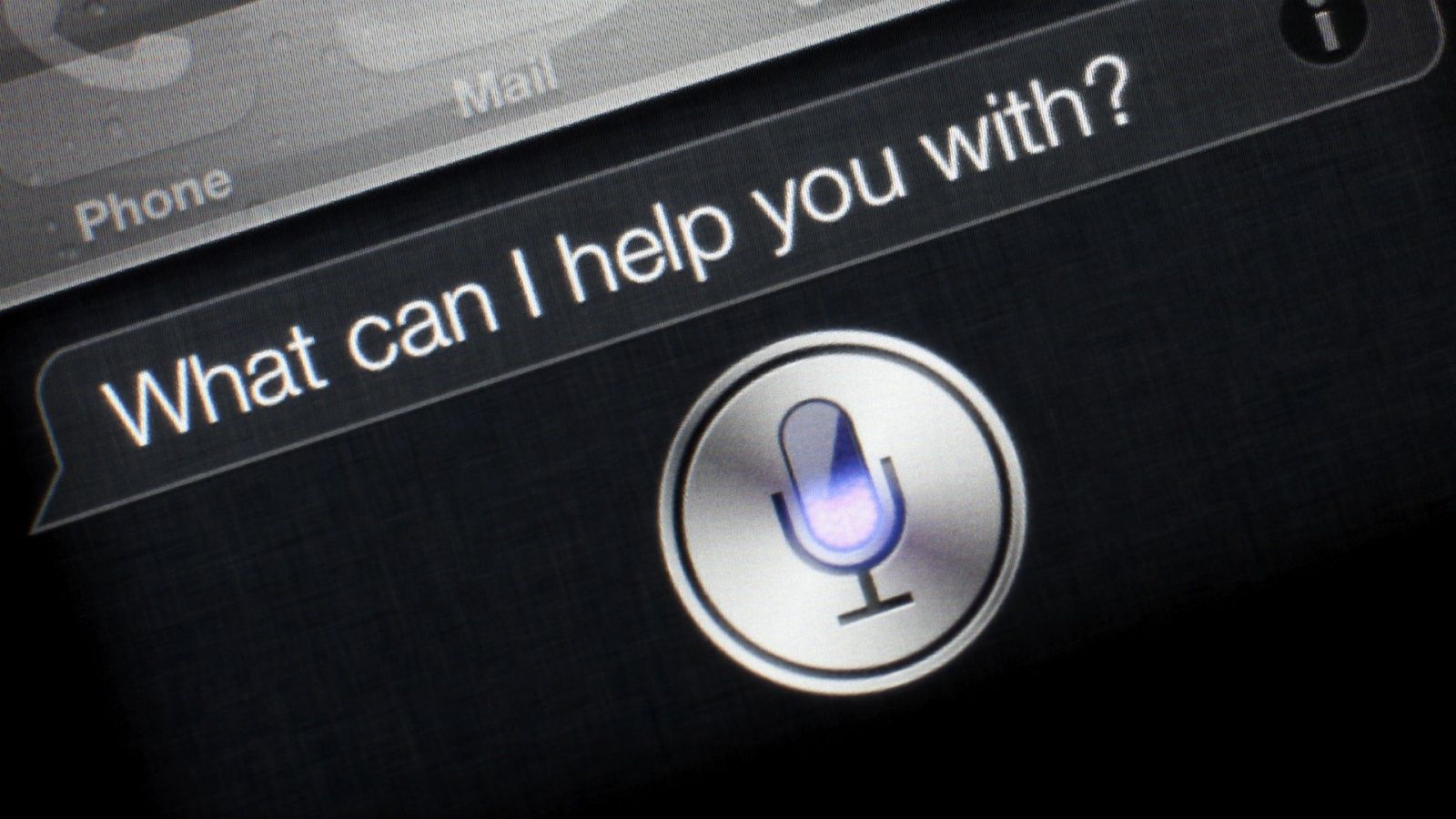
    As Apple closes in on the much talked about launch on the 9th of September, the company is already busy searching for artificial-intelligence experts to help improve Siri’s functionality that has become stale in comparison to Google Now and Microsoft’s Cortana. Both competitors believe that the customers want an AI system that provides information catered specifically to their time and location, something Siri has failed to deliver.

    siri-ios-7

    To up their game, Apple has decided to hire at least 86 AI experts to work on machine learning alone, as well as employees with doctorates specializing in AI. According to a report by Reuters, the company’s user privacy that limits the amount of data sent from the iPhone to the servers, which makes it a challenge to improve Siri’s AI.

    As part of its push, the company is currently trying to hire at least 86 more employees with expertise in the branch of artificial intelligence known as machine learning, according to a recent analysis of Apple job postings. The company has also stepped up its courtship of machine-learning PhD’s, joining Google, Amazon, Facebook and others in a fierce contest, leading academics say.” – Reuters

    The major problems for Siri, at the moment, are that it is lacking in both personal touch and information. Responses provided by Siri are far too rigid, allowing for only a simple user-requested reply. Limited data to the servers mean a limited knowledge of individual users and tastes. While trying to maintain the same level of user privacy, Apple Inc. is looking for solutions that will go around it and still deliver a smarter, personal Siri.

    In the upcoming launch on the 9th of September, Apple hopes to bring a faster, smarter version of Siri with its iOS 9 upgrade, which will provide users with information based on time and location using a feature called Proactive. Commenting on the iOS 9, Craig Federighi, Apple’s SVP of software engineer said that it was “adding intelligence throughout the user experience in a way that enhances how you use your device but without compromising your privacy.”  Though one may have to wait for the iPhone 7 (expected next year) for a fully improved Siri, the Apple has been teasing with a number of coy and witty replies when asked “Hey Siri, give us a hint” as part of Apple’s invites for the launch on the 9th of September.

    And with smarter, more cryptic replies such as:  

    A photo posted by iGyaan Network (@igyaan) on

    These various responses hint at the possibility that a new and improved Siri might be here sooner than expected. Until then, you can poke Siri for more hints.

iGyaan Network
Privacy Overview

This website uses cookies so that we can provide you with the best user experience possible. Cookie information is stored in your browser and performs functions such as recognising you when you return to our website and helping our team to understand which sections of the website you find most interesting and useful.