Tag: malware

  • Google Researchers Discover Six Serious Security Flaws In The Apple iPhone

    Google Researchers Discover Six Serious Security Flaws In The Apple iPhone

    Apple released its routine iOS 12.4 update for iPhones and iPads earlier this month. The update, like most software updates by the company claims of patching newly found security flaws and bugs. Now, in the latest report, it has been revealed that most of these serious security flaws that were patched in the iOS 12.4 update were originally discovered by Google security researchers. Out of the total six bugs reported, five have been already fixed, with one unknown flaw still remaining unchecked.

    About The Security Flaws
    The aforementioned security flaws in the latest version of iOS were found by two members of Google’s Project Zero bug-hunting team. These two people are named Natalie Silvanovich and Samuel Groß, who alerted Apple immediately upon finding the flaws. While what vulnerabilities were discovered have not been revealed for obvious security purposes, they have been claimed to be interactionless. This means they can be exploited without any interaction from the user of the iPhone. The flaw has been found in the smartphone’s iMessage application.

    Among the total six security flaws found by Google, at least four relied on the attacker/hacker sending malicious code to an iPhone. It is recommended that users of the Apple iPhone who still have not updated their device, do so at the earliest. The remaining security flaw that still hasn’t been patched, is expected to be fixed with the next update of the iOS software.

    What Is Project Zero?
    Google

    Also read: The Samsung Galaxy M20s Will Feature a Massive 5830 mAh Battery

    Project Zero is a team of security analysts that are employed by Google. The team is aimed at finding zero-day vulnerabilities; that is bugs in software before they are found by anyone else for malicious use. These vulnerabilities, if left unchecked can be exploited by various criminal organisations, hackers and many intelligence agencies. Project Zero was announced by Google on the 15th of July 2014 and has been responsible for finding many serious security flaws with major software and devices.

  • Agent Smith Malware Affects 25 Million Android Devices

    Agent Smith Malware Affects 25 Million Android Devices

    The world’s most popular mobile OS, Android has once again been subjected to a wide scale malicious attack. A security firm “Check Point” discovered a new malware which replace portions of known apps with its own code. Noteworthy, the malware has affected more than 25 milion devices around the globe, out of which 15 million are in India alone. 

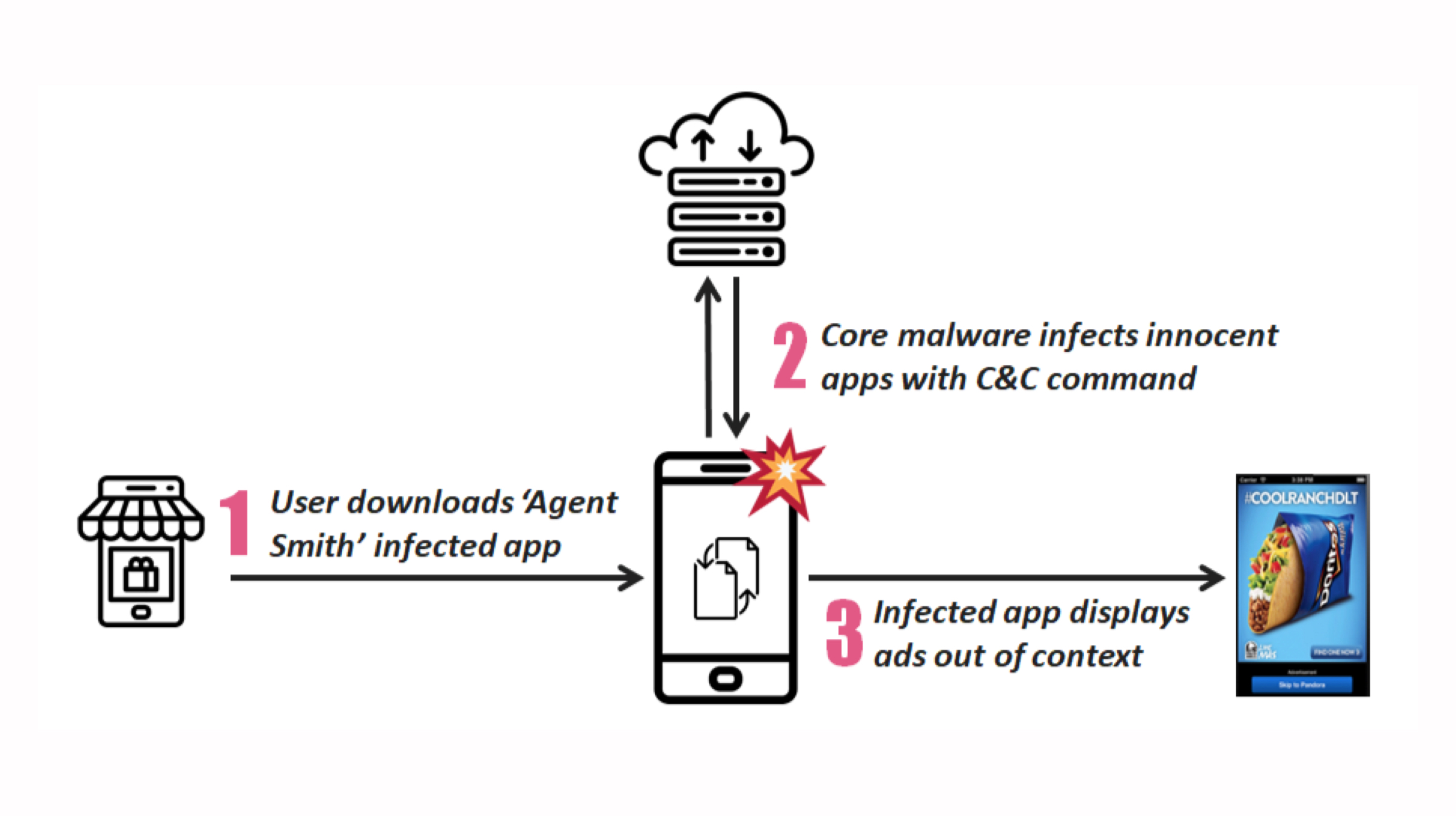
    According to Check Point, the malware is named “Agent Smith” and is designed to target known vulnerabilities  of the Android operating system. The application was revealed to partially replace code on legitimate apps with malicious code. Notably, the whole process was exectuted without the knowledge or permission of the device owner.agent smith malware

    Surprisingly, the malware is not intended to steal user data, instead, it injected the infected apps with lines of  code so that they display advertisements. The developer would earn ad credits whenever a user with infected applications would watch or click on the display advertisements. Therfore, the developer could gain monetary value with the whole scheme. agent smith malware

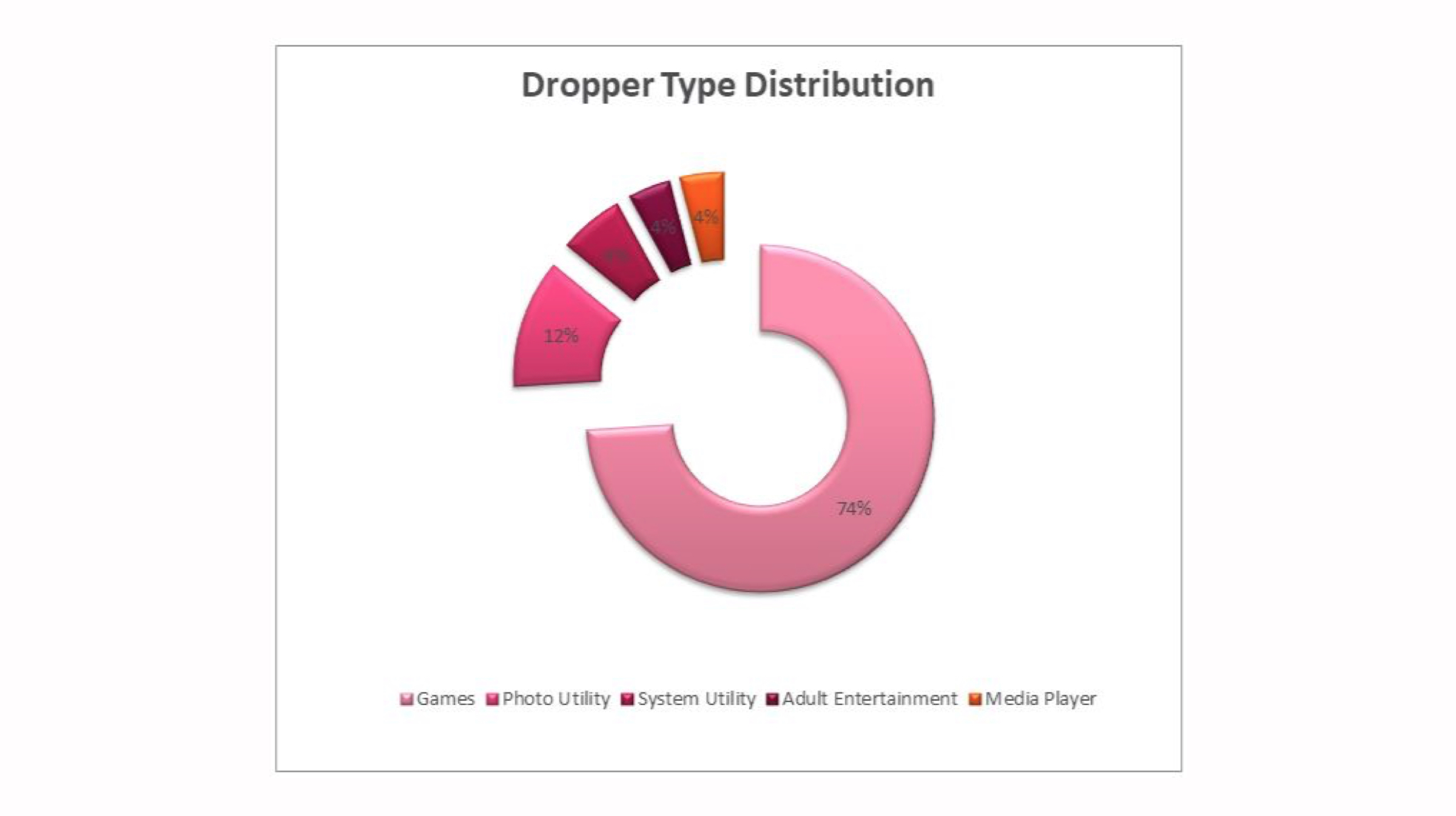
    The reserach agency revealed that the Agent Smith malware mainly targeted well-known apps like WhatsApp and Flipkart, therefore, accounting for the astounding reach it had. The source of the malicious app was traced back to a third party application store which is called 9Apps. The malware was concealed in programs like games, video players and adult entertainment apps which have high demand. agent smith malware

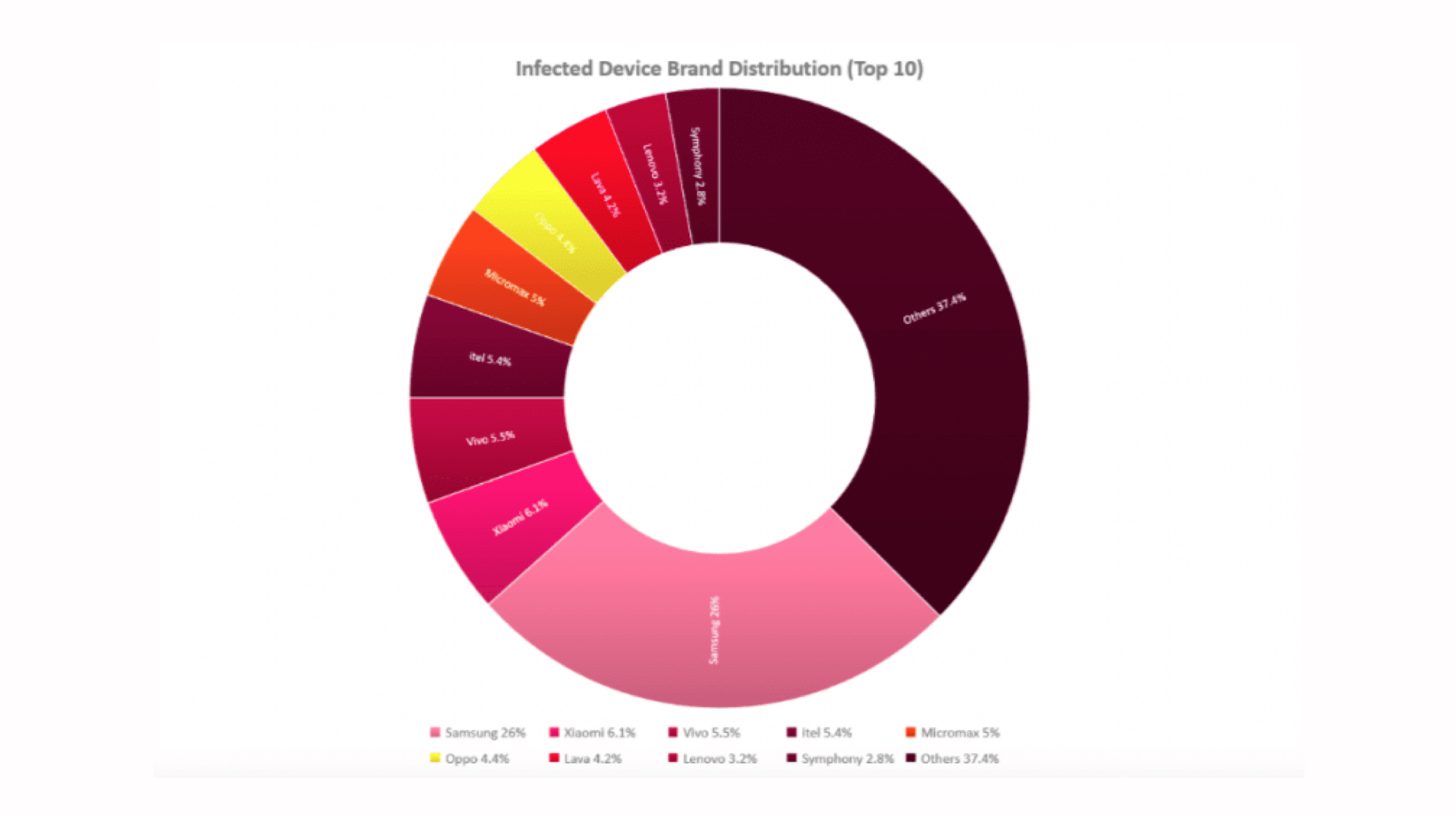
    Check Point also shared a donut graph that shows the distribution of malware on smartphones manufactured by OEMs. At over 26 percent, Samsung device owners carry the maximum share in the information representaion tool. 

    Aside from 15 million Indian smartphones, the malware was even able to spread onto 3,00,000 devices in the US. Surprisingly, the exploits used by the malware to execute the infection process were patched several years ago. However, a large number of developers did not update their respective applications. 

    Also Read:  Apple Will Soon Launch Multiple New iPad Models

    This is just one security breach that has made out to the public. It wont be wrong to assume that several other cases like this still remain covered. Conclusively, in this day and era of widespread technology, nothing seems to be truly safe regardless of security measures that are implented. 

  • Fake Update App Fools 10 Million Samsung Galaxy Owners

    Fake Update App Fools 10 Million Samsung Galaxy Owners

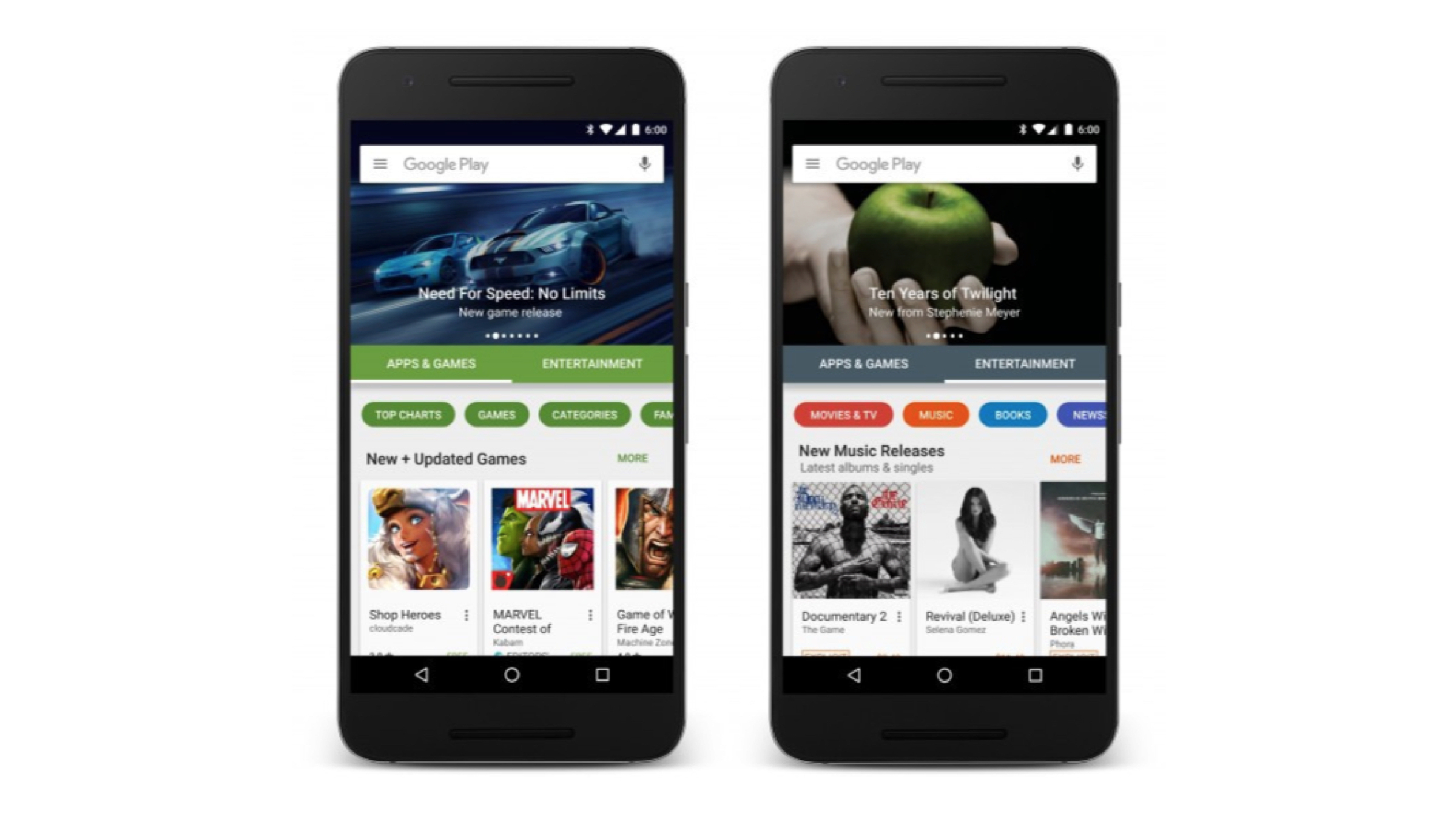
    The Google Play Store has been subjected to multiple incidents for unknowingly circulating applications that are ridden with malware or adware. In the lookout for the latest firmware updates, 10 Million Samsung Galaxy smartphone owners downloaded a fake app from the Play Store.

    The “Updates For Samsung” application which has now been taken down from the Play Store is not affiliated with Samsung (yet distributing their firmware). Shockingly, the application offered an annual subscription of US $ 34.99 in exchange for allowing users to download the latest software updates in exchange for high-speed downloads which are freely available in fact (explained later). Samsung Galaxy S10

    Besides, the “Updates For Samsung” app did provide free updates but the downloads were capped to 56 kbps. Therefore, it would take days or even weeks to download an update package which would not weigh more than 2 GB. Hence, a large number of users fell for the trap and ended up paying for the subscription.

    Adding further to the list of concerns is the fact that payments made to purchase a subscription on “Updates For Samsung” were processed through the companies own website and not Google Play which is usually a case. 

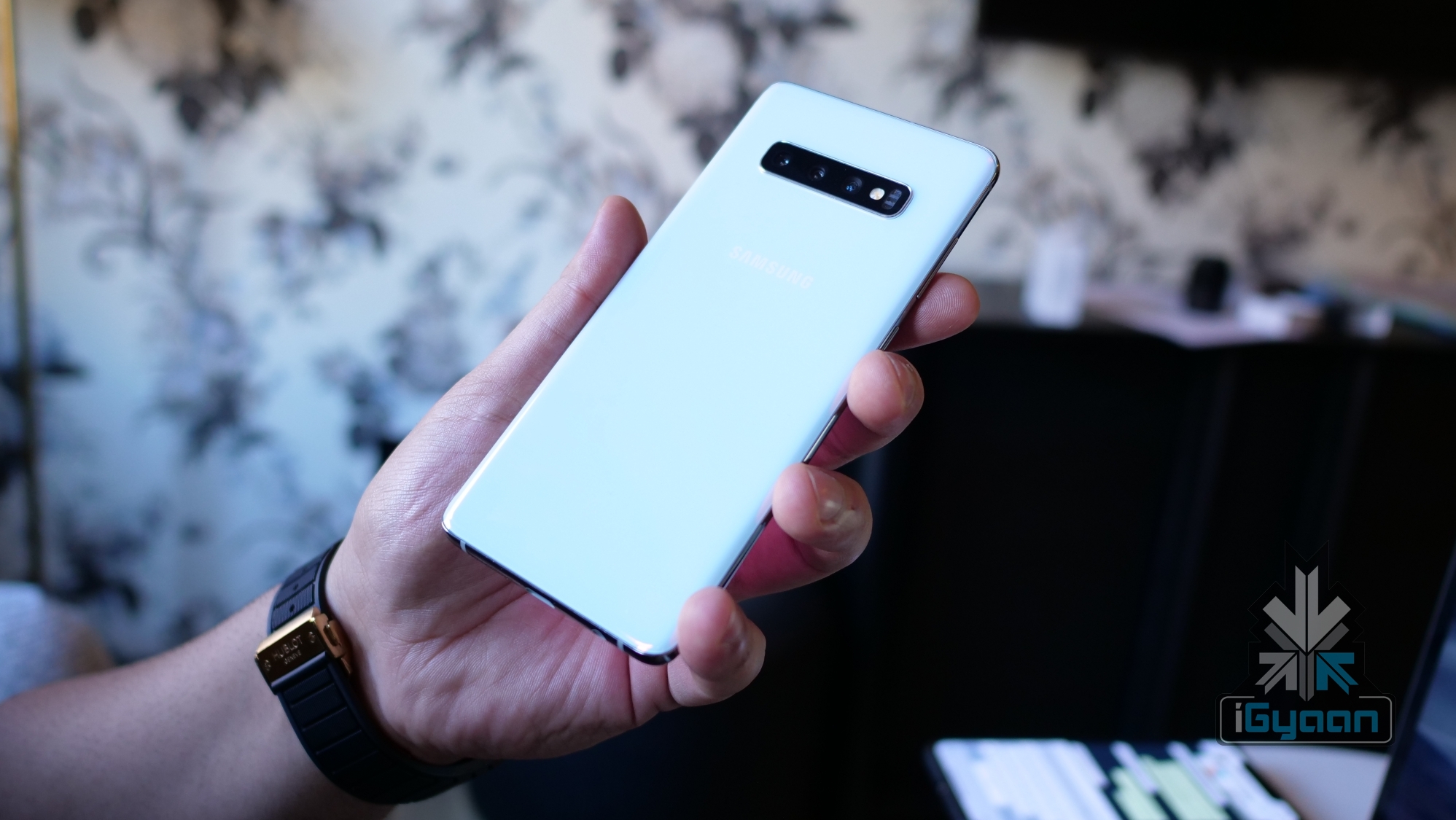
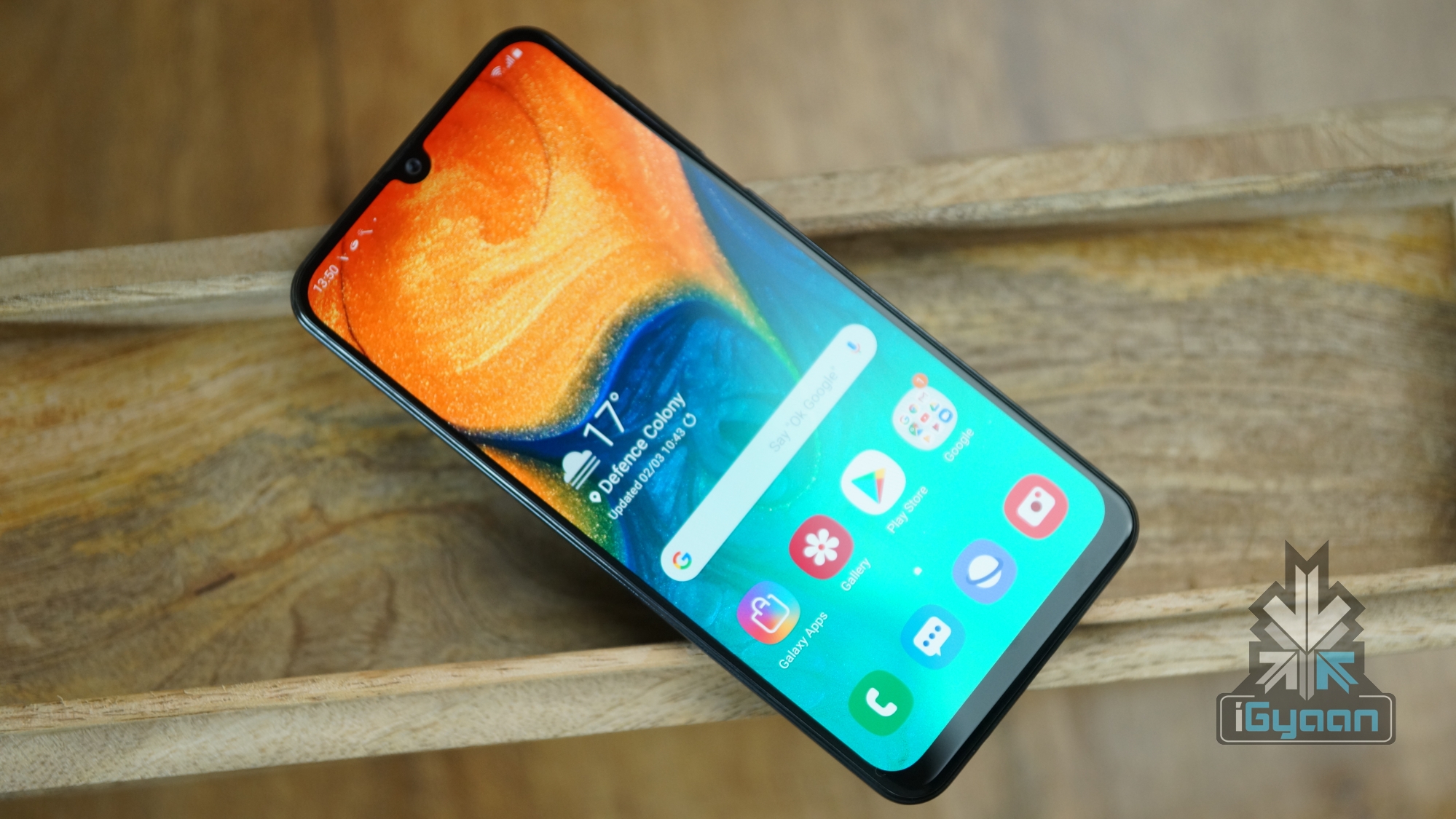
    Furthermore, the “Updates For Samsung” application was loaded with adware and some users complained that it was extremely resource hungry. One user wrote that it could bring the flagship grade Galaxy S10 to a grinding halt which would require a reboot to return to a functional stage. Samsung Galaxy A50

    In case you did not know, every Samsung smartphone has a built-in update checker which can be used to install the latest firmware update without any additional cost. Following is the method that will allow you to check and update your Samsung Galaxy smartphone:

    • Find the Settings app among your listed apps and open it.
    • Look for Software Update in the search tab.
    • Click Check For Updates
    • Scroll through Settings and click on Software Update
    • If an update is available, click Download.
    • Once downloaded, press install.

    Installing an OTA (Over The Air) update can usually take anywhere between 10 minutes to an hour. Even longer in an rare case.

    Also Read: Redmi K20 Pro Indian Price Leaks, Starts At Rs 24,999

    Make sure your device is charged enough to run through the complete installation process or keep it connected to a wall charger. 

    Never press any buttons while the software update is in progress as this can lead to a bricked device. 

  • Over 2,000 Dangerous Apps Found On The Google Play Store

    Over 2,000 Dangerous Apps Found On The Google Play Store

    Google’s Android is by far one of the most accessible OS (operating system) available in the market. It is estimated that about 75% of all smartphone users are using the software. This implies that 3 out of every 4th person has an Android enabled device. Hence, there are bound to be shortcomings and problems related to such a high user base. Notably, a brand new report has claimed that over 2,040 of Google Play Store apps are harmful to the users, some of which are famous.

    Google Play

    Research by the University of Sydney and Data6161 or CSIRO has administered over 1 million apps on the Google Play store. The two-year long study had found a large number of fake apps which weren’t malware but still required an unnecessary amount of permissions. These apps had no need for the data access that they were asking the users to provide. Certain software available on the Play store were famous, such as Hill Climb Racing and Temple Run. However, a few of these applications were downright malware.

    Machine learning and Neural networking are being heavily implemented in the processing of all the 1 million applications. An algorithm was specifically developed to look for similar text description and icon designs in Google Play’s top 10,000 most popular apps. A massive number of 49,608 were seen as potential threats to users or their device’s integrity. VirusTotal flagged about 7,246 of the apps as outright malicious while the remaining 2,040 were fake and high-risk apps. Furthermore, 1,565 of such apps made at least 5 sensitive permissions request and 1,407 were embedded with 3rd party ad libraries.

    Also ReadHonor 9X To Feature A Triple Camera Set Up And Kirin 810

    The aforementioned dangerous applications have since been removed. Google has reported that the number of rejected app submissions has jumped by more than 55% over the previous year while app suspension has increased by up to 66%. Users should be wary of such applications and should ensure to always download only the official and recognised corporations applications from the Google Play store. If unavoidable, one should pay attention as to what permissions the apps are demanding. A game should have no right to making calls and sending messages or have access to customers contact details.

  • The Laptop With World’s Six Most Dangerous Malware Sold For US$ 1.3 Million

    The Laptop With World’s Six Most Dangerous Malware Sold For US$ 1.3 Million

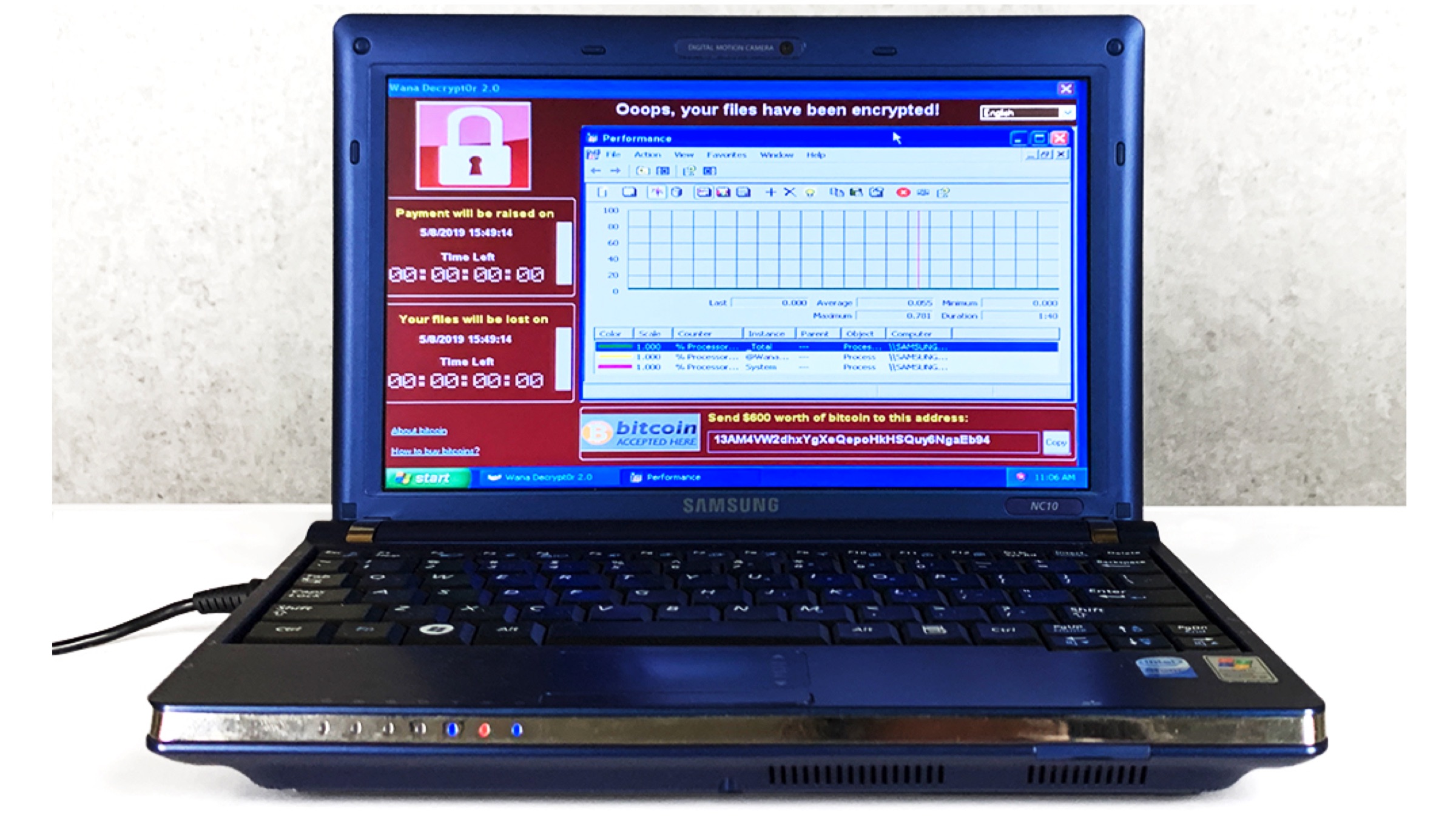
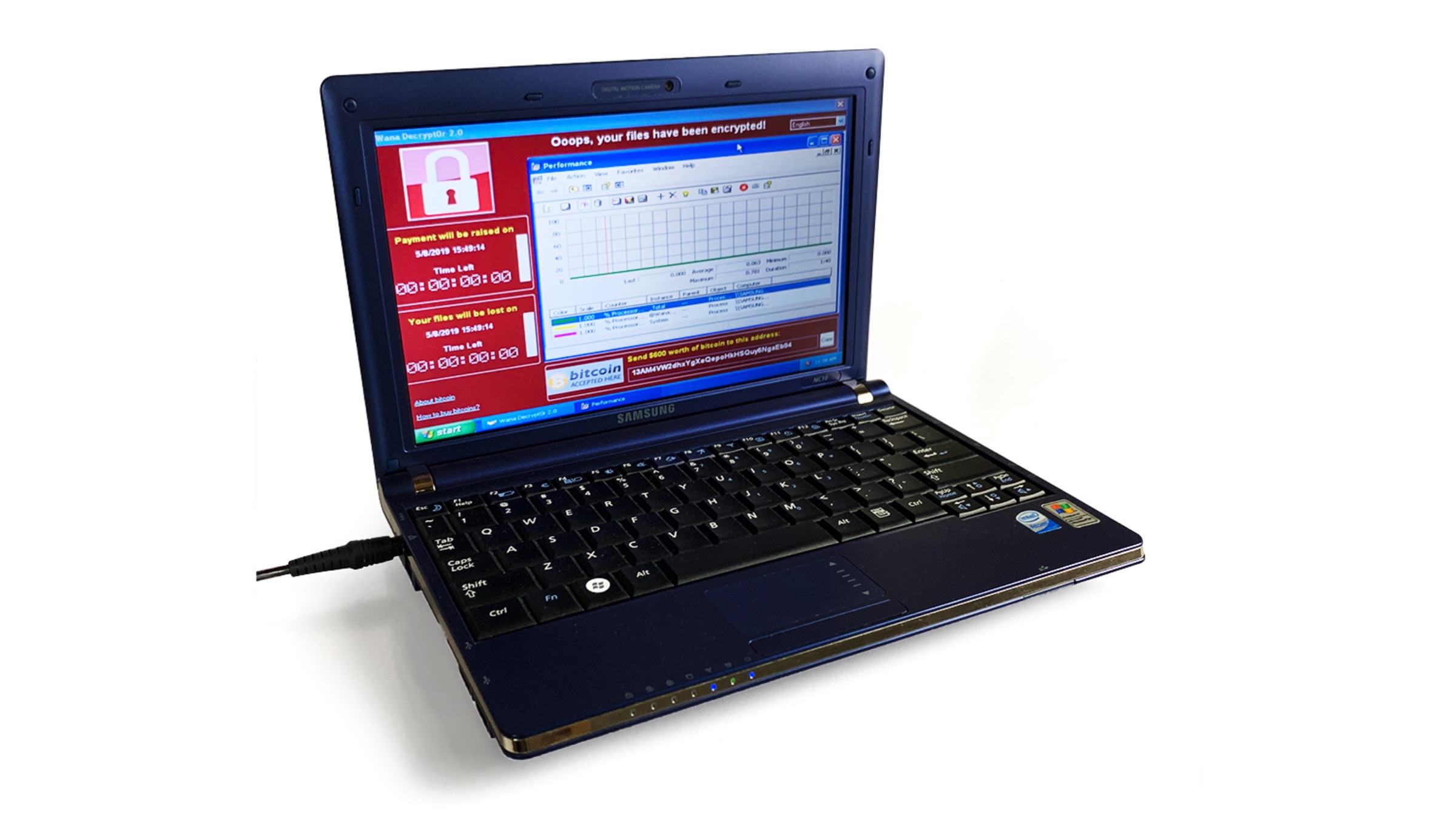
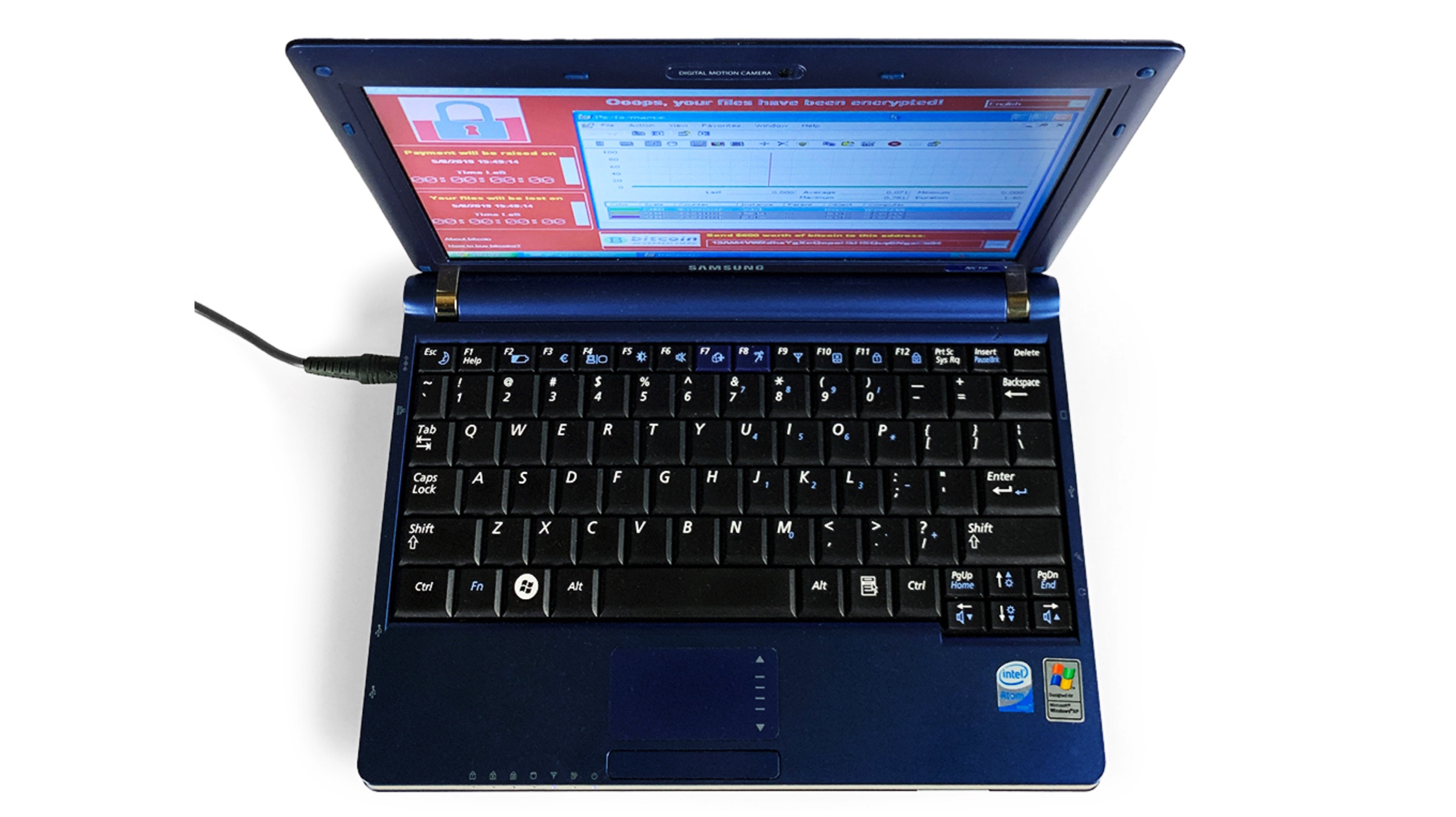
    What would you want to pay for a laptop that is a decade old and runs Windows XP? Oh, and add the fact that it has six of the world’s most dangerous malware installed in it. If you are having trouble answering the question, let us do the work for you. The laptop in question, framed as an artwork called Persistence of Chaos by Guo O Dong has been sold at an online auction for a whopping price of US$ 1,345,000 (INR 93,694,852).

    About The Laptop

    Malware


    The laptop in question here is a Samsung NC10-14GB 10.2-Inch Blue Netbook which was introduced back in the year 2008. It was created by internet artist named Guo O Dong and was commissioned to do so by a cybersecurity firm known as Deep Instinct. The device as mentioned above runs 6 pieces of malware that are considered most dangerous in the world. All the malware installed in the laptop has been reported to have caused financial damages totalling US$ 95 Billion. The artwork has been kept isolated and is airgapped, which refers to it as it is kept away from the internet to prevent the spread of the malware.

    Malware Infected Samsung laptop

    Also read: OnePlus 7 Pro Nebula Blue Edition To Go On Sale For The First Time In India

    The artist claims the intention behind the laptop was to make physical the abstract threat the digital world poses. The malware(s) inside the device are the ILOVEYOU virus, which was distributed via email and caused US$15 Billion in damages; the MyDoom, spread by Russian spammers and causing US$ 38 Billion in damages. The third is the SoBig worm, which was reported to have caused US$ 37 Billion in damages. Other malware includes the WannaCry, DarkTequila and BlackEnergy viruses, which also have been notorious in causing financial damage to consumers. For those curious, you can visit this link to watch the live stream of the laptop kept in its enclosure because apparently, that is a thing now.

  • Google Removes 29 Malicious Photo-Editing Apps From Play Store

    Google Removes 29 Malicious Photo-Editing Apps From Play Store

    Google is on the roll again. This time, it reportedly took down 29 suspicious Google apps from the Play Store. And the surprising thing was the fact that these applications had already been downloaded over millions of times. Read on to find out more.

    What Do These Apps Do?

    As reported, several apps which are downloaded from the Play Store tend to display objectionable links and content on their screens. The links and clickable content then redirects the users to ‘scam’ websites, where information is misused. Supposedly, these ‘fake’ apps can access remote ad configuration servers for performing their phishing attacks. Previously, Google banned some Crypto-mining apps from their Play Store, due to policy changes by Google in July 2018. It also banned Chrome crypto-mining apps from the Chrome store. Crypto-jacking was a pretty common activity at that time. Hackers used to take over user’s devices for crypto-mining, even on mobile devices.

    List Of Malicious Apps

    Below is the list of the apps that were pulled off the Google Play Store. If you still have any app from the list in your phone, go ahead and uninstall it. It’s for the best 

    • Pro Camera Beauty
    • Cartoon Art Photo
    • Emoji Camera
    • Artistic effect Filter
    • Art Editor
    • Beauty Camera
    • Selfie Camera Pro
    • Horizon Beauty Camera
    • Super Camera
    • Art Effects for Photo
    • Awesome Cartoon Art
    • Art filter Photo
    • Art Filter Photo Effects
    • Cartoon Effect
    • Art Effect
    • Photo Editor
    • Wallpapers HD
    • Magic Art Filter Photo Editor
    • Fill Art Photo Editor
    • ArtFlipPhotoEditing
    • Art Filter
    • Cartoon Art Photo Filter
    • Art Filter Photo Editor
    • Pixture
    • Art Effect
    • Photo Art Effect
    • Cartoon Photo Filter
    App Demographics

    Also Read : HMD Global To Launch Nokia 9 PureView On February 24

    A lot of these apps are Beauty camera based apps, which lure users via promises of earning “a lot of money in a short span of time”. Our sources say that a huge percentage of downloads were performed in Asia, particularly India. This clearly indicates the kind of audience such developers are targeting. These apps are tough to remove from the application list because they create failsafes such as creating fake app shortcuts. These apps provide irritating full-screen ads, that are very disturbing and take you to another webpage. Thankfully, Google is trying to get rid of such apps, which seems like a good move. 

  • Android Safer Than iOS According to Reports

    Android Safer Than iOS According to Reports

    The mythbusters are back, and this time one of the all time popular myths regarding iOS has been busted. According to a new study, it turns out that iOS isn’t as malware-proof as people have come to believe. In fact, reports suggest that Android is safer and more secure than iOS.

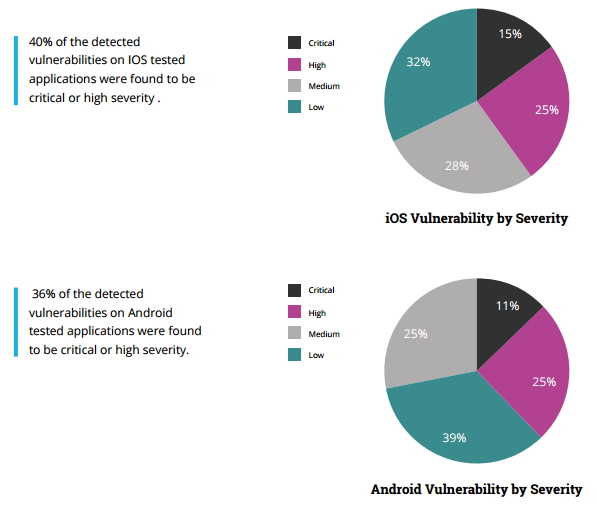
    The study carried out by Checkmarx and AppSec Labs claim that Apple’s ‘wall garden’, that is the App Store, is filled with apps that have greater percentage of critical or high severity security vulnerabilities when compared to Android apps.

    According to the report, a critical vulnerability is defined as one “that exposes a major security risk with a direct exploit (not needing user involvement). If exploited, the security threat might cause major damage to the application and/or have major impact on the company.”

    Here’s what the claim means for everyone. Firtsly, it breaks the image of iOS being regarded as the most fool-proof operating system. Secondly, it also means that there is now no safe operating system out there as all the major players are now on the same boat. Of course, it was only a matter of time for a report such as this to come out. Hackers do tend to target big names, especially ones that claim to be unbreakable.

    “With more than 1.5 million apps available in the two main app stores, Apple and Android, and hundreds of billions of downloads to date, the mobile landscape has quickly become the main playground for hackers and attackers.”

    ios-vs-android-security

    As the reports suggest, 36 percent of Android apps were found to be potentially critical or highly severe while a surprising 40 percent of iOS apps were deemed critical, crushing the common misconception that iOS is a safer platform.

    There seems to be some credibility to this report, especially after the recent news that a popular app on the App Store, called InstaAgent, has been leaking Instagram username and passwords and sending them off to a remote server as well as publishing unauthorized images to users account without their consent.

    Checkmarx’s Amit Ashbel explained to GeekTime that most of the security flaws are the result of vulnerabilities in developers’ code. “The mobile application industry as a whole is lagging behind on secure coding best practices,” he added.

    Well, that’s one less thing for iPhone users to brag about now.

    Source: [tw-button size=”medium” background=”#07ABE2″ color=”” target=”_blank” link=”https://www.checkmarx.com/2015/11/05/the-state-of-mobile-app-security/”]Checkmarx[/tw-button]


  • Mac Malware Reaches an All-Time High

    Mac Malware Reaches an All-Time High

    It’s a myth that your Mac is the most malware-free PC out there. That perhaps used to be the case, and one reason behind it was that hackers were more attracted to Windows due to their larger presence in the market. But not anymore. Over the years there has been a change. Apple’s share of the PC has grown and, of course, hackers are all too aware of that.

    3-ways-to-protect-your-mac-from-malware-ffc0cae69b

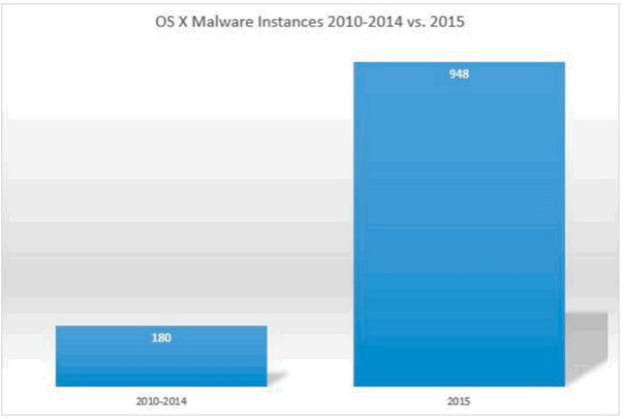
    There has been an increase in malware specifically targeting Apple’s Mac platform. What’s more is that the malware is a lot more dangerous and sophisticated than one would think. According to reports from BleepingComputer, 2015 was the most malware-ridden year for the Mac. The reports summarised the findings from Bit9 and Carbon Black that state that OS X malware this year was five times more prevalent than the preceding five years combined.

    Bit9 and Carbon Black also released a chart that leaves everything quite clear.

    os-x-malware-growth

    According to the chart, there was about 180 instances of malware during the period of 2010-2014, while 2015 saw a whopping 948 instances, and there’s still a couple of months to the end of this year.

    BleepingComputer also listed some of the most common OS X malware found this year. This is based on a 10 week study with over 1400 unique malware samples collected and analysed. The common ones are narrowed down were:

    Lamadai – backdoor Trojan targeting a Java vulnerability.
    Kitm – ran commands on machines for victims at the Oslo Freedom Forum
    Hackback – ran commands on machines for victims at the Oslo Freedom Forum
    LaoShu – spam via undelivered mail parcels
    Appetite – Trojan targeting government organizations
    Coin Thief – stole bitcoin login credentials via cracked AngryBird applications.

    Another point to note is that while there are a number of malware being floating around these days, not all are dangerous. Apple has protected itself from most. The issue is, however, that there is a rise in the number of malware targeting Macs. The onus is on Apple to take this into serious consideration and work to make its future OS X updates safer.

  • Stagefright Bugs Leave Android Devices Vulnerable to Hacking

    Stagefright Bugs Leave Android Devices Vulnerable to Hacking

    Stagefright, Android’s media playback system, was found with a bug earlier this year in July. The bug allowed hackers to break into any device by simply sending a specifically structured text message. However Google promptly responded to this and fixed the bug.android marshmallow

    You ask how is this news relevant now, in a world of iPhone launches and Google events, about half a year away from Stagefright’s illness? The answer lies with a similar discovery made by Zimperium, the same company which had earlier found this bug. Stagefright is open to two such similar bugs and requires no more than a certain kind of multimedia message this time.

    This basically means that a hacker can remotely execute a code of a device by sending an MP3 or MP4 file containing the required malware to the user. Zimperium mentioned in a blog post,

    “The vulnerability lies in the processing of metadata within the files, so merely previewing the song or video would trigger the issue.”

    The one way you can protect yourself from malware until these bugs get fixed is to avoid opening messages containing multimedia files from unknown sources.

  • Tips to Help Protect your Computer from Viruses

    Tips to Help Protect your Computer from Viruses

    In developing times like now, we live under the constant threat of computer viruses and malware that reach your system through emails or any external devices like a pen drive. We have multiple Anti-Virus programs available and it is critical to keep updating them. But the key to a virus-free environment is beyond using an anti-virus program. Safe computing practices and policies should be used to safeguard your PC from such threats.

    Let’s take a look at some user friendly, yet efficient methods of dealing with viruses, other than using Anti-Virus programs:

    Do not open suspicious email attachments

    spam
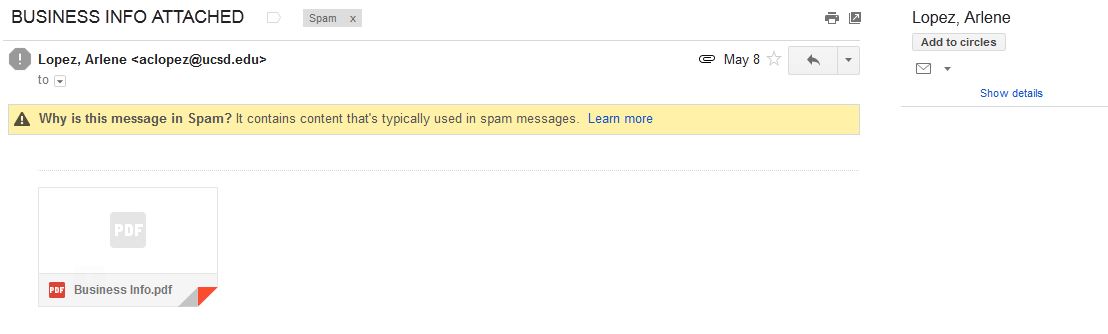
    Most of the infected emails are filtered in the SPAM Folder

    It is wise not to open any unknown email with an attachment unless you are expecting them. Most of the viruses and links to phishing websites come through emails. To know whether the mail contains a virus or not, you can follow the steps below:

    • Always check the sender’s address. If the address is known to you, it is safe to open the mail. But if the address is unknown, we would recommend caution before clicking on the mail.
    • Check the subject line. If the subject line shows some random sentences asking you to open the mail, Do Not click on it. Some viruses are capable of mimic, or spoof, legitimate email addresses.

    Keeping your computer updated

    Keeping your computer updated helps to lower down incoming viruses from external sources. It is because across different Operating Systems, various security updates are released, thus helping in protecting your computer.

    Using a Firewall

    firewall
    Pictorial representation of how a Firewall works

    Use of Firewall does not entirely eliminate the threat of Viruses, but it helps in alerting you if a virus or worm attempts to connect to your computer. It can also block hackers from downloading potentially harmful files to your computer.

    Disabling the Auto-Play Option

    Many viruses attach themselves to a drive and start installing automatically when the media is connected to a computer. As a result, connecting any external hard disk or external data can lead to automatic propagation of such threats. Hence, disable Autoplay.

    Lastly, Surf Safe

    Many anti-malware programs include browser plug-ins that help avoid virus infections and internet phishing. These plug-ins should always be utilized with regular web browsing. Personal data and sensitive information should never be entered on any web page that has arrived independently. They should instead open a web browser, enter the address of the page they need to reach, and enter their information instead of clicking on a hyperlink and assuming the link has directed them to the proper URL. Hyperlinks contained within an e-mail message often redirect users to fraudulent, fake, or unauthorized websites. By entering web addresses manually, users can help ensure that they arrive at the actual page they intend.

    Although the above methods should be carried out on a daily basis, the only fool-proof savior is a good Anti-Virus program, like Avast! to name one. Many computers receive free anti-virus programs, but these are not enough to provide sufficient protection against the ever-growing list of threats. We need to stay updated with ever-growing technology. Browse safe!

  • And the Award For the City With the Most Infected Internet Goes to New Delhi

    And the Award For the City With the Most Infected Internet Goes to New Delhi

    Internet in India is slow, we all know that. In fact, it’s the slowest amongst all its contemporaries. It’s a shame that even with an economy as big as India, internet, the basic necessity to compete in the 21st century market is available at dismal speeds. A new report from F-Secure states that New Delhi, the capital of India is the worst place to connect to the internet.

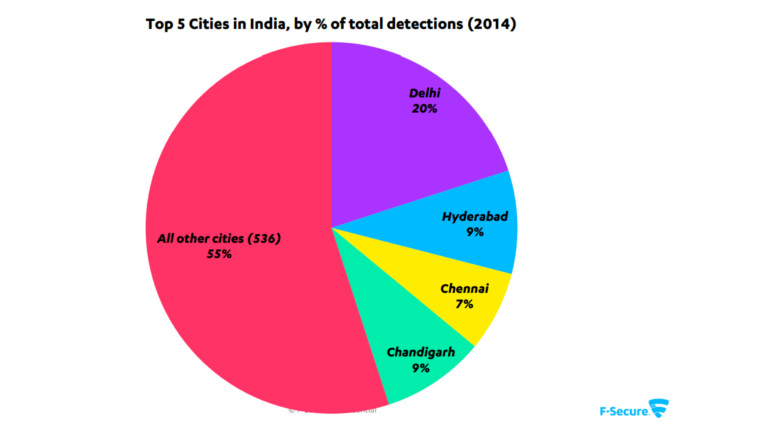
    F- secure, the Finnish computer security company has come out with its “The State of Internet in India” report. It states that the Indian capital ranks on the top of the ranks of most infected computers. The city has 20 percent of all the infected systems in India. Following Delhi, with 9 percent each is Chandigarh and Hyderabad and with 7 percent is Chennai.

    top5-cities

    One of the reasons cited for these high levels of infection is the use of pirated softwares that are often tainted. Botnets were found to be one of the major infections affecting the systems across the nation. Hackers use Botnet to take control of PCs and use them for their malicious intentions such as spams or DDoS attacks. The lack of computer awareness amongst users is also seen as a cause for the high levels of infections.

    Smartphones are also at risk of these attacks. Mumbai with 22 percent tops the chart in smartphone infections and following it, of course, is New Delhi. The major malwares in the Android ecosystem are Android/SMSSend and Android/FakeInst. These malwares send malicious SMS to the contacts of the user and thus multiply. Another malware called Android/SMSreg gets on the system when the user connects to free wi-fi. Hackers can gain access to all the personal information including GPS location, IMEI number, network operator, package name and SDK version.

    top-5-malware

    All of this point to the fact that Indians are in a desperate need of a safety and security lesson when dealing with the digital market. We need to get more serious in terms of cyber-security and tackling malware. In the digital economy, the threats will be digital too, so preparedness needs to be the biggest priority.

  • Android Devices Vulnerable to Lurking Malware That Sends Out Private Data

    Android Devices Vulnerable to Lurking Malware That Sends Out Private Data

    Google’s mobile operating system Android is used in many devices such as tablets, smartphones, smartwatches and more. The OS is convenient to use and for that reason, its sale is recorded more than the combined sales of Windows, iOS and Mac OS X in 2012, 2013 and 2014. However, this is also true that Android is the weakest OS and an prey to malware and Trojans.

    A new discovery has showcased that a Trojan named ‘Android SMSSEND’ is lurking. It is a threatening Trojan virus that steals essential data from your Android smartphone and leaks confidential information to all those in your contact list. This is done by sending messages to your contacts. The sensitive information that it dispatches illegally includes IMEI number, device ID, device type, contacts, pictures, passwords and personal banking information.

    android malware

    It is estimated that Android SMSSEND can install spyware, track your phone location, illegally access text messages and harm your system. Although, Google uses a malware scanner Google Bouncer to keep a close watch at these viruses, but the scanner seems inadequate. Whenever a user installs a third-party app, a warning message appears on screen to alert the user about the suspicious app.

    It’s highly advisable not to download and install applications from untrusted sources. Also, one should run full system scan after every 3-4 days. In case, you are installing an application, read all the permissions beforehand. To save your data, it is recommended to take regular backup of the device. Last but not the least, one should avoid using unknown Wi-Fi networks as they may not be secure.

  • Fake iMessage App For Android Surfaces, Raises Security Concerns

    Fake iMessage App For Android Surfaces, Raises Security Concerns

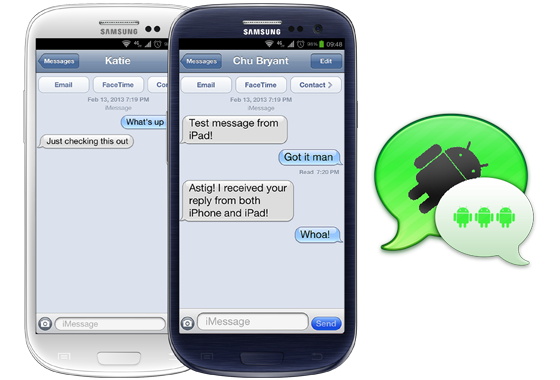
    There’s something fishy about this iMessage app for Android, and it’s not the fact that it’s using an outdate iOS 6 skin. While that should be a first warning sign, the reality is that the app, which recently appeared in the Google Play Store, is the work of a third-party developer. It by no means provides official cross-platform access to Apple’s popular messaging service.

    9to5Mac reports that scrutiny of the .apk file – the form the program takes outside the Play Store ecosystem – suggests that there is a serious potential risk to personal data. The app works by using the developer’s own server as a proxy to spoof messages into appearing to come from an iPad Mini, thus bypassing the strict “Apple Only” nature of the iMessage protocol. However, in doing so, it means that the developer has access to all of your message data.

    People that have tried the app reported varying results – some report that they can only message other Android users, while others have only some Apple contacts.

    In addition to these security flaws, the iMessage app requires you to sign in with a working Apple ID. As you probably already know if you have one, your Apple ID stores payment information and personal data, and serves as your gateway into a number of Apple services.

    The iMessage for Android app is available as a free download in the Google Play Store and is by a developer called Daniel Zweigart.

  • Bluebox Security Reveals That 99% Android Devices Have Major App Vulnerability

    Bluebox Security Reveals That 99% Android Devices Have Major App Vulnerability

    The company Bluebox security, has found a security hole in Android’s operating system. What’s even more scary about this news is the report states that this security hole has been around since Android 1.6 Donut. Apparently what can happen is malicious developers can change the APK of a legitimate company, without any breaks to its cryptographic signature. This basically means that if an app is hacked on Android, the user would not know and could be entering their information and sending it to the malicious hackers unknowingly.

    Android apps (packaged as an “APK”) are signed with an encryption key (just like iOS apps) to prevent a malicious party from changing the code. Signed apps are expressly designed to enable the system to detect any tampering or modification.

    Since verified apps are granted complete access to the Android system and all applications on a phone, the security weakness is potentially huge, although it remains theoretical since it is unclear how malicious apps and updates would be served to users.

    Apps listed on the Google Play store are immune from this tampering, so a hacker would need to lure a user into downloading a malicious version of an app in other ways, perhaps via a third-party app store or fake app links. A phishing email with a link to a fake update for a popular app, for example, might generate some downloads. 

    If Google has not done anything up to this point, it makes you wonder if they taking this security issue as seriously as they should. Smartphone malware is becoming a huge problem and in order to prevent threats, the security companies along with the OS developers must work together, to stop this ongoing threat. 

    As SlashGear reports, according to Bluebox, it informed Google of this Android vulnerability in February of this year. To take care of the issue, every device manufacturer will need to create a patch and roll it out to its users, who will then need to install it. The security firm says it will release “tools/material” and more info about this vulnerability during Blackhat USA 2013, which takes place later this month.

    [Via]

  • Bing Answers Critics, Says It Blocks “94% Of Clicks To Malicious Sites”

    Bing Answers Critics, Says It Blocks “94% Of Clicks To Malicious Sites”

    Bing has responded to the malware study conducted by AV-TEST earlier this week, claiming that Bing search results led to five times more malware than Google.

    To that Bing said, “the conclusions many have drawn from the study are wrong.”

    A blog post by Bing said : 

    AV-TEST didn’t actually do any searching on bing.com.  Rather they used a Bing API to execute a number of queries and downloaded the result to their system for further analysis.  By using the API instead of the user interface, AV-TEST bypassed our warning system designed to keep customers from being harmed by malware. Bing actually does prevent customers from clicking on malware infected sites by disabling the link on the results page and showing the below message to stop people from going to the site. 

    Overall, Bing says it shows results with malware warnings for about 0.04 percent of searches. Microsoft’s senior program manager for Bing David Felstead also claims that Bing’s warning system blocks “94% of clicks to malicious sites.”

    We show results with warnings for about 0.04% of all searches, meaning about 1 in 2,500 search result pages will have a result with a malware warning on it. Of those, only a small proportion of malicious links ever get clicked and the warning therefore triggered, so a user will see the warning only 1 in every 10,000 searches. In any case, the overall scale of the problem is very small.

     Felstead later points out a search term that can be entered into Google that results in malicious results.

    [SearchEngineLand, TechCrunch, Bing]

iGyaan Network
Privacy Overview

This website uses cookies so that we can provide you with the best user experience possible. Cookie information is stored in your browser and performs functions such as recognising you when you return to our website and helping our team to understand which sections of the website you find most interesting and useful.