Tag: whatsapp

  • WhatsApp Introduces New Vulcan Salute and Middle Finger Emoji

    WhatsApp Introduces New Vulcan Salute and Middle Finger Emoji

    WhatsApp has introduced a couple of new emojis for its users. The new emoji includes the middle finger and the Vulcan Salute from Star Wars. Both these emoji are available in different skin tones within the app. While the middle-finger emoji seems Android-only for now, the Vulcan emoji is also supported on iOS, though it is not part of the stock emoji keyboard.

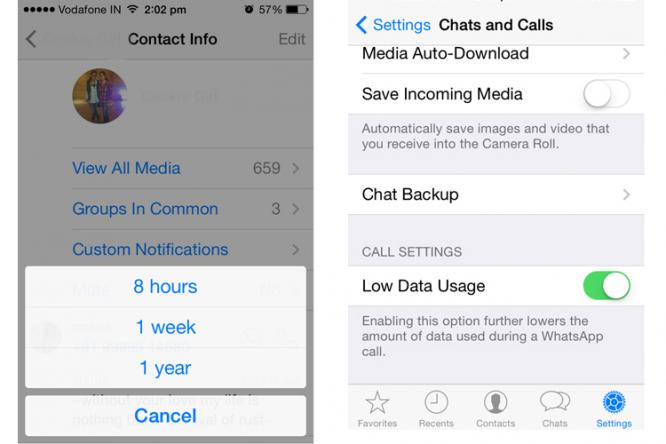
    WhatsApp has recently upgraded itself and comes with a bunch of new features. Among them, is a new custom notification setting that allows you to set different notifications for the different chats you’re in or mute specific conversations entirely.
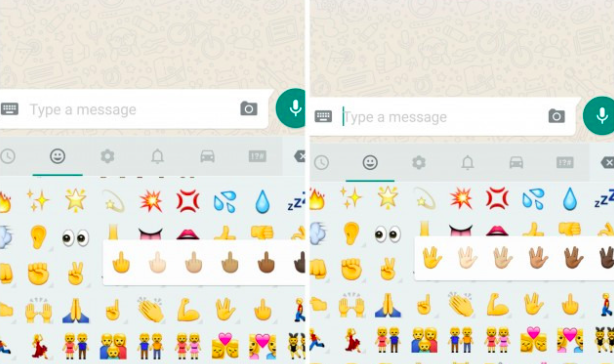
    emojis

    You can also mark your chats as read or unread and WhatsApp has even included an “low data” usage feature to make voice calls. This reduces the amount of data that is used during phone calls made through the app.

    Apart from all of this WhatsApp has also made sharing contact information easier, by allowing you to save the information or even start a new WhatsApp message from within the app itself.

    Image Source : [tw-button size=”medium” background=”#07ABE2″ color=”” target=”_blank” link=”http://mashable.com/2015/08/26/whatsapp-android-emoji/”]Mashable [/tw-button]
  • WhatsApp’s Latest iOS Update Allows You to Mute Individual Chats

    WhatsApp’s Latest iOS Update Allows You to Mute Individual Chats

    Whatsapp has been rolling out quite a few updates only for Android devices, leaving iOS users with absolutely no new features that the Android user enjoys. Today, it looks like Whatsapp for iOS has bought in some noteworthy and useful features, while some of these are not available for Android.

    whataspp

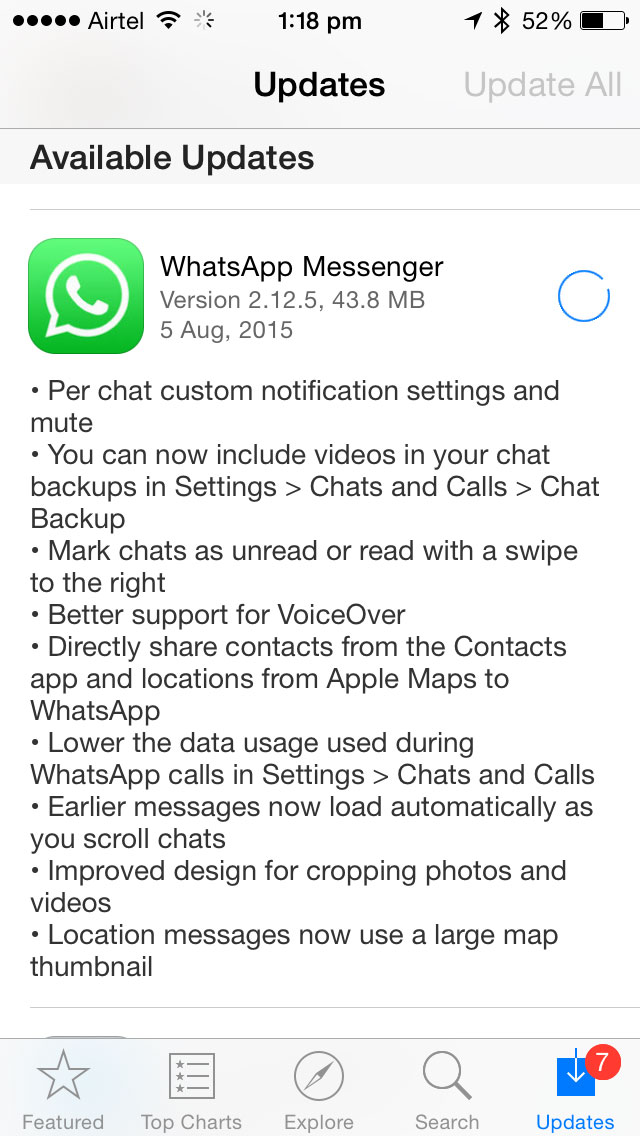
    The new update brought in features like backing up video chats, improved VoiceOver support and sharing location directly on Whatsapp, which will show a large map thumbnail for improved reading. If that is not good enough, Apple Maps can also be shared to Whatsapp directly.

    Messages can now be marked as Read/Unread. A feature already present in Whatsapp for Android, this allows users to mark messages as unread. For iOS devices, a swipe to the right marks the message as read or unread which earlier gave the option to delete a conversation.

    One of the most exciting new features is the Mute Individual Chat. This feature is for now, absent in Android and as the name suggests, allows you to mute individual contacts. Earlier, you could mute only group chats. You can also customize chat notifications, setting up specific message tones for different people now.

    Whatsapp has also disabled the ‘Show Preview’ in the iOS update to provide better security and privacy and gives the option of lowering data usage on Whatsapp calls.

    Whatsapp-for-iOS1

    You can download the new update for iOS here.

  • Microsoft Assures Users Will Be Able To Access WhatsApp on Edge Soon

    Microsoft Assures Users Will Be Able To Access WhatsApp on Edge Soon

    Microsoft released Windows 10 on 29th July but, if you are an avid WhatsApp Web user, it is likely that you may not be able to use this feature on your brand new Edge browser. At least, not yet.

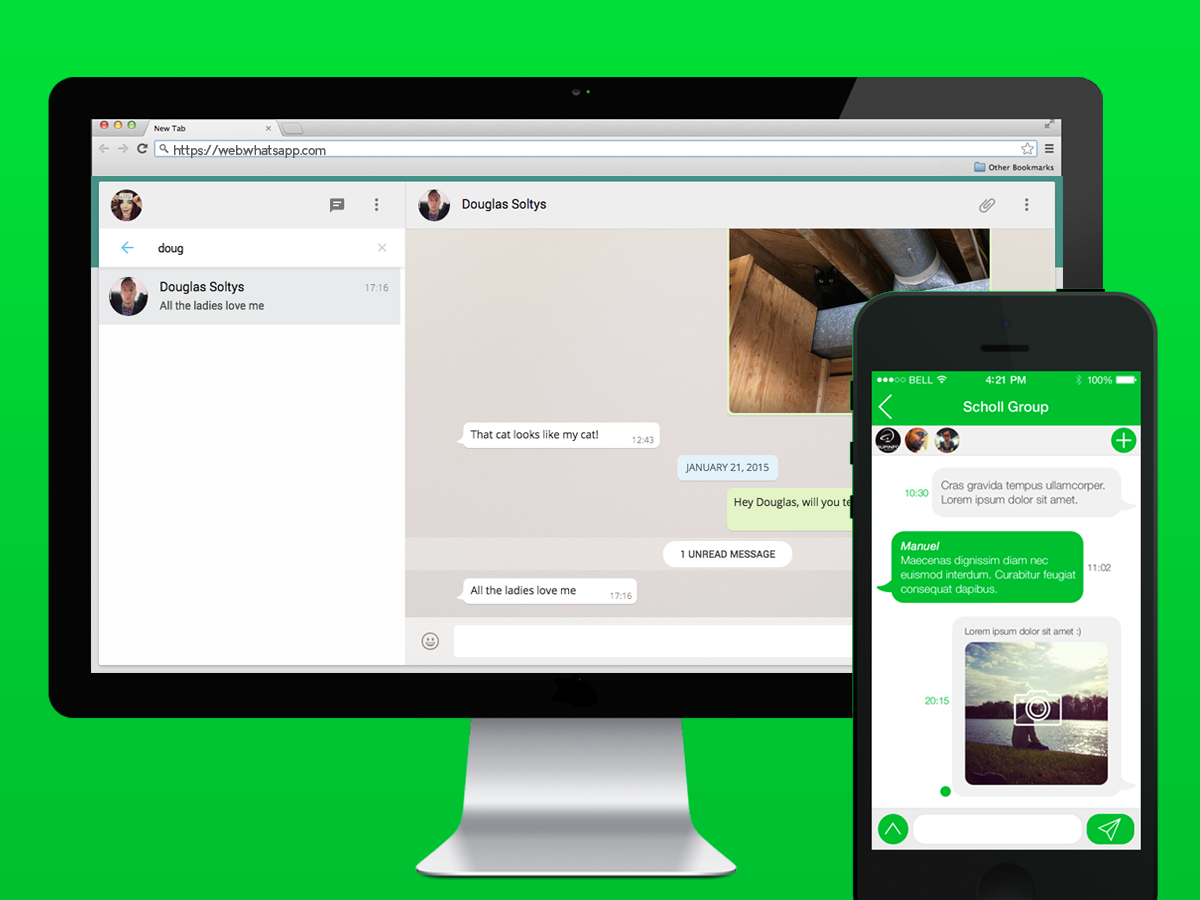
    If you have been using Internet Explorer, or Microsoft’s brand new browser called Edge in Windows 10, you’ve been out of luck – so far. Currently, WhatsApp Web is not cooperative with Microsoft’s Edge browser, though it can be accessed on Mozilla Firefox, Opera, Apple Safari and Google Chrome, which are all consistent on Windows.

    According to a Windows Central report, a Microsoft program manager revealed that the company is, in fact, striving to get WhatsApp Web support to Edge.

    Softpedia has quoted Microsoft’s Program Manager Greg Witworth (on Twitter), as stating that the Redmond-based company is working with the instant message service company to allow WhatsApp Web to support Edge users.

    The report says that WhatsApp Web for Edge may be made accessible as an OS update; however, there is no particular timeline given for the launch of the service.

    Moreover, Microsoft’s Internet Explorer (IE) does not support WhatsApp Web. Hence, those on Windows need to use other browsers to access WhatsApp on their desktops.

    Meanwhile, WhatsApp Web has been updated to feature aspects at par with the smartphone version of the popular messaging service. You will notice a new “edit” icon adjacent to “current status”, which allows you to make changes to your status and share it with friends. You can also hover over their current profile image, and an option is displayed that can be used for editing the image.

    With the roll out of Windows 10 happening on a global scale, Microsoft has announced the price of the operating system in India. Microsoft’s official online store has listed the Home version under Rs 7,999 and the Pro version for Rs 14,999. For those users who are using Windows XP and earlier versions, or are assembling new PCs or laptops need to purchase the software. And, for those who are operating original Windows 7 and Windows 8, you are eligible for the free upgrade.

    Windows 10 brings a new Edge browser, a new Windows Store, Office 2016 suite and completely redesigned Photos, Videos, Music, Maps, People, Mail and Calendar apps, among other upgrades.

  • New WhatsApp Update Enables ‘Mark As Unread’ Feature

    New WhatsApp Update Enables ‘Mark As Unread’ Feature

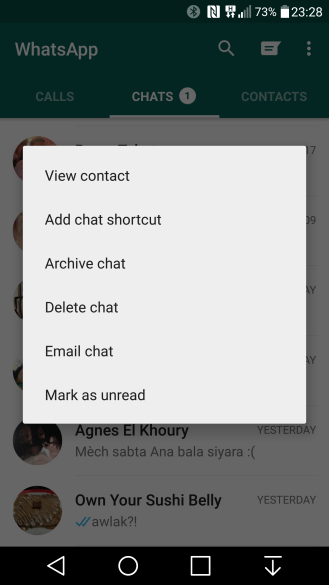
    Few months back, WhatsApp announced a much talked about ‘calling’ update, and just recently it announced another update that enables you to mark a conversation as unread. To activate the updated feature you have to tap and hold the conversation you wish to respond to later. This doesn’t change the status of the conversation if you have already read it, rather, it acts as a reminder for a conversation you didn’t have the time to respond to immediately, and in the process, avoids many a conflict that has been caused by the little blue tick marks.

    Image Source: AndroidPolice
    Image Source: AndroidPolice

    WhatsAppApart from this WhatsApp has made itself very efficient by introducing other updates such as the low data usage feature  for voice calls, useful when you’re on a limited or slow data plan and the ‘mute’ button on the customized settings options. This feature enables you to mute a group conversation for up to a full year! One can also customize settings for specific tone, vibration length, light, popup notification, as well as the call ringtone and vibration.

    Mute Option

    low data usage

    With multiple updates and new features it seems like WhatsApp is here to stay, at least till the near future.


  • Whatsapp is Slowly Gaining Facebook Characteristics With ‘Like’ Option

    Whatsapp is Slowly Gaining Facebook Characteristics With ‘Like’ Option

    Facebook acquired Whatsapp last year for a whooping price of $19 billion. After the acquisition, Zuckerberg has been slowly been remodelling Whatsapp to the likes of Facebook. Both have been exchanging features with each other like Facebook is slowly turning its independent Messenger app into Whatsapp, integration of the ‘Seen’ blue tick on Whatsapp, and many more. Now, there are rumours about Whatsapp’s adoption of Facebook’s unique features, the ‘Like’ and ‘Mark as Read’ options.

    According to reports from WhatsApp beta tester Ilhan Pektas, WhatsApp could get characteristics such as “Like” and “Mark as unread” in a forthcoming update. The Like feature is exciting though we are not sure at this point how it will operate. Perhaps it will act in a similar manner as the thumbs up button on Facebook Messenger or like the photos being exchanged.

    The Thumbs up feature will allow users to send a fast and concise reply to simple questions without having to type it out. It could also be executed in group chats where photos and videos are shared and group chat members can “Like” it, which once again does away with the need to type out a comment if it isn’t required.

    The “Mark as unread” feature is impressive since this allows users to avoid the dreaded blue ticks to indicate a message has been read. However given that the blue ticks feature can be disabled, we are not sure if this feature is indeed necessary, but given that this is a rumored feature for now, do consider it for now.

    If this comes out to be true, the Facebook’s ‘Like’ button, which is a highlight trait of the social platform, will be an unique attachment to the most popularly used instant messaging service worldwide while the ‘mark as unread’ feature would also come handy similarly as seen in mail services.

  • Facebook is Slowly Turning its Independent Messenger App into WhatsApp

    Facebook is Slowly Turning its Independent Messenger App into WhatsApp

    Recently, Facebook came out with a new feature that allows you to log into its Messenger without actually having a Facebook account. The social media giant made this announcement on Wednesday, stating that this move is being done to push Messenger’s count of 700 million users, higher. They said that users in US, Peru, Canada and Venezuela would no longer need a Facebook account to use Messenger.

    Users in the mentioned countries can make an account using their names and their phone number only. They can upload their phone contacts to the app. Yes, we know what you’re thinking, this is quite similar to popular instant messaging apps like WeChat and (Facebook-owned) WhatsApp.

    With Messenger, we’ve been focused on creating the best messaging experience possible by giving people a fun and easy way to connect and express themselves with friends. With this update, more people can enjoy all the features that are available on Messenger – including photos, videos, group chats, voice and video calling, stickers and more.

    Last year in July, when Facebook announced that it will be removing the messaging feature from its mobile app, which will require people to use its standalone Messenger app instead. This forced users to download the Messenger app to chat with their Facebook contacts on their mobiles.

    Just a few months prior to this, Facebook had acquired WhatsApp for $19 Billion. Then why, has Facebook been trying to make Facebook Messenger more and more like WhatsApp? It owns both. What difference would remain between the two, which were once entirely different apps?

    WhatsApp 1

    The math is simple. Currently, WhatsApp has about 800 million active users, and Messenger has about 700 million monthly users. If added up, the number would outweigh any other competitive instant messaging app. Messaging has become a way of life, and there are many users that use Facebook purely for chatting and talking with friends. This group of users will find the change very welcoming.

    Mark Zuckerberg is also on a spree to convert the chat-only app to something more. Messenger has, earlier this year, introduced the payment feature that allows you to make payments through the Messenger interface. He also introduced video calling and location sharing features.

    Needless to say, we’re certainly interested to see where the continuously-evolving Messenger finally lands in the near future.

  • Windows Phone Users Can Finally Make Calls Via WhatsApp

    Windows Phone Users Can Finally Make Calls Via WhatsApp

    Windows Phones users were left behind in the race to get WhatsApp’s most coveted feature. They were disappointed when WhatsApp introduced the voice-calling feature for Android and iOS users in April. Today, they can celebrate as the popular messaging app has enabled voice-calling for devices supporting Windows 8 and above.

    WhatsApp first introduced the voice-calling feature in March for Android users. In April, the feature was rolled out in an update for iOS users.

    WhatsApp 1

    Voice-calling will be made available in the version 2.12.60. The feature allows WhatsApp users to call each other for free using the Internet. Users have noticed that the interface is similar to the one used by Android for making regular calls. WhatsApp previously allowed users to make regular calls from the app itself, which has since been replaced by its own call-making feature.

    Although smartphone users were thrilled to be able to make VOIP calls through their favourite messaging app, they soon realised it wasn’t that big a deal. The feature is still not popular in India due to slow internet connectivity.

  • 6 WhatsApp Features Everyone Should Know

    6 WhatsApp Features Everyone Should Know

    WhatsApp is sure to have found a space on almost everyone’s handsets. The app with over a 800 million active user base, offers one of the best services to have a real-time conversation. Most of us must be using the app for a while now, but you probably didn’t know that WhatsApp is hiding many features that could make the wrinkles from your forehead, vanish. Mastering the tool can help you save the bandwidth, mute negligible groups, keep the stalkers at bay, and hence, have a good night’s sleep.

    Here are some of the features that can make your life a lot easier.

    Add Conversation Shortcut to the Home Screen

    whatsapp 1

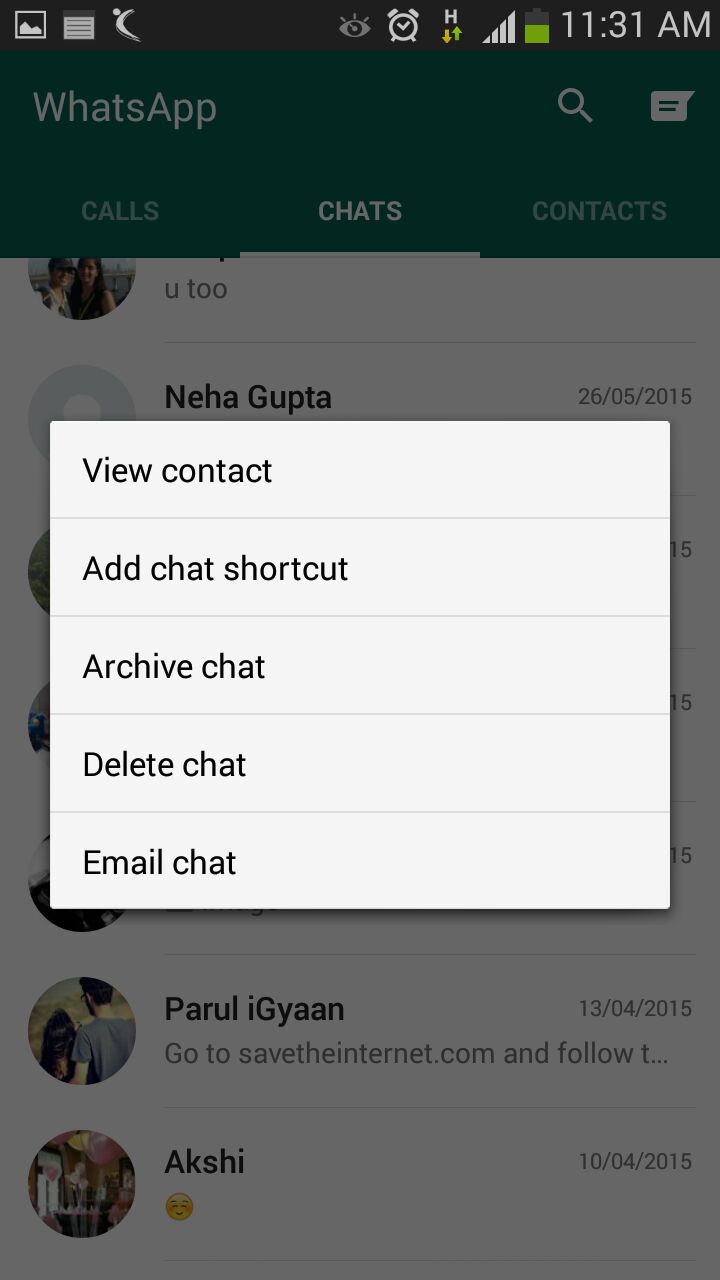
    There must be folks in your WhatsApp contacts with whom you talk frequently to. Bring them a step closer by creating a chat shortcut on Home screen. Long tap on the desired contact and click ‘Add chat shortcut’ present in the chat menu. An icon will add to your home screen through which you can chat directly with the person, without surfing through a list of contacts. A useful feature, unfortunately missing on Apple devices.

    Pop-Up Notifications

    WhatsApp

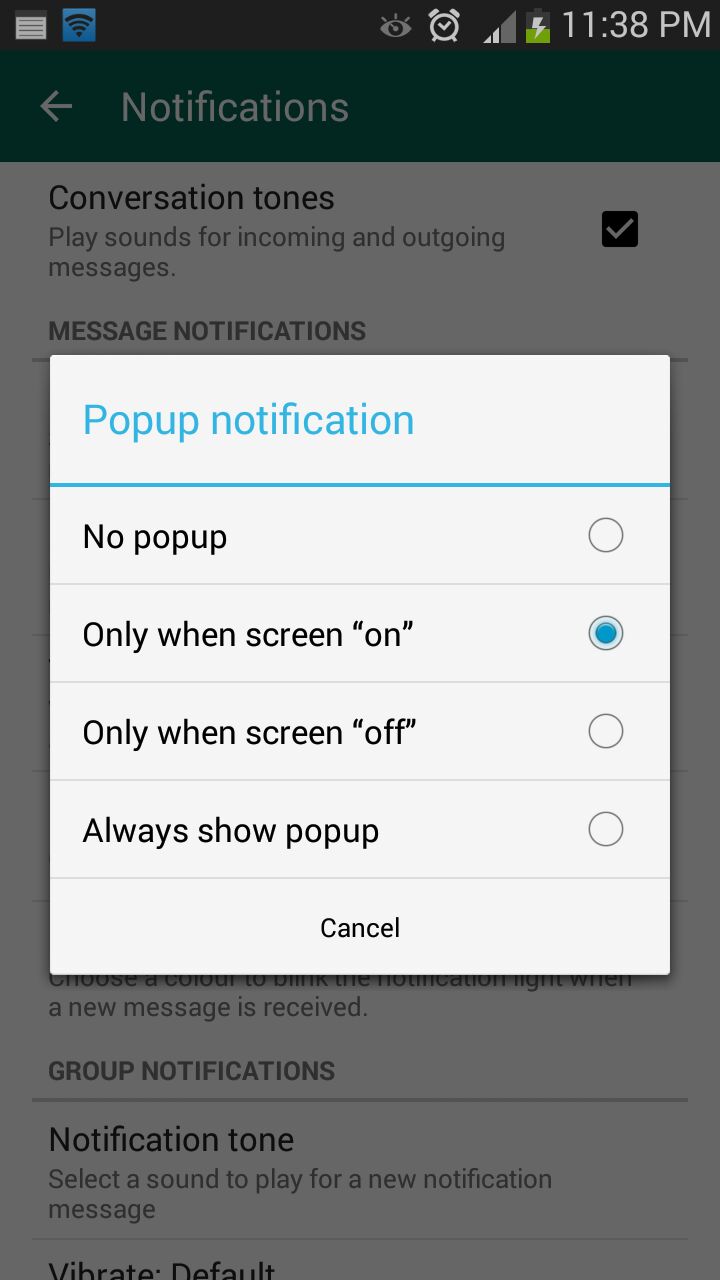
    This feature on WhatsApp lets you access messages even when the screen is locked. Go to Settings > Notifications > Popup Notifications and select ‘Only when screen is off’ to see messages and reply without unlocking the device. Pop up notifications put aside the hassle of unlocking screen to see received notifications and reply to them.

    Mute Group Chats

    whatsapp 5

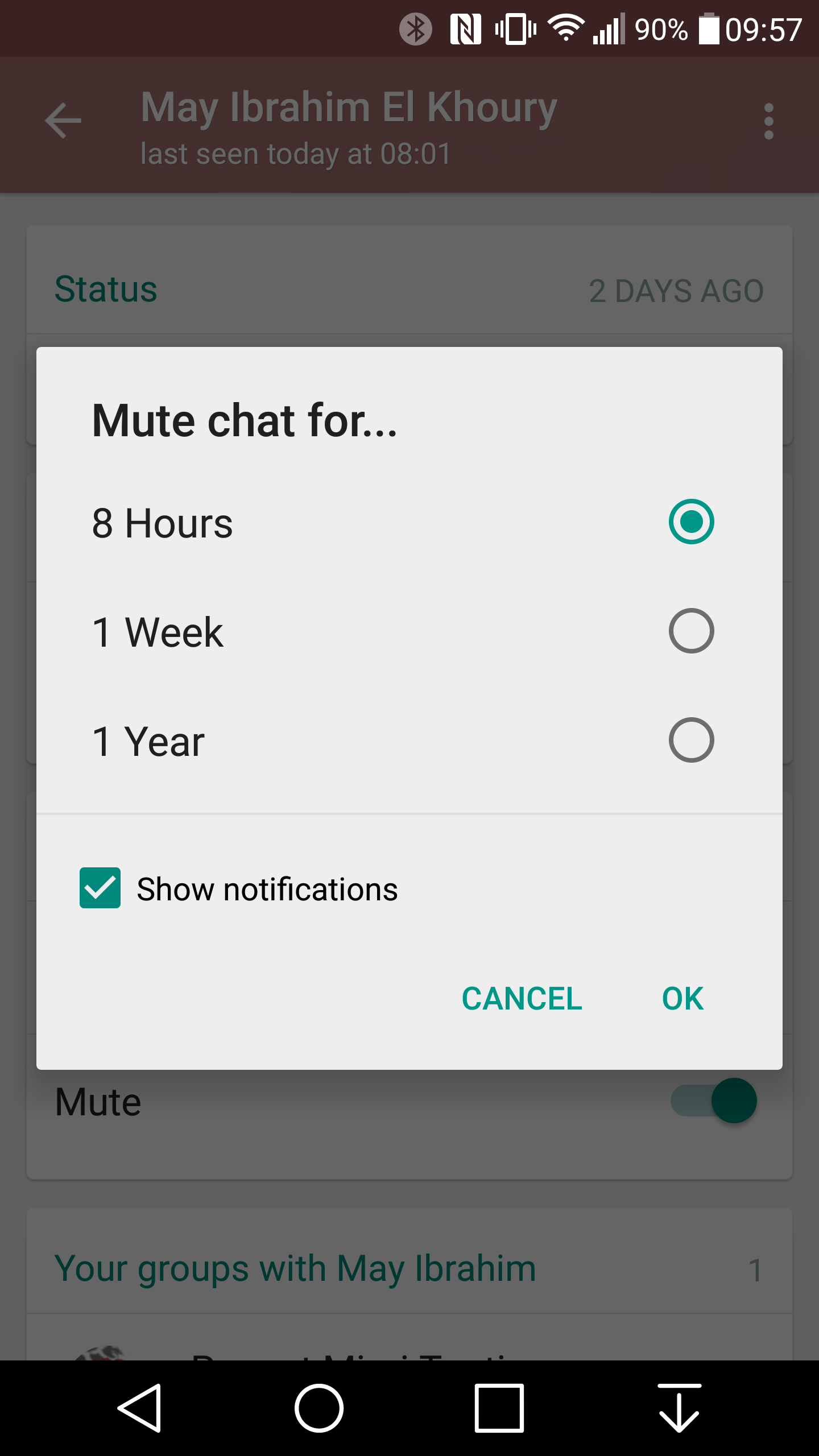
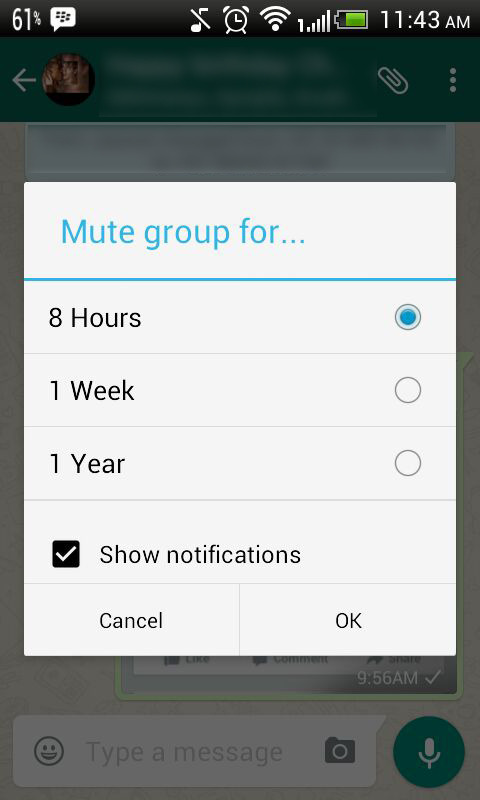
    Besides giving you the convenience of sharing things at one place, Group chats can be a bit noisy at times. No worries! Mute them and let your friends do the talking. Click on the group and from the drop-down menu, select Mute. Select the time frame for which you don’t want any updates and disable Show notifications.

    Disable Media Auto-Download

    whatsapp 3

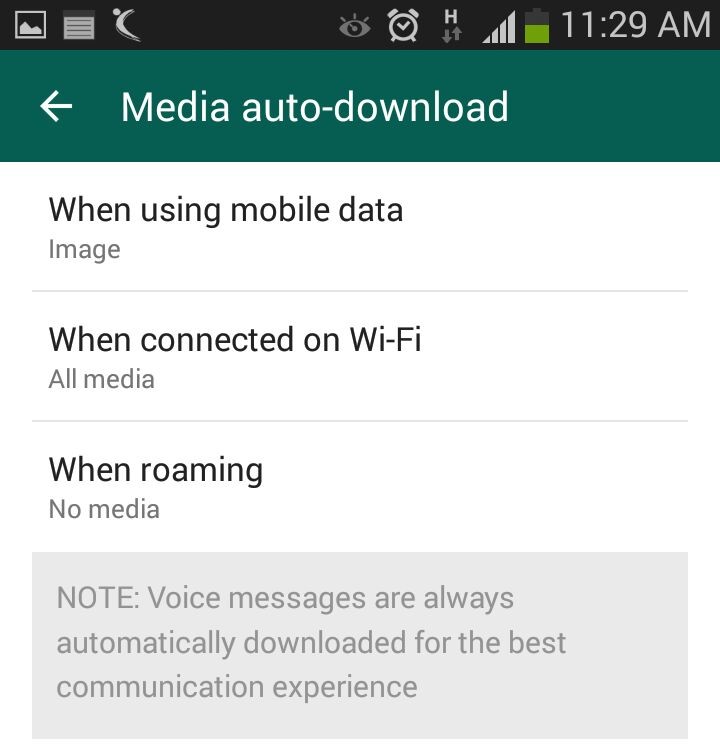
    Media auto-download gobbles up your internet data. Turn it off to save the bandwidth and specify WhatsApp when you want the audio and video files to be downloaded. Click on Settings > Chat settings > Media auto-download and choose from the options when using mobile data, Wi-Fi and roaming.

    Send Conversations Through Email

    whatsapp 4

    Users are going to love this feature, at least some of them. WhatsApp allows you keep a record of your chats on your PC or inbox by sending conversations through email. It’s as fast as any other mailing process and takes mere seconds. Long press the contact and tap on ‘Email chat’ from the chat menu. Add recipients’ email address and the conversation will be sent to the provided address. You can choose to include media file if you like.

    Avoid Blue Ticks

    whatsapp

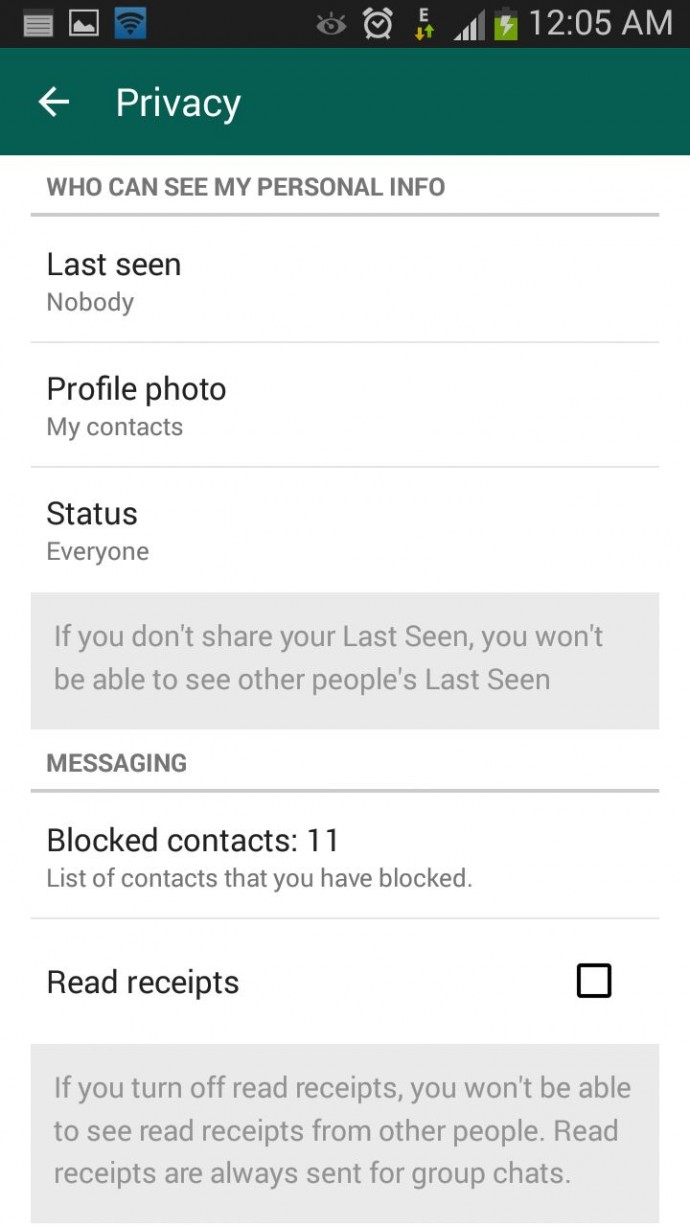
    Where the cross-platform social messaging service got acclaims for real-time conversation, blue ticks brought outrage for offering recipients with read receipts. The new WhatsApp version allows you to avoid this through a simple setting. Click on Settings > Account > Privacy and disable Read receipts if don’t want the sender to know about the delivery status. Now, neither you nor any sender will be able to see read receipts. Isn’t it useful?

  • WhatsApp Will Soon Allow You To Make Purchases And Download Apps

    WhatsApp Will Soon Allow You To Make Purchases And Download Apps

    When Facebook acquired WhatsApp for $19 billion last year, we weren’t sure how the social media giant would make use of the messaging app. However, at the F8 conference 2015, Facebook announced a new Business for Messenger initiative, through which the company might be able to make some profit. According to this initiative, Business for its Messenger app will give users the choice to install apps and make purchases with the Facebook Messenger app itself.

    The company said that they would include some of the features of Facebook Messenger and experiment with it on WhatsApp, to promote business to consumer communications that could be paid up by marketers.

    [quote text_size=”small” author=”David Wehner” author_title=”Facebook’s Chief Financial Officer”]

    We think that enabling that [business to consumer] messaging has an excellent business potential for us. As we learn those things, I think there are going to be opportunities to bring some of those things to WhatsApp, but that’s more longer-term than the near-term.

    [/quote]

    Facebook CEO, Mark Zuckerberg says that once WhatsApp reaches 1 billion users, will business through the messaging app is meaningful. For now, WhatsApp has got around 800 million users. After the $22 billion acquisition by Facebook, WhatsApp Chief Jan Koum said that the messaging app will be ad-free.

    Currently, Facebook is working with more business partners and will soon begin Business for its Messenger app.

  • WhatsApp’s Latest Update for Android Now Available on Google Play Store

    WhatsApp’s Latest Update for Android Now Available on Google Play Store

    WhatsApp is out with their new update and is sure to easy on your eyes. Earlier, WhatsApp had released the new update with a new Material Design and UI, but only to a handful of users as beta versions. After a month of anxious waiting, the update is now available for everyone to download through the Google Play Store.

    The new build (version 2.12.87) has a dark green background that earlier was grey in colour. The top bar that holds the Search and Setting buttons has been enlarged as compared to the previous update. This top bar hides itself when you scroll downwards. When you click on a friend’s profile, you will find that the person’s picture is big enough to be viewed easily as a profile picture. The new chat screen looks very light and bright, maybe because of the fresh aura of the dark green interface. From the Emoji perspective, the only change you will see is a white background on the emoji list.  While calling through WhatsApp, the caller’s name will be highlighted in bigger fonts with smaller and more minimalistic icons.

    This update can now be downloaded on Android devices from the Google Play Store. As of now, we do not have any knowledge about the new update for the iOS, Windows or Blackberry devices. Keep checking this page out to stay updated.

    Just to be made clear, some users received this update few weeks ago. This update was actually the beta version of the same. The final version is being talked about in this article.

    Click here to read more about WhatsApp Voice Calling feature.

  • Here’s an Important WhatsApp Update for iOS That Everyone Missed Out On

    Here’s an Important WhatsApp Update for iOS That Everyone Missed Out On

    Most iPhone users have trouble admitting it, but iOS comes with several limitations. One of the major restrictions has been the absence of easy inter-app sharing; more specifically, sending images from the Photos app to WhatsApp directly.

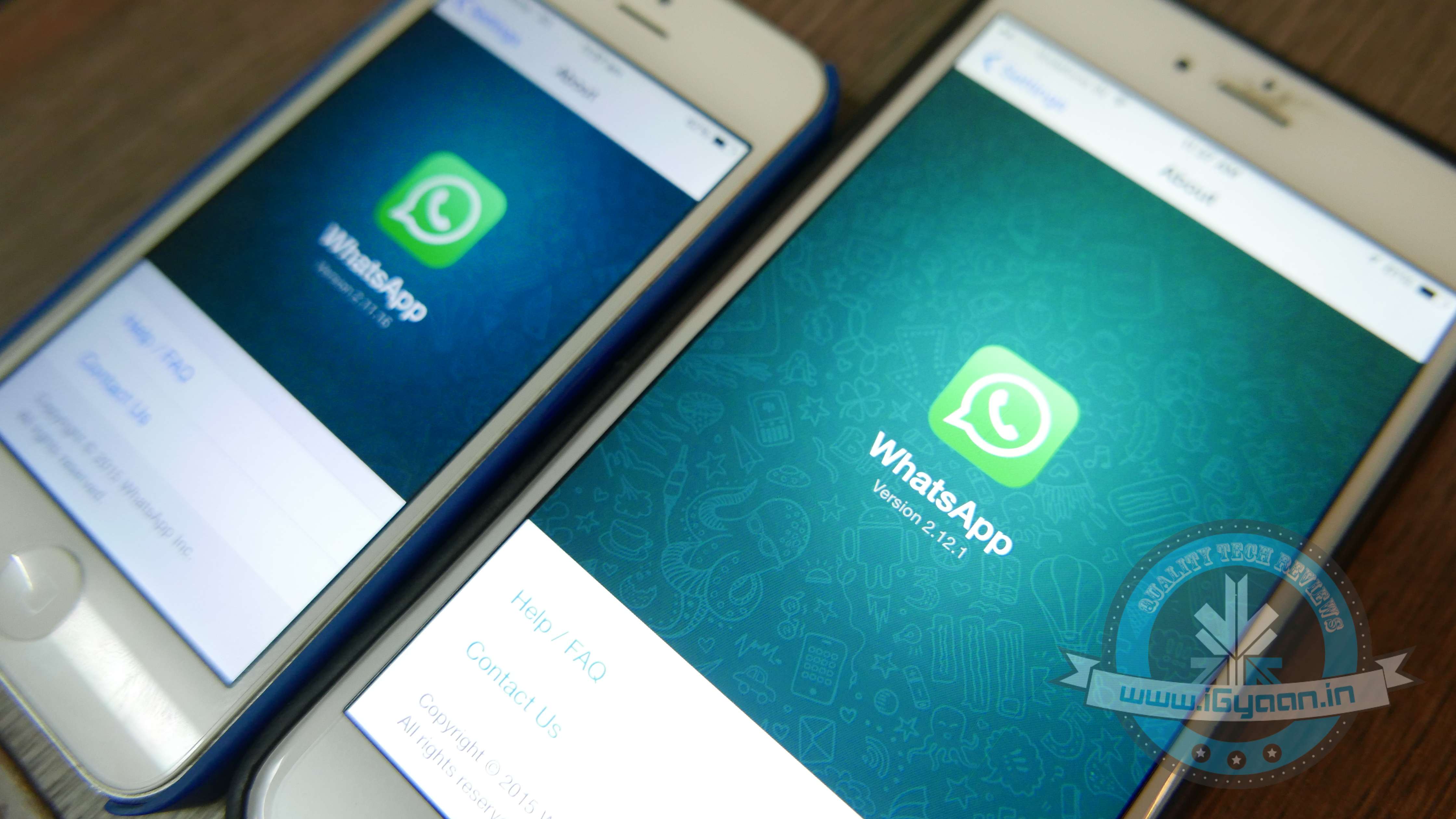
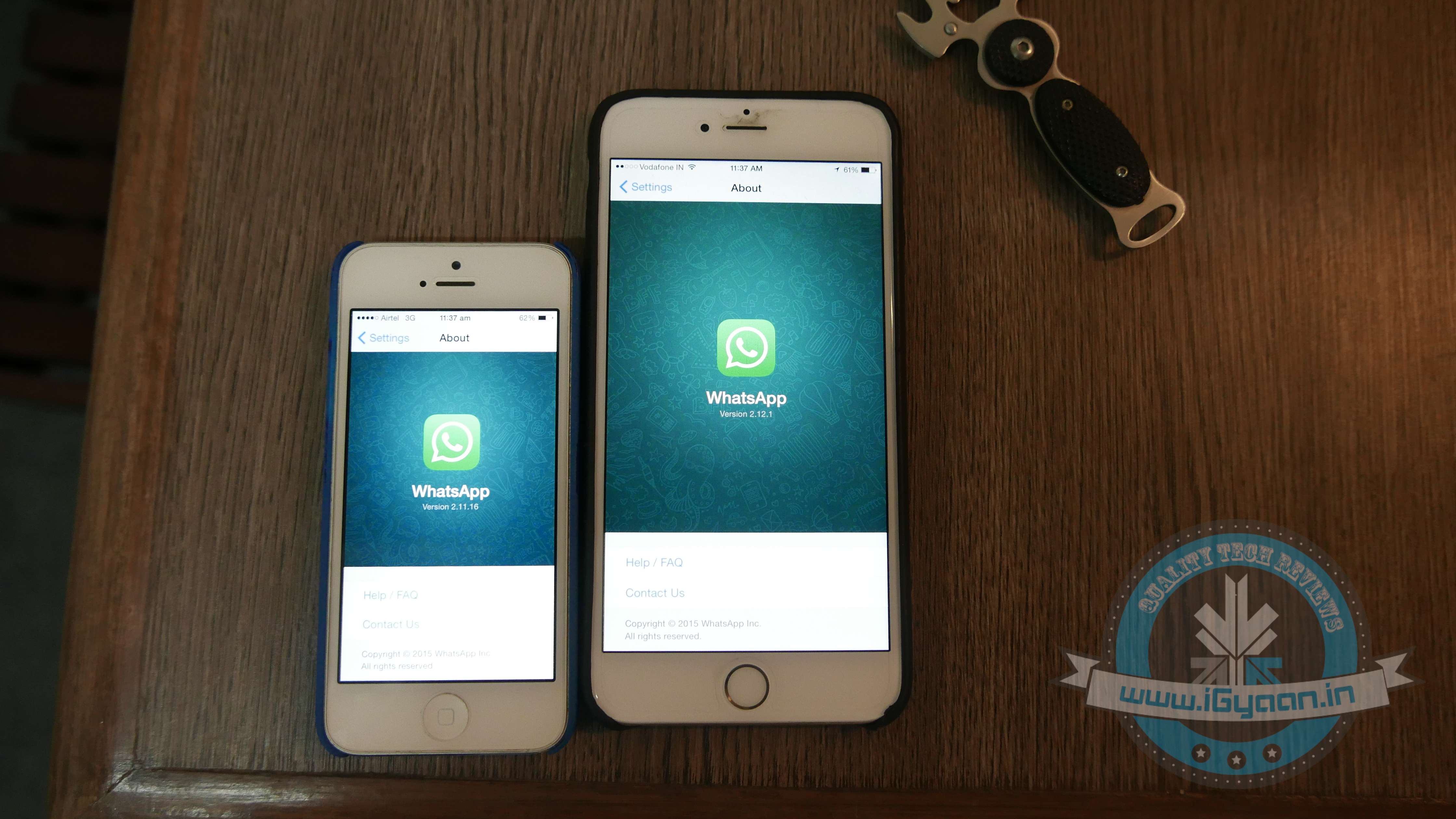
    The new WhatsApp update, Version 2.12.1, other than adding the much-awaited voice calling feature, finally gives iPhone users the right to directly share an image from the Photos app with a WhatsApp contact.

    WhatsApp 3
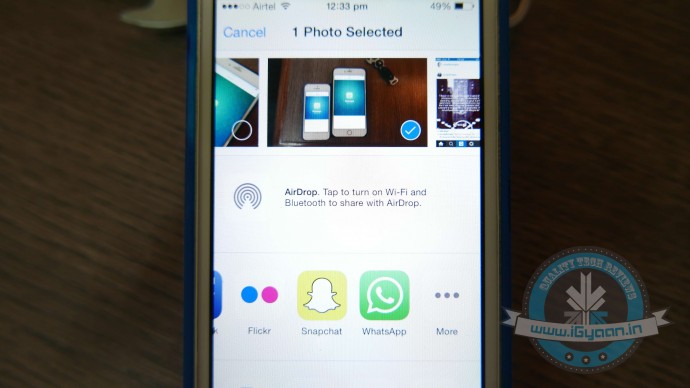
    The WhatsApp icon has been added to the list of ‘Share’ options.

    A feature that Android users have always enjoyed, was a tiresome detail missing from iOS. Earlier if an iPhone user was scrolling through old pictures on his/her smartphone and decided he/she wanted to share one that was clicked in 2013 with a friend via WhatsApp. They would have to open the WhatsApp app, find the friend, and then scroll back in time to retrieve the picture. The new WhatsApp update now cuts back on the long procedure and makes it super easy to share images.

    To enable the setup, you would first need to install the update. Then open the Photos App, choose an image and click on the Share button. Scroll through the end of the list and click on ‘More’. From the list of apps, you now have WhatsApp added as one of the sharing options. Enable it, and you’re good to go.

    For more details on the new update, click here.

  • WhatsApp Brings Voice-Calling to iOS Along With Few More Features

    WhatsApp Brings Voice-Calling to iOS Along With Few More Features

    It’s been a while since the cross-platform mobile messaging app debuted its much-talked about free calling service on Android platform. The iOS users were left behind with no access to this feature, but now WhatsApp has released the calling tool for iOS users as well.

    WhatsApp update with version 2.12.1 hit the iTunes Store, which states that upgraded app will feature voice-calling on iPhone. Users can make a call to any of their friends and relatives across the globe using the cellular data. WhatsApp stated that it has started rolling out the service, and it will slowly reach all iOS devices “over the next several weeks.”

    The latest version is not just about the voice-calling update and introduces a slew of other features, making use of iOS 8’s sharing extensions. With the new version installed, users would be able to share photos, videos, and links right to WhatsApp from other apps. To know more about the useful inter-app sharing improvements, click here. 

    iPhone users can now also edit contacts directly from the app. One can capture photos and videos within WhatsApp and can send multiple videos before cropping them. A caption can also be added along with the photos, just like Android app.

    Meanwhile, WhatsApp recorded a steep increase in its active user base. The CEO of the company said that it now serves 800 million active users, which was 600 million nearly four months back. Covering the iOS users as well, Windows is the only platform left where the voice-calling is still to arrive.

  • WhatsApp Hits 800 Million Monthly Active Users

    WhatsApp Hits 800 Million Monthly Active Users

    WhatsApp is one of the biggest success stories in the tech industry; the app is miles ahead of its competition. To announce another major accomplishment, CEO and Founder of WhatsApp, Jan Koum took to his official Facebook page and stated that the popular messaging app now has 800 Million Active users.  He also stressed upon the fact that there is a major difference between registered users and active users.

    On the other hand, Facebook announced last month that its Messenger app had managed to acquire 600 million active users within the short span of four months. Facebook, which owns both its Messenger as well as WhatsApp, has decidedly kept the two apps separate.

    [quote text_size=”small” author=”Jan Kuom” author_title=”CEO and Founder of WhatsApp”]

    WhatsApp – now serving 800,000,000 monthly active users. Reminder for the press out there: active and registered users are not the same thing :)

    [/quote]

    In the past couple of months we’ve been hearing about WhatsApp’s slow takeover in the voice calling segment. Android users have been the first ones to receive the voice calling update, while iOS and Windows users wait in line.

  • The First Glimpse at How Facebook Plans to Integrate WhatsApp

    The First Glimpse at How Facebook Plans to Integrate WhatsApp

    It’s barely been a few days since Facebook gave an adrenaline boost to its Messenger platform by opening it for third-party developers. The independent platform gave users freedom to interact with businesses and made it an all-around service. The social networking giant is now making one more modification to the messaging tool that will incorporate WhatsApp to Facebook.

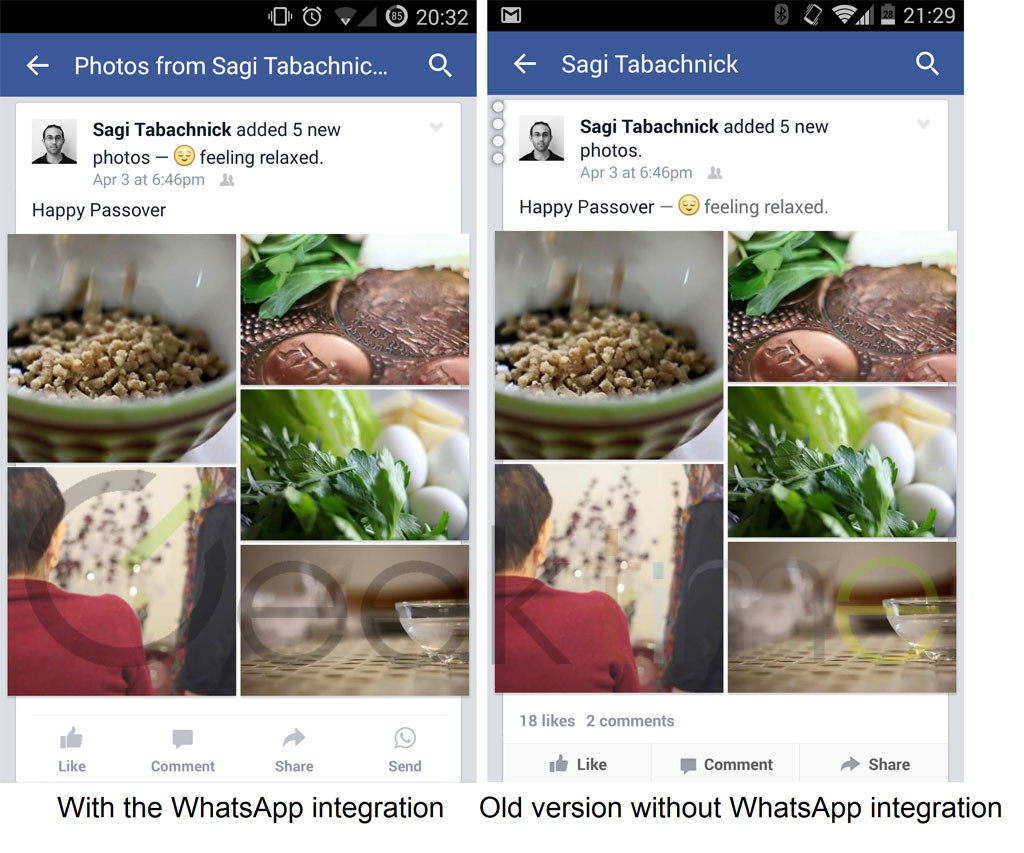
    According to a report by Geek Time, Facebook is testing a new feature on its app for Android operating system that will mark the first major integration of WhatsApp to it parent company Facebook. The company has reportedly added a ‘Send’ button to Facebook’s latest version 31.0.0.7.13. The new feature is a part of the status actions buttons that appear beneath every status update, and it looks exactly like the WhatsApp icon.

    As per the source, the button is spotted at the right side of the window for some users (for left-to-right languages) in the recent update. The pictures depicting the new feature inclusion is provided below:

    whatsapp facebookIt’s just the first glimpse at how Facebook is planning to play its WhatsApp acquisition. The same report also confirms of a deeper integration between the two that would allow users to send messages directly from Facebook Messenger to WhatsApp. It took Facebook more than a year to merge its buyout with its central tool, but it seems like the parent firm was mulling over on how to use it wisely. The social networking tool seems to be making slow but steady moves, towards becoming the ruler of the messaging market.

    Without leaving its ground, Facebook is firming its grasp into several other domains as well. Recently, we reported that Facebook is also developing a new caller ID and call blocking tool ‘Phone‘ and has built a solar-powered drone to beam down internet to the earth.

  • WhatsApp Voice Calling Feature Decoded; Here is What the New Version Looks Like

    WhatsApp Voice Calling Feature Decoded; Here is What the New Version Looks Like

    WhatsApp voice-calling is the feature Android users have been waiting for, for a long long time. The company has finally rolled out the update and the tool functions amazing on smartphones (on good network, of course.)

    Now you don’t need to figure out a way to get an invite, users just need to download the latest version of the cross-platform mobile messaging service i.e. 2.12.5. Once downloaded, the free voice-calling service will be activated on your phones. It’s observed that some people, especially Samsung users, still don’t have access to the new calling feature, but it’s likely that they will receive it soon.

    Screenshot_2015-03-16-10-33-54

    We tried the new WhatsApp free calling feature on an HTC model. Here’s what we found new in the mobile messaging service:

    Split screen

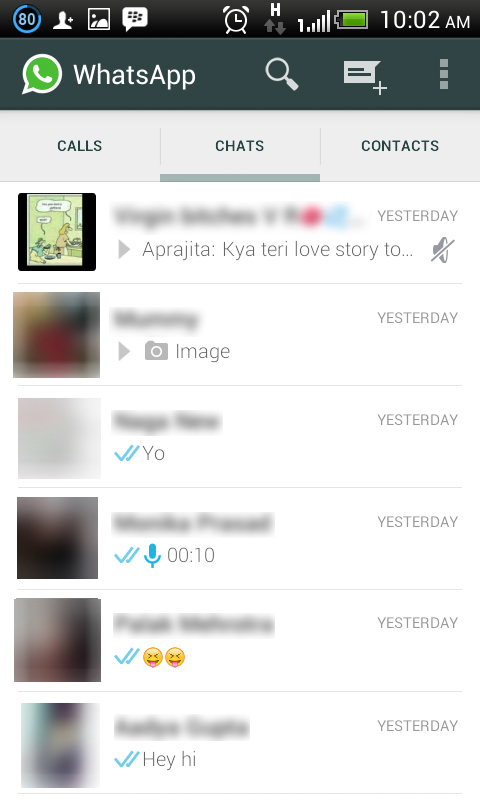
    The new version of WhatsApp has a divided screen, just what we saw in the leaked images, a few months back. The page is split into three parts with categories: Calls, Chats and Contacts. Earlier there used to be one screen with Chats where you could find the chat history with your WhatsApp contacts.

    1

    Call Log

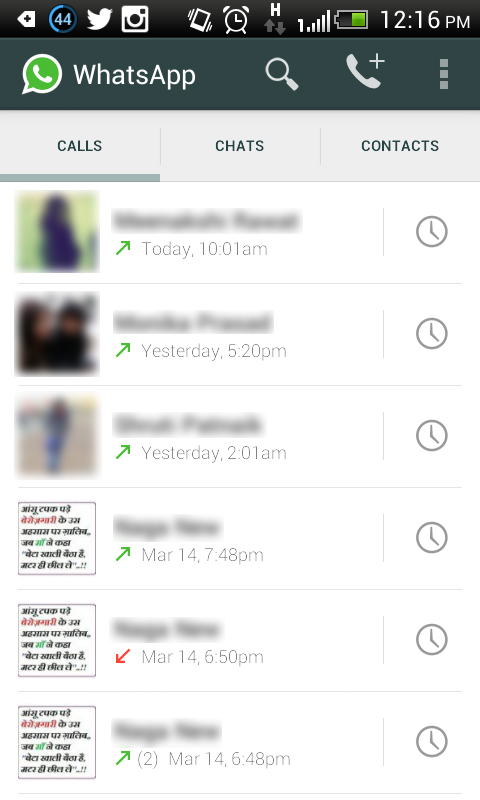
    Just like the chat history, there is a call history option in the updated version. Just tap on Calls to see incoming calls, outgoing calls and missed calls. The feature is very much similar to the call log option on your phone, with notifications about the date and time of the calls as well.

     3

    New WhatsApp Panel

    WhatsApp has done major modifications in the app along with embedding the voice-calling tool. The Contacts section is shifted to the bottom and given it a place in one out of the three split columns of the screen. A dropdown option sits at the top right of the new panel, and on its left is Contacts field to add more contacts. The dropdown menu comprises of three options: Refresh, Status and Settings.

    Uncluttered Format

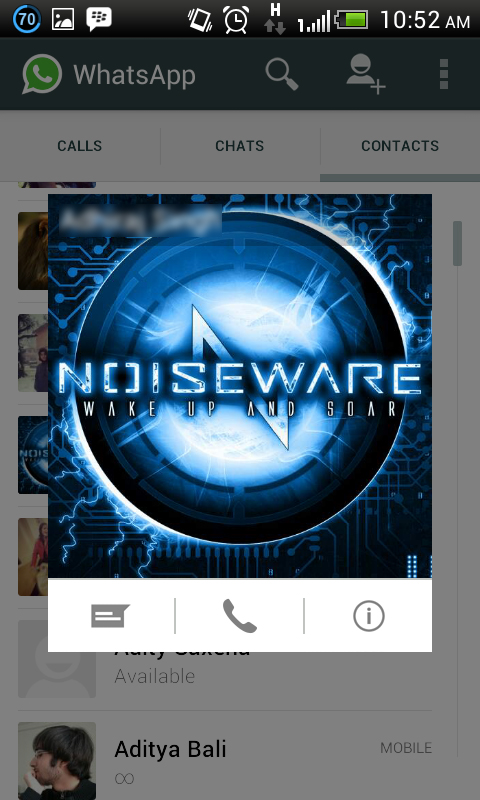
    WhatsApp has become more organised with the new version. Earlier, users have to go to the user’s profile to see a particular profile picture, but now it’s pretty easy. Click on the image of the contact and the picture appears in another window with options to start a call or chat.

    WAPP

    Tried and Tested:

    We tried the voice-calling feature from an HTC phone with a Samsung S3 device, which doesn’t have the access to the upgrade. The calling was average, and there was a gap of a mere few seconds while sending out one conversation and receiving it at the other end.  Overall, it’s not as smooth as a regular call, but again it depends on the strength of your internet.

iGyaan Network
Privacy Overview

This website uses cookies so that we can provide you with the best user experience possible. Cookie information is stored in your browser and performs functions such as recognising you when you return to our website and helping our team to understand which sections of the website you find most interesting and useful.