Category: Apps and Software

Games, Apps, Softwares, Operating Systems and Software Hacks

  • Here’s Why SnapChat’s Profile GIF Changes Interaction

    Here’s Why SnapChat’s Profile GIF Changes Interaction

    Snapchat seems to be changing its display, format and along with it, the way its users interact with each other. Snapchat originally became very popular amongst the younger generation because of the fact that it erased memories in 10 seconds and kept their live statuses for just 24 hours. So, unlike Facebook, where someone can look through your past and bring up an embarrassing status or profile picture, Snapchat erases it all.

    However, there is one thing on Snapchat that does not self-destruct, and that is the profile GIF. The profile GIF was added in July along with the tap-to-view feature. So, now, on your profile screen, if you tap on the QR code you will be able to shoot a series of 5 selfies which turns into an animated profile GIF.
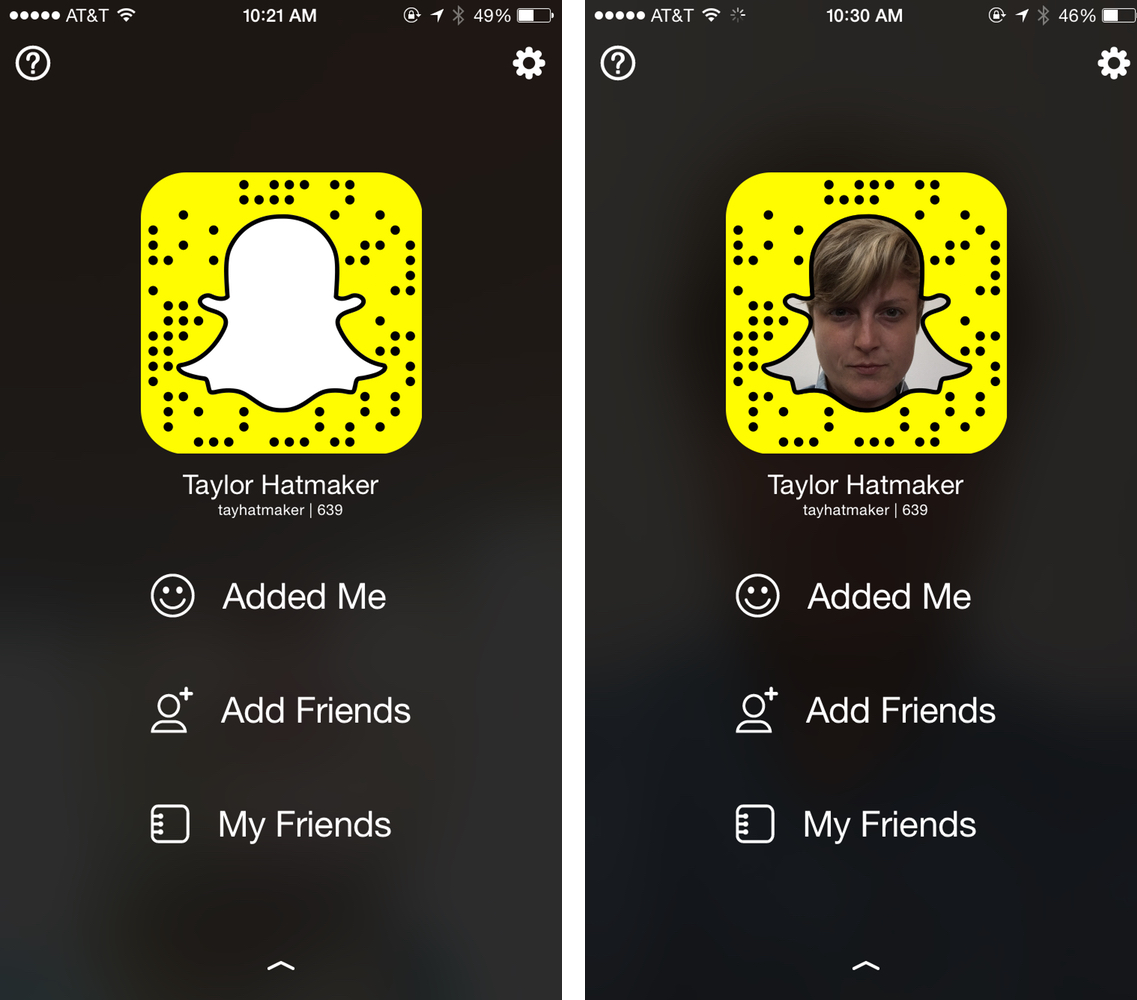
    SnapChat profile

    Initially this seemed like just a cool customization which encouraged people to share it more and thereby strengthening Snapchat’s user base. However, there is another purpose for this customization, and that is, it somehow solves Snapchat’s identification problem. Basically, previously, when you added someone on Snapchat, you knew nothing about them except for their username. The anonymous character of this app made it very popular with the youngsters.

    However, now, when you add someone, their profile GIF shows. So, you can immediately identify the person’s gender, and perhaps even their sense of humour. So, you won’t have to follow a person, then check out their Snap Story and then unfollow them, if you’re not interested.

    This is very useful for Snapchatters who make their profiles public, because they can efficiently decide whom to follow back. The profile GIF definitely seems to be providing more transparency to one’s identity, thereby allowing you to be more aware of whom you add and follow.

    Oh well, in this fast-paced world where social interactions and networking seem to play an important
    role, it is necessary for social media to catch up too. And that’s exactly what Snapchat is doing.
  • Apple Haters Pounce on ‘Move to iOS’ App

    Apple Haters Pounce on ‘Move to iOS’ App

    We love controversies. And there is no one more likely to stir up mixed reactions that take over the internet quite as much as Apple. In a move that was sure to create a buzz just from its title, Apple released an Android app (yes, we said Android) called ‘Move to iOS’ which allows Android users who are looking to switch to Apple to do so in an easy fashion.

    The app allows a smooth, easy way to transfer all your data such as contacts, photos, messages and bookmarks from your old Android device to your new iPhone. Apple promises a simple process to transfer your Android data. However, the app will only work if you’re setting up your iPhone or iPad as a new device.

    Move to iOS

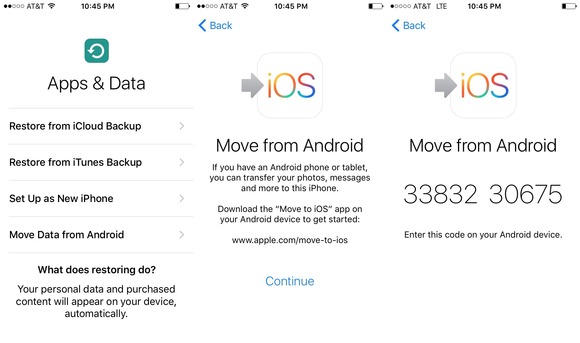
    Now for a quick tour on how the app works. When you begin setting up your iPhone or iPad, you will select a language, cellular or wireless network, then choose the apps and data you want to transfer. You will then select the Move Data from Android option in the transfer content screen. Then open the ‘Move to iOS’ app on your Android device. You’ll be prompted to enter a nine-digit code on both devices after which the transfer will begin.

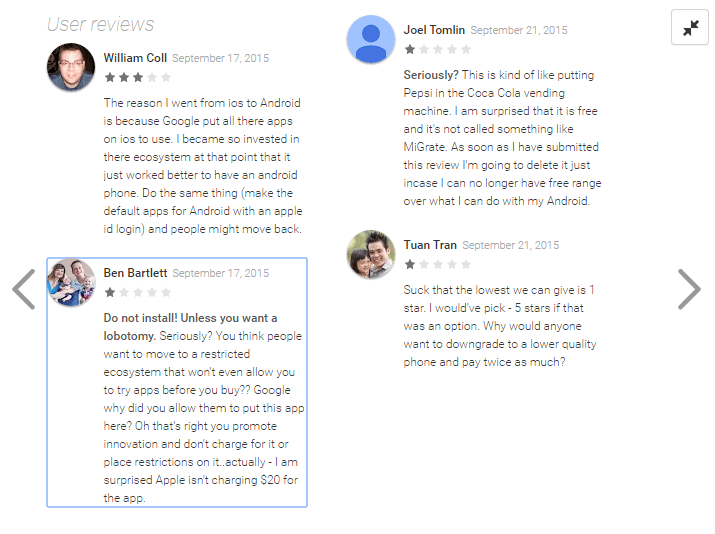
    While this app is truly helpful for those who want to switch over to the iPhone and would deserve anywhere between 4-5 stars, it, however, has received a hilarious 1.7 out of 5 rating on the Google Play Store. The low rating is credited to Android users who have shown their scorn at the app by giving it the lowest rating possible and by posting hateful reviews. Just for fun, here are some of them.

    Move to iOS Reviews

    While Android users have voiced their opinions (which have less to do with the app itself), you can download this app here if you are planning to switch from Android to iOS. It is a solid app that allows smooth transfer of data, no matter what haters say.

    Image Source: [tw-button size=”medium” background=”#07ABE2″ color=”” target=”_blank” link=”http://www.macworld.com/article/2984758/ios-apps/hands-on-with-apples-move-to-ios-android-app.html”]Mac World[/tw-button]

  • Over 50% of All iPhones Upgrade to iOS 9

    Over 50% of All iPhones Upgrade to iOS 9

    Following its release on Wednesday, September 16th, iOS 9 has become the most successful and swiftly adopted iOS so far. The speed with which users went ahead to update their devices led Apple to affirm that more than half of all iPhones have iOS 9 now.

    ios-9-logo1

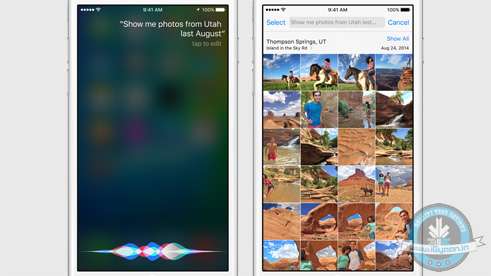
    The new operating system comes with a better, faster version of all characteristic Apple features, along with additions, which are bound to woo users. iOS 9 is equipped with a power-saving mode, a feature that allows you to place a FaceTime call and watch a video simultaneously, a smarter Siri, scribbling functions in the Notes app, and an improved Apple Maps that now includes transit directions.

    The update process has been made easier by Apple. Memory and storage issues, which have been a concern with the recent iPhones, have also been taken care of with this update. The iOS 9 takes no more than 1.3 GB of space as compared to the 4.6 GB of iOS 8. Users are also able to temporarily delete apps which will be restored once the update is complete.

    Apple wwdc ios 9 siri 0

    The new iPhone 6s and 6s Plus will be available for sale Friday onwards. iOS 9 is their operating system by default. Apple expects to set new records in its sales come the 25th of this month.

    All this seems to be comforting news for the company grappling with a series of problems in its software this week. Failed iOS updates were followed by a cyber attack on numerous apps in Apple’s App Store. However, the reduced update speed for Android users have inevitably made Apple’s stats look prettier than they are.The fact that different companies allow updates to OS Lollilop on their handsets at different times have allowed upgrades to iOS 9 to be the most to any OS in such a short period of time. Despite a few hiccups following the fancy Apple event earlier this month, Apple has managed to maintain its stable position in the tech world.

  • iOS 9 Soon to Beat Android Lollipop’s Adoption Rate

    iOS 9 Soon to Beat Android Lollipop’s Adoption Rate

    It’s just been a couple of days since its release and iOS 9 adoption rates are already threatening to take over Android Lollipop. We all know that the number of iOS devices doesn’t match up to Android’s dominance. As per the last official count, Android had reached 1 billion active users, while there are 800 million iOS devices. Android is the most widely used platform for smartphone and tablets today,  on the other hand iOS is exclusively used by Apple and is obviously lesser used.

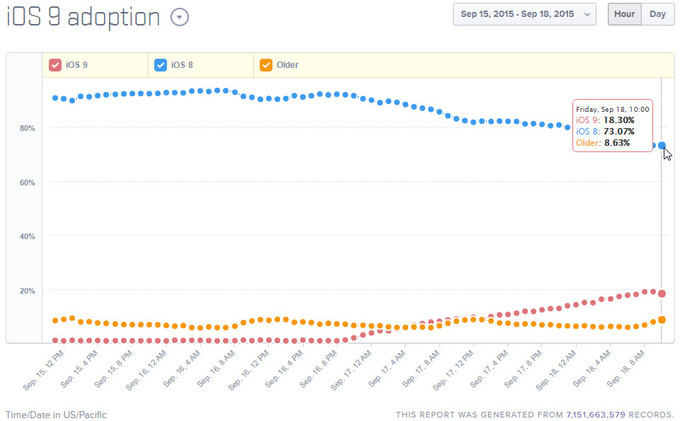
    New stats tell us that the iOS 9 adoption rates have reached over 18% in 3 days only and the numbers are expected to be on the rise.

    IOS 9

    Now Android Lollipop on the other hand, has reportedly only reached a 20% threshold with users still being stuck with the Android KitKat, which was made available some 2 years ago. Obviously, Android still have software update issues which Apple is conveniently taking advantage of.

    Well, so far so good. We all knew that Android needs to step it up sooner or later. So, let’s hope Marshmallow is the answer to their problems.

  • 5 Cool Features of iOS 9

    5 Cool Features of iOS 9

    iOS 9 is finally out, and those of you who haven’t updated your iPhones and iPads yet can do so while we tell you some of the neat new features of the latest operating system.

    New icons

    011ed5879fb24339be3910d11b899362dbe85caca7

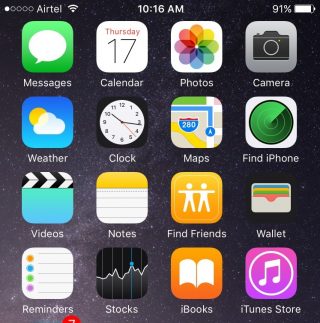
    Whenever we do an update it’s obvious our eyes are going to search for something new from the get go. While the iOS 9 is mostly the same as the iOS 8 in terms of the look of it, users will find three brand new icons in their home screen (Well, two actually and one revamped). The two new default apps are called Find iPhone and Find Friends. Both these apps were already available for download in the App Store. Find Friends/iPhone is pretty useful if you want to know if a friend is nearby for a cup of coffee, or if you’ve suffered a mini heart-attack from losing your iPhone.

    The Passbook has been renamed as Wallet, which is a cleaner name and suits that fact that the app can now store all your credit cards, reward cards and membership cards.

    A back button


    0119e9620c5dde814972d8d7fd656a5d8bf3cd8f13


    The iOS 9 has plenty of new features that are hidden away from the usual ones. Once you start using your device as you normally would, you’ll find subtle changes and additions in your iPhone that really make a difference to your usability.

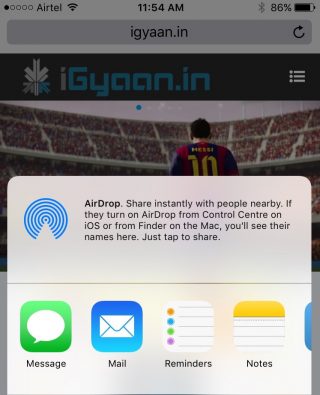
    Take for instance the new back button that appears on the top-left corner of your screen when you switch from one app to another. And if you open a link from your Mail that takes you to Safari, the back button will appear that will take you back to Mail. Now you won’t have to double-click the Home button every time you want to go back to the previous app.

    New Low Power Mode


    0166c8c88067dc3e5379a40cde8644836efd09e44f

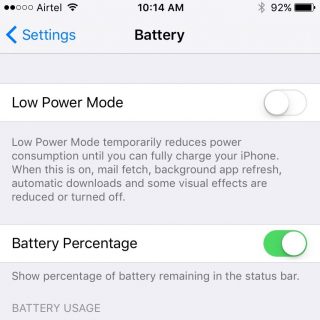
    This is perhaps one of the best new features Apple could have provided. The new Battery settings comes with The Low Power Mode which promises to give you an additional 3 hours of battery life, if you find yourself on really low power and still need the phone to stay alive for a few more hours.

    The Low Power Mode disables background app refresh, automatic downloads, mail fetch and visual effects to give you as much extra battery life as it possibly can. Battery information will be displayed in the Notification Center for the iOS device and the Apple Watch.

    Changes to the shift key

    0176c86e7956390bad0ac2100fd11fdc647ce80d25


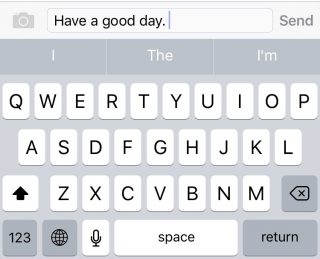
    Apple has made another subtle but much needed change to the keyboard. You can actually see the capitalized letters when you turn on the caps lock. The letters change to upper case when ‘shift’ is on and change back to lower case when ‘shift’ is turned off.

    New Notes app

    01fa1ab0a97825190ae34c2a65ce175ca6c905631f

    Notes has undergone some major changes. You now have the feature to add Photos to your notes, make a checklist, and draw and doodle using your fingers. The Notes app also allows you to embed websites, photos, maps, and more without having to leave the app.

    You can take a photo from within the Notes app as well. Finally, you can arrange the items attached to your notes with the new Attachment Browser.

    These are but a few of the subtle and not-so-subtle changes that come with the new iOS 9. Other features also include split-screen multitasking and picture-in-picture for the iPad, a new and improved Siri, with a Proactive feature when you swipe right on the homescreen, transit directions in Maps, new search bar in Settings, and much more. Though some of these features are yet to work well in India.

    What are your favorite updates from the new iOS 9? Let us know in the comments below.

  • App of the Week: Pintasking

    App of the Week: Pintasking

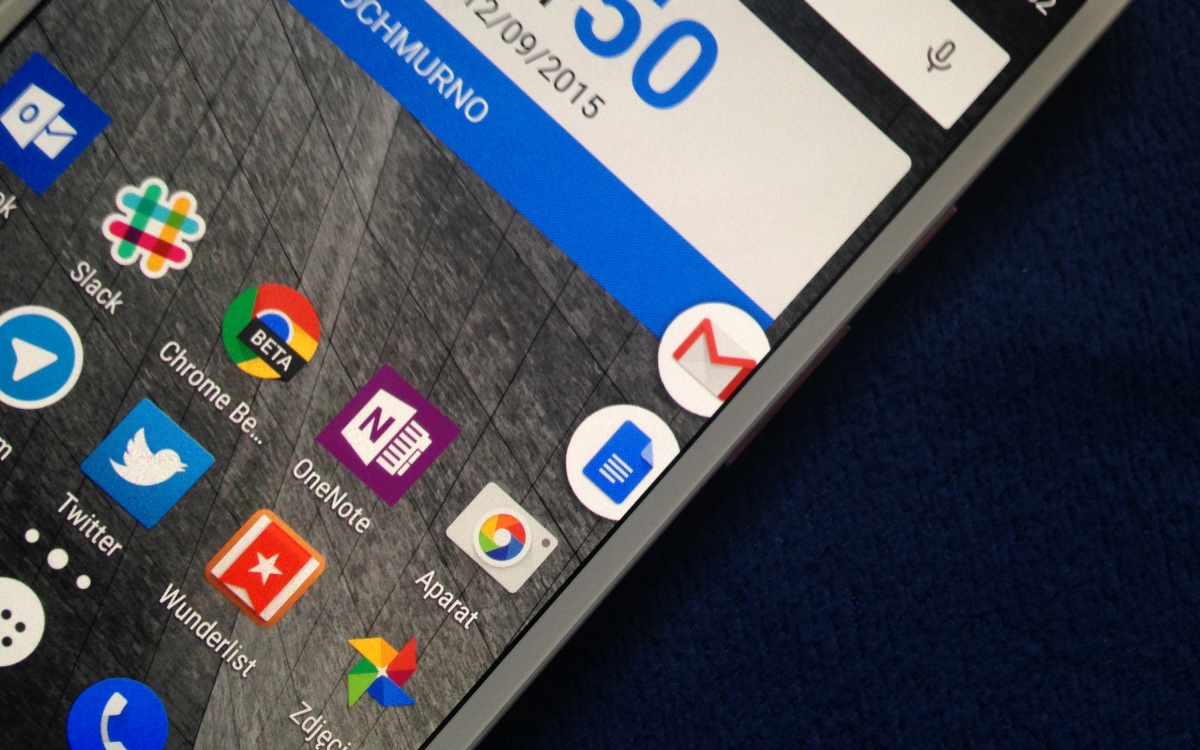
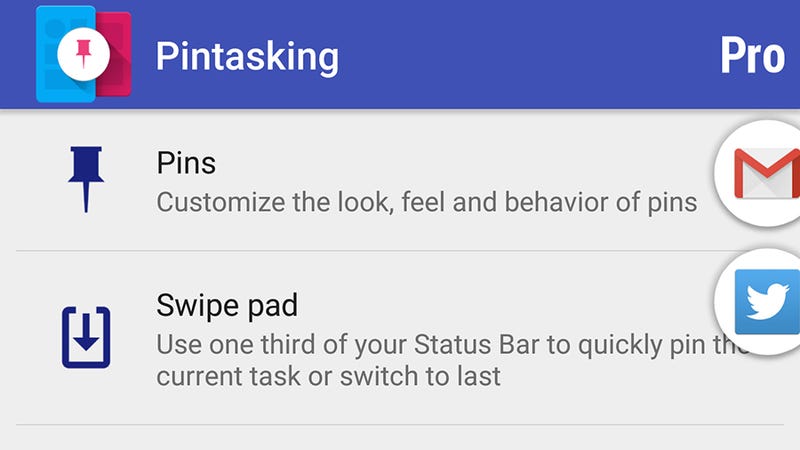
    Move over, Apple, Android has arrived with its own multitasking app called Pintasking, that creates bubble shortcuts on the homescreen allowing users to switch between favorite apps and webpages, quicker. The app was launched last month and has since seen positive reviews.

    Pintasking

    Pintasking uses Facebook Messenger-like bubbles which will stay in the corner of your screen or anywhere else according to your preference. You can pin apps and documents of your choice and switch between them with ease. You can even pin an app by pulling down the notification drawer and tapping on the “Tap to Pin” option. Once you choose the apps and websites you want pinned to your homescreen, the bubbles will appear on the right edge which you can reposition to your choice.

    Basically, the app works like a Windows taskbar that allows you to quickly access those applications that you use most often. You can have apps like Google Hangouts and Android Messenger pinned right there for you to switch back and forth. Another way to pin apps is by tapping and holding the Home button and dragging it up (an action that usually launches Google Now). You then open the setting of Pintasking and customize your pins. Once you’ve set it up, you can switch between two or more apps by pulling up the Home button. It works kind of like the Alt-Tab on Windows.

    Pintasking Gives Your Android Device a Shortcut Taskbar

    While the free version allows for only two pins and limits the way you want them to appear on your screen, it’s still enough for you to check out whether the app is worth your time and money in case you wish to go for the full features. Though Android already has a fast app switcher, we think this app adds an extra bit of speed which is always welcomed for smartphone users. You can download the app here and let us know whether it eases the way you use your phone or not. The app works on Android 4.1 and above.

  • App Of The Week: Pac-Man 256 Comes With The Best Glitch Ever

    App Of The Week: Pac-Man 256 Comes With The Best Glitch Ever

    From the makers who brought you ‘Crossy Road’ comes another fun, addictive, and nostalgia-driven game – Pac-Man 256. Hipster Whale has developed what you may call an update of the original Pac-Man, including its ‘glitches’. Yes, you read it correctly. The game builds on the famous Pac-Man glitch that appeared once the player made it to level 256. In that glitch, the player was met with half-a-screen of scrambled alphanumeric characters and an endless, unbeatable level due to limitations in the game’s coding. Pac-Man 256 uses that bug and makes it the enemy of the game.

    The new Pac-Man is very much like the original. There are ghosts chasing after you while you escape them and eat up the dots and fruits in your way. But players are also navigating endlessly upwards to escape the ‘Glitch’, which starts eating away at the bottom of the board.  If the ‘Glitch’ catches up to you, or you get eaten by a ghost, you will die and need to use a credit to play again. Credits are earned via in-app purchases. You didn’t think it was that easy, did you?

    We had mentioned the addictiveness of ‘Crossy Road’ and the new Pac-Man follows the trend. It will bring back memories of the original, and will remind you of that ever crazy glitch, if you were one of the great souls who made it to level 256. If you thought the original Pac-Man was a great way to kill time, then the new one will surely take up your whole day. We suggest you either play ‘Crossy Road’ or ‘Pac-Man 256’ but not both at once.

    If you find yourself with some spare time head over to Apple Store, Google Play, or Amazon Appstore to download Pac-Man 256.

  • What Makes ‘Crossy Road’ So Addictive?

    What Makes ‘Crossy Road’ So Addictive?

    Now that the popular mobile game Crossy Road will be available on the new Apple TV, we decided to dig a little deeper into the game and other such games and the reasons behind their addictiveness. Andy Sum, developer of Crossy Road, had a big moment when he took to stage to talk about his game. He described Crossy Road as an endless arcade hopper game. The game is simple enough to understand: players control a mascot such as a chicken, koala, bunny etc. and hop across the road and obstacles to get as far as possible and achieve a high score.

    Here’s a look at the game in action presented by Sum at the Apple event

    https://www.youtube.com/watch?v=OfPMaqC-WSw

    Clearly, Crossy Road draws inspiration from the classic 1981 arcade game Frogger, and other more recent ones like Temple Run and Flappy Bird. So what is it about these games that make them so addictive and popular, so much so that they get to take the stage at an Apple Event?

    Simple gameplay

    One of the reasons for the growing popularity of these games is the simplicity of it all. Games like Crossy Road, Flappy Bird, and Frogger have a simple manner of progression. There are obstacles to cross using mostly your thumbs to tap on the screen. With no tricky controls, these games can actually be played with one hand tied behind your back.

    flappy-bird crossy_road_header_1

    Old style graphics

    The simplicity of graphics also makes the game fun to play. Almost everyone would like to play games that have almost real-life graphics, but sometimes we just like to get back to the good old minecraft-like days. It doesn’t ask for much, and is a good way to pass time while going to work. Or at work (Yes, we all do it.)

    Tests patience

    In a busy world like ours, patience is a rarity. Yet these games require incredible patience. And those who manage to reach a higher level or rake up high points have it in them to deal with the rest of the day. The game also has the ability to frustrate you into pulling out your hair. But it all adds to the fun of it.

    7702ad502ebb74b4f7ca42413941d60b

    Here’s a video of someone who scored a 580 in Crossy Road, which, if one has played the game would know is not an easy feat to achieve.

    And finally a look at how people from the ’80s passed their time. You can see where Crossy Road comes from.

    If you haven’t played the game yet, you can download it here for Android and here for iOS. Let us know what you think about the game in the comments below.
  • Here’s a Camera App that Can Make Your Pictures Look Professional

    Here’s a Camera App that Can Make Your Pictures Look Professional

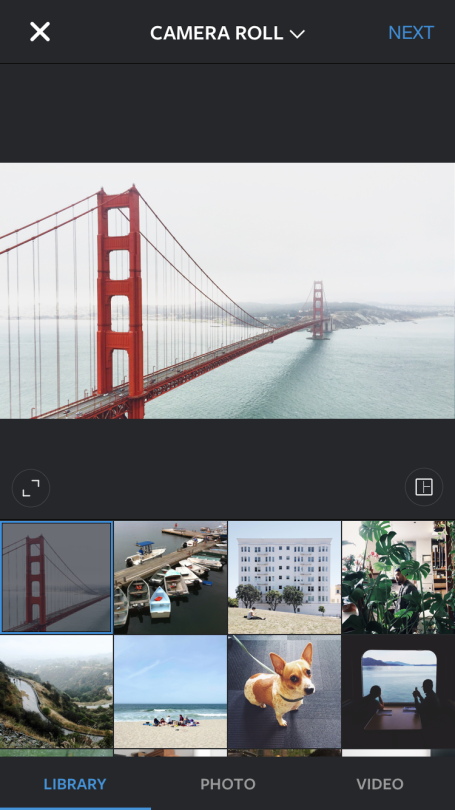
    When we purchase a smartphone today, one of our primary concerns is having a phone with an excellent camera, especially for the amateur photographers and Instagrammers out there. Gone are the days of carrying around a separate digital camera, and rightly so if your phone has the capabilities of taking quality photographs almost as clear as a DSLR camera. And one cannot deny that today’s iPhones are winning in the camera department.

    Tap, tap, tap, a company that created the third-party camera app, Camera+ for iOS users, is selling its app for free now. The app currently has a strong 14 million user base, and has earned $18 million dollars in sales. The app is useful for those who want a little more from their iPhones, providing a bunch of extra editing tools – both basic and advanced – such as special effects and lighting filters, an image stabilizer, and integrated sharing with Facebook, Flickr, and Twitter. But until now, the app was only available as a paid download.

    http://theawesomer.com/app-camera/44278/
    Edited using Camera+

    The company will continue to have the paid version for users who want the complete set of features. The free app will have most of the basic features for free and select advanced features via in-app purchases, which include manual shooting, advanced editing, and lossless TIFF, to name a few. The free app will be a great advantage for those iPhone users who have a hobby for photography and like to play around with various editing features without having to pay for it.

    060910_App_Camera_plus_4
    Edited using Camera+

    The app has received favorable reviews. PC Advisor gave the app 4-and-a-half stars out of 5 and declared it a “must-have” app for iPhone photographers. Wired gave the app a 9 out of 10, describing it as a “secret weapon” for photographers, stating that it contained so much functionality that it was “too easy to get lost in the deeply layered menus or forget where you found that killer function the other day.”

    Click here to download the app. Who knows, maybe you could start your very own phone photography blog and click amazing pictures like the ones given below:

    Natali Prosvetova ~ This will be my monument
    Claude Panneton ~ Abandoned

    Source: [tw-button size=”medium” background=”#07ABE2″ color=”” target=”_blank” link=”http://theawesomer.com/app-camera/44278/”][/tw-button]

    [tw-button size=”medium” background=”#07ABE2″ color=”” target=”_blank” link=”http://www.pixelsatanexhibition.com/”][/tw-button]

  • Zomato’s New Service Allows Restaurants to Create Independent Apps

    Zomato’s New Service Allows Restaurants to Create Independent Apps

    In a bid to further expand their already growing food-tech market, Zomato has launched its very own Whitelabel platform that gives power to restaurant owners to set up their own custom-branded mobile app on iOS and Android. This is Zomato’s latest move in allowing restaurants to have a more direct and personal relationship with its customers. Zomato also stated that the customized app can be created and managed with no technical expertise necessary.

    Restaurateurs will be able to set up their app and provide real-time menus and prices, and other information, while also allowing direct reservations without having customers do it through the Zomato app. The app will also offer photos and offers, push notifications on upcoming events and promotions to targeted customers. Overall, the idea is to help restaurants connect with their customers, and to provide customers greater satisfaction and value offers from restaurants they frequent.

    whitelabel zomato

    A similar kind of app called Wisely was launched in Ann Arbor just last week and serves the Ann Arbor market providing personalized services to customers. A few other adopters of whitelabel platforms include the Summer House Café in New Delhi, Miyabi Sushi in Dubai, and Shizuku Ramen in Melbourne. However, none of them have managed to launch it as big as Zomato intends.

    “There is not one single service provider for restaurants which can give them the entire suite of technologies required to run an internet presence closely integrated with the operations of their business,” said Ashish Goel, Chief of Product and Design, Zomato.

    Zomato has stated that the service will be available in all the 22 countries it currently operates, and will provide a subscription based service at approximately $200 a month per location. The service should be up and running by the end of September.

  • Here’s An App That Will Never Let You Walk Alone

    Here’s An App That Will Never Let You Walk Alone

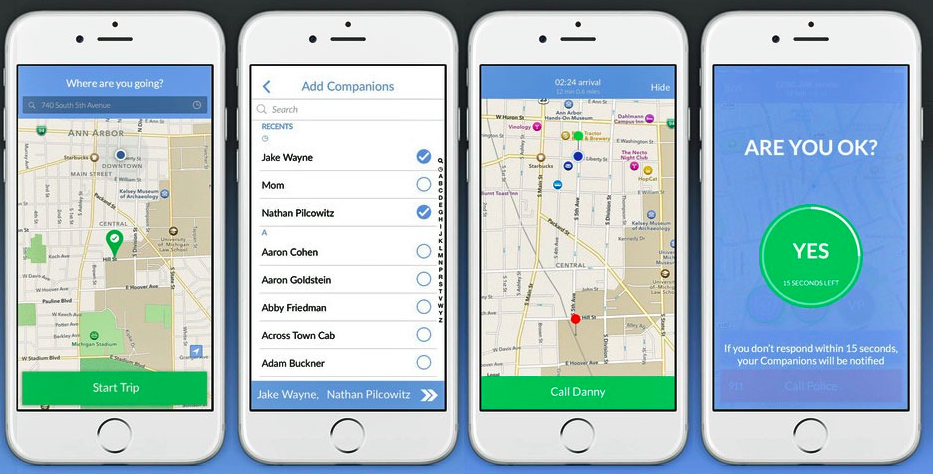
    Today we’re going to talk about an app called Companion that is basically a virtual security app for you. So, now when you just have to get something to eat, and the only store open is that shady corner store; you’ll have a companion, virtually.

    “Companion is a peer-to-peer safety app that improves public safety and provides peace of mind to anyone on the move!”

    Now the best thing about this app is that, the person you pick to be your ‘companion’ doesn’t need to be an app user! So now all you have to do is, enter your destination and select anyone in your contacts to be your ‘Companion’. The ‘companion’ can now track your progress and will be automatically notified when you arrive at your destination safely.

    companion app

    This app can also detect when you start running or in case you fall, or even if your headphones have been pulled out of the jack. There is a fifteen seconds time period within which, if you don’t respond, the app will notify your ‘companion’ immediately. Apart from this you can also contact the local police department to report an emergency.

    Furthermore, for University students, the app comes with the ability to report areas around the campus which you can record as a safe zone, and similarly you can even record an “I feel nervous” zone. The Companion app is said to contact your school or university’s officials upon detecting suspicious activity.

    This app can be downloaded on both iOS and Android devices. Check it out here:


    Source: [tw-button size=”medium” background=”#07ABE2″ color=”” target=”_blank” link=”http://companionapp.io/”]Companion[/tw-button]

  • WhatsApp Introduces New Vulcan Salute and Middle Finger Emoji

    WhatsApp Introduces New Vulcan Salute and Middle Finger Emoji

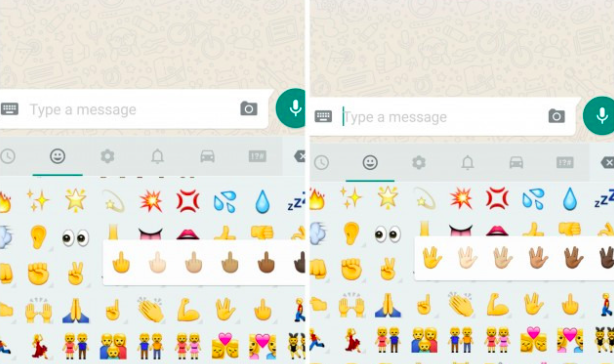
    WhatsApp has introduced a couple of new emojis for its users. The new emoji includes the middle finger and the Vulcan Salute from Star Wars. Both these emoji are available in different skin tones within the app. While the middle-finger emoji seems Android-only for now, the Vulcan emoji is also supported on iOS, though it is not part of the stock emoji keyboard.

    WhatsApp has recently upgraded itself and comes with a bunch of new features. Among them, is a new custom notification setting that allows you to set different notifications for the different chats you’re in or mute specific conversations entirely.

    emojis

    You can also mark your chats as read or unread and WhatsApp has even included an “low data” usage feature to make voice calls. This reduces the amount of data that is used during phone calls made through the app.

    Apart from all of this WhatsApp has also made sharing contact information easier, by allowing you to save the information or even start a new WhatsApp message from within the app itself.

    Image Source : [tw-button size=”medium” background=”#07ABE2″ color=”” target=”_blank” link=”http://mashable.com/2015/08/26/whatsapp-android-emoji/”]Mashable [/tw-button]

  • Facebook Brings Out its Very Own Artificial Intelligence Assistant Named “M”

    Facebook Brings Out its Very Own Artificial Intelligence Assistant Named “M”

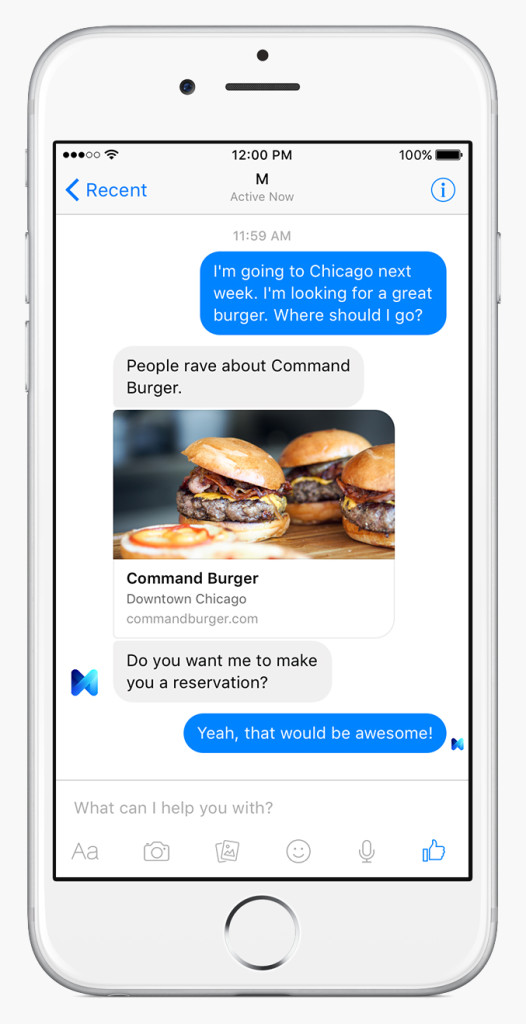
    We all know about Siri, Cortana and Google Now, but yesterday our favourite social media platform, Facebook launched “M”. M is its very own text-based virtual assistant, which is also integrated with Facebook Messenger. What is different about M, is that it relies on both human and artificial intelligence to fulfill requests. This is something that both Siri and Cortana need to catch up on.

    Reports suggest that there is a team of M Trainers, who are prepared and trained to fulfill requests that the artificial intelligence component cannot answer. It is also said, that as of now, the artificial intelligence does not have access to all the social data that Facebook collects and therefore has to depend on the information available through earlier conversations and follow-up questions. This however could change “with proper user consent” says Facebook’s VP of messaging products, David Marcus.

    facebook m 2

    What makes M’s activities different from Siri, Cortana or Google Now? Well, an example of what it can do is this – it can allow people to get recommendations for vacations and restaurants for instance, and can also follow through with bookings or purchases.

    David Marcus also added that Facebook is planning to hire thousands of M trainers in the future. This artificial intelligence assistant can be good for Facebook’s financial strength, since it can generate money via various partnerships with businesses.

    The sad part is, that currently M is only available to residents of California’s Bay Area. This has been reported to be an intentional move, so as to, ensure commonality between M trainers and the people making requests. The product will be launched on Messenger apps all around the world, soon. Watch this space for more updates.

    Source : [tw-button size=”medium” background=”#07ABE2″ color=”” target=”_blank” link=”http://www.wired.com/2015/08/facebook-launches-m-new-kind-virtual-assistant/”]Wired [/tw-button]

iGyaan Network
Privacy Overview

This website uses cookies so that we can provide you with the best user experience possible. Cookie information is stored in your browser and performs functions such as recognising you when you return to our website and helping our team to understand which sections of the website you find most interesting and useful.